学习链接
HttpObjectDecoder&HttpObjectEncoder源码浅析
HTTP模拟文件列表服务器
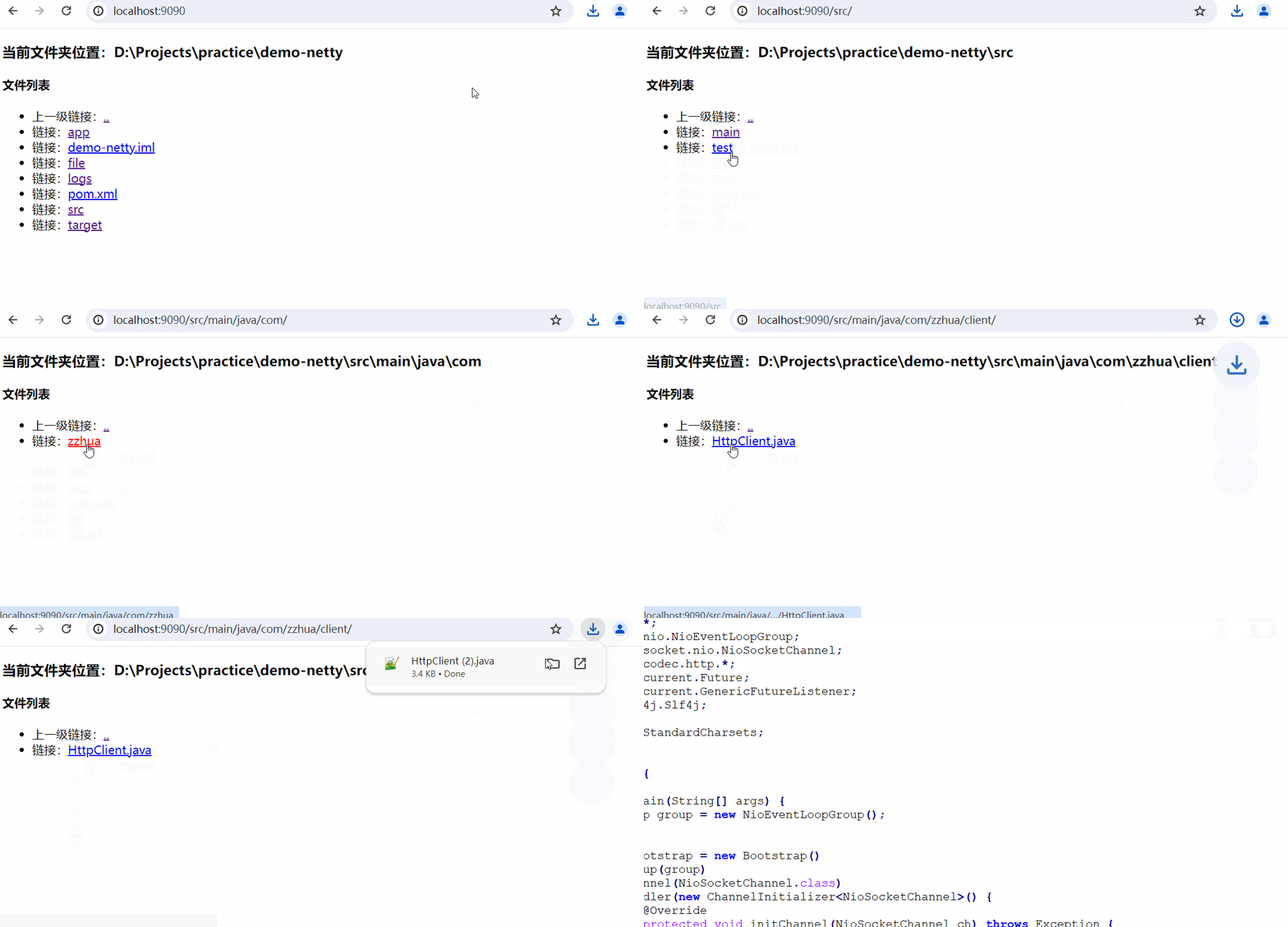
FileServer
java
package com.zzhua.file;

import io.netty.bootstrap.ServerBootstrap;
import io.netty.channel.ChannelFuture;
import io.netty.channel.ChannelInitializer;
import io.netty.channel.ChannelPipeline;
import io.netty.channel.nio.NioEventLoopGroup;
import io.netty.channel.socket.SocketChannel;
import io.netty.channel.socket.nio.NioServerSocketChannel;
import io.netty.handler.codec.http.HttpObjectAggregator;
import io.netty.handler.codec.http.HttpServerCodec;
import io.netty.handler.logging.LoggingHandler;
import io.netty.handler.stream.ChunkedWriteHandler;

//通过 HTTP 请求 返回访问指定目录的文件列表
public class FileServer {


    public static void main(String[] args) {
        NioEventLoopGroup bossGroup = new NioEventLoopGroup();
        NioEventLoopGroup workerGroup = new NioEventLoopGroup();
        //连接指引对象
        ServerBootstrap serverBootstrap = new ServerBootstrap();
        //链式编程
        serverBootstrap.group(bossGroup, workerGroup)
                .channel(NioServerSocketChannel.class)
                .handler(new LoggingHandler())
                .childHandler(new ChannelInitializer<SocketChannel>() {
                    @Override
                    protected void initChannel(SocketChannel socketChannel) throws Exception {
                        ChannelPipeline pipeline = socketChannel.pipeline();
                        //设定编解码器 Netty提供的http 编解码器
                        pipeline.addLast(new HttpServerCodec());
                        //数据聚合器 因为是分段传输 处理Http消息的聚合器
                        pipeline.addLast(new HttpObjectAggregator(512 * 1024));
                        //支持大数据的文件传输 控制对内存的使用
                        pipeline.addLast(new ChunkedWriteHandler());
                        // 添加自定义处理器
                        pipeline.addLast(new FileServerHandler());
                    }
                });
        // 启动服务器
        try {
            ChannelFuture future = serverBootstrap.bind(9090).sync();
            // 阻塞关闭
            future.channel().closeFuture().sync();
        } catch (Exception e) {
            e.printStackTrace();
        } finally {
            workerGroup.shutdownGracefully();
            bossGroup.shutdownGracefully();
        }

    }
}
FileServerHandler
java
package com.zzhua.file;

import io.netty.buffer.ByteBuf;
import io.netty.buffer.Unpooled;
import io.netty.channel.ChannelFutureListener;
import io.netty.channel.ChannelHandlerContext;
import io.netty.channel.SimpleChannelInboundHandler;
import io.netty.handler.codec.http.*;
import io.netty.util.CharsetUtil;

import java.io.File;
import java.io.UnsupportedEncodingException;
import java.net.URLDecoder;
import java.util.regex.Pattern;

/**
 * @projectName: gchatsystem
 * @package: com.hyc.gchatsystem.file
 * @className: FileServerHandler
 * @author: 冷环渊 doomwatcher
 * @description: TODO
 * @date: 2022/4/13 17:36
 * @version: 1.0
 */
//文件服务器处理器
public class FileServerHandler extends SimpleChannelInboundHandler<FullHttpRequest> {

    private static final Pattern INSECURE_URI = Pattern.compile(".*[<>&\"].*");

    //文件名称匹配规则,必须是英文、数字下划线、中划线
    private static final Pattern ALLOWED_FILE_NAME = Pattern.compile("[A-Za-z0-9][-_A-Za-z0-9\\.]*");

    //文件路徑
    private final String url;

    public FileServerHandler() {
        this.url = "/";
    }

    @Override
    protected void channelRead0(ChannelHandlerContext ctx, FullHttpRequest request) throws Exception {

        // 如果无法解码,返回400
        if (!request.decoderResult().isSuccess()) {
            sendError(ctx, HttpResponseStatus.BAD_REQUEST);
            return;
        }

        //只支持GET方法,其他方法返回
        if (request.method() != HttpMethod.GET) {
            sendError(ctx, HttpResponseStatus.METHOD_NOT_ALLOWED);
            return;
        }
        //获取文件路径
        final String uri = request.uri();
        // 格式化URL,并且获取文件的磁盘路径
        final String path = sanitizeUri(uri);
        System.out.println(path);
        if (path == null) {
            sendError(ctx, HttpResponseStatus.FORBIDDEN);
            return;
        }
        File file = new File(path);
        // 如果文件隐藏不可访问或者文件不存在
        if (file.isHidden() || !file.exists()) {
            sendError(ctx, HttpResponseStatus.NOT_FOUND);
            return;
        }
        //如果是文件目录
        if (file.isDirectory()) {
            //以/结尾时,就列出文件夹下的所有文件
            if (uri.endsWith("/")) {
                sendListing(ctx, file);
            } else {
                //否则进行重定向,打开文件夹,继续深入
                sendRedirect(ctx, uri + '/');
            }
            return;
        }
        //既不是文件夹,也不是文件
        if (!file.isFile()) {
            sendError(ctx, HttpResponseStatus.FORBIDDEN);
        }
        else {
			sendFile(ctx, request);
		}
    }

	private void sendFile(ChannelHandlerContext ctx, FullHttpRequest request) {
        try {
            String uri = request.uri();
            File file = new File(System.getProperty("user.dir") + File.separator + uri);
            if (!file.exists()) {
                throw new FileNotFoundException(file.getPath());
            }
            DefaultHttpResponse response = new DefaultHttpResponse(HttpVersion.HTTP_1_1, HttpResponseStatus.OK);
            response.headers().set(HttpHeaderNames.CONTENT_TYPE, "application/octet-stream");
            response.headers().set(HttpHeaderNames.CONTENT_DISPOSITION, "attachment; filename=" + URLEncoder.encode(file.getName()));
            response.headers().set(HttpHeaderNames.CONTENT_LENGTH, file.length());
            ctx.writeAndFlush(response);
            HttpChunkedInput httpChunkedInput = new HttpChunkedInput(new ChunkedFile(file));
            ctx.writeAndFlush(httpChunkedInput);
        } catch (Exception e) {
            ctx.fireExceptionCaught(e);
        }
    }

    /**
     * 异常处理
     */
    @Override
    public void exceptionCaught(ChannelHandlerContext ctx, Throwable cause) throws Exception {
        cause.printStackTrace();
        if (ctx.channel().isActive()) {
            sendError(ctx, HttpResponseStatus.INTERNAL_SERVER_ERROR);
        }
    }

    /**
     * 格式化uri,返回文件的磁盘路径
     * @param uri
     * @return
     *
     */
    private String sanitizeUri(String uri) {
        try {
            uri = URLDecoder.decode(uri, "UTF-8");
        } catch (UnsupportedEncodingException e) {
            //用utf-8解码出现错误时,就换种解码方式
            try {
                uri = URLDecoder.decode(uri, "ISO-8859-1");
            } catch (UnsupportedEncodingException e1) {
                throw new Error();
            }
        }
        if (!uri.startsWith(url)) {
            return null;
        }
        if (!uri.startsWith("/")) {
            return null;
        }
        uri = uri.replace('/', File.separatorChar);
        if (uri.contains(File.separator + '.')
                || uri.contains('.' + File.separator) || uri.startsWith(".")
                || uri.endsWith(".") || INSECURE_URI.matcher(uri).matches()) {
            return null;
        }
        System.out.println(System.getProperty("user.dir"));
        //
        return System.getProperty("user.dir") + File.separator + uri;
    }

    /**
     * 展示文件列表
     * @param ctx
     * @param dir
     *
     */
    private static void sendListing(ChannelHandlerContext ctx, File dir) {
        FullHttpResponse response = new DefaultFullHttpResponse(HttpVersion.HTTP_1_1, HttpResponseStatus.OK);
        response.headers().set(HttpHeaderNames.CONTENT_TYPE, "text/html; charset=UTF-8");
        StringBuilder buf = new StringBuilder();
        String dirPath = dir.getPath();
        buf.append("<!DOCTYPE html>\r\n");
        buf.append("<html><head><title>");
        buf.append("使用netty做下载文件服务器");
        buf.append("</title></head><body>\r\n");
        buf.append("<h3>");
        buf.append("当前文件夹位置:");
        buf.append(dirPath);
        buf.append("</h3>\r\n");
        buf.append("<h4>");
        buf.append("文件列表");
        buf.append("</h4>\r\n");
        buf.append("<ul>");
        buf.append("<li>上一级链接:<a href=\"../\">..</a></li>\r\n");
        for (File f : dir.listFiles()) {
            //隐藏文件,不可读文件直接跳过
            if (f.isHidden() || !f.canRead()) {
                continue;
            }
            String name = f.getName();
            //非英文、数字、下划线、中划线组成的文件,也跳过
            if (!ALLOWED_FILE_NAME.matcher(name).matches()) {
                continue;
            }
            buf.append("<li>链接:<a href=\"");
            buf.append(name);
            buf.append("\">");
            buf.append(name);
            buf.append("</a></li>\r\n");
        }
        buf.append("</ul></body></html>\r\n");
        ByteBuf buffer = Unpooled.copiedBuffer(buf, CharsetUtil.UTF_8);
        response.content().writeBytes(buffer);
        buffer.release();
        ctx.writeAndFlush(response).addListener(ChannelFutureListener.CLOSE);
    }

    /**
     * 发送重定向
     * @param ctx
     * @param newUri
     *
     */
    private static void sendRedirect(ChannelHandlerContext ctx, String newUri) {
        FullHttpResponse response = new DefaultFullHttpResponse(HttpVersion.HTTP_1_1, HttpResponseStatus.FOUND);
        //设置访问的url路径为新的文件夹路径
        response.headers().set(HttpHeaderNames.LOCATION, newUri);
        ctx.writeAndFlush(response).addListener(ChannelFutureListener.CLOSE);
    }

    /**
     * 显示错误信息
     * @param ctx
     * @param status
     *
     */
    private static void sendError(ChannelHandlerContext ctx, HttpResponseStatus status) {
        FullHttpResponse response = new DefaultFullHttpResponse(HttpVersion.HTTP_1_1, status, Unpooled.copiedBuffer("Failure: " + status.toString() + "\r\n", CharsetUtil.UTF_8));
        response.headers().set(HttpHeaderNames.CONTENT_TYPE, "text/plain; charset=UTF-8");
        ctx.writeAndFlush(response).addListener(ChannelFutureListener.CLOSE);
    }
}