文章目录
下载代码
shell
git clone https://github.com/openssl/openssl.git
git checkout -b openssl-3.5.4 #这里需要指定自己想要安装的版本
卸载Ubuntu自带的openssl
一定要先下载代码再卸载默认的openssl。否则git将无法进行安全验证导致下载代码失败。
查看默认的opessl版本
shell
openssl version -aubuntu22.04默认安装的是3.0.2版本

卸载默认的openssl
shell
sudo apt remove --purge openssl
sudo apt autoremove
编译openssl
https://github.com/openssl/openssl/blob/master/NOTES-UNIX.md
shell
./Configure --prefix=/usr/lib/ssl/ --openssldir=/usr/lib/ssl/ '-Wl,-rpath,$(LIBRPATH)' #这里注意选择自己想要的安装目录
make -j8 #8为并行编译的线程数,由于我的虚拟机是8核心,因此启动8个线程编译
sudo make install #由于我指定的安装目录需要root权限,如果是普通目录可以省略sudo直接运行"make install"
验证安装
创建软连接
由于openssl默认安装路径为"/usr/lib/ssl/bin/openssl",因此需要在"/usr/bin"下建立一个软连接。否则直接执行"openssl",系统将找不到它。
shell
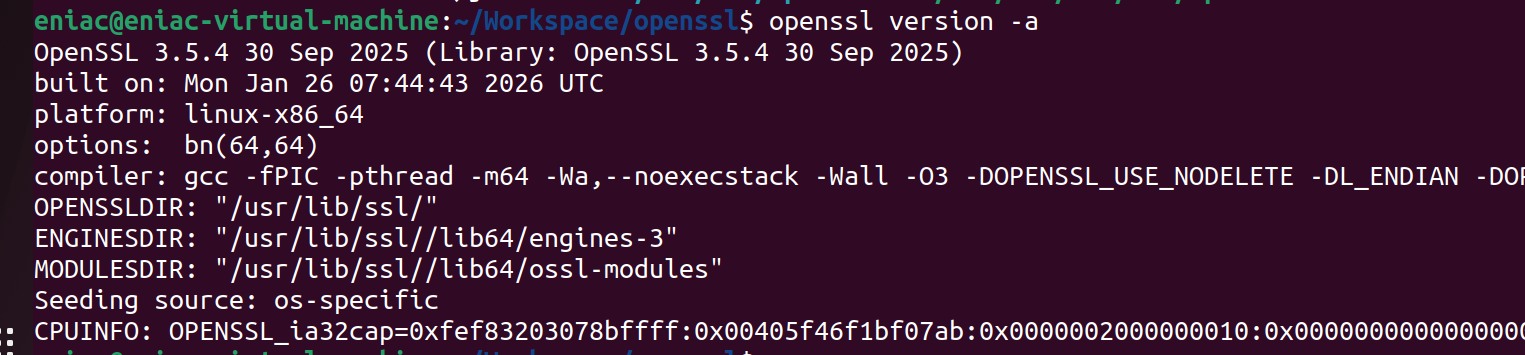
sudo ln -s /usr/lib/ssl/bin/openssl /usr/bin/openssl再执行openssl version -a查看结果,版本已经更新为3.5.4
恢复git功能
编译完openssl后,git clone代码会失败。

这是因为我们在卸载默认openssl时将ca-certificate一起卸载了。因此重新安装即可。
shell
sudo apt install -y ca-certificates
sudo update-ca-certificates --fresh