实现动态数据,请求后端接口数据,在flutter一般使用的是dio这个第三方库
安装dio
pubspec.yaml文件里面
js
 versions available, run `flutter pub outdated`.
dependencies:
  flutter:
    sdk: flutter
  material_design_icons_flutter: ^5.0.5955-rc.1
  get:

  # The following adds the Cupertino Icons font to your application.
  # Use with the CupertinoIcons class for iOS style icons.
  cupertino_icons: ^1.0.8
  # 轮播图
  flutter_swiper_view: ^1.1.8
  http: ^1.4.0
  english_words: ^4.0.0
  provider: ^6.0.0
  carousel_slider_plus: ^7.1.1
  dio: ^5.9.0
  json_annotation: ^4.9.0
测试实现
在有状态组件的initState生命周期中请求数据
js
class _MyWidgetHelloState extends State<MyWidgetHello> {
  @override
  void initState() {
    super.initState();
    print("initState");
    // _fetchChannels();
    Dio().get('https://geek.itheima.net/v1_0/channels').then((value) {
      print(value);
    });
  }
...
}
控制台接口数据的展示

或者使用async 和await 来实现
js
class _MyWidgetHelloState extends State<MyWidgetHello> {
  @override
  void initState() {
    super.initState();
    print("initState");
    _fetchChannels();
  }

  Future<void> _fetchChannels() async {
    try {
      final response = await Dio().get(
        'https://geek.itheima.net/v1_0/channels',
      );
      // print full response for debugging
      print('request success: ${response.statusCode}');
      print(response.data);
    } catch (e, st) {
      // print error and stacktrace to help debugging
      print('request failed: $e');
      print(st);
    }
  }
再试刷新项目即可以实现同样的数据获取效果

dio的封装
js
import 'package:dio/dio.dart';
import 'package:flutter/material.dart';
import 'package:flutter_app_01/utils/globalData.dart';

class DioHttp {
  final _dio = Dio();
  DioHttp() {
    _dio.options
      ..baseUrl = GlobalConstants.BASE_URL
      ..connectTimeout =
          Duration(seconds: 5) //5s
      ..receiveTimeout = Duration(seconds: 5); //5s

    _addInterceptors();
  }

  void _addInterceptors() {
    _dio.interceptors.add(
      InterceptorsWrapper(
        onRequest: (request, handler) async {
          print("请求开始: ${request.path}");
          handler.next(request);
        },
        onResponse: (response, handler) async {
          print("响应开始: ${response.statusCode}");
          if (response.statusCode! >= 200 && response.statusCode! < 300) {
            handler.next(response);
            return;
          }
          handler.reject(DioException(requestOptions: response.requestOptions));
        },
        onError: (error, handler) async {
          print("错误开始: ${error.message}");
        },
      ),
    );
  }

  Future<dynamic> get(
    String url, {
    Map<String, dynamic>? queryParameters,
  }) async {
    return _handleResponse(_dio.get(url, queryParameters: queryParameters));
  }

  // 解构 返回的结果
  Future<dynamic> _handleResponse(Future<Response<dynamic>> task) async {
    try {
      Response<dynamic> res = await task;
      final data = res.data as Map<String, dynamic>;
      if (data['code'] == GlobalConstants.SUCCESS_CODE) {
        return data['result'];
      }
      throw Exception(data['message'] ?? "加载数据异常");
    } on Exception catch (e) {
      // TODO
      throw Exception(e);
    }
  }
}

final dioRequest = DioHttp();
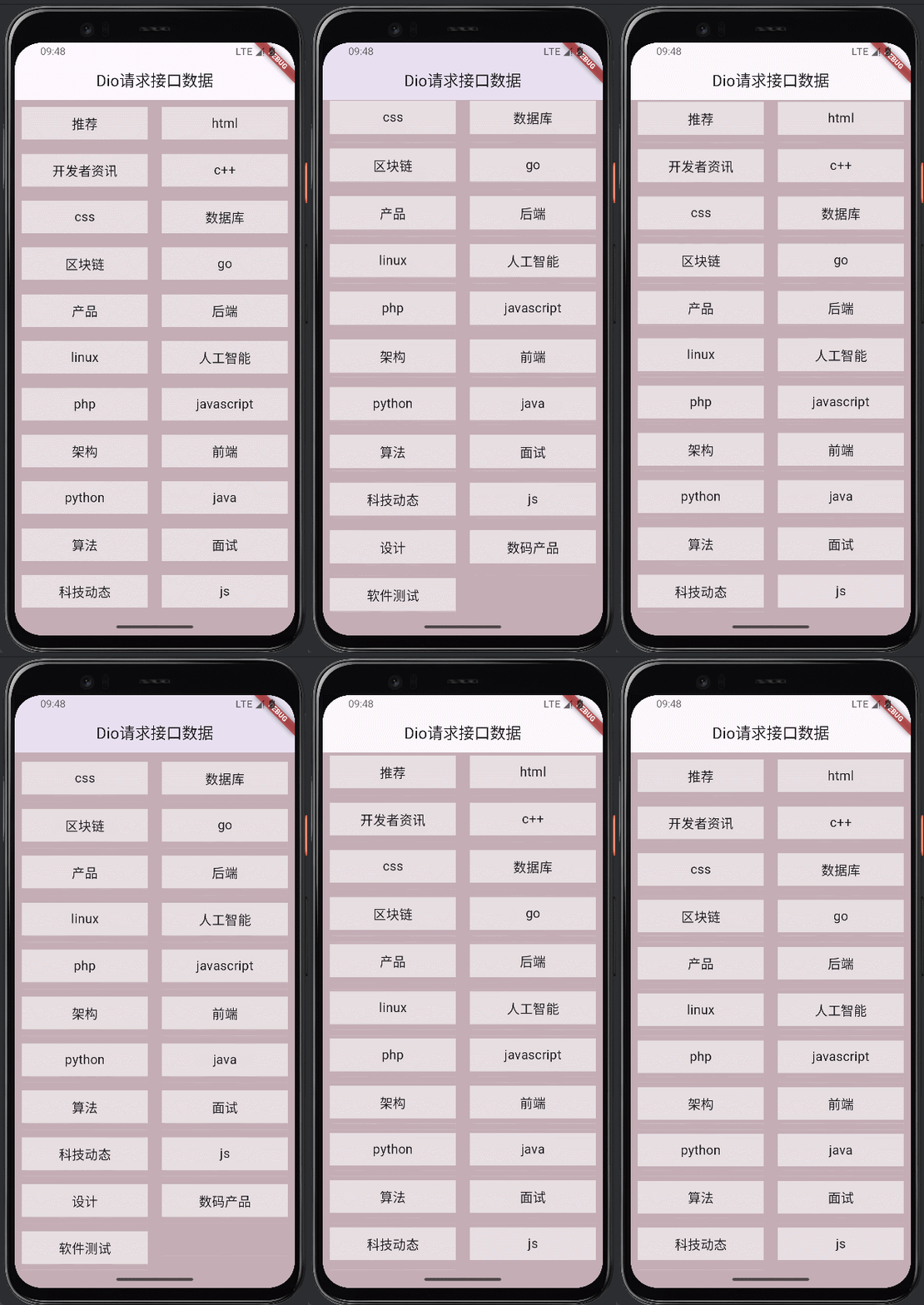
实战案例
main.dart文件
js
class _MyWidgetHelloState extends State<MyWidgetHello> {
  List<Channel> channelList = [];
  @override
  void initState() {
    super.initState();
    print("initState");
    initChannels();
  }

  void initChannels() async {
    List<dynamic> channels = await fetchChannels();
    print(channels);
    setState(() {
      channelList = channels
          .map((item) => Channel(item['name'], item['id']))
          .toList();
    });
  }

  @override
  Widget build(BuildContext context) {
    return MaterialApp(
      home: Scaffold(
        appBar: AppBar(title: Text('Dio请求接口数据'), centerTitle: true),
        body: Container(
          height: double.infinity,
          width: double.infinity,
          color: const Color.fromARGB(255, 196, 173, 181),
          child: SafeArea(
            child: GridView.count(
              childAspectRatio: 3,
              crossAxisCount: 2,
              children: List.generate(
                channelList.length,
                (index) => ChannelItem(channelList[index]),
              ),
            ),
          ),
        ),
      ),
    );
  }
}
apis下面的接口
js
import 'package:flutter_app_01/utils/request.dart';

Future<List<dynamic>> fetchChannels() async {
  final result = await dioRequest.get(
    'https://mock.presstime.cn/mock/698af414175f731e2bd6dcdf/api/channal-list',
  );
  // dioRequest._handleResponse returns the `result` object from the API
  // so access channels directly from the returned map
  if (result is Map<String, dynamic>) {
    return (result['channels']);
  } else {
    print('unexpected result type: ${result.runtimeType}');
  }
  return [];
}
实体类
js
class Channel {
  String name;
  int id;
  Channel(this.name, this.id);
}
ChannelItem组件
js
import 'package:flutter/material.dart';
import 'package:flutter_app_01/pojo/channal.dart';

class ChannelItem extends StatelessWidget {
  const ChannelItem(this.channel, {super.key});
  final Channel channel;

  @override
  Widget build(BuildContext context) {
    return Padding(
      padding: const EdgeInsets.fromLTRB(10, 10, 10, 10),
      child: Center(
        child: Container(
          // height: 40,
          width: double.infinity,
          color: Colors.white60,
          alignment: Alignment.center,
          child: Text(
            channel.name,
            style: const TextStyle(
              // 设置字体样式
              fontSize: 18,
            ),
          ),
        ),
      ),
    );
  }
}
下一步完善post请求