欢迎加入开源鸿蒙跨平台社区:https://openharmonycrossplatform.csdn.net
🎯 欢迎来到 Flutter for OpenHarmony 社区!本文将深入讲解 Flutter 中 path_provider 目录路径获取组件的使用方法,带你全面掌握文件存储路径的获取与使用。
一、path_provider 组件概述
在 Flutter for OpenHarmony 应用开发中,path_provider 是一个非常重要的插件,用于获取设备上常用目录的路径。不同的操作系统(Android、iOS、Windows、macOS、Linux、OpenHarmony)有不同的文件系统结构和存储位置,path_provider 为开发者提供了一个统一的 API,屏蔽了平台差异,让开发者可以轻松获取各种常用目录路径。
📋 path_provider 组件特点
| 特点 | 说明 |
|---|---|
| 跨平台支持 | 支持 Android、iOS、Linux、macOS、Windows、OpenHarmony |
| 统一 API | 不同平台使用相同的 API 获取路径 |
| 异步操作 | 所有获取路径的操作都是异步的 |
| 自动创建目录 | 部分目录如果不存在会自动创建 |
| 类型安全 | 返回类型为 Directory 或 Future<Directory> |
| 路径标准化 | 自动处理不同平台的路径分隔符差异 |
💡 使用场景:文件存储、缓存管理、图片保存、日志记录、数据库存储、下载文件管理等需要访问文件系统的场景。
二、OpenHarmony 平台适配说明
2.1 兼容性信息
本项目基于 path_provider@2.1.5 开发,适配 Flutter 3.27.5-ohos-1.0.4。
2.2 支持的目录类型
在 OpenHarmony 平台上,path_provider 支持获取以下目录:
| 目录方法 | 说明 | OpenHarmony 支持 |
|---|---|---|
| getTemporaryPath() | 临时目录路径 | ✅ yes |
| getApplicationSupportPath() | 应用支持文件目录 | ✅ yes |
| getApplicationDocumentsPath() | 应用文档目录 | ✅ yes |
| getApplicationCachePath() | 应用缓存目录 | ✅ yes |
| getExternalCachePaths() | 外部缓存目录列表 | ✅ yes |
| getExternalStoragePath() | 外部存储根目录 | ✅ yes |
| getExternalStoragePaths() | 外部存储特定类型目录 | ✅ yes |
| getDownloadsPath() | 下载目录 | ✅ yes |
三、项目配置与安装
3.1 添加依赖配置
首先,需要在你的 Flutter 项目的 pubspec.yaml 文件中添加 path_provider 依赖。
打开项目根目录下的 pubspec.yaml 文件,找到 dependencies 部分,添加以下配置:
yaml
dependencies:
  flutter:
    sdk: flutter

  # 添加 path_provider 依赖(OpenHarmony 适配版本)
  path_provider:
    git:
      url: https://atomgit.com/openharmony-tpc/flutter_packages.git
      path: packages/path_provider/path_provider
配置说明:
- 使用 git 方式引用开源鸿蒙适配的 flutter_packages 仓库
url:指定 AtomGit 托管的仓库地址path:指定 path_provider 包的具体路径- 本项目基于
path_provider@2.1.2开发,适配 Flutter 3.27.5-ohos-1.0.4
⚠️ 重要:对于 OpenHarmony 平台,必须使用 git 方式引用适配版本,不能直接使用 pub.dev 的版本号。
3.2 下载依赖
配置完成后,需要在项目根目录执行以下命令下载依赖:
bash
flutter pub get执行成功后,你会看到类似以下的输出:
Running "flutter pub get" in my_cross_platform_app...
Resolving dependencies...
Got dependencies!
3.3 权限配置说明
path_provider 在 OpenHarmony 平台上需要配置网络权限(ohos.permission.INTERNET),否则在安装 hap 包时可能会报错 9568289。
3.3.1 配置应用权限等级
默认的应用权限等级是 normal,但某些权限需要 system_basic 等级。如果遇到权限问题,需要修改应用等级。
修改应用等级步骤:
- 打开
ohos/AppScope/app.json5文件 - 找到
app对象,修改bundleType或其他相关配置 - 具体配置请参考华为官方文档:安装hap时提示code9568289
3.3.2 在 module.json5 中添加权限
打开 ohos/entry/src/main/module.json5 文件,在 requestPermissions 数组中添加网络权限:
json5
{
  "module": {
    "name": "entry",
    "type": "entry",
    "description": "$string:module_desc",
    "mainElement": "EntryAbility",
    "deviceTypes": [
      "default",
      "tablet"
    ],
    "deliveryWithInstall": true,
    "installationFree": false,
    "pages": "$profile:main_pages",
    "abilities": [
      {
        "name": "EntryAbility",
        "srcEntry": "./ets/entryability/EntryAbility.ets",
        "description": "$string:EntryAbility_desc",
        "icon": "$media:icon",
        "label": "$string:EntryAbility_label",
        "startWindowIcon": "$media:icon",
        "startWindowBackground": "$color:start_window_background",
        "exported": true,
        "skills": [
          {
            "entities": [
              "entity.system.home"
            ],
            "actions": [
              "action.system.home"
            ]
          }
        ]
      }
    ],
    "requestPermissions": [
      {
        "name": "ohos.permission.INTERNET",
        "reason": "$string:network_reason",
        "usedScene": {
          "abilities": [
            "EntryAbility"
          ],
          "when": "inuse"
        }
      }
    ]
  }
}
配置说明:
name:权限名称,这里是ohos.permission.INTERNETreason:申请权限的原因,引用字符串资源usedScene:使用场景,指定在哪些 Ability 中使用,以及使用时机
3.3.3 添加权限原因说明
打开 ohos/entry/src/main/resources/base/element/string.json 文件,添加权限原因的字符串:
json
{
  "string": [
    {
      "name": "network_reason",
      "value": "使用网络"
    }
  ]
}
注意: 如果你的 string.json 文件已经有其他内容,只需在 string 数组中添加新的对象即可,不要覆盖原有内容。
3.4 依赖自动配置说明
执行 flutter pub get 后,OpenHarmony 平台的依赖会自动配置到 ohos/entry/oh-package.json5 文件中。你不需要手动配置 OpenHarmony 端的依赖,Flutter 构建系统会自动处理。
四、path_provider 基础用法
4.1 导入包
在使用 path_provider 之前,首先需要导入相关包:
dart
import 'package:path_provider/path_provider.dart';
import 'dart:io';
4.2 获取临时目录 - getTemporaryPath()
临时目录用于存储临时文件,系统可能会在存储空间不足时自动清理该目录下的文件。
dart
// 获取临时目录路径
Directory tempDir = await getTemporaryDirectory();
String tempPath = tempDir.path;

print('临时目录路径: $tempPath');
适用场景:
- 下载文件的临时存储
- 图片压缩的中间文件
- 需要短期保存的缓存数据
特点:
- 系统可能会自动清理
- 不应该存储重要数据
- 适合作为临时工作区
4.3 获取应用支持目录 - getApplicationSupportPath()
应用支持目录用于存储应用的支持文件,如果目录不存在会自动创建。
dart
// 获取应用支持目录路径
Directory supportDir = await getApplicationSupportDirectory();
String supportPath = supportDir.path;

print('应用支持目录路径: $supportPath');
适用场景:
- 配置文件
- 数据库文件
- 需要长期保存的应用数据
- 用户生成的内容
特点:
- 应用卸载后会被删除
- 不会被系统自动清理
- 适合存储应用的核心数据
4.4 获取应用文档目录 - getApplicationDocumentsPath()
应用文档目录用于存储用户生成的文档或应用无法重新创建的数据。
dart
// 获取应用文档目录路径
Directory documentsDir = await getApplicationDocumentsDirectory();
String documentsPath = documentsDir.path;

print('应用文档目录路径: $documentsPath');
适用场景:
- 用户创建的文档
- 用户编辑的内容
- 应用无法重新创建的数据
- 用户导出的文件
特点:
- 应用卸载后会被删除
- 不会被系统自动清理
- 适合存储用户的重要数据
4.5 获取应用缓存目录 - getApplicationCachePath()
应用缓存目录用于存储应用的缓存文件,如果目录不存在会自动创建。
dart
// 获取应用缓存目录路径
Directory cacheDir = await getApplicationCacheDirectory();
String cachePath = cacheDir.path;

print('应用缓存目录路径: $cachePath');
适用场景:
- 图片缓存
- 网络请求缓存
- 临时下载的文件
- 可重新生成的数据
特点:
- 应用卸载后会被删除
- 系统可能会在存储空间不足时清理
- 适合存储可重新生成的缓存数据
4.6 获取外部存储路径 - getExternalStoragePath()
获取外部存储的根目录路径。
dart
// 获取外部存储路径
Directory? externalDir = await getExternalStorageDirectory();
if (externalDir != null) {
  String externalPath = externalDir.path;
  print('外部存储路径: $externalPath');
}
适用场景:
- 存储用户可见的文件
- 需要与其他应用共享的文件
- 大文件的存储
特点:
- 可能在某些平台上不可用(返回 null)
- 需要额外的存储权限
- 应用卸载后文件可能保留
4.7 获取外部存储特定类型目录 - getExternalStoragePaths()
获取外部存储中特定类型的目录,如音乐、图片、文档等。
dart
// 获取音乐目录
List<Directory>? musicDirs = await getExternalStorageDirectories(type: StorageDirectory.music);
if (musicDirs != null && musicDirs.isNotEmpty) {
  print('音乐目录: ${musicDirs.map((d) => d.path).join(', ')}');
}

// 获取图片目录
List<Directory>? pictureDirs = await getExternalStorageDirectories(type: StorageDirectory.pictures);
if (pictureDirs != null && pictureDirs.isNotEmpty) {
  print('图片目录: ${pictureDirs.map((d) => d.path).join(', ')}');
}

// 获取下载目录
List<Directory>? downloadDirs = await getExternalStorageDirectories(type: StorageDirectory.downloads);
if (downloadDirs != null && downloadDirs.isNotEmpty) {
  print('下载目录: ${downloadDirs.map((d) => d.path).join(', ')}');
}
StorageDirectory 支持的类型:
| 类型 | 说明 |
|---|---|
| StorageDirectory.root | 存储根目录 |
| StorageDirectory.music | 音乐文件目录 |
| StorageDirectory.podcasts | 播客文件目录 |
| StorageDirectory.ringtones | 铃声目录 |
| StorageDirectory.alarms | 闹钟铃声目录 |
| StorageDirectory.notifications | 通知文件目录 |
| StorageDirectory.pictures | 图片目录 |
| StorageDirectory.movies | 电影/视频目录 |
| StorageDirectory.downloads | 下载目录 |
| StorageDirectory.dcim | 相机照片和视频目录 |
| StorageDirectory.documents | 文档目录 |
4.8 获取外部缓存目录 - getExternalCachePaths()
获取外部存储中的缓存目录列表。
dart
// 获取外部缓存目录
List<Directory>? externalCacheDirs = await getExternalCacheDirectories();
if (externalCacheDirs != null && externalCacheDirs.isNotEmpty) {
  for (var dir in externalCacheDirs) {
    print('外部缓存目录: ${dir.path}');
  }
}
适用场景:
- 大文件的缓存存储
- 需要保存在外部存储的缓存
- 可能被清理的临时文件
4.9 获取下载目录 - getDownloadsPath()
获取系统的下载目录。
dart
// 获取下载目录
Directory? downloadsDir = await getDownloadsDirectory();
if (downloadsDir != null) {
  String downloadsPath = downloadsDir.path;
  print('下载目录路径: $downloadsPath');
}
适用场景:
- 保存下载的文件
- 用户下载的内容
- 需要在下载文件夹中显示的文件
五、文件操作完整示例
下面展示如何结合 path_provider 和 dart:io 进行文件操作:
5.1 创建文件
dart
import 'dart:io';
import 'package:path_provider/path_provider.dart';

// 在应用文档目录创建文件
Future<File> createFile(String fileName, String content) async {
  final Directory dir = await getApplicationDocumentsDirectory();
  final File file = File('${dir.path}/$fileName');
  return await file.writeAsString(content);
}

// 使用示例
File myFile = await createFile('hello.txt', 'Hello, OpenHarmony!');
print('文件创建成功: ${myFile.path}');
5.2 读取文件
dart
// 读取文件内容
Future<String> readFile(String fileName) async {
  final Directory dir = await getApplicationDocumentsDirectory();
  final File file = File('${dir.path}/$fileName');
  return await file.readAsString();
}

// 使用示例
String content = await readFile('hello.txt');
print('文件内容: $content');
5.3 删除文件
dart
// 删除文件
Future<bool> deleteFile(String fileName) async {
  final Directory dir = await getApplicationDocumentsDirectory();
  final File file = File('${dir.path}/$fileName');

  if (await file.exists()) {
    await file.delete();
    return true;
  }
  return false;
}

// 使用示例
bool deleted = await deleteFile('hello.txt');
print('文件删除${deleted ? "成功" : "失败"}');
5.4 创建目录
dart
// 创建子目录
Future<Directory> createDirectory(String dirName) async {
  final Directory appDir = await getApplicationDocumentsDirectory();
  final Directory newDir = Directory('${appDir.path}/$dirName');

  if (!await newDir.exists()) {
    await newDir.create(recursive: true);
  }

  return newDir;
}

// 使用示例
Directory myDir = await createDirectory('images');
print('目录创建成功: ${myDir.path}');
5.5 列出目录内容
dart
// 列出目录中的所有文件
Future<List<FileSystemEntity>> listDirectoryFiles(Directory dir) async {
  return await dir.list().toList();
}

// 使用示例
Directory appDir = await getApplicationDocumentsDirectory();
List<FileSystemEntity> files = await listDirectoryFiles(appDir);

print('目录内容:');
for (var file in files) {
  print('  ${file.path}');
}
六、完整示例代码
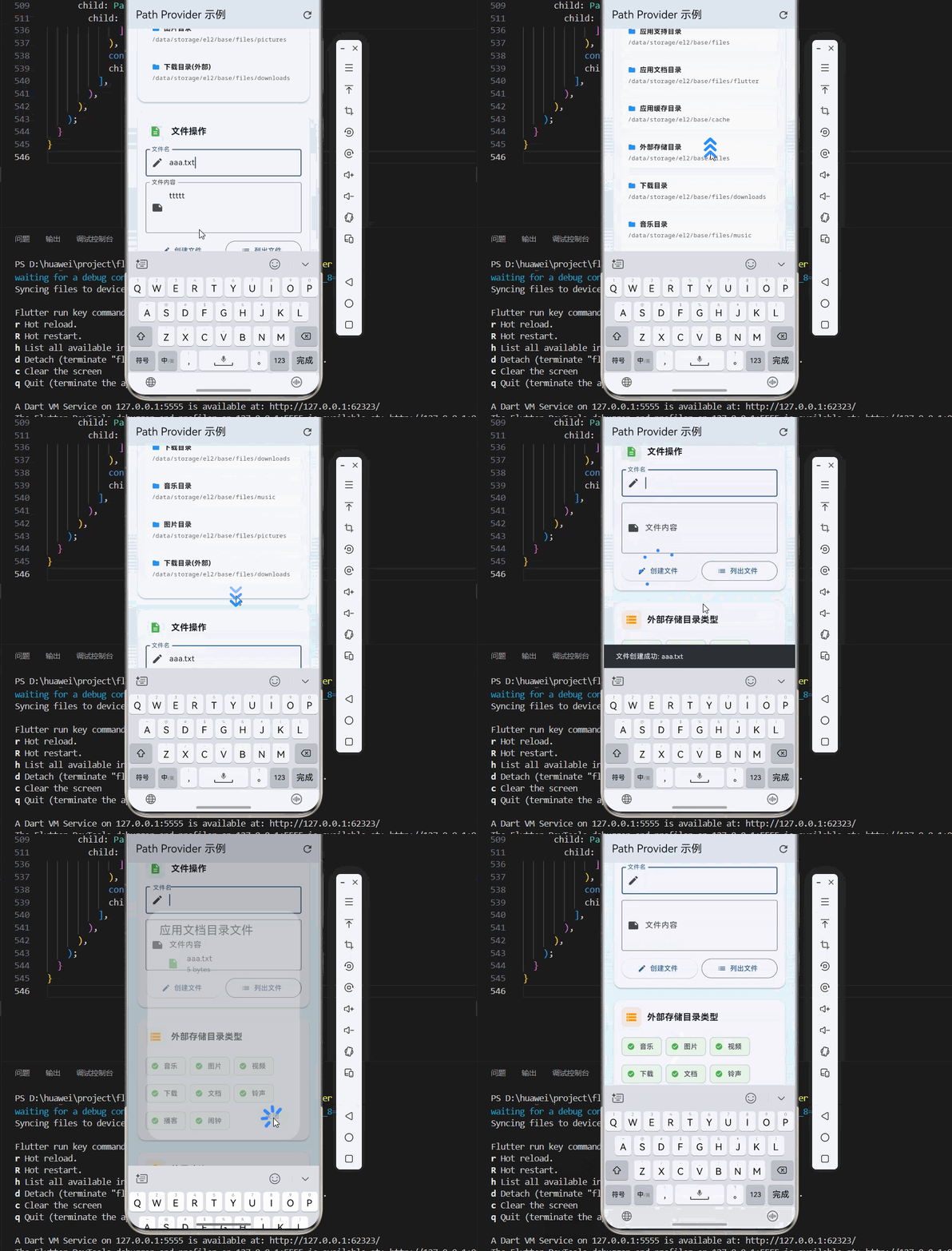
下面是一个完整的示例应用,展示了 path_provider 的各种用法:
dart
import 'package:flutter/material.dart';
import 'package:path_provider/path_provider.dart';
import 'dart:io';
void main() {
runApp(const PathProviderDemo());
}
class PathProviderDemo extends StatelessWidget {
const PathProviderDemo({super.key});
@override
Widget build(BuildContext context) {
return MaterialApp(
title: 'Path Provider 示例',
debugShowCheckedModeBanner: false,
theme: ThemeData(
colorScheme: ColorScheme.fromSeed(seedColor: Colors.blue),
useMaterial3: true,
),
home: const PathProviderPage(),
);
}
}
class PathProviderPage extends StatefulWidget {
const PathProviderPage({super.key});
@override
State<PathProviderPage> createState() => _PathProviderPageState();
}
class _PathProviderPageState extends State<PathProviderPage> {
// 路径数据
Map<String, String?> _paths = {};
// 文件操作控制器
final TextEditingController _fileNameController = TextEditingController();
final TextEditingController _fileContentController = TextEditingController();
@override
void initState() {
super.initState();
_loadAllPaths();
}
@override
void dispose() {
_fileNameController.dispose();
_fileContentController.dispose();
super.dispose();
}
// 加载所有路径
Future<void> _loadAllPaths() async {
setState(() {
_paths = {};
});
// 临时目录
try {
Directory tempDir = await getTemporaryDirectory();
_paths['临时目录'] = tempDir.path;
} catch (e) {
_paths['临时目录'] = '获取失败: $e';
}
// 应用支持目录
try {
Directory supportDir = await getApplicationSupportDirectory();
_paths['应用支持目录'] = supportDir.path;
} catch (e) {
_paths['应用支持目录'] = '获取失败: $e';
}
// 应用文档目录
try {
Directory docsDir = await getApplicationDocumentsDirectory();
_paths['应用文档目录'] = docsDir.path;
} catch (e) {
_paths['应用文档目录'] = '获取失败: $e';
}
// 应用缓存目录
try {
Directory cacheDir = await getApplicationCacheDirectory();
_paths['应用缓存目录'] = cacheDir.path;
} catch (e) {
_paths['应用缓存目录'] = '获取失败: $e';
}
// 外部存储目录
try {
Directory? externalDir = await getExternalStorageDirectory();
_paths['外部存储目录'] = externalDir?.path ?? '不可用';
} catch (e) {
_paths['外部存储目录'] = '获取失败: $e';
}
// 下载目录
try {
Directory? downloadDir = await getDownloadsDirectory();
_paths['下载目录'] = downloadDir?.path ?? '不可用';
} catch (e) {
_paths['下载目录'] = '获取失败: $e';
}
// 外部存储特定类型目录
try {
List<Directory>? musicDirs = await getExternalStorageDirectories(type: StorageDirectory.music);
_paths['音乐目录'] = musicDirs?.map((d) => d.path).join(', ') ?? '不可用';
} catch (e) {
_paths['音乐目录'] = '获取失败: $e';
}
try {
List<Directory>? pictureDirs = await getExternalStorageDirectories(type: StorageDirectory.pictures);
_paths['图片目录'] = pictureDirs?.map((d) => d.path).join(', ') ?? '不可用';
} catch (e) {
_paths['图片目录'] = '获取失败: $e';
}
try {
List<Directory>? downloadDirs = await getExternalStorageDirectories(type: StorageDirectory.downloads);
_paths['下载目录(外部)'] = downloadDirs?.map((d) => d.path).join(', ') ?? '不可用';
} catch (e) {
_paths['下载目录(外部)'] = '获取失败: $e';
}
setState(() {});
}
// 创建文件
Future<void> _createFile() async {
String fileName = _fileNameController.text.trim();
String content = _fileContentController.text;
if (fileName.isEmpty) {
_showSnackBar('请输入文件名');
return;
}
try {
Directory docsDir = await getApplicationDocumentsDirectory();
File file = File('${docsDir.path}/$fileName');
await file.writeAsString(content);
_showSnackBar('文件创建成功: $fileName');
_fileNameController.clear();
_fileContentController.clear();
} catch (e) {
_showSnackBar('创建文件失败: $e');
}
}
// 列出文件
Future<List<FileSystemEntity>> _listFiles() async {
try {
Directory docsDir = await getApplicationDocumentsDirectory();
return await docsDir.list().toList();
} catch (e) {
_showSnackBar('列出文件失败: $e');
return [];
}
}
// 显示文件列表
Future<void> _showFileList() async {
List<FileSystemEntity> files = await _listFiles();
if (!mounted) return;
showDialog(
context: context,
builder: (BuildContext context) {
return AlertDialog(
title: const Text('应用文档目录文件'),
content: SizedBox(
width: double.maxFinite,
height: 300,
child: files.isEmpty
? const Center(child: Text('暂无文件'))
: ListView.builder(
itemCount: files.length,
itemBuilder: (context, index) {
FileSystemEntity file = files[index];
return ListTile(
leading: Icon(
file is Directory ? Icons.folder : Icons.insert_drive_file,
color: file is Directory ? Colors.blue : Colors.green,
),
title: Text(file.path.split('/').last),
subtitle: Text(
file is File
? '${(file as File).lengthSync()} bytes'
: '目录',
),
);
},
),
),
actions: [
TextButton(
onPressed: () => Navigator.of(context).pop(),
child: const Text('关闭'),
),
],
);
},
);
}
// 显示提示信息
void _showSnackBar(String message) {
ScaffoldMessenger.of(context).showSnackBar(
SnackBar(
content: Text(message),
duration: const Duration(seconds: 2),
),
);
}
@override
Widget build(BuildContext context) {
return Scaffold(
appBar: AppBar(
title: const Text('Path Provider 示例'),
actions: [
IconButton(
icon: const Icon(Icons.refresh),
onPressed: _loadAllPaths,
tooltip: '刷新路径',
),
],
),
body: Container(
decoration: BoxDecoration(
gradient: LinearGradient(
begin: Alignment.topCenter,
end: Alignment.bottomCenter,
colors: [
Colors.blue.shade50,
Colors.cyan.shade50,
],
),
),
child: SingleChildScrollView(
padding: const EdgeInsets.all(16),
child: Column(
crossAxisAlignment: CrossAxisAlignment.start,
children: [
// 路径信息卡片
_buildSectionCard(
title: '系统目录路径',
icon: Icons.folder_open,
color: Colors.blue,
child: _paths.isEmpty
? const Center(child: CircularProgressIndicator())
: Column(
children: _paths.entries.map((entry) {
return _buildPathItem(entry.key, entry.value ?? '不可用');
}).toList(),
),
),
const SizedBox(height: 16),
// 文件操作卡片
_buildSectionCard(
title: '文件操作',
icon: Icons.description,
color: Colors.green,
child: Column(
children: [
TextField(
controller: _fileNameController,
decoration: const InputDecoration(
labelText: '文件名',
border: OutlineInputBorder(),
prefixIcon: Icon(Icons.edit),
),
),
const SizedBox(height: 12),
TextField(
controller: _fileContentController,
maxLines: 3,
decoration: const InputDecoration(
labelText: '文件内容',
border: OutlineInputBorder(),
prefixIcon: Icon(Icons.note),
),
),
const SizedBox(height: 12),
Row(
children: [
Expanded(
child: ElevatedButton.icon(
onPressed: _createFile,
icon: const Icon(Icons.create),
label: const Text('创建文件'),
),
),
const SizedBox(width: 8),
Expanded(
child: OutlinedButton.icon(
onPressed: _showFileList,
icon: const Icon(Icons.list),
label: const Text('列出文件'),
),
),
],
),
],
),
),
const SizedBox(height: 16),
// 存储目录类型卡片
_buildSectionCard(
title: '外部存储目录类型',
icon: Icons.storage,
color: Colors.orange,
child: Wrap(
spacing: 8,
runSpacing: 8,
children: [
_buildStorageTypeChip('音乐', StorageDirectory.music),
_buildStorageTypeChip('图片', StorageDirectory.pictures),
_buildStorageTypeChip('视频', StorageDirectory.movies),
_buildStorageTypeChip('下载', StorageDirectory.downloads),
_buildStorageTypeChip('文档', StorageDirectory.documents),
_buildStorageTypeChip('铃声', StorageDirectory.ringtones),
_buildStorageTypeChip('播客', StorageDirectory.podcasts),
_buildStorageTypeChip('闹钟', StorageDirectory.alarms),
],
),
),
const SizedBox(height: 16),
// 使用建议卡片
_buildSectionCard(
title: '使用建议',
icon: Icons.lightbulb,
color: Colors.amber,
child: Column(
crossAxisAlignment: CrossAxisAlignment.start,
children: [
_buildTipItem(
icon: Icons.folder,
title: '临时目录',
description: '用于短期存储,系统可能自动清理',
),
_buildTipItem(
icon: Icons.support,
title: '应用支持目录',
description: '用于配置文件、数据库等核心数据',
),
_buildTipItem(
icon: Icons.description,
title: '应用文档目录',
description: '用于用户生成的内容和重要文档',
),
_buildTipItem(
icon: Icons.cached,
title: '应用缓存目录',
description: '用于可重新生成的缓存数据',
),
_buildTipItem(
icon: Icons.sd_storage,
title: '外部存储',
description: '用于大文件存储和需要共享的内容',
),
],
),
),
const SizedBox(height: 32),
],
),
),
),
);
}
Widget _buildPathItem(String label, String path) {
return Container(
margin: const EdgeInsets.only(bottom: 12),
padding: const EdgeInsets.all(12),
decoration: BoxDecoration(
color: Colors.grey.shade50,
borderRadius: BorderRadius.circular(8),
border: Border.all(color: Colors.grey.shade200),
),
child: Column(
crossAxisAlignment: CrossAxisAlignment.start,
children: [
Row(
children: [
Icon(
Icons.folder,
size: 16,
color: Colors.blue,
),
const SizedBox(width: 8),
Text(
label,
style: const TextStyle(
fontWeight: FontWeight.bold,
fontSize: 14,
),
),
],
),
const SizedBox(height: 4),
SelectableText(
path,
style: TextStyle(
fontSize: 12,
color: path.contains('失败') ? Colors.red : Colors.grey.shade700,
fontFamily: 'monospace',
),
),
],
),
);
}
Widget _buildStorageTypeChip(String label, StorageDirectory type) {
return FutureBuilder<List<Directory>?>(
future: getExternalStorageDirectories(type: type),
builder: (context, snapshot) {
bool available = snapshot.hasData && snapshot.data != null && snapshot.data!.isNotEmpty;
return Chip(
label: Text(label),
avatar: Icon(
available ? Icons.check_circle : Icons.cancel,
size: 16,
color: available ? Colors.green : Colors.grey,
),
backgroundColor: available ? Colors.green.shade50 : Colors.grey.shade100,
);
},
);
}
Widget _buildTipItem({
required IconData icon,
required String title,
required String description,
}) {
return Padding(
padding: const EdgeInsets.symmetric(vertical: 8),
child: Row(
crossAxisAlignment: CrossAxisAlignment.start,
children: [
Container(
padding: const EdgeInsets.all(8),
decoration: BoxDecoration(
color: Colors.amber.shade100,
borderRadius: BorderRadius.circular(8),
),
child: Icon(
icon,
size: 20,
color: Colors.amber.shade700,
),
),
const SizedBox(width: 12),
Expanded(
child: Column(
crossAxisAlignment: CrossAxisAlignment.start,
children: [
Text(
title,
style: const TextStyle(
fontWeight: FontWeight.bold,
fontSize: 14,
),
),
const SizedBox(height: 2),
Text(
description,
style: TextStyle(
fontSize: 12,
color: Colors.grey.shade600,
),
),
],
),
),
],
),
);
}
Widget _buildSectionCard({
required String title,
required IconData icon,
required Color color,
required Widget child,
}) {
return Card(
elevation: 2,
shape: RoundedRectangleBorder(
borderRadius: BorderRadius.circular(16),
),
child: Padding(
padding: const EdgeInsets.all(16),
child: Column(
crossAxisAlignment: CrossAxisAlignment.start,
children: [
Row(
children: [
Container(
padding: const EdgeInsets.all(8),
decoration: BoxDecoration(
color: color.withOpacity(0.1),
borderRadius: BorderRadius.circular(8),
),
child: Icon(
icon,
color: color,
size: 24,
),
),
const SizedBox(width: 12),
Text(
title,
style: const TextStyle(
fontSize: 18,
fontWeight: FontWeight.bold,
),
),
],
),
const SizedBox(height: 16),
child,
],
),
),
);
}
}七、常见问题与最佳实践
7.1 常见问题
Q1: 为什么获取路径返回 null?
A: 某些目录可能在特定平台上不可用:
getExternalStorageDirectory()可能在 iOS 上返回 nullgetDownloadsDirectory()可能在某些平台上不可用- 使用前检查返回值是否为 null
dart
Directory? dir = await getDownloadsDirectory();
if (dir != null) {
  // 安全使用路径
  String path = dir.path;
} else {
  // 处理不可用的情况
  print('下载目录不可用');
}
Q2: 如何处理不同平台的路径分隔符?
A: path_provider 返回的路径已经根据平台进行了标准化处理:
- Windows 使用反斜杠
\ - macOS/Linux/Android/OpenHarmony 使用正斜杠
/ - 不需要手动处理路径分隔符
Q3: 应用卸载后数据会保留吗?
A: 这取决于使用的目录:
getApplicationDocumentsDirectory()、getApplicationSupportDirectory()、getApplicationCacheDirectory():应用卸载后会被删除getExternalStorageDirectory()、getExternalStorageDirectories():可能保留(取决于平台)
Q4: 如何清理缓存?
A: 可以遍历缓存目录并删除文件:
dart
Future<void> clearCache() async {
  Directory cacheDir = await getApplicationCacheDirectory();
  if (await cacheDir.exists()) {
    cacheDir.deleteSync(recursive: true);
    await cacheDir.create(); // 重新创建空目录
  }
}
7.2 最佳实践
1. 根据场景选择合适的目录
| 场景 | 推荐目录 | 原因 |
|---|---|---|
| 配置文件 | getApplicationSupportPath() | 长期保存,不会被清理 |
| 数据库 | getApplicationSupportPath() | 需要持久保存 |
| 用户文档 | getApplicationDocumentsPath() | 用户重要数据 |
| 图片缓存 | getApplicationCachePath() | 可重新生成 |
| 下载文件 | getDownloadsPath() | 用户可见 |
| 临时文件 | getTemporaryPath() | 短期存储 |
2. 创建路径管理工具类
为了更方便地使用路径,可以创建一个管理类:
dart
class PathManager {
  // 单例模式
  static final PathManager _instance = PathManager._internal();
  factory PathManager() => _instance;
  PathManager._internal();

  // 缓存路径
  Directory? _tempDir;
  Directory? _supportDir;
  Directory? _docsDir;
  Directory? _cacheDir;

  // 初始化所有路径
  Future<void> init() async {
    _tempDir = await getTemporaryDirectory();
    _supportDir = await getApplicationSupportDirectory();
    _docsDir = await getApplicationDocumentsDirectory();
    _cacheDir = await getApplicationCacheDirectory();
  }

  // 获取临时目录
  Directory get tempDir => _tempDir!;
  String get tempPath => _tempDir!.path;

  // 获取支持目录
  Directory get supportDir => _supportDir!;
  String get supportPath => _supportDir!.path;

  // 获取文档目录
  Directory get docsDir => _docsDir!;
  String get docsPath => _docsDir!.path;

  // 获取缓存目录
  Directory get cacheDir => _cacheDir!;
  String get cachePath => _cacheDir!.path;

  // 获取配置文件路径
  File get configFile => File('$_supportDir/config.json');

  // 获取数据库文件路径
  File get databaseFile => File('$_supportDir/database.db');

  // 获取日志目录
  Directory get logDir => Directory('$_supportDir/logs');
}

// 在 main 函数中初始化
void main() async {
  WidgetsFlutterBinding.ensureInitialized();
  await PathManager().init();
  runApp(MyApp());
}

// 使用
File dbFile = PathManager().databaseFile;
3. 处理异常
所有文件操作都应该处理异常:
dart
try {
  Directory dir = await getApplicationDocumentsDirectory();
  File file = File('${dir.path}/data.txt');
  await file.writeAsString('Hello');
} catch (e) {
  print('文件操作失败: $e');
  // 提供备用方案或提示用户
}
4. 检查目录/文件是否存在
在操作文件前检查是否存在:
dart
Directory dir = await getApplicationDocumentsDirectory();
File file = File('${dir.path}/data.txt');

if (await file.exists()) {
  // 文件存在,执行读取
  String content = await file.readAsString();
} else {
  // 文件不存在,执行创建
  await file.writeAsString('默认内容');
}
5. 使用相对路径
在应用文档目录中使用相对路径来组织文件:
dart
Directory docsDir = await getApplicationDocumentsDirectory();

// 创建子目录
Directory imagesDir = Directory('${docsDir.path}/images');
if (!await imagesDir.exists()) {
  await imagesDir.create(recursive: true);
}

// 保存图片到子目录
File imageFile = File('${imagesDir.path}/photo.jpg');
八、总结
恭喜你!通过这篇文章的学习,你已经掌握了 Flutter 中 path_provider 目录路径获取的全面知识。
🎯 核心要点
- 基础用法 :使用
getXxxDirectory()方法获取不同类型的目录路径 - 目录类型:临时目录、应用支持目录、应用文档目录、应用缓存目录、外部存储目录等
- 异步操作 :所有获取路径的操作都是异步的,必须使用
await等待 - 平台差异:path_provider 屏蔽了平台差异,提供统一的 API
- 文件操作 :结合
dart:io进行文件的创建、读取、删除等操作
📚 目录选择指南
| 目录类型 | 保存期限 | 清理风险 | 适用场景 |
|---|---|---|---|
| 临时目录 | 短期 | 高 | 临时文件、下载缓存 |
| 应用支持目录 | 长期 | 低 | 配置文件、数据库 |
| 应用文档目录 | 长期 | 低 | 用户文档、重要数据 |
| 应用缓存目录 | 中期 | 中 | 图片缓存、可重新生成的数据 |
| 外部存储 | 长期 | 低 | 大文件、需要共享的内容 |
🚀 进阶方向
掌握了 path_provider 后,你还可以探索以下方向:
- 文件选择器 :学习使用
file_selector选择文件 - 图片选择器 :学习使用
image_picker选择图片 - 数据库:学习使用 SQLite、Hive 等数据库方案
- 文件上传下载:学习结合网络请求实现文件传输
- 权限管理:学习如何处理存储权限