欢迎加入开源鸿蒙跨平台社区:https://openharmonycrossplatform.csdn.net
🎯 欢迎来到 Flutter for OpenHarmony 社区!本文将深入讲解 Flutter 中 shared_preferences 轻量级存储的使用方法,带你从零开始掌握这一重要的数据持久化方案。
一、shared_preferences 组件概述
在 Flutter for OpenHarmony 应用开发中,shared_preferences 是一个非常实用的轻量级数据持久化方案。它提供了简单的键值对存储功能,类似于 Android 中的 SharedPreferences 和 iOS 中的 UserDefaults,适合存储用户的简单设置、配置信息等轻量级数据。
📋 shared_preferences 组件特点
| 特点 | 说明 |
|---|---|
| 键值对存储 | 使用简单的键值对方式存储数据 |
| 跨平台支持 | 支持 Android、iOS、Linux、macOS、Windows、OpenHarmony |
| 异步操作 | 所有读写操作都是异步的,不会阻塞 UI |
| 类型支持 | 支持 String、int、double、bool、List<String> |
| 持久化 | 数据会持久保存,应用重启后仍然可用 |
| 简单易用 | API 简洁直观,易于上手 |
💡 使用场景:保存用户设置(如主题、语言)、登录状态、开关状态、用户偏好配置等小型数据。不适合存储大量数据或复杂对象。
二、OpenHarmony 平台适配说明
本项目基于 shared_preferences@2.2.0 开发,适配 Flutter 3.27.5-ohos-1.0.4。
2.1 支持的数据类型
在 OpenHarmony 平台上,shared_preferences 支持以下数据类型:
| 数据类型 | 说明 | OpenHarmony 支持 |
|---|---|---|
| String | 字符串值 | ✅ yes |
| int | 整数值 | ✅ yes |
| double | 浮点数值 | ✅ yes |
| bool | 布尔值 | ✅ yes |
List<String> |
字符串列表 | ✅ yes |
三、项目配置与安装
3.1 添加依赖配置
首先,需要在你的 Flutter 项目的 pubspec.yaml 文件中添加 shared_preferences 依赖。
打开项目根目录下的 pubspec.yaml 文件,找到 dependencies 部分,添加以下配置:
yaml
dependencies:
  flutter:
    sdk: flutter

  # 添加 shared_preferences 依赖(从 git 引入,支持 OpenHarmony 平台)
  shared_preferences:
    git:
      url: "https://gitcode.com/openharmony-tpc/flutter_packages.git"
      path: "packages/shared_preferences/shared_preferences"
配置说明:
- 使用
git方式从 GitCode 仓库引入依赖 url指向开源鸿蒙 TPC 维护的 flutter_packages 仓库path指定仓库中 shared_preferences 包的具体路径- 该版本已适配 OpenHarmony 平台,版本为 2.5.3
3.2 下载依赖
配置完成后,需要在项目根目录执行以下命令下载依赖:
bash
flutter pub get执行成功后,你会看到类似以下的输出:
Running "flutter pub get" in my_cross_platform_app...
Resolving dependencies...
Got dependencies!
3.3 依赖自动配置说明
执行 flutter pub get 后,OpenHarmony 平台的依赖会自动配置到 ohos/entry/oh-package.json5 文件中。Flutter 构建系统会自动处理平台相关的依赖配置,无需手动干预。
四、shared_preferences 基础用法
4.1 获取 SharedPreferences 实例
在使用 shared_preferences 之前,首先需要获取其实例。这是一个异步操作:
dart
import 'package:shared_preferences/shared_preferences.dart';

// 获取 SharedPreferences 实例
final SharedPreferences prefs = await SharedPreferences.getInstance();
注意事项:
getInstance()是一个异步方法,返回Future<SharedPreferences>- 建议在应用启动时获取实例并缓存,避免重复获取
- 在 StatefulWidget 中,可以在
initState或其他合适的地方获取实例
4.2 存储数据
shared_preferences 为每种数据类型提供了对应的存储方法,所有存储方法都返回 Future<bool>,表示操作是否成功。
4.2.1 存储 String
dart
// 存储字符串
bool success = await prefs.setString('username', '张三');
4.2.2 存储 int
dart
// 存储整数
bool success = await prefs.setInt('age', 25);
4.2.3 存储 double
dart
// 存储浮点数
bool success = await prefs.setDouble('height', 175.5);
4.2.4 存储 bool
dart
// 存储布尔值
bool success = await prefs.setBool('isLoggedIn', true);
4.2.5 存储 List<String>
dart
// 存储字符串列表
bool success = await prefs.setStringList('favorites', ['苹果', '香蕉', '橙子']);
4.3 读取数据
读取数据时,如果指定的键不存在,会返回 null 或默认值。
4.3.1 读取 String
dart
// 读取字符串,如果不存在返回 null
String? username = prefs.getString('username');

// 提供默认值
String username = prefs.getString('username') ?? '默认用户';
4.3.2 读取 int
dart
// 读取整数,如果不存在返回 null
int? age = prefs.getInt('age');

// 提供默认值
int age = prefs.getInt('age') ?? 0;
4.3.3 读取 double
dart
// 读取浮点数,如果不存在返回 null
double? height = prefs.getDouble('height');

// 提供默认值
double height = prefs.getDouble('height') ?? 0.0;
4.3.4 读取 bool
dart
// 读取布尔值,如果不存在返回 null
bool? isLoggedIn = prefs.getBool('isLoggedIn');

// 提供默认值
bool isLoggedIn = prefs.getBool('isLoggedIn') ?? false;
4.3.5 读取 List<String>
dart
// 读取字符串列表,如果不存在返回 null
List<String>? favorites = prefs.getStringList('favorites');

// 提供默认值
List<String> favorites = prefs.getStringList('favorites') ?? [];
五、常用 API 详解
5.1 remove - 删除指定键
删除指定键及其对应的值:
dart
// 删除指定键
bool success = await prefs.remove('username');
返回值说明:
true:删除成功false:删除失败
5.2 clear - 清空所有数据
清空 SharedPreferences 中的所有数据:
dart
// 清空所有数据
bool success = await prefs.clear();
使用场景:
- 用户退出登录时清除缓存数据
- 应用重置功能
- 调试时清除测试数据
⚠️ 警告 :
clear()会删除所有数据,请谨慎使用!
5.3 containsKey - 检查键是否存在
检查指定的键是否存在于 SharedPreferences 中:
dart
// 检查键是否存在
bool exists = prefs.containsKey('username');

if (exists) {
  print('键 username 存在');
} else {
  print('键 username 不存在');
}
5.4 getKeys - 获取所有键
获取 SharedPreferences 中存储的所有键:
dart
// 获取所有键
Set<String> allKeys = prefs.getKeys();

// 遍历所有键
for (String key in allKeys) {
  print('键: $key');
}
5.5 reload - 重新加载数据
从磁盘重新加载 SharedPreferences 数据,用于同步其他进程或线程对数据的修改:
dart
// 重新加载数据
bool success = await prefs.reload();
使用场景:
- 多进程/多线程环境下需要同步数据时
- 确保获取到最新的数据
六、完整示例代码
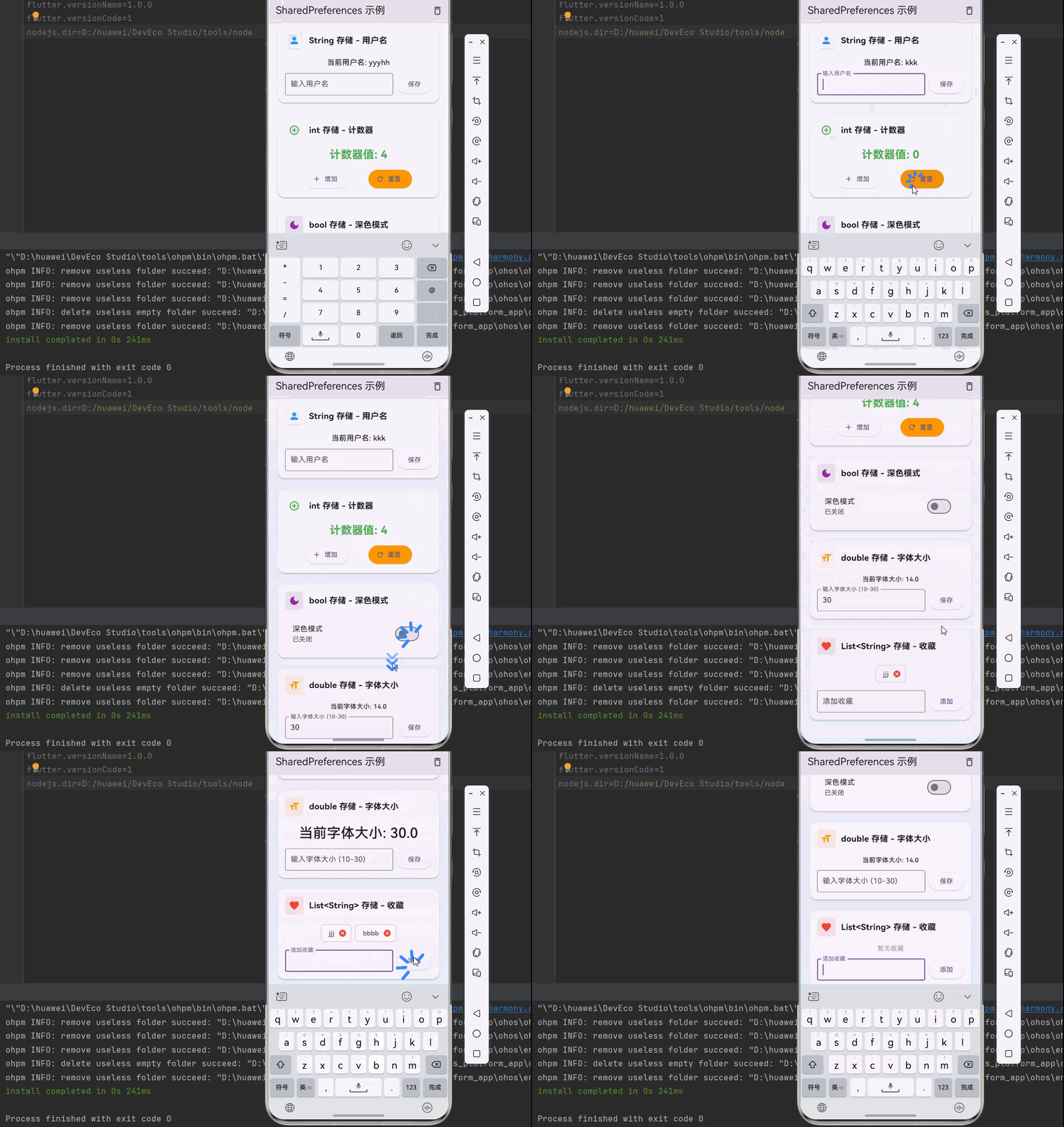
下面是一个完整的示例应用,展示了 shared_preferences 的各种用法:
dart
import 'package:flutter/material.dart';
import 'package:shared_preferences/shared_preferences.dart';
void main() {
runApp(const MyApp());
}
class MyApp extends StatelessWidget {
const MyApp({super.key});
@override
Widget build(BuildContext context) {
return const MaterialApp(
title: 'SharedPreferences 示例',
home: SharedPreferencesDemo(),
);
}
}
class SharedPreferencesDemo extends StatefulWidget {
const SharedPreferencesDemo({super.key});
@override
State<SharedPreferencesDemo> createState() => _SharedPreferencesDemoState();
}
class _SharedPreferencesDemoState extends State<SharedPreferencesDemo> {
final Future<SharedPreferences> _prefs = SharedPreferences.getInstance();
late Future<int> _counter;
late Future<String> _username;
late Future<bool> _isDarkMode;
late Future<double> _fontSize;
late Future<List<String>> _favorites;
final TextEditingController _usernameController = TextEditingController();
final TextEditingController _fontSizeController = TextEditingController();
final TextEditingController _favoriteController = TextEditingController();
@override
void initState() {
super.initState();
_counter = _prefs.then((SharedPreferences prefs) {
return prefs.getInt('counter') ?? 0;
});
_username = _prefs.then((SharedPreferences prefs) {
return prefs.getString('username') ?? '';
});
_isDarkMode = _prefs.then((SharedPreferences prefs) {
return prefs.getBool('isDarkMode') ?? false;
});
_fontSize = _prefs.then((SharedPreferences prefs) {
return prefs.getDouble('fontSize') ?? 14.0;
});
_favorites = _prefs.then((SharedPreferences prefs) {
return prefs.getStringList('favorites') ?? [];
});
}
Future<void> _incrementCounter() async {
final SharedPreferences prefs = await _prefs;
final int counter = (prefs.getInt('counter') ?? 0) + 1;
setState(() {
_counter = prefs.setInt('counter', counter).then((bool success) {
return counter;
});
});
}
Future<void> _resetCounter() async {
final SharedPreferences prefs = await _prefs;
setState(() {
_counter = prefs.setInt('counter', 0).then((bool success) {
return 0;
});
});
}
Future<void> _saveUsername() async {
final SharedPreferences prefs = await _prefs;
String username = _usernameController.text.trim();
if (username.isNotEmpty) {
setState(() {
_username = prefs.setString('username', username).then((bool success) {
return username;
});
});
_usernameController.clear();
}
}
Future<void> _toggleDarkMode(bool value) async {
final SharedPreferences prefs = await _prefs;
setState(() {
_isDarkMode = prefs.setBool('isDarkMode', value).then((bool success) {
return value;
});
});
}
Future<void> _saveFontSize() async {
final SharedPreferences prefs = await _prefs;
double? fontSize = double.tryParse(_fontSizeController.text);
if (fontSize != null && fontSize > 0) {
setState(() {
_fontSize = prefs.setDouble('fontSize', fontSize).then((bool success) {
return fontSize;
});
});
_fontSizeController.clear();
}
}
Future<void> _addFavorite() async {
final SharedPreferences prefs = await _prefs;
String favorite = _favoriteController.text.trim();
List<String> currentFavorites = await _favorites;
if (favorite.isNotEmpty && !currentFavorites.contains(favorite)) {
currentFavorites.add(favorite);
setState(() {
_favorites = prefs.setStringList('favorites', currentFavorites).then((bool success) {
return currentFavorites;
});
});
_favoriteController.clear();
}
}
Future<void> _removeFavorite(String favorite) async {
final SharedPreferences prefs = await _prefs;
List<String> currentFavorites = await _favorites;
currentFavorites.remove(favorite);
setState(() {
_favorites = prefs.setStringList('favorites', currentFavorites).then((bool success) {
return currentFavorites;
});
});
}
Future<void> _clearAll() async {
final SharedPreferences prefs = await _prefs;
bool confirm = await _showConfirmDialog('确定要清空所有数据吗?');
if (confirm) {
await prefs.clear();
setState(() {
_counter = Future<int>.value(0);
_username = Future<String>.value('');
_isDarkMode = Future<bool>.value(false);
_fontSize = Future<double>.value(14.0);
_favorites = Future<List<String>>.value([]);
});
}
}
Future<bool> _showConfirmDialog(String message) async {
return await showDialog<bool>(
context: context,
builder: (BuildContext context) {
return AlertDialog(
title: const Text('确认'),
content: Text(message),
actions: [
TextButton(
onPressed: () => Navigator.of(context).pop(false),
child: const Text('取消'),
),
TextButton(
onPressed: () => Navigator.of(context).pop(true),
child: const Text('确定'),
),
],
);
},
) ??
false;
}
@override
Widget build(BuildContext context) {
return Scaffold(
appBar: AppBar(
title: const Text('SharedPreferences 示例'),
actions: [
IconButton(
icon: const Icon(Icons.delete_outline),
onPressed: _clearAll,
tooltip: '清空所有数据',
),
],
),
body: FutureBuilder(
future: Future.wait([_counter, _username, _isDarkMode, _fontSize, _favorites]),
builder: (BuildContext context, AsyncSnapshot<List<dynamic>> snapshot) {
if (snapshot.connectionState == ConnectionState.waiting) {
return const Center(child: CircularProgressIndicator());
}
if (snapshot.hasError) {
return Center(child: Text('Error: ${snapshot.error}'));
}
final int counter = snapshot.data![0] as int;
final String username = snapshot.data![1] as String;
final bool isDarkMode = snapshot.data![2] as bool;
final double fontSize = snapshot.data![3] as double;
final List<String> favorites = snapshot.data![4] as List<String>;
return Container(
decoration: BoxDecoration(
gradient: LinearGradient(
begin: Alignment.topCenter,
end: Alignment.bottomCenter,
colors: [
Colors.purple.shade50,
Colors.blue.shade50,
],
),
),
child: SingleChildScrollView(
padding: const EdgeInsets.all(16),
child: Column(
crossAxisAlignment: CrossAxisAlignment.start,
children: [
_buildSectionCard(
title: 'String 存储 - 用户名',
icon: Icons.person,
color: Colors.blue,
child: Column(
children: [
Text(
'当前用户名: $username',
style: const TextStyle(
fontSize: 16,
fontWeight: FontWeight.w500,
),
),
const SizedBox(height: 12),
Row(
children: [
Expanded(
child: TextField(
controller: _usernameController,
decoration: const InputDecoration(
labelText: '输入用户名',
border: OutlineInputBorder(),
contentPadding: EdgeInsets.symmetric(
horizontal: 12,
vertical: 8,
),
),
),
),
const SizedBox(width: 8),
ElevatedButton(
onPressed: _saveUsername,
child: const Text('保存'),
),
],
),
],
),
),
const SizedBox(height: 16),
_buildSectionCard(
title: 'int 存储 - 计数器',
icon: Icons.add_circle_outline,
color: Colors.green,
child: Column(
children: [
Text(
'计数器值: $counter',
style: const TextStyle(
fontSize: 24,
fontWeight: FontWeight.bold,
color: Colors.green,
),
),
const SizedBox(height: 12),
Row(
mainAxisAlignment: MainAxisAlignment.spaceEvenly,
children: [
ElevatedButton.icon(
onPressed: _incrementCounter,
icon: const Icon(Icons.add),
label: const Text('增加'),
),
ElevatedButton.icon(
onPressed: _resetCounter,
icon: const Icon(Icons.refresh),
label: const Text('重置'),
style: ElevatedButton.styleFrom(
backgroundColor: Colors.orange,
),
),
],
),
],
),
),
const SizedBox(height: 16),
_buildSectionCard(
title: 'bool 存储 - 深色模式',
icon: Icons.dark_mode,
color: Colors.purple,
child: SwitchListTile(
title: const Text('深色模式'),
subtitle: Text(isDarkMode ? '已开启' : '已关闭'),
value: isDarkMode,
onChanged: _toggleDarkMode,
),
),
const SizedBox(height: 16),
_buildSectionCard(
title: 'double 存储 - 字体大小',
icon: Icons.format_size,
color: Colors.orange,
child: Column(
children: [
Text(
'当前字体大小: ${fontSize.toStringAsFixed(1)}',
style: TextStyle(
fontSize: fontSize,
fontWeight: FontWeight.w500,
),
),
const SizedBox(height: 12),
Row(
children: [
Expanded(
child: TextField(
controller: _fontSizeController,
keyboardType: TextInputType.number,
decoration: const InputDecoration(
labelText: '输入字体大小 (10-30)',
border: OutlineInputBorder(),
contentPadding: EdgeInsets.symmetric(
horizontal: 12,
vertical: 8,
),
),
),
),
const SizedBox(width: 8),
ElevatedButton(
onPressed: _saveFontSize,
child: const Text('保存'),
),
],
),
],
),
),
const SizedBox(height: 16),
_buildSectionCard(
title: 'List<String> 存储 - 收藏',
icon: Icons.favorite,
color: Colors.red,
child: Column(
children: [
if (favorites.isEmpty)
const Text(
'暂无收藏',
style: TextStyle(color: Colors.grey),
)
else
Wrap(
spacing: 8,
runSpacing: 8,
children: favorites.map((favorite) {
return Chip(
label: Text(favorite),
onDeleted: () => _removeFavorite(favorite),
deleteIconColor: Colors.red,
);
}).toList(),
),
const SizedBox(height: 12),
Row(
children: [
Expanded(
child: TextField(
controller: _favoriteController,
decoration: const InputDecoration(
labelText: '添加收藏',
border: OutlineInputBorder(),
contentPadding: EdgeInsets.symmetric(
horizontal: 12,
vertical: 8,
),
),
),
),
const SizedBox(width: 8),
ElevatedButton(
onPressed: _addFavorite,
child: const Text('添加'),
),
],
),
],
),
),
const SizedBox(height: 32),
],
),
),
);
},
),
);
}
Widget _buildSectionCard({
required String title,
required IconData icon,
required Color color,
required Widget child,
}) {
return Card(
elevation: 2,
shape: RoundedRectangleBorder(
borderRadius: BorderRadius.circular(16),
),
child: Padding(
padding: const EdgeInsets.all(16),
child: Column(
crossAxisAlignment: CrossAxisAlignment.start,
children: [
Row(
children: [
Container(
padding: const EdgeInsets.all(8),
decoration: BoxDecoration(
color: color.withOpacity(0.1),
borderRadius: BorderRadius.circular(8),
),
child: Icon(
icon,
color: color,
size: 24,
),
),
const SizedBox(width: 12),
Text(
title,
style: const TextStyle(
fontSize: 18,
fontWeight: FontWeight.bold,
),
),
],
),
const SizedBox(height: 16),
child,
],
),
),
);
}
}七、常见问题与最佳实践
7.1 常见问题
Q1: 为什么数据没有保存成功?
A: 检查以下几点:
- 确认已调用
await等待异步操作完成 - 确认使用的键名正确(注意大小写)
- 确认数据类型匹配,不要用
setInt存储double类型的值
Q2: 应用重启后数据丢失了怎么办?
A: shared_preferences 的数据是持久化的,正常情况下不会丢失。如果出现数据丢失:
- 检查是否调用了
clear()方法 - 检查应用是否有清除数据的逻辑
- 在某些调试模式下,重新安装应用会清除数据
Q3: 可以存储复杂对象吗?
A: shared_preferences 不支持直接存储复杂对象。如果需要存储复杂对象,可以:
- 将对象转换为 JSON 字符串后存储
- 使用
jsonEncode()和jsonDecode()进行序列化和反序列化
dart
// 存储对象
import 'dart:convert';

class User {
  final String name;
  final int age;

  User({required this.name, required this.age});

  Map<String, dynamic> toJson() => {'name': name, 'age': age};
  factory User.fromJson(Map<String, dynamic> json) =>
      User(name: json['name'], age: json['age']);
}

// 存储
User user = User(name: '张三', age: 25);
await prefs.setString('user', jsonEncode(user.toJson()));

// 读取
String? userJson = prefs.getString('user');
if (userJson != null) {
  User user = User.fromJson(jsonDecode(userJson));
}
Q4: SharedPreferences 的存储容量有限制吗?
A: 理论上没有严格限制,但建议只存储少量轻量级数据。如果需要存储大量数据,建议使用文件存储或数据库。
7.2 最佳实践
1. 使用常量定义键名
为了避免拼写错误和提高代码可维护性,建议使用常量定义键名:
dart
class PreferenceKeys {
  static const String username = 'username';
  static const String counter = 'counter';
  static const String isDarkMode = 'isDarkMode';
  static const String fontSize = 'fontSize';
  static const String favorites = 'favorites';
}

// 使用
await prefs.setString(PreferenceKeys.username, '张三');
String? username = prefs.getString(PreferenceKeys.username);
2. 处理异步操作
所有 SharedPreferences 的操作都是异步的,确保使用 await 等待操作完成:
dart
// ❌ 错误示例
prefs.setString('key', 'value');
print(prefs.getString('key')); // 可能还没有保存成功

// ✅ 正确示例
await prefs.setString('key', 'value');
print(prefs.getString('key')); // 保存完成后才读取
3. 提供默认值
读取数据时始终提供合理的默认值,避免 null 导致的问题:
dart
// ❌ 可能返回 null
String username = prefs.getString('username')!;

// ✅ 提供默认值
String username = prefs.getString('username') ?? '默认用户';
4. 实例缓存与空值检查
为了避免重复获取 SharedPreferences 实例和处理异步加载期间的空值问题,建议:
dart
class _MyWidgetState extends State<MyWidget> {
  SharedPreferences? _prefs;

  @override
  void initState() {
    super.initState();
    _loadData();
  }

  Future<void> _loadData() async {
    _prefs = await SharedPreferences.getInstance();
    if (_prefs != null) {
      setState(() {
        // 加载数据
      });
    }
  }

  Future<void> _saveData() async {
    if (_prefs != null) {
      await _prefs!.setString('key', 'value');
    }
  }
}
八、总结
恭喜你!通过这篇文章的学习,你已经掌握了 Flutter 中 shared_preferences 轻量级存储的全面知识。
🎯 核心要点
- 基础用法 :使用
getInstance()获取实例,通过setXxx()和getXxx()方法进行数据读写 - 数据类型 :支持 String、int、double、bool、List
<String>五种数据类型 - 异步操作 :所有操作都是异步的,必须使用
await等待完成 - 持久化:数据会持久保存,应用重启后仍然可用
- 最佳实践:使用常量定义键名、提供默认值、添加错误处理
📚 使用场景建议
| 场景 | 推荐方案 |
|---|---|
| 用户设置(主题、语言) | shared_preferences |
| 登录状态 | shared_preferences |
| 简单的计数器 | shared_preferences |
| 收藏列表(少量) | shared_preferences |
| 大量数据存储 | 文件存储 / 数据库 |
| 复杂对象存储 | JSON 序列化 + shared_preferences |
| 需要加密的数据 | 加密 + shared_preferences |
🚀 进阶方向
掌握了 shared_preferences 后,你还可以探索以下方向:
- 文件存储 :学习使用
path_provider+File进行文件存储 - 数据库:学习使用 SQLite、Hive 等数据库方案
- 加密存储 :学习使用
flutter_secure_storage进行加密存储 - 状态管理:结合 Provider、Riverpod 等状态管理方案使用
- 数据同步:实现本地存储与服务器数据的同步