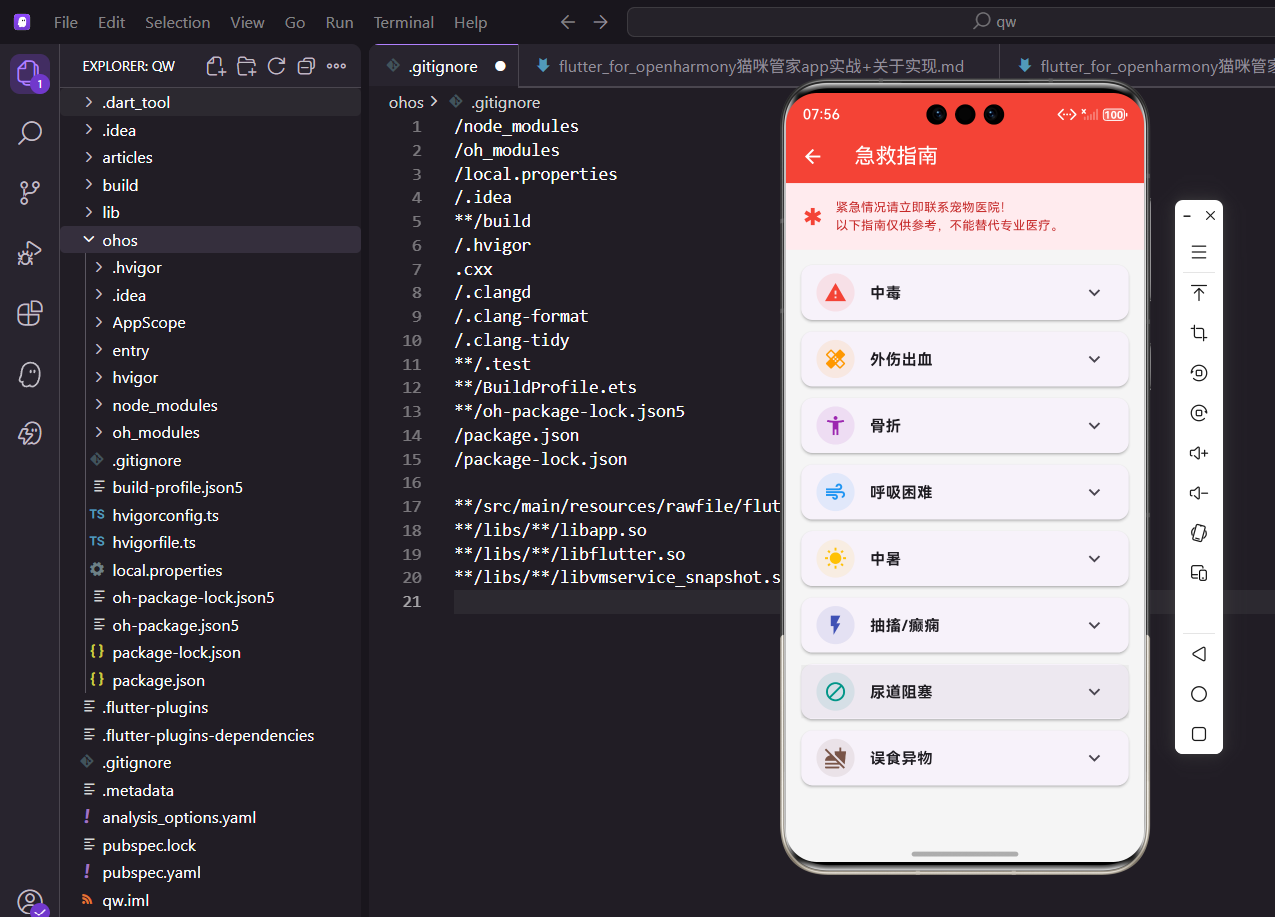
养猫难免遇到紧急情况,提前了解一些急救知识很有必要。今天来实现一个急救指南功能,列出常见的紧急情况,包括症状识别和应急处理方法。
一、急救数据定义
用列表存储各种紧急情况:
dart
final List<Map<String, dynamic>> _emergencies = const [
  {
    'title': '中毒',
    'icon': Icons.warning,
    'color': Colors.red,
    'symptoms': '呕吐、腹泻、流涎、抽搐、呼吸困难',
    'actions': [
      '立即带猫咪远离毒源',
      '不要自行催吐',
      '记录可能的毒物名称',
      '立即送医',
    ],
  },
每种情况包含标题、图标、颜色、症状和处理步骤。
中毒用红色警告,是最紧急的情况之一。
外伤和骨折:
dart
{
  'title': '外伤出血',
  'icon': Icons.healing,
  'color': Colors.orange,
  'symptoms': '伤口出血、疼痛、舔舐伤口',
  'actions': [
    '用干净纱布按压止血',
    '不要使用酒精消毒',
    '防止猫咪舔舐伤口',
    '尽快就医',
  ],
},
{
  'title': '骨折',
  'icon': Icons.accessibility_new,
  'color': Colors.purple,
  'symptoms': '跛行、肿胀、不愿移动、疼痛',
  'actions': [
    '尽量不要移动猫咪',
    '用毛巾轻轻包裹固定',
    '不要尝试复位',
    '立即送医',
  ],
},
外伤提醒不要用酒精,会刺激伤口。
骨折强调不要自己复位,容易造成二次伤害。
呼吸困难和中暑:
dart
{
  'title': '呼吸困难',
  'icon': Icons.air,
  'color': Colors.blue,
  'symptoms': '张口呼吸、呼吸急促、嘴唇发紫',
  'actions': [
    '保持环境通风',
    '不要强迫猫咪躺下',
    '减少刺激和压力',
    '紧急送医',
  ],
},
{
  'title': '中暑',
  'icon': Icons.wb_sunny,
  'color': Colors.amber,
  'symptoms': '喘气、流涎、虚弱、体温升高',
  'actions': [
    '移至阴凉处',
    '用湿毛巾擦拭身体',
    '提供少量饮水',
    '尽快就医',
  ],
},
猫咪张口呼吸是危险信号,正常猫不会这样。
中暑要降温但不能用冰水,温差太大会休克。
抽搐和尿道阻塞:
dart
{
  'title': '抽搐/癫痫',
  'icon': Icons.flash_on,
  'color': Colors.indigo,
  'symptoms': '全身抽搐、意识丧失、口吐白沫',
  'actions': [
    '移开周围危险物品',
    '不要强行按住猫咪',
    '记录发作时间',
    '发作后立即就医',
  ],
},
{
  'title': '尿道阻塞',
  'icon': Icons.block,
  'color': Colors.teal,
  'symptoms': '频繁蹲厕、无尿或少尿、嚎叫',
  'actions': [
    '这是紧急情况!',
    '不要按压腹部',
    '立即送医',
    '24小时内可能致命',
  ],
},
抽搐时不要按住猫咪,会造成伤害。
尿道阻塞是公猫常见急症,24 小时内可能致命。
误食异物:
dart
{
  'title': '误食异物',
  'icon': Icons.no_food,
  'color': Colors.brown,
  'symptoms': '呕吐、不吃东西、腹痛',
  'actions': [
    '不要自行催吐',
    '记录可能吞食的物品',
    '观察是否有呕吐物',
    '尽快就医检查',
  ],
},
误食异物不要催吐,尖锐物品可能划伤食道。
记录吞食的东西,方便医生判断。
二、页面整体结构
顶部警告提示:
dart
@override
Widget build(BuildContext context) {
  return Scaffold(
    appBar: AppBar(
      title: const Text('急救指南'),
      backgroundColor: Colors.red,
    ),
    body: Column(
      children: [
        Container(
          padding: EdgeInsets.all(16.w),
          color: Colors.red[50],
          child: Row(
            children: [
              Icon(Icons.emergency, color: Colors.red, size: 24.sp),
              SizedBox(width: 12.w),
              Expanded(
                child: Text(
                  '紧急情况请立即联系宠物医院!\n以下指南仅供参考,不能替代专业医疗。',
                  style: TextStyle(fontSize: 13.sp, color: Colors.red[800]),
                ),
              ),
            ],
          ),
        ),
AppBar 用红色,强调这是紧急相关的页面。
顶部提示用户要联系医院,指南只是参考。
列表区域:
dart
Expanded(
  child: ListView.builder(
    padding: EdgeInsets.all(16.w),
    itemCount: _emergencies.length,
    itemBuilder: (context, index) => _buildEmergencyCard(_emergencies[index]),
  ),
),
Expanded 让列表占满剩余空间。
ListView.builder 按需构建,性能好。
三、急救卡片组件
用 ExpansionTile 展开详情:
dart
Widget _buildEmergencyCard(Map<String, dynamic> emergency) {
  return Card(
    margin: EdgeInsets.only(bottom: 12.h),
    child: ExpansionTile(
      leading: CircleAvatar(
        backgroundColor: (emergency['color'] as Color).withOpacity(0.1),
        child: Icon(emergency['icon'], color: emergency['color'], size: 24.sp),
      ),
      title: Text(
        emergency['title'],
        style: TextStyle(fontWeight: FontWeight.bold, fontSize: 16.sp),
      ),
每种情况配不同颜色和图标,一眼能区分。
标题加粗,是卡片的主要信息。
展开后的内容:
dart
children: [
  Padding(
    padding: EdgeInsets.all(16.w),
    child: Column(
      crossAxisAlignment: CrossAxisAlignment.start,
      children: [
        Text('症状表现', style: TextStyle(fontWeight: FontWeight.bold, color: Colors.grey[700])),
        SizedBox(height: 4.h),
        Text(emergency['symptoms'], style: TextStyle(fontSize: 13.sp)),
        SizedBox(height: 12.h),
        Text('应急措施', style: TextStyle(fontWeight: FontWeight.bold, color: Colors.grey[700])),
        SizedBox(height: 4.h),
分两部分:症状表现和应急措施。
小标题用灰色加粗,和内容区分。
应急措施列表:
dart
...(emergency['actions'] as List<String>).map((action) => Padding(
  padding: EdgeInsets.only(bottom: 4.h),
  child: Row(
    crossAxisAlignment: CrossAxisAlignment.start,
    children: [
      Icon(Icons.check_circle, size: 16.sp, color: emergency['color']),
      SizedBox(width: 8.w),
      Expanded(child: Text(action, style: TextStyle(fontSize: 13.sp))),
    ],
  ),
)),
用展开运算符
...把 map 结果展开。每条措施前面有个勾选图标,用对应的颜色。
四、图标选择的考量
每种情况配合适的图标:
dart
'icon': Icons.warning,           // 中毒 - 警告
'icon': Icons.healing,           // 外伤 - 创可贴
'icon': Icons.accessibility_new, // 骨折 - 人形
'icon': Icons.air,               // 呼吸困难 - 空气
'icon': Icons.wb_sunny,          // 中暑 - 太阳
'icon': Icons.flash_on,          // 抽搐 - 闪电
'icon': Icons.block,             // 尿道阻塞 - 禁止
'icon': Icons.no_food,           // 误食 - 禁止食物
图标要和情况语义匹配。
用户看图标就能大概知道是什么情况。
五、颜色的紧急程度
颜色选择有讲究:
dart
'color': Colors.red,    // 中毒 - 最紧急
'color': Colors.orange, // 外伤 - 紧急
'color': Colors.teal,   // 尿道阻塞 - 紧急
'color': Colors.amber,  // 中暑 - 需要处理
'color': Colors.blue,   // 呼吸困难 - 需要关注
红色和橙色表示最紧急的情况。
颜色深浅暗示紧急程度。
六、警告提示的设计
顶部固定提示:
dart
Container(
  padding: EdgeInsets.all(16.w),
  color: Colors.red[50],
  child: Row(
    children: [
      Icon(Icons.emergency, color: Colors.red, size: 24.sp),
      SizedBox(width: 12.w),
      Expanded(
        child: Text(
          '紧急情况请立即联系宠物医院!\n以下指南仅供参考,不能替代专业医疗。',
背景用浅红色,和列表区分。
文字用深红色,醒目但不刺眼。
为什么要加这个提示:
急救指南只是应急参考,不能替代专业医疗。
避免用户过度依赖 App 而延误就医。
七、列表项的交互
ExpansionTile 的优势:
dart
ExpansionTile(
  leading: ...,
  title: ...,
  children: [...],
)
点击整行都能展开,操作区域大。
自带展开收起动画,体验流畅。
展开状态管理:
ExpansionTile 内部维护状态,不需要手动管理。
多个卡片可以同时展开,方便对比。
八、应急措施的展示
用列表而不是纯文本:
dart
'actions': [
  '立即带猫咪远离毒源',
  '不要自行催吐',
  '记录可能的毒物名称',
  '立即送医',
],
分步骤列出,用户按顺序操作。
比一大段文字更容易阅读和执行。
每条措施带图标:
dart
Row(
  children: [
    Icon(Icons.check_circle, size: 16.sp, color: emergency['color']),
    SizedBox(width: 8.w),
    Expanded(child: Text(action, ...)),
  ],
)
勾选图标暗示这是待办事项。
颜色和卡片主题色一致。
九、crossAxisAlignment 的作用
设为 start 的原因:
dart
Row(
  crossAxisAlignment: CrossAxisAlignment.start,
  children: [
    Icon(...),
    Expanded(child: Text(action, ...)),
  ],
)
如果措施文字换行,图标和第一行对齐。
不设的话图标会垂直居中,看起来怪。
十、页面布局的层次
整体结构:
dart
Scaffold(
  appBar: AppBar(...),  // 红色标题栏
  body: Column(
    children: [
      Container(...),   // 顶部警告
      Expanded(
        child: ListView.builder(...),  // 急救列表
      ),
    ],
  ),
)
Column 让警告和列表垂直排列。
Expanded 让列表占满剩余空间。
十一、紧急联系人功能
添加快速拨打宠物医院电话的功能:
dart
class EmergencyContactCard extends StatelessWidget {
  final String name;
  final String phone;
  final String address;
  final bool is24Hours;

  const EmergencyContactCard({
    super.key,
    required this.name,
    required this.phone,
    required this.address,
    this.is24Hours = false,
  });

  @override
  Widget build(BuildContext context) {
    return Card(
      margin: EdgeInsets.symmetric(horizontal: 16.w, vertical: 8.h),
      child: Padding(
        padding: EdgeInsets.all(16.w),
        child: Column(
          crossAxisAlignment: CrossAxisAlignment.start,
          children: [
            Row(
              children: [
                Icon(Icons.local_hospital, color: Colors.red, size: 24.sp),
                SizedBox(width: 8.w),
                Expanded(
                  child: Text(
                    name,
                    style: TextStyle(
                      fontSize: 16.sp,
                      fontWeight: FontWeight.bold,
                    ),
                  ),
                ),
                if (is24Hours)
                  Container(
                    padding: EdgeInsets.symmetric(horizontal: 8.w, vertical: 4.h),
                    decoration: BoxDecoration(
                      color: Colors.green,
                      borderRadius: BorderRadius.circular(4.r),
                    ),
                    child: Text(
                      '24小时',
                      style: TextStyle(
                        color: Colors.white,
                        fontSize: 10.sp,
                      ),
                    ),
                  ),
              ],
            ),
            SizedBox(height: 8.h),
            Row(
              children: [
                Icon(Icons.phone, size: 16.sp, color: Colors.grey),
                SizedBox(width: 4.w),
                Text(phone, style: TextStyle(fontSize: 14.sp)),
              ],
            ),
            SizedBox(height: 4.h),
            Row(
              children: [
                Icon(Icons.location_on, size: 16.sp, color: Colors.grey),
                SizedBox(width: 4.w),
                Expanded(
                  child: Text(address, style: TextStyle(fontSize: 14.sp)),
                ),
              ],
            ),
            SizedBox(height: 12.h),
            Row(
              mainAxisAlignment: MainAxisAlignment.end,
              children: [
                OutlinedButton.icon(
                  onPressed: () => _launchMap(address),
                  icon: const Icon(Icons.map, size: 16),
                  label: const Text('导航'),
                  style: OutlinedButton.styleFrom(
                    foregroundColor: Colors.blue,
                  ),
                ),
                SizedBox(width: 8.w),
                ElevatedButton.icon(
                  onPressed: () => _makePhoneCall(phone),
                  icon: const Icon(Icons.phone, size: 16),
                  label: const Text('拨打'),
                  style: ElevatedButton.styleFrom(
                    backgroundColor: Colors.red,
                    foregroundColor: Colors.white,
                  ),
                ),
              ],
            ),
          ],
        ),
      ),
    );
  }

  void _makePhoneCall(String phoneNumber) async {
    final Uri launchUri = Uri(
      scheme: 'tel',
      path: phoneNumber,
    );
    if (await canLaunchUrl(launchUri)) {
      await launchUrl(launchUri);
    }
  }

  void _launchMap(String address) async {
    final Uri launchUri = Uri(
      scheme: 'geo',
      path: '0,0',
      queryParameters: {'q': address},
    );
    if (await canLaunchUrl(launchUri)) {
      await launchUrl(launchUri);
    }
  }
}
紧急联系人卡片显示宠物医院的名称、电话、地址。24小时营业的医院会显示绿色标签。提供拨打电话和地图导航两个快捷按钮。
_makePhoneCall方法使用tel协议拨打电话,_launchMap使用geo协议打开地图导航。这些功能在紧急情况下能节省宝贵时间,让用户快速联系到医院。
十二、急救准备清单
提供急救物品准备建议:
dart
Widget _buildPreparationSection() {
  return Card(
    margin: EdgeInsets.all(16.w),
    child: ExpansionTile(
      leading: CircleAvatar(
        backgroundColor: Colors.blue.withOpacity(0.1),
        child: Icon(Icons.medical_services, color: Colors.blue, size: 24.sp),
      ),
      title: Text(
        '家庭急救准备',
        style: TextStyle(fontWeight: FontWeight.bold, fontSize: 16.sp),
      ),
      children: [
        Padding(
          padding: EdgeInsets.all(16.w),
          child: Column(
            crossAxisAlignment: CrossAxisAlignment.start,
            children: [
              Text(
                '建议准备的物品',
                style: TextStyle(
                  fontWeight: FontWeight.bold,
                  color: Colors.grey[700],
                  fontSize: 14.sp,
                ),
              ),
              SizedBox(height: 8.h),
              _buildPreparationItem('无菌纱布', '用于包扎伤口'),
              _buildPreparationItem('医用胶带', '固定纱布'),
              _buildPreparationItem('碘伏', '消毒伤口(不要用酒精)'),
              _buildPreparationItem('止血钳', '拔除异物'),
              _buildPreparationItem('体温计', '测量体温'),
              _buildPreparationItem('宠物专用药品', '遵医嘱准备'),
              _buildPreparationItem('航空箱', '紧急送医时使用'),
              SizedBox(height: 12.h),
              Container(
                padding: EdgeInsets.all(12.w),
                decoration: BoxDecoration(
                  color: Colors.amber.withOpacity(0.1),
                  borderRadius: BorderRadius.circular(8.r),
                ),
                child: Row(
                  children: [
                    Icon(Icons.info, color: Colors.amber, size: 20.sp),
                    SizedBox(width: 8.w),
                    Expanded(
                      child: Text(
                        '定期检查物品有效期,过期及时更换',
                        style: TextStyle(fontSize: 12.sp, color: Colors.amber[900]),
                      ),
                    ),
                  ],
                ),
              ),
            ],
          ),
        ),
      ],
    ),
  );
}

Widget _buildPreparationItem(String item, String description) {
  return Padding(
    padding: EdgeInsets.only(bottom: 8.h),
    child: Row(
      crossAxisAlignment: CrossAxisAlignment.start,
      children: [
        Icon(Icons.check_box, size: 16.sp, color: Colors.blue),
        SizedBox(width: 8.w),
        Expanded(
          child: Column(
            crossAxisAlignment: CrossAxisAlignment.start,
            children: [
              Text(
                item,
                style: TextStyle(fontSize: 14.sp, fontWeight: FontWeight.w500),
              ),
              Text(
                description,
                style: TextStyle(fontSize: 12.sp, color: Colors.grey[600]),
              ),
            ],
          ),
        ),
      ],
    ),
  );
}
急救准备清单列出家庭应该准备的急救物品,每项包含名称和用途说明。底部提醒用户定期检查有效期。
这个功能帮助用户提前做好准备,真正遇到紧急情况时不会手忙脚乱。清单中特别注明不要用酒精消毒,因为酒精会刺激伤口,这种细节提示很重要。
十三、急救视频教程
提供急救操作的视频教程链接:
dart
Widget _buildVideoTutorials() {
  final tutorials = [
    {
      'title': '猫咪心肺复苏术',
      'duration': '5:30',
      'thumbnail': 'assets/images/cpr_tutorial.jpg',
      'url': 'https://example.com/cpr',
    },
    {
      'title': '如何正确包扎伤口',
      'duration': '3:45',
      'thumbnail': 'assets/images/bandage_tutorial.jpg',
      'url': 'https://example.com/bandage',
    },
    {
      'title': '异物卡喉急救方法',
      'duration': '4:20',
      'thumbnail': 'assets/images/choking_tutorial.jpg',
      'url': 'https://example.com/choking',
    },
  ];

  return Column(
    crossAxisAlignment: CrossAxisAlignment.start,
    children: [
      Padding(
        padding: EdgeInsets.all(16.w),
        child: Text(
          '急救视频教程',
          style: TextStyle(
            fontSize: 18.sp,
            fontWeight: FontWeight.bold,
          ),
        ),
      ),
      SizedBox(
        height: 180.h,
        child: ListView.builder(
          scrollDirection: Axis.horizontal,
          padding: EdgeInsets.symmetric(horizontal: 16.w),
          itemCount: tutorials.length,
          itemBuilder: (context, index) {
            final tutorial = tutorials[index];
            return _buildVideoCard(tutorial);
          },
        ),
      ),
    ],
  );
}

Widget _buildVideoCard(Map<String, String> tutorial) {
  return Container(
    width: 200.w,
    margin: EdgeInsets.only(right: 12.w),
    child: Card(
      clipBehavior: Clip.antiAlias,
      child: InkWell(
        onTap: () => _playVideo(tutorial['url']!),
        child: Column(
          crossAxisAlignment: CrossAxisAlignment.start,
          children: [
            Stack(
              children: [
                Container(
                  height: 120.h,
                  color: Colors.grey[300],
                  child: Center(
                    child: Icon(
                      Icons.play_circle_outline,
                      size: 48.sp,
                      color: Colors.white,
                    ),
                  ),
                ),
                Positioned(
                  bottom: 8.h,
                  right: 8.w,
                  child: Container(
                    padding: EdgeInsets.symmetric(horizontal: 6.w, vertical: 2.h),
                    decoration: BoxDecoration(
                      color: Colors.black.withOpacity(0.7),
                      borderRadius: BorderRadius.circular(4.r),
                    ),
                    child: Text(
                      tutorial['duration']!,
                      style: TextStyle(
                        color: Colors.white,
                        fontSize: 10.sp,
                      ),
                    ),
                  ),
                ),
              ],
            ),
            Padding(
              padding: EdgeInsets.all(8.w),
              child: Text(
                tutorial['title']!,
                style: TextStyle(
                  fontSize: 13.sp,
                  fontWeight: FontWeight.w500,
                ),
                maxLines: 2,
                overflow: TextOverflow.ellipsis,
              ),
            ),
          ],
        ),
      ),
    ),
  );
}

void _playVideo(String url) {
  // 实现视频播放功能
  print('Playing video: $url');
}
视频教程区域横向滚动显示多个教程卡片。每个卡片显示缩略图、标题和时长。点击卡片播放对应的教程视频。
视频教程比文字说明更直观,用户可以看到具体的操作步骤。心肺复苏、包扎伤口、异物卡喉这些都是需要正确操作的技能,视频能帮助用户更好地学习。
十四、常见问题解答
添加FAQ区域解答常见疑问:
dart
Widget _buildFAQSection() {
  final faqs = [
    {
      'question': '猫咪呕吐一定是中毒吗?',
      'answer': '不一定。猫咪呕吐的原因很多,包括毛球症、吃太快、食物不耐受等。如果只是偶尔呕吐,精神状态正常,可以观察。但如果频繁呕吐、呕吐物带血、伴随其他症状,应立即就医。',
    },
    {
      'question': '猫咪体温多少算正常?',
      'answer': '猫咪正常体温是38-39.2℃。超过39.5℃算发烧,低于37.5℃算体温过低。测量时使用宠物专用体温计,从肛门插入约2-3厘米,保持1-2分钟。',
    },
    {
      'question': '发现猫咪受伤,第一时间该做什么?',
      'answer': '首先保持冷静,轻声安抚猫咪。检查伤口情况,如果出血严重,用干净纱布按压止血。不要使用酒精或双氧水消毒,可以用碘伏。同时联系宠物医院,准备送医。',
    },
    {
      'question': '猫咪不吃不喝多久需要就医?',
      'answer': '成年猫超过24小时不吃不喝,幼猫超过12小时,就应该就医。长时间不进食可能导致脂肪肝等严重问题。如果伴随呕吐、腹泻、精神萎靡,应立即就医。',
    },
  ];

  return Column(
    crossAxisAlignment: CrossAxisAlignment.start,
    children: [
      Padding(
        padding: EdgeInsets.all(16.w),
        child: Text(
          '常见问题',
          style: TextStyle(
            fontSize: 18.sp,
            fontWeight: FontWeight.bold,
          ),
        ),
      ),
      ...faqs.map((faq) => Card(
        margin: EdgeInsets.symmetric(horizontal: 16.w, vertical: 6.h),
        child: ExpansionTile(
          title: Text(
            faq['question']!,
            style: TextStyle(fontSize: 14.sp, fontWeight: FontWeight.w500),
          ),
          children: [
            Padding(
              padding: EdgeInsets.all(16.w),
              child: Text(
                faq['answer']!,
                style: TextStyle(fontSize: 13.sp, color: Colors.grey[700]),
              ),
            ),
          ],
        ),
      )),
    ],
  );
}
FAQ区域用ExpansionTile实现问答展开效果。问题作为标题,答案在展开后显示。涵盖了用户常见的疑问,比如呕吐是否中毒、正常体温范围、受伤处理、禁食时长等。
这些问题都是养猫过程中经常遇到的,提前了解能帮助用户更好地判断情况的严重程度,避免过度紧张或掉以轻心。
十五、紧急情况记录
提供记录紧急情况的功能:
dart
class EmergencyRecord {
  final String id;
  final DateTime dateTime;
  final String type;
  final String symptoms;
  final String actions;
  final String result;

  EmergencyRecord({
    required this.id,
    required this.dateTime,
    required this.type,
    required this.symptoms,
    required this.actions,
    required this.result,
  });
}

Widget _buildRecordButton() {
  return Padding(
    padding: EdgeInsets.all(16.w),
    child: ElevatedButton.icon(
      onPressed: _showRecordDialog,
      icon: const Icon(Icons.note_add),
      label: const Text('记录紧急情况'),
      style: ElevatedButton.styleFrom(
        backgroundColor: Colors.orange,
        foregroundColor: Colors.white,
        minimumSize: Size(double.infinity, 48.h),
      ),
    ),
  );
}

void _showRecordDialog() {
  final typeController = TextEditingController();
  final symptomsController = TextEditingController();
  final actionsController = TextEditingController();
  final resultController = TextEditingController();

  showDialog(
    context: context,
    builder: (context) => AlertDialog(
      title: const Text('记录紧急情况'),
      content: SingleChildScrollView(
        child: Column(
          mainAxisSize: MainAxisSize.min,
          children: [
            TextField(
              controller: typeController,
              decoration: const InputDecoration(
                labelText: '情况类型',
                hintText: '如:中毒、外伤等',
              ),
            ),
            SizedBox(height: 12.h),
            TextField(
              controller: symptomsController,
              decoration: const InputDecoration(
                labelText: '症状表现',
                hintText: '详细描述症状',
              ),
              maxLines: 3,
            ),
            SizedBox(height: 12.h),
            TextField(
              controller: actionsController,
              decoration: const InputDecoration(
                labelText: '采取的措施',
                hintText: '记录处理步骤',
              ),
              maxLines: 3,
            ),
            SizedBox(height: 12.h),
            TextField(
              controller: resultController,
              decoration: const InputDecoration(
                labelText: '处理结果',
                hintText: '最终情况如何',
              ),
              maxLines: 2,
            ),
          ],
        ),
      ),
      actions: [
        TextButton(
          onPressed: () => Navigator.pop(context),
          child: const Text('取消'),
        ),
        ElevatedButton(
          onPressed: () {
            _saveRecord(
              typeController.text,
              symptomsController.text,
              actionsController.text,
              resultController.text,
            );
            Navigator.pop(context);
          },
          child: const Text('保存'),
        ),
      ],
    ),
  );
}

void _saveRecord(String type, String symptoms, String actions, String result) {
  final record = EmergencyRecord(
    id: DateTime.now().millisecondsSinceEpoch.toString(),
    dateTime: DateTime.now(),
    type: type,
    symptoms: symptoms,
    actions: actions,
    result: result,
  );

  // 保存到数据库
  ScaffoldMessenger.of(context).showSnackBar(
    const SnackBar(content: Text('记录已保存')),
  );
}
紧急情况记录功能让用户记录遇到的紧急情况,包括类型、症状、采取的措施和最终结果。这些记录对后续就医很有帮助,医生可以了解猫咪的病史。
记录功能也能帮助用户总结经验,下次遇到类似情况时能更从容应对。保存的记录可以在历史记录页面查看,形成完整的健康档案。
小结
急救指南是个实用功能,关键时刻能帮上忙。UI 上用红色主题强调紧急性,顶部固定警告提示用户要联系医院。每种情况用 ExpansionTile 展开详情,包含症状识别和分步骤的应急措施。
数据结构用 Map 列表,每种情况配不同颜色和图标,视觉上容易区分。紧急联系人卡片提供快速拨打电话和地图导航功能,节省宝贵时间。
急救准备清单帮助用户提前准备必要物品,视频教程提供直观的操作指导。FAQ区域解答常见疑问,帮助用户正确判断情况。紧急情况记录功能让用户记录处理过程,形成健康档案。
整个页面功能完整,信息丰富,既有理论指导又有实操工具,是猫咪管家App中非常重要的安全保障功能。希望大家的猫咪都健健康康,用不上这个功能。
欢迎加入开源鸿蒙跨平台社区:https://openharmonycrossplatform.csdn.net