离谱!React中不起眼的\[\]和{}居然也会导致性能问题
当前的ai非常的流行,想要写一个ai问答的项目来玩玩,自己之前虽然也写过一个ai助手这个小项目,但是那个项目也只是为了应付面试而写的,对于对话中的流式渲染,也只是用marked这个库来简单的进行了展示,在性能,样式还有扩展性方面非常的不堪。所以针对于这个问题,想要升级一下之前的项目,在流式渲染这个地方进行升级。
经过了方案选择,技术落地之后,也是实现了这样的一个组件。其实就是二次封装了streamdown这个库,针对性的进行了一点扩展,比如实现了定时渲染,渲染自定义react组件,自定义标签渲染。
但是沾沾自喜的时候,发现在渲染的过程中存在性能问题。比如我在渲染自定义标签的时候,多次打印了同一个内容。按理说,这个内容是被缓存的,不需要进行重复打印的。
然后我就一点一点进行排查。
代码如下:也是简略了很多,后面的CustomStreamDown都表示这个组件。
tsx
import { Streamdown } from "streamdown";
import React, { memo, useEffect, useMemo, useRef, useState } from "react";
import { math } from "@streamdown/math";
import { CustomComponentPlugin } from "./CustomPlugin";
import { CustomImage, MathComponent } from "./CustomComponent";
import * as StyledElements from "./HTMLElement";

interface StreamdownTestProps {
  pushdata: string; // 要推送的内容字符串
  extraComponents?: Record<string, React.FC<any>>; // 额外组件记录,键为组件名称,值为组件函数
  customComponentPlugin?: any[]; // 自定义组件插件数组,用来处理自定义组件的渲染
  renderTime?: number; // 渲染时间间隔,默认 1000 毫秒
}

const CustomStreamDown: React.FC<StreamdownTestProps> = memo(
  ({
    pushdata,
    extraComponents = {},
    customComponentPlugin = [],
    renderTime,
  }) => {
    const [content, setContent] = useState<string>(""); // 用来展示的内容
    const contentRef = useRef<string>(""); // 缓存传入的内容
    const timerRef = useRef<number | undefined>(undefined); // 定时器引用,用来清除定时器

    useEffect(() => {
      // 每当推送内容的时候缓存住内容
      contentRef.current += pushdata;
    }, [pushdata]);

    useEffect(() => {
      // 每隔一段时间渲染一下缓存的内容
      timerRef.current = window.setInterval(() => {
        setContent(contentRef.current);
      }, renderTime);

      return () => {
        window.clearInterval(timerRef.current);
        timerRef.current = undefined;
      };
    }, []);

    const rehypePlugin = useMemo(() => {
      // 自定义插件,用来实现渲染自定义react组件
      return [CustomComponentPlugin, ...customComponentPlugin];
    }, [customComponentPlugin]);

    const components = useMemo(() => {
      // 针对转换之后的标签用自己的组件进行自定义渲染
      return {
        img: CustomImage,
        math: MathComponent,
        h1: StyledElements.StyledH1,
        h2: StyledElements.StyledH2,
        h3: StyledElements.StyledH3,
        h4: StyledElements.StyledH4,
        h5: StyledElements.StyledH5,
        h6: StyledElements.StyledH6,
        p: StyledElements.StyledP,
        a: StyledElements.StyledA,
        ul: StyledElements.StyledUl,
        ol: StyledElements.StyledOl,
        li: StyledElements.StyledLi,
        blockquote: StyledElements.StyledBlockquote,
        table: StyledElements.StyledTable,
        thead: StyledElements.StyledThead,
        tbody: StyledElements.StyledTbody,
        tr: StyledElements.StyledTr,
        th: StyledElements.StyledTh,
        td: StyledElements.StyledTd,
        hr: StyledElements.StyledHr,
        strong: StyledElements.StyledStrong,
        em: StyledElements.StyledEm,
        del: StyledElements.StyledDel,
        br: StyledElements.StyledBr,
        ...extraComponents,
      };
    }, [extraComponents]);

    const plugins = useMemo(() => {
      return { math };
    }, []);

    return (
      <div className="leading-[1.6] max-w-[800px] mx-auto p-4">
        <Streamdown
          plugins={plugins}
          rehypePlugins={rehypePlugin}
          mode="streaming"
          components={components}
        >
          {content}
        </Streamdown>
      </div>
    );
  },
);

export default CustomStreamDown;
先来讲一下这个Streamdown组件的渲染方式吧,每一次content发生变化,就会触发Streamdown的重新渲染,但是渲染也是进行一个增量渲染,之前已经渲染过的就不用再进行渲染了,而是进行一个缓存,只用来渲染新增的内容。这些都是在Streamdown组件里面完成的。
tsx
export const StyledH1 = React.memo((props: any) => {
  const { children, id } = props;
  console.log("styleH1", props);
  return (
    <h1
      id={id}
      className="text-4xl font-bold text-gray-800 mt-8 mb-4 pb-2 border-b border-gray-200"
    >
      {children}
      {id && (
        <a
          href={`#${id}`}
          className="ml-2 text-gray-400 hover:text-gray-600 transition-colors"
          aria-label="Anchor link"
        >
          🔗
        </a>
      )}
    </h1>
  );
});
这是我的h1组件,当我运行代码的时候,发现这个styleH1的内容发生了多次的渲染,多次的渲染也就算了,有可能是在渲染其他的h1标签的内容,但是问题是在log结果中,我还看见了多个一样的h1的log,但是在推送过来的内容中,h1标签的内容是不一样的。这就说明了,在渲染的过程中,之前缓存过的内容也被重复渲染了。这是比较致命的,因为这个组件是一个不断接收推送的数据的组件,一旦内容比较大的时候,大量的重复渲染就会导致比较严重的卡顿。
所以我得找找问题的原因。我发现直接通过调用组件是无法调试到Streamdown里面的内容的,如果我想要搞清楚问题产生的原因,拿到Streamdown的源码。
比较幸运的是Streamdown是一个开源的库,所以可以通过拉取项目到本地,然后通过pnpm的workspace将原项目中的Streamdown指向了这个本地的Streamdown,然后修改了一下Streamdown的package.json文件中的main,让他直接能够访问到源码,而不是打包之后的文件。
然后直接在源码中console.log,发现成功使用了源码。
然后也不是无脑的通过console.log和debugger的方式来进行调试。而是先阅读源码,看一下index文件中的数据渲染的流程和渲染的方式是什么样的。
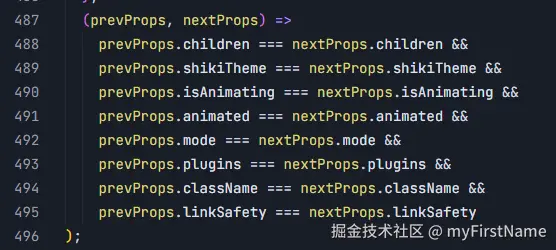
简单的看了一下Streamdown的组件中也是用了memo来进行一个包裹的,也有第二个回调函数来进行进一步的判断。但是由于children是一个经常变化的参数,所以就显得使用memo来进行优化的效果也不是特别的明显。
然后就是streamdown的数据流向了,数据流向大概如下。
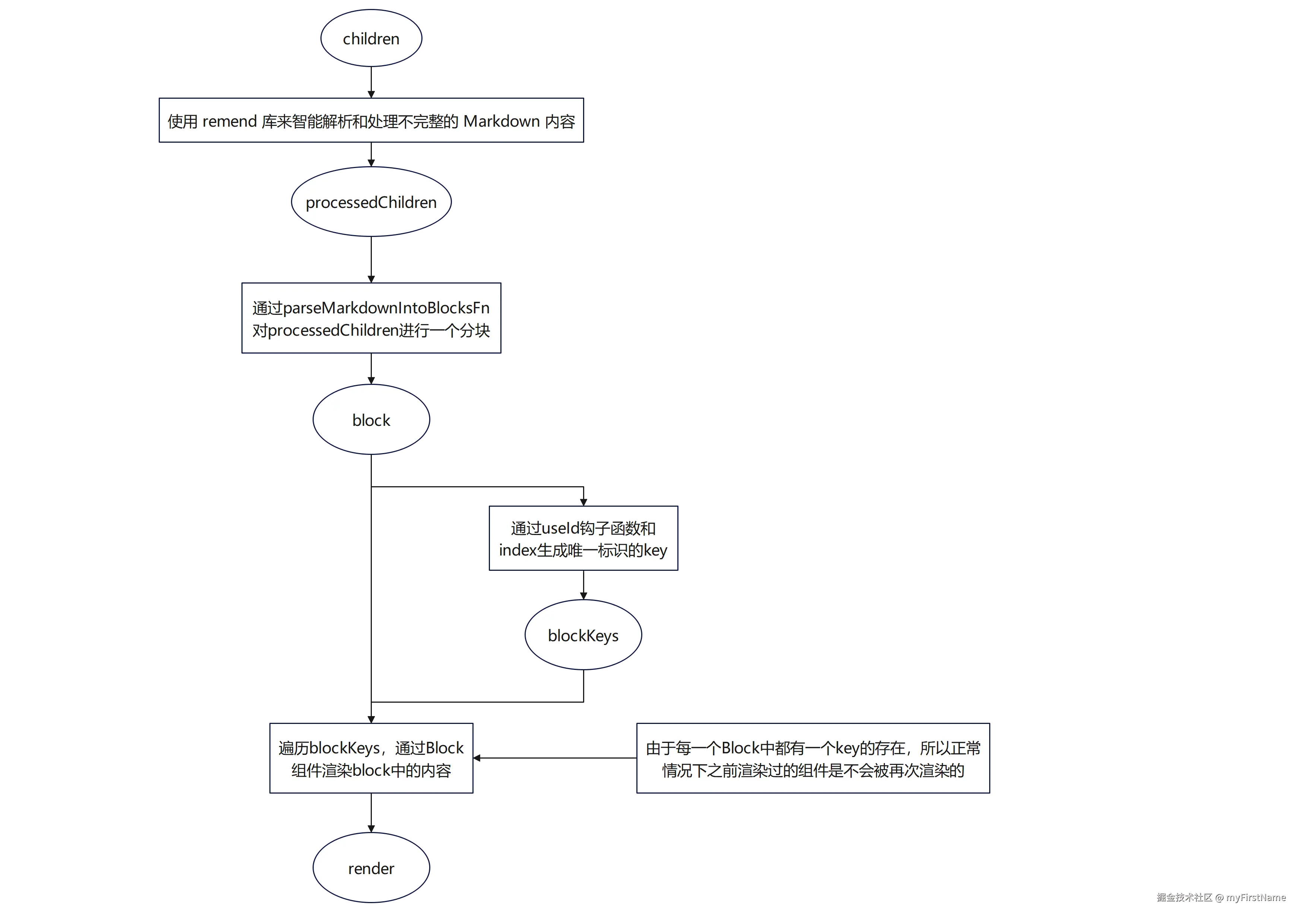
在这个数据流向中,只要children发生了变化,就会走一遍上面的流程。由于children是一个会频繁变化的变量,所以上面的流程也会频繁的走。但是Streamdown组件优化的点就是,由于唯一的 key 值的存在,在渲染过程中相同 key 对应的 Block 组件实例不会被销毁重建,而是直接复用已有实例,而且Block组件又有memo包裹住,所以在渲染的时候,会进行一个浅比较,props没有发生变化,就不会触发这些组件的重渲染。由于最新的Block的props中的content可能会新增内容,所以需要进行渲染的地方也是最新的Block组件。
但是,我通过debugger发现,之前已经渲染过的组件也会发生重渲染,这就是上面的styleH1组件内容重复打印的原因。
这就有点离谱了。我又仔细看了一下渲染的逻辑,发现逻辑没有问题。那么问题应该出在了渲染Block组件的这个阶段。
我通过在Block组件的memo的回调函数里面的各个关键地方打上debugger,然后再浏览器中进行调试运行。发现,在进行第二次pushdata内容推送的时候,果然会导致之前已经渲染过的组件调用memo进行判断,判断是否需要进行重新渲染。
tsx
export const Block = memo(
  ({
    content,
    shouldParseIncompleteMarkdown: _,
    index: __,
    ...props
  }: BlockProps) => {
    return <Markdown {...props}>{content}</Markdown>;
  },
  (prevProps, nextProps) => {
    // ...

    if (prevProps.remarkPlugins !== nextProps.remarkPlugins) {
      debugger;
      return false;
    }
    debugger;

    return true;
  },
);
然后代码就走到了这个地方进入了判断。return了 false。让组件发生渲染。
tsx
    if (prevProps.rehypePlugins !== nextProps.rehypePlugins) {
      debugger;
      return false;
    }
这就说明传入组件的props中rehypePlugins的地址不一样,说明rehypePlugins的值发生了变化。
然后我就找会导致rehypePlugins发生变化的代码。
tsx
    const mergedRehypePlugins = useMemo(() => {
      // ...
    }, [rehypePlugins, plugins?.math, animatePlugin, isAnimating, allowedTags]);

	// ...

    return (
        {/* ... */}
            {blocksToRender.map((block, index) => {
              debugger;
              return (
                <BlockComponent
                  components={mergedComponents}
                  content={block}
                  index={index}
                  key={blockKeys[index]}
                  rehypePlugins={mergedRehypePlugins}
                  remarkPlugins={mergedRemarkPlugins}
                  shouldParseIncompleteMarkdown={shouldParseIncompleteMarkdown}
                  {...props}
                />
              );
            })}
            {/* ... */}
    );
  },
发现会导致rehypePlugins变化的代码只有这个,也就是当 [rehypePlugins, plugins?.math, animatePlugin, isAnimating, allowedTags] 这几个依赖项中的一个发生了变化就会导致mergedRehypePlugins重新赋值。然后就开始排查这几个依赖项。我发现我的组件中后面的这几个依赖项根本就没有使用 animatePlugin, isAnimating, allowedTags,所以直接排除。然后就找会导致 rehypePlugins, plugins?.math, 这两个依赖项发生变化的代码,比较幸运,这个组件写的相对简单,只有组件的props会影响到这两个依赖项的值。然后就找使用这个组件的props了,也就是CustomStreamDown中传给Streamdown的属性。
tsx
// ...

const CustomStreamDown: React.FC<StreamdownTestProps> = memo(
  ({
    pushdata,
    extraComponents = {},
    customComponentPlugin = [],
    renderTime,
  }) => {
    // ...

    const rehypePlugins = useMemo(() => {
      // 自定义插件,用来实现渲染自定义react组件
      return [CustomComponentPlugin, ...customComponentPlugin];
    }, [customComponentPlugin]);

    const plugins = useMemo(() => {
      return { math };
    }, []);

    // ...

    return (
      <div className="leading-[1.6] max-w-[800px] mx-auto p-4">
        <Streamdown
          plugins={plugins}
          rehypePlugins={rehypePlugins}
          mode="streaming"
          components={components}
        >
          {content}
        </Streamdown>
      </div>
    );
  },
);

export default CustomStreamDown;
粗看,也没有什么问题,plugins的值由于没有依赖项,所以只会在组件第一次渲染的时候才会进行赋值,后续的值都是一样的。rehypePlugins也被用useMemo包裹住了,当customComponentPlugin发生变化的时候,才会重新赋值。然后我又找了一下调用CustomStreamDown的地方,我发现也没有传入customComponentPlugin这个属性呀。所以说,这个rehypePlugins是不会发生变化的呀。
当时我不信邪,就在useMemo中打上了一个debugger。结果,还真在第二次推送数据的时候,走进了这个useMemo,让rehypePlugins重新赋值了。
这就有点离谱了。因为会影响customComponentPlugin依赖发生变化的地方就只有props中的customComponentPlugin发生变化,但是我在调用组件的时候又没有传入customComponentPlugin,所以props中customComponentPlugin的值就不会变(当时我没有注意到每一次\[\]的地址都是一样的),有点左右脑互搏了属于是。
当时我发现这个现象的时候,我还天真的以为是react19的bug,还兴奋了好一会儿。
结果在我冷静下来之后,偶然间注意到了customComponentPlugin初始值,我就想会不会是初始化的时候由于是用的\[\]初始化值,所以导致每一次的customComponentPlugin都是新的地址,然后导致rehypePlugins依赖项发生变化。产生了新的值呢。
然后我把这个customComponentPlugin初始化值是不是每一次组件渲染的时候都是一个新的值,抛给了ai,让ai来确认一下。
结果ai回答说。确实。后面我进行了验证,还真是,\[\] === \[\] 的值为false。
也就是说,在调用CustomStreamDown组件的时候,没有传入customComponentPlugin值,所以CustomStreamDown组件的customComponentPlugin用的是默认值。然后在每一次新的数据推进来的时候组件会进行重渲染,然后会直接在默认参数的这个位置都会创建一个新的\[\]或者{},然后赋值给customComponentPlugin,所以每一次的customComponentPlugin值地址值都是不一样的,所以会导致后面的streamdown中的Block组件在进行浅比较的时候判断props中的customComponentPlugin不一样,而return false,然后导致无意义的渲染,导致性能问题。
害。
然后对代码进行了修改,用一个常量来表示\[\]和{},这两个默认值,这样就解决了无意义的重渲染问题。后面也进行了简单的测试,发现重渲染问题消失了,开发者面板的性能这一项的cpu占用从50%~100%,降低到了25%~50%。后面进行大量数据测试的时候,页面也流畅了很多。也是一个比较大的提升。比较streamdown的children变化的比较频繁,减少这种重渲染的问题性能提升也是比较大的。
总之,这下老实了。以后如果再遇到了props的默认值为\[\]和{}的时候都会注意一下了。