欢迎加入开源鸿蒙跨平台社区:https://openharmonycrossplatform.csdn.net
🎯 欢迎来到 Flutter for OpenHarmony 社区!本文将深入讲解 Flutter 中 mobile_device_identifier 设备唯一标识插件的使用方法,带你全面掌握在应用中获取设备唯一 ID 的各种技巧。
第一次安装:
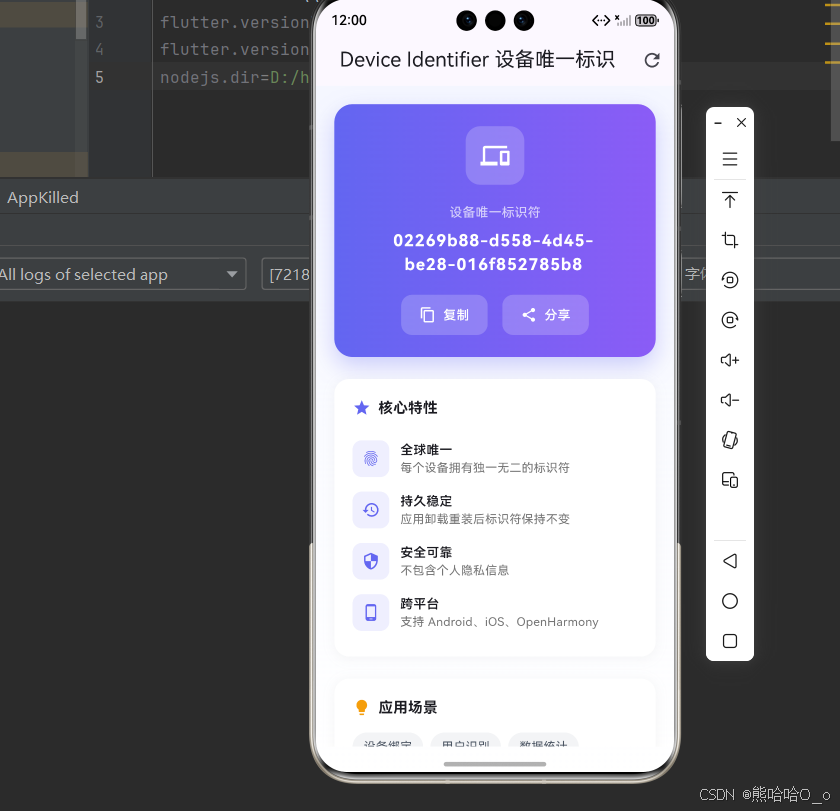
第二次安装:
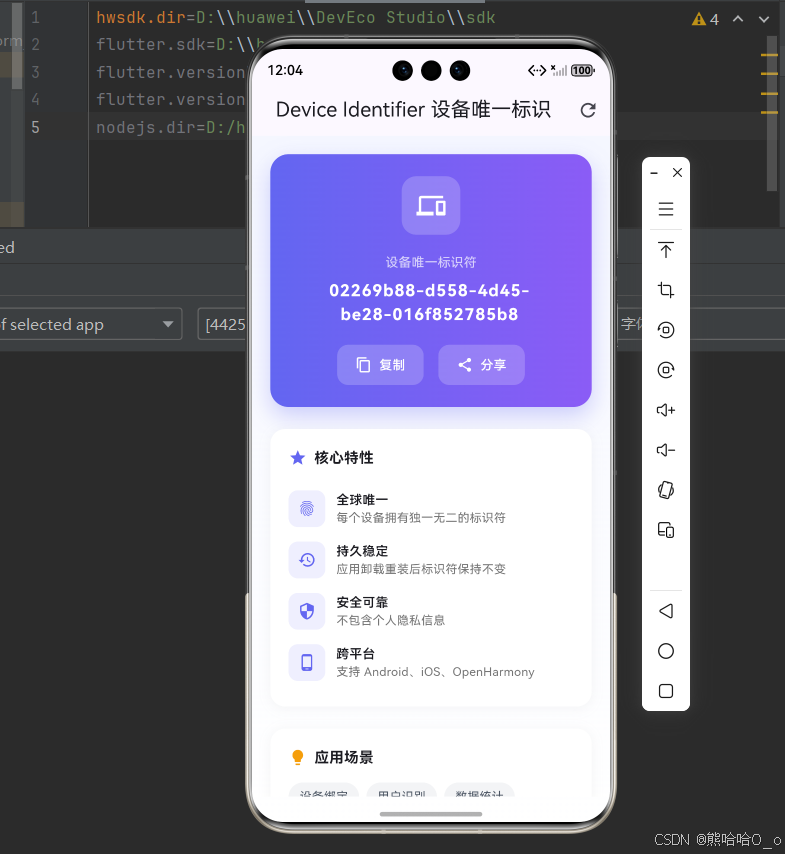
一、mobile_device_identifier 插件概述
在移动应用开发中,获取设备唯一标识符是一个非常常见的需求。无论是用户身份识别、设备绑定、数据统计还是安全验证,都需要一个稳定可靠的设备标识符。在 Flutter for OpenHarmony 应用开发中,mobile_device_identifier 插件正是为此而生的解决方案。
mobile_device_identifier 是一个用于获取设备唯一标识符的 Flutter 插件,它能够在不同平台上获取设备的唯一 ID,并保证在应用卸载重装后 ID 保持不变。这对于需要识别用户设备的应用场景非常重要,如设备绑定、推送通知、数据分析等。
📋 mobile_device_identifier 插件特点
| 特点 | 说明 |
|---|---|
| 唯一性 | 生成的设备 ID 在全球范围内唯一 |
| 持久性 | 应用卸载重装后 ID 保持不变 |
| 跨平台支持 | 支持 Android、iOS、OpenHarmony 等多个平台 |
| 无需权限 | 在大多数平台上不需要特殊权限即可获取 |
| 简单易用 | 一行代码即可获取设备 ID |
| 安全可靠 | 使用系统级 API 生成,保证安全性 |
为什么需要设备唯一标识符?
设备唯一标识符在移动应用开发中有着广泛的应用场景,其重要性体现在以下几个方面:
1. 用户身份识别
在某些应用场景中,需要识别用户所使用的设备。例如,免费试用应用可能限制每个设备只能试用一次,或者某些内容服务可能限制同时登录的设备数量。通过设备 ID,应用可以准确识别用户设备。
2. 设备绑定
对于安全敏感的应用,如银行应用、企业应用等,可能需要将用户账号与特定设备绑定。当用户在新设备上登录时,需要进行额外的验证。设备 ID 是实现设备绑定的基础。
3. 数据统计与分析
在应用数据分析中,设备 ID 用于统计活跃用户数、留存率等指标。通过设备 ID,可以准确计算独立设备数量,避免重复计数。
4. 推送通知
推送通知服务需要设备标识来定位目标设备。虽然现代推送服务通常使用自己的设备令牌,但设备 ID 仍然是一个重要的辅助标识。
5. 防作弊与安全
在游戏、投票、抽奖等场景中,需要防止用户通过多次安装应用来作弊。设备 ID 可以帮助识别同一设备上的多次安装行为。
6. 个性化设置同步
某些应用允许用户在设置中保存偏好设置,并在重新安装后恢复。设备 ID 可以帮助关联用户数据,实现跨安装的数据同步。
💡 使用场景:设备绑定、用户识别、数据统计、推送通知、防作弊、个性化设置同步等。
二、OpenHarmony 平台适配说明
2.1 兼容性信息
本项目基于 mobile_device_identifier@0.0.3 开发,适配 Flutter 3.27.5-ohos-1.0.4。OpenHarmony 版本的 mobile_device_identifier 插件由开源鸿蒙社区进行适配和维护,确保在鸿蒙设备上能够正常工作。
2.2 设备 ID 生成机制
在 OpenHarmony 平台上,设备 ID 的生成机制如下:
1. 优先使用 OAID
OAID(Open Anonymous Device Identifier,开放匿名设备标识符)是 OpenHarmony 系统提供的设备标识符。它具有以下特点:
- 匿名性:不包含用户个人信息
- 可重置:用户可以在设置中重置 OAID
- 跨应用一致性:同一设备上的不同应用获取到的 OAID 相同
2. 备选方案
如果 OAID 不可用,插件会尝试使用其他标识符作为备选方案,确保在各种情况下都能获取到有效的设备标识。
2.3 与其他平台的差异
不同平台获取设备 ID 的方式有所不同:
| 平台 | 主要标识符 | 特点 |
|---|---|---|
| Android | Android ID / IMEI | Android ID 在恢复出厂后重置 |
| iOS | identifierForVendor | 同一开发商的应用 ID 相同 |
| OpenHarmony | OAID | 用户可重置,匿名性强 |
⚠️ 注意:由于隐私保护的要求,现代移动操作系统对设备标识符的获取都有一定的限制。开发者应该遵守相关的隐私政策,在获取和使用设备 ID 时告知用户并获得同意。
三、项目配置与安装
3.1 添加依赖配置
首先,需要在你的 Flutter 项目的 pubspec.yaml 文件中添加 mobile_device_identifier 依赖。
打开项目根目录下的 pubspec.yaml 文件,找到 dependencies 部分,添加以下配置:
yaml
dependencies:
  flutter:
    sdk: flutter

  # 添加 mobile_device_identifier 依赖(OpenHarmony 适配版本)
  mobile_device_identifier:
    git:
      url: "https://atomgit.com/openharmony-sig/fluttertpc_mobile_device_identifier.git"

dev_dependencies:
  # mobile_device_identifier 鸿蒙平台支持
  mobile_device_identifier_ohos:
    git:
      url: "https://atomgit.com/openharmony-sig/fluttertpc_mobile_device_identifier.git"
      path: ./ohos
配置说明:
- 使用 git 方式引用开源鸿蒙适配的 fluttertpc_mobile_device_identifier 仓库
url:指定 GitCode 托管的仓库地址mobile_device_identifier_ohos:鸿蒙平台的原生实现,作为 dev_dependency 引入- 本项目基于
mobile_device_identifier@0.0.2开发,适配 Flutter 3.27.5-ohos-1.0.4
⚠️ 重要 :对于 OpenHarmony 平台,必须使用 git 方式引用适配版本,不能直接使用 pub.dev 的版本号。这是因为 pub.dev 上的官方版本可能尚未支持 OpenHarmony 平台,或者存在兼容性问题。同时需要添加
mobile_device_identifier_ohos作为 dev_dependency 以确保鸿蒙平台功能正常。
3.2 下载依赖
配置完成后,需要在项目根目录执行以下命令下载依赖:
bash
flutter pub get执行成功后,你会看到类似以下的输出:
Running "flutter pub get" in my_cross_platform_app...
Resolving dependencies...
Got dependencies!
3.3 权限配置
在 OpenHarmony 平台上,获取设备 ID 需要配置相关权限。
ohos/entry/src/main/module.json5:
json
{
  "module": {
    "requestPermissions": [
      {"name": "ohos.permission.INTERNET"},
      {
        "name": "ohos.permission.APP_TRACKING_CONSENT",
        "reason": "$string:reason",
        "usedScene": {
          "abilities": ["EntryAbility"],
          "when": "inuse"
        }
      }
    ]
  }
}
ohos/entry/src/main/resources/base/element/string.json:
添加权限申请原因:
json
{
  "string": [
    {
      "name": "reason",
      "value": "应用信息读取"
    }
  ]
}
⚠️ 重要提示 :
ohos.permission.APP_TRACKING_CONSENT权限属于system_basic级别,默认应用权限是normal。安装 HAP 包时可能会报错 9568289 。需要参考 官方文档 修改应用等级为system_basic。
四、mobile_device_identifier 基础用法
4.1 导入库
在使用 mobile_device_identifier 之前,需要先导入库:
dart
import 'package:flutter/services.dart';
import 'package:mobile_device_identifier_ohos/mobile_device_identifier_ohos.dart';
⚠️ 注意 :OpenHarmony 平台需要导入
mobile_device_identifier_ohos包,这是鸿蒙平台的原生实现。
4.2 获取设备 ID
获取设备 ID 需要先创建 MobileDeviceIdentifier 实例,然后调用 getDeviceId() 方法:
dart
final _mobileDeviceIdentifierPlugin = MobileDeviceIdentifier();

Future<String?> _getDeviceId() async {
  try {
    String? deviceId = await _mobileDeviceIdentifierPlugin.getDeviceId();
    return deviceId;
  } on PlatformException catch (e) {
    debugPrint('获取设备 ID 失败: ${e.message}');
    return null;
  }
}
这个方法会返回一个字符串类型的设备 ID。如果获取失败,可能返回 null。
4.3 在 Widget 中使用
在 Flutter Widget 中使用设备 ID 的示例:
dart
class DeviceIdWidget extends StatefulWidget {
  const DeviceIdWidget({super.key});

  @override
  State<DeviceIdWidget> createState() => _DeviceIdWidgetState();
}

class _DeviceIdWidgetState extends State<DeviceIdWidget> {
  String? _deviceId;
  bool _isLoading = true;
  final _mobileDeviceIdentifierPlugin = MobileDeviceIdentifier();

  @override
  void initState() {
    super.initState();
    _loadDeviceId();
  }

  Future<void> _loadDeviceId() async {
    try {
      final id = await _mobileDeviceIdentifierPlugin.getDeviceId();
      setState(() {
        _deviceId = id;
        _isLoading = false;
      });
    } on PlatformException catch (e) {
      setState(() {
        _isLoading = false;
      });
      debugPrint('获取设备 ID 失败: ${e.message}');
    }
  }

  @override
  Widget build(BuildContext context) {
    if (_isLoading) {
      return const CircularProgressIndicator();
    }

    return Column(
      children: [
        const Text('设备 ID:'),
        Text(
          _deviceId ?? '获取失败',
          style: const TextStyle(fontWeight: FontWeight.bold),
        ),
      ],
    );
  }
}
4.4 错误处理
在获取设备 ID 时,可能会遇到各种错误。建议添加适当的错误处理:
dart
Future<String> getDeviceIdSafely() async {
  try {
    final plugin = MobileDeviceIdentifier();
    final deviceId = await plugin.getDeviceId();
    if (deviceId == null || deviceId.isEmpty) {
      return 'unknown';
    }
    return deviceId;
  } catch (e) {
    debugPrint('获取设备 ID 失败: $e');
    return 'error';
  }
}
五、实际应用场景
5.1 设备绑定功能
设备绑定是设备 ID 最常见的应用场景之一。以下是一个设备绑定的示例实现:
dart
class DeviceBindingService {
  static const String _keyDeviceId = 'bound_device_id';

  final SharedPreferences _prefs;

  DeviceBindingService(this._prefs);

  Future<bool> isCurrentDeviceBound() async {
    final boundId = _prefs.getString(_keyDeviceId);
    if (boundId == null) {
      return false;
    }

    final currentId = await MobileDeviceIdentifier.getDeviceId();
    return boundId == currentId;
  }

  Future<bool> bindCurrentDevice() async {
    final currentId = await MobileDeviceIdentifier.getDeviceId();
    if (currentId == null) {
      return false;
    }

    await _prefs.setString(_keyDeviceId, currentId);
    return true;
  }

  Future<void> unbindDevice() async {
    await _prefs.remove(_keyDeviceId);
  }
}
5.2 设备数量限制
某些应用需要限制同一账号可使用的设备数量:
dart
class DeviceLimitService {
  final int maxDevices;

  DeviceLimitService({this.maxDevices = 3});

  Future<bool> canAddNewDevice(String userId) async {
    final devices = await _getRegisteredDevices(userId);
    return devices.length < maxDevices;
  }

  Future<bool> registerCurrentDevice(String userId) async {
    final deviceId = await MobileDeviceIdentifier.getDeviceId();
    if (deviceId == null) return false;

    final devices = await _getRegisteredDevices(userId);

    if (devices.contains(deviceId)) {
      return true;
    }

    if (devices.length >= maxDevices) {
      return false;
    }

    devices.add(deviceId);
    await _saveRegisteredDevices(userId, devices);
    return true;
  }

  Future<List<String>> _getRegisteredDevices(String userId) async {
    // 从服务器或本地存储获取已注册设备列表
    return [];
  }

  Future<void> _saveRegisteredDevices(String userId, List<String> devices) async {
    // 保存已注册设备列表到服务器或本地存储
  }
}
5.3 用户统计与分析
设备 ID 可用于统计独立设备数量:
dart
class AnalyticsService {
  Future<void> trackDevice() async {
    final deviceId = await MobileDeviceIdentifier.getDeviceId();
    if (deviceId == null) return;

    // 发送设备信息到分析服务器
    await _sendToServer({
      'device_id': deviceId,
      'timestamp': DateTime.now().toIso8601String(),
      'platform': Platform.operatingSystem,
    });
  }

  Future<void> _sendToServer(Map<String, dynamic> data) async {
    // 实现数据发送逻辑
  }
}
5.4 设备信息展示页面
以下是一个完整的设备信息展示页面:
dart
class DeviceInfoPage extends StatefulWidget {
  const DeviceInfoPage({super.key});

  @override
  State<DeviceInfoPage> createState() => _DeviceInfoPageState();
}

class _DeviceInfoPageState extends State<DeviceInfoPage> {
  String? _deviceId;
  bool _isLoading = true;
  bool _copied = false;

  @override
  void initState() {
    super.initState();
    _loadDeviceInfo();
  }

  Future<void> _loadDeviceInfo() async {
    try {
      final id = await MobileDeviceIdentifier.getDeviceId();
      setState(() {
        _deviceId = id;
        _isLoading = false;
      });
    } catch (e) {
      setState(() {
        _isLoading = false;
      });
    }
  }

  Future<void> _copyDeviceId() async {
    if (_deviceId == null) return;

    await Clipboard.setData(ClipboardData(text: _deviceId!));
    setState(() {
      _copied = true;
    });

    ScaffoldMessenger.of(context).showSnackBar(
      const SnackBar(content: Text('设备 ID 已复制')),
    );

    Future.delayed(const Duration(seconds: 2), () {
      if (mounted) {
        setState(() {
          _copied = false;
        });
      }
    });
  }

  @override
  Widget build(BuildContext context) {
    return Scaffold(
      appBar: AppBar(title: const Text('设备信息')),
      body: _isLoading
          ? const Center(child: CircularProgressIndicator())
          : _buildContent(),
    );
  }

  Widget _buildContent() {
    return SingleChildScrollView(
      padding: const EdgeInsets.all(20),
      child: Column(
        crossAxisAlignment: CrossAxisAlignment.stretch,
        children: [
          _buildDeviceCard(),
          const SizedBox(height: 20),
          _buildInfoSection(),
        ],
      ),
    );
  }

  Widget _buildDeviceCard() {
    return Container(
      padding: const EdgeInsets.all(24),
      decoration: BoxDecoration(
        gradient: const LinearGradient(
          colors: [Color(0xFF6366F1), Color(0xFF8B5CF6)],
        ),
        borderRadius: BorderRadius.circular(16),
      ),
      child: Column(
        children: [
          const Icon(Icons.devices, size: 48, color: Colors.white),
          const SizedBox(height: 16),
          const Text(
            '设备唯一标识',
            style: TextStyle(color: Colors.white70, fontSize: 14),
          ),
          const SizedBox(height: 8),
          Text(
            _deviceId ?? '获取失败',
            style: const TextStyle(
              color: Colors.white,
              fontSize: 16,
              fontWeight: FontWeight.bold,
            ),
            textAlign: TextAlign.center,
          ),
          const SizedBox(height: 16),
          ElevatedButton.icon(
            onPressed: _copyDeviceId,
            icon: Icon(_copied ? Icons.check : Icons.copy, size: 18),
            label: Text(_copied ? '已复制' : '复制 ID'),
            style: ElevatedButton.styleFrom(
              backgroundColor: Colors.white,
              foregroundColor: const Color(0xFF6366F1),
            ),
          ),
        ],
      ),
    );
  }

  Widget _buildInfoSection() {
    return Container(
      padding: const EdgeInsets.all(20),
      decoration: BoxDecoration(
        color: Colors.grey[100],
        borderRadius: BorderRadius.circular(12),
      ),
      child: Column(
        crossAxisAlignment: CrossAxisAlignment.start,
        children: [
          const Text(
            '关于设备标识',
            style: TextStyle(fontSize: 16, fontWeight: FontWeight.bold),
          ),
          const SizedBox(height: 12),
          _buildInfoItem('唯一性', '每个设备拥有全球唯一的标识符'),
          _buildInfoItem('持久性', '应用卸载重装后标识符保持不变'),
          _buildInfoItem('安全性', '标识符不包含个人隐私信息'),
          _buildInfoItem('用途', '用于设备识别、数据同步等功能'),
        ],
      ),
    );
  }

  Widget _buildInfoItem(String title, String description) {
    return Padding(
      padding: const EdgeInsets.symmetric(vertical: 8),
      child: Row(
        crossAxisAlignment: CrossAxisAlignment.start,
        children: [
          Container(
            width: 6,
            height: 6,
            margin: const EdgeInsets.only(top: 6, right: 12),
            decoration: const BoxDecoration(
              color: Color(0xFF6366F1),
              shape: BoxShape.circle,
            ),
          ),
          Expanded(
            child: Column(
              crossAxisAlignment: CrossAxisAlignment.start,
              children: [
                Text(
                  title,
                  style: const TextStyle(fontWeight: FontWeight.w500),
                ),
                Text(
                  description,
                  style: TextStyle(color: Colors.grey[600], fontSize: 13),
                ),
              ],
            ),
          ),
        ],
      ),
    );
  }
}
六、完整示例代码
下面是一个完整的示例应用,展示了 mobile_device_identifier 插件的各种用法:
dart
import 'package:flutter/material.dart';
import 'package:flutter/services.dart';
import 'package:mobile_device_identifier/mobile_device_identifier.dart';

void main() {
  runApp(const MyApp());
}

class MyApp extends StatelessWidget {
  const MyApp({super.key});

  @override
  Widget build(BuildContext context) {
    return MaterialApp(
      title: 'Device Identifier 示例',
      debugShowCheckedModeBanner: false,
      theme: ThemeData(
        colorScheme: ColorScheme.fromSeed(seedColor: const Color(0xFF6366F1)),
        useMaterial3: true,
      ),
      home: const DeviceIdentifierDemoPage(),
    );
  }
}

class DeviceIdentifierDemoPage extends StatefulWidget {
  const DeviceIdentifierDemoPage({super.key});

  @override
  State<DeviceIdentifierDemoPage> createState() => _DeviceIdentifierDemoPageState();
}

class _DeviceIdentifierDemoPageState extends State<DeviceIdentifierDemoPage> {
  String? _deviceId;
  bool _isLoading = true;
  String? _error;

  @override
  void initState() {
    super.initState();
    _loadDeviceId();
  }

  Future<void> _loadDeviceId() async {
    setState(() {
      _isLoading = true;
      _error = null;
    });

    try {
      final id = await MobileDeviceIdentifier.getDeviceId();
      setState(() {
        _deviceId = id;
        _isLoading = false;
      });
    } catch (e) {
      setState(() {
        _error = e.toString();
        _isLoading = false;
      });
    }
  }

  Future<void> _copyToClipboard() async {
    if (_deviceId == null) return;

    await Clipboard.setData(ClipboardData(text: _deviceId!));

    if (mounted) {
      ScaffoldMessenger.of(context).showSnackBar(
        SnackBar(
          content: const Text('设备 ID 已复制到剪贴板'),
          behavior: SnackBarBehavior.floating,
          shape: RoundedRectangleBorder(borderRadius: BorderRadius.circular(10)),
        ),
      );
    }
  }

  @override
  Widget build(BuildContext context) {
    return Scaffold(
      appBar: AppBar(
        title: const Text('Device Identifier 设备唯一标识'),
        centerTitle: true,
        elevation: 0,
        actions: [
          IconButton(
            icon: const Icon(Icons.refresh),
            onPressed: _loadDeviceId,
            tooltip: '刷新',
          ),
        ],
      ),
      body: Container(
        decoration: const BoxDecoration(
          gradient: LinearGradient(
            begin: Alignment.topCenter,
            end: Alignment.bottomCenter,
            colors: [
              Color(0xFFF5F7FF),
              Color(0xFFFFFFFF),
            ],
          ),
        ),
        child: SafeArea(
          child: _isLoading
              ? const Center(child: CircularProgressIndicator())
              : _error != null
                  ? _buildErrorView()
                  : _buildContentView(),
        ),
      ),
    );
  }

  Widget _buildErrorView() {
    return Center(
      child: Padding(
        padding: const EdgeInsets.all(32),
        child: Column(
          mainAxisAlignment: MainAxisAlignment.center,
          children: [
            Container(
              width: 80,
              height: 80,
              decoration: BoxDecoration(
                color: Colors.red[50],
                shape: BoxShape.circle,
              ),
              child: Icon(Icons.error_outline, size: 40, color: Colors.red[400]),
            ),
            const SizedBox(height: 24),
            const Text(
              '获取设备 ID 失败',
              style: TextStyle(fontSize: 18, fontWeight: FontWeight.bold),
            ),
            const SizedBox(height: 12),
            Text(
              _error!,
              textAlign: TextAlign.center,
              style: TextStyle(color: Colors.grey[600]),
            ),
            const SizedBox(height: 24),
            ElevatedButton.icon(
              onPressed: _loadDeviceId,
              icon: const Icon(Icons.refresh),
              label: const Text('重试'),
            ),
          ],
        ),
      ),
    );
  }

  Widget _buildContentView() {
    return SingleChildScrollView(
      padding: const EdgeInsets.all(20),
      child: Column(
        crossAxisAlignment: CrossAxisAlignment.stretch,
        children: [
          _buildDeviceIdCard(),
          const SizedBox(height: 24),
          _buildFeaturesSection(),
          const SizedBox(height: 24),
          _buildUseCasesSection(),
        ],
      ),
    );
  }

  Widget _buildDeviceIdCard() {
    return Container(
      padding: const EdgeInsets.all(24),
      decoration: BoxDecoration(
        gradient: const LinearGradient(
          colors: [Color(0xFF6366F1), Color(0xFF8B5CF6)],
        ),
        borderRadius: BorderRadius.circular(20),
        boxShadow: [
          BoxShadow(
            color: const Color(0xFF6366F1).withOpacity(0.3),
            blurRadius: 20,
            offset: const Offset(0, 10),
          ),
        ],
      ),
      child: Column(
        children: [
          Container(
            width: 64,
            height: 64,
            decoration: BoxDecoration(
              color: Colors.white.withOpacity(0.2),
              borderRadius: BorderRadius.circular(16),
            ),
            child: const Icon(Icons.devices, size: 32, color: Colors.white),
          ),
          const SizedBox(height: 20),
          const Text(
            '设备唯一标识符',
            style: TextStyle(
              color: Colors.white70,
              fontSize: 14,
            ),
          ),
          const SizedBox(height: 8),
          SelectableText(
            _deviceId ?? '未知',
            style: const TextStyle(
              color: Colors.white,
              fontSize: 18,
              fontWeight: FontWeight.bold,
              letterSpacing: 1,
            ),
            textAlign: TextAlign.center,
          ),
          const SizedBox(height: 20),
          Row(
            mainAxisAlignment: MainAxisAlignment.center,
            children: [
              _buildActionButton(
                icon: Icons.copy,
                label: '复制',
                onTap: _copyToClipboard,
              ),
              const SizedBox(width: 16),
              _buildActionButton(
                icon: Icons.share,
                label: '分享',
                onTap: () {
                  // 实现分享功能
                },
              ),
            ],
          ),
        ],
      ),
    );
  }

  Widget _buildActionButton({
    required IconData icon,
    required String label,
    required VoidCallback onTap,
  }) {
    return InkWell(
      onTap: onTap,
      borderRadius: BorderRadius.circular(12),
      child: Container(
        padding: const EdgeInsets.symmetric(horizontal: 20, vertical: 12),
        decoration: BoxDecoration(
          color: Colors.white.withOpacity(0.2),
          borderRadius: BorderRadius.circular(12),
        ),
        child: Row(
          mainAxisSize: MainAxisSize.min,
          children: [
            Icon(icon, size: 18, color: Colors.white),
            const SizedBox(width: 8),
            Text(
              label,
              style: const TextStyle(color: Colors.white, fontWeight: FontWeight.w500),
            ),
          ],
        ),
      ),
    );
  }

  Widget _buildFeaturesSection() {
    return Container(
      padding: const EdgeInsets.all(20),
      decoration: BoxDecoration(
        color: Colors.white,
        borderRadius: BorderRadius.circular(16),
        boxShadow: [
          BoxShadow(
            color: Colors.grey.withOpacity(0.1),
            blurRadius: 10,
            offset: const Offset(0, 2),
          ),
        ],
      ),
      child: Column(
        crossAxisAlignment: CrossAxisAlignment.start,
        children: [
          const Row(
            children: [
              Icon(Icons.star, color: Color(0xFF6366F1), size: 20),
              SizedBox(width: 8),
              Text(
                '核心特性',
                style: TextStyle(fontSize: 16, fontWeight: FontWeight.bold),
              ),
            ],
          ),
          const SizedBox(height: 16),
          _buildFeatureItem(Icons.fingerprint, '全球唯一', '每个设备拥有独一无二的标识符'),
          _buildFeatureItem(Icons.restore, '持久稳定', '应用卸载重装后标识符保持不变'),
          _buildFeatureItem(Icons.security, '安全可靠', '不包含个人隐私信息'),
          _buildFeatureItem(Icons.phone_android, '跨平台', '支持 Android、iOS、OpenHarmony'),
        ],
      ),
    );
  }

  Widget _buildFeatureItem(IconData icon, String title, String description) {
    return Padding(
      padding: const EdgeInsets.symmetric(vertical: 8),
      child: Row(
        children: [
          Container(
            width: 40,
            height: 40,
            decoration: BoxDecoration(
              color: const Color(0xFF6366F1).withOpacity(0.1),
              borderRadius: BorderRadius.circular(10),
            ),
            child: Icon(icon, color: const Color(0xFF6366F1), size: 20),
          ),
          const SizedBox(width: 12),
          Expanded(
            child: Column(
              crossAxisAlignment: CrossAxisAlignment.start,
              children: [
                Text(
                  title,
                  style: const TextStyle(fontWeight: FontWeight.w600),
                ),
                Text(
                  description,
                  style: TextStyle(color: Colors.grey[600], fontSize: 13),
                ),
              ],
            ),
          ),
        ],
      ),
    );
  }

  Widget _buildUseCasesSection() {
    return Container(
      padding: const EdgeInsets.all(20),
      decoration: BoxDecoration(
        color: Colors.white,
        borderRadius: BorderRadius.circular(16),
        boxShadow: [
          BoxShadow(
            color: Colors.grey.withOpacity(0.1),
            blurRadius: 10,
            offset: const Offset(0, 2),
          ),
        ],
      ),
      child: Column(
        crossAxisAlignment: CrossAxisAlignment.start,
        children: [
          const Row(
            children: [
              Icon(Icons.lightbulb, color: Color(0xFFF59E0B), size: 20),
              SizedBox(width: 8),
              Text(
                '应用场景',
                style: TextStyle(fontSize: 16, fontWeight: FontWeight.bold),
              ),
            ],
          ),
          const SizedBox(height: 16),
          Wrap(
            spacing: 8,
            runSpacing: 8,
            children: [
              _buildUseCaseChip('设备绑定'),
              _buildUseCaseChip('用户识别'),
              _buildUseCaseChip('数据统计'),
              _buildUseCaseChip('推送通知'),
              _buildUseCaseChip('防作弊'),
              _buildUseCaseChip('设置同步'),
            ],
          ),
        ],
      ),
    );
  }

  Widget _buildUseCaseChip(String label) {
    return Container(
      padding: const EdgeInsets.symmetric(horizontal: 12, vertical: 6),
      decoration: BoxDecoration(
        color: const Color(0xFFF3F4F6),
        borderRadius: BorderRadius.circular(20),
      ),
      child: Text(
        label,
        style: const TextStyle(fontSize: 13, color: Color(0xFF4B5563)),
      ),
    );
  }
}
七、隐私与合规
7.1 隐私政策要求
在使用设备 ID 时,开发者需要遵守相关的隐私法规和应用商店政策:
告知用户:在应用的隐私政策中明确说明设备 ID 的收集和使用目的。
获得同意:在首次收集设备 ID 前,应获得用户的明确同意。
最小化使用:只收集和使用必要的设备信息,不要过度收集。
数据安全:妥善保管设备 ID 等数据,防止泄露。
7.2 用户权利
用户对设备 ID 拥有以下权利:
知情权:用户有权知道应用收集了哪些设备信息。
选择权:用户有权选择是否允许应用收集设备 ID。
删除权:用户有权要求删除其设备相关数据。
7.3 最佳实践
提供退出选项:为用户提供关闭设备 ID 收集的选项。
匿名化处理:在可能的情况下,对设备 ID 进行匿名化处理后再使用。
定期审查:定期审查设备 ID 的使用情况,确保符合最新的法规要求。
八、常见问题与解决方案
8.1 设备 ID 为空
如果获取到的设备 ID 为空,可能是以下原因:
- 设备不支持相关 API
- 系统权限不足
- 系统版本过低
解决方案:添加空值检查,并提供备选方案。
8.2 设备 ID 变化
在某些情况下,设备 ID 可能会发生变化:
- 用户重置了 OAID
- 设备恢复出厂设置
- 系统升级
解决方案:在应用中处理 ID 变化的情况,如重新绑定设备。
8.3 多设备同步
如果需要跨设备同步数据,不应仅依赖设备 ID:
解决方案:结合用户账号系统,实现更可靠的数据同步。
九、总结
本文详细介绍了 Flutter for OpenHarmony 中 mobile_device_identifier 插件的使用方法,包括:
- 设备 ID 的获取方法
- 设备绑定、数量限制等实际应用场景
- 完整的示例代码
- 隐私合规注意事项
通过 mobile_device_identifier 插件,开发者可以轻松获取设备唯一标识符,实现设备识别、数据统计、安全验证等多种功能。
📚 扩展阅读: