欢迎加入开源鸿蒙跨平台社区:https://openharmonycrossplatform.csdn.net
🎯 欢迎来到 Flutter for OpenHarmony 社区!本文将深入讲解 Flutter 中 TimePicker 时间选择器的使用方法,带你从基础到精通,掌握时间选择、时间范围限制、自定义样式等常见交互模式。
一、TimePicker 组件概述
在移动应用开发中,时间选择是一种常见的交互需求。用户需要选择闹钟时间、预约时间、日程安排等,而良好的时间选择体验可以大大提升应用的易用性。Flutter 提供了 TimePicker 组件,专门用于实现时间选择功能,支持 Material Design 设计规范。
📋 TimePicker 组件特点
| 特点 | 说明 |
|---|---|
| Material Design | 遵循 Material Design 设计规范 |
| 两种模式 | 支持时钟模式和输入模式 |
| 24小时制/12小时制 | 灵活的时间格式支持 |
| 时间范围限制 | 支持设置可选时间范围 |
| 自定义样式 | 支持自定义颜色、形状等样式 |
| 响应式布局 | 适配不同屏幕尺寸 |
TimePicker 与其他时间选择方案对比
| 方案 | 优点 | 缺点 |
|---|---|---|
| showTimePicker | 开箱即用、Material 风格 | 样式定制有限 |
| CupertinoTimerPicker | iOS 风格 | 仅 iOS 风格 |
| 自定义时间选择器 | 完全自定义 | 开发成本高 |
💡 使用场景:TimePicker 适合需要用户选择时间的场景,如设置闹钟、预约时间、日程安排、倒计时设置等。
二、TimePicker 基础用法
TimePicker 通常通过 showTimePicker 函数来显示,这是一个异步函数,返回用户选择的时间。让我们从最基础的用法开始学习。
2.1 最简单的 TimePicker
最基础的 TimePicker 使用方式如下:
dart
ElevatedButton(
  onPressed: () async {
    final TimeOfDay? time = await showTimePicker(
      context: context,
      initialTime: TimeOfDay.now(),
    );
    if (time != null) {
      print('选择的时间: ${time.hour}:${time.minute}');
    }
  },
  child: const Text('选择时间'),
)
代码解析:
showTimePicker:显示时间选择器的函数context:构建上下文,必需参数initialTime:初始显示的时间,类型为TimeOfDay- 返回值:用户选择的时间,如果取消则返回
null
2.2 TimeOfDay 时间类
TimeOfDay 是 Flutter 中表示时间的类:
dart
final now = TimeOfDay.now();
final specific = TimeOfDay(hour: 14, minute: 30);

print('小时: ${now.hour}');
print('分钟: ${now.minute}');
print('格式化: ${now.format(context)}');
TimeOfDay 常用属性和方法:
| 属性/方法 | 说明 |
|---|---|
| hour | 小时(0-23) |
| minute | 分钟(0-59) |
| format() | 根据本地设置格式化时间 |
| now() | 获取当前时间 |
| replacing() | 创建新的 TimeOfDay 实例 |
2.3 完整基础示例
下面是一个完整的可运行示例,展示了 TimePicker 的基础用法:
dart
class TimePickerBasicExample extends StatefulWidget {
  const TimePickerBasicExample({super.key});

  @override
  State<TimePickerBasicExample> createState() => _TimePickerBasicExampleState();
}

class _TimePickerBasicExampleState extends State<TimePickerBasicExample> {
  TimeOfDay? _selectedTime;

  Future<void> _selectTime() async {
    final TimeOfDay? time = await showTimePicker(
      context: context,
      initialTime: _selectedTime ?? TimeOfDay.now(),
    );
    if (time != null) {
      setState(() {
        _selectedTime = time;
      });
    }
  }

  @override
  Widget build(BuildContext context) {
    return Scaffold(
      appBar: AppBar(title: const Text('TimePicker 基础示例')),
      body: Center(
        child: Column(
          mainAxisAlignment: MainAxisAlignment.center,
          children: [
            Text(
              _selectedTime != null
                  ? '选择的时间: ${_selectedTime!.format(context)}'
                  : '请选择时间',
              style: const TextStyle(fontSize: 24),
            ),
            const SizedBox(height: 24),
            ElevatedButton.icon(
              onPressed: _selectTime,
              icon: const Icon(Icons.access_time),
              label: const Text('选择时间'),
            ),
          ],
        ),
      ),
    );
  }
}
三、showTimePicker 核心参数详解
showTimePicker 函数提供了丰富的参数来控制时间选择器的行为和外观。
3.1 基础参数
| 参数 | 类型 | 说明 |
|---|---|---|
| context | BuildContext | 构建上下文(必需) |
| initialTime | TimeOfDay | 初始时间(必需) |
| initialEntryMode | TimePickerEntryMode | 初始输入模式 |
| cancelText | String? | 取消按钮文本 |
| confirmText | String? | 确认按钮文本 |
| helpText | String? | 帮助文本 |
| errorInvalidText | String? | 无效时间错误文本 |
3.2 initialEntryMode 输入模式
TimePicker 支持两种输入模式:
dart
showTimePicker(
  context: context,
  initialTime: TimeOfDay.now(),
  initialEntryMode: TimePickerEntryMode.dial,
);
输入模式说明:
| 模式 | 说明 |
|---|---|
| TimePickerEntryMode.dial | 时钟表盘模式(默认) |
| TimePickerEntryMode.input | 文本输入模式 |
| TimePickerEntryMode.dialOnly | 仅时钟模式 |
| TimePickerEntryMode.inputOnly | 仅输入模式 |
3.3 时间范围限制
可以通过在选择后验证时间来限制可选时间范围:
dart
Future<void> _selectTime() async {
  final TimeOfDay? time = await showTimePicker(
    context: context,
    initialTime: TimeOfDay.now(),
  );
  if (time != null) {
    final hour = time.hour;
    if (hour >= 8 && hour < 18) {
      setState(() {
        _selectedTime = time;
      });
    } else {
      ScaffoldMessenger.of(context).showSnackBar(
        const SnackBar(content: Text('请选择工作时间 8:00-18:00')),
      );
    }
  }
}
常用时间验证示例:
dart
bool _isWorkHour(TimeOfDay time) {
  return time.hour >= 9 && time.hour < 18;
}

bool _isNotPastTime(TimeOfDay time) {
  final now = TimeOfDay.now();
  if (time.hour > now.hour) return true;
  if (time.hour == now.hour && time.minute >= now.minute) return true;
  return false;
}

bool _isEvenNumberMinute(TimeOfDay time) {
  return time.minute % 15 == 0;
}
3.4 自定义文本
可以自定义按钮和帮助文本:
dart
showTimePicker(
  context: context,
  initialTime: TimeOfDay.now(),
  cancelText: '取消',
  confirmText: '确定',
  helpText: '选择预约时间',
  errorInvalidText: '请选择有效时间',
);
四、TimePicker 主题定制
可以通过 Theme 或 TimePickerTheme 来自定义 TimePicker 的外观。
4.1 使用 TimePickerTheme
dart
Theme(
  data: Theme.of(context).copyWith(
    timePickerTheme: TimePickerTheme(
      backgroundColor: Colors.white,
      hourMinuteTextColor: Colors.blue,
      hourMinuteColor: Colors.blue.withOpacity(0.1),
      dialHandColor: Colors.blue,
      dialBackgroundColor: Colors.grey[200],
      entryModeIconColor: Colors.blue,
    ),
  ),
  child: Builder(
    builder: (context) => ElevatedButton(
      onPressed: () => showTimePicker(
        context: context,
        initialTime: TimeOfDay.now(),
      ),
      child: const Text('选择时间'),
    ),
  ),
)
4.2 TimePickerTheme 属性详解
| 属性 | 说明 |
|---|---|
| backgroundColor | 背景颜色 |
| hourMinuteTextColor | 时分文本颜色 |
| hourMinuteColor | 时分背景颜色 |
| hourMinuteShape | 时分形状 |
| dialHandColor | 表针颜色 |
| dialHandColor | 表盘背景颜色 |
| dialTextColor | 表盘数字颜色 |
| entryModeIconColor | 切换模式图标颜色 |
| dayPeriodTextColor | AM/PM 文本颜色 |
| dayPeriodColor | AM/PM 背景颜色 |
| shape | 整体形状 |
| dayPeriodShape | AM/PM 形状 |
4.3 深色主题适配
dart
Theme(
  data: Theme.of(context).copyWith(
    timePickerTheme: TimePickerTheme(
      backgroundColor: Colors.grey[900],
      hourMinuteTextColor: Colors.white,
      hourMinuteColor: Colors.blue.withOpacity(0.2),
      dialHandColor: Colors.blue,
      dialBackgroundColor: Colors.grey[800],
      dialTextColor: Colors.white,
      entryModeIconColor: Colors.blue,
    ),
  ),
  child: Builder(
    builder: (context) => ElevatedButton(
      onPressed: () => showTimePicker(
        context: context,
        initialTime: TimeOfDay.now(),
      ),
      child: const Text('选择时间'),
    ),
  ),
)
五、TimePicker 实际应用场景
TimePicker 在实际开发中有着广泛的应用,让我们通过具体示例来学习。
5.1 闹钟设置
使用 TimePicker 实现闹钟设置功能:
dart
class AlarmSettingPage extends StatefulWidget {
  const AlarmSettingPage({super.key});

  @override
  State<AlarmSettingPage> createState() => _AlarmSettingPageState();
}

class _AlarmSettingPageState extends State<AlarmSettingPage> {
  TimeOfDay _alarmTime = const TimeOfDay(hour: 7, minute: 0);
  bool _alarmEnabled = true;
  final List<String> _repeatDays = [];
  String _alarmLabel = '闹钟';

  Future<void> _selectAlarmTime() async {
    final TimeOfDay? time = await showTimePicker(
      context: context,
      initialTime: _alarmTime,
      helpText: '设置闹钟时间',
    );
    if (time != null) {
      setState(() {
        _alarmTime = time;
      });
    }
  }

  @override
  Widget build(BuildContext context) {
    return Scaffold(
      appBar: AppBar(title: const Text('设置闹钟')),
      body: ListView(
        children: [
          ListTile(
            title: const Text('时间'),
            subtitle: Text(_alarmTime.format(context)),
            trailing: const Icon(Icons.access_time),
            onTap: _selectAlarmTime,
          ),
          SwitchListTile(
            title: const Text('启用闹钟'),
            value: _alarmEnabled,
            onChanged: (value) {
              setState(() {
                _alarmEnabled = value;
              });
            },
          ),
          ListTile(
            title: const Text('标签'),
            subtitle: Text(_alarmLabel),
            trailing: const Icon(Icons.label),
            onTap: () async {
              final label = await showDialog<String>(
                context: context,
                builder: (context) => AlertDialog(
                  title: const Text('闹钟标签'),
                  content: TextField(
                    onChanged: (value) => _alarmLabel = value,
                    decoration: const InputDecoration(hintText: '输入标签'),
                  ),
                  actions: [
                    TextButton(
                      onPressed: () => Navigator.pop(context),
                      child: const Text('取消'),
                    ),
                    TextButton(
                      onPressed: () => Navigator.pop(context, _alarmLabel),
                      child: const Text('确定'),
                    ),
                  ],
                ),
              );
              if (label != null) {
                setState(() {
                  _alarmLabel = label;
                });
              }
            },
          ),
          const Divider(),
          const Padding(
            padding: EdgeInsets.all(16),
            child: Text('重复', style: TextStyle(fontWeight: FontWeight.bold)),
          ),
          Wrap(
            spacing: 8,
            children: ['周一', '周二', '周三', '周四', '周五', '周六', '周日']
                .map((day) => FilterChip(
                      label: Text(day),
                      selected: _repeatDays.contains(day),
                      onSelected: (selected) {
                        setState(() {
                          if (selected) {
                            _repeatDays.add(day);
                          } else {
                            _repeatDays.remove(day);
                          }
                        });
                      },
                    ))
                .toList(),
          ),
        ],
      ),
      floatingActionButton: FloatingActionButton(
        onPressed: () {
          ScaffoldMessenger.of(context).showSnackBar(
            SnackBar(
              content: Text('闹钟已设置: ${_alarmTime.format(context)}'),
            ),
          );
        },
        child: const Icon(Icons.save),
      ),
    );
  }
}
5.2 预约时间选择
使用 TimePicker 实现预约时间选择,限制工作时间:
dart
class AppointmentPage extends StatefulWidget {
  const AppointmentPage({super.key});

  @override
  State<AppointmentPage> createState() => _AppointmentPageState();
}

class _AppointmentPageState extends State<AppointmentPage> {
  DateTime _selectedDate = DateTime.now();
  TimeOfDay? _selectedTime;
  String _serviceType = '普通咨询';

  final List<String> _serviceTypes = [
    '普通咨询',
    '专家咨询',
    'VIP 服务',
  ];

  Future<void> _selectDate() async {
    final DateTime? date = await showDatePicker(
      context: context,
      initialDate: _selectedDate,
      firstDate: DateTime.now(),
      lastDate: DateTime.now().add(const Duration(days: 30)),
    );
    if (date != null) {
      setState(() {
        _selectedDate = date;
        _selectedTime = null;
      });
    }
  }

  Future<void> _selectTime() async {
    final TimeOfDay? time = await showTimePicker(
      context: context,
      initialTime: _selectedTime ?? const TimeOfDay(hour: 9, minute: 0),
      helpText: '选择预约时间',
    );
    if (time != null) {
      setState(() {
        _selectedTime = time;
      });
    }
  }

  @override
  Widget build(BuildContext context) {
    return Scaffold(
      appBar: AppBar(title: const Text('预约服务')),
      body: ListView(
        padding: const EdgeInsets.all(16),
        children: [
          Card(
            child: Padding(
              padding: const EdgeInsets.all(16),
              child: Column(
                crossAxisAlignment: CrossAxisAlignment.start,
                children: [
                  const Text(
                    '选择日期',
                    style: TextStyle(fontWeight: FontWeight.bold),
                  ),
                  const SizedBox(height: 8),
                  ListTile(
                    title: Text(
                      '${_selectedDate.year}-${_selectedDate.month}-${_selectedDate.day}',
                    ),
                    trailing: const Icon(Icons.calendar_today),
                    onTap: _selectDate,
                  ),
                ],
              ),
            ),
          ),
          const SizedBox(height: 16),
          Card(
            child: Padding(
              padding: const EdgeInsets.all(16),
              child: Column(
                crossAxisAlignment: CrossAxisAlignment.start,
                children: [
                  const Text(
                    '选择时间(工作时间 9:00-18:00)',
                    style: TextStyle(fontWeight: FontWeight.bold),
                  ),
                  const SizedBox(height: 8),
                  ListTile(
                    title: Text(
                      _selectedTime != null
                          ? _selectedTime!.format(context)
                          : '请选择时间',
                    ),
                    trailing: const Icon(Icons.access_time),
                    onTap: _selectTime,
                  ),
                ],
              ),
            ),
          ),
          const SizedBox(height: 16),
          Card(
            child: Padding(
              padding: const EdgeInsets.all(16),
              child: Column(
                crossAxisAlignment: CrossAxisAlignment.start,
                children: [
                  const Text(
                    '服务类型',
                    style: TextStyle(fontWeight: FontWeight.bold),
                  ),
                  const SizedBox(height: 8),
                  Wrap(
                    spacing: 8,
                    children: _serviceTypes
                        .map((type) => ChoiceChip(
                              label: Text(type),
                              selected: _serviceType == type,
                              onSelected: (selected) {
                                if (selected) {
                                  setState(() {
                                    _serviceType = type;
                                  });
                                }
                              },
                            ))
                        .toList(),
                  ),
                ],
              ),
            ),
          ),
          const SizedBox(height: 24),
          ElevatedButton(
            onPressed: _selectedTime != null
                ? () {
                    ScaffoldMessenger.of(context).showSnackBar(
                      SnackBar(
                        content: Text(
                          '预约成功: ${_selectedDate.year}-${_selectedDate.month}-${_selectedDate.day} ${_selectedTime!.format(context)}',
                        ),
                      ),
                    );
                  }
                : null,
            child: const Text('确认预约'),
          ),
        ],
      ),
    );
  }
}
5.3 倒计时设置
使用 TimePicker 实现倒计时设置:
dart
class CountdownSettingPage extends StatefulWidget {
  const CountdownSettingPage({super.key});

  @override
  State<CountdownSettingPage> createState() => _CountdownSettingPageState();
}

class _CountdownSettingPageState extends State<CountdownSettingPage> {
  TimeOfDay _duration = const TimeOfDay(hour: 0, minute: 5);
  bool _isRunning = false;
  int _remainingSeconds = 0;

  Future<void> _selectDuration() async {
    final TimeOfDay? time = await showTimePicker(
      context: context,
      initialTime: _duration,
      helpText: '设置倒计时时长',
      confirmText: '设置',
      cancelText: '取消',
    );
    if (time != null) {
      setState(() {
        _duration = time;
        _remainingSeconds = time.hour * 3600 + time.minute * 60;
      });
    }
  }

  void _startCountdown() {
    setState(() {
      _isRunning = true;
      _remainingSeconds = _duration.hour * 3600 + _duration.minute * 60;
    });
    _tick();
  }

  void _tick() {
    Future.delayed(const Duration(seconds: 1), () {
      if (_isRunning && _remainingSeconds > 0) {
        setState(() {
          _remainingSeconds--;
        });
        _tick();
      } else if (_remainingSeconds == 0) {
        setState(() {
          _isRunning = false;
        });
        ScaffoldMessenger.of(context).showSnackBar(
          const SnackBar(content: Text('倒计时结束!')),
        );
      }
    });
  }

  void _stopCountdown() {
    setState(() {
      _isRunning = false;
    });
  }

  String _formatTime(int seconds) {
    final hours = seconds ~/ 3600;
    final minutes = (seconds % 3600) ~/ 60;
    final secs = seconds % 60;
    return '${hours.toString().padLeft(2, '0')}:${minutes.toString().padLeft(2, '0')}:${secs.toString().padLeft(2, '0')}';
  }

  @override
  Widget build(BuildContext context) {
    return Scaffold(
      appBar: AppBar(title: const Text('倒计时')),
      body: Center(
        child: Column(
          mainAxisAlignment: MainAxisAlignment.center,
          children: [
            Text(
              _formatTime(_remainingSeconds),
              style: const TextStyle(fontSize: 48, fontWeight: FontWeight.bold),
            ),
            const SizedBox(height: 32),
            if (!_isRunning) ...[
              Text(
                '设置时长: ${_duration.format(context)}',
                style: const TextStyle(fontSize: 18),
              ),
              const SizedBox(height: 16),
              ElevatedButton.icon(
                onPressed: _selectDuration,
                icon: const Icon(Icons.timer),
                label: const Text('设置时长'),
              ),
              const SizedBox(height: 16),
              ElevatedButton.icon(
                onPressed: _startCountdown,
                icon: const Icon(Icons.play_arrow),
                label: const Text('开始'),
              ),
            ] else ...[
              ElevatedButton.icon(
                onPressed: _stopCountdown,
                icon: const Icon(Icons.stop),
                label: const Text('停止'),
                style: ElevatedButton.styleFrom(
                  backgroundColor: Colors.red,
                ),
              ),
            ],
          ],
        ),
      ),
    );
  }
}
5.4 日程安排
使用 TimePicker 实现日程安排功能:
dart
class SchedulePage extends StatefulWidget {
  const SchedulePage({super.key});

  @override
  State<SchedulePage> createState() => _SchedulePageState();
}

class _SchedulePageState extends State<SchedulePage> {
  final List<Schedule> _schedules = [];
  final TextEditingController _titleController = TextEditingController();

  Future<void> _addSchedule() async {
    final TimeOfDay? time = await showTimePicker(
      context: context,
      initialTime: TimeOfDay.now(),
      helpText: '选择日程时间',
    );
    if (time != null) {
      final title = await showDialog<String>(
        context: context,
        builder: (context) => AlertDialog(
          title: const Text('日程标题'),
          content: TextField(
            controller: _titleController,
            decoration: const InputDecoration(hintText: '输入日程标题'),
          ),
          actions: [
            TextButton(
              onPressed: () => Navigator.pop(context),
              child: const Text('取消'),
            ),
            TextButton(
              onPressed: () => Navigator.pop(context, _titleController.text),
              child: const Text('确定'),
            ),
          ],
        ),
      );
      if (title != null && title.isNotEmpty) {
        setState(() {
          _schedules.add(Schedule(time: time, title: title));
          _schedules.sort((a, b) {
            final aMinutes = a.time.hour * 60 + a.time.minute;
            final bMinutes = b.time.hour * 60 + b.time.minute;
            return aMinutes.compareTo(bMinutes);
          });
        });
        _titleController.clear();
      }
    }
  }

  @override
  void dispose() {
    _titleController.dispose();
    super.dispose();
  }

  @override
  Widget build(BuildContext context) {
    return Scaffold(
      appBar: AppBar(title: const Text('日程安排')),
      body: _schedules.isEmpty
          ? const Center(child: Text('暂无日程,点击右下角添加'))
          : ListView.builder(
              itemCount: _schedules.length,
              itemBuilder: (context, index) {
                final schedule = _schedules[index];
                return ListTile(
                  leading: CircleAvatar(
                    child: Text(schedule.time.format(context)),
                  ),
                  title: Text(schedule.title),
                  trailing: IconButton(
                    icon: const Icon(Icons.delete),
                    onPressed: () {
                      setState(() {
                        _schedules.removeAt(index);
                      });
                    },
                  ),
                );
              },
            ),
      floatingActionButton: FloatingActionButton(
        onPressed: _addSchedule,
        child: const Icon(Icons.add),
      ),
    );
  }
}

class Schedule {
  final TimeOfDay time;
  final String title;

  Schedule({required this.time, required this.title});
}
六、CupertinoTimerPicker iOS 风格时间选择器
Flutter 还提供了 CupertinoTimerPicker,用于实现 iOS 风格的时间选择器。
6.1 基本用法
dart
class CupertinoTimerPickerExample extends StatefulWidget {
  const CupertinoTimerPickerExample({super.key});

  @override
  State<CupertinoTimerPickerExample> createState() => _CupertinoTimerPickerExampleState();
}

class _CupertinoTimerPickerExampleState extends State<CupertinoTimerPickerExample> {
  Duration _duration = Duration.zero;

  @override
  Widget build(BuildContext context) {
    return Scaffold(
      appBar: AppBar(title: const Text('iOS 风格时间选择器')),
      body: Column(
        mainAxisAlignment: MainAxisAlignment.center,
        children: [
          Text(
            '${_duration.inHours.toString().padLeft(2, '0')}:${(_duration.inMinutes % 60).toString().padLeft(2, '0')}:${(_duration.inSeconds % 60).toString().padLeft(2, '0')}',
            style: const TextStyle(fontSize: 48),
          ),
          const SizedBox(height: 32),
          SizedBox(
            height: 200,
            child: CupertinoTimerPicker(
              mode: CupertinoTimerPickerMode.hms,
              initialTimerDuration: _duration,
              onTimerDurationChanged: (Duration newDuration) {
                setState(() {
                  _duration = newDuration;
                });
              },
            ),
          ),
        ],
      ),
    );
  }
}
6.2 CupertinoTimerPicker 模式
| 模式 | 说明 |
|---|---|
| CupertinoTimerPickerMode.hms | 时分秒 |
| CupertinoTimerPickerMode.hm | 时分 |
| CupertinoTimerPickerMode.ms | 分秒 |
6.3 配合 CupertinoActionSheet 使用
dart
class CupertinoTimePickerSheet extends StatelessWidget {
  const CupertinoTimePickerSheet({super.key});

  void _showPicker(BuildContext context) {
    showCupertinoModalPopup(
      context: context,
      builder: (context) => Container(
        height: 300,
        color: CupertinoColors.systemBackground.resolveFrom(context),
        child: Column(
          children: [
            Container(
              height: 50,
              decoration: BoxDecoration(
                color: CupertinoColors.systemGrey5.resolveFrom(context),
              ),
              child: Row(
                mainAxisAlignment: MainAxisAlignment.spaceBetween,
                children: [
                  CupertinoButton(
                    onPressed: () => Navigator.pop(context),
                    child: const Text('取消'),
                  ),
                  CupertinoButton(
                    onPressed: () => Navigator.pop(context),
                    child: const Text('确定'),
                  ),
                ],
              ),
            ),
            Expanded(
              child: CupertinoTimerPicker(
                mode: CupertinoTimerPickerMode.hm,
                initialTimerDuration: Duration.zero,
                onTimerDurationChanged: (duration) {},
              ),
            ),
          ],
        ),
      ),
    );
  }

  @override
  Widget build(BuildContext context) {
    return CupertinoPageScaffold(
      navigationBar: const CupertinoNavigationBar(
        middle: Text('iOS 风格时间选择'),
      ),
      child: Center(
        child: CupertinoButton(
          onPressed: () => _showPicker(context),
          child: const Text('选择时间'),
        ),
      ),
    );
  }
}
七、最佳实践
7.1 用户体验优化
| 建议 | 说明 |
|---|---|
| 合理默认值 | 提供合理的初始时间 |
| 时间范围限制 | 根据业务限制可选时间 |
| 清晰提示 | 提供清晰的帮助文本 |
| 格式化显示 | 使用本地化格式显示时间 |
7.2 样式设计
| 建议 | 说明 |
|---|---|
| 主题一致 | 保持与应用整体主题一致 |
| 深色模式适配 | 支持深色模式 |
| 响应式布局 | 适配不同屏幕尺寸 |
7.3 交互设计
| 建议 | 说明 |
|---|---|
| 即时反馈 | 选择后即时显示结果 |
| 错误处理 | 处理无效时间选择 |
| 取消操作 | 允许用户取消选择 |
八、总结
TimePicker 是 Flutter 中用于时间选择的核心组件,提供了 Material Design 风格的时间选择体验。通过本文的学习,你应该已经掌握了:
- TimePicker 的基本用法和核心概念
- showTimePicker 函数的各种参数配置
- TimePickerTheme 主题定制方法
- 如何实现闹钟设置、预约时间、倒计时等实际应用
- CupertinoTimerPicker iOS 风格时间选择器的使用
- 时间选择的最佳实践
在实际开发中,TimePicker 常用于闹钟设置、预约系统、日程安排、倒计时等场景。结合时间范围限制和自定义样式,可以提供更好的用户体验。
九、完整示例代码
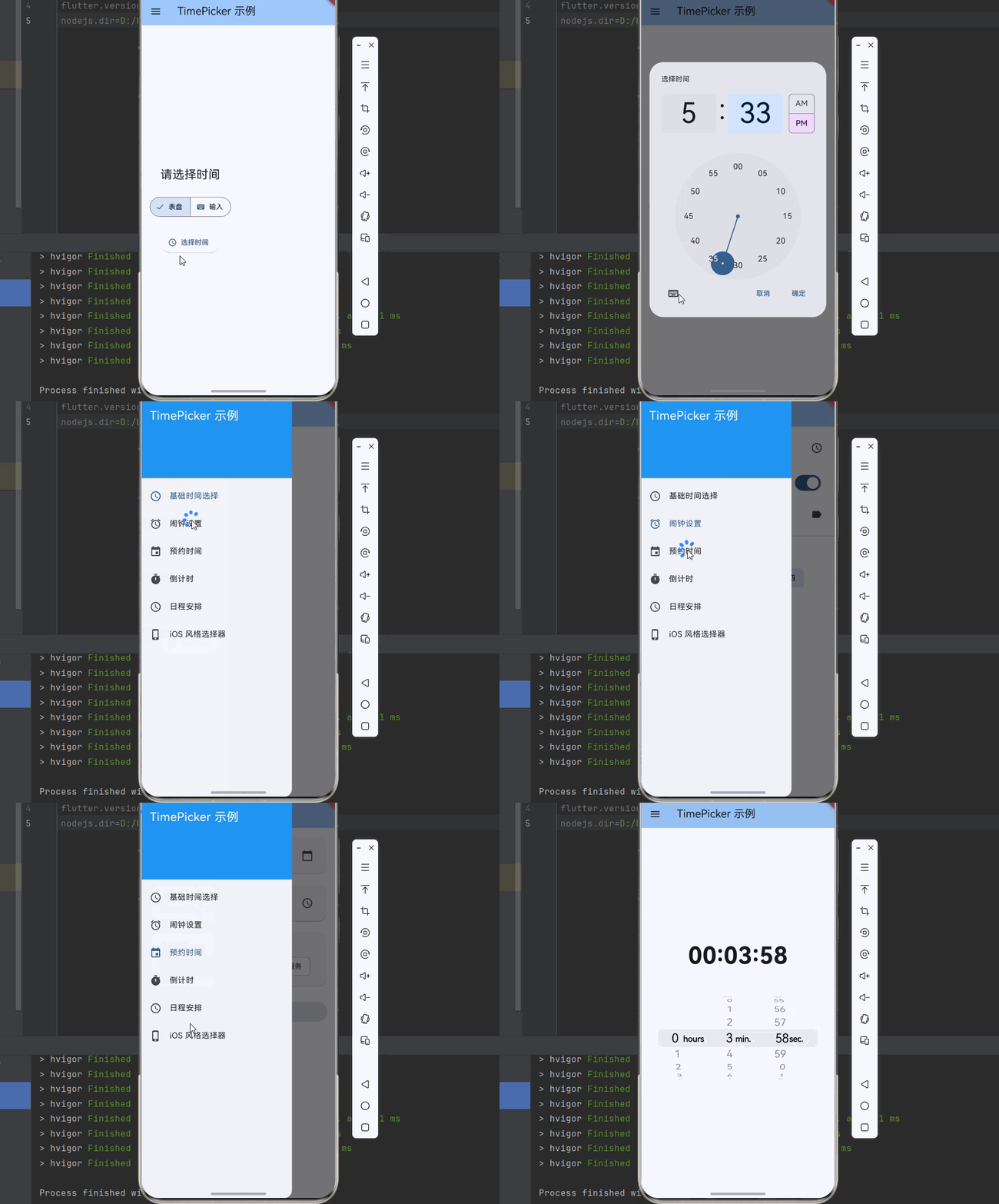
下面是一个完整的可运行示例,展示了 TimePicker 的各种用法:
dart
import 'package:flutter/material.dart';
import 'package:flutter/cupertino.dart';
void main() {
runApp(const MyApp());
}
class MyApp extends StatelessWidget {
const MyApp({super.key});
@override
Widget build(BuildContext context) {
return MaterialApp(
title: 'TimePicker 示例',
theme: ThemeData(
colorScheme: ColorScheme.fromSeed(seedColor: Colors.blue),
useMaterial3: true,
),
home: const TimePickerDemoPage(),
);
}
}
class TimePickerDemoPage extends StatefulWidget {
const TimePickerDemoPage({super.key});
@override
State<TimePickerDemoPage> createState() => _TimePickerDemoPageState();
}
class _TimePickerDemoPageState extends State<TimePickerDemoPage> {
int _selectedIndex = 0;
@override
Widget build(BuildContext context) {
return Scaffold(
appBar: AppBar(
title: const Text('TimePicker 示例'),
backgroundColor: Theme.of(context).colorScheme.inversePrimary,
),
drawer: Drawer(
child: ListView(
children: [
const DrawerHeader(
decoration: BoxDecoration(color: Colors.blue),
child: Text(
'TimePicker 示例',
style: TextStyle(color: Colors.white, fontSize: 24),
),
),
ListTile(
leading: const Icon(Icons.access_time),
title: const Text('基础时间选择'),
selected: _selectedIndex == 0,
onTap: () {
setState(() => _selectedIndex = 0);
Navigator.pop(context);
},
),
ListTile(
leading: const Icon(Icons.alarm),
title: const Text('闹钟设置'),
selected: _selectedIndex == 1,
onTap: () {
setState(() => _selectedIndex = 1);
Navigator.pop(context);
},
),
ListTile(
leading: const Icon(Icons.event),
title: const Text('预约时间'),
selected: _selectedIndex == 2,
onTap: () {
setState(() => _selectedIndex = 2);
Navigator.pop(context);
},
),
ListTile(
leading: const Icon(Icons.timer),
title: const Text('倒计时'),
selected: _selectedIndex == 3,
onTap: () {
setState(() => _selectedIndex = 3);
Navigator.pop(context);
},
),
ListTile(
leading: const Icon(Icons.schedule),
title: const Text('日程安排'),
selected: _selectedIndex == 4,
onTap: () {
setState(() => _selectedIndex = 4);
Navigator.pop(context);
},
),
ListTile(
leading: const Icon(Icons.phone_iphone),
title: const Text('iOS 风格选择器'),
selected: _selectedIndex == 5,
onTap: () {
setState(() => _selectedIndex = 5);
Navigator.pop(context);
},
),
],
),
),
body: _buildPage(),
);
}
Widget _buildPage() {
switch (_selectedIndex) {
case 0:
return const BasicTimePickerPage();
case 1:
return const AlarmSettingPage();
case 2:
return const AppointmentPage();
case 3:
return const CountdownSettingPage();
case 4:
return const SchedulePage();
case 5:
return const CupertinoTimerPickerExample();
default:
return const BasicTimePickerPage();
}
}
}
class BasicTimePickerPage extends StatefulWidget {
const BasicTimePickerPage({super.key});
@override
State<BasicTimePickerPage> createState() => _BasicTimePickerPageState();
}
class _BasicTimePickerPageState extends State<BasicTimePickerPage> {
TimeOfDay? _selectedTime;
TimePickerEntryMode _entryMode = TimePickerEntryMode.dial;
Future<void> _selectTime() async {
final TimeOfDay? time = await showTimePicker(
context: context,
initialTime: _selectedTime ?? TimeOfDay.now(),
initialEntryMode: _entryMode,
helpText: '选择时间',
cancelText: '取消',
confirmText: '确定',
);
if (time != null) {
setState(() {
_selectedTime = time;
});
}
}
@override
Widget build(BuildContext context) {
return Padding(
padding: const EdgeInsets.all(16),
child: Column(
mainAxisAlignment: MainAxisAlignment.center,
children: [
Text(
_selectedTime != null
? '选择的时间: ${_selectedTime!.format(context)}'
: '请选择时间',
style: const TextStyle(fontSize: 24),
),
const SizedBox(height: 24),
SegmentedButton<TimePickerEntryMode>(
segments: const [
ButtonSegment(
value: TimePickerEntryMode.dial,
label: Text('表盘'),
icon: Icon(Icons.dialpad),
),
ButtonSegment(
value: TimePickerEntryMode.input,
label: Text('输入'),
icon: Icon(Icons.keyboard),
),
],
selected: {_entryMode},
onSelectionChanged: (Set<TimePickerEntryMode> selection) {
setState(() {
_entryMode = selection.first;
});
},
),
const SizedBox(height: 24),
ElevatedButton.icon(
onPressed: _selectTime,
icon: const Icon(Icons.access_time),
label: const Text('选择时间'),
),
],
),
);
}
}
class AlarmSettingPage extends StatefulWidget {
const AlarmSettingPage({super.key});
@override
State<AlarmSettingPage> createState() => _AlarmSettingPageState();
}
class _AlarmSettingPageState extends State<AlarmSettingPage> {
TimeOfDay _alarmTime = const TimeOfDay(hour: 7, minute: 0);
bool _alarmEnabled = true;
String _alarmLabel = '闹钟';
final Set<String> _repeatDays = {};
Future<void> _selectAlarmTime() async {
final TimeOfDay? time = await showTimePicker(
context: context,
initialTime: _alarmTime,
helpText: '设置闹钟时间',
);
if (time != null) {
setState(() {
_alarmTime = time;
});
}
}
@override
Widget build(BuildContext context) {
return ListView(
children: [
ListTile(
title: const Text('时间'),
subtitle: Text(
_alarmTime.format(context),
style: const TextStyle(fontSize: 32, fontWeight: FontWeight.bold),
),
trailing: const Icon(Icons.access_time),
onTap: _selectAlarmTime,
),
SwitchListTile(
title: const Text('启用闹钟'),
value: _alarmEnabled,
onChanged: (value) {
setState(() {
_alarmEnabled = value;
});
},
),
ListTile(
title: const Text('标签'),
subtitle: Text(_alarmLabel),
trailing: const Icon(Icons.label),
onTap: () async {
final controller = TextEditingController(text: _alarmLabel);
final label = await showDialog<String>(
context: context,
builder: (context) => AlertDialog(
title: const Text('闹钟标签'),
content: TextField(
controller: controller,
decoration: const InputDecoration(hintText: '输入标签'),
),
actions: [
TextButton(
onPressed: () => Navigator.pop(context),
child: const Text('取消'),
),
TextButton(
onPressed: () => Navigator.pop(context, controller.text),
child: const Text('确定'),
),
],
),
);
if (label != null && label.isNotEmpty) {
setState(() {
_alarmLabel = label;
});
}
controller.dispose();
},
),
const Divider(),
const Padding(
padding: EdgeInsets.all(16),
child: Text('重复', style: TextStyle(fontWeight: FontWeight.bold)),
),
Padding(
padding: const EdgeInsets.symmetric(horizontal: 16),
child: Wrap(
spacing: 8,
children: ['周一', '周二', '周三', '周四', '周五', '周六', '周日']
.map((day) => FilterChip(
label: Text(day),
selected: _repeatDays.contains(day),
onSelected: (selected) {
setState(() {
if (selected) {
_repeatDays.add(day);
} else {
_repeatDays.remove(day);
}
});
},
))
.toList(),
),
),
],
);
}
}
class AppointmentPage extends StatefulWidget {
const AppointmentPage({super.key});
@override
State<AppointmentPage> createState() => _AppointmentPageState();
}
class _AppointmentPageState extends State<AppointmentPage> {
DateTime _selectedDate = DateTime.now();
TimeOfDay? _selectedTime;
String _serviceType = '普通咨询';
final List<String> _serviceTypes = ['普通咨询', '专家咨询', 'VIP 服务'];
Future<void> _selectDate() async {
final DateTime? date = await showDatePicker(
context: context,
initialDate: _selectedDate,
firstDate: DateTime.now(),
lastDate: DateTime.now().add(const Duration(days: 30)),
);
if (date != null) {
setState(() {
_selectedDate = date;
_selectedTime = null;
});
}
}
Future<void> _selectTime() async {
final TimeOfDay? time = await showTimePicker(
context: context,
initialTime: _selectedTime ?? const TimeOfDay(hour: 9, minute: 0),
helpText: '选择预约时间(工作时间 9:00-18:00)',
);
if (time != null) {
setState(() {
_selectedTime = time;
});
}
}
@override
Widget build(BuildContext context) {
return ListView(
padding: const EdgeInsets.all(16),
children: [
Card(
child: ListTile(
title: const Text('选择日期'),
subtitle: Text(
'${_selectedDate.year}-${_selectedDate.month.toString().padLeft(2, '0')}-${_selectedDate.day.toString().padLeft(2, '0')}',
),
trailing: const Icon(Icons.calendar_today),
onTap: _selectDate,
),
),
const SizedBox(height: 16),
Card(
child: ListTile(
title: const Text('选择时间'),
subtitle: Text(
_selectedTime != null
? _selectedTime!.format(context)
: '请选择时间(工作时间 9:00-18:00)',
),
trailing: const Icon(Icons.access_time),
onTap: _selectTime,
),
),
const SizedBox(height: 16),
Card(
child: Padding(
padding: const EdgeInsets.all(16),
child: Column(
crossAxisAlignment: CrossAxisAlignment.start,
children: [
const Text(
'服务类型',
style: TextStyle(fontWeight: FontWeight.bold),
),
const SizedBox(height: 8),
Wrap(
spacing: 8,
children: _serviceTypes
.map((type) => ChoiceChip(
label: Text(type),
selected: _serviceType == type,
onSelected: (selected) {
if (selected) {
setState(() {
_serviceType = type;
});
}
},
))
.toList(),
),
],
),
),
),
const SizedBox(height: 24),
ElevatedButton(
onPressed: _selectedTime != null
? () {
ScaffoldMessenger.of(context).showSnackBar(
SnackBar(
content: Text(
'预约成功: ${_selectedDate.year}-${_selectedDate.month}-${_selectedDate.day} ${_selectedTime!.format(context)}',
),
),
);
}
: null,
child: const Text('确认预约'),
),
],
);
}
}
class CountdownSettingPage extends StatefulWidget {
const CountdownSettingPage({super.key});
@override
State<CountdownSettingPage> createState() => _CountdownSettingPageState();
}
class _CountdownSettingPageState extends State<CountdownSettingPage> {
TimeOfDay _duration = const TimeOfDay(hour: 0, minute: 5);
bool _isRunning = false;
int _remainingSeconds = 300;
Future<void> _selectDuration() async {
final TimeOfDay? time = await showTimePicker(
context: context,
initialTime: _duration,
helpText: '设置倒计时时长',
);
if (time != null) {
setState(() {
_duration = time;
_remainingSeconds = time.hour * 3600 + time.minute * 60;
});
}
}
void _startCountdown() {
setState(() {
_isRunning = true;
_remainingSeconds = _duration.hour * 3600 + _duration.minute * 60;
});
_tick();
}
void _tick() {
Future.delayed(const Duration(seconds: 1), () {
if (_isRunning && _remainingSeconds > 0) {
setState(() {
_remainingSeconds--;
});
_tick();
} else if (_remainingSeconds == 0) {
setState(() {
_isRunning = false;
});
ScaffoldMessenger.of(context).showSnackBar(
const SnackBar(content: Text('倒计时结束!')),
);
}
});
}
void _stopCountdown() {
setState(() {
_isRunning = false;
});
}
String _formatTime(int seconds) {
final hours = seconds ~/ 3600;
final minutes = (seconds % 3600) ~/ 60;
final secs = seconds % 60;
return '${hours.toString().padLeft(2, '0')}:${minutes.toString().padLeft(2, '0')}:${secs.toString().padLeft(2, '0')}';
}
@override
Widget build(BuildContext context) {
return Center(
child: Column(
mainAxisAlignment: MainAxisAlignment.center,
children: [
Text(
_formatTime(_remainingSeconds),
style: const TextStyle(fontSize: 48, fontWeight: FontWeight.bold),
),
const SizedBox(height: 32),
if (!_isRunning) ...[
Text(
'设置时长: ${_duration.format(context)}',
style: const TextStyle(fontSize: 18),
),
const SizedBox(height: 16),
ElevatedButton.icon(
onPressed: _selectDuration,
icon: const Icon(Icons.timer),
label: const Text('设置时长'),
),
const SizedBox(height: 16),
ElevatedButton.icon(
onPressed: _startCountdown,
icon: const Icon(Icons.play_arrow),
label: const Text('开始'),
),
] else ...[
ElevatedButton.icon(
onPressed: _stopCountdown,
icon: const Icon(Icons.stop),
label: const Text('停止'),
style: ElevatedButton.styleFrom(backgroundColor: Colors.red),
),
],
],
),
);
}
}
class SchedulePage extends StatefulWidget {
const SchedulePage({super.key});
@override
State<SchedulePage> createState() => _SchedulePageState();
}
class _SchedulePageState extends State<SchedulePage> {
final List<Schedule> _schedules = [];
Future<void> _addSchedule() async {
final TimeOfDay? time = await showTimePicker(
context: context,
initialTime: TimeOfDay.now(),
helpText: '选择日程时间',
);
if (time != null) {
final controller = TextEditingController();
final title = await showDialog<String>(
context: context,
builder: (context) => AlertDialog(
title: const Text('日程标题'),
content: TextField(
controller: controller,
decoration: const InputDecoration(hintText: '输入日程标题'),
),
actions: [
TextButton(
onPressed: () => Navigator.pop(context),
child: const Text('取消'),
),
TextButton(
onPressed: () => Navigator.pop(context, controller.text),
child: const Text('确定'),
),
],
),
);
if (title != null && title.isNotEmpty) {
setState(() {
_schedules.add(Schedule(time: time, title: title));
_schedules.sort((a, b) {
final aMinutes = a.time.hour * 60 + a.time.minute;
final bMinutes = b.time.hour * 60 + b.time.minute;
return aMinutes.compareTo(bMinutes);
});
});
}
controller.dispose();
}
}
@override
Widget build(BuildContext context) {
return Scaffold(
body: _schedules.isEmpty
? const Center(child: Text('暂无日程,点击右下角添加'))
: ListView.builder(
itemCount: _schedules.length,
itemBuilder: (context, index) {
final schedule = _schedules[index];
return ListTile(
leading: CircleAvatar(
child: Text(schedule.time.format(context)),
),
title: Text(schedule.title),
trailing: IconButton(
icon: const Icon(Icons.delete),
onPressed: () {
setState(() {
_schedules.removeAt(index);
});
},
),
);
},
),
floatingActionButton: FloatingActionButton(
onPressed: _addSchedule,
child: const Icon(Icons.add),
),
);
}
}
class Schedule {
final TimeOfDay time;
final String title;
Schedule({required this.time, required this.title});
}
class CupertinoTimerPickerExample extends StatefulWidget {
const CupertinoTimerPickerExample({super.key});
@override
State<CupertinoTimerPickerExample> createState() => _CupertinoTimerPickerExampleState();
}
class _CupertinoTimerPickerExampleState extends State<CupertinoTimerPickerExample> {
Duration _duration = const Duration(hours: 0, minutes: 5, seconds: 0);
String _formatDuration(Duration d) {
return '${d.inHours.toString().padLeft(2, '0')}:${(d.inMinutes % 60).toString().padLeft(2, '0')}:${(d.inSeconds % 60).toString().padLeft(2, '0')}';
}
@override
Widget build(BuildContext context) {
return Column(
mainAxisAlignment: MainAxisAlignment.center,
children: [
Text(
_formatDuration(_duration),
style: const TextStyle(fontSize: 48, fontWeight: FontWeight.bold),
),
const SizedBox(height: 32),
SizedBox(
height: 200,
child: CupertinoTimerPicker(
mode: CupertinoTimerPickerMode.hms,
initialTimerDuration: _duration,
onTimerDurationChanged: (Duration newDuration) {
setState(() {
_duration = newDuration;
});
},
),
),
],
);
}
}