欢迎加入开源鸿蒙跨平台社区:https://openharmonycrossplatform.csdn.net
🎯 欢迎来到 Flutter for OpenHarmony 社区!本文将通过实战案例深入讲解 Flutter 中 image_cropper 图片裁剪的应用,带你掌握头像裁剪、证件照制作、图片编辑等常见场景的实现方法。
一、image_cropper 实战概述
在移动应用开发中,图片裁剪是一种非常常见的需求。用户需要上传头像、制作证件照、编辑社交媒体图片等,都需要用到图片裁剪功能。Flutter 提供了 image_cropper 插件,支持 OpenHarmony 平台,可以轻松实现各种图片裁剪场景。
📋 实战场景
| 场景 | 说明 |
|---|---|
| 用户头像裁剪 | 圆形或方形头像裁剪 |
| 证件照制作 | 固定比例裁剪(如 1:1、3:4) |
| 社交媒体图片 | 适配不同平台的图片尺寸 |
| 身份证照片 | 精确裁剪身份证正反面 |
| 产品图片 | 电商产品图片标准化处理 |
| 封面图片 | 文章或视频封面裁剪 |
OpenHarmony 平台适配
本项目基于 image_cropper@2.0.0 开发,适配 Flutter 3.7.12-ohos-1.0.6,SDK 5.0.0(12)。
依赖配置:
yaml
dependencies:
  image_cropper:
    git:
      url: https://atomgit.com/openharmony-sig/fluttertpc_image_cropper.git
      path: ./image_cropper
      ref: master
  image_picker: ^1.0.4
  http: ^1.1.0
 # 添加 path_provider 依赖(OpenHarmony 适配版本)
  path_provider:
    git:
      url: https://atomgit.com/openharmony-tpc/flutter_packages.git
      path: packages/path_provider/path_provider
  image_picker:
    git:
      url: https://gitcode.com/openharmony-tpc/flutter_packages.git
      path: packages/image_picker/image_picker
dev_dependencies:
  imagecropper_ohos:
    git:
      url: https://atomgit.com/openharmony-sig/fluttertpc_image_cropper.git
      path: ./image_cropper/ohos
      ref: master
💡 使用场景:image_cropper 适合需要用户交互裁剪图片的场景,如头像上传、证件照制作、图片编辑器等。
二、image_cropper 核心概念
2.1 主要组件
image_cropper 在 OpenHarmony 平台上主要使用以下组件:
| 组件 | 说明 |
|---|---|
| ImagecropperOhos | 裁剪器核心类 |
| Crop Widget | 交互式裁剪界面组件 |
| CropState | 裁剪状态管理 |
2.2 核心方法
dart
final imageCropper = ImagecropperOhos();

// 图片采样加载
final sample = await imageCropper.sampleImage(
  path: imagePath,
  maximumSize: 1024,
);

// 执行裁剪
final croppedFile = await imageCropper.cropImage(
  file: sampleFile,
  area: cropArea,
  angle: rotationAngle,
  cx: centerX,
  cy: centerY,
);
2.3 Crop Widget 属性
| 属性 | 类型 | 说明 |
|---|---|---|
| image | ImageProvider | 图片提供者 |
| aspectRatio | double? | 固定裁剪比例 |
| maximumScale | double | 最大缩放比例 |
| alwaysShowGrid | bool | 始终显示网格 |
| rotateController | RotateController? | 旋转控制器 |
2.4 CropState 属性
| 属性 | 类型 | 说明 |
|---|---|---|
| scale | double | 当前缩放比例 |
| area | Rect? | 当前裁剪区域 |
| angle | double | 当前旋转角度 |
| cx | double | 旋转中心 X 坐标 |
| cy | double | 旋转中心 Y 坐标 |
三、实战案例一:用户头像裁剪
用户头像裁剪是最常见的图片裁剪场景,通常需要支持圆形和方形两种裁剪模式。
3.1 头像裁剪页面
dart
class AvatarCropPage extends StatefulWidget {
  final String imagePath;

  const AvatarCropPage({super.key, required this.imagePath});

  @override
  State<AvatarCropPage> createState() => _AvatarCropPageState();
}

class _AvatarCropPageState extends State<AvatarCropPage> {
  final imageCropper = ImagecropperOhos();
  final cropKey = GlobalKey<CropState>();
  File? _sample;
  File? _originalFile;
  bool _isCircleCrop = true;
  bool _isLoading = false;

  @override
  void initState() {
    super.initState();
    _originalFile = File(widget.imagePath);
    _loadSample();
  }

  Future<void> _loadSample() async {
    setState(() => _isLoading = true);
    final sample = await imageCropper.sampleImage(
      path: widget.imagePath,
      maximumSize: MediaQuery.of(context).size.shortestSide.ceil(),
    );
    setState(() {
      _sample = sample;
      _isLoading = false;
    });
  }

  Future<void> _performCrop() async {
    final scale = cropKey.currentState?.scale;
    final area = cropKey.currentState?.area;
    final angle = cropKey.currentState?.angle;
    final cx = cropKey.currentState?.cx ?? 0;
    final cy = cropKey.currentState?.cy ?? 0;

    if (area == null) return;

    setState(() => _isLoading = true);

    final sample = await imageCropper.sampleImage(
      path: _originalFile!.path,
      maximumSize: (2000 / scale!).round(),
    );

    final croppedFile = await imageCropper.cropImage(
      file: sample!,
      area: area,
      angle: angle,
      cx: cx,
      cy: cy,
    );
    sample.delete();

    setState(() => _isLoading = false);
    Navigator.pop(context, croppedFile.path);
  }

  @override
  Widget build(BuildContext context) {
    return Scaffold(
      backgroundColor: Colors.black,
      appBar: AppBar(
        backgroundColor: Colors.transparent,
        elevation: 0,
        leading: IconButton(
          icon: const Icon(Icons.close, color: Colors.white),
          onPressed: () => Navigator.pop(context),
        ),
        title: const Text('裁剪头像', style: TextStyle(color: Colors.white)),
        actions: [
          TextButton(
            onPressed: _isLoading ? null : _performCrop,
            child: const Text('完成', style: TextStyle(color: Colors.white)),
          ),
        ],
      ),
      body: Stack(
        children: [
          if (_sample != null)
            Column(
              children: [
                Expanded(
                  child: Center(
                    child: Container(
                      width: MediaQuery.of(context).size.shortestSide * 0.8,
                      height: MediaQuery.of(context).size.shortestSide * 0.8,
                      decoration: _isCircleCrop
                          ? BoxDecoration(
                              shape: BoxShape.circle,
                              border: Border.all(color: Colors.white, width: 2),
                            )
                          : BoxDecoration(
                              border: Border.all(color: Colors.white, width: 2),
                            ),
                      child: ClipRRect(
                        borderRadius: _isCircleCrop
                            ? BorderRadius.circular(MediaQuery.of(context).size.shortestSide * 0.4)
                            : BorderRadius.zero,
                        child: Crop.file(_sample!, key: cropKey),
                      ),
                    ),
                  ),
                ),
                Padding(
                  padding: const EdgeInsets.all(20),
                  child: Row(
                    mainAxisAlignment: MainAxisAlignment.center,
                    children: [
                      _buildCropModeButton('圆形', true),
                      const SizedBox(width: 20),
                      _buildCropModeButton('方形', false),
                    ],
                  ),
                ),
              ],
            ),
          if (_isLoading)
            Container(
              color: Colors.black54,
              child: const Center(child: CircularProgressIndicator()),
            ),
        ],
      ),
    );
  }

  Widget _buildCropModeButton(String label, bool isCircle) {
    final isSelected = _isCircleCrop == isCircle;
    return OutlinedButton(
      onPressed: () => setState(() => _isCircleCrop = isCircle),
      style: OutlinedButton.styleFrom(
        foregroundColor: isSelected ? Colors.blue : Colors.white,
        side: BorderSide(color: isSelected ? Colors.blue : Colors.white),
      ),
      child: Text(label),
    );
  }

  @override
  void dispose() {
    _sample?.delete();
    super.dispose();
  }
}
3.2 头像选择与预览组件
dart
class AvatarSelector extends StatefulWidget {
  final String? initialAvatar;
  final Function(String) onAvatarChanged;

  const AvatarSelector({
    super.key,
    this.initialAvatar,
    required this.onAvatarChanged,
  });

  @override
  State<AvatarSelector> createState() => _AvatarSelectorState();
}

class _AvatarSelectorState extends State<AvatarSelector> {
  String? _avatarPath;
  final ImagePicker _picker = ImagePicker();

  Future<void> _pickAndCropAvatar() async {
    final pickedFile = await _picker.pickImage(
      source: ImageSource.gallery,
      maxWidth: 1024,
      maxHeight: 1024,
    );

    if (pickedFile != null) {
      final croppedPath = await Navigator.push<String>(
        context,
        MaterialPageRoute(
          builder: (context) => AvatarCropPage(imagePath: pickedFile.path),
        ),
      );

      if (croppedPath != null) {
        setState(() => _avatarPath = croppedPath);
        widget.onAvatarChanged(croppedPath);
      }
    }
  }

  @override
  Widget build(BuildContext context) {
    return GestureDetector(
      onTap: _pickAndCropAvatar,
      child: Stack(
        children: [
          CircleAvatar(
            radius: 50,
            backgroundImage: _avatarPath != null
                ? FileImage(File(_avatarPath!))
                : widget.initialAvatar != null
                    ? NetworkImage(widget.initialAvatar!) as ImageProvider
                    : null,
            child: _avatarPath == null && widget.initialAvatar == null
                ? const Icon(Icons.person, size: 50)
                : null,
          ),
          Positioned(
            right: 0,
            bottom: 0,
            child: Container(
              padding: const EdgeInsets.all(4),
              decoration: const BoxDecoration(
                color: Colors.blue,
                shape: BoxShape.circle,
              ),
              child: const Icon(Icons.camera_alt, size: 20, color: Colors.white),
            ),
          ),
        ],
      ),
    );
  }
}
四、实战案例二:证件照制作
证件照制作需要支持固定比例裁剪,如 1:1、3:4、2:3 等常见证件照比例。
4.1 证件照裁剪页面
dart
class IdPhotoCropPage extends StatefulWidget {
  final String imagePath;
  final double aspectRatio;

  const IdPhotoCropPage({
    super.key,
    required this.imagePath,
    this.aspectRatio = 3 / 4,
  });

  @override
  State<IdPhotoCropPage> createState() => _IdPhotoCropPageState();
}

class _IdPhotoCropPageState extends State<IdPhotoCropPage> {
  final imageCropper = ImagecropperOhos();
  final cropKey = GlobalKey<CropState>();
  File? _sample;
  File? _originalFile;
  bool _isLoading = false;

  @override
  void initState() {
    super.initState();
    _originalFile = File(widget.imagePath);
    _loadSample();
  }

  Future<void> _loadSample() async {
    setState(() => _isLoading = true);
    final sample = await imageCropper.sampleImage(
      path: widget.imagePath,
      maximumSize: MediaQuery.of(context).size.longestSide.ceil(),
    );
    setState(() {
      _sample = sample;
      _isLoading = false;
    });
  }

  Future<void> _performCrop() async {
    final scale = cropKey.currentState?.scale;
    final area = cropKey.currentState?.area;
    final angle = cropKey.currentState?.angle;
    final cx = cropKey.currentState?.cx ?? 0;
    final cy = cropKey.currentState?.cy ?? 0;

    if (area == null) return;

    setState(() => _isLoading = true);

    final sample = await imageCropper.sampleImage(
      path: _originalFile!.path,
      maximumSize: (3000 / scale!).round(),
    );

    final croppedFile = await imageCropper.cropImage(
      file: sample!,
      area: area,
      angle: angle,
      cx: cx,
      cy: cy,
    );
    sample.delete();

    setState(() => _isLoading = false);
    Navigator.pop(context, croppedFile.path);
  }

  @override
  Widget build(BuildContext context) {
    final cropWidth = MediaQuery.of(context).size.width * 0.85;
    final cropHeight = cropWidth / widget.aspectRatio;

    return Scaffold(
      backgroundColor: Colors.black,
      appBar: AppBar(
        backgroundColor: Colors.transparent,
        elevation: 0,
        leading: IconButton(
          icon: const Icon(Icons.arrow_back, color: Colors.white),
          onPressed: () => Navigator.pop(context),
        ),
        title: const Text('证件照裁剪', style: TextStyle(color: Colors.white)),
        actions: [
          TextButton(
            onPressed: _isLoading ? null : _performCrop,
            child: const Text('保存', style: TextStyle(color: Colors.white)),
          ),
        ],
      ),
      body: Stack(
        children: [
          if (_sample != null)
            Column(
              children: [
                Expanded(
                  child: Center(
                    child: Container(
                      width: cropWidth,
                      height: cropHeight,
                      decoration: BoxDecoration(
                        border: Border.all(color: Colors.white, width: 2),
                      ),
                      child: Crop.file(_sample!, key: cropKey),
                    ),
                  ),
                ),
                Container(
                  padding: const EdgeInsets.all(20),
                  child: Column(
                    children: [
                      const Text(
                        '提示:请确保人脸位于裁剪框中央',
                        style: TextStyle(color: Colors.white70, fontSize: 12),
                      ),
                      const SizedBox(height: 16),
                      Row(
                        mainAxisAlignment: MainAxisAlignment.spaceEvenly,
                        children: [
                          _buildTip('正面朝向'),
                          _buildTip('光线均匀'),
                          _buildTip('背景简洁'),
                        ],
                      ),
                    ],
                  ),
                ),
              ],
            ),
          if (_isLoading)
            Container(
              color: Colors.black54,
              child: const Center(child: CircularProgressIndicator()),
            ),
        ],
      ),
    );
  }

  Widget _buildTip(String text) {
    return Row(
      mainAxisSize: MainAxisSize.min,
      children: [
        const Icon(Icons.check_circle, color: Colors.green, size: 16),
        const SizedBox(width: 4),
        Text(text, style: const TextStyle(color: Colors.white70, fontSize: 12)),
      ],
    );
  }

  @override
  void dispose() {
    _sample?.delete();
    super.dispose();
  }
}
4.2 证件照类型选择
dart
class IdPhotoTypeSelector extends StatelessWidget {
  final Function(double aspectRatio) onTypeSelected;

  const IdPhotoTypeSelector({super.key, required this.onTypeSelected});

  @override
  Widget build(BuildContext context) {
    return Container(
      padding: const EdgeInsets.all(16),
      child: Column(
        mainAxisSize: MainAxisSize.min,
        crossAxisAlignment: CrossAxisAlignment.start,
        children: [
          const Text(
            '选择证件照类型',
            style: TextStyle(fontSize: 18, fontWeight: FontWeight.bold),
          ),
          const SizedBox(height: 16),
          Wrap(
            spacing: 12,
            runSpacing: 12,
            children: [
              _buildTypeCard('一寸照片', '25mm×35mm', 5 / 7, context),
              _buildTypeCard('二寸照片', '35mm×49mm', 5 / 7, context),
              _buildTypeCard('小二寸', '33mm×48mm', 11 / 16, context),
              _buildTypeCard('护照照片', '33mm×48mm', 11 / 16, context),
              _buildTypeCard('签证照片', '35mm×45mm', 7 / 9, context),
              _buildTypeCard('身份证照片', '26mm×32mm', 13 / 16, context),
            ],
          ),
        ],
      ),
    );
  }

  Widget _buildTypeCard(
    String name,
    String size,
    double ratio,
    BuildContext context,
  ) {
    return GestureDetector(
      onTap: () {
        Navigator.pop(context);
        onTypeSelected(ratio);
      },
      child: Container(
        width: 100,
        padding: const EdgeInsets.all(12),
        decoration: BoxDecoration(
          color: Colors.grey[100],
          borderRadius: BorderRadius.circular(8),
        ),
        child: Column(
          children: [
            Container(
              width: 40,
              height: 40 / ratio,
              decoration: BoxDecoration(
                color: Colors.blue.withOpacity(0.2),
                border: Border.all(color: Colors.blue),
                borderRadius: BorderRadius.circular(4),
              ),
            ),
            const SizedBox(height: 8),
            Text(name, style: const TextStyle(fontSize: 12)),
            Text(size, style: TextStyle(fontSize: 10, color: Colors.grey[600])),
          ],
        ),
      ),
    );
  }
}
五、实战案例三:图片编辑器
实现一个功能完整的图片编辑器,支持裁剪、旋转、比例选择等功能。
5.1 图片编辑器主页面
dart
class ImageEditorPage extends StatefulWidget {
  final String imagePath;

  const ImageEditorPage({super.key, required this.imagePath});

  @override
  State<ImageEditorPage> createState() => _ImageEditorPageState();
}

class _ImageEditorPageState extends State<ImageEditorPage> {
  final imageCropper = ImagecropperOhos();
  final cropKey = GlobalKey<CropState>();
  final rotateController = RotateController();

  File? _sample;
  File? _originalFile;
  bool _isLoading = false;
  double _aspectRatio = 1.0;
  String _selectedRatio = '1:1';

  final List<Map<String, dynamic>> _ratioOptions = [
    {'label': '自由', 'ratio': null},
    {'label': '1:1', 'ratio': 1.0},
    {'label': '4:3', 'ratio': 4 / 3},
    {'label': '3:4', 'ratio': 3 / 4},
    {'label': '16:9', 'ratio': 16 / 9},
    {'label': '9:16', 'ratio': 9 / 16},
  ];

  @override
  void initState() {
    super.initState();
    _originalFile = File(widget.imagePath);
    _loadSample();
  }

  Future<void> _loadSample() async {
    setState(() => _isLoading = true);
    final sample = await imageCropper.sampleImage(
      path: widget.imagePath,
      maximumSize: MediaQuery.of(context).size.longestSide.ceil(),
    );
    setState(() {
      _sample = sample;
      _isLoading = false;
    });
  }

  Future<void> _performCrop() async {
    final scale = cropKey.currentState?.scale;
    final area = cropKey.currentState?.area;
    final angle = cropKey.currentState?.angle;
    final cx = cropKey.currentState?.cx ?? 0;
    final cy = cropKey.currentState?.cy ?? 0;

    if (area == null) return;

    setState(() => _isLoading = true);

    final sample = await imageCropper.sampleImage(
      path: _originalFile!.path,
      maximumSize: (3000 / scale!).round(),
    );

    final croppedFile = await imageCropper.cropImage(
      file: sample!,
      area: area,
      angle: angle,
      cx: cx,
      cy: cy,
    );
    sample.delete();

    setState(() => _isLoading = false);
    Navigator.pop(context, croppedFile.path);
  }

  void _rotateLeft() {
    rotateController.rotate?.call(-90);
  }

  void _rotateRight() {
    rotateController.rotate?.call(90);
  }

  @override
  Widget build(BuildContext context) {
    return Scaffold(
      backgroundColor: Colors.black,
      appBar: AppBar(
        backgroundColor: Colors.transparent,
        elevation: 0,
        leading: IconButton(
          icon: const Icon(Icons.close, color: Colors.white),
          onPressed: () => Navigator.pop(context),
        ),
        title: const Text('编辑图片', style: TextStyle(color: Colors.white)),
        actions: [
          TextButton(
            onPressed: _isLoading ? null : _performCrop,
            child: const Text('保存', style: TextStyle(color: Colors.white)),
          ),
        ],
      ),
      body: Stack(
        children: [
          if (_sample != null)
            Column(
              children: [
                Expanded(
                  child: Center(
                    child: Crop.file(
                      _sample!,
                      key: cropKey,
                      rotateController: rotateController,
                    ),
                  ),
                ),
                _buildRatioSelector(),
                _buildToolbar(),
              ],
            ),
          if (_isLoading)
            Container(
              color: Colors.black54,
              child: const Center(child: CircularProgressIndicator()),
            ),
        ],
      ),
    );
  }

  Widget _buildRatioSelector() {
    return Container(
      height: 60,
      padding: const EdgeInsets.symmetric(vertical: 8),
      child: ListView.builder(
        scrollDirection: Axis.horizontal,
        itemCount: _ratioOptions.length,
        itemBuilder: (context, index) {
          final option = _ratioOptions[index];
          final isSelected = _selectedRatio == option['label'];
          return GestureDetector(
            onTap: () {
              setState(() {
                _selectedRatio = option['label'];
                _aspectRatio = option['ratio'] ?? 1.0;
              });
            },
            child: Container(
              margin: const EdgeInsets.symmetric(horizontal: 8),
              padding: const EdgeInsets.symmetric(horizontal: 16, vertical: 8),
              decoration: BoxDecoration(
                color: isSelected ? Colors.blue : Colors.transparent,
                borderRadius: BorderRadius.circular(20),
                border: Border.all(color: Colors.white),
              ),
              child: Center(
                child: Text(
                  option['label'],
                  style: TextStyle(color: Colors.white),
                ),
              ),
            ),
          );
        },
      ),
    );
  }

  Widget _buildToolbar() {
    return Container(
      padding: const EdgeInsets.symmetric(horizontal: 20, vertical: 16),
      child: Row(
        mainAxisAlignment: MainAxisAlignment.spaceEvenly,
        children: [
          _buildToolButton(Icons.rotate_left, '左旋转', _rotateLeft),
          _buildToolButton(Icons.rotate_right, '右旋转', _rotateRight),
          _buildToolButton(Icons.flip, '翻转', () {}),
          _buildToolButton(Icons.restore, '重置', () {
            rotateController.rotate?.call(0);
            setState(() {
              _selectedRatio = '自由';
              _aspectRatio = 1.0;
            });
          }),
        ],
      ),
    );
  }

  Widget _buildToolButton(IconData icon, String label, VoidCallback onTap) {
    return GestureDetector(
      onTap: onTap,
      child: Column(
        mainAxisSize: MainAxisSize.min,
        children: [
          Icon(icon, color: Colors.white, size: 28),
          const SizedBox(height: 4),
          Text(label, style: const TextStyle(color: Colors.white, fontSize: 12)),
        ],
      ),
    );
  }

  @override
  void dispose() {
    _sample?.delete();
    super.dispose();
  }
}
六、实战案例四:身份证照片裁剪
身份证照片裁剪需要精确裁剪身份证的正反面,支持自动检测边缘。
6.1 身份证裁剪页面
dart
class IdCardCropPage extends StatefulWidget {
  final String imagePath;
  final bool isFront;

  const IdCardCropPage({
    super.key,
    required this.imagePath,
    this.isFront = true,
  });

  @override
  State<IdCardCropPage> createState() => _IdCardCropPageState();
}

class _IdCardCropPageState extends State<IdCardCropPage> {
  final imageCropper = ImagecropperOhos();
  final cropKey = GlobalKey<CropState>();
  File? _sample;
  File? _originalFile;
  bool _isLoading = false;

  static const double idCardAspectRatio = 85.6 / 54.0;

  @override
  void initState() {
    super.initState();
    _originalFile = File(widget.imagePath);
    _loadSample();
  }

  Future<void> _loadSample() async {
    setState(() => _isLoading = true);
    final sample = await imageCropper.sampleImage(
      path: widget.imagePath,
      maximumSize: MediaQuery.of(context).size.longestSide.ceil(),
    );
    setState(() {
      _sample = sample;
      _isLoading = false;
    });
  }

  Future<void> _performCrop() async {
    final scale = cropKey.currentState?.scale;
    final area = cropKey.currentState?.area;
    final angle = cropKey.currentState?.angle;
    final cx = cropKey.currentState?.cx ?? 0;
    final cy = cropKey.currentState?.cy ?? 0;

    if (area == null) return;

    setState(() => _isLoading = true);

    final sample = await imageCropper.sampleImage(
      path: _originalFile!.path,
      maximumSize: (3000 / scale!).round(),
    );

    final croppedFile = await imageCropper.cropImage(
      file: sample!,
      area: area,
      angle: angle,
      cx: cx,
      cy: cy,
    );
    sample.delete();

    setState(() => _isLoading = false);
    Navigator.pop(context, croppedFile.path);
  }

  @override
  Widget build(BuildContext context) {
    final cropWidth = MediaQuery.of(context).size.width * 0.9;
    final cropHeight = cropWidth / idCardAspectRatio;

    return Scaffold(
      backgroundColor: Colors.black,
      appBar: AppBar(
        backgroundColor: Colors.transparent,
        elevation: 0,
        leading: IconButton(
          icon: const Icon(Icons.arrow_back, color: Colors.white),
          onPressed: () => Navigator.pop(context),
        ),
        title: Text(
          widget.isFront ? '裁剪身份证正面' : '裁剪身份证反面',
          style: const TextStyle(color: Colors.white),
        ),
        actions: [
          TextButton(
            onPressed: _isLoading ? null : _performCrop,
            child: const Text('确认', style: TextStyle(color: Colors.white)),
          ),
        ],
      ),
      body: Stack(
        children: [
          if (_sample != null)
            Column(
              children: [
                Expanded(
                  child: Center(
                    child: Container(
                      width: cropWidth,
                      height: cropHeight,
                      decoration: BoxDecoration(
                        border: Border.all(color: Colors.blue, width: 3),
                        borderRadius: BorderRadius.circular(8),
                      ),
                      child: ClipRRect(
                        borderRadius: BorderRadius.circular(6),
                        child: Crop.file(_sample!, key: cropKey),
                      ),
                    ),
                  ),
                ),
                Container(
                  padding: const EdgeInsets.all(20),
                  child: Column(
                    children: [
                      Text(
                        widget.isFront
                            ? '请将身份证正面放入框内'
                            : '请将身份证反面放入框内',
                        style: const TextStyle(color: Colors.white, fontSize: 16),
                      ),
                      const SizedBox(height: 8),
                      Text(
                        '确保边角对齐,图像清晰',
                        style: TextStyle(color: Colors.grey[400], fontSize: 12),
                      ),
                    ],
                  ),
                ),
              ],
            ),
          if (_isLoading)
            Container(
              color: Colors.black54,
              child: const Center(child: CircularProgressIndicator()),
            ),
        ],
      ),
    );
  }

  @override
  void dispose() {
    _sample?.delete();
    super.dispose();
  }
}
6.2 身份证上传组件
dart
class IdCardUploader extends StatefulWidget {
  final Function(String frontPath, String backPath)? onBothUploaded;

  const IdCardUploader({super.key, this.onBothUploaded});

  @override
  State<IdCardUploader> createState() => _IdCardUploaderState();
}

class _IdCardUploaderState extends State<IdCardUploader> {
  String? _frontPath;
  String? _backPath;
  final ImagePicker _picker = ImagePicker();

  Future<void> _pickAndCropIdCard(bool isFront) async {
    final pickedFile = await _picker.pickImage(
      source: ImageSource.camera,
      preferredCameraDevice: CameraDevice.rear,
    );

    if (pickedFile != null) {
      final croppedPath = await Navigator.push<String>(
        context,
        MaterialPageRoute(
          builder: (context) => IdCardCropPage(
            imagePath: pickedFile.path,
            isFront: isFront,
          ),
        ),
      );

      if (croppedPath != null) {
        setState(() {
          if (isFront) {
            _frontPath = croppedPath;
          } else {
            _backPath = croppedPath;
          }
        });

        if (_frontPath != null && _backPath != null) {
          widget.onBothUploaded?.call(_frontPath!, _backPath!);
        }
      }
    }
  }

  @override
  Widget build(BuildContext context) {
    return Column(
      children: [
        Row(
          children: [
            Expanded(
              child: _buildIdCardSlot(
                '正面(人像面)',
                _frontPath,
                () => _pickAndCropIdCard(true),
              ),
            ),
            const SizedBox(width: 16),
            Expanded(
              child: _buildIdCardSlot(
                '反面(国徽面)',
                _backPath,
                () => _pickAndCropIdCard(false),
              ),
            ),
          ],
        ),
        if (_frontPath != null && _backPath != null)
          Padding(
            padding: const EdgeInsets.only(top: 16),
            child: ElevatedButton(
              onPressed: () {
                widget.onBothUploaded?.call(_frontPath!, _backPath!);
              },
              child: const Text('提交认证'),
            ),
          ),
      ],
    );
  }

  Widget _buildIdCardSlot(String label, String? path, VoidCallback onTap) {
    return GestureDetector(
      onTap: onTap,
      child: Container(
        height: 100,
        decoration: BoxDecoration(
          color: Colors.grey[200],
          borderRadius: BorderRadius.circular(8),
          border: Border.all(color: Colors.grey[300]!),
        ),
        child: path != null
            ? ClipRRect(
                borderRadius: BorderRadius.circular(8),
                child: Image.file(File(path), fit: BoxFit.cover),
              )
            : Column(
                mainAxisAlignment: MainAxisAlignment.center,
                children: [
                  Icon(Icons.add_a_photo, size: 32, color: Colors.grey[600]),
                  const SizedBox(height: 8),
                  Text(label, style: TextStyle(color: Colors.grey[600])),
                ],
              ),
      ),
    );
  }
}
七、最佳实践
7.1 性能优化
| 建议 | 说明 |
|---|---|
| 图片采样 | 使用 sampleImage 进行预加载压缩 |
| 及时清理 | 删除临时文件释放内存 |
| 合理尺寸 | 根据需求设置合适的 maximumSize |
| 异步处理 | 使用 async/await 避免阻塞 UI |
7.2 用户体验
| 建议 | 说明 |
|---|---|
| 加载提示 | 显示加载进度指示器 |
| 操作引导 | 提供清晰的裁剪操作提示 |
| 预览确认 | 裁剪后提供预览确认机会 |
| 错误处理 | 处理各种异常情况 |
7.3 内存管理
dart
@override
void dispose() {
  _sample?.delete();
  _lastCropped?.delete();
  super.dispose();
}
八、总结
本文通过实战案例详细介绍了 Flutter for OpenHarmony 中 image_cropper 的应用,包括:
- 用户头像裁剪的实现
- 证件照制作功能
- 图片编辑器的开发
- 身份证照片裁剪
通过本文的学习,你应该能够在 Flutter for OpenHarmony 项目中熟练使用 image_cropper 实现各种图片裁剪功能。
九、完整示例代码
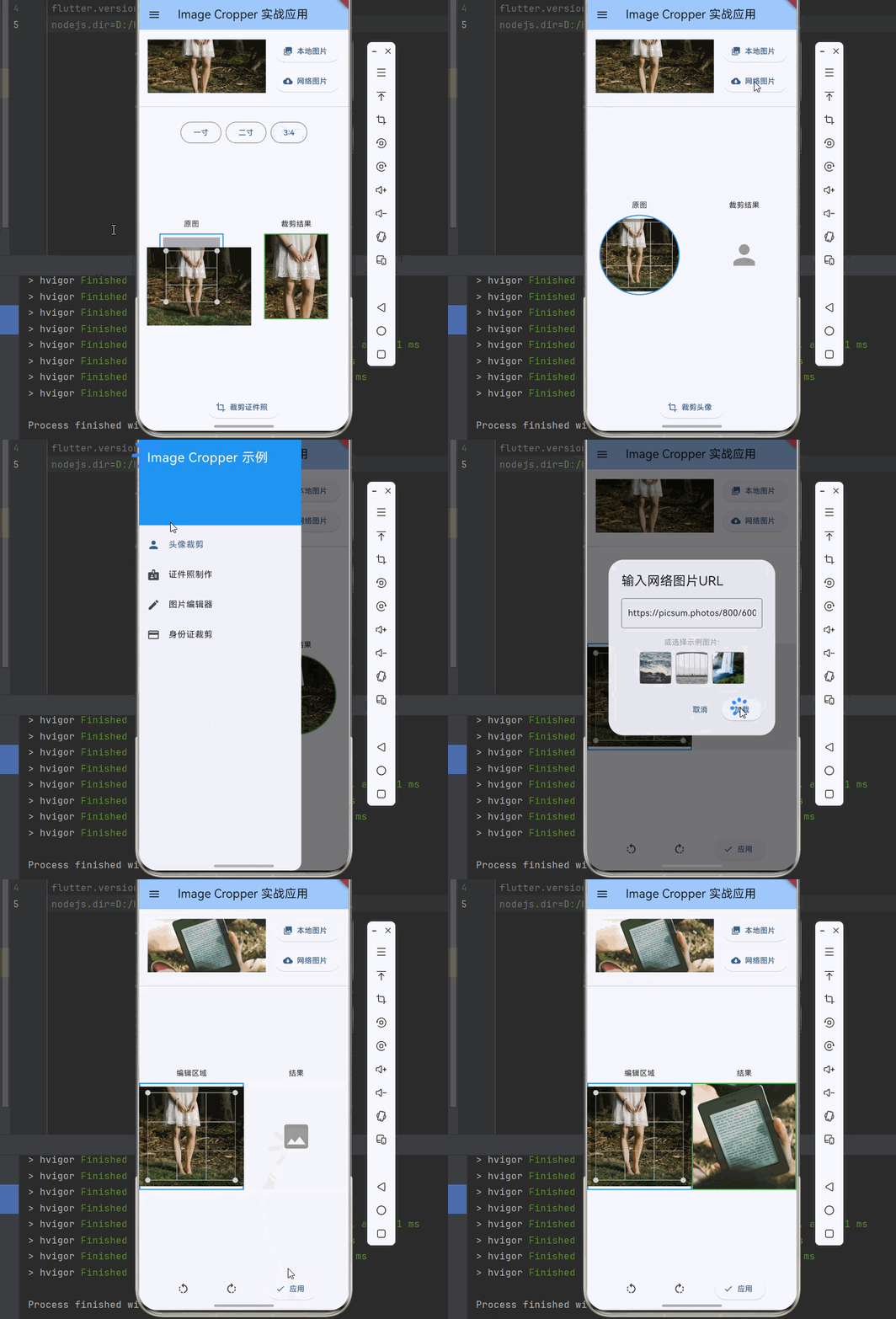
下面是一个完整的可运行示例,展示了 image_cropper 的各种实战应用,支持本地图片和网络图片:
dart
import 'dart:io';
import 'package:flutter/material.dart';
import 'package:flutter/services.dart';
import 'package:image_picker/image_picker.dart';
import 'package:imagecropper_ohos/imagecropper_ohos.dart';
import 'package:imagecropper_ohos/page/crop.dart';
import 'package:path_provider/path_provider.dart';
import 'package:http/http.dart' as http;
void main() {
runApp(const MyApp());
}
class MyApp extends StatelessWidget {
const MyApp({super.key});
@override
Widget build(BuildContext context) {
return MaterialApp(
title: 'Image Cropper 实战应用',
theme: ThemeData(
colorScheme: ColorScheme.fromSeed(seedColor: Colors.blue),
useMaterial3: true,
),
home: const ImageCropperDemoPage(),
);
}
}
class ImageCropperDemoPage extends StatefulWidget {
const ImageCropperDemoPage({super.key});
@override
State<ImageCropperDemoPage> createState() => _ImageCropperDemoPageState();
}
class _ImageCropperDemoPageState extends State<ImageCropperDemoPage> {
int _selectedIndex = 0;
final ImagePicker _picker = ImagePicker();
String? _selectedImagePath;
bool _isLoadingImage = false;
final TextEditingController _urlController = TextEditingController();
final List<String> _sampleNetworkImages = [
'https://picsum.photos/800/600',
'https://picsum.photos/600/800',
'https://picsum.photos/800/800',
];
Future<void> _pickImage() async {
final pickedFile = await _picker.pickImage(source: ImageSource.gallery);
if (pickedFile != null) {
setState(() {
_selectedImagePath = pickedFile.path;
});
}
}
Future<void> _loadNetworkImage(String url) async {
if (url.isEmpty) return;
setState(() => _isLoadingImage = true);
try {
final response = await http.get(Uri.parse(url));
final bytes = response.bodyBytes;
final tempDir = await getTemporaryDirectory();
final file = File('${tempDir.path}/network_image_${DateTime.now().millisecondsSinceEpoch}.jpg');
await file.writeAsBytes(bytes);
setState(() {
_selectedImagePath = file.path;
_isLoadingImage = false;
});
} catch (e) {
setState(() => _isLoadingImage = false);
if (mounted) {
ScaffoldMessenger.of(context).showSnackBar(
SnackBar(content: Text('加载网络图片失败: $e')),
);
}
}
}
void _showNetworkImageDialog() {
showDialog(
context: context,
builder: (context) => AlertDialog(
title: const Text('输入网络图片URL'),
content: Column(
mainAxisSize: MainAxisSize.min,
children: [
TextField(
controller: _urlController,
decoration: const InputDecoration(
hintText: 'https://example.com/image.jpg',
border: OutlineInputBorder(),
),
keyboardType: TextInputType.url,
),
const SizedBox(height: 16),
const Text('或选择示例图片:', style: TextStyle(color: Colors.grey)),
const SizedBox(height: 8),
Wrap(
spacing: 8,
children: _sampleNetworkImages.map((url) {
return GestureDetector(
onTap: () {
_urlController.text = url;
},
child: Container(
width: 60,
height: 60,
decoration: BoxDecoration(
border: Border.all(color: Colors.grey),
borderRadius: BorderRadius.circular(8),
),
child: Image.network(url, fit: BoxFit.cover),
),
);
}).toList(),
),
],
),
actions: [
TextButton(
onPressed: () => Navigator.pop(context),
child: const Text('取消'),
),
ElevatedButton(
onPressed: () {
Navigator.pop(context);
_loadNetworkImage(_urlController.text);
},
child: const Text('加载'),
),
],
),
);
}
@override
Widget build(BuildContext context) {
return Scaffold(
appBar: AppBar(
title: const Text('Image Cropper 实战应用'),
backgroundColor: Theme.of(context).colorScheme.inversePrimary,
),
drawer: Drawer(
child: ListView(
children: [
const DrawerHeader(
decoration: BoxDecoration(color: Colors.blue),
child: Text(
'Image Cropper 示例',
style: TextStyle(color: Colors.white, fontSize: 24),
),
),
ListTile(
leading: const Icon(Icons.person),
title: const Text('头像裁剪'),
selected: _selectedIndex == 0,
onTap: () {
setState(() => _selectedIndex = 0);
Navigator.pop(context);
},
),
ListTile(
leading: const Icon(Icons.badge),
title: const Text('证件照制作'),
selected: _selectedIndex == 1,
onTap: () {
setState(() => _selectedIndex = 1);
Navigator.pop(context);
},
),
ListTile(
leading: const Icon(Icons.edit),
title: const Text('图片编辑器'),
selected: _selectedIndex == 2,
onTap: () {
setState(() => _selectedIndex = 2);
Navigator.pop(context);
},
),
ListTile(
leading: const Icon(Icons.credit_card),
title: const Text('身份证裁剪'),
selected: _selectedIndex == 3,
onTap: () {
setState(() => _selectedIndex = 3);
Navigator.pop(context);
},
),
],
),
),
body: Column(
children: [
Padding(
padding: const EdgeInsets.all(16),
child: Column(
children: [
Row(
children: [
Expanded(
child: _selectedImagePath != null
? Image.file(
File(_selectedImagePath!),
height: 100,
fit: BoxFit.cover,
)
: Container(
height: 100,
color: Colors.grey[200],
child: const Center(child: Text('请选择图片')),
),
),
const SizedBox(width: 16),
Column(
children: [
ElevatedButton.icon(
onPressed: _pickImage,
icon: const Icon(Icons.photo_library),
label: const Text('本地图片'),
),
const SizedBox(height: 8),
ElevatedButton.icon(
onPressed: _isLoadingImage ? null : _showNetworkImageDialog,
icon: const Icon(Icons.cloud_download),
label: const Text('网络图片'),
),
],
),
],
),
if (_isLoadingImage)
const Padding(
padding: EdgeInsets.only(top: 8),
child: LinearProgressIndicator(),
),
],
),
),
const Divider(),
Expanded(
child: _selectedImagePath == null
? const Center(child: Text('请先选择一张图片(支持本地或网络图片)'))
: _buildPage(),
),
],
),
);
}
Widget _buildPage() {
switch (_selectedIndex) {
case 0:
return AvatarCropDemo(imagePath: _selectedImagePath!);
case 1:
return IdPhotoCropDemo(imagePath: _selectedImagePath!);
case 2:
return ImageEditorDemo(imagePath: _selectedImagePath!);
case 3:
return IdCardCropDemo(imagePath: _selectedImagePath!);
default:
return AvatarCropDemo(imagePath: _selectedImagePath!);
}
}
}
class AvatarCropDemo extends StatefulWidget {
final String imagePath;
const AvatarCropDemo({super.key, required this.imagePath});
@override
State<AvatarCropDemo> createState() => _AvatarCropDemoState();
}
class _AvatarCropDemoState extends State<AvatarCropDemo> {
final imageCropper = ImagecropperOhos();
final cropKey = GlobalKey<CropState>();
File? _sample;
String? _croppedPath;
bool _isLoading = false;
@override
void initState() {
super.initState();
_loadSample();
}
Future<void> _loadSample() async {
setState(() => _isLoading = true);
final sample = await imageCropper.sampleImage(
path: widget.imagePath,
maximumSize: 512,
);
setState(() {
_sample = sample;
_isLoading = false;
});
}
Future<void> _performCrop() async {
final scale = cropKey.currentState?.scale;
final area = cropKey.currentState?.area;
final angle = cropKey.currentState?.angle;
final cx = cropKey.currentState?.cx ?? 0;
final cy = cropKey.currentState?.cy ?? 0;
if (area == null) return;
setState(() => _isLoading = true);
final sample = await imageCropper.sampleImage(
path: widget.imagePath,
maximumSize: (2000 / scale!).round(),
);
final croppedFile = await imageCropper.cropImage(
file: sample!,
area: area,
angle: angle,
cx: cx,
cy: cy,
);
sample.delete();
setState(() {
_croppedPath = croppedFile.path;
_isLoading = false;
});
}
@override
Widget build(BuildContext context) {
return Stack(
children: [
Column(
children: [
Expanded(
child: Row(
children: [
Expanded(
child: Column(
mainAxisAlignment: MainAxisAlignment.center,
children: [
const Text('原图'),
const SizedBox(height: 8),
if (_sample != null)
Container(
width: 150,
height: 150,
decoration: BoxDecoration(
shape: BoxShape.circle,
border: Border.all(color: Colors.blue, width: 2),
),
child: ClipOval(
child: Crop.file(_sample!, key: cropKey),
),
),
],
),
),
Expanded(
child: Column(
mainAxisAlignment: MainAxisAlignment.center,
children: [
const Text('裁剪结果'),
const SizedBox(height: 8),
if (_croppedPath != null)
Container(
width: 150,
height: 150,
decoration: BoxDecoration(
shape: BoxShape.circle,
border: Border.all(color: Colors.green, width: 2),
),
child: ClipOval(
child: Image.file(File(_croppedPath!), fit: BoxFit.cover),
),
)
else
Container(
width: 150,
height: 150,
decoration: BoxDecoration(
shape: BoxShape.circle,
color: Colors.grey[200],
),
child: const Icon(Icons.person, size: 60, color: Colors.grey),
),
],
),
),
],
),
),
Padding(
padding: const EdgeInsets.all(20),
child: ElevatedButton.icon(
onPressed: _isLoading ? null : _performCrop,
icon: const Icon(Icons.crop),
label: const Text('裁剪头像'),
),
),
],
),
if (_isLoading)
Container(
color: Colors.black26,
child: const Center(child: CircularProgressIndicator()),
),
],
);
}
@override
void dispose() {
_sample?.delete();
super.dispose();
}
}
class IdPhotoCropDemo extends StatefulWidget {
final String imagePath;
const IdPhotoCropDemo({super.key, required this.imagePath});
@override
State<IdPhotoCropDemo> createState() => _IdPhotoCropDemoState();
}
class _IdPhotoCropDemoState extends State<IdPhotoCropDemo> {
final imageCropper = ImagecropperOhos();
final cropKey = GlobalKey<CropState>();
File? _sample;
String? _croppedPath;
bool _isLoading = false;
double _aspectRatio = 3 / 4;
@override
void initState() {
super.initState();
_loadSample();
}
Future<void> _loadSample() async {
setState(() => _isLoading = true);
final sample = await imageCropper.sampleImage(
path: widget.imagePath,
maximumSize: 1024,
);
setState(() {
_sample = sample;
_isLoading = false;
});
}
Future<void> _performCrop() async {
final scale = cropKey.currentState?.scale;
final area = cropKey.currentState?.area;
final angle = cropKey.currentState?.angle;
final cx = cropKey.currentState?.cx ?? 0;
final cy = cropKey.currentState?.cy ?? 0;
if (area == null) return;
setState(() => _isLoading = true);
final sample = await imageCropper.sampleImage(
path: widget.imagePath,
maximumSize: (2000 / scale!).round(),
);
final croppedFile = await imageCropper.cropImage(
file: sample!,
area: area,
angle: angle,
cx: cx,
cy: cy,
);
sample.delete();
setState(() {
_croppedPath = croppedFile.path;
_isLoading = false;
});
}
@override
Widget build(BuildContext context) {
return Stack(
children: [
Column(
children: [
Padding(
padding: const EdgeInsets.all(16),
child: Row(
mainAxisAlignment: MainAxisAlignment.center,
children: [
_buildRatioButton('一寸', 5 / 7),
const SizedBox(width: 8),
_buildRatioButton('二寸', 5 / 7),
const SizedBox(width: 8),
_buildRatioButton('3:4', 3 / 4),
],
),
),
Expanded(
child: Row(
children: [
Expanded(
child: Column(
mainAxisAlignment: MainAxisAlignment.center,
children: [
const Text('原图'),
const SizedBox(height: 8),
if (_sample != null)
Container(
width: 120,
height: 120 / _aspectRatio,
decoration: BoxDecoration(
border: Border.all(color: Colors.blue, width: 2),
),
child: Crop.file(_sample!, key: cropKey),
),
],
),
),
Expanded(
child: Column(
mainAxisAlignment: MainAxisAlignment.center,
children: [
const Text('裁剪结果'),
const SizedBox(height: 8),
if (_croppedPath != null)
Container(
width: 120,
height: 120 / _aspectRatio,
decoration: BoxDecoration(
border: Border.all(color: Colors.green, width: 2),
),
child: Image.file(File(_croppedPath!), fit: BoxFit.cover),
)
else
Container(
width: 120,
height: 120 / _aspectRatio,
color: Colors.grey[200],
child: const Icon(Icons.image, size: 40, color: Colors.grey),
),
],
),
),
],
),
),
Padding(
padding: const EdgeInsets.all(20),
child: ElevatedButton.icon(
onPressed: _isLoading ? null : _performCrop,
icon: const Icon(Icons.crop),
label: const Text('裁剪证件照'),
),
),
],
),
if (_isLoading)
Container(
color: Colors.black26,
child: const Center(child: CircularProgressIndicator()),
),
],
);
}
Widget _buildRatioButton(String label, double ratio) {
final isSelected = _aspectRatio == ratio;
return OutlinedButton(
onPressed: () => setState(() => _aspectRatio = ratio),
style: OutlinedButton.styleFrom(
backgroundColor: isSelected ? Colors.blue.withOpacity(0.1) : null,
),
child: Text(label),
);
}
@override
void dispose() {
_sample?.delete();
super.dispose();
}
}
class ImageEditorDemo extends StatefulWidget {
final String imagePath;
const ImageEditorDemo({super.key, required this.imagePath});
@override
State<ImageEditorDemo> createState() => _ImageEditorDemoState();
}
class _ImageEditorDemoState extends State<ImageEditorDemo> {
final imageCropper = ImagecropperOhos();
final cropKey = GlobalKey<CropState>();
final rotateController = RotateController();
File? _sample;
String? _croppedPath;
bool _isLoading = false;
@override
void initState() {
super.initState();
_loadSample();
}
Future<void> _loadSample() async {
setState(() => _isLoading = true);
final sample = await imageCropper.sampleImage(
path: widget.imagePath,
maximumSize: 1024,
);
setState(() {
_sample = sample;
_isLoading = false;
});
}
Future<void> _performCrop() async {
final scale = cropKey.currentState?.scale;
final area = cropKey.currentState?.area;
final angle = cropKey.currentState?.angle;
final cx = cropKey.currentState?.cx ?? 0;
final cy = cropKey.currentState?.cy ?? 0;
if (area == null) return;
setState(() => _isLoading = true);
final sample = await imageCropper.sampleImage(
path: widget.imagePath,
maximumSize: (2000 / scale!).round(),
);
final croppedFile = await imageCropper.cropImage(
file: sample!,
area: area,
angle: angle,
cx: cx,
cy: cy,
);
sample.delete();
setState(() {
_croppedPath = croppedFile.path;
_isLoading = false;
});
}
@override
Widget build(BuildContext context) {
return Stack(
children: [
Column(
children: [
Expanded(
child: Row(
children: [
Expanded(
child: Column(
mainAxisAlignment: MainAxisAlignment.center,
children: [
const Text('编辑区域'),
const SizedBox(height: 8),
if (_sample != null)
Container(
width: 200,
height: 200,
decoration: BoxDecoration(
border: Border.all(color: Colors.blue, width: 2),
),
child: Crop.file(
_sample!,
key: cropKey,
rotateController: rotateController,
),
),
],
),
),
Expanded(
child: Column(
mainAxisAlignment: MainAxisAlignment.center,
children: [
const Text('结果'),
const SizedBox(height: 8),
if (_croppedPath != null)
Container(
width: 200,
height: 200,
decoration: BoxDecoration(
border: Border.all(color: Colors.green, width: 2),
),
child: Image.file(File(_croppedPath!), fit: BoxFit.cover),
)
else
Container(
width: 200,
height: 200,
color: Colors.grey[200],
child: const Icon(Icons.image, size: 60, color: Colors.grey),
),
],
),
),
],
),
),
Padding(
padding: const EdgeInsets.all(16),
child: Row(
mainAxisAlignment: MainAxisAlignment.spaceEvenly,
children: [
IconButton(
onPressed: () => rotateController.rotate?.call(-90),
icon: const Icon(Icons.rotate_left),
tooltip: '左旋转',
),
IconButton(
onPressed: () => rotateController.rotate?.call(90),
icon: const Icon(Icons.rotate_right),
tooltip: '右旋转',
),
ElevatedButton.icon(
onPressed: _isLoading ? null : _performCrop,
icon: const Icon(Icons.check),
label: const Text('应用'),
),
],
),
),
],
),
if (_isLoading)
Container(
color: Colors.black26,
child: const Center(child: CircularProgressIndicator()),
),
],
);
}
@override
void dispose() {
_sample?.delete();
super.dispose();
}
}
class IdCardCropDemo extends StatefulWidget {
final String imagePath;
const IdCardCropDemo({super.key, required this.imagePath});
@override
State<IdCardCropDemo> createState() => _IdCardCropDemoState();
}
class _IdCardCropDemoState extends State<IdCardCropDemo> {
final imageCropper = ImagecropperOhos();
final cropKey = GlobalKey<CropState>();
File? _sample;
String? _croppedPath;
bool _isLoading = false;
static const double idCardAspectRatio = 85.6 / 54.0;
@override
void initState() {
super.initState();
_loadSample();
}
Future<void> _loadSample() async {
setState(() => _isLoading = true);
final sample = await imageCropper.sampleImage(
path: widget.imagePath,
maximumSize: 1024,
);
setState(() {
_sample = sample;
_isLoading = false;
});
}
Future<void> _performCrop() async {
final scale = cropKey.currentState?.scale;
final area = cropKey.currentState?.area;
final angle = cropKey.currentState?.angle;
final cx = cropKey.currentState?.cx ?? 0;
final cy = cropKey.currentState?.cy ?? 0;
if (area == null) return;
setState(() => _isLoading = true);
final sample = await imageCropper.sampleImage(
path: widget.imagePath,
maximumSize: (2000 / scale!).round(),
);
final croppedFile = await imageCropper.cropImage(
file: sample!,
area: area,
angle: angle,
cx: cx,
cy: cy,
);
sample.delete();
setState(() {
_croppedPath = croppedFile.path;
_isLoading = false;
});
}
@override
Widget build(BuildContext context) {
final cropWidth = 280.0;
final cropHeight = cropWidth / idCardAspectRatio;
return Stack(
children: [
Column(
children: [
Expanded(
child: Row(
children: [
Expanded(
child: Column(
mainAxisAlignment: MainAxisAlignment.center,
children: [
const Text('身份证裁剪'),
const SizedBox(height: 8),
if (_sample != null)
Container(
width: cropWidth,
height: cropHeight,
decoration: BoxDecoration(
border: Border.all(color: Colors.blue, width: 2),
borderRadius: BorderRadius.circular(8),
),
child: ClipRRect(
borderRadius: BorderRadius.circular(6),
child: Crop.file(_sample!, key: cropKey),
),
),
const SizedBox(height: 8),
const Text(
'请将身份证放入框内',
style: TextStyle(fontSize: 12, color: Colors.grey),
),
],
),
),
Expanded(
child: Column(
mainAxisAlignment: MainAxisAlignment.center,
children: [
const Text('裁剪结果'),
const SizedBox(height: 8),
if (_croppedPath != null)
Container(
width: cropWidth,
height: cropHeight,
decoration: BoxDecoration(
border: Border.all(color: Colors.green, width: 2),
borderRadius: BorderRadius.circular(8),
),
child: ClipRRect(
borderRadius: BorderRadius.circular(6),
child: Image.file(File(_croppedPath!), fit: BoxFit.cover),
),
)
else
Container(
width: cropWidth,
height: cropHeight,
decoration: BoxDecoration(
color: Colors.grey[200],
borderRadius: BorderRadius.circular(8),
),
child: const Icon(Icons.credit_card, size: 40, color: Colors.grey),
),
],
),
),
],
),
),
Padding(
padding: const EdgeInsets.all(20),
child: ElevatedButton.icon(
onPressed: _isLoading ? null : _performCrop,
icon: const Icon(Icons.crop),
label: const Text('裁剪身份证'),
),
),
],
),
if (_isLoading)
Container(
color: Colors.black26,
child: const Center(child: CircularProgressIndicator()),
),
],
);
}
@override
void dispose() {
_sample?.delete();
super.dispose();
}
}