欢迎加入开源鸿蒙跨平台社区:https://openharmonycrossplatform.csdn.net
🔍 一、组件概述与应用场景
📱 1.1 为什么需要可拖拽排序?
在移动应用中,列表排序是一个常见的需求。用户可能需要调整任务的优先级、重新排列收藏夹中的项目、或者自定义播放列表的顺序。传统的排序方式通常需要点击上下移动按钮或者进入编辑模式后选择移动位置,操作繁琐且不够直观。
可拖拽排序提供了一种更加自然和直观的交互方式。用户只需要长按列表项,然后拖动到目标位置即可完成排序。这种交互方式符合用户的直觉,大大提升了操作效率和用户体验。
这就是 ReorderableListView 要实现的功能。它提供了一套完整的拖拽排序解决方案,支持长按拖拽、动画过渡、状态回调等特性。
📋 1.2 ReorderableListView 是什么?
ReorderableListView 是 Flutter Material 库中的内置组件,用于展示一个可以通过长按拖拽来重新排序的列表。当用户长按列表项时,该项会被提升并可以拖动到列表中的其他位置。松手后,列表项会动画过渡到新的位置。
🎯 1.3 核心功能特性
| 功能特性 | 详细说明 | OpenHarmony 支持 |
|---|---|---|
| 长按拖拽 | 长按列表项后可拖拽移动 | ✅ 完全支持 |
| 动画过渡 | 拖拽和排序过程带有平滑动画 | ✅ 完全支持 |
| 代理组件 | 拖拽时显示的代理组件 | ✅ 完全支持 |
| 占位组件 | 拖拽时原位置的占位组件 | ✅ 完全支持 |
| 回调通知 | 排序完成后的回调通知 | ✅ 完全支持 |
💡 1.4 典型应用场景
任务管理:调整任务的优先级顺序,重要任务置顶。
收藏夹管理:重新排列收藏的项目顺序。
播放列表:自定义音乐或视频的播放顺序。
表单字段:自定义表单字段的显示顺序。
🏗️ 二、系统架构设计
📐 2.1 整体架构
┌─────────────────────────────────────────────────────────┐
│                    UI 层 (展示层)                        │
│  ┌─────────────┐  ┌─────────────┐  ┌─────────────┐     │
│  │  列表项     │  │  拖拽手柄   │  │  排序指示   │     │
│  └─────────────┘  └─────────────┘  └─────────────┘     │
├─────────────────────────────────────────────────────────┤
│                  服务层 (业务逻辑)                       │
│  ┌─────────────────────────────────────────────────┐   │
│  │         ReorderableListController               │   │
│  │  • 列表数据管理                                  │   │
│  │  • 排序状态管理                                  │   │
│  │  • 拖拽事件处理                                  │   │
│  │  • 数据持久化                                    │   │
│  └─────────────────────────────────────────────────┘   │
├─────────────────────────────────────────────────────────┤
│                  基础设施层 (底层实现)                   │
│  ┌─────────────────────────────────────────────────┐   │
│  │         ReorderableListView 组件                 │   │
│  │  • ReorderableListView - 可排序列表              │   │
│  │  • ReorderableDragStartListener - 拖拽监听器     │   │
│  │  • SliverReorderableList - 滚动列表变体          │   │
│  └─────────────────────────────────────────────────┘   │
└─────────────────────────────────────────────────────────┘
📊 2.2 数据模型设计
dart
/// 可排序列表项模型
class ReorderableItem {
  /// 唯一标识
  final String id;

  /// 标题
  final String title;

  /// 副标题
  final String? subtitle;

  /// 图标
  final IconData? icon;

  /// 颜色
  final Color? color;

  /// 排序索引
  int sortOrder;

  ReorderableItem({
    required this.id,
    required this.title,
    this.subtitle,
    this.icon,
    this.color,
    this.sortOrder = 0,
  });
}

/// 排序配置模型
class ReorderConfig {
  /// 是否显示拖拽手柄
  final bool showDragHandle;

  /// 拖拽手柄图标
  final Icon dragHandleIcon;

  /// 是否启用动画
  final bool enableAnimation;

  /// 动画时长
  final Duration animationDuration;

  const ReorderConfig({
    this.showDragHandle = true,
    this.dragHandleIcon = const Icon(Icons.drag_handle),
    this.enableAnimation = true,
    this.animationDuration = const Duration(milliseconds: 200),
  });
}
🛠️ 三、核心组件详解
🎬 3.1 ReorderableListView 基本用法
dart
class MyReorderableList extends StatefulWidget {
  @override
  _MyReorderableListState createState() => _MyReorderableListState();
}

class _MyReorderableListState extends State<MyReorderableList> {
  final List<String> _items = ['项目一', '项目二', '项目三', '项目四'];

  @override
  Widget build(BuildContext context) {
    return ReorderableListView(
      // 子项构建
      children: _items.map((item) {
        return ListTile(
          key: ValueKey(item),
          title: Text(item),
          trailing: ReorderableDragStartListener(
            index: _items.indexOf(item),
            child: Icon(Icons.drag_handle),
          ),
        );
      }).toList(),
      // 排序回调
      onReorder: (oldIndex, newIndex) {
        setState(() {
          if (newIndex > oldIndex) {
            newIndex -= 1;
          }
          final item = _items.removeAt(oldIndex);
          _items.insert(newIndex, item);
        });
      },
    );
  }
}
📋 3.2 ReorderableListView.builder 构造函数
当列表项较多时,使用 builder 构造函数更高效。
dart
ReorderableListView.builder(
  // 列表项数量
  itemCount: _items.length,
  // 列表项构建
  itemBuilder: (context, index) {
    final item = _items[index];
    return ListTile(
      key: ValueKey(item.id),
      title: Text(item.title),
      trailing: ReorderableDragStartListener(
        index: index,
        child: Icon(Icons.drag_handle),
      ),
    );
  },
  // 排序回调
  onReorder: (oldIndex, newIndex) {
    // 处理排序逻辑
  },
  // 代理装饰器
  proxyDecorator: (child, index, animation) {
    return AnimatedBuilder(
      animation: animation,
      builder: (context, child) {
        return Transform.scale(
          scale: 1.05,
          child: child,
        );
      },
      child: child,
    );
  },
);
🎨 3.3 自定义代理装饰器
代理装饰器用于自定义拖拽时的外观。
dart
Widget _proxyDecorator(Widget child, int index, Animation<double> animation) {
  return AnimatedBuilder(
    animation: animation,
    builder: (BuildContext context, Widget? child) {
      final animValue = Curves.easeInOut.transform(animation.value);
      final elevation = 1 + animValue * 8;
      final scale = 1 + animValue * 0.02;

      return Transform.scale(
        scale: scale,
        child: Card(
          elevation: elevation,
          color: Colors.indigo.shade50,
          child: child,
        ),
      );
    },
    child: child,
  );
}
📝 四、完整示例代码
下面是一个完整的可拖拽排序列表系统示例:
dart
import 'package:flutter/material.dart';
void main() {
runApp(const ReorderableListApp());
}
class ReorderableListApp extends StatelessWidget {
const ReorderableListApp({super.key});
@override
Widget build(BuildContext context) {
return MaterialApp(
title: '可拖拽排序系统',
debugShowCheckedModeBanner: false,
theme: ThemeData(
colorScheme: ColorScheme.fromSeed(seedColor: Colors.deepPurple),
useMaterial3: true,
),
home: const MainPage(),
);
}
}
class MainPage extends StatefulWidget {
const MainPage({super.key});
@override
State<MainPage> createState() => _MainPageState();
}
class _MainPageState extends State<MainPage> {
int _currentIndex = 0;
final List<Widget> _pages = [
const TaskPriorityPage(),
const FavoritesManagePage(),
const PlaylistPage(),
];
@override
Widget build(BuildContext context) {
return Scaffold(
body: _pages[_currentIndex],
bottomNavigationBar: NavigationBar(
selectedIndex: _currentIndex,
onDestinationSelected: (index) {
setState(() => _currentIndex = index);
},
destinations: const [
NavigationDestination(
icon: Icon(Icons.task_alt),
label: '任务优先级',
),
NavigationDestination(
icon: Icon(Icons.star),
label: '收藏管理',
),
NavigationDestination(
icon: Icon(Icons.queue_music),
label: '播放列表',
),
],
),
);
}
}
// ============ 任务优先级页面 ============
class TaskPriorityPage extends StatefulWidget {
const TaskPriorityPage({super.key});
@override
State<TaskPriorityPage> createState() => _TaskPriorityPageState();
}
class _TaskPriorityPageState extends State<TaskPriorityPage> {
final List<TaskItem> _tasks = [
TaskItem(
id: '1',
title: '完成项目报告',
subtitle: '截止日期:今天',
priority: Priority.high,
isCompleted: false,
),
TaskItem(
id: '2',
title: '回复客户邮件',
subtitle: '截止日期:明天',
priority: Priority.medium,
isCompleted: false,
),
TaskItem(
id: '3',
title: '更新文档',
subtitle: '截止日期:本周',
priority: Priority.low,
isCompleted: true,
),
TaskItem(
id: '4',
title: '团队会议',
subtitle: '截止日期:今天下午',
priority: Priority.high,
isCompleted: false,
),
TaskItem(
id: '5',
title: '代码审查',
subtitle: '截止日期:明天',
priority: Priority.medium,
isCompleted: false,
),
];
void _onReorder(int oldIndex, int newIndex) {
setState(() {
if (newIndex > oldIndex) {
newIndex -= 1;
}
final task = _tasks.removeAt(oldIndex);
_tasks.insert(newIndex, task);
});
}
@override
Widget build(BuildContext context) {
return Scaffold(
appBar: AppBar(
title: const Text('任务优先级排序'),
centerTitle: true,
actions: [
IconButton(
icon: const Icon(Icons.add),
onPressed: () => _showAddTaskDialog(),
),
],
),
body: Column(
children: [
_buildPriorityLegend(),
Expanded(
child: ReorderableListView.builder(
padding: const EdgeInsets.symmetric(vertical: 8),
itemCount: _tasks.length,
onReorder: _onReorder,
proxyDecorator: _taskProxyDecorator,
itemBuilder: (context, index) {
final task = _tasks[index];
return _buildTaskItem(task, index);
},
),
),
],
),
);
}
Widget _buildPriorityLegend() {
return Container(
padding: const EdgeInsets.all(16),
child: Row(
mainAxisAlignment: MainAxisAlignment.spaceEvenly,
children: [
_buildLegendItem('高优先级', Colors.red),
_buildLegendItem('中优先级', Colors.orange),
_buildLegendItem('低优先级', Colors.green),
],
),
);
}
Widget _buildLegendItem(String label, Color color) {
return Row(
children: [
Container(
width: 12,
height: 12,
decoration: BoxDecoration(
color: color,
shape: BoxShape.circle,
),
),
const SizedBox(width: 6),
Text(label, style: const TextStyle(fontSize: 12)),
],
);
}
Widget _buildTaskItem(TaskItem task, int index) {
return Dismissible(
key: Key(task.id),
direction: DismissDirection.endToStart,
background: Container(
alignment: Alignment.centerRight,
padding: const EdgeInsets.only(right: 20),
color: Colors.red,
child: const Icon(Icons.delete, color: Colors.white),
),
onDismissed: (direction) {
setState(() {
_tasks.removeAt(index);
});
},
child: Container(
key: ValueKey(task.id),
margin: const EdgeInsets.symmetric(horizontal: 16, vertical: 4),
decoration: BoxDecoration(
color: Colors.white,
borderRadius: BorderRadius.circular(12),
border: Border.all(
color: _getPriorityColor(task.priority).withOpacity(0.3),
width: 2,
),
boxShadow: [
BoxShadow(
color: Colors.black.withOpacity(0.05),
blurRadius: 4,
offset: const Offset(0, 2),
),
],
),
child: ListTile(
contentPadding: const EdgeInsets.symmetric(horizontal: 16, vertical: 4),
leading: GestureDetector(
onTap: () {
setState(() {
task.isCompleted = !task.isCompleted;
});
},
child: Container(
width: 28,
height: 28,
decoration: BoxDecoration(
color: task.isCompleted
? _getPriorityColor(task.priority)
: Colors.transparent,
border: Border.all(
color: _getPriorityColor(task.priority),
width: 2,
),
borderRadius: BorderRadius.circular(8),
),
child: task.isCompleted
? const Icon(Icons.check, color: Colors.white, size: 18)
: null,
),
),
title: Text(
task.title,
style: TextStyle(
decoration: task.isCompleted ? TextDecoration.lineThrough : null,
color: task.isCompleted ? Colors.grey : null,
),
),
subtitle: Text(
task.subtitle,
style: TextStyle(
color: Colors.grey.shade500,
fontSize: 12,
),
),
trailing: ReorderableDragStartListener(
index: index,
child: Container(
padding: const EdgeInsets.all(8),
child: Icon(
Icons.drag_handle,
color: _getPriorityColor(task.priority),
),
),
),
),
),
);
}
Widget _taskProxyDecorator(Widget child, int index, Animation<double> animation) {
return AnimatedBuilder(
animation: animation,
builder: (context, child) {
final animValue = Curves.easeInOut.transform(animation.value);
final elevation = 1 + animValue * 12;
final scale = 1 + animValue * 0.02;
return Transform.scale(
scale: scale,
child: Material(
elevation: elevation,
color: Colors.transparent,
borderRadius: BorderRadius.circular(12),
child: child,
),
);
},
child: child,
);
}
Color _getPriorityColor(Priority priority) {
switch (priority) {
case Priority.high:
return Colors.red;
case Priority.medium:
return Colors.orange;
case Priority.low:
return Colors.green;
}
}
void _showAddTaskDialog() {
final controller = TextEditingController();
Priority selectedPriority = Priority.medium;
showDialog(
context: context,
builder: (context) {
return StatefulBuilder(
builder: (context, setState) {
return AlertDialog(
title: const Text('添加任务'),
content: Column(
mainAxisSize: MainAxisSize.min,
children: [
TextField(
controller: controller,
decoration: const InputDecoration(
labelText: '任务名称',
border: OutlineInputBorder(),
),
),
const SizedBox(height: 16),
Row(
mainAxisAlignment: MainAxisAlignment.spaceEvenly,
children: Priority.values.map((p) {
return ChoiceChip(
label: Text(
p == Priority.high
? '高'
: p == Priority.medium
? '中'
: '低',
),
selected: selectedPriority == p,
selectedColor: _getPriorityColor(p).withOpacity(0.3),
onSelected: (selected) {
setState(() {
selectedPriority = p;
});
},
);
}).toList(),
),
],
),
actions: [
TextButton(
onPressed: () => Navigator.pop(context),
child: const Text('取消'),
),
ElevatedButton(
onPressed: () {
if (controller.text.isNotEmpty) {
this.setState(() {
_tasks.insert(0, TaskItem(
id: DateTime.now().toString(),
title: controller.text,
subtitle: '新添加的任务',
priority: selectedPriority,
isCompleted: false,
));
});
Navigator.pop(context);
}
},
child: const Text('添加'),
),
],
);
},
);
},
);
}
}
// ============ 收藏管理页面 ============
class FavoritesManagePage extends StatefulWidget {
const FavoritesManagePage({super.key});
@override
State<FavoritesManagePage> createState() => _FavoritesManagePageState();
}
class _FavoritesManagePageState extends State<FavoritesManagePage> {
final List<FavoriteItem> _favorites = [
FavoriteItem(
id: '1',
title: 'Flutter 开发指南',
subtitle: 'Flutter 官方文档',
icon: Icons.book,
color: Colors.blue,
),
FavoriteItem(
id: '2',
title: 'Dart 语言教程',
subtitle: 'Dart 官方网站',
icon: Icons.code,
color: Colors.indigo,
),
FavoriteItem(
id: '3',
title: 'Material Design',
subtitle: 'Google 设计规范',
icon: Icons.palette,
color: Colors.purple,
),
FavoriteItem(
id: '4',
title: 'OpenHarmony 文档',
subtitle: '开源鸿蒙社区',
icon: Icons.devices,
color: Colors.teal,
),
FavoriteItem(
id: '5',
title: 'Git 版本控制',
subtitle: '代码管理工具',
icon: Icons.source,
color: Colors.orange,
),
];
void _onReorder(int oldIndex, int newIndex) {
setState(() {
if (newIndex > oldIndex) {
newIndex -= 1;
}
final item = _favorites.removeAt(oldIndex);
_favorites.insert(newIndex, item);
});
}
@override
Widget build(BuildContext context) {
return Scaffold(
appBar: AppBar(
title: const Text('收藏夹管理'),
centerTitle: true,
),
body: Column(
children: [
_buildInfoBanner(),
Expanded(
child: ReorderableListView.builder(
padding: const EdgeInsets.all(16),
itemCount: _favorites.length,
onReorder: _onReorder,
proxyDecorator: _favoriteProxyDecorator,
itemBuilder: (context, index) {
final item = _favorites[index];
return _buildFavoriteItem(item, index);
},
),
),
],
),
);
}
Widget _buildInfoBanner() {
return Container(
margin: const EdgeInsets.all(16),
padding: const EdgeInsets.all(16),
decoration: BoxDecoration(
color: Colors.deepPurple.shade50,
borderRadius: BorderRadius.circular(12),
),
child: Row(
children: [
Icon(Icons.info_outline, color: Colors.deepPurple.shade300),
const SizedBox(width: 12),
Expanded(
child: Text(
'长按并拖动右侧图标可调整收藏顺序',
style: TextStyle(color: Colors.deepPurple.shade700),
),
),
],
),
);
}
Widget _buildFavoriteItem(FavoriteItem item, int index) {
return Container(
key: ValueKey(item.id),
margin: const EdgeInsets.only(bottom: 12),
decoration: BoxDecoration(
color: Colors.white,
borderRadius: BorderRadius.circular(16),
boxShadow: [
BoxShadow(
color: Colors.black.withOpacity(0.05),
blurRadius: 8,
offset: const Offset(0, 2),
),
],
),
child: ListTile(
contentPadding: const EdgeInsets.symmetric(horizontal: 20, vertical: 8),
leading: Container(
width: 48,
height: 48,
decoration: BoxDecoration(
color: item.color.withOpacity(0.1),
borderRadius: BorderRadius.circular(12),
),
child: Icon(item.icon, color: item.color),
),
title: Text(
item.title,
style: const TextStyle(fontWeight: FontWeight.w600),
),
subtitle: Text(
item.subtitle,
style: TextStyle(color: Colors.grey.shade500, fontSize: 13),
),
trailing: Row(
mainAxisSize: MainAxisSize.min,
children: [
Container(
padding: const EdgeInsets.symmetric(horizontal: 8, vertical: 4),
decoration: BoxDecoration(
color: Colors.grey.shade100,
borderRadius: BorderRadius.circular(8),
),
child: Text(
'#${index + 1}',
style: TextStyle(
color: Colors.grey.shade600,
fontSize: 12,
fontWeight: FontWeight.bold,
),
),
),
ReorderableDragStartListener(
index: index,
child: Container(
padding: const EdgeInsets.all(8),
child: Icon(
Icons.drag_handle,
color: Colors.grey.shade400,
),
),
),
],
),
),
);
}
Widget _favoriteProxyDecorator(Widget child, int index, Animation<double> animation) {
return AnimatedBuilder(
animation: animation,
builder: (context, child) {
return Material(
elevation: 6,
color: Colors.transparent,
borderRadius: BorderRadius.circular(16),
child: child,
);
},
child: child,
);
}
}
// ============ 播放列表页面 ============
class PlaylistPage extends StatefulWidget {
const PlaylistPage({super.key});
@override
State<PlaylistPage> createState() => _PlaylistPageState();
}
class _PlaylistPageState extends State<PlaylistPage> {
final List<MusicItem> _playlist = [
MusicItem(
id: '1',
title: '夜曲',
artist: '周杰伦',
duration: '4:32',
coverColor: Colors.indigo,
),
MusicItem(
id: '2',
title: '稻香',
artist: '周杰伦',
duration: '3:58',
coverColor: Colors.green,
),
MusicItem(
id: '3',
title: '晴天',
artist: '周杰伦',
duration: '4:29',
coverColor: Colors.blue,
),
MusicItem(
id: '4',
title: '七里香',
artist: '周杰伦',
duration: '4:59',
coverColor: Colors.orange,
),
MusicItem(
id: '5',
title: '青花瓷',
artist: '周杰伦',
duration: '3:59',
coverColor: Colors.cyan,
),
];
int? _playingIndex;
void _onReorder(int oldIndex, int newIndex) {
setState(() {
if (newIndex > oldIndex) {
newIndex -= 1;
}
final item = _playlist.removeAt(oldIndex);
_playlist.insert(newIndex, item);
if (_playingIndex != null) {
if (_playingIndex == oldIndex) {
_playingIndex = newIndex;
} else if (oldIndex < _playingIndex! && newIndex >= _playingIndex!) {
_playingIndex = _playingIndex! - 1;
} else if (oldIndex > _playingIndex! && newIndex <= _playingIndex!) {
_playingIndex = _playingIndex! + 1;
}
}
});
}
@override
Widget build(BuildContext context) {
return Scaffold(
appBar: AppBar(
title: const Text('播放列表'),
centerTitle: true,
actions: [
IconButton(
icon: const Icon(Icons.shuffle),
onPressed: () {
setState(() {
_playlist.shuffle();
});
},
),
],
),
body: Column(
children: [
_buildPlaylistHeader(),
Expanded(
child: ReorderableListView.builder(
padding: const EdgeInsets.symmetric(vertical: 8),
itemCount: _playlist.length,
onReorder: _onReorder,
proxyDecorator: _musicProxyDecorator,
itemBuilder: (context, index) {
final music = _playlist[index];
final isPlaying = _playingIndex == index;
return _buildMusicItem(music, index, isPlaying);
},
),
),
],
),
);
}
Widget _buildPlaylistHeader() {
return Container(
margin: const EdgeInsets.all(16),
padding: const EdgeInsets.all(20),
decoration: BoxDecoration(
gradient: LinearGradient(
colors: [Colors.deepPurple.shade400, Colors.deepPurple.shade600],
begin: Alignment.topLeft,
end: Alignment.bottomRight,
),
borderRadius: BorderRadius.circular(16),
),
child: Row(
children: [
Container(
width: 60,
height: 60,
decoration: BoxDecoration(
color: Colors.white.withOpacity(0.2),
borderRadius: BorderRadius.circular(12),
),
child: const Icon(Icons.music_note, color: Colors.white, size: 32),
),
const SizedBox(width: 16),
Expanded(
child: Column(
crossAxisAlignment: CrossAxisAlignment.start,
children: [
const Text(
'我的播放列表',
style: TextStyle(
color: Colors.white,
fontSize: 18,
fontWeight: FontWeight.bold,
),
),
const SizedBox(height: 4),
Text(
'${_playlist.length} 首歌曲',
style: TextStyle(
color: Colors.white.withOpacity(0.8),
fontSize: 14,
),
),
],
),
),
Container(
padding: const EdgeInsets.all(12),
decoration: BoxDecoration(
color: Colors.white.withOpacity(0.2),
shape: BoxShape.circle,
),
child: const Icon(Icons.play_arrow, color: Colors.white),
),
],
),
);
}
Widget _buildMusicItem(MusicItem music, int index, bool isPlaying) {
return Container(
key: ValueKey(music.id),
margin: const EdgeInsets.symmetric(horizontal: 16, vertical: 4),
decoration: BoxDecoration(
color: isPlaying ? Colors.deepPurple.shade50 : Colors.white,
borderRadius: BorderRadius.circular(12),
border: isPlaying
? Border.all(color: Colors.deepPurple.shade200, width: 2)
: null,
boxShadow: [
BoxShadow(
color: Colors.black.withOpacity(0.03),
blurRadius: 4,
offset: const Offset(0, 2),
),
],
),
child: ListTile(
contentPadding: const EdgeInsets.symmetric(horizontal: 12, vertical: 4),
leading: GestureDetector(
onTap: () {
setState(() {
_playingIndex = isPlaying ? null : index;
});
},
child: Stack(
alignment: Alignment.center,
children: [
Container(
width: 48,
height: 48,
decoration: BoxDecoration(
color: music.coverColor.withOpacity(0.2),
borderRadius: BorderRadius.circular(8),
),
child: Icon(
Icons.music_note,
color: music.coverColor,
),
),
if (isPlaying)
Container(
width: 48,
height: 48,
decoration: BoxDecoration(
color: Colors.black.withOpacity(0.4),
borderRadius: BorderRadius.circular(8),
),
child: const Icon(
Icons.pause,
color: Colors.white,
),
),
],
),
),
title: Text(
music.title,
style: TextStyle(
fontWeight: FontWeight.w600,
color: isPlaying ? Colors.deepPurple : null,
),
),
subtitle: Text(
'${music.artist} · ${music.duration}',
style: TextStyle(
color: Colors.grey.shade500,
fontSize: 13,
),
),
trailing: Row(
mainAxisSize: MainAxisSize.min,
children: [
Text(
'${index + 1}',
style: TextStyle(
color: Colors.grey.shade400,
fontSize: 14,
fontWeight: FontWeight.bold,
),
),
ReorderableDragStartListener(
index: index,
child: Container(
padding: const EdgeInsets.all(8),
child: Icon(
Icons.drag_handle,
color: Colors.grey.shade400,
),
),
),
],
),
),
);
}
Widget _musicProxyDecorator(Widget child, int index, Animation<double> animation) {
return AnimatedBuilder(
animation: animation,
builder: (context, child) {
final animValue = Curves.easeInOut.transform(animation.value);
final scale = 1 + animValue * 0.03;
return Transform.scale(
scale: scale,
child: Material(
elevation: 8,
color: Colors.transparent,
borderRadius: BorderRadius.circular(12),
child: child,
),
);
},
child: child,
);
}
}
// ============ 数据模型 ============
enum Priority { high, medium, low }
class TaskItem {
final String id;
final String title;
final String subtitle;
final Priority priority;
bool isCompleted;
TaskItem({
required this.id,
required this.title,
required this.subtitle,
required this.priority,
required this.isCompleted,
});
}
class FavoriteItem {
final String id;
final String title;
final String subtitle;
final IconData icon;
final Color color;
FavoriteItem({
required this.id,
required this.title,
required this.subtitle,
required this.icon,
required this.color,
});
}
class MusicItem {
final String id;
final String title;
final String artist;
final String duration;
final Color coverColor;
MusicItem({
required this.id,
required this.title,
required this.artist,
required this.duration,
required this.coverColor,
});
}🏆 五、最佳实践与注意事项
⚠️ 5.1 状态管理最佳实践
使用唯一 Key :每个列表项必须有唯一的 Key,推荐使用 ValueKey。
正确处理索引 :onReorder 回调中,当 newIndex > oldIndex 时需要减 1。
状态同步:排序后同步更新其他依赖索引的状态。
🔐 5.2 用户体验注意事项
拖拽手柄:提供明显的拖拽手柄,让用户知道可以拖拽。
视觉反馈:拖拽时提供视觉反馈,如阴影、缩放等。
动画流畅:确保排序动画流畅,不要阻塞主线程。
📱 5.3 OpenHarmony 平台特殊说明
原生支持:ReorderableListView 是 Flutter 内置组件,OpenHarmony 完全支持。
触摸响应:OpenHarmony 上触摸响应灵敏,拖拽流畅。
性能表现:即使列表项较多,排序操作依然流畅。
📌 六、总结
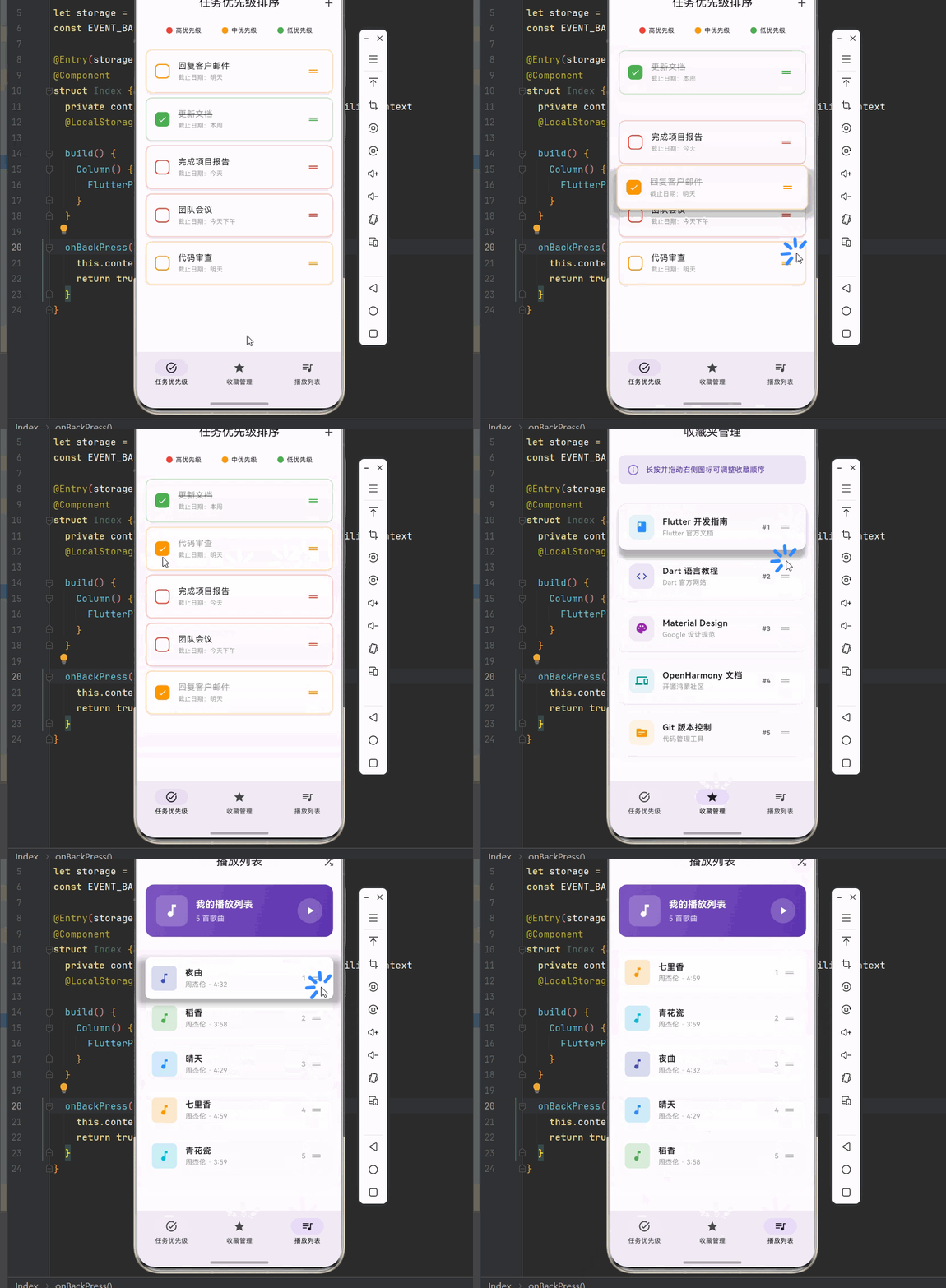
本文通过一个完整的可拖拽排序列表系统案例,深入讲解了 ReorderableListView 组件的使用方法与最佳实践:
任务优先级排序:结合优先级颜色和完成状态,实现任务管理功能。
收藏夹管理:展示收藏项目列表,支持拖拽调整顺序。
播放列表排序:结合播放状态,实现音乐播放列表管理。
自定义代理装饰器 :通过 proxyDecorator 自定义拖拽时的外观效果。
掌握这些技巧,你就能构建出专业级的可拖拽排序功能,提升应用的交互体验。