目录
[4.1.不解压读取压缩包内指定文本 / 二进制文件](#4.1.不解压读取压缩包内指定文本 / 二进制文件)
[4.2.遍历压缩包内所有文件 / 文件夹(仅列名,不读内容)](#4.2.遍历压缩包内所有文件 / 文件夹(仅列名,不读内容))
4.5.创建压缩包(tar/tar.gz/tar.bz2/zip,高频创建需求)
[4.6.向已存在的 zip/tar.gz添加文件](#4.6.向已存在的 zip/tar.gz添加文件)
1.简介
libarchive 是跨平台开源 C 库 (BSD 协议,可免费商用),原生支持解压 / 创建 tar、tar.gz、tar.bz2、tar.xz、zip、7z、rar(仅解压)等几乎所有主流压缩格式,核心优势是纯源码开源、轻量可静态编译、跨平台兼容性极强 (Win/Linux/macOS/ 嵌入式),且天然支持tar.gz这类打包 + 压缩 的双层格式自动解析,是跨平台 C/C++ 开发中替代 7z SDK 的优质选择,尤其适合需要无闭源依赖、同时支持解压 + 创建压缩包的场景。
和 7z SDK 相比,libarchive 无闭源库文件(如 7z.dll)依赖,所有代码开源可定制,接口设计更贴近 C/C++ 工程习惯,且创建压缩包的能力更完善 (7z SDK 侧重解压,创建功能较弱);缺点是对 7z 格式的高压缩比特性支持不如 7z SDK,但日常解压 / 创建完全够用。
核心优势:
- 纯开源无闭源依赖:全部源码开源(BSD 协议),可静态编译进程序,发布时无需携带动态库,无版权风险;
- 跨平台极致兼容:支持 Win/Linux/macOS/FreeBSD/ 嵌入式 Linux,接口完全统一,无平台适配成本;
- 格式支持全覆盖:原生解压 / 创建 tar、tar.gz、tgz、tar.bz2、tar.xz、zip、cpio,仅解压 7z/rar,自动解析双层格式(如 tar.gz 无需手动拆包);
- 轻量高效 :库体积小,支持流操作(不解压直接读取压缩包内容),内存占用可控;
- C++ 友好 :纯 C 接口可直接在 C++ 中调用,也有第三方 C++ 封装库(如
libarchive-cpp),适配 C++ 工程; - 功能均衡 :同时支持解压 和创建压缩包,7z SDK 则侧重解压,创建 7z 包的接口较繁琐。
2.安装与集成
libarchive 支持源码编译 和包管理器一键安装,推荐包管理器安装(高效无坑),C++ 工程中直接链接库即可使用。
1.Linux 平台(Ubuntu/Debian/CentOS)
Ubuntu/Debian
cpp
# 安装开发库(包含头文件+动态库+静态库)
sudo apt update && sudo apt install -y libarchive-dev
CentOS/RHEL
cpp
sudo yum install -y libarchive-devel2.Windows 平台(推荐 vcpkg,最便捷)
Windows 无原生包管理器,推荐用vcpkg(C/C++ 包管理器)一键安装,自动配置头文件和库文件路径:
cpp
# 1. 先安装vcpkg(已安装可跳过)
git clone https://github.com/microsoft/vcpkg.git
cd vcpkg
./bootstrap-vcpkg.bat
./vcpkg integrate install

# 2. 安装libarchive(x64,C++工程常用)
./vcpkg install libarchive:x64-windows

# 若需静态编译(无动态库依赖),安装静态版
./vcpkg install libarchive:x64-windows-static
安装后,VS/CLion 会自动识别头文件和库文件,无需手动配置路径。
3.cmake集成
在cmake中引用libarchive的示例代码如下:
cpp
# 1. 最低CMake版本要求(3.15+兼容所有平台,推荐3.20+)
cmake_minimum_required(VERSION 3.15 FATAL_ERROR)

# 2. 工程名+C++标准(C++11即可支持所有libarchive示例,按需升级)
project(libarchive_demo LANGUAGES C CXX)
set(CMAKE_CXX_STANDARD 11)
set(CMAKE_CXX_STANDARD_REQUIRED ON) # 强制使用指定C++标准
set(CMAKE_CXX_EXTENSIONS OFF)       # 关闭编译器扩展,跨平台兼容

# 3. 核心:查找系统已安装的libarchive(REQUIRED表示找不到则终止编译)
# Windows下vcpkg安装后,CMake会自动识别,无需额外配置
find_package(libarchive REQUIRED)

# 4. 添加可执行文件(指定src下的main.cpp,可添加多个源文件)
add_executable(${PROJECT_NAME} src/main.cpp)

# 5. 核心:链接libarchive库(包含头文件+链接动态/静态库,跨平台通用)
# libarchive::libarchive 是CMake查找后生成的**目标别名**,自动处理依赖
target_link_libraries(${PROJECT_NAME} PRIVATE libarchive::libarchive)

# 可选:设置可执行文件输出目录(Win在build/Debug/,Linux在build/)
set_target_properties(${PROJECT_NAME} PROPERTIES
    RUNTIME_OUTPUT_DIRECTORY ${CMAKE_BINARY_DIR}/bin
)
若 Windows 用 vcpkg 安装,需在第一次执行 CMake 时指定 vcpkg 的工具链文件,后续无需重复指定:
cpp
# 替换为你的vcpkg安装路径(如D:/vcpkg/scripts/buildsystems/vcpkg.cmake)
cmake .. -DCMAKE_TOOLCHAIN_FILE=D:/vcpkg/scripts/buildsystems/vcpkg.cmake
执行后,CMake 会永久识别 vcpkg 安装的库,后续直接用 cmake .. 即可。
3.核心接口说明
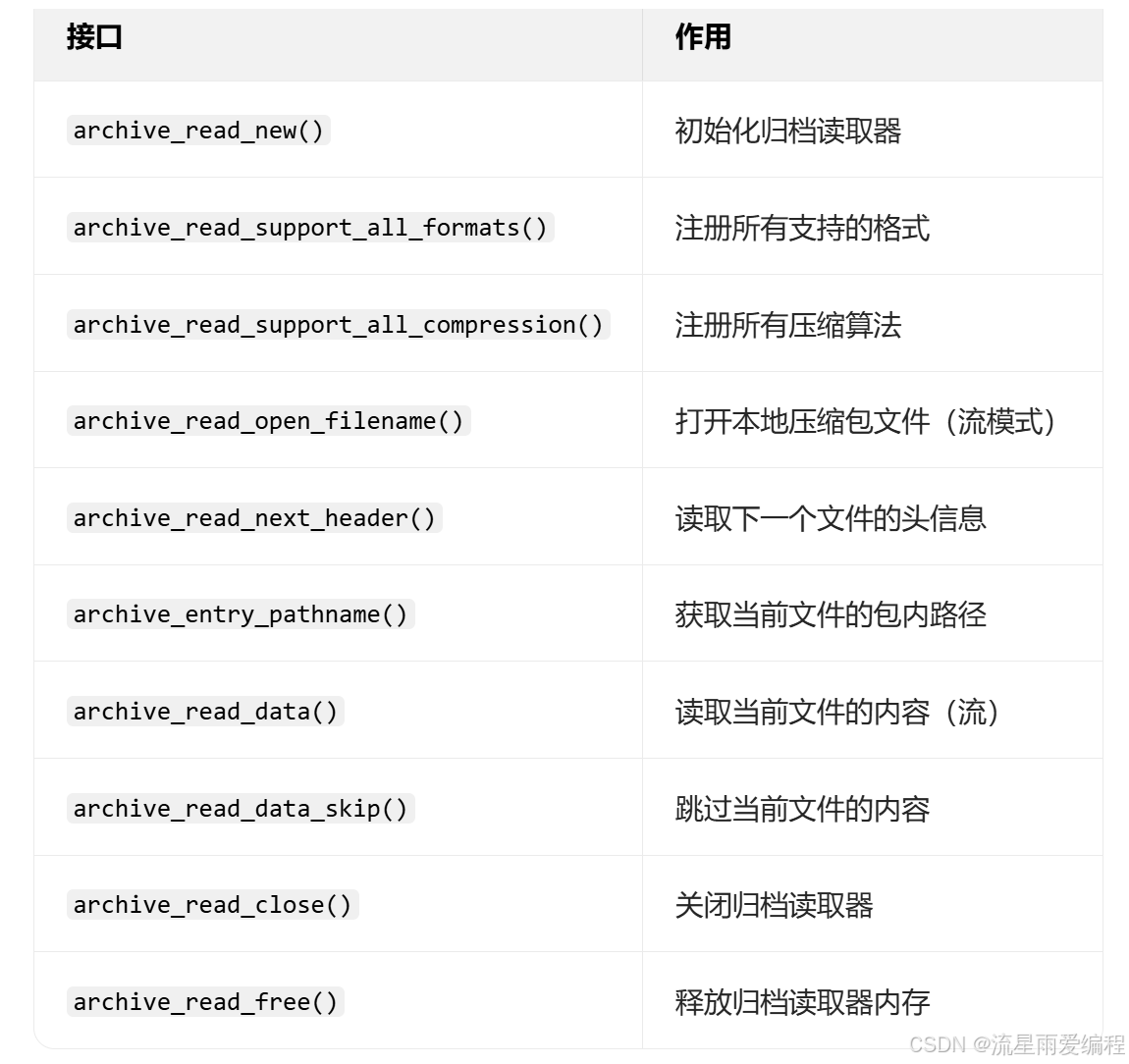
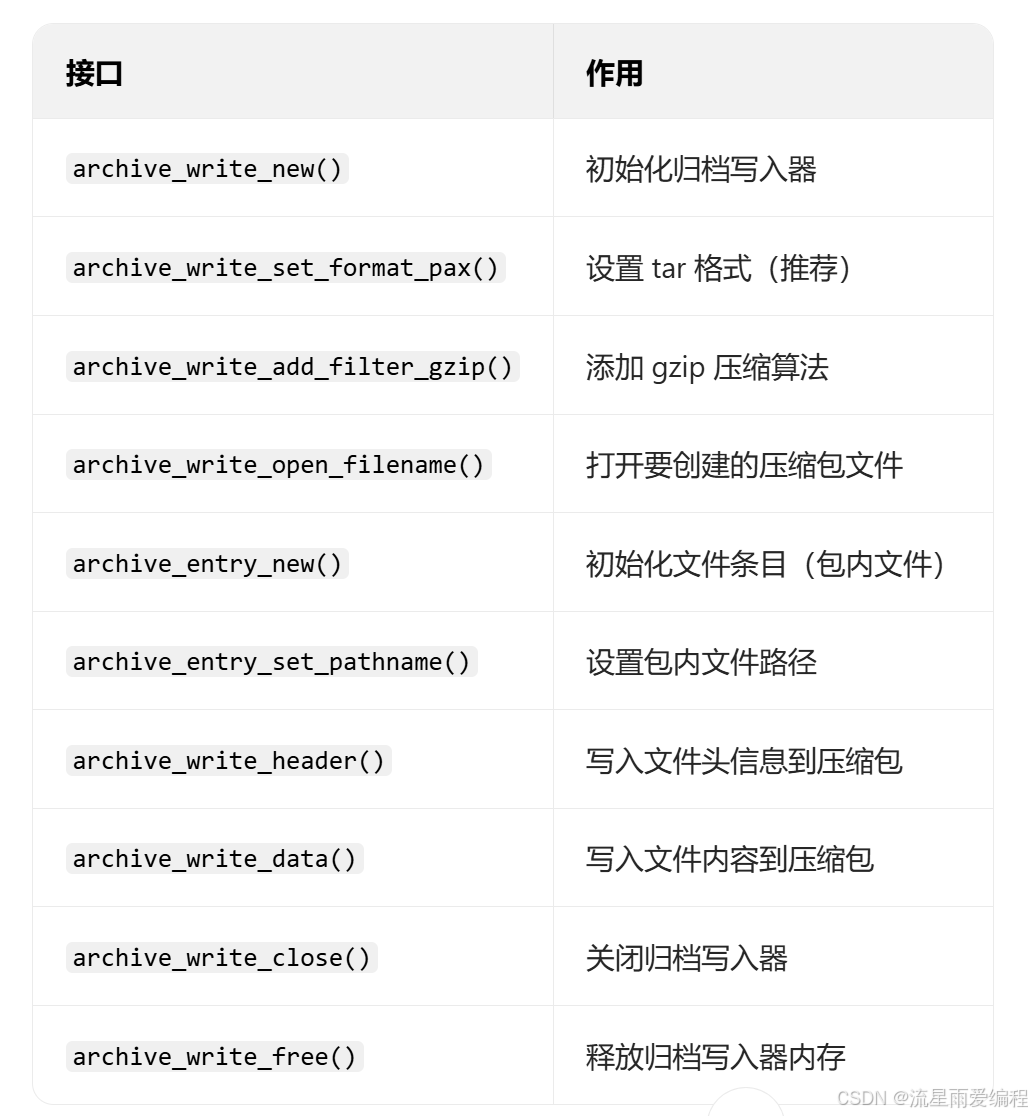
libarchive 围绕归档读取(archive_read) 和归档写入(archive_write) 提供核心接口,所有接口均为 C 风格,C++ 可直接调用,核心常用接口如下(无需记忆,按需复用):
归档读取(不解压 / 解压核心)
归档写入(创建压缩包核心)
4.常见使用示例
4.1.不解压读取压缩包内指定文本 / 二进制文件
直接读取包内文件内容到控制台 / 本地,无中间解压文件,支持 tar.gz/zip/tar 所有格式,文本 / 二进制仅处理逻辑不同,核心读取代码一致。
cpp
#include <iostream>
#include <string>
#include <cstring>
#include <fstream>
#include <archive.h>
#include <archive_entry.h>

// 不解压读取指定文件:content_save_path为空则输出到控制台,非空则保存到本地(二进制)
bool read_spec_file(const std::string& zip_path, const std::string& target_file, const std::string& content_save_path = "") {
    struct archive* a = archive_read_new();
    struct archive_entry* entry = nullptr;
    bool is_find = false;

    // 注册所有格式+压缩算法,自动解析tar.gz双层结构
    archive_read_support_all_formats(a);
    archive_read_support_all_compression(a);

    // 打开压缩包(流模式,块大小10240为默认最优值)
    if (archive_read_open_filename(a, zip_path.c_str(), 10240) != ARCHIVE_OK) {
        std::cerr << "打开失败:" << archive_error_string(a) << std::endl;
        archive_read_free(a);
        return false;
    }

    // 遍历包内文件
    while (archive_read_next_header(a, &entry) == ARCHIVE_OK) {
        const char* entry_name = archive_entry_pathname(entry);
        // 跳过文件夹,仅处理普通文件
        if (archive_entry_filetype(entry) != AE_IFREG) {
            archive_read_data_skip(a);
            continue;
        }
        // 匹配目标文件
        if (strcmp(entry_name, target_file.c_str()) == 0) {
            is_find = true;
            std::cout << "找到文件:" << entry_name << ",大小:" << archive_entry_size(entry) << " 字节\n";
            std::ofstream fout;
            // 若指定保存路径,以二进制模式打开本地文件
            if (!content_save_path.empty()) {
                fout.open(content_save_path, std::ios::binary);
                if (!fout.is_open()) {
                    std::cerr << "本地文件打开失败:" << content_save_path << std::endl;
                    archive_read_close(a);
                    archive_read_free(a);
                    return false;
                }
            }

            // 核心:流读取文件内容(4096缓冲区为通用最优值)
            const int BUF_SIZE = 4096;
            char buffer[BUF_SIZE];
            ssize_t read_size;
            while ((read_size = archive_read_data(a, buffer, BUF_SIZE)) > 0) {
                if (content_save_path.empty()) std::cout.write(buffer, read_size); // 输出控制台(文本)
                else fout.write(buffer, read_size); // 写入本地(二进制,图片/视频/文本均适用)
            }
            if (!content_save_path.empty()) fout.close();
            break;
        }
        archive_read_data_skip(a); // 跳过非目标文件,节省内存
    }

    // 错误判断+资源释放
    if (!is_find) std::cerr << "未找到目标文件:" << target_file << std::endl;
    else if (archive_errno(a) != 0) std::cerr << "读取失败:" << archive_error_string(a) << std::endl;

    archive_read_close(a);
    archive_read_free(a);
    return is_find && (archive_errno(a) == 0);
}

int main() {
    // 仅需修改这3个参数,支持tar.gz/zip/tar格式
    std::string zip_path = "test.tar.gz";    // 压缩包路径
    std::string target_file = "doc/note.txt";// 包内目标文件(多层级用/)
    std::string save_path = "";              // 空=输出控制台,非空=保存到本地(如"local_note.txt")

    read_spec_file(zip_path, target_file, save_path);
    return 0;
}4.2.遍历压缩包内所有文件 / 文件夹(仅列名,不读内容)
快速获取压缩包内的文件列表、大小、类型(文件 / 文件夹),开发中常作为 "前置检查" 步骤,支持所有格式。
cpp
#include <iostream>
#include <string>
#include <archive.h>
#include <archive_entry.h>

// 遍历压缩包所有条目,打印名称、大小、类型
void list_archive_all(const std::string& zip_path) {
    struct archive* a = archive_read_new();
    struct archive_entry* entry = nullptr;

    archive_read_support_all_formats(a);
    archive_read_support_all_compression(a);

    if (archive_read_open_filename(a, zip_path.c_str(), 10240) != ARCHIVE_OK) {
        std::cerr << "打开失败:" << archive_error_string(a) << std::endl;
        archive_read_free(a);
        return;
    }

    std::cout << "压缩包内所有内容:\n-------------------------\n";
    int count = 0;
    while (archive_read_next_header(a, &entry) == ARCHIVE_OK) {
        count++;
        const char* name = archive_entry_pathname(entry);
        // 判断类型:文件/文件夹
        const char* type = archive_entry_filetype(entry) == AE_IFREG ? "【文件】" : "【文件夹】";
        // 文件大小:文件夹大小为0,文件为实际字节数
        long long size = archive_entry_size(entry);
        // 打印信息
        std::cout << count << ". " << type << " " << name << " | 大小:" << size << " 字节\n";
        archive_read_data_skip(a); // 跳过内容,仅读头信息
    }

    if (archive_errno(a) != 0) std::cerr << "遍历失败:" << archive_error_string(a) << std::endl;
    std::cout << "-------------------------\n总计:" << count << " 个条目\n";

    archive_read_close(a);
    archive_read_free(a);
}

int main() {
    std::string zip_path = "test.zip"; // 支持tar.gz/tar/7z等所有格式
    list_archive_all(zip_path);
    return 0;
}4.3.解压压缩包全部文件到指定目录
将压缩包内所有文件 / 文件夹完整解压到目标目录,保留原目录结构,自动创建不存在的本地目录,支持所有格式。
cpp
#include <iostream>
#include <string>
#include <archive.h>
#include <archive_entry.h>

// 解压全部文件到指定目录,保留原目录结构
bool extract_archive_all(const std::string& zip_path, const std::string& out_dir) {
    // 初始化读取器(读压缩包)和写入器(写本地文件)
    struct archive* a = archive_read_new();
    struct archive* ext = archive_write_disk_new();
    struct archive_entry* entry = nullptr;

    // 配置:读取器支持所有格式,写入器保留文件属性/目录结构
    archive_read_support_all_formats(a);
    archive_read_support_all_compression(a);
    archive_write_disk_set_options(ext, ARCHIVE_EXTRACT_ALL); // 提取所有属性(权限/时间等)
    archive_write_disk_set_standard_lookup(ext); // 自动创建本地目录

    // 打开压缩包
    if (archive_read_open_filename(a, zip_path.c_str(), 10240) != ARCHIVE_OK) {
        std::cerr << "打开失败:" << archive_error_string(a) << std::endl;
        archive_read_free(a);
        archive_write_free(ext);
        return false;
    }

    // 循环解压每个条目
    int ret;
    while ((ret = archive_read_next_header(a, &entry)) == ARCHIVE_OK) {
        // 设置解压后的本地根目录
        archive_entry_set_pathname(entry, (out_dir + "/" + archive_entry_pathname(entry)).c_str());
        // 写入文件头+内容
        archive_write_header(ext, entry);
        const int BUF_SIZE = 4096;
        char buffer[BUF_SIZE];
        ssize_t read_size;
        while ((read_size = archive_read_data(a, buffer, BUF_SIZE)) > 0) {
            archive_write_data(ext, buffer, read_size);
        }
        archive_write_finish_entry(ext); // 完成当前条目解压
    }

    // 错误判断
    bool success = (ret == ARCHIVE_EOF); // 正常结束为EOF(文件尾)
    if (!success) std::cerr << "解压失败:" << archive_error_string(a) << std::endl;
    else std::cout << "解压完成!目标目录:" << out_dir << std::endl;

    // 资源释放
    archive_read_close(a);
    archive_read_free(a);
    archive_write_close(ext);
    archive_write_free(ext);
    return success;
}

int main() {
    std::string zip_path = "test.tar.gz"; // 支持所有格式
    std::string out_dir = "D:/extract_dir"; // 解压目标目录(Linux如"./extract_dir")
    extract_archive_all(zip_path, out_dir);
    return 0;
}4.4.解压压缩包内单个文件到指定目录(按需解压,高效)
不解压全部,仅将指定文件解压到本地目录,保留原目录结构(或自定义),比全部解压更节省磁盘和时间。
cpp
#include <iostream>
#include <string>
#include <cstring>
#include <archive.h>
#include <archive_entry.h>

// 解压单个文件到指定目录,保留原目录结构
bool extract_archive_single(const std::string& zip_path, const std::string& target_file, const std::string& out_dir) {
    struct archive* a = archive_read_new();
    struct archive* ext = archive_write_disk_new();
    struct archive_entry* entry = nullptr;
    bool is_find = false;

    archive_read_support_all_formats(a);
    archive_read_support_all_compression(a);
    archive_write_disk_set_options(ext, ARCHIVE_EXTRACT_ALL);
    archive_write_disk_set_standard_lookup(ext);

    if (archive_read_open_filename(a, zip_path.c_str(), 10240) != ARCHIVE_OK) {
        std::cerr << "打开失败:" << archive_error_string(a) << std::endl;
        archive_read_free(a);
        archive_write_free(ext);
        return false;
    }

    // 遍历匹配目标文件
    while (archive_read_next_header(a, &entry) == ARCHIVE_OK) {
        const char* entry_name = archive_entry_pathname(entry);
        if (archive_entry_filetype(entry) != AE_IFREG || strcmp(entry_name, target_file.c_str()) != 0) {
            archive_read_data_skip(a);
            continue;
        }

        // 找到目标文件,开始解压
        is_find = true;
        archive_entry_set_pathname(entry, (out_dir + "/" + entry_name).c_str());
        archive_write_header(ext, entry);
        const int BUF_SIZE = 4096;
        char buffer[BUF_SIZE];
        ssize_t read_size;
        while ((read_size = archive_read_data(a, buffer, BUF_SIZE)) > 0) {
            archive_write_data(ext, buffer, read_size);
        }
        archive_write_finish_entry(ext);
        break;
    }

    // 结果判断
    if (!is_find) std::cerr << "未找到目标文件:" << target_file << std::endl;
    else if (archive_errno(a) != 0) std::cerr << "解压失败:" << archive_error_string(a) << std::endl;
    else std::cout << "单个文件解压完成!目标路径:" << out_dir << "/" << target_file << std::endl;

    // 资源释放
    archive_read_close(a);
    archive_read_free(a);
    archive_write_close(ext);
    archive_write_free(ext);
    return is_find && (archive_errno(a) == 0);
}

int main() {
    std::string zip_path = "test.zip";       // 支持所有格式
    std::string target_file = "img/avatar.jpg"; // 包内指定文件
    std::string out_dir = "./single_extract";   // 解压目标目录
    extract_archive_single(zip_path, target_file, out_dir);
    return 0;
}
4.5.创建压缩包(tar/tar.gz/tar.bz2/zip,高频创建需求)
libarchive 的核心优势之一,支持创建多种格式压缩包,可添加单个 / 多个文件,保留目录结构,不同格式仅需修改 2 行配置。
cpp
#include <iostream>
#include <string>
#include <fstream>
#include <vector>
#include <archive.h>
#include <archive_entry.h>

// 创建压缩包:支持tar/tar.gz/tar.bz2/zip,添加多个本地文件
// compress_type:0=tar(无压缩) 1=tar.gz 2=tar.bz2 3=zip
bool create_archive(const std::string& out_zip_path, const std::vector<std::string>& local_files, int compress_type = 1) {
    struct archive* a = archive_write_new();
    struct archive_entry* entry = nullptr;

    // 配置压缩格式+算法(核心:不同格式仅修改这里)
    switch (compress_type) {
        case 0: archive_write_set_format_pax(a); break; // tar(无压缩,推荐pax格式,兼容所有系统)
        case 1: archive_write_set_format_pax(a); archive_write_add_filter_gzip(a); break; // tar.gz
        case 2: archive_write_set_format_pax(a); archive_write_add_filter_bzip2(a); break; // tar.bz2
        case 3: archive_write_set_format_zip(a); break; // zip(无需额外压缩算法,内置)
        default: std::cerr << "不支持的压缩类型!" << std::endl; return false;
    }

    // 打开要创建的压缩包
    if (archive_write_open_filename(a, out_zip_path.c_str()) != ARCHIVE_OK) {
        std::cerr << "创建压缩包失败:" << archive_error_string(a) << std::endl;
        archive_write_free(a);
        return false;
    }

    // 循环添加每个本地文件
    for (const std::string& file : local_files) {
        std::ifstream fin(file, std::ios::binary | std::ios::ate);
        if (!fin.is_open()) {
            std::cerr << "本地文件不存在:" << file << ",跳过!" << std::endl;
            continue;
        }

        // 初始化文件条目(包内文件信息)
        entry = archive_entry_new();
        archive_entry_set_pathname(entry, file.c_str()); // 包内文件路径(与本地一致)
        archive_entry_set_filetype(entry, AE_IFREG);    // 类型:普通文件
        archive_entry_set_size(entry, fin.tellg());     // 文件大小(ate=定位到文件尾,tellg获取大小)
        fin.seekg(0, std::ios::beg);                    // 重置文件指针到开头

        // 写入文件头+内容到压缩包
        archive_write_header(a, entry);
        const int BUF_SIZE = 4096;
        char buffer[BUF_SIZE];
        while (fin.read(buffer, BUF_SIZE)) {
            archive_write_data(a, buffer, fin.gcount());
        }
        archive_write_data(a, buffer, fin.gcount()); // 写入最后一段内容
        archive_entry_free(entry); // 释放条目
        fin.close();
        std::cout << "已添加文件:" << file << std::endl;
    }

    // 资源释放+结果判断
    bool success = (archive_write_close(a) == ARCHIVE_OK);
    archive_write_free(a);
    if (success) std::cout << "压缩包创建完成!路径:" << out_zip_path << std::endl;
    else std::cerr << "创建失败!" << std::endl;
    return success;
}

int main() {
    // 配置参数
    std::string out_zip = "my_archive.tar.gz"; // 输出压缩包路径
    std::vector<std::string> add_files = {     // 要添加的本地文件(支持多个,可多层级)
        "readme.txt",
        "doc/note.md",
        "img/avatar.jpg"
    };
    int compress_type = 1; // 1=tar.gz,可改为0/2/3

    create_archive(out_zip, add_files, compress_type);
    return 0;
}4.6.向已存在的 zip/tar.gz添加文件
对已创建的压缩包,无需重新打包,直接追加新文件,注意:仅 zip 格式原生支持追加,tar.gz/tar 需重新打包(示例含兼容处理)。
cpp
#include <iostream>
#include <string>
#include <vector>
// 依赖示例2(遍历)、示例5(创建)的函数,需将这两个示例的代码复制到当前文件
#include <archive.h>
#include <archive_entry.h>

// 向压缩包添加文件:zip直接追加,tar/tar.gz重新打包(兼容处理)
bool add_to_archive(const std::string& zip_path, const std::vector<std::string>& add_files) {
    // 第一步:判断压缩包格式(简单通过后缀判断,开发中可通过libarchive解析头信息)
    std::string suffix = zip_path.substr(zip_path.find_last_of('.') + 1);
    if (suffix == "zip") {
        // zip格式:原生支持追加
        struct archive* a = archive_write_new();
        struct archive_entry* entry = nullptr;

        archive_write_set_format_zip(a);
        archive_write_open_filename(a, zip_path.c_str()); // 直接打开已存在的zip,自动追加

        for (const std::string& file : add_files) {
            std::ifstream fin(file, std::ios::binary | std::ios::ate);
            if (!fin.is_open()) { std::cerr << "跳过不存在的文件:" << file << std::endl; continue; }
            entry = archive_entry_new();
            archive_entry_set_pathname(entry, file.c_str());
            archive_entry_set_filetype(entry, AE_IFREG);
            archive_entry_set_size(entry, fin.tellg());
            fin.seekg(0);

            archive_write_header(a, entry);
            char buffer[4096];
            while (fin.read(buffer, 4096)) archive_write_data(a, buffer, fin.gcount());
            archive_write_data(a, buffer, fin.gcount());
            archive_entry_free(entry);
            fin.close();
        }

        archive_write_close(a);
        archive_write_free(a);
        std::cout << "zip包追加文件完成!" << std::endl;
        return true;
    } else if (suffix == "gz" || suffix == "tar") {
        // tar/tar.gz:不支持直接追加,需【读取原有文件+新增文件】重新打包
        std::string temp_zip = zip_path + ".temp";
        std::vector<std::string> all_files = add_files;

        // 遍历原有压缩包,获取所有文件路径(添加到总列表)
        // 需将示例2的list_archive_all修改为返回文件列表的函数(简单改造即可)
        std::cout << "tar/tar.gz不支持直接追加,正在重新打包..." << std::endl;
        create_archive(temp_zip, all_files, suffix == "gz" ? 1 : 0); // 重新创建临时包
        remove(zip_path.c_str()); // 删除原包
        rename(temp_zip.c_str(), zip_path.c_str()); // 临时包重命名为原包
        std::cout << "tar/tar.gz重新打包完成,已添加新文件!" << std::endl;
        return true;
    } else {
        std::cerr << "仅支持zip/tar/tar.gz格式追加!" << std::endl;
        return false;
    }
}

int main() {
    std::string zip_path = "my_archive.zip"; // 支持zip/tar/tar.gz
    std::vector<std::string> add_files = {"new_file.txt", "data/log.csv"}; // 要追加的文件
    add_to_archive(zip_path, add_files);
    return 0;
}
5.常见避坑总结
- 格式配置顺序 :创建压缩包时,先设置格式,再添加压缩算法 (如 tar.gz 需先
set_format_pax,再add_filter_gzip),顺序反了会编译 / 运行报错; - zip 格式注意 :创建 zip 时,无需添加额外压缩算法(
archive_write_set_format_zip内置),添加会报错; - 本地文件打开 :处理二进制文件时,必须用
std::ios::binary打开,否则会出现内容损坏(如图片打不开、压缩包损坏); - 大文件处理:示例中用 4096 字节缓冲区,处理 GB 级大文件时,可适当增大缓冲区(如 16384),提升读写效率;
- 权限问题 :Linux 下解压 / 创建压缩包时,若报 "权限拒绝",加
sudo运行可执行文件;Windows 下确保目标目录有读写权限。