文章目录
- [一、源 和 Channels的介绍](#一、源 和 Channels的介绍)
- 二、国内镜像
- 三、配置方式
- 四、举例:将私有源修改为阿里源
-
- 0.阿里源
- 1.每台机器都要修改3个文件
-
- (1)复制.1的/etc/apt/sources.list
- (2)复制.1的/etc/resolv.conf
- [(3)etc/hosts 添加 112.15.7.51 mirrors.aliyun.com](#(3)etc/hosts 添加 112.15.7.51 mirrors.aliyun.com)
一、源 和 Channels的介绍
1.软件源 (Source/Repository)
源(Source/Repository),是存放软件包的服务器地址,包含软件包的元数据(metadata)和实际文件。
在Linux中,"源"通常指软件源(Software Repository),也称为软件仓库,是Linux系统用于获取、安装、更新和管理软件包的核心机制。它本质上是一个存储了预编译软件包、依赖信息和元数据的服务器或镜像站点,通过包管理器(如APT、YUM、DNF等)进行访问。
2.频道 (Channels)
Channel(频道),是源内的分类目录或逻辑分组,可以理解为"软件包分类"或"仓库"。
常见的Channels:
| Channel | 维护方 | 特点 | 适用场景 | 用途 |
|---|---|---|---|---|
defaults |
Anaconda Inc. | 稳定、经过测试 | 通用,推荐新手 | Anaconda官方维护的包,最稳定 |
conda-forge |
社区 | 最新、包最全 | 需要新版包时 | 社区维护的包,最新,最全 |
pytorch |
Meta | PyTorch官方 | 深度学习 | PyTorch官方包 |
nvidia |
NVIDIA | CUDA相关 | GPU计算 | NVIDIA的CUDA包 |
pkgs/main |
Anaconda | 核心包 | 基础Python环境 | |
pkgs/free |
Anaconda | 已废弃的旧版免费包 | 不要用 |
3.源和Channels的关系
bash
源(服务器)
    └── channels(分类目录)
            └── 具体的软件包(python=3.8, numpy等)

例如:
mirrors.tuna.tsinghua.edu.cn(清华源)
    ├── anaconda/pkgs/main(channel)
    ├── anaconda/pkgs/free(channel,已废弃)
    └── anaconda/cloud/pytorch(channel)
二、国内镜像
1.国内常用镜像一览
| 镜像 | 地址 | 状态 |
|---|---|---|
| 清华 | https://mirrors.tuna.tsinghua.edu.cn/anaconda/... |
主流,但free已死 |
| 中科大 | https://mirrors.ustc.edu.cn/anaconda/... |
稳定 |
| 阿里云 | https://mirrors.aliyun.com/anaconda/... |
较快 |
| 上海交大 | https://mirror.sjtu.edu.cn/anaconda/... |
可用 |
2.清华源和Channels
(1)清华源
bash
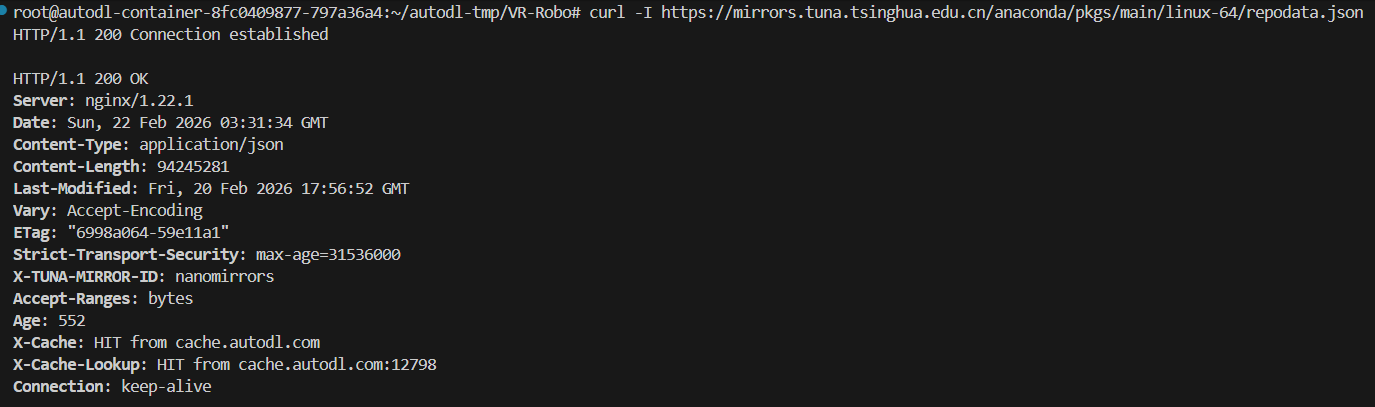
mirrors.tuna.tsinghua.edu.cn测试能否连上清华源:
bash
curl -I https://mirrors.tuna.tsinghua.edu.cn/anaconda/pkgs/main/linux-64/repodata.json成功如图:
(2)清华源的Channels
pkgs/main 是正常的,但你的错误是因为 pkgs/free 这个channel已经死了
清华镜像的结构:
bash
├── pkgs/main          ← 对应官方 pkgs/main
├── pkgs/free          ← 对应官方 pkgs/free(已废弃)
├── cloud/conda-forge  ← 对应 conda-forge
├── cloud/pytorch      ← 对应 pytorch
三、配置方式
1.配置文件位置
bash
~/.condarc          # 用户配置(优先级最高)
/root/.condarc      # root用户配置
/etc/conda/condarc  # 系统全局配置
删除旧的配置:
bash
# 删除旧的配置文件
rm -f ~/.condarc
2.配置格式(YAML)
yaml
channels:
  - https://mirrors.tuna.tsinghua.edu.cn/anaconda/cloud/pytorch
  - https://mirrors.tuna.tsinghua.edu.cn/anaconda/pkgs/main
  - defaults

show_channel_urls: true    # 显示包从哪个channel下载
channel_priority: strict   # 严格按channel顺序
四、举例:将私有源修改为阿里源
0.阿里源
http://mirrors.aliyun.com/ubuntu/ 中的 mirrors 即表示这是阿里云提供的Ubuntu源镜像。
1.每台机器都要修改3个文件
(1)复制.1的/etc/apt/sources.list
bash
deb https://mirrors.aliyun.com/ubuntu/ focal main restricted universe multiverse
deb-src https://mirrors.aliyun.com/ubuntu/ focal main restricted universe multiverse

deb https://mirrors.aliyun.com/ubuntu/ focal-security main restricted universe multiverse
deb-src https://mirrors.aliyun.com/ubuntu/ focal-security main restricted universe multiverse

deb https://mirrors.aliyun.com/ubuntu/ focal-updates main restricted universe multiverse
deb-src https://mirrors.aliyun.com/ubuntu/ focal-updates main restricted universe multiverse

# deb https://mirrors.aliyun.com/ubuntu/ focal-proposed main restricted universe multiverse
# deb-src https://mirrors.aliyun.com/ubuntu/ focal-proposed main restricted universe multiverse

deb https://mirrors.aliyun.com/ubuntu/ focal-backports main restricted universe multiverse
deb-src https://mirrors.aliyun.com/ubuntu/ focal-backports main restricted universe multiverse
(2)复制.1的/etc/resolv.conf
bash
# Generated by NetworkManager
nameserver 10.1.4.210
(3)etc/hosts 添加 112.15.7.51 mirrors.aliyun.com
/etc/hosts最后一行添加:
bash
112.15.7.51 mirrors.aliyun.com即:
bash
127.0.0.1 localhost
127.0.1.1 ubuntu
112.15.7.51 mirrors.aliyun.com

# The following lines are desirable for IPv6 capable hosts
::1     ip6-localhost ip6-loopback
fe00::0 ip6-localnet
ff00::0 ip6-mcastprefix
ff02::1 ip6-allnodes
ff02::2 ip6-allrouters
127.0.0.1 hza-peg-blt-01
改为
bash
127.0.0.1 localhost
127.0.1.1 ubuntu
112.15.7.51 mirrors.aliyun.com

# The following lines are desirable for IPv6 capable hosts
::1     ip6-localhost ip6-loopback
fe00::0 ip6-localnet
ff00::0 ip6-mcastprefix
ff02::1 ip6-allnodes
ff02::2 ip6-allrouters
127.0.0.1 hza-peg-blt-01
112.15.7.51 mirrors.aliyun.com