欢迎加入开源鸿蒙跨平台社区:https://openharmonycrossplatform.csdn.net
一、Isolate 架构深度解析
在 Flutter 中,Dart 是单线程执行的,但通过 Isolate 可以实现真正的并行计算。每个 Isolate 都有自己独立的内存堆和事件循环,通过消息传递进行通信。理解这套架构的底层原理,是构建高性能并发系统的基础。
📱 1.1 Flutter Isolate 架构
Flutter 的 Isolate 系统由多个核心层次组成,每一层都有其特定的职责:
┌─────────────────────────────────────────────────────────────────┐
│                      应用层 (Application Layer)                  │
│  ┌─────────────────────────────────────────────────────────┐    │
│  │  Isolate, Compute, IsolateSpawn...                      │    │
│  └─────────────────────────────────────────────────────────┘    │
│                              │                                   │
│                              ▼                                   │
│  ┌─────────────────────────────────────────────────────────┐    │
│  │              消息传递层 (Message Layer)                  │    │
│  │  SendPort, ReceivePort, TransferableTypedData...        │    │
│  └─────────────────────────────────────────────────────────┘    │
│                              │                                   │
│                              ▼                                   │
│  ┌─────────────────────────────────────────────────────────┐    │
│  │              事件循环层 (Event Loop Layer)               │    │
│  │  EventQueue, MicrotaskQueue, Timer...                   │    │
│  └─────────────────────────────────────────────────────────┘    │
│                              │                                   │
│                              ▼                                   │
│  ┌─────────────────────────────────────────────────────────┐    │
│  │              虚拟机层 (VM Layer)                         │    │
│  │  Dart VM, Isolate Runtime, Memory Management...         │    │
│  └─────────────────────────────────────────────────────────┘    │
└─────────────────────────────────────────────────────────────────┘
🔬 1.2 Isolate 核心概念详解
Flutter Isolate 系统的核心概念包括以下几个部分:
Isolate(隔离区)
Isolate 是 Dart 并发编程的基本单位,每个 Isolate 都有独立的内存空间。
dart
Isolate isolate = await Isolate.spawn(entryPoint, message);SendPort(发送端口)
SendPort 用于向 Isolate 发送消息,是单向通信的发送端。
dart
sendPort.send(data);ReceivePort(接收端口)
ReceivePort 用于接收来自其他 Isolate 的消息。
dart
ReceivePort receivePort = ReceivePort();
receivePort.listen((message) {
  print('Received: $message');
});
🎯 1.3 单线程与多线程对比
理解 Dart 单线程模型与 Isolate 多线程模型的区别:
┌─────────────────────────────────────────────────────────────┐
│                    Dart 单线程模型                           │
├─────────────────────────────────────────────────────────────┤
│                                                              │
│  ┌─────────────────────────────────────────────────────┐    │
│  │  主线程 (Main Thread)                                │    │
│  │  ┌─────────────────────────────────────────────┐    │    │
│  │  │  Event Loop                                  │    │    │
│  │  │  ┌─────┐ ┌─────┐ ┌─────┐ ┌─────┐           │    │    │
│  │  │  │ E1  │→│ E2  │→│ E3  │→│ E4  │→ ...      │    │    │
│  │  │  └─────┘ └─────┘ └─────┘ └─────┘           │    │    │
│  │  └─────────────────────────────────────────────┘    │    │
│  │                                                      │    │
│  │  UI 渲染 + 事件处理 + 异步任务 (串行执行)            │    │
│  └─────────────────────────────────────────────────────┘    │
│                                                              │
│  问题: 耗时任务会阻塞 UI 渲染                               │
│                                                              │
└─────────────────────────────────────────────────────────────┘

┌─────────────────────────────────────────────────────────────┐
│                    Isolate 多线程模型                        │
├─────────────────────────────────────────────────────────────┤
│                                                              │
│  ┌─────────────────────────────────────────────────────┐    │
│  │  主 Isolate (Main Isolate)                           │    │
│  │  ┌─────────────────────────────────────────────┐    │    │
│  │  │  UI 渲染 + 事件处理                          │    │    │
│  │  └─────────────────────────────────────────────┘    │    │
│  └─────────────────────────────────────────────────────┘    │
│           │                    │                             │
│           │ SendPort           │ SendPort                    │
│           ▼                    ▼                             │
│  ┌─────────────────┐  ┌─────────────────┐                   │
│  │  Worker Isolate │  │  Worker Isolate │                   │
│  │  ┌───────────┐  │  │  ┌───────────┐  │                   │
│  │  │ 耗时任务1 │  │  │  │ 耗时任务2 │  │                   │
│  │  └───────────┘  │  │  └───────────┘  │                   │
│  └─────────────────┘  └─────────────────┘                   │
│                                                              │
│  优势: 耗时任务不阻塞 UI,真正的并行执行                     │
│                                                              │
└─────────────────────────────────────────────────────────────┘
并发模型对比:
| 特性 | 单线程 (async/await) | Isolate 多线程 |
|---|---|---|
| 内存共享 | 是 | 否 |
| 通信方式 | 直接访问 | 消息传递 |
| 适用场景 | I/O 密集型 | CPU 密集型 |
| 创建开销 | 无 | 较大 |
| 数据安全 | 需要同步 | 天然安全 |
| 调试难度 | 简单 | 较复杂 |
二、基础 Isolate 实现
基础 Isolate 实现包括 Isolate 创建、消息传递和生命周期管理。
👆 2.1 简单 Isolate 创建
dart
import 'dart:async';
import 'dart:isolate';
import 'package:flutter/material.dart';

/// 简单 Isolate 示例
class SimpleIsolateDemo extends StatefulWidget {
  const SimpleIsolateDemo({super.key});

  @override
  State<SimpleIsolateDemo> createState() => _SimpleIsolateDemoState();
}

class _SimpleIsolateDemoState extends State<SimpleIsolateDemo> {
  String _result = '等待执行';
  bool _isRunning = false;

  Future<void> _runIsolate() async {
    setState(() {
      _isRunning = true;
      _result = 'Isolate 运行中...';
    });

    final receivePort = ReceivePort();

    await Isolate.spawn(
      _isolateEntryPoint,
      receivePort.sendPort,
    );

    receivePort.listen((message) {
      if (message is String) {
        setState(() {
          _result = message;
          _isRunning = false;
        });
        receivePort.close();
      }
    });
  }

  static void _isolateEntryPoint(SendPort sendPort) {
    int sum = 0;
    for (int i = 0; i < 100000000; i++) {
      sum += i;
    }
    sendPort.send('计算完成: $sum');
  }

  @override
  Widget build(BuildContext context) {
    return Scaffold(
      appBar: AppBar(title: const Text('简单 Isolate')),
      body: Center(
        child: Column(
          mainAxisAlignment: MainAxisAlignment.center,
          children: [
            Text(
              _result,
              style: const TextStyle(fontSize: 18),
              textAlign: TextAlign.center,
            ),
            const SizedBox(height: 24),
            ElevatedButton(
              onPressed: _isRunning ? null : _runIsolate,
              child: _isRunning
                  ? const SizedBox(
                      width: 20,
                      height: 20,
                      child: CircularProgressIndicator(strokeWidth: 2),
                    )
                  : const Text('启动 Isolate'),
            ),
          ],
        ),
      ),
    );
  }
}
🔄 2.2 双向通信 Isolate
实现主 Isolate 与 Worker Isolate 之间的双向通信。
dart
/// 双向通信 Isolate 示例
class BidirectionalIsolateDemo extends StatefulWidget {
  const BidirectionalIsolateDemo({super.key});

  @override
  State<BidirectionalIsolateDemo> createState() =>
      _BidirectionalIsolateDemoState();
}

class _BidirectionalIsolateDemoState extends State<BidirectionalIsolateDemo> {
  Isolate? _isolate;
  SendPort? _workerSendPort;
  final ReceivePort _mainReceivePort = ReceivePort();
  final List<String> _messages = [];
  bool _isConnected = false;

  @override
  void initState() {
    super.initState();
    _setupMainReceivePort();
  }

  void _setupMainReceivePort() {
    _mainReceivePort.listen((message) {
      if (message is SendPort) {
        _workerSendPort = message;
        setState(() => _isConnected = true);
        _addMessage('Isolate 已连接');
      } else if (message is Map) {
        _addMessage('收到: ${message['type']} - ${message['data']}');
      } else if (message is String) {
        _addMessage(message);
      }
    });
  }

  Future<void> _spawnIsolate() async {
    _isolate = await Isolate.spawn(
      _workerEntryPoint,
      _mainReceivePort.sendPort,
    );
    _addMessage('Isolate 已创建');
  }

  static void _workerEntryPoint(SendPort mainSendPort) {
    final workerReceivePort = ReceivePort();
    mainSendPort.send(workerReceivePort.sendPort);

    workerReceivePort.listen((message) {
      if (message is Map) {
        switch (message['type']) {
          case 'calculate':
            final result = _performCalculation(message['data']);
            mainSendPort.send({
              'type': 'result',
              'data': result,
            });
            break;
          case 'ping':
            mainSendPort.send({
              'type': 'pong',
              'data': message['data'],
            });
            break;
          case 'shutdown':
            workerReceivePort.close();
            Isolate.exit();
            break;
        }
      }
    });
  }

  static int _performCalculation(int n) {
    int sum = 0;
    for (int i = 0; i < n; i++) {
      sum += i;
    }
    return sum;
  }

  void _sendMessage(String type, dynamic data) {
    if (_workerSendPort != null) {
      _workerSendPort!.send({'type': type, 'data': data});
      _addMessage('发送: $type - $data');
    }
  }

  void _addMessage(String message) {
    setState(() {
      _messages.insert(0, '${DateTime.now().toString().substring(11, 19)} - $message');
      if (_messages.length > 20) {
        _messages.removeLast();
      }
    });
  }

  void _shutdownIsolate() {
    if (_workerSendPort != null) {
      _workerSendPort!.send({'type': 'shutdown', 'data': null});
      setState(() {
        _isConnected = false;
        _workerSendPort = null;
      });
    }
    _isolate?.kill(priority: Isolate.immediate);
    _isolate = null;
    _addMessage('Isolate 已关闭');
  }

  @override
  void dispose() {
    _shutdownIsolate();
    _mainReceivePort.close();
    super.dispose();
  }

  @override
  Widget build(BuildContext context) {
    return Scaffold(
      appBar: AppBar(title: const Text('双向通信 Isolate')),
      body: Column(
        children: [
          Container(
            padding: const EdgeInsets.all(16),
            color: _isConnected ? Colors.green.shade50 : Colors.red.shade50,
            child: Row(
              mainAxisAlignment: MainAxisAlignment.spaceBetween,
              children: [
                Text(
                  _isConnected ? '已连接' : '未连接',
                  style: TextStyle(
                    color: _isConnected ? Colors.green : Colors.red,
                    fontWeight: FontWeight.bold,
                  ),
                ),
                if (!_isConnected)
                  ElevatedButton(
                    onPressed: _spawnIsolate,
                    child: const Text('创建 Isolate'),
                  ),
                if (_isConnected)
                  ElevatedButton(
                    onPressed: _shutdownIsolate,
                    style: ElevatedButton.styleFrom(backgroundColor: Colors.red),
                    child: const Text('关闭'),
                  ),
              ],
            ),
          ),
          if (_isConnected)
            Padding(
              padding: const EdgeInsets.all(8),
              child: Row(
                mainAxisAlignment: MainAxisAlignment.spaceEvenly,
                children: [
                  ElevatedButton(
                    onPressed: () => _sendMessage('ping', 'hello'),
                    child: const Text('Ping'),
                  ),
                  ElevatedButton(
                    onPressed: () => _sendMessage('calculate', 10000000),
                    child: const Text('计算'),
                  ),
                ],
              ),
            ),
          Expanded(
            child: ListView.builder(
              itemCount: _messages.length,
              itemBuilder: (context, index) {
                return ListTile(
                  dense: true,
                  title: Text(_messages[index]),
                );
              },
            ),
          ),
        ],
      ),
    );
  }
}
🌊 2.3 Isolate 生命周期管理
完整的 Isolate 生命周期管理包括创建、运行、暂停、恢复和销毁。
dart
/// Isolate 生命周期管理示例
class IsolateLifecycleDemo extends StatefulWidget {
  const IsolateLifecycleDemo({super.key});

  @override
  State<IsolateLifecycleDemo> createState() => _IsolateLifecycleDemoState();
}

class _IsolateLifecycleDemoState extends State<IsolateLifecycleDemo> {
  Isolate? _isolate;
  IsolateStatus _status = IsolateStatus.notCreated;
  final ReceivePort _receivePort = ReceivePort();
  SendPort? _workerSendPort;
  int _counter = 0;

  @override
  void initState() {
    super.initState();
    _receivePort.listen((message) {
      if (message is SendPort) {
        _workerSendPort = message;
        setState(() => _status = IsolateStatus.running);
      } else if (message is int) {
        setState(() => _counter = message);
      }
    });
  }

  Future<void> _createIsolate() async {
    setState(() => _status = IsolateStatus.creating);
    _isolate = await Isolate.spawn(
      _counterWorker,
      _receivePort.sendPort,
    );
  }

  static void _counterWorker(SendPort mainPort) {
    final workerPort = ReceivePort();
    mainPort.send(workerPort.sendPort);

    int counter = 0;
    Timer.periodic(const Duration(seconds: 1), (timer) {
      counter++;
      mainPort.send(counter);
    });

    workerPort.listen((message) {
      if (message == 'pause') {
        // 暂停逻辑
      } else if (message == 'resume') {
        // 恢复逻辑
      } else if (message == 'stop') {
        timer.cancel();
        workerPort.close();
        Isolate.exit();
      }
    });
  }

  void _pauseIsolate() {
    _isolate?.pause();
    setState(() => _status = IsolateStatus.paused);
  }

  void _resumeIsolate() {
    _isolate?.resume(_isolate!.pauseCapability!);
    setState(() => _status = IsolateStatus.running);
  }

  void _killIsolate() {
    _isolate?.kill(priority: Isolate.immediate);
    _isolate = null;
    _workerSendPort = null;
    setState(() {
      _status = IsolateStatus.notCreated;
      _counter = 0;
    });
  }

  @override
  void dispose() {
    _killIsolate();
    _receivePort.close();
    super.dispose();
  }

  @override
  Widget build(BuildContext context) {
    return Scaffold(
      appBar: AppBar(title: const Text('Isolate 生命周期')),
      body: Padding(
        padding: const EdgeInsets.all(16),
        child: Column(
          children: [
            _buildStatusCard(),
            const SizedBox(height: 24),
            Text(
              '计数器: $_counter',
              style: const TextStyle(fontSize: 48, fontWeight: FontWeight.bold),
            ),
            const SizedBox(height: 24),
            _buildControlButtons(),
          ],
        ),
      ),
    );
  }

  Widget _buildStatusCard() {
    Color statusColor;
    String statusText;

    switch (_status) {
      case IsolateStatus.notCreated:
        statusColor = Colors.grey;
        statusText = '未创建';
        break;
      case IsolateStatus.creating:
        statusColor = Colors.orange;
        statusText = '创建中...';
        break;
      case IsolateStatus.running:
        statusColor = Colors.green;
        statusText = '运行中';
        break;
      case IsolateStatus.paused:
        statusColor = Colors.amber;
        statusText = '已暂停';
        break;
    }

    return Card(
      child: Padding(
        padding: const EdgeInsets.all(16),
        child: Row(
          mainAxisAlignment: MainAxisAlignment.spaceBetween,
          children: [
            Row(
              children: [
                Container(
                  width: 12,
                  height: 12,
                  decoration: BoxDecoration(
                    color: statusColor,
                    shape: BoxShape.circle,
                  ),
                ),
                const SizedBox(width: 12),
                Text(
                  statusText,
                  style: const TextStyle(fontSize: 18, fontWeight: FontWeight.bold),
                ),
              ],
            ),
            Icon(
              _status == IsolateStatus.running
                  ? Icons.play_circle_filled
                  : _status == IsolateStatus.paused
                      ? Icons.pause_circle_filled
                      : Icons.radio_button_unchecked,
              color: statusColor,
              size: 32,
            ),
          ],
        ),
      ),
    );
  }

  Widget _buildControlButtons() {
    return Wrap(
      spacing: 12,
      runSpacing: 12,
      alignment: WrapAlignment.center,
      children: [
        ElevatedButton.icon(
          onPressed: _status == IsolateStatus.notCreated ? _createIsolate : null,
          icon: const Icon(Icons.add),
          label: const Text('创建'),
        ),
        ElevatedButton.icon(
          onPressed: _status == IsolateStatus.running ? _pauseIsolate : null,
          icon: const Icon(Icons.pause),
          label: const Text('暂停'),
        ),
        ElevatedButton.icon(
          onPressed: _status == IsolateStatus.paused ? _resumeIsolate : null,
          icon: const Icon(Icons.play_arrow),
          label: const Text('恢复'),
        ),
        ElevatedButton.icon(
          onPressed: _status != IsolateStatus.notCreated ? _killIsolate : null,
          icon: const Icon(Icons.stop),
          label: const Text('销毁'),
          style: ElevatedButton.styleFrom(backgroundColor: Colors.red),
        ),
      ],
    );
  }
}

enum IsolateStatus {
  notCreated,
  creating,
  running,
  paused,
}
三、Compute 函数使用
Compute 是 Flutter 提供的简化版 Isolate API,适合简单的后台计算任务。
📊 3.1 基础 Compute 使用
dart
import 'package:flutter/foundation.dart';

/// Compute 基础示例
class ComputeDemo extends StatefulWidget {
  const ComputeDemo({super.key});

  @override
  State<ComputeDemo> createState() => _ComputeDemoState();
}

class _ComputeDemoState extends State<ComputeDemo> {
  String _result = '等待计算';
  bool _isComputing = false;

  Future<void> _runCompute() async {
    setState(() {
      _isComputing = true;
      _result = '计算中...';
    });

    try {
      final result = await compute(_heavyComputation, 100000000);
      setState(() {
        _result = '计算结果: $result';
      });
    } catch (e) {
      setState(() {
        _result = '计算错误: $e';
      });
    } finally {
      setState(() {
        _isComputing = false;
      });
    }
  }

  static int _heavyComputation(int n) {
    int sum = 0;
    for (int i = 0; i < n; i++) {
      sum += i;
    }
    return sum;
  }

  @override
  Widget build(BuildContext context) {
    return Scaffold(
      appBar: AppBar(title: const Text('Compute 函数')),
      body: Center(
        child: Column(
          mainAxisAlignment: MainAxisAlignment.center,
          children: [
            Text(
              _result,
              style: const TextStyle(fontSize: 18),
              textAlign: TextAlign.center,
            ),
            const SizedBox(height: 24),
            ElevatedButton(
              onPressed: _isComputing ? null : _runCompute,
              child: _isComputing
                  ? const SizedBox(
                      width: 20,
                      height: 20,
                      child: CircularProgressIndicator(strokeWidth: 2),
                    )
                  : const Text('开始计算'),
            ),
          ],
        ),
      ),
    );
  }
}
🎨 3.2 复杂数据处理
使用 Compute 处理复杂的数据结构。
dart
/// 复杂数据处理示例
class ComplexComputeDemo extends StatefulWidget {
  const ComplexComputeDemo({super.key});

  @override
  State<ComplexComputeDemo> createState() => _ComplexComputeDemoState();
}

class _ComplexComputeDemoState extends State<ComplexComputeDemo> {
  List<DataItem> _processedData = [];
  bool _isProcessing = false;
  String _status = '';

  Future<void> _processLargeDataset() async {
    setState(() {
      _isProcessing = true;
      _status = '生成测试数据...';
    });

    final rawData = List.generate(10000, (index) {
      return RawData(
        id: index,
        value: index * 1.5,
        timestamp: DateTime.now().subtract(Duration(seconds: index)),
        category: 'Category ${index % 10}',
      );
    });

    setState(() => _status = '后台处理中...');

    try {
      final result = await compute(_processData, rawData);
      setState(() {
        _processedData = result;
        _status = '处理完成,共 ${result.length} 条数据';
      });
    } catch (e) {
      setState(() => _status = '处理失败: $e');
    } finally {
      setState(() => _isProcessing = false);
    }
  }

  static List<DataItem> _processData(List<RawData> rawData) {
    final Map<String, List<RawData>> grouped = {};

    for (final item in rawData) {
      grouped.putIfAbsent(item.category, () => []).add(item);
    }

    return grouped.entries.map((entry) {
      final values = entry.value.map((e) => e.value).toList();
      values.sort();

      return DataItem(
        category: entry.key,
        count: entry.value.length,
        average: values.reduce((a, b) => a + b) / values.length,
        min: values.first,
        max: values.last,
        sum: values.reduce((a, b) => a + b),
      );
    }).toList()
      ..sort((a, b) => b.sum.compareTo(a.sum));
  }

  @override
  Widget build(BuildContext context) {
    return Scaffold(
      appBar: AppBar(title: const Text('复杂数据处理')),
      body: Column(
        children: [
          Padding(
            padding: const EdgeInsets.all(16),
            child: Column(
              children: [
                Text(
                  _status,
                  style: const TextStyle(fontSize: 16),
                ),
                const SizedBox(height: 12),
                ElevatedButton(
                  onPressed: _isProcessing ? null : _processLargeDataset,
                  child: _isProcessing
                      ? const Row(
                          mainAxisSize: MainAxisSize.min,
                          children: [
                            SizedBox(
                              width: 16,
                              height: 16,
                              child: CircularProgressIndicator(strokeWidth: 2),
                            ),
                            SizedBox(width: 8),
                            Text('处理中...'),
                          ],
                        )
                      : const Text('处理大数据集'),
                ),
              ],
            ),
          ),
          Expanded(
            child: ListView.builder(
              itemCount: _processedData.length,
              itemBuilder: (context, index) {
                final item = _processedData[index];
                return Card(
                  margin: const EdgeInsets.symmetric(horizontal: 16, vertical: 4),
                  child: ListTile(
                    title: Text(item.category),
                    subtitle: Text(
                      '数量: ${item.count} | 平均: ${item.average.toStringAsFixed(2)}',
                    ),
                    trailing: Text(
                      '总和: ${item.sum.toStringAsFixed(0)}',
                      style: const TextStyle(fontWeight: FontWeight.bold),
                    ),
                  ),
                );
              },
            ),
          ),
        ],
      ),
    );
  }
}

class RawData {
  final int id;
  final double value;
  final DateTime timestamp;
  final String category;

  RawData({
    required this.id,
    required this.value,
    required this.timestamp,
    required this.category,
  });
}

class DataItem {
  final String category;
  final int count;
  final double average;
  final double min;
  final double max;
  final double sum;

  DataItem({
    required this.category,
    required this.count,
    required this.average,
    required this.min,
    required this.max,
    required this.sum,
  });
}
🔄 3.3 多任务并行计算
使用多个 Compute 实现并行任务处理。
dart
/// 多任务并行计算示例
class ParallelComputeDemo extends StatefulWidget {
  const ParallelComputeDemo({super.key});

  @override
  State<ParallelComputeDemo> createState() => _ParallelComputeDemoState();
}

class _ParallelComputeDemoState extends State<ParallelComputeDemo> {
  final List<TaskResult> _results = [];
  bool _isRunning = false;
  int _completedTasks = 0;
  int _totalTasks = 0;

  Future<void> _runParallelTasks() async {
    setState(() {
      _isRunning = true;
      _results.clear();
      _completedTasks = 0;
      _totalTasks = 5;
    });

    final tasks = <Future<TaskResult>>[];
    final taskNames = ['任务A', '任务B', '任务C', '任务D', '任务E'];
    final taskSizes = [50000000, 60000000, 70000000, 80000000, 90000000];

    for (int i = 0; i < taskNames.length; i++) {
      tasks.add(_runSingleTask(taskNames[i], taskSizes[i]));
    }

    final results = await Future.wait(tasks);

    setState(() {
      _results.addAll(results);
      _isRunning = false;
    });
  }

  Future<TaskResult> _runSingleTask(String name, int size) async {
    final stopwatch = Stopwatch()..start();

    final result = await compute(_taskComputation, size);

    stopwatch.stop();

    setState(() {
      _completedTasks++;
    });

    return TaskResult(
      name: name,
      result: result,
      duration: stopwatch.elapsedMilliseconds,
    );
  }

  static int _taskComputation(int n) {
    int sum = 0;
    for (int i = 0; i < n; i++) {
      sum += i;
    }
    return sum;
  }

  @override
  Widget build(BuildContext context) {
    return Scaffold(
      appBar: AppBar(title: const Text('多任务并行计算')),
      body: Column(
        children: [
          Padding(
            padding: const EdgeInsets.all(16),
            child: Column(
              children: [
                LinearProgressIndicator(
                  value: _totalTasks > 0 ? _completedTasks / _totalTasks : 0,
                ),
                const SizedBox(height: 8),
                Text(
                  '进度: $_completedTasks / $_totalTasks',
                  style: const TextStyle(fontSize: 16),
                ),
                const SizedBox(height: 12),
                ElevatedButton(
                  onPressed: _isRunning ? null : _runParallelTasks,
                  child: const Text('启动并行任务'),
                ),
              ],
            ),
          ),
          Expanded(
            child: ListView.builder(
              itemCount: _results.length,
              itemBuilder: (context, index) {
                final result = _results[index];
                return Card(
                  margin: const EdgeInsets.symmetric(horizontal: 16, vertical: 4),
                  child: ListTile(
                    leading: CircleAvatar(
                      child: Text(result.name.substring(2)),
                    ),
                    title: Text(result.name),
                    subtitle: Text('耗时: ${result.duration}ms'),
                    trailing: Text(
                      '结果: ${result.result.toStringAsExponential(2)}',
                      style: const TextStyle(fontSize: 12),
                    ),
                  ),
                );
              },
            ),
          ),
        ],
      ),
    );
  }
}

class TaskResult {
  final String name;
  final int result;
  final int duration;

  TaskResult({
    required this.name,
    required this.result,
    required this.duration,
  });
}
四、消息传递机制
🎯 4.1 消息类型与编解码
dart
/// 消息类型与编解码示例
class MessageCodecDemo extends StatefulWidget {
  const MessageCodecDemo({super.key});

  @override
  State<MessageCodecDemo> createState() => _MessageCodecDemoState();
}

class _MessageCodecDemoState extends State<MessageCodecDemo> {
  final ReceivePort _mainPort = ReceivePort();
  SendPort? _workerPort;
  Isolate? _isolate;
  final List<String> _logs = [];

  @override
  void initState() {
    super.initState();
    _setupCommunication();
  }

  void _setupCommunication() {
    _mainPort.listen((message) {
      _addLog('收到消息: ${message.runtimeType}');

      if (message is SendPort) {
        _workerPort = message;
        _addLog('Worker SendPort 已接收');
      } else if (message is _CustomMessage) {
        _addLog('CustomMessage: ${message.content}');
      } else if (message is List<int>) {
        _addLog('List<int>: 长度 ${message.length}');
      } else if (message is Map) {
        _addLog('Map: ${message.keys.join(", ")}');
      } else if (message is TransferableTypedData) {
        _addLog('TransferableTypedData 已接收');
      }
    });
  }

  Future<void> _spawnIsolate() async {
    _isolate = await Isolate.spawn(
      _messageWorker,
      _mainPort.sendPort,
    );
    _addLog('Isolate 已创建');
  }

  static void _messageWorker(SendPort mainPort) {
    final workerPort = ReceivePort();
    mainPort.send(workerPort.sendPort);

    workerPort.listen((message) {
      if (message is _CustomMessage) {
        mainPort.send(_CustomMessage(
          content: 'Echo: ${message.content}',
          timestamp: DateTime.now(),
        ));
      } else if (message is String) {
        mainPort.send('Received: $message');
      } else if (message is List<int>) {
        final sum = message.reduce((a, b) => a + b);
        mainPort.send({'sum': sum, 'count': message.length});
      }
    });
  }

  void _sendCustomMessage() {
    if (_workerPort != null) {
      _workerPort!.send(_CustomMessage(
        content: 'Hello from Main',
        timestamp: DateTime.now(),
      ));
      _addLog('发送 CustomMessage');
    }
  }

  void _sendList() {
    if (_workerPort != null) {
      _workerPort!.send(List.generate(100, (i) => i));
      _addLog('发送 List<int>');
    }
  }

  void _sendString() {
    if (_workerPort != null) {
      _workerPort!.send('Hello Worker');
      _addLog('发送 String');
    }
  }

  void _addLog(String log) {
    setState(() {
      _logs.insert(0, '${DateTime.now().toString().substring(11, 19)} - $log');
      if (_logs.length > 30) _logs.removeLast();
    });
  }

  @override
  void dispose() {
    _isolate?.kill();
    _mainPort.close();
    super.dispose();
  }

  @override
  Widget build(BuildContext context) {
    return Scaffold(
      appBar: AppBar(title: const Text('消息传递机制')),
      body: Column(
        children: [
          Padding(
            padding: const EdgeInsets.all(8),
            child: Wrap(
              spacing: 8,
              children: [
                ElevatedButton(
                  onPressed: _isolate == null ? _spawnIsolate : null,
                  child: const Text('创建 Isolate'),
                ),
                ElevatedButton(
                  onPressed: _workerPort != null ? _sendCustomMessage : null,
                  child: const Text('发送对象'),
                ),
                ElevatedButton(
                  onPressed: _workerPort != null ? _sendList : null,
                  child: const Text('发送列表'),
                ),
                ElevatedButton(
                  onPressed: _workerPort != null ? _sendString : null,
                  child: const Text('发送字符串'),
                ),
              ],
            ),
          ),
          Expanded(
            child: ListView.builder(
              itemCount: _logs.length,
              itemBuilder: (context, index) {
                return ListTile(
                  dense: true,
                  title: Text(_logs[index], style: const TextStyle(fontSize: 12)),
                );
              },
            ),
          ),
        ],
      ),
    );
  }
}

class _CustomMessage {
  final String content;
  final DateTime timestamp;

  _CustomMessage({required this.content, required this.timestamp});
}
📐 4.2 TransferableTypedData 高效传输
dart
import 'dart:typed_data';

/// TransferableTypedData 高效传输示例
class TransferableDataDemo extends StatefulWidget {
  const TransferableDataDemo({super.key});

  @override
  State<TransferableDataDemo> createState() => _TransferableDataDemoState();
}

class _TransferableDataDemoState extends State<TransferableDataDemo> {
  final ReceivePort _mainPort = ReceivePort();
  SendPort? _workerPort;
  Isolate? _isolate;
  String _status = '';
  int _dataSize = 1000000;

  @override
  void initState() {
    super.initState();
    _mainPort.listen((message) {
      if (message is SendPort) {
        _workerPort = message;
        setState(() => _status = 'Isolate 已就绪');
      } else if (message is String) {
        setState(() => _status = message);
      }
    });
  }

  Future<void> _spawnIsolate() async {
    setState(() => _status = '创建 Isolate...');
    _isolate = await Isolate.spawn(
      _dataWorker,
      _mainPort.sendPort,
    );
  }

  static void _dataWorker(SendPort mainPort) {
    final workerPort = ReceivePort();
    mainPort.send(workerPort.sendPort);

    workerPort.listen((message) {
      if (message is TransferableTypedData) {
        final stopwatch = Stopwatch()..start();

        final data = message.materialize();
        final bytes = data.asUint8List();

        int sum = 0;
        for (final byte in bytes) {
          sum += byte;
        }

        stopwatch.stop();

        mainPort.send('处理完成: ${bytes.length} 字节, 耗时 ${stopwatch.elapsedMilliseconds}ms, 总和: $sum');
      }
    });
  }

  void _sendTransferableData() {
    if (_workerPort == null) return;

    setState(() => _status = '准备数据...');

    final stopwatch = Stopwatch()..start();

    final data = Uint8List(_dataSize);
    for (int i = 0; i < _dataSize; i++) {
      data[i] = i % 256;
    }

    final transferable = TransferableTypedData.fromList([data]);

    stopwatch.stop();

    setState(() => _status = '数据准备完成: ${stopwatch.elapsedMilliseconds}ms');

    _workerPort!.send(transferable);
  }

  @override
  void dispose() {
    _isolate?.kill();
    _mainPort.close();
    super.dispose();
  }

  @override
  Widget build(BuildContext context) {
    return Scaffold(
      appBar: AppBar(title: const Text('高效数据传输')),
      body: Padding(
        padding: const EdgeInsets.all(16),
        child: Column(
          children: [
            Text(
              '数据大小: ${(_dataSize / 1024).toStringAsFixed(1)} KB',
              style: const TextStyle(fontSize: 16),
            ),
            Slider(
              value: _dataSize.toDouble(),
              min: 10000,
              max: 10000000,
              divisions: 100,
              label: '${(_dataSize / 1024).toStringAsFixed(0)} KB',
              onChanged: (value) {
                setState(() => _dataSize = value.round());
              },
            ),
            const SizedBox(height: 16),
            Text(
              _status,
              style: const TextStyle(fontSize: 14, color: Colors.grey),
              textAlign: TextAlign.center,
            ),
            const SizedBox(height: 24),
            Row(
              mainAxisAlignment: MainAxisAlignment.spaceEvenly,
              children: [
                ElevatedButton(
                  onPressed: _isolate == null ? _spawnIsolate : null,
                  child: const Text('创建 Isolate'),
                ),
                ElevatedButton(
                  onPressed: _workerPort != null ? _sendTransferableData : null,
                  child: const Text('发送数据'),
                ),
              ],
            ),
          ],
        ),
      ),
    );
  }
}
五、并发任务调度系统
🔄 5.1 任务队列实现
dart
/// 任务队列调度系统
class TaskQueueDemo extends StatefulWidget {
  const TaskQueueDemo({super.key});

  @override
  State<TaskQueueDemo> createState() => _TaskQueueDemoState();
}

class _TaskQueueDemoState extends State<TaskQueueDemo> {
  final TaskScheduler _scheduler = TaskScheduler(maxWorkers: 3);
  final List<TaskInfo> _tasks = [];
  final List<TaskInfo> _completedTasks = [];
  bool _isRunning = false;

  void _addTask() {
    final task = TaskInfo(
      id: DateTime.now().millisecondsSinceEpoch,
      name: 'Task ${_tasks.length + 1}',
      complexity: 10000000 + (_tasks.length * 1000000),
    );
    setState(() {
      _tasks.add(task);
    });
  }

  void _startProcessing() async {
    setState(() => _isRunning = true);

    for (final task in List.from(_tasks)) {
      final result = await _scheduler.executeTask(task);
      setState(() {
        _tasks.remove(task);
        task.result = result;
        task.completedAt = DateTime.now();
        _completedTasks.insert(0, task);
      });
    }

    setState(() => _isRunning = false);
  }

  @override
  void dispose() {
    _scheduler.dispose();
    super.dispose();
  }

  @override
  Widget build(BuildContext context) {
    return Scaffold(
      appBar: AppBar(title: const Text('任务队列调度')),
      body: Column(
        children: [
          _buildControlPanel(),
          const Divider(),
          _buildTaskQueue(),
          const Divider(),
          _buildCompletedTasks(),
        ],
      ),
    );
  }

  Widget _buildControlPanel() {
    return Padding(
      padding: const EdgeInsets.all(16),
      child: Row(
        mainAxisAlignment: MainAxisAlignment.spaceEvenly,
        children: [
          ElevatedButton.icon(
            onPressed: _isRunning ? null : _addTask,
            icon: const Icon(Icons.add),
            label: const Text('添加任务'),
          ),
          ElevatedButton.icon(
            onPressed: _isRunning || _tasks.isEmpty ? null : _startProcessing,
            icon: const Icon(Icons.play_arrow),
            label: const Text('开始处理'),
          ),
        ],
      ),
    );
  }

  Widget _buildTaskQueue() {
    return Expanded(
      flex: 1,
      child: Column(
        children: [
          Container(
            padding: const EdgeInsets.all(8),
            color: Colors.blue.shade50,
            child: Row(
              children: [
                const Icon(Icons.list, color: Colors.blue),
                const SizedBox(width: 8),
                Text('待处理任务: ${_tasks.length}'),
              ],
            ),
          ),
          Expanded(
            child: ListView.builder(
              itemCount: _tasks.length,
              itemBuilder: (context, index) {
                final task = _tasks[index];
                return ListTile(
                  leading: const CircleAvatar(
                    child: Icon(Icons.hourglass_empty),
                  ),
                  title: Text(task.name),
                  subtitle: Text('复杂度: ${task.complexity}'),
                );
              },
            ),
          ),
        ],
      ),
    );
  }

  Widget _buildCompletedTasks() {
    return Expanded(
      flex: 1,
      child: Column(
        children: [
          Container(
            padding: const EdgeInsets.all(8),
            color: Colors.green.shade50,
            child: Row(
              children: [
                const Icon(Icons.check_circle, color: Colors.green),
                const SizedBox(width: 8),
                Text('已完成任务: ${_completedTasks.length}'),
              ],
            ),
          ),
          Expanded(
            child: ListView.builder(
              itemCount: _completedTasks.length,
              itemBuilder: (context, index) {
                final task = _completedTasks[index];
                return ListTile(
                  leading: const CircleAvatar(
                    backgroundColor: Colors.green,
                    child: Icon(Icons.check, color: Colors.white),
                  ),
                  title: Text(task.name),
                  subtitle: Text('结果: ${task.result}'),
                  trailing: Text(
                    '${task.completedAt?.toString().substring(11, 19) ?? ''}',
                    style: const TextStyle(fontSize: 12),
                  ),
                );
              },
            ),
          ),
        ],
      ),
    );
  }
}

class TaskInfo {
  final int id;
  final String name;
  final int complexity;
  String? result;
  DateTime? completedAt;

  TaskInfo({
    required this.id,
    required this.name,
    required this.complexity,
  });
}

class TaskScheduler {
  final int maxWorkers;
  final List<Isolate> _workers = [];
  final List<ReceivePort> _ports = [];
  final List<SendPort> _sendPorts = [];
  int _activeWorkers = 0;

  TaskScheduler({required this.maxWorkers});

  Future<String> executeTask(TaskInfo task) async {
    while (_activeWorkers >= maxWorkers) {
      await Future.delayed(const Duration(milliseconds: 100));
    }

    _activeWorkers++;

    final result = await compute(_executeTaskInIsolate, task.complexity);

    _activeWorkers--;

    return result;
  }

  static String _executeTaskInIsolate(int complexity) {
    final stopwatch = Stopwatch()..start();

    int sum = 0;
    for (int i = 0; i < complexity; i++) {
      sum += i;
    }

    stopwatch.stop();

    return '总和: $sum, 耗时: ${stopwatch.elapsedMilliseconds}ms';
  }

  void dispose() {
    for (final port in _ports) {
      port.close();
    }
    for (final worker in _workers) {
      worker.kill();
    }
    _workers.clear();
    _ports.clear();
    _sendPorts.clear();
  }
}
📊 5.2 线程池管理
dart
/// 线程池管理系统
class IsolatePool {
  final int poolSize;
  final List<_IsolateWorker> _workers = [];
  final Queue<Completer<dynamic>> _taskQueue = Queue();
  final Queue<_IsolateWorker> _availableWorkers = Queue();
  bool _isInitialized = false;

  IsolatePool({this.poolSize = 4});

  Future<void> initialize() async {
    if (_isInitialized) return;

    for (int i = 0; i < poolSize; i++) {
      final worker = await _IsolateWorker.create();
      _workers.add(worker);
      _availableWorkers.add(worker);
    }

    _isInitialized = true;
  }

  Future<T> execute<T>(Future<T> Function() task) async {
    if (!_isInitialized) {
      await initialize();
    }

    final completer = Completer<T>();

    if (_availableWorkers.isNotEmpty) {
      final worker = _availableWorkers.removeFirst();
      _runTask(worker, task, completer);
    } else {
      _taskQueue.add(completer as Completer<dynamic>);
    }

    return completer.future;
  }

  void _runTask<T>(
    _IsolateWorker worker,
    Future<T> Function() task,
    Completer<T> completer,
  ) async {
    try {
      final result = await worker.execute(task);
      completer.complete(result);
    } catch (e) {
      completer.completeError(e);
    } finally {
      if (_taskQueue.isNotEmpty) {
        final nextCompleter = _taskQueue.removeFirst();
        _runTask(worker, task as Future<dynamic> Function(), nextCompleter);
      } else {
        _availableWorkers.add(worker);
      }
    }
  }

  void dispose() {
    for (final worker in _workers) {
      worker.dispose();
    }
    _workers.clear();
    _availableWorkers.clear();
    _taskQueue.clear();
    _isInitialized = false;
  }
}

class _IsolateWorker {
  final Isolate _isolate;
  final ReceivePort _receivePort;
  final SendPort _sendPort;

  _IsolateWorker._(this._isolate, this._receivePort, this._sendPort);

  static Future<_IsolateWorker> create() async {
    final receivePort = ReceivePort();
    final isolate = await Isolate.spawn(
      _workerEntryPoint,
      receivePort.sendPort,
    );

    final sendPort = await receivePort.first as SendPort;
    final workerReceivePort = ReceivePort();

    return _IsolateWorker._(isolate, workerReceivePort, sendPort);
  }

  Future<T> execute<T>(Future<T> Function() task) async {
    final completer = Completer<T>();
    final responsePort = ReceivePort();

    _sendPort.send({
      'task': task,
      'responsePort': responsePort.sendPort,
    });

    responsePort.listen((result) {
      if (result is T) {
        completer.complete(result);
      } else {
        completer.completeError(result);
      }
      responsePort.close();
    });

    return completer.future;
  }

  void dispose() {
    _isolate.kill();
    _receivePort.close();
  }

  static void _workerEntryPoint(SendPort mainPort) {
    final workerPort = ReceivePort();
    mainPort.send(workerPort.sendPort);

    workerPort.listen((message) async {
      if (message is Map) {
        final task = message['task'] as Future<dynamic> Function();
        final responsePort = message['responsePort'] as SendPort;

        try {
          final result = await task();
          responsePort.send(result);
        } catch (e) {
          responsePort.send(e);
        }
      }
    });
  }
}

/// 线程池使用示例
class IsolatePoolDemo extends StatefulWidget {
  const IsolatePoolDemo({super.key});

  @override
  State<IsolatePoolDemo> createState() => _IsolatePoolDemoState();
}

class _IsolatePoolDemoState extends State<IsolatePoolDemo> {
  final IsolatePool _pool = IsolatePool(poolSize: 4);
  final List<String> _results = [];
  bool _isInitialized = false;
  bool _isRunning = false;

  Future<void> _initializePool() async {
    await _pool.initialize();
    setState(() => _isInitialized = true);
  }

  Future<void> _runTasks() async {
    setState(() => _isRunning = true);

    final futures = <Future<String>>[];
    for (int i = 0; i < 10; i++) {
      futures.add(_pool.execute(() async {
        await Future.delayed(Duration(milliseconds: 100 + (i * 50)));
        return 'Task $i completed';
      }));
    }

    final results = await Future.wait(futures);

    setState(() {
      _results.addAll(results);
      _isRunning = false;
    });
  }

  @override
  void dispose() {
    _pool.dispose();
    super.dispose();
  }

  @override
  Widget build(BuildContext context) {
    return Scaffold(
      appBar: AppBar(title: const Text('线程池管理')),
      body: Column(
        children: [
          Padding(
            padding: const EdgeInsets.all(16),
            child: Row(
              mainAxisAlignment: MainAxisAlignment.spaceEvenly,
              children: [
                ElevatedButton(
                  onPressed: _isInitialized ? null : _initializePool,
                  child: Text(_isInitialized ? '已初始化' : '初始化线程池'),
                ),
                ElevatedButton(
                  onPressed: _isInitialized && !_isRunning ? _runTasks : null,
                  child: const Text('执行任务'),
                ),
              ],
            ),
          ),
          Expanded(
            child: ListView.builder(
              itemCount: _results.length,
              itemBuilder: (context, index) {
                return ListTile(
                  leading: const Icon(Icons.check_circle, color: Colors.green),
                  title: Text(_results[index]),
                );
              },
            ),
          ),
        ],
      ),
    );
  }
}
六、OpenHarmony 平台适配
📱 6.1 OpenHarmony Isolate 特性
dart
import 'dart:io';

/// OpenHarmony Isolate 适配
class OpenHarmonyIsolateAdapter {
  static bool get isOpenHarmony {
    try {
      return Platform.operatingSystem == 'openharmony';
    } catch (_) {
      return false;
    }
  }

  static int get optimalIsolateCount {
    if (isOpenHarmony) {
      return 2;
    }
    return Platform.numberOfProcessors;
  }

  static Future<T> runOnIsolate<T>(
    T Function() computation, {
    bool preferCompute = true,
  }) async {
    if (preferCompute) {
      return await compute(_wrapComputation, _ComputationWrapper(computation));
    }

    final receivePort = ReceivePort();
    await Isolate.spawn(
      _isolateEntryPoint,
      _IsolateMessage(
        sendPort: receivePort.sendPort,
        computation: computation,
      ),
    );

    return await receivePort.first as T;
  }

  static T _wrapComputation<T>(_ComputationWrapper<T> wrapper) {
    return wrapper.computation();
  }

  static void _isolateEntryPoint<T>(_IsolateMessage<T> message) {
    final result = message.computation();
    message.sendPort.send(result);
  }
}

class _ComputationWrapper<T> {
  final T Function() computation;
  _ComputationWrapper(this.computation);
}

class _IsolateMessage<T> {
  final SendPort sendPort;
  final T Function() computation;
  _IsolateMessage({required this.sendPort, required this.computation});
}

/// OpenHarmony 适配示例
class OpenHarmonyIsolateDemo extends StatefulWidget {
  const OpenHarmonyIsolateDemo({super.key});

  @override
  State<OpenHarmonyIsolateDemo> createState() => _OpenHarmonyIsolateDemoState();
}

class _OpenHarmonyIsolateDemoState extends State<OpenHarmonyIsolateDemo> {
  String _platformInfo = '';
  String _result = '';
  bool _isRunning = false;

  @override
  void initState() {
    super.initState();
    _loadPlatformInfo();
  }

  void _loadPlatformInfo() {
    setState(() {
      _platformInfo = '''
平台: ${Platform.operatingSystem}
是否 OpenHarmony: ${OpenHarmonyIsolateAdapter.isOpenHarmony}
推荐 Isolate 数量: ${OpenHarmonyIsolateAdapter.optimalIsolateCount}
处理器核心数: ${Platform.numberOfProcessors}
''';
    });
  }

  Future<void> _runComputation() async {
    setState(() {
      _isRunning = true;
      _result = '计算中...';
    });

    try {
      final result = await OpenHarmonyIsolateAdapter.runOnIsolate(() {
        int sum = 0;
        for (int i = 0; i < 100000000; i++) {
          sum += i;
        }
        return sum;
      });

      setState(() {
        _result = '计算结果: $result';
      });
    } catch (e) {
      setState(() {
        _result = '错误: $e';
      });
    } finally {
      setState(() {
        _isRunning = false;
      });
    }
  }

  @override
  Widget build(BuildContext context) {
    return Scaffold(
      appBar: AppBar(title: const Text('OpenHarmony Isolate 适配')),
      body: Padding(
        padding: const EdgeInsets.all(16),
        child: Column(
          crossAxisAlignment: CrossAxisAlignment.start,
          children: [
            Card(
              child: Padding(
                padding: const EdgeInsets.all(16),
                child: Text(
                  _platformInfo,
                  style: const TextStyle(fontFamily: 'monospace'),
                ),
              ),
            ),
            const SizedBox(height: 24),
            Text(
              _result,
              style: const TextStyle(fontSize: 16),
            ),
            const SizedBox(height: 24),
            ElevatedButton(
              onPressed: _isRunning ? null : _runComputation,
              child: _isRunning
                  ? const CircularProgressIndicator(color: Colors.white)
                  : const Text('执行计算'),
            ),
          ],
        ),
      ),
    );
  }
}
七、最佳实践与调试技巧
🎯 7.1 Isolate 最佳实践
┌─────────────────────────────────────────────────────────────┐
│                  Isolate 最佳实践                            │
├─────────────────────────────────────────────────────────────┤
│  ┌─────────────────────────────────────────────────────┐   │
│  │  1. CPU 密集型任务使用 Isolate                       │   │
│  └─────────────────────────────────────────────────────┘   │
│  ┌─────────────────────────────────────────────────────┐   │
│  │  2. I/O 密集型任务使用 async/await                   │   │
│  └─────────────────────────────────────────────────────┘   │
│  ┌─────────────────────────────────────────────────────┐   │
│  │  3. 简单任务优先使用 compute 函数                    │   │
│  └─────────────────────────────────────────────────────┘   │
│  ┌─────────────────────────────────────────────────────┐   │
│  │  4. 大数据传输使用 TransferableTypedData            │   │
│  └─────────────────────────────────────────────────────┘   │
│  ┌─────────────────────────────────────────────────────┐   │
│  │  5. 及时关闭不再使用的 Isolate                       │   │
│  └─────────────────────────────────────────────────────┘   │
│  ┌─────────────────────────────────────────────────────┐   │
│  │  6. 避免频繁创建和销毁 Isolate                       │   │
│  └─────────────────────────────────────────────────────┘   │
│  ┌─────────────────────────────────────────────────────┐   │
│  │  7. 使用线程池复用 Isolate                           │   │
│  └─────────────────────────────────────────────────────┘   │
└─────────────────────────────────────────────────────────────┘
🔧 7.2 常见问题与解决方案
| 问题 | 解决方案 |
|---|---|
| Isolate 创建开销大 | 使用线程池复用 Isolate |
| 消息传递慢 | 使用 TransferableTypedData |
| 内存占用高 | 及时关闭不用的 Isolate |
| 调试困难 | 添加详细日志,使用 Observatory |
| 数据序列化错误 | 确保数据类型可序列化 |
| UI 卡顿 | 检查是否误用 Isolate |
📊 7.3 性能监控
dart
/// Isolate 性能监控
class IsolatePerformanceMonitor {
  static final Map<int, _IsolateStats> _stats = {};

  static void recordCreation(int isolateId, Duration creationTime) {
    _stats[isolateId] = _IsolateStats(
      isolateId: isolateId,
      creationTime: creationTime,
      createdAt: DateTime.now(),
    );
  }

  static void recordMessage(int isolateId, int messageSize) {
    _stats[isolateId]?.messageCount++;
    _stats[isolateId]?.totalMessageSize += messageSize;
  }

  static void recordTask(int isolateId, Duration taskDuration) {
    _stats[isolateId]?.taskCount++;
    _stats[isolateId]?.totalTaskTime += taskDuration;
  }

  static Map<String, dynamic> getStats(int isolateId) {
    final stats = _stats[isolateId];
    if (stats == null) return {};

    return {
      'isolateId': stats.isolateId,
      'creationTime': stats.creationTime.inMilliseconds,
      'messageCount': stats.messageCount,
      'totalMessageSize': stats.totalMessageSize,
      'taskCount': stats.taskCount,
      'totalTaskTime': stats.totalTaskTime.inMilliseconds,
      'averageTaskTime': stats.taskCount > 0
          ? stats.totalTaskTime.inMilliseconds / stats.taskCount
          : 0,
    };
  }
}

class _IsolateStats {
  final int isolateId;
  final Duration creationTime;
  final DateTime createdAt;
  int messageCount = 0;
  int totalMessageSize = 0;
  int taskCount = 0;
  Duration totalTaskTime = Duration.zero;

  _IsolateStats({
    required this.isolateId,
    required this.creationTime,
    required this.createdAt,
  });
}
八、完整示例代码
以下是完整的 Isolate 多线程计算系统示例代码:
dart
import 'dart:async';
import 'dart:collection';
import 'dart:isolate';
import 'dart:typed_data';
import 'dart:io';
import 'package:flutter/foundation.dart';
import 'package:flutter/material.dart';
void main() {
runApp(const MyApp());
}
class MyApp extends StatelessWidget {
const MyApp({super.key});
@override
Widget build(BuildContext context) {
return MaterialApp(
title: 'Isolate 多线程计算系统',
theme: ThemeData(
colorScheme: ColorScheme.fromSeed(seedColor: Colors.blue),
useMaterial3: true,
),
home: const IsolateHomePage(),
debugShowCheckedModeBanner: false,
);
}
}
class IsolateHomePage extends StatelessWidget {
const IsolateHomePage({super.key});
@override
Widget build(BuildContext context) {
return Scaffold(
appBar: AppBar(
title: const Text('⚡ Isolate 多线程计算系统'),
backgroundColor: Theme.of(context).colorScheme.inversePrimary,
),
body: ListView(
padding: const EdgeInsets.all(16),
children: [
_buildSectionCard(
context,
title: '简单 Isolate',
description: '基础创建与通信',
icon: Icons.memory,
color: Colors.blue,
onTap: () => Navigator.push(
context,
MaterialPageRoute(builder: (_) => const SimpleIsolateDemo()),
),
),
_buildSectionCard(
context,
title: '双向通信',
description: '主从双向消息传递',
icon: Icons.swap_horiz,
color: Colors.green,
onTap: () => Navigator.push(
context,
MaterialPageRoute(builder: (_) => const BidirectionalIsolateDemo()),
),
),
_buildSectionCard(
context,
title: '生命周期管理',
description: '创建、暂停、恢复、销毁',
icon: Icons.sync,
color: Colors.orange,
onTap: () => Navigator.push(
context,
MaterialPageRoute(builder: (_) => const IsolateLifecycleDemo()),
),
),
_buildSectionCard(
context,
title: 'Compute 函数',
description: '简化版后台计算',
icon: Icons.calculate,
color: Colors.purple,
onTap: () => Navigator.push(
context,
MaterialPageRoute(builder: (_) => const ComputeDemo()),
),
),
_buildSectionCard(
context,
title: '并行计算',
description: '多任务并行处理',
icon: Icons.speed,
color: Colors.teal,
onTap: () => Navigator.push(
context,
MaterialPageRoute(builder: (_) => const ParallelComputeDemo()),
),
),
_buildSectionCard(
context,
title: '任务队列',
description: '任务调度系统',
icon: Icons.queue,
color: Colors.indigo,
onTap: () => Navigator.push(
context,
MaterialPageRoute(builder: (_) => const TaskQueueDemo()),
),
),
_buildSectionCard(
context,
title: '线程池',
description: 'Isolate 复用管理',
icon: Icons.pool,
color: Colors.cyan,
onTap: () => Navigator.push(
context,
MaterialPageRoute(builder: (_) => const IsolatePoolDemo()),
),
),
_buildSectionCard(
context,
title: 'OpenHarmony 适配',
description: '平台特性适配',
icon: Icons.phone_android,
color: Colors.red,
onTap: () => Navigator.push(
context,
MaterialPageRoute(builder: (_) => const OpenHarmonyIsolateDemo()),
),
),
],
),
);
}
Widget _buildSectionCard(
BuildContext context, {
required String title,
required String description,
required IconData icon,
required Color color,
required VoidCallback onTap,
}) {
return Card(
margin: const EdgeInsets.only(bottom: 12),
shape: RoundedRectangleBorder(borderRadius: BorderRadius.circular(16)),
child: InkWell(
onTap: onTap,
borderRadius: BorderRadius.circular(16),
child: Padding(
padding: const EdgeInsets.all(16),
child: Row(
children: [
Container(
width: 56,
height: 56,
decoration: BoxDecoration(
color: color.withOpacity(0.1),
borderRadius: BorderRadius.circular(12),
),
child: Icon(icon, color: color, size: 28),
),
const SizedBox(width: 16),
Expanded(
child: Column(
crossAxisAlignment: CrossAxisAlignment.start,
children: [
Text(
title,
style: const TextStyle(
fontSize: 16,
fontWeight: FontWeight.bold,
),
),
const SizedBox(height: 4),
Text(
description,
style: TextStyle(color: Colors.grey[600], fontSize: 14),
),
],
),
),
Icon(Icons.chevron_right, color: Colors.grey[400]),
],
),
),
),
);
}
}
class SimpleIsolateDemo extends StatefulWidget {
const SimpleIsolateDemo({super.key});
@override
State<SimpleIsolateDemo> createState() => _SimpleIsolateDemoState();
}
class _SimpleIsolateDemoState extends State<SimpleIsolateDemo> {
String _result = '点击按钮开始计算';
bool _isComputing = false;
static int _heavyComputation(int n) {
int result = 0;
for (int i = 0; i < n; i++) {
result += i;
}
return result;
}
Future<void> _runComputation() async {
setState(() {
_isComputing = true;
_result = '计算中...';
});
final result = await compute(_heavyComputation, 100000000);
setState(() {
_result = '结果: $result';
_isComputing = false;
});
}
@override
Widget build(BuildContext context) {
return Scaffold(
appBar: AppBar(title: const Text('简单 Isolate')),
body: Center(
child: Column(
mainAxisAlignment: MainAxisAlignment.center,
children: [
Text(_result, style: const TextStyle(fontSize: 18)),
const SizedBox(height: 24),
ElevatedButton(
onPressed: _isComputing ? null : _runComputation,
child: const Text('开始计算'),
),
],
),
),
);
}
}
class BidirectionalIsolateDemo extends StatefulWidget {
const BidirectionalIsolateDemo({super.key});
@override
State<BidirectionalIsolateDemo> createState() => _BidirectionalIsolateDemoState();
}
class _BidirectionalIsolateDemoState extends State<BidirectionalIsolateDemo> {
Isolate? _isolate;
SendPort? _sendPort;
ReceivePort? _receivePort;
final List<String> _messages = [];
bool _isRunning = false;
Future<void> _startIsolate() async {
_receivePort = ReceivePort();
_isolate = await Isolate.spawn(
_isolateEntryPoint,
_receivePort!.sendPort,
);
_receivePort!.listen((message) {
if (message is SendPort) {
_sendPort = message;
setState(() => _isRunning = true);
} else {
setState(() {
_messages.insert(0, '收到: $message');
});
}
});
}
static void _isolateEntryPoint(SendPort mainSendPort) {
final receivePort = ReceivePort();
mainSendPort.send(receivePort.sendPort);
receivePort.listen((message) {
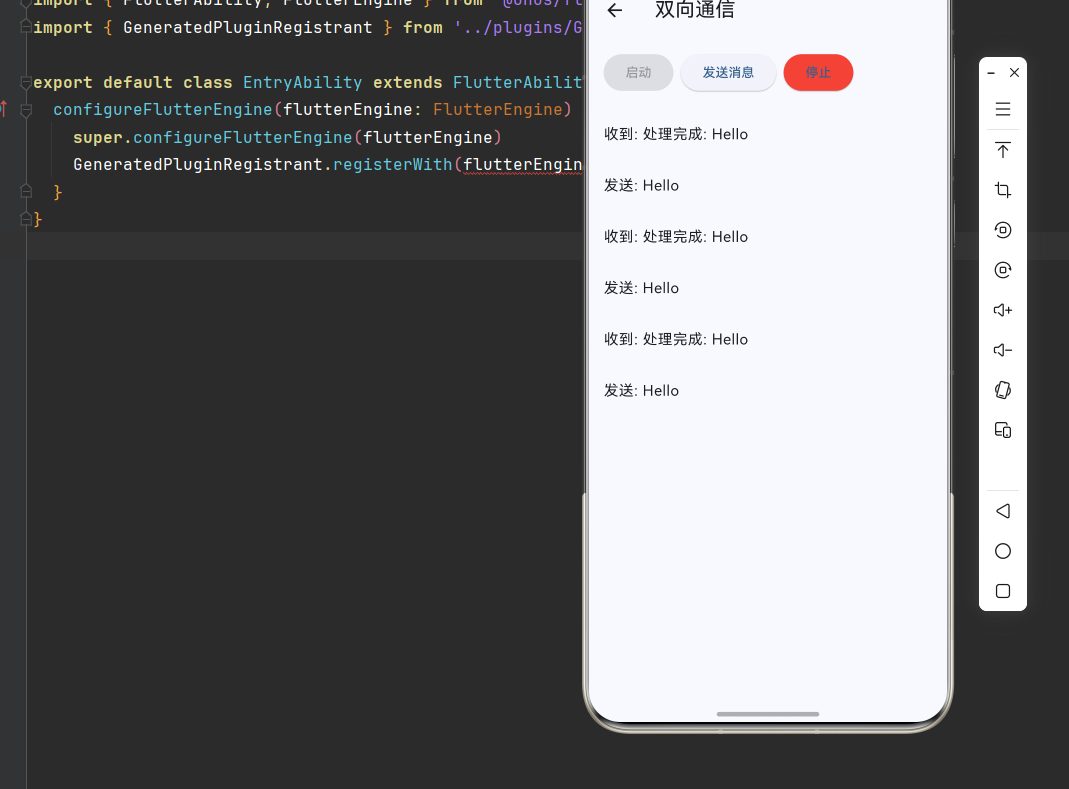
mainSendPort.send('处理完成: $message');
});
}
void _sendMessage(String message) {
_sendPort?.send(message);
setState(() {
_messages.insert(0, '发送: $message');
});
}
void _stopIsolate() {
_isolate?.kill(priority: Isolate.immediate);
_receivePort?.close();
setState(() {
_isRunning = false;
_sendPort = null;
});
}
@override
void dispose() {
_stopIsolate();
super.dispose();
}
@override
Widget build(BuildContext context) {
return Scaffold(
appBar: AppBar(title: const Text('双向通信')),
body: Column(
children: [
Padding(
padding: const EdgeInsets.all(16),
child: Row(
children: [
ElevatedButton(
onPressed: _isRunning ? null : _startIsolate,
child: const Text('启动'),
),
const SizedBox(width: 8),
ElevatedButton(
onPressed: _isRunning ? () => _sendMessage('Hello') : null,
child: const Text('发送消息'),
),
const SizedBox(width: 8),
ElevatedButton(
onPressed: _isRunning ? _stopIsolate : null,
style: ElevatedButton.styleFrom(backgroundColor: Colors.red),
child: const Text('停止'),
),
],
),
),
Expanded(
child: ListView.builder(
itemCount: _messages.length,
itemBuilder: (context, index) => ListTile(title: Text(_messages[index])),
),
),
],
),
);
}
}
class IsolateLifecycleDemo extends StatefulWidget {
const IsolateLifecycleDemo({super.key});
@override
State<IsolateLifecycleDemo> createState() => _IsolateLifecycleDemoState();
}
class _IsolateLifecycleDemoState extends State<IsolateLifecycleDemo> {
String _status = '未启动';
Isolate? _isolate;
Future<void> _createIsolate() async {
final receivePort = ReceivePort();
_isolate = await Isolate.spawn((sendPort) {
sendPort.send('Isolate 已启动');
}, receivePort.sendPort);
receivePort.listen((message) {
setState(() => _status = message.toString());
});
setState(() => _status = '运行中');
}
void _pauseIsolate() {
_isolate?.pause();
setState(() => _status = '已暂停');
}
void _resumeIsolate() {
_isolate?.resume();
setState(() => _status = '运行中');
}
void _killIsolate() {
_isolate?.kill(priority: Isolate.immediate);
_isolate = null;
setState(() => _status = '已终止');
}
@override
Widget build(BuildContext context) {
return Scaffold(
appBar: AppBar(title: const Text('生命周期管理')),
body: Center(
child: Column(
mainAxisAlignment: MainAxisAlignment.center,
children: [
Text('状态: $_status', style: const TextStyle(fontSize: 20)),
const SizedBox(height: 24),
Wrap(
spacing: 8,
children: [
ElevatedButton(onPressed: _createIsolate, child: const Text('创建')),
ElevatedButton(onPressed: _pauseIsolate, child: const Text('暂停')),
ElevatedButton(onPressed: _resumeIsolate, child: const Text('恢复')),
ElevatedButton(onPressed: _killIsolate, child: const Text('终止')),
],
),
],
),
),
);
}
}
class ComputeDemo extends StatefulWidget {
const ComputeDemo({super.key});
@override
State<ComputeDemo> createState() => _ComputeDemoState();
}
class _ComputeDemoState extends State<ComputeDemo> {
int _result = 0;
bool _isComputing = false;
static int _fibonacci(int n) {
if (n <= 1) return n;
return _fibonacci(n - 1) + _fibonacci(n - 2);
}
Future<void> _computeFib() async {
setState(() => _isComputing = true);
final result = await compute(_fibonacci, 40);
setState(() {
_result = result;
_isComputing = false;
});
}
@override
Widget build(BuildContext context) {
return Scaffold(
appBar: AppBar(title: const Text('Compute 函数')),
body: Center(
child: Column(
mainAxisAlignment: MainAxisAlignment.center,
children: [
Text('斐波那契(40) = $_result', style: const TextStyle(fontSize: 20)),
const SizedBox(height: 24),
ElevatedButton(
onPressed: _isComputing ? null : _computeFib,
child: _isComputing
? const CircularProgressIndicator(color: Colors.white)
: const Text('计算'),
),
],
),
),
);
}
}
class ParallelComputeDemo extends StatefulWidget {
const ParallelComputeDemo({super.key});
@override
State<ParallelComputeDemo> createState() => _ParallelComputeDemoState();
}
class _ParallelComputeDemoState extends State<ParallelComputeDemo> {
List<int> _results = [];
bool _isComputing = false;
static int _computeTask(int n) {
int result = 0;
for (int i = 0; i < n; i++) {
result += i;
}
return result;
}
Future<void> _runParallel() async {
setState(() {
_isComputing = true;
_results = [];
});
final futures = List.generate(4, (i) => compute(_computeTask, 10000000 * (i + 1)));
final results = await Future.wait(futures);
setState(() {
_results = results;
_isComputing = false;
});
}
@override
Widget build(BuildContext context) {
return Scaffold(
appBar: AppBar(title: const Text('并行计算')),
body: Padding(
padding: const EdgeInsets.all(16),
child: Column(
children: [
ElevatedButton(
onPressed: _isComputing ? null : _runParallel,
child: _isComputing
? const CircularProgressIndicator(color: Colors.white)
: const Text('并行执行4个任务'),
),
const SizedBox(height: 24),
Expanded(
child: ListView.builder(
itemCount: _results.length,
itemBuilder: (context, index) => ListTile(
title: Text('任务 ${index + 1}'),
subtitle: Text('结果: ${_results[index]}'),
),
),
),
],
),
),
);
}
}
class TaskQueueDemo extends StatefulWidget {
const TaskQueueDemo({super.key});
@override
State<TaskQueueDemo> createState() => _TaskQueueDemoState();
}
class _TaskQueueDemoState extends State<TaskQueueDemo> {
final List<String> _taskQueue = [];
final List<String> _completedTasks = [];
bool _isProcessing = false;
void _addTask() {
final taskId = DateTime.now().millisecondsSinceEpoch;
setState(() {
_taskQueue.add('Task-$taskId');
});
}
Future<void> _processQueue() async {
if (_isProcessing || _taskQueue.isEmpty) return;
setState(() => _isProcessing = true);
while (_taskQueue.isNotEmpty) {
final task = _taskQueue.first;
await Future.delayed(const Duration(milliseconds: 500));
setState(() {
_taskQueue.removeAt(0);
_completedTasks.insert(0, '$task 完成');
});
}
setState(() => _isProcessing = false);
}
@override
Widget build(BuildContext context) {
return Scaffold(
appBar: AppBar(title: const Text('任务队列')),
body: Column(
children: [
Padding(
padding: const EdgeInsets.all(16),
child: Row(
children: [
ElevatedButton(onPressed: _addTask, child: const Text('添加任务')),
const SizedBox(width: 8),
ElevatedButton(
onPressed: _isProcessing ? null : _processQueue,
child: const Text('处理队列'),
),
],
),
),
Expanded(
child: Row(
children: [
Expanded(
child: Column(
children: [
const Text('待处理', style: TextStyle(fontWeight: FontWeight.bold)),
Expanded(
child: ListView.builder(
itemCount: _taskQueue.length,
itemBuilder: (context, index) => ListTile(
title: Text(_taskQueue[index]),
leading: const Icon(Icons.pending),
),
),
),
],
),
),
Expanded(
child: Column(
children: [
const Text('已完成', style: TextStyle(fontWeight: FontWeight.bold)),
Expanded(
child: ListView.builder(
itemCount: _completedTasks.length,
itemBuilder: (context, index) => ListTile(
title: Text(_completedTasks[index]),
leading: const Icon(Icons.check, color: Colors.green),
),
),
),
],
),
),
],
),
),
],
),
);
}
}
class IsolatePoolDemo extends StatefulWidget {
const IsolatePoolDemo({super.key});
@override
State<IsolatePoolDemo> createState() => _IsolatePoolDemoState();
}
class _IsolatePoolDemoState extends State<IsolatePoolDemo> {
final List<Isolate> _isolates = [];
final List<String> _logs = [];
int _poolSize = 0;
Future<void> _createIsolate() async {
final receivePort = ReceivePort();
final isolate = await Isolate.spawn(
(sendPort) {
sendPort.send('Isolate ready');
},
receivePort.sendPort,
);
receivePort.listen((message) {
setState(() {
_logs.insert(0, '收到: $message');
});
});
setState(() {
_isolates.add(isolate);
_poolSize = _isolates.length;
_logs.insert(0, '创建 Isolate #${_isolates.length}');
});
}
void _killAll() {
for (final isolate in _isolates) {
isolate.kill(priority: Isolate.immediate);
}
setState(() {
_isolates.clear();
_poolSize = 0;
_logs.insert(0, '销毁所有 Isolate');
});
}
@override
void dispose() {
_killAll();
super.dispose();
}
@override
Widget build(BuildContext context) {
return Scaffold(
appBar: AppBar(title: const Text('Isolate 线程池')),
body: Column(
children: [
Padding(
padding: const EdgeInsets.all(16),
child: Row(
children: [
Text('线程池大小: $_poolSize', style: const TextStyle(fontSize: 18)),
const Spacer(),
ElevatedButton(onPressed: _createIsolate, child: const Text('创建')),
const SizedBox(width: 8),
ElevatedButton(onPressed: _killAll, child: const Text('销毁全部')),
],
),
),
Expanded(
child: ListView.builder(
itemCount: _logs.length,
itemBuilder: (context, index) => ListTile(
title: Text(_logs[index]),
dense: true,
),
),
),
],
),
);
}
}
class OpenHarmonyIsolateDemo extends StatefulWidget {
const OpenHarmonyIsolateDemo({super.key});
@override
State<OpenHarmonyIsolateDemo> createState() => _OpenHarmonyIsolateDemoState();
}
class _OpenHarmonyIsolateDemoState extends State<OpenHarmonyIsolateDemo> {
String _platformInfo = '';
bool _isOhos = false;
@override
void initState() {
super.initState();
_checkPlatform();
}
void _checkPlatform() {
setState(() {
_isOhos = !kIsWeb && Platform.operatingSystem == 'ohos';
_platformInfo = '平台: ${Platform.operatingSystem}\n'
'Isolate 支持: ${_isOhos ? "OpenHarmony 原生支持" : "标准 Dart Isolate"}';
});
}
@override
Widget build(BuildContext context) {
return Scaffold(
appBar: AppBar(title: const Text('OpenHarmony Isolate')),
body: Padding(
padding: const EdgeInsets.all(16),
child: Column(
crossAxisAlignment: CrossAxisAlignment.start,
children: [
Card(
color: _isOhos ? Colors.green.shade100 : Colors.blue.shade100,
child: Padding(
padding: const EdgeInsets.all(16),
child: Row(
children: [
Icon(_isOhos ? Icons.phone_android : Icons.computer,
color: _isOhos ? Colors.green : Colors.blue),
const SizedBox(width: 12),
Text(
_isOhos ? 'OpenHarmony 环境' : '其他平台环境',
style: const TextStyle(fontSize: 18, fontWeight: FontWeight.bold),
),
],
),
),
),
const SizedBox(height: 16),
const Text('平台信息:', style: TextStyle(fontSize: 16, fontWeight: FontWeight.bold)),
const SizedBox(height: 8),
Container(
padding: const EdgeInsets.all(12),
decoration: BoxDecoration(
color: Colors.grey.shade100,
borderRadius: BorderRadius.circular(8),
),
child: Text(_platformInfo, style: const TextStyle(fontFamily: 'monospace')),
),
],
),
),
);
}
}九、总结
本文深入探讨了 Flutter for OpenHarmony 的 Isolate 多线程计算系统,从架构原理到具体实现,涵盖了以下核心内容:
📚 核心知识点回顾
- Isolate 架构:理解 Dart 单线程模型与 Isolate 多线程模型的区别
- 基础实现:掌握 Isolate 创建、双向通信和生命周期管理
- Compute 函数:简化版 Isolate API 的使用场景和限制
- 消息传递:SendPort、ReceivePort 和 TransferableTypedData 的使用
- 任务调度:任务队列和线程池的设计与实现
- 平台适配:OpenHarmony 平台的 Isolate 特性适配
🎯 最佳实践要点
- CPU 密集型任务使用 Isolate,I/O 密集型任务使用 async/await
- 简单任务优先使用 compute 函数
- 大数据传输使用 TransferableTypedData 提升性能
- 使用线程池复用 Isolate 避免频繁创建销毁
- 及时关闭不再使用的 Isolate 释放资源
🚀 进阶方向
- 深入研究 Dart VM 的 Isolate 实现机制
- 实现更复杂的任务调度算法
- 探索 Isolate 与原生线程的协作
- 优化大数据量场景的消息传递效率
通过掌握这些技术,你可以构建出高性能的并发计算系统,充分利用多核处理器的计算能力,为用户提供流畅的应用体验。
💡 提示:在实际项目中,建议使用 Flutter DevTools 的 Performance 面板监控 Isolate 的性能表现。