概述
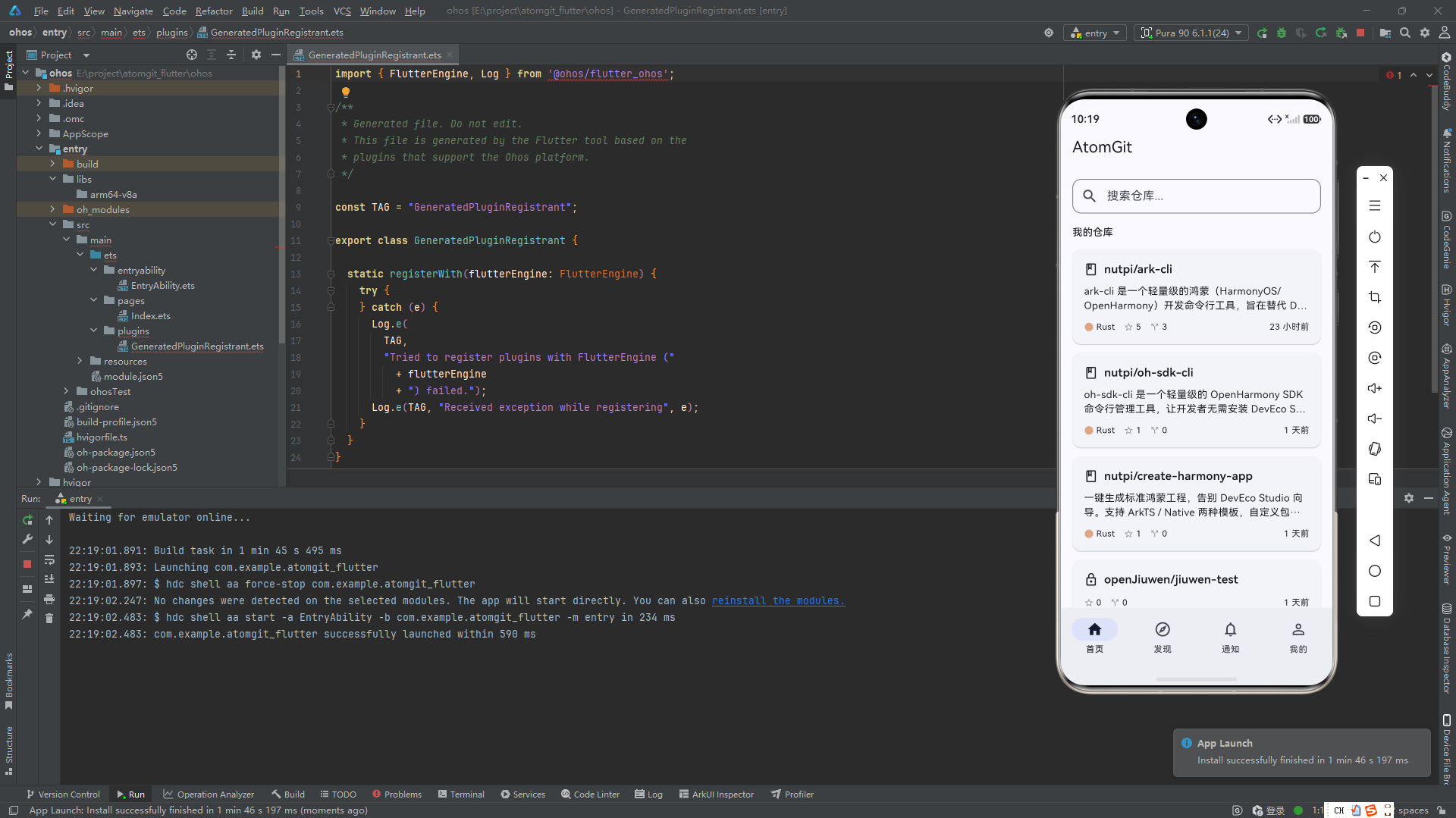
首页是整个应用的门面,承载着用户进入应用后的第一印象。在 AtomGit Flutter 客户端中,首页的设计需要同时兼顾两种用户状态:尚未登录的访客和已认证的用户。这两种状态对应着完全不同的信息架构和交互路径。
访客状态下的首页更像一个品牌展示和功能引导页,告知用户这个应用能做什么、登录后能获得什么。而已登录用户的首页则是一个高效的工作台,聚合了用户自己的仓库和平台热门仓库,方便快速访问和操作。
HomeTab 的整体设计思路
HomeTab 是底部导航栏的第一个 Tab,用户启动应用后默认展示。它的设计核心理念是"根据身份展示不同的内容"。这个理念的实现依赖于 Provider 状态管理框架 ------ 通过监听 AuthProvider 的登录状态变化,在同一个 Widget 中动态切换 UI。
dart
class HomeTab extends StatefulWidget {
  const HomeTab({super.key});

  @override
  State<HomeTab> createState() => _HomeTabState();
}

class _HomeTabState extends State<HomeTab> {
  List<Repository>? _trendingRepos;
  List<Repository>? _userRepos;
  bool _isLoadingTrending = false;
  bool _isLoadingUserRepos = false;
  String? _error;

  @override
  Widget build(BuildContext context) {
    final isLoggedIn = context.watch<AuthProvider>().isLoggedIn;

    return Scaffold(
      appBar: AppBar(
        title: const Text('AtomGit'),
        actions: [
          if (isLoggedIn)
            IconButton(
              icon: const Icon(Icons.search),
              onPressed: () {
                // 在首页顶部提供搜索入口
              },
            ),
        ],
      ),
      body: RefreshIndicator(
        onRefresh: _onRefresh,
        child: isLoggedIn ? _buildAuthedBody() : _buildWelcome(context),
      ),
    );
  }
}
注意 context.watch<AuthProvider>().isLoggedIn 的使用。这不是一次性读取,而是建立了一个持续订阅关系 ------ 当 AuthProvider 调用 notifyListeners() 时,HomeTab 的 build 方法会自动重新执行。这意味着用户登录或登出时,首页 UI 会无缝切换,不需要手动刷新或导航。
双重数据加载策略
首页在已登录状态下需要同时加载两个数据源:热门仓库和用户自己的仓库。这两个数据源的加载时机和失败处理相互独立,不能因为一个失败而阻塞另一个。
为什么需要两层触发机制
在 Flutter 中,initState 和 build 之间有一个微妙的时间差。initState 在 Widget 创建时立即调用,但此时可能 AuthProvider 尚未完成 session 恢复(token 从本地存储中读取)。如果只在 initState 中触发数据加载,可能出现这样的时序问题:
initState调用 → AuthProvider 尚未恢复 token → 跳过加载- AuthProvider 恢复 token →
notifyListeners()→ HomeTab 重建 - build 执行 → 但没人重新触发数据加载 → 页面空白
为了解决这个问题,项目采用了两层触发机制:
dart
@override
void initState() {
  super.initState();
  // 第一层:initState 中首次尝试
  _loadTrending();
}

@override
Widget build(BuildContext context) {
  final isLoggedIn = context.watch<AuthProvider>().isLoggedIn;

  // 第二层:如果 build 时发现应该加载但没加载,补充触发
  if (isLoggedIn && _trendingRepos == null && !_isLoadingTrending) {
    WidgetsBinding.instance.addPostFrameCallback((_) => _loadTrending());
  }
  if (isLoggedIn && _userRepos == null && !_isLoadingUserRepos) {
    WidgetsBinding.instance.addPostFrameCallback((_) => _loadUserRepos());
  }
  // ... 构建 UI
}
为什么使用 addPostFrameCallback?
在 build 方法中直接调用 _loadTrending() 会触发 setState,而 setState 不能在 build 过程中调用。addPostFrameCallback 将回调延迟到当前帧渲染完成之后,此时调用 setState 是安全的。
这三重条件判断(isLoggedIn && _trendingRepos == null && !_isLoadingTrending)确保:
- 只在已登录时加载
- 只有数据未加载时才触发
- 只有没在加载中才触发(防止重复请求)
热门仓库加载
热门仓库通过搜索 API 获取,使用 stars:>100 作为质量过滤条件:
dart
Future<void> _loadTrending() async {
  if (_isLoadingTrending) return;

  setState(() {
    _isLoadingTrending = true;
    _error = null;
  });

  try {
    final apiClient = context.read<AtomGitApiClient>();
    final response = await apiClient.get(
      '/search/repositories',
      queryParams: {
        'q': 'stars:>100',
        'sort': 'stars',
        'order': 'desc',
        'per_page': '10',
      },
    );

    final items = parseList<dynamic>(response.data, 'items') ?? [];
    _trendingRepos = items
        .whereType<Map<String, dynamic>>()
        .map(Repository.fromJson)
        .toList();
  } on ApiException catch (e) {
    _error = e.message;
  } catch (e) {
    _error = '加载热门仓库失败';
  } finally {
    setState(() => _isLoadingTrending = false);
  }
}
搜索查询 stars:>100 表示只返回超过 100 颗星的仓库。排序方式 sort: 'stars' 配合 order: 'desc' 确保最热门的仓库排在最前面。每页 10 条足以填满首屏。
用户仓库加载
用户仓库使用不同的 API 端点和排序参数:
dart
Future<void> _loadUserRepos() async {
  if (_isLoadingUserRepos) return;

  setState(() => _isLoadingUserRepos = true);

  try {
    final apiClient = context.read<AtomGitApiClient>();
    final response = await apiClient.get(
      '/user/repos',
      queryParams: {
        'sort': 'updated',
        'per_page': '10',
      },
    );

    _userRepos = (parseList<dynamic>(response.data) ?? [])
        .whereType<Map<String, dynamic>>()
        .map(Repository.fromJson)
        .toList();
  } on ApiException catch (e) {
    // 用户仓库加载失败不阻塞热门仓库的展示
    // 只在两个都失败时才显示全局错误
  } finally {
    setState(() => _isLoadingUserRepos = false);
  }
}
注意错误处理的不同:用户仓库加载失败时没有设置 _error。这是因为热门仓库可以独立展示。只有当两个数据源都失败、用户看不到任何内容时,才需要展示全局错误状态。
下拉刷新机制
下拉刷新使用 Material 3 的 RefreshIndicator 组件包裹整个 body:
dart
Future<void> _onRefresh() async {
  final isLoggedIn = context.read<AuthProvider>().isLoggedIn;
  if (!isLoggedIn) return;

  // 清空缓存,强制重新加载
  setState(() {
    _trendingRepos = null;
    _userRepos = null;
  });

  await Future.wait([
    _loadTrending(),
    _loadUserRepos(),
  ]);
}
刷新流程分为三步:
- 清空当前数据:将两个列表设为 null,UI 会立即展示 loading 状态
- 并行加载 :使用
Future.wait同时发起两个请求,减少总等待时间 - 自动恢复 :加载完成后
setState触发重建,RefreshIndicator自动收起刷新动画
Future.wait 在这里比串行 await 优越 ------ 两次 API 调用合计延迟可能从 600ms 降低到 300ms。
但 Future.wait 有一个需要注意的行为:如果其中任意一个 Future 抛出异常,Future.wait 也会抛出异常。当前代码中 _loadUserRepos 内部已 catch 异常,所以 Future.wait 不会因为用户仓库加载失败而中断热门仓库的加载。
未登录欢迎页
欢迎页是访客看到的第一个界面,需要简洁但有吸引力:
dart
Widget _buildWelcome(BuildContext context) {
  return ListView(
    children: [
      const SizedBox(height: 60),
      Icon(
        Icons.code,
        size: 80,
        color: Theme.of(context).colorScheme.primary.withOpacity(0.6),
      ),
      const SizedBox(height: 24),
      Text(
        '探索 AtomGit',
        textAlign: TextAlign.center,
        style: Theme.of(context).textTheme.headlineMedium?.copyWith(
              fontWeight: FontWeight.bold,
            ),
      ),
      const SizedBox(height: 12),
      Padding(
        padding: const EdgeInsets.symmetric(horizontal: 40),
        child: Text(
          '发现优秀开源项目,参与社区协作,管理你的代码仓库',
          textAlign: TextAlign.center,
          style: Theme.of(context).textTheme.bodyLarge?.copyWith(
                color: Colors.grey,
              ),
        ),
      ),
      const SizedBox(height: 32),
      Padding(
        padding: const EdgeInsets.symmetric(horizontal: 32),
        child: FilledButton.icon(
          onPressed: () =>
              Navigator.pushNamed(context, '/login'),
          icon: const Icon(Icons.login),
          label: const Text('登录 / 注册'),
        ),
      ),
      const SizedBox(height: 24),
      // 未登录状态下的搜索入口
      Padding(
        padding: const EdgeInsets.symmetric(horizontal: 16),
        child: TextField(
          decoration: InputDecoration(
            hintText: '搜索仓库...',
            prefixIcon: const Icon(Icons.search),
            // InputDecoration 的样式在 AppTheme 中全局设置:
            // border: OutlineInputBorder(borderRadius: 12)
            // contentPadding: EdgeInsets.symmetric(horizontal: 16, vertical: 12)
          ),
          onSubmitted: (value) {
            if (value.trim().isNotEmpty) {
              Navigator.pushNamed(context, '/search',
                  arguments: value.trim());
            }
          },
        ),
      ),
    ],
  );
}
欢迎页的布局层次:
- 大图标(带透明度):建立视觉焦点
- 标题文案:传达应用价值
- 描述文案:解释能做什么
- 主导按钮:引导登录(最优先操作)
- 搜索框:提供有限的看功能(即使不登录也能搜索)
搜索功能的权限控制是分层的:未登录用户可以搜索和浏览结果,但一些需要认证的操作(如 Star 仓库)会引导登录。
已登录首页布局
已登录用户的首页将两个数据源合并到一个 ListView 中:
dart
Widget _buildAuthedBody() {
  if (_error != null && _trendingRepos == null && _userRepos == null) {
    return ErrorRetryWidget(
      message: _error!,
      onRetry: _onRefresh,
    );
  }

  if (_isLoadingTrending && _trendingRepos == null) {
    return const LoadingIndicator(message: '加载中...');
  }

  final hasTrending = _trendingRepos != null && _trendingRepos!.isNotEmpty;
  final hasUserRepos = _userRepos != null && _userRepos!.isNotEmpty;

  if (!hasTrending && !hasUserRepos && !_isLoadingTrending) {
    return const Center(child: Text('暂无仓库'));
  }

  return ListView(
    children: [
      // 用户仓库区域
      if (hasUserRepos) ...[
        _SectionHeader(title: '我的仓库'),
        ..._userRepos!.map((repo) => _repoItem(repo)),
        const SizedBox(height: 16),
      ],

      // 热门仓库区域
      if (hasTrending) ...[
        _SectionHeader(title: '热门仓库'),
        ..._trendingRepos!.map((repo) => _repoItem(repo)),
      ],

      // 底部加载状态(用户仓库还在加载中)
      if (_isLoadingUserRepos && _userRepos == null)
        const Padding(
          padding: EdgeInsets.all(24),
          child: Center(child: CircularProgressIndicator()),
        ),
    ],
  );
}
状态优先级:
- 全局错误(两个数据源都失败且无缓存)→ ErrorRetryWidget
- 首次加载中(热门仓库数据尚未到)→ LoadingIndicator
- 全部为空(两个数据源都返回空)→ 空状态提示
- 正常展示(至少有一个数据源有数据)→ 列表
分区标题组件
dart
class _SectionHeader extends StatelessWidget {
  final String title;

  const _SectionHeader({required this.title});

  @override
  Widget build(BuildContext context) {
    return Padding(
      padding: const EdgeInsets.fromLTRB(16, 20, 16, 8),
      child: Text(
        title,
        style: Theme.of(context).textTheme.titleMedium?.copyWith(
              fontWeight: FontWeight.w600,
              color: Theme.of(context).colorScheme.primary,
            ),
      ),
    );
  }
}
分区标题使用主题色,字体加粗,与仓库卡片形成视觉分区。
RepoCard 组件的详细设计
RepoCard 是首页使用最频繁的组件。每个仓库以卡片形式展示,包含多个信息层次:
dart
class RepoCard extends StatelessWidget {
  final Repository repo;
  final VoidCallback? onTap;

  const RepoCard({super.key, required this.repo, this.onTap});

  @override
  Widget build(BuildContext context) {
    return Card(
      margin: const EdgeInsets.symmetric(horizontal: 16, vertical: 6),
      child: InkWell(
        onTap: onTap,
        borderRadius: BorderRadius.circular(12),
        child: Padding(
          padding: const EdgeInsets.all(16),
          child: Column(
            crossAxisAlignment: CrossAxisAlignment.start,
            children: [
              // 第一层:仓库名 + 可见性图标
              _buildHeader(context),
              // 第二层:描述(可选,最多 2 行)
              if (repo.description != null && repo.description!.isNotEmpty) ...[
                const SizedBox(height: 8),
                _buildDescription(context),
              ],
              // 第三层:语言 + 统计 + 更新时间
              const SizedBox(height: 12),
              _buildStatsRow(context),
            ],
          ),
        ),
      ),
    );
  }
}
Card 与 InkWell 的配合
Card 的 clipBehavior: Clip.antiAlias(在全局主题中设置)使圆角裁剪正常工作。InkWell 的 borderRadius 必须与 Card 的圆角一致(12px),否则水波纹效果会超出卡片范围,产生视觉瑕疵。
可见性图标处理
dart
Widget _buildPrivacyIcon() {
  if (repo.isPrivate) {
    return Image.asset(
      'assets/images/private.png',
      width: 16,
      height: 16,
      errorBuilder: (context, error, stackTrace) =>
          const Icon(Icons.lock_outline, size: 16),
    );
  }
  return const Icon(Icons.book_outlined, size: 16);
}
优先使用项目内的私有图标资源,但通过 errorBuilder 提供了 Material 图标的 fallback。这个设计很小但很重要 ------ 即使图标文件丢失或损坏,UI 不会因此崩溃或留白。
统计行的布局技巧
dart
Widget _buildStatsRow(BuildContext context) {
  return Row(
    children: [
      // 语言指示点 + 语言名
      _LanguageDot(language: repo.language),
      if (repo.language != null) ...[
        const SizedBox(width: 4),
        Text(repo.language!,
            style: Theme.of(context).textTheme.bodySmall),
        const SizedBox(width: 16),
      ],
      // Stars
      Icon(Icons.star_border, size: 16,
          color: Theme.of(context).colorScheme.onSurfaceVariant),
      const SizedBox(width: 2),
      Text(_formatCount(repo.stargazersCount),
          style: Theme.of(context).textTheme.bodySmall),
      const SizedBox(width: 12),
      // Forks
      Icon(Icons.call_split, size: 16,
          color: Theme.of(context).colorScheme.onSurfaceVariant),
      const SizedBox(width: 2),
      Text(_formatCount(repo.forksCount),
          style: Theme.of(context).textTheme.bodySmall),
      // Spacer 将时间推到最右侧
      const Spacer(),
      Text(DateFormatter.relative(repo.updatedAt),
          style: Theme.of(context).textTheme.bodySmall),
    ],
  );
}
Spacer 在这里起着关键的排版作用 ------ 它将左右两组信息分开,统计信息靠左,时间信息靠右。没有 Spacer 的话,时间会紧跟在 forks 数字后面,视觉效果混乱。
语言颜色映射系统
dart
static final _languageColors = {
  'Dart':       const Color(0xFF00B4AB),
  'Python':     const Color(0xFF3572A5),
  'JavaScript': const Color(0xFFF7DF1E),
  'TypeScript': const Color(0xFF3178C6),
  'Java':       const Color(0xFFB07219),
  'Go':         const Color(0xFF00ADD8),
  'Rust':       const Color(0xFFDEA584),
  'C++':        const Color(0xFFF34B7D),
  'C':          const Color(0xFF555555),
  'Swift':      const Color(0xFFF05138),
  'Kotlin':     const Color(0xFFA97BFF),
};

Widget _languageDot(String? language) {
  final color = _languageColors[language] ?? Colors.grey;
  return Container(
    width: 12,
    height: 12,
    decoration: BoxDecoration(
      color: color,
      shape: BoxShape.circle,
    ),
  );
}
这些颜色来自 GitHub 的语言色谱,确保用户看到熟悉的视觉暗示。未知语言统一使用灰色兜底。
数字格式化
dart
String _formatCount(int count) {
  if (count >= 1000) {
    return '${(count / 1000).toStringAsFixed(1)}k';
  }
  return count.toString();
}
toStringAsFixed(1) 始终显示 1 位小数。这意味着 1000 显示为 "1.0k",1200 显示为 "1.2k"。如果不需要 ".0" 后缀,可以改用:
dart
final result = count / 1000;
if (result == result.roundToDouble()) {
  return '${result.toInt()}k';
}
return '${result.toStringAsFixed(1)}k';
但当前简化版本在实际使用中表现良好,且代码更短。
仓库导航
点击仓库卡片后,需要解析仓库的 owner 和 name 参数,导航到详情页:
dart
Widget _repoItem(Repository repo) {
  final info = repo.ownerAndName;
  return RepoCard(
    repo: repo,
    onTap: info != null
        ? () {
            Navigator.pushNamed(
              context,
              '/repo',
              arguments: {
                'owner': info.owner,
                'name': info.name,
              },
            );
          }
        : null,
  );
}
onTap 为 null 时 InkWell 不展示水波纹效果,暗示用户该卡片不可点击。这种情况在数据异常时可能出现(fullName 无法解析出 owner 和 name)。
ownerAndName 的两级解析
dart
({String owner, String name})? get ownerAndName {
  // 优先:从 fullName 拆分(标准格式 "owner/name")
  final parts = fullName.split('/');
  if (parts.length == 2 &&
      parts[0].isNotEmpty &&
      parts[1].isNotEmpty) {
    return (owner: parts[0], name: parts[1]);
  }

  // Fallback:从 owner.login + path/name 组合
  final ownerLogin = owner?.login;
  final repoPath = path ?? name;
  if (ownerLogin != null &&
      ownerLogin.isNotEmpty &&
      repoPath.isNotEmpty) {
    return (owner: ownerLogin, name: repoPath);
  }

  return null;
}
这是整个应用中仓库导航的关键 getter。使用 Dart 3 Record 类型作为返回值,代码简洁且类型安全。
错误处理的层次设计
首页的错误处理遵循"逐步降级"原则:
- 热门仓库加载失败 → 不阻塞用户仓库展示
- 用户仓库加载失败 → 不阻塞热门仓库展示
- 两者都失败 → 展示 ErrorRetryWidget
dart
// 错误展示条件
if (_error != null &&
    _trendingRepos == null &&
    _userRepos == null) {
  return ErrorRetryWidget(
    message: _error!,
    onRetry: _onRefresh,
  );
}
关键在于 && 条件 ------ 只要有一个数据源有结果,就不展示错误。用户能看到部分内容总比看到错误页面好。
加载状态的用户体验
首页的加载过程分为三个阶段,每个阶段对应不同的 UI:
| 阶段 | UI 状态 | 用户感受 |
|---|---|---|
| 首次加载 | LoadingIndicator + "加载中..." | 等待 |
| 部分加载 | 热门已展示,用户仓库还在加载 | 内容逐渐出现 |
| 刷新 | RefreshIndicator 动画 | 下拉即可更新 |
部分加载是提升感知性能的关键。热门仓库通常在 200ms 内返回(因为是公开数据),用户仓库可能稍慢。但用户先看到热门仓库,等待感会大幅降低。