常用命令
git子模块有如下的常用命令:
git submodule add <url> <path>
git submodule init //如果克隆的时候没有把子模块一起克隆就要先初始化子模块再更新
git submodule update  //把子模块的版本和主项目对齐
git submodule update --init -f //强制更新子模块到最新提交状态,该指令将清除子模块的修改
git submodule update --init --recursive //确保所有子模块都被正确地初始化和更新到仓库中的最新状态。如果发生"git upload-pack: not our ref"错误使用该命令解决
git submodule foreach 'git checkout .'//遍历所有子模块执行checkout命令
git submodule foreach 'git clean -dxf .'//遍历所有子模块执行clean命令
所有子模块更新到和主模块对齐
引入子模块后比较头疼的问题是主模块切换分支或者切换到某次提交怎么把所有的子模块一起给更新到目标分支或者目标提交上来!
主要是用这个命令:git submodule update --init -f
这里先丢弃本地修改然后切换到8810分支:
bash
admin@chengdong MINGW64 /e/syd/8811 (main)
$ git status
On branch main
Your branch is up to date with 'origin/main'.

Changes not staged for commit:
  (use "git add <file>..." to update what will be committed)
  (use "git restore <file>..." to discard changes in working directory)
  (commit or discard the untracked or modified content in submodules)
        modified:   component/boot2 (modified content)

no changes added to commit (use "git add" and/or "git commit -a")

admin@chengdong MINGW64 /e/syd/8811 (main)
$ git checkout 8810
Updating files: 100% (3417/3417), done.
M       component/boot2
M       component/rf24
M       component/xc6xx_drivers
Switched to branch '8810'
Your branch is up to date with 'origin/8810'.

admin@chengdong MINGW64 /e/syd/8811 (8810)
$ git status
On branch 8810
Your branch is up to date with 'origin/8810'.

Changes not staged for commit:
  (use "git add <file>..." to update what will be committed)
  (use "git restore <file>..." to discard changes in working directory)
  (commit or discard the untracked or modified content in submodules)
        modified:   component/boot2 (new commits, modified content)
        modified:   component/rf24 (new commits)
        modified:   component/xc6xx_drivers (new commits)

no changes added to commit (use "git add" and/or "git commit -a")
这时候使用"git submodule update --init"命令来更新子模块会报错,因为有的子模块有修改:
bash
admin@chengdong MINGW64 /e/syd/8811 (8810)
$ git submodule foreach 'git status'
Entering 'component/ble52_boot1'
HEAD detached at 08a451f
nothing to commit, working tree clean
Entering 'component/boot2'
HEAD detached at 848732c
Changes not staged for commit:
  (use "git add <file>..." to update what will be committed)
  (use "git restore <file>..." to discard changes in working directory)
        modified:   app/main.c
        modified:   mdk/boot2
        modified:   mdk/boot2.uvprojx
        modified:   mdk/s.bin

no changes added to commit (use "git add" and/or "git commit -a")
Entering 'component/rf24'
HEAD detached at 80ce1e1
nothing to commit, working tree clean
Entering 'component/xc6xx_drivers'
HEAD detached at 9703b5c
nothing to commit, working tree clean

admin@chengdong MINGW64 /e/syd/8811 (8810)
$ git submodule status
 08a451f51252dc1495cfb8265947e9374b19b40d component/ble52_boot1 (xc67xx_rom_code_v1.0~2)
+848732c3d1667d9553de977053a94f09474ba4d3 component/boot2 (remotes/origin/add/rom_ota-1-g848732c)
+80ce1e1ea555a5d0c9d0d7471e60772e28ba6292 component/rf24 (remotes/origin/HEAD)
+9703b5c72c382d6a93de2d005f919fcb7a1f21be component/xc6xx_drivers (remotes/origin/HEAD)

admin@chengdong MINGW64 /e/syd/8811 (8810)
$ git submodule update --init
error: Your local changes to the following files would be overwritten by checkout:
        app/main.c
        mdk/boot2
        mdk/boot2.uvprojx
        mdk/s.bin
Please commit your changes or stash them before you switch branches.
Aborting
fatal: Unable to checkout '4d678b297c2c4b299551bed91f837b8aa5996df6' in submodule path 'component/boot2'
Submodule path 'component/rf24': checked out '2947e13906416d05c2976aa29ee070e90ac5ab67'
Submodule path 'component/xc6xx_drivers': checked out 'd33051d8def0eaae6dc72646458279dbd9a09699'
未修改的子模块最新的提交如下:
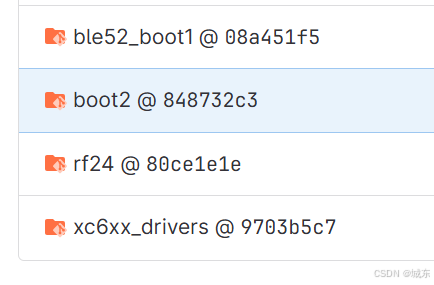
接下来使用"git submodule update --init -f"命令强制更新子模块,该命令会清除所有子模的修改,所以谨慎使用:
bash
admin@chengdong MINGW64 /e/syd/8811 (8810)
$ git submodule update --init -f
Submodule path 'component/ble52_boot1': checked out '08a451f51252dc1495cfb8265947e9374b19b40d'
Submodule path 'component/boot2': checked out '4d678b297c2c4b299551bed91f837b8aa5996df6'
Submodule path 'component/rf24': checked out '2947e13906416d05c2976aa29ee070e90ac5ab67'
Submodule path 'component/xc6xx_drivers': checked out 'd33051d8def0eaae6dc72646458279dbd9a09699'

admin@chengdong MINGW64 /e/syd/8811 (8810)
$ git submodule status
 08a451f51252dc1495cfb8265947e9374b19b40d component/ble52_boot1 (xc67xx_rom_code_v1.0~2)
 4d678b297c2c4b299551bed91f837b8aa5996df6 component/boot2 (4d678b2)
 2947e13906416d05c2976aa29ee070e90ac5ab67 component/rf24 (2947e13)
 d33051d8def0eaae6dc72646458279dbd9a09699 component/xc6xx_drivers (remotes/origin/baoliandeng-6-gd33051d)
更新后的子模块提交记录如下:
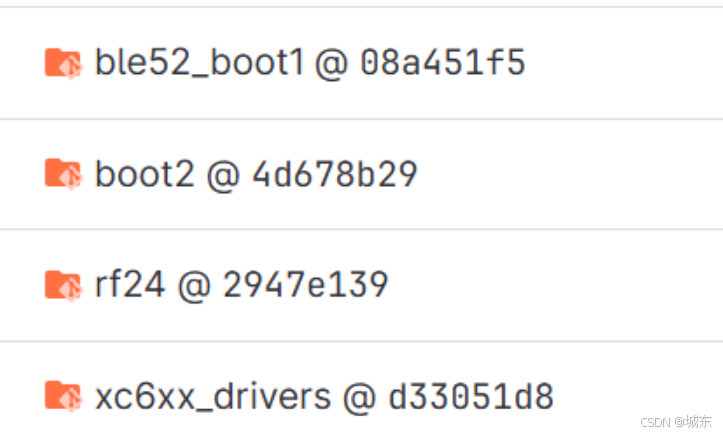
可以看到"git submodule update --init -f"指令切换是正确有效的,但是注意,这里查看各个模块的状态依旧有看到Untracked文件,这个是因为更新子模块只是更新修改的内容,不更新Untracked文件,这个对使用上是没有问题的
bash
admin@chengdong MINGW64 /e/syd/8811 (8810)
$ git status
On branch 8810
Your branch is up to date with 'origin/8810'.

Changes not staged for commit:
  (use "git add <file>..." to update what will be committed)
  (use "git restore <file>..." to discard changes in working directory)
  (commit or discard the untracked or modified content in submodules)
        modified:   component/boot2 (untracked content)

no changes added to commit (use "git add" and/or "git commit -a")

admin@chengdong MINGW64 /e/syd/8811 (8810)
$ git submodule foreach 'git status'
Entering 'component/ble52_boot1'
HEAD detached at 08a451f
nothing to commit, working tree clean
Entering 'component/boot2'
HEAD detached at 4d678b2
Untracked files:
  (use "git add <file>..." to include in what will be committed)
        mdk/Listings/
        mdk/Objects/
        mdk/boot2.uvguix.admin

nothing added to commit but untracked files present (use "git add" to track)
Entering 'component/rf24'
HEAD detached at 2947e13
nothing to commit, working tree clean
Entering 'component/xc6xx_drivers'
HEAD detached at d33051d
nothing to commit, working tree clean