不太好用echarts来实现的进度条样式,决定记录下组件
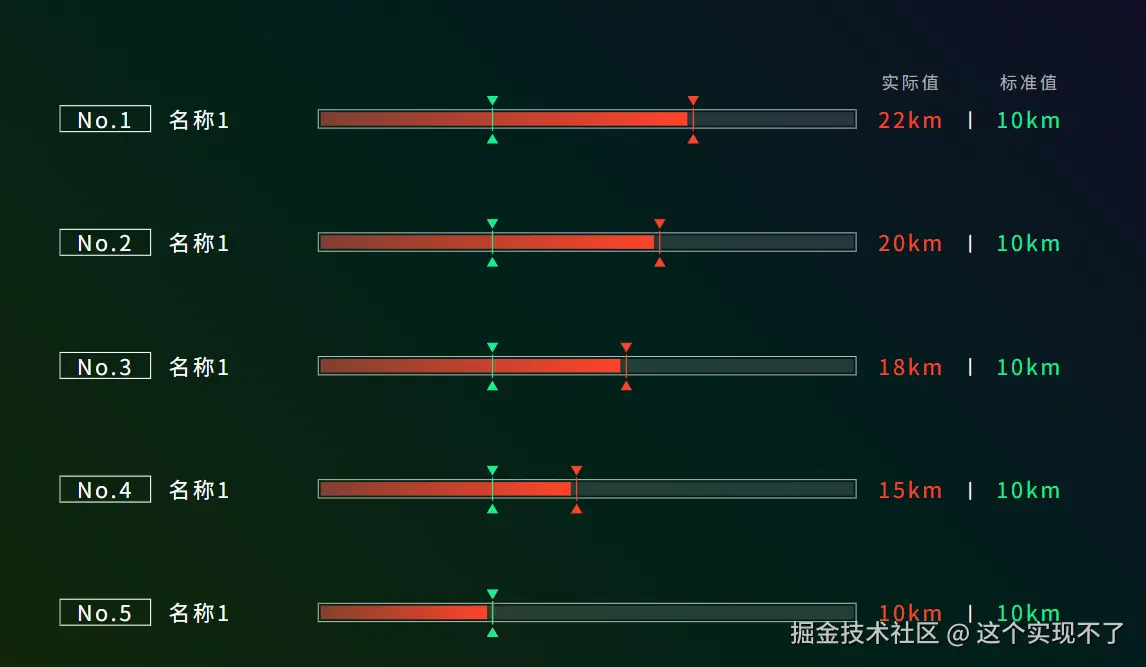
js
import { defineComponent } from 'vue'
import { setVeConfig } from './veConfigUtils'
import CommonProgressBar from './CommonProgressBar'
import GeneralTitleCard from './GeneralTitleCard'
import { COLOR_YELLOW, COLOR_LIGHT_GREEN } from './createChart'

const props = {
  propData: {
    type: Array,
    default: () => [
      { name: '家堡4290', value: 22 },
      { name: '家堡4290', value: 20 },
      { name: '家堡4290', value: 18 },
      { name: '家堡4290', value: 15 },
      { name: '家堡4290', value: 10 },
    ],
  },

  puValue: {
    default: 10,
    type: Number,
  },
}

export const VeConfig = setVeConfig('DisplayProgressBar', props)

export default defineComponent({
  components: {},
  props,
  data() {
    return {}
  },
  computed: {
    showPropData() {
      return _.orderBy(this.propData, 'value', 'desc')
    },
  },
  created() {},
  mounted() {},
  beforeDestroy() {},
  methods: {
    getBarWidth(value) {
      // 计算百分比,最大不超过100%
      const maxValue = this.puValue + (this.showPropData[0]?.value || 0)
      const percentage = Math.min((value / maxValue) * 100, 100)
      return `${percentage}%`
    },
  },
})
html
<div class="display-progress-bar ">
  <div class="display-progress-bar__top">
    <span>实际值</span>
    <span class="el-icon-minus"></span>
    <span>标准值</span>
  </div>
  <div class="display-progress-bar__bottom">
    <div v-for="(item, index) in showPropData" :key="item.name + index" class="display-progress-bar__item">
      <section>No.{{ index + 1 }}</section>
      <section>{{ item.name }}</section>
      <section class="bar-boxs">
        <div class="bar-item" :style="{ width: getBarWidth(item.value) }"></div>
        <div class="pu-icon pu-icon__red" :style="{ left: getBarWidth(item.value) }"></div>
        <div class="pu-icon pu-icon__green" :style="{ left: getBarWidth(puValue) }"></div>
      </section>
      <section class="value1">{{ item.value }}km</section>
      <section class="line-icon">
        <span class="el-icon-minus"></span>
      </section>
      <section class="value2">{{ puValue }}km</section>
    </div>
  </div>
</div>
css
.display-progress-bar {
  // display: flex;
  // flex-direction: column;
  // justify-content: space-between;
  letter-spacing: 5px;
  font-size: 40px;
  padding: 2rem 0 0 0;
  position: relative;

  &__top {
    position: absolute;
    right: 0;
    display: grid;
    grid-template-columns: 150px 5px 150px;
    gap: 2rem;
    top: 0;
    color: #AEAEAE;
    font-size: 32px;

    >span {
      text-align: center;
    }

    .el-icon-minus {
      opacity: 0;
    }
  }

  &__bottom {
    height: 100%;
    overflow-y: auto;
    overflow-x: hidden;
    scroll-behavior: smooth;
    display: flex;
    flex-direction: column;
    justify-content: space-between;

    .display-progress-bar__item {
      display: grid;
      grid-template-columns: 170px 250px 1fr 150px 5px 150px;
      gap: 2rem;
      grid-template-rows: 110px;
      align-items: center;
    }

    section {
      text-align: center;

      &:nth-of-type(1) {
        border: 2px solid #fff;
        padding: 0 5px;
      }

      &:nth-of-type(2) {
        text-align: left;
      }
    }

    .value1 {
      color: #ff432A;
    }

    .value2 {
      color: #18EE8E;
    }

    .line-icon {
      display: flex;
      align-items: center;
      justify-content: center;
    }

    .el-icon-minus {
      transform: rotate(90deg) translate(5px, 0px);
    }

    .bar-boxs {
      width: 100%;
      background: rgba(255, 255, 255, 0.13);
      position: relative;
      height: 25px;

      &::before {
        content: '';
        position: absolute;
        width: calc(100% + 10px);
        height: calc(100% + 10px);
        left: -5px;
        top: -5px;
        border: 1px solid #fff;
      }

      .bar-item {
        height: 100%;
        background: linear-gradient(270deg, #ff432A 0%, rgba(255, 67, 42, 0.42) 100%);
      }

      .pu-icon {
        position: absolute;
        width: 22px;
        height: 88px;
        top: -120%;
        background: url(scn/file/upload/assets/图例icon/红色标幺值icon.png) 100% no-repeat;
      }

      .pu-icon__green {
        background: url(scn/file/upload/assets/图例icon/绿色标幺值icon.png) 100% no-repeat;
      }
    }

    &::-webkit-scrollbar {
      width: 8px; // 滚动条宽度
    }

    &::-webkit-scrollbar-track {
      background: rgba(255, 255, 255, 0.10); // 滚动条轨道背景
      border-radius: 4px;
    }

    &::-webkit-scrollbar-thumb {
      background: rgba(2, 227, 244, 0.5); // 蓝色滚动条滑块
      border-radius: 4px;

      &:hover {
        background: rgba(255, 255, 255, 0.10); // 鼠标悬停时更深一点的蓝色
      }
    }

    &::-webkit-scrollbar-corner {
      background: rgba(255, 255, 255, 0.10); // 滚动条角落背景
    }
  }
}