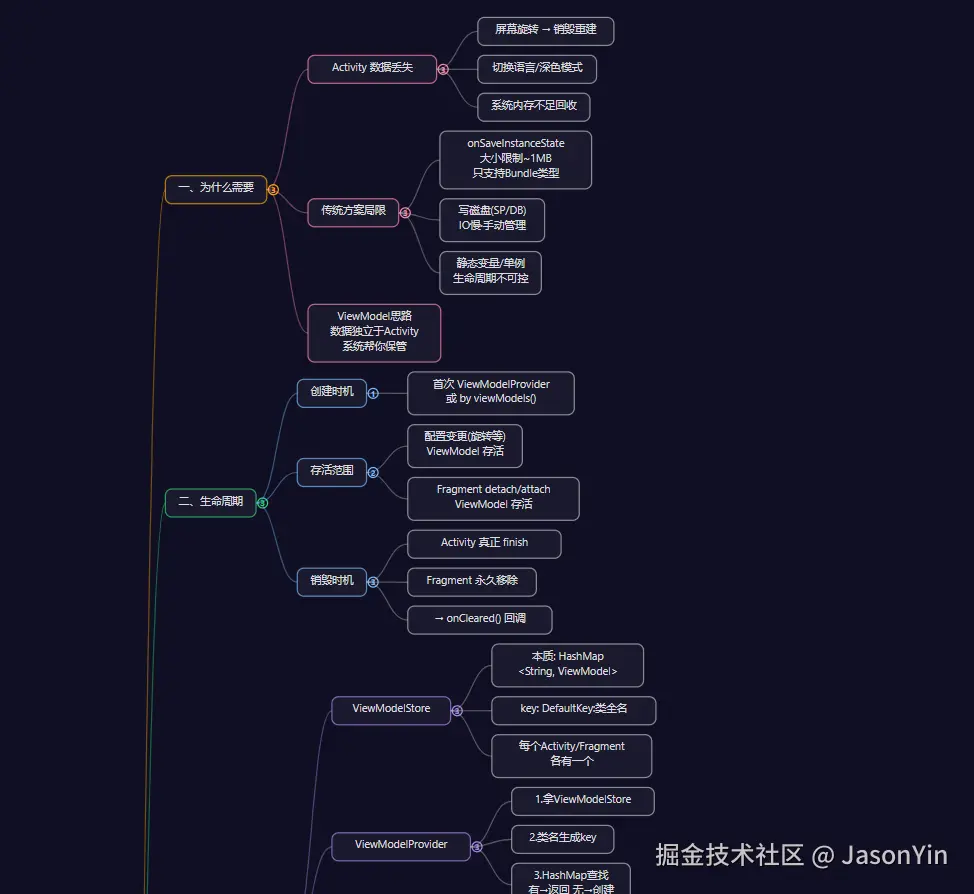
<!DOCTYPE html>
<html lang="zh-CN">
<head>
<meta charset="UTF-8">
<meta name="viewport" content="width=device-width, initial-scale=1.0">
<title>ViewModel 知识体系思维导图</title>
<style>
  * { margin: 0; padding: 0; box-sizing: border-box; }
  body {
    font-family: -apple-system, BlinkMacSystemFont, 'Segoe UI', 'PingFang SC', 'Microsoft YaHei', sans-serif;
    background: #0f0f23;
    overflow: hidden;
    width: 100vw;
    height: 100vh;
  }
  #canvas {
    width: 100%;
    height: 100%;
    cursor: grab;
  }
  #canvas:active { cursor: grabbing; }
  .controls {
    position: fixed;
    bottom: 20px;
    right: 20px;
    display: flex;
    gap: 8px;
    z-index: 100;
  }
  .controls button {
    width: 40px; height: 40px;
    border-radius: 50%;
    border: 1px solid #444;
    background: #1a1a2e;
    color: #fff;
    font-size: 18px;
    cursor: pointer;
    display: flex;
    align-items: center;
    justify-content: center;
    transition: background 0.2s;
  }
  .controls button:hover { background: #2a2a4e; }
  .tip {
    position: fixed;
    top: 16px;
    left: 50%;
    transform: translateX(-50%);
    color: #666;
    font-size: 13px;
    z-index: 100;
    pointer-events: none;
  }
</style>
</head>
<body>
<div class="tip">🖱️ 滚轮缩放 · 拖拽平移 · 点击节点展开/折叠</div>
<div class="controls">
  <button onclick="zoomIn()" title="放大">+</button>
  <button onclick="zoomOut()" title="缩小">−</button>
  <button onclick="resetView()" title="重置">⌂</button>
</div>
<svg id="canvas"></svg>

<script>
// ========== 思维导图数据 ==========
const data = {
  text: 'ViewModel\n完整知识体系', color: '#ff6b6b',
  children: [
    {
      text: '一、为什么需要', color: '#ffa502',
      children: [
        { text: 'Activity 数据丢失', color: '#f8a', children: [
          { text: '屏幕旋转 → 销毁重建' },
          { text: '切换语言/深色模式' },
          { text: '系统内存不足回收' },
        ]},
        { text: '传统方案局限', color: '#f8a', children: [
          { text: 'onSaveInstanceState\n大小限制~1MB\n只支持Bundle类型' },
          { text: '写磁盘(SP/DB)\nIO慢·手动管理' },
          { text: '静态变量/单例\n生命周期不可控' },
        ]},
        { text: 'ViewModel思路\n数据独立于Activity\n系统帮你保管', color: '#f8a' },
      ]
    },
    {
      text: '二、生命周期', color: '#2ed573',
      children: [
        { text: '创建时机', color: '#7bf', children: [
          { text: '首次 ViewModelProvider\n或 by viewModels()' },
        ]},
        { text: '存活范围', color: '#7bf', children: [
          { text: '配置变更(旋转等)\nViewModel 存活' },
          { text: 'Fragment detach/attach\nViewModel 存活' },
        ]},
        { text: '销毁时机', color: '#7bf', children: [
          { text: 'Activity 真正 finish' },
          { text: 'Fragment 永久移除' },
          { text: '→ onCleared() 回调' },
        ]},
      ]
    },
    {
      text: '三、底层原理(源码)', color: '#1e90ff',
      children: [
        { text: 'ViewModelStore', color: '#a8e', children: [
          { text: '本质: HashMap\n<String, ViewModel>' },
          { text: 'key: DefaultKey:类全名' },
          { text: '每个Activity/Fragment\n各有一个' },
        ]},
        { text: 'ViewModelProvider', color: '#a8e', children: [
          { text: '1.拿ViewModelStore' },
          { text: '2.类名生成key' },
          { text: '3.HashMap查找\n有→返回 无→创建' },
        ]},
        { text: 'Factory工厂', color: '#a8e', children: [
          { text: 'NewInstanceFactory\n反射无参构造' },
          { text: 'AndroidViewModelFactory\n反射(application)' },
          { text: '自定义Factory\n有参数时使用' },
        ]},
        { text: 'NonConfiguration\nInstances', color: '#a8e', children: [
          { text: '销毁前:\nonRetainNonConfig..\n→ 存入ActivityClientRecord' },
          { text: '重建时:\ngetLastNonConfig..\n→ 恢复ViewModelStore' },
          { text: 'ActivityClientRecord\n由系统进程持有不回收' },
        ]},
      ]
    },
    {
      text: '四、viewModelScope', color: '#ff4757',
      children: [
        { text: '协程上下文', color: '#fc6', children: [
          { text: 'SupervisorJob\n子协程失败不影响兄弟' },
          { text: 'Dispatchers.Main\n.immediate\n默认主线程' },
        ]},
        { text: '懒创建机制', color: '#fc6', children: [
          { text: '首次访问时创建' },
          { text: '缓存在mBagOfTags' },
          { text: 'CloseableCoroutineScope' },
        ]},
        { text: '自动取消', color: '#fc6', children: [
          { text: 'ViewModel.clear()' },
          { text: '→ close() → cancel()' },
          { text: '→ 所有子协程结束' },
        ]},
      ]
    },
    {
      text: '五、创建方式', color: '#a55eea',
      children: [
        { text: '无参构造\nby viewModels()' },
        { text: '自定义Factory\n有参数时' },
        { text: 'AndroidViewModel\n需要Context时' },
        { text: 'Koin注入(推荐)\nby viewModel()' },
        { text: 'CreationExtras\nLifecycle 2.5+' },
      ]
    },
    {
      text: '六、数据暴露方式', color: '#ffa502',
      children: [
        { text: 'StateFlow', color: '#7bf', children: [
          { text: '必须有初始值' },
          { text: '新订阅者立刻收到最新值' },
          { text: '相同值不重复发射' },
          { text: '适合: 页面状态\n搜索词·开关' },
        ]},
        { text: 'SharedFlow\n(项目主用)', color: '#7bf', children: [
          { text: '不需要初始值' },
          { text: 'replay=0 无历史' },
          { text: '适合: 网络请求\nToast·导航事件' },
        ]},
        { text: 'LiveData(遗留)', color: '#7bf', children: [
          { text: '有粘性' },
          { text: '只能主线程set' },
          { text: '适合View系统' },
        ]},
      ]
    },
    {
      text: '七、项目ViewModel模式', color: '#2ed573',
      children: [
        { text: 'BaseViewModel\nexception流', color: '#f8a' },
        { text: 'launch扩展\ntry-catch-finally\n异常统一处理', color: '#f8a' },
        { text: 'State密封类\nLoading·Success·Error', color: '#f8a' },
        { text: 'Repository层\ntoFlow+resultCall\n自动发Loading', color: '#f8a' },
        { text: '数据流\nUI→VM→Repo→Api\nLoading→Success/Error', color: '#f8a' },
      ]
    },
    {
      text: '八、Fragment间通信', color: '#1e90ff',
      children: [
        { text: 'activityViewModels()\n从Activity的Store获取' },
        { text: '同Activity下Fragment\n拿到同一个实例' },
        { text: 'A写入 → B自动收到' },
      ]
    },
    {
      text: '九、常见坑', color: '#ff4757',
      children: [
        { text: '持有Context\n→ 内存泄漏', color: '#fc6' },
        { text: 'SharedFlow丢事件\n→ 先collect再请求\n或replay=1', color: '#fc6' },
        { text: '多Flow串行collect\n→ 每个单独launch', color: '#fc6' },
        { text: '不用repeatOnLifecycle\n→ 后台浪费资源', color: '#fc6' },
        { text: 'VM里做UI操作\n→ 发事件让UI处理', color: '#fc6' },
        { text: '有参数没Factory\n→ 反射崩溃', color: '#fc6' },
      ]
    },
  ]
};

// ========== 布局计算 ==========
const CFG = {
  nodeH: 40,        // 节点基础高度
  lineH: 18,        // 每行文字高度
  padX: 16,         // 节点水平内边距
  padY: 8,          // 节点垂直内边距
  gapX: 50,         // 水平间距
  gapY: 12,         // 垂直间距
  fontSize: 13,
  rootFontSize: 16,
  charW: 8,         // 估算每字符宽度
  cnCharW: 13,      // 中文字符宽度
};

function measureText(text, fontSize) {
  const lines = text.split('\n');
  let maxW = 0;
  for (const line of lines) {
    let w = 0;
    for (const ch of line) {
      w += ch.charCodeAt(0) > 127 ? CFG.cnCharW : CFG.charW;
    }
    if (w > maxW) maxW = w;
  }
  const width = maxW + CFG.padX * 2;
  const height = lines.length * CFG.lineH + CFG.padY * 2;
  return { width: Math.max(width, 60), height: Math.max(height, 32), lines };
}

function layoutTree(node, depth = 0) {
  const isRoot = depth === 0;
  const fs = isRoot ? CFG.rootFontSize : CFG.fontSize;
  const m = measureText(node.text, fs);
  node._w = m.width;
  node._h = m.height;
  node._lines = m.lines;
  node._depth = depth;
  node._collapsed = false;

  if (!node.children || node.children.length === 0) {
    node._totalH = node._h;
    return;
  }
  for (const c of node.children) layoutTree(c, depth + 1);

  let totalH = 0;
  for (let i = 0; i < node.children.length; i++) {
    totalH += node.children[i]._totalH;
    if (i > 0) totalH += CFG.gapY;
  }
  node._totalH = Math.max(node._h, totalH);
}

function positionTree(node, x, y) {
  node._x = x;
  node._y = y;

  if (!node.children || node.children.length === 0 || node._collapsed) return;

  const childX = x + node._w + CFG.gapX;
  let totalH = 0;
  for (let i = 0; i < node.children.length; i++) {
    totalH += node.children[i]._totalH;
    if (i > 0) totalH += CFG.gapY;
  }

  let curY = y + node._h / 2 - totalH / 2;
  for (const c of node.children) {
    const cy = curY + c._totalH / 2 - c._h / 2;
    positionTree(c, childX, cy);
    curY += c._totalH + CFG.gapY;
  }
}

// ========== SVG 渲染 ==========
const svg = document.getElementById('canvas');
const NS = 'http://www.w3.org/2000/svg';
let gMain;

function el(tag, attrs = {}) {
  const e = document.createElementNS(NS, tag);
  for (const [k, v] of Object.entries(attrs)) e.setAttribute(k, v);
  return e;
}

const defaultColors = ['#888','#aaa','#999','#bbb','#ccc'];

function getColor(node) {
  return node.color || defaultColors[node._depth % defaultColors.length];
}

function renderNode(g, node) {
  const color = getColor(node);
  const isRoot = node._depth === 0;
  const r = isRoot ? 12 : 8;

  // 节点背景
  const rect = el('rect', {
    x: node._x, y: node._y,
    width: node._w, height: node._h,
    rx: r, ry: r,
    fill: isRoot ? color : '#1a1a2e',
    stroke: color,
    'stroke-width': isRoot ? 0 : 1.5,
    'stroke-opacity': 0.7,
    cursor: 'pointer',
  });
  g.appendChild(rect);

  // 文字
  const fs = isRoot ? CFG.rootFontSize : CFG.fontSize;
  const textColor = isRoot ? '#fff' : '#ddd';
  const startY = node._y + CFG.padY + fs * 0.85;
  for (let i = 0; i < node._lines.length; i++) {
    const t = el('text', {
      x: node._x + node._w / 2,
      y: startY + i * CFG.lineH,
      fill: textColor,
      'font-size': fs,
      'text-anchor': 'middle',
      'pointer-events': 'none',
      'font-weight': isRoot ? 'bold' : 'normal',
    });
    t.textContent = node._lines[i];
    g.appendChild(t);
  }

  // 折叠指示器
  if (node.children && node.children.length > 0) {
    const cx = node._x + node._w + 8;
    const cy = node._y + node._h / 2;
    const indicator = el('circle', {
      cx, cy, r: 6,
      fill: node._collapsed ? color : 'transparent',
      stroke: color,
      'stroke-width': 1.5,
      cursor: 'pointer',
      'data-id': node._id,
    });
    g.appendChild(indicator);
    const sign = el('text', {
      x: cx, y: cy + 4,
      fill: node._collapsed ? '#fff' : color,
      'font-size': 10,
      'text-anchor': 'middle',
      'pointer-events': 'none',
      'font-weight': 'bold',
    });
    sign.textContent = node._collapsed ? '+' : node.children.length;
    g.appendChild(sign);

    // 点击事件
    rect.addEventListener('click', () => toggleCollapse(node));
    indicator.addEventListener('click', () => toggleCollapse(node));
  }

  // 连线 + 递归子节点
  if (node.children && !node._collapsed) {
    for (const c of node.children) {
      const x1 = node._x + node._w;
      const y1 = node._y + node._h / 2;
      const x2 = c._x;
      const y2 = c._y + c._h / 2;
      const mx = (x1 + x2) / 2;
      const path = el('path', {
        d: `M${x1},${y1} C${mx},${y1} ${mx},${y2} ${x2},${y2}`,
        fill: 'none',
        stroke: getColor(c),
        'stroke-width': 1.5,
        'stroke-opacity': 0.4,
      });
      g.appendChild(path);
      renderNode(g, c);
    }
  }
}

let nodeIdCounter = 0;
function assignIds(node) {
  node._id = nodeIdCounter++;
  if (node.children) node.children.forEach(assignIds);
}

function findNode(node, id) {
  if (node._id === id) return node;
  if (node.children) {
    for (const c of node.children) {
      const found = findNode(c, id);
      if (found) return found;
    }
  }
  return null;
}

function toggleCollapse(node) {
  if (!node.children || node.children.length === 0) return;
  node._collapsed = !node._collapsed;
  rebuild();
}

function rebuild() {
  layoutTree(data);
  positionTree(data, 50, 50);
  // 计算边界
  let minX = Infinity, minY = Infinity, maxX = -Infinity, maxY = -Infinity;
  function bounds(n) {
    minX = Math.min(minX, n._x);
    minY = Math.min(minY, n._y);
    maxX = Math.max(maxX, n._x + n._w + 20);
    maxY = Math.max(maxY, n._y + n._h);
    if (n.children && !n._collapsed) n.children.forEach(bounds);
  }
  bounds(data);

  if (gMain) svg.removeChild(gMain);
  gMain = el('g');
  svg.appendChild(gMain);
  renderNode(gMain, data);
}

// ========== 平移缩放 ==========
let scale = 1, tx = 0, ty = 0;
let dragging = false, lastX, lastY;

function applyTransform() {
  if (gMain) gMain.setAttribute('transform', `translate(${tx},${ty}) scale(${scale})`);
}

svg.addEventListener('mousedown', e => {
  dragging = true;
  lastX = e.clientX;
  lastY = e.clientY;
});
window.addEventListener('mousemove', e => {
  if (!dragging) return;
  tx += e.clientX - lastX;
  ty += e.clientY - lastY;
  lastX = e.clientX;
  lastY = e.clientY;
  applyTransform();
});
window.addEventListener('mouseup', () => dragging = false);

svg.addEventListener('wheel', e => {
  e.preventDefault();
  const delta = e.deltaY > 0 ? 0.9 : 1.1;
  const rect = svg.getBoundingClientRect();
  const mx = e.clientX - rect.left;
  const my = e.clientY - rect.top;
  tx = mx - (mx - tx) * delta;
  ty = my - (my - ty) * delta;
  scale *= delta;
  applyTransform();
}, { passive: false });

function zoomIn() { scale *= 1.2; applyTransform(); }
function zoomOut() { scale *= 0.8; applyTransform(); }
function resetView() {
  scale = 1; tx = 0; ty = 0;
  applyTransform();
}

// ========== 初始化 ==========
assignIds(data);
rebuild();

// 居中显示
setTimeout(() => {
  const rect = svg.getBoundingClientRect();
  tx = rect.width / 2 - 700;
  ty = rect.height / 2 - 400;
  scale = 0.85;
  applyTransform();
}, 50);
</script>