1.确保你的分支提交完毕; 2.在开发分支运行此脚本; 3.打包完成,部署平台进行部署;
一.vue2项目为例,在根目录下建立一个script文件夹,里面建一个di-build.js文件,文件的内容代码如下:
js
const { spawn } = require("child_process");
const { promisify } = require("util");
const exec = promisify(require("child_process").exec);

class BranchDeployer {
  constructor() {
    this.targetBranch = 'develop';
    this.currentBranch = "";
    this.npmStdout = 'di'
  }

  async run() {
    try {
      console.log("🚀 开始di构建打包流程...");

      // 获取当前分支
      await this.getCurrentBranch();
      console.log(`📋 检测到当前分支: ${this.currentBranch}`);

      // 如果当前分支已经是目标分支,则退出
      if (this.currentBranch === this.targetBranch) {
        console.log(`⚠️  当前分支已经是 ${this.targetBranch},跳过部署`);
        return;
      }

      // 检查工作区是否干净
      await this.checkWorkingDirectoryClean();

      // 拉取最新代码
      await this.pullCurrentBranch();

      // 更新所有分支并切换到目标分支
      await this.switchToTargetBranch();

      // 合并分支
      await this.mergeBranches();

      // 构建 - 添加更详细的错误处理
      await this.buildWithFallback();

      // 提交构建产物
      await this.commitBuildArtifacts();

      // 推送
      await this.pushToRemote();

      // 切换回原分支
      await this.switchBackToOriginalBranch();

      console.log(
        `✅ 打包完成!已将 ${this.currentBranch} 成功合并到 ${this.targetBranch}`
      );
    } catch (error) {
      console.error("❌ 打包过程中发生错误:", error.message);

      process.exit(1);
    }
  }

  async getCurrentBranch() {
    try {
      const { stdout } = await exec("git branch --show-current");
      this.currentBranch = stdout.trim();
    } catch (error) {
      throw new Error(`获取当前分支失败: ${error.message}`);
    }
  }

  async checkWorkingDirectoryClean() {
    try {
      const { stdout } = await exec("git status --porcelain");
      if (stdout.trim() !== "") {
        throw new Error("工作区有未提交的更改,请先提交或暂存更改");
      }
    } catch (error) {
      throw new Error(`检查工作区状态失败: ${error.message}`);
    }
  }

  async pullCurrentBranch() {
    console.log("⬇️ 开始拉取最新的远端代码...", this.currentBranch);
    try {
      await exec(`git pull origin ${this.currentBranch}`);
    } catch (error) {
      throw new Error(`拉取当前分支代码失败: ${error.message}`);
    }
  }

  async switchToTargetBranch() {
    try {
      // 更新所有分支
      await exec("git fetch origin");

      // 检查目标分支是否存在
      try {
        await exec(
          `git show-ref --verify --quiet refs/heads/${this.targetBranch}`
        );
      } catch (error) {
        throw new Error(`目标分支 ${this.targetBranch} 不存在,请检查分支名称`);
      }

      // 切换到目标分支并更新
      await exec(`git checkout ${this.targetBranch}`);
      await exec(`git pull origin ${this.targetBranch}`);
    } catch (error) {
      throw new Error(`切换到目标分支失败: ${error.message}`);
    }
  }

  async mergeBranches() {
    console.log(
      `🔄 开始将 ${this.currentBranch} 合并到 ${this.targetBranch}...`
    );

    return new Promise((resolve, reject) => {
      const mergeProcess = spawn(
        "git",
        ["merge", "--no-ff", this.currentBranch],
        {
          stdio: "inherit",
          shell: true
        }
      );

      mergeProcess.on("close", async (code) => {
        if (code === 0) {
          resolve();
        } else {
          // 合并冲突,回滚并切换回原分支
          try {
            await exec("git merge --abort");
            await exec(`git checkout ${this.currentBranch}`);
            reject(new Error("合并冲突!请手动解决冲突后重新运行脚本"));
          } catch (error) {
            reject(new Error(`合并失败且回滚也失败: ${error.message}`));
          }
        }
      });

      mergeProcess.on("error", (error) => {
        reject(new Error(`合并过程出错: ${error.message}`));
      });
    });
  }

  async buildWithFallback() {
    console.log("📦 开始构建过程...");

    try {
      // 首先检查 package.json 是否存在
      const fs = require("fs");
      if (!fs.existsSync("package.json")) {
        throw new Error("package.json 文件不存在,请在项目根目录运行此脚本");
      }

      // 检查 npm 命令是否可用
      try {
        await exec("npm --version");
      } catch (error) {
        throw new Error("npm 命令不可用,请确保已安装 Node.js 和 npm");
      }

      try {
        console.log(`🔄 尝试运行: npm run ${this.npmStdout}`);
        const success = await this.runNpmCommand(this.npmStdout);
        if (success) {
          console.log(`✅ 使用 npm run ${this.npmStdout} 构建成功`);
          return;
        }
      } catch (error) {
        console.log(`❌ npm run ${this.npmStdout} 失败: ${error.message}`);
        throw new Error(`npm run ${this.npmStdout} 失败: ${error.message}`);
      }
    } catch (error) {
      throw new Error(`构建过程失败: ${error.message}`);
    }
  }

  async runNpmCommand(command) {
    return new Promise((resolve, reject) => {
      console.log(`▶️  执行: npm run ${command}`);

      const npmProcess = spawn("npm", ['run', command], {
        stdio: "inherit",
        shell: true
      });

      npmProcess.on("close", (code) => {
        if (code === 0) {
          resolve(true);
        } else {
          reject(new Error(`npm ${command} 退出码: ${code}`));
        }
      });

      npmProcess.on("error", (error) => {
        reject(new Error(`npm ${command} 执行错误: ${error.message}`));
      });
    });
  }

  async commitBuildArtifacts() {
    console.log("💾 检查构建产物...");
    try {
      // 添加所有文件
      await exec("git add .");

      // 检查是否有文件需要提交
      const { stdout } = await exec("git status --porcelain");
      if (stdout.trim() !== "") {
        const timestamp = new Date().toLocaleString("zh-CN");
        await exec(
          `git commit -m "dist: 自动构建提交 from ${this.currentBranch} (${timestamp})"`
        );
        console.log("✅ 构建产物已提交");
      } else {
        console.log("📝 没有检测到构建产物的变化");
      }
    } catch (error) {
      throw new Error(`提交构建产物失败: ${error.message}`);
    }
  }

  async pushToRemote() {
    console.log(`🚀 推送到远程 ${this.targetBranch} 分支...`);
    try {
      await exec(`git push origin ${this.targetBranch}`);
    } catch (error) {
      throw new Error(`推送到远程失败: ${error.message}`);
    }
  }

  async switchBackToOriginalBranch() {
    console.log(`🔙 切换回原分支 ${this.currentBranch}...`);
    try {
      await exec(`git checkout ${this.currentBranch}`);
    } catch (error) {
      throw new Error(`切换回原分支失败: ${error.message}`);
    }
  }
}


// 使用示例
async function main() {
  const deployer = new BranchDeployer();
  await deployer.run();
}

// 如果直接运行此文件
if (require.main === module) {
  main().catch((error) => {
    console.error("❌ 打包失败:", error.message);
    process.exit(1);
  });
}

module.exports = BranchDeployer;
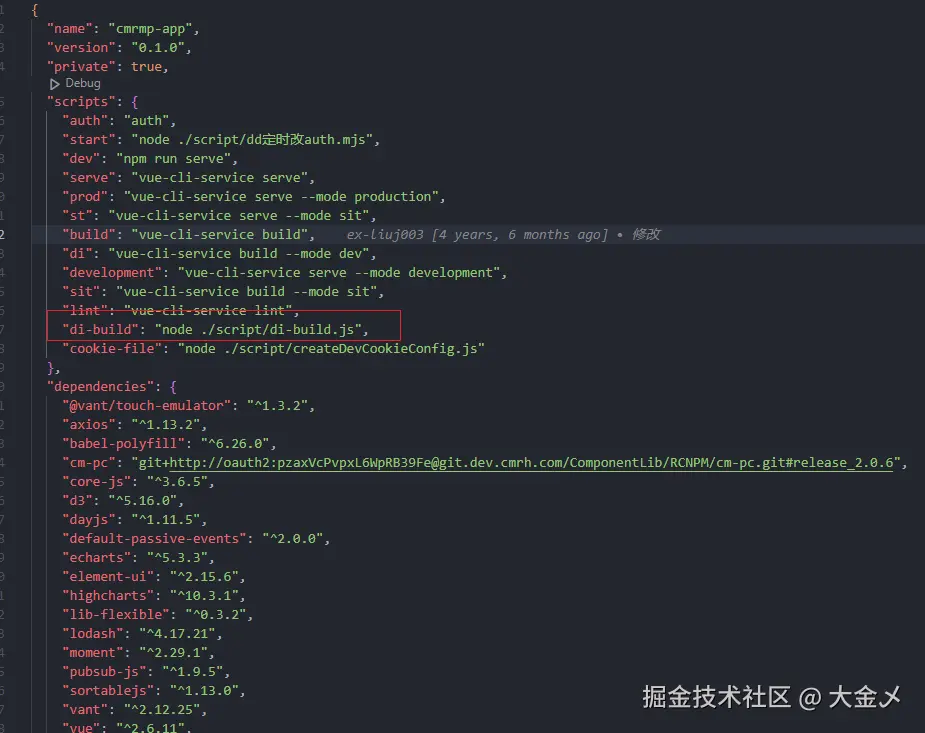
第二步.在package.json文件中加入进行如图:
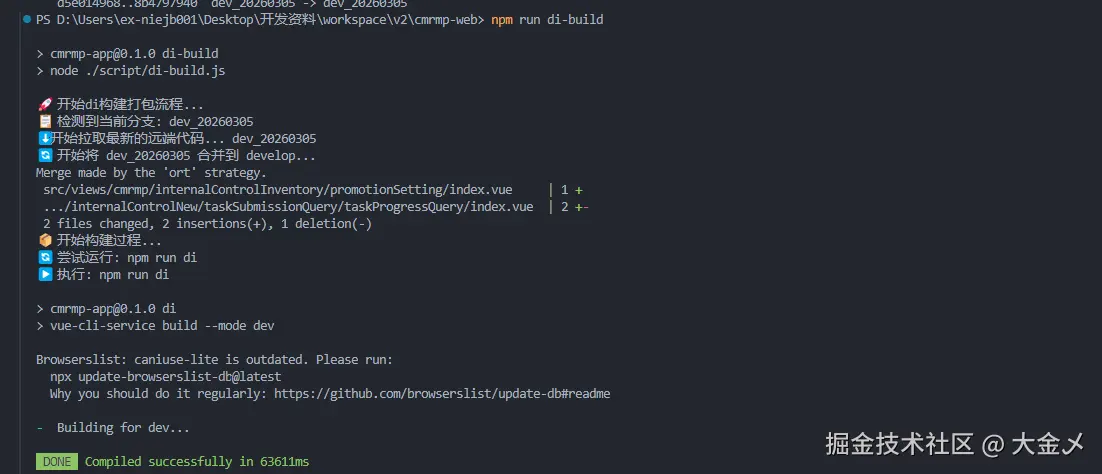
第三步:运行该命令 npm run di-build 如图:
注意点:各自的开发环境打包命令根据自身的命令来配置