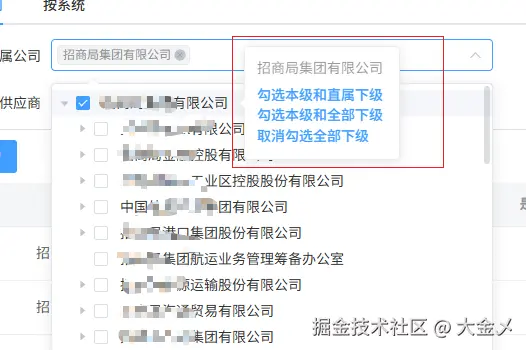
看效果图: 多选模式:
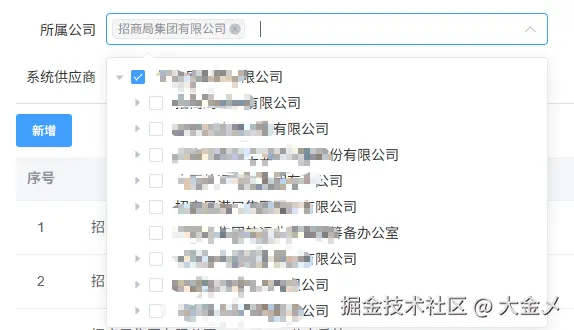 单选模式:
单选模式:
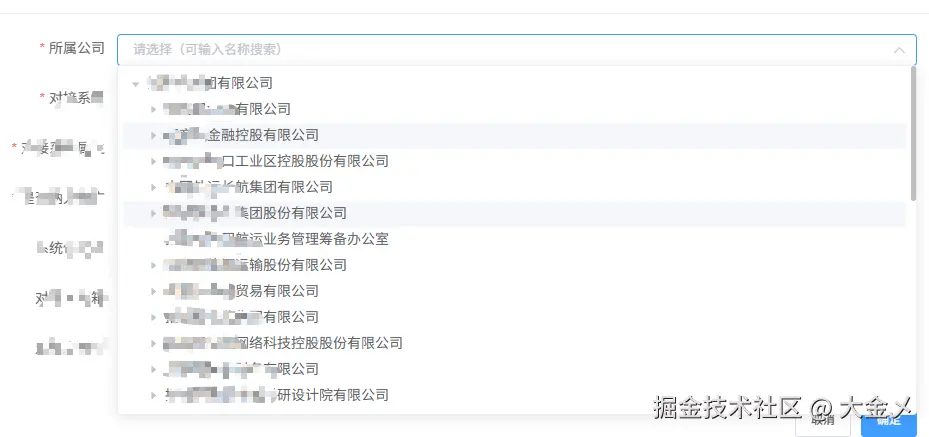 直接上复制代码就能用,在代码中找到这个方法getCompanyList;然后替换成自己的树形结构的接口,返回的数据结构需要根据自身的结构来处理
使用例子
js
<template>
  <TreeSelect
    v-model="selectedValue"
    :tree-data="treeData"
    :multiple="true"
    placeholder="请选择部门"
  />
</template>

<script>
export default {
  data() {
    return {
      selectedValue: [],
      treeData: [
        {
          deptName: '总公司',
          rcmOrgId: '1',
          children: [
            { deptName: '技术部', rcmOrgId: '2' },
            { deptName: '市场部', rcmOrgId: '3' }
          ]
        }
      ]
    }
  }
}
</script>
动态加载数据
js
<template>
  <TreeSelect
    v-model="selectedDept"
    resource-code="cmrmp:dept"
    :is-dept="true"
    placeholder="选择部门"
    @tree-done="handleTreeDone"
  />
</template>

<script>
export default {
  data() {
    return {
      selectedDept: ''
    }
  },
  methods: {
    handleTreeDone(treeData) {
      console.log('树数据加载完成:', treeData)
    }
  }
}
</script>
自定义配置
js
<template>
  <TreeSelect
    v-model="selectedValues"
    :tree-data="orgData"
    :multiple="true"
    :check-strictly="true"
    :default-props="{
      children: 'children',
      label: 'name',
      value: 'id'
    }"
    :clearable="false"
    size="medium"
    @change="handleSelectionChange"
  />
</template>

<script>
export default {
  data() {
    return {
      selectedValues: [],
      orgData: [
        {
          name: '组织架构',
          id: 'org-1',
          children: [
            { name: '研发中心', id: 'dept-1' },
            { name: '产品部', id: 'dept-2' }
          ]
        }
      ]
    }
  },
  methods: {
    handleSelectionChange(values, nodes) {
      console.log('选中值:', values)
      console.log('节点数据:', nodes)
    }
  }
}
</script>
获取选中数据
js
<template>
  <div>
    <TreeSelect
      ref="treeSelect"
      v-model="selectedIds"
      :tree-data="companyData"
      :multiple="true"
    />
    <button @click="getSelectedData">获取选中数据</button>
  </div>
</template>

<script>
export default {
  data() {
    return {
      selectedIds: [],
      companyData: [] // 树数据
    }
  },
  methods: {
    getSelectedData() {
      const nodes = this.$refs.treeSelect.getCheckedNodes()
      const keys = this.$refs.treeSelect.getCheckedKeys()
      console.log('选中节点:', nodes)
      console.log('选中键值:', keys)
    }
  }
}
</script>
组件代码如下: 在components文件夹下建立treeSelect文件夹,然后创建index.vue文件;把下面代码复制进去
js
<template>
<div
class="treeSelectWrap"
@mouseleave="onmouseleave"
@mouseenter="onmouseenter"
>
<!-- 禁用状态,单选 -->
<el-input
v-if="disabled && !multiple"
disabled
style="width: 100%"
placeholder="请输入"
:size="size"
:value="selectedDisabledValue"
></el-input>
<!-- 禁用状态,多选 -->
<el-select
v-if="disabled && multiple"
:value="selectedDisabledValue"
:size="size"
style="width: 100%"
disabled
multiple
collapse-tags
>
<el-option
v-for="item in options"
:key="item.value"
:label="item.label"
:value="item.value"
></el-option>
</el-select>
<template v-if="!disabled">
<!-- 下拉树形选择器 -->
<el-popover
:trigger="trigger"
ref="popoverRef"
popper-class="treeSelectPopover"
:width="popoverSlotWidth"
:visible-arrow="false"
:placement="placement"
:disabled="disabled"
:append-to-body="appendToBody"
>
<el-select
v-model="selectedValue"
ref="treeSelect"
slot="reference"
filterable
popper-class="displayNone"
placeholder="请选择(可输入名称搜索)"
style="width: 100%"
:multiple="multiple"
:clearable="clearable"
:collapse-tags="multiple"
:filter-method="filterMethod"
:size="size"
:disabled="disabled"
@clear="clearSelected"
@remove-tag="removeTag"
@visible-change="visbleChange"
>
<el-option
v-for="item in options"
:key="item.value"
:label="item.label"
:value="item.value"
></el-option>
</el-select>
<el-tree
v-if="!disabled"
ref="tree"
:data="treeDataList"
:props="defaultProps"
:node-key="treeNodeKey"
:show-checkbox="multiple"
:filter-node-method="filterNode"
:check-strictly="!checkStrictly"
:default-expanded-keys="defaultExpandedKeys"
:highlight-current="!multiple"
:expand-on-click-node="false"
@check="handleTreeCheck"
@node-click="handleTreeNodeClick"
@current-change="handleCurrentChange"
@node-expand="nodeExpand"
@node-collapse="nodeCollapse"
>
<!-- 多种勾选选项 -->
<div
class="span-ellipsis"
slot-scope="{ node, data }"
v-if="multiple"
>
<TreeSeletLabelPopover
v-if="node.data.children && node.data.children.length"
v-bind="refs"
:node="node"
:node-key="treeNodeKey"
:selectedValue="selectedValue"
@popoverChangeValue="popoverChangeValue"
>
<div
class="text-ellipsis"
:style="{
backgroundColor: data.orgStatus === '0' ? '#DDD' : '',
textDecoration: data.orgStatus === '0' ? 'line-through' : '',
}"
>
<span>{{ node.label }}</span>
</div>
</TreeSeletLabelPopover>
<div
v-else
class="text-ellipsis"
:style="{
backgroundColor: data.orgStatus === '0' ? '#DDD' : '',
textDecoration: data.orgStatus === '0' ? 'line-through' : '',
}"
:title="node.label"
>
<span>{{ node.label }}</span>
</div>
</div>
<div
v-else
slot-scope="{ node, data }"
:class="{ 'text-ellipsis': true, 'node-disabled': !data.open }"
:style="{
backgroundColor: data.orgStatus === '0' ? '#DDD' : '',
textDecoration: data.orgStatus === '0' ? 'line-through' : '',
}"
:title="node.label"
>
<span>{{ node.label }}</span>
</div>
</el-tree>
</el-popover>
</template>
</div>
</template>
<script>
import { getOpenNode, getTreeAllLength } from "@/utils";
import TreeSeletLabelPopover from "./TreeSeletLabelPopover";
import axios from "axios";
export default {
name: "CMR_TreeSelect",
components: {
TreeSeletLabelPopover,
},
props: {
// select的size
size: {
type: String,
default: "small",
},
// 树形数据
treeData: {
type: Array,
default: () => [],
},
// 是否多选
multiple: {
type: Boolean,
default: false,
},
// 是否可清空
clearable: {
type: Boolean,
default: true,
},
// 父子节点关联(多选时有效)
checkStrictly: {
type: Boolean,
default: false,
},
// 节点配置选项
defaultProps: {
type: Object,
default: () => ({
children: "children",
label: "deptName",
value: "rcmOrgId",
}),
},
// 默认选中的值
value: {
type: [String, Number, Array],
default: () => [],
},
// 是否默认选中第一个
defaultOne: {
type: Boolean,
default: false,
},
resourceCode: {
type: String,
default: "",
},
isDept: {
type: Boolean,
default: false,
},
requestUrl: {
type: String,
default: "",
},
// 是否挂在body上
appendToBody: {
type: Boolean,
default: false,
},
// popover的位置
placement: {
type: String,
default: "bottom-start",
},
disabled: {
type: Boolean,
default: false,
},
// 禁用状态下,以文本的方式展示
/**
* 为何需要单独设置禁用状态的值?
* 1.禁用下不走树结构,减少数的接口请求
* 2.回显值不一定在树结构中
*/
disabledValue: {
type: [String, Array],
default: "",
},
trigger: {
type: String,
default: "click",
},
},
data() {
return {
selectedValue: this.multiple ? [] : "", // 选中的值
selectedDisabledValue: this.multiple ? [] : "", // 禁用状态的值
treeDataList: [], // 数结构数据
treeNodeKey: "", // 节点唯一标识字段
options: [], // 下拉选择的option
popoverSlotWidth: 350, // popover的宽度
isInit: true,
refs: {
companyTreeRef: {},
companySelectRef: {},
},
};
},
watch: {
value: {
handler(newVal) {
if (!this.disabled) {
this.selectedValue = newVal;
this.initSelectedNodes();
}
},
deep: true,
immediate: true,
},
disabled: {
handler(newVal) {
if (newVal) {
this.initDisabledText();
}
},
deep: true,
immediate: true,
},
disabledValue: {
handler() {
this.initDisabledText();
},
immediate: true,
deep: true,
},
treeData: {
handler(val) {
if (val.length && !this.disabled) {
this.treeDataList = val;
}
},
deep: true,
immediate: true,
},
treeDataList: {
handler(val) {
if (!this.disabled) {
this.addAttr(val);
if (this.defaultOne) {
this.setDefaultOne();
}
this.initOptions();
this.initSelectedNodes();
}
},
deep: true,
immediate: true,
},
resourceCode: {
handler(val) {
if (val) {
this.getCompanyList(val);
}
},
immediate: true,
},
defaultProps: {
handler(val) {
if (val && typeof val === "object") {
this.treeNodeKey = val.value;
}
},
deep: true,
immediate: true,
},
// 动态改变展开节点
defaultExpandedKeys: {
handler(keys) {
if (this.$refs.tree && this.$refs.tree.store) {
const nodes = this.$refs.tree.store._getAllNodes();
nodes.forEach((item) => {
item.expanded = keys.includes(item.data[this.defaultProps.value]);
});
}
},
deep: true,
},
},
computed: {
// 默认展开的节点
defaultExpandedKeys() {
if (this.disabled) {
return [];
}
const findOpen = getOpenNode(this.treeDataList || []);
let findNode = [];
if (findOpen.length) {
findNode = this.getExpandChild(this.treeDataList, findOpen[0].level);
}
const data = Array.isArray(this.value) ? this.value : [this.value];
const valueLength = getTreeAllLength(this.treeDataList);
// 当全选时,只展开根节点
if (valueLength === data.length) {
return findNode;
}
// 初始化时, 不为第一级时,展开第一个open的项
if (this.isInit && findOpen[0]?.level > 1) {
// eslint-disable-next-line vue/no-side-effects-in-computed-properties
this.isInit = false;
return [findOpen[0][this.defaultProps.value]];
}
const checkedParentKeys = data
.filter(Boolean)
.map((item) => {
return this.findParentOrSelf(
this.treeDataList || [],
(node) => node[this.defaultProps.value] === item
);
})
.filter(Boolean)
.map((i) => i[this.defaultProps.value]);
const res = [...findNode, ...checkedParentKeys].filter(Boolean);
return this.$lodash.uniq(res);
},
},
mounted() {
if (!this.disabled) {
this.refs.companySelectRef = this.$refs.treeSelect;
this.refs.companyTreeRef = this.$refs.tree;
const treeSelectPopoverEl =
this.$refs.popoverRef.$el.querySelector(".treeSelectPopover");
if (treeSelectPopoverEl) {
treeSelectPopoverEl.addEventListener("mouseenter", this.onmouseenter);
treeSelectPopoverEl.addEventListener("mouseleave", this.onmouseleave);
}
window.addEventListener("resize", this.setPopoverSlotWidth);
this.setPopoverSlotWidth();
}
},
beforeDestroy() {
if (!this.disabled) {
window.removeEventListener("resize", this.setPopoverSlotWidth);
const treeSelectPopoverEl =
this.$refs.popoverRef.$el.querySelector(".treeSelectPopover");
if (treeSelectPopoverEl) {
treeSelectPopoverEl.removeEventListener(
"mouseenter",
this.onmouseenter
);
treeSelectPopoverEl.removeEventListener(
"mouseleave",
this.onmouseleave
);
}
}
},
methods: {
// 处理hover模式下的交互样式问题
onmouseleave() {
if (!this.disabled && this.trigger === "hover") {
this.$refs.treeSelect.visible = false;
}
},
onmouseenter() {
if (!this.disabled && this.trigger === "hover") {
this.$refs.treeSelect.visible = true;
}
},
// 设置popover的宽度
setPopoverSlotWidth() {
setTimeout(() => {
this.popoverSlotWidth =
this.$refs.treeSelect?.$el?.offsetWidth || 350;
});
},
// 添加权限禁用节点
addAttr(tree) {
tree.map((item) => {
if (!item.open) {
item.disabled = true;
} else {
item.disabled = false;
}
if (item.children) {
this.addAttr(item.children);
}
});
},
// 重置过滤显示
visbleChange(visible) {
if (!visible) {
this.$refs.tree.filter();
}
},
// 输入过滤寻找
filterMethod(val) {
if (val) {
this.$refs.tree.filter(val);
} else {
this.$refs.tree.filter();
}
},
filterNode(value, data) {
if (!value) return true;
return data.deptName.indexOf(value) !== -1;
},
// 节点悬浮选择
popoverChangeValue(ids) {
this.$emit("change", ids);
this.$emit("input", ids);
},
// 获取数结构数据
async getCompanyList(val) {
if (this.disabled || (this.treeDataList && this.treeDataList.length)) {
return;
}
let url = "/cmrmp/api/commonComponent/queryCompanyTree";
if (this.isDept) url = "/cmrmp/api/commonComponent/queryOrgTree";
if (this.requestUrl) url = this.requestUrl;
const res = await axios.get(url, {
params: {
resourceCode: val,
},
});
if (res.data.code === "1") {
const data = res.data.result || [];
this.addAttr(data);
this.treeDataList = data;
if (this.defaultOne) {
this.setDefaultOne();
}
this.$emit("treeDone", data);
}
},
// 找寻父节点或自己
findParentOrSelf(tree, condition, parent = null) {
// 如果 tree 是数组,遍历每个子节点
if (Array.isArray(tree)) {
for (let node of tree) {
const result = this.findParentOrSelf(node, condition, parent);
if (result) return result;
}
return null;
}
// 如果当前节点满足条件
if (condition(tree)) {
// 如果有父节点,返回父节点;否则返回自己
return parent || tree;
}
// 递归查找子节点
if (tree.children && Array.isArray(tree.children)) {
for (let child of tree.children) {
const result = this.findParentOrSelf(child, condition, tree);
if (result) return result;
}
}
return null;
},
// 找到需要展开的节点层级
getExpandChild(node, level, result = []) {
if (Array.isArray(node)) {
node.forEach((o, ind) => {
if (ind === 0 && level === 1 && o.level === 1)
result.push(o[this.defaultProps.value]);
else if (o.level < level) result.push(o[this.defaultProps.value]);
if (o.children) this.getExpandChild(o.children, level, result);
});
} else {
if (node.children) this.getExpandChild(node.children, level, result);
}
return result;
},
// 递归找到第一个有权限(open)的节点
findFirstOpenNode(list) {
if (!list) return;
let arr = JSON.parse(JSON.stringify(list));
while (arr.length) {
let cur = arr[0];
if (cur.open) return cur;
if (cur.children?.length) {
arr = arr.concat(cur.children);
}
arr.shift();
}
},
// 默认选中第一个
setDefaultOne() {
if (!this.treeDataList.length) return;
const curNode = this.findFirstOpenNode(this.treeDataList);
if (curNode) {
const data = this.multiple
? [curNode[this.defaultProps.value]]
: curNode[this.defaultProps.value];
this.$emit("change", data);
this.$emit("input", data);
}
},
// 初始化已选中的节点
initSelectedNodes() {
if (!this.treeDataList.length) return;
this.$nextTick(() => {
if (this.multiple) {
// 多选模式
this.$refs.tree?.setCheckedKeys(this.selectedValue || []);
} else {
// 单选模式
this.$refs.tree?.setCurrentKey(this.selectedValue || "");
}
});
},
// 初始化禁用状态下的文本
initDisabledText() {
if (!this.disabled) {
return;
}
const val = this.disabledValue;
if (this.multiple) {
// 多选模式
if (typeof val == "string" && val.includes(",")) {
this.selectedDisabledValue = val.split(",");
} else if (Array.isArray(val)) {
this.selectedDisabledValue = val;
} else {
this.selectedDisabledValue = [val];
}
this.options = this.selectedDisabledValue.map((d) => {
return { value: d, label: d };
});
} else {
// 单选模式
this.selectedDisabledValue = val;
}
},
// 树结构平铺成el-select的一维option
flattenTree(
treeData,
idKey = this.defaultProps.value,
nameKey = this.defaultProps.label,
childrenKey = this.defaultProps.children
) {
const result = [];
// 确保输入是数组,如果不是则包装成数组
const treeArray = Array.isArray(treeData) ? treeData : [treeData];
function traverse(node) {
if (!node) return;
// 将当前节点转换为目标格式并添加到结果中
result.push({
label: node[nameKey],
value: node[idKey],
});
// 如果存在子节点,则递归遍历
if (node[childrenKey] && Array.isArray(node[childrenKey])) {
node[childrenKey].forEach(traverse);
}
}
// 遍历树的每个根节点
treeArray.forEach(traverse);
return result;
},
// 初始化options
initOptions() {
if (!this.treeDataList.length) return;
const list = this.flattenTree(this.treeDataList);
this.options = list;
},
// 节点展开
nodeExpand() {
this.$refs.treeSelect.visible = true;
},
// 节点收起
nodeCollapse() {
this.$refs.treeSelect.visible = true;
},
// 处理树节点点击(单选)
handleTreeNodeClick(data, node) {
if (this.multiple) {
this.$refs.treeSelect.visible = true;
return;
}
if (!this.multiple && data.open) {
this.selectedValue =
data[this.defaultProps.value] || data[this.treeNodeKey];
this.$emit("input", this.selectedValue);
this.$emit("change", this.selectedValue, data, node);
this.$refs.popoverRef.doClose();
}
},
// 处理树节点选择变化(多选)
handleTreeCheck(data, checkedInfo) {
if (this.multiple) {
this.$refs.treeSelect.visible = true;
const checkedKeys = checkedInfo.checkedKeys;
this.selectedValue = checkedKeys;
this.$emit("input", this.selectedValue);
this.$emit("change", this.selectedValue, checkedInfo.checkedNodes);
}
},
// 处理当前节点变化(单选)
handleCurrentChange(data, node) {
if (this.multiple) {
this.$refs.treeSelect.visible = true;
return;
}
if (!this.multiple && data.open) {
this.selectedValue =
data[this.defaultProps.value] || data[this.treeNodeKey];
}
},
// 清空选择
clearSelected() {
// if (this.defaultOne) {
// this.setDefaultOne();
// return;
// }
if (this.multiple) {
this.selectedValue = [];
this.$refs.tree.setCheckedKeys([]);
} else {
this.selectedValue = "";
this.$refs.tree.setCurrentKey(null);
}
this.$emit("input", this.selectedValue);
this.$emit("change", this.selectedValue);
},
// 移除标签(多选时)
removeTag(tag) {
// 查找要移除的节点
const nodes = this.$refs.tree.getCheckedNodes();
const nodeToRemove = nodes.find(
(node) => node[this.defaultProps.value] === tag
);
if (nodeToRemove) {
const key =
nodeToRemove[this.defaultProps.value] ||
nodeToRemove[this.treeNodeKey];
this.$refs.tree.setChecked(key, false);
// 更新选中值
const index = this.selectedValue.indexOf(key);
if (index > -1) {
this.selectedValue.splice(index, 1);
}
// if (this.selectedValue.length === 0) {
// if (this.defaultOne) {
// this.setDefaultOne();
// return;
// }
// }
this.$emit("input", this.selectedValue);
this.$emit("change", this.selectedValue);
}
},
// 获取选中的节点数据
getCheckedNodes() {
return this.multiple
? this.$refs.tree.getCheckedNodes()
: [this.$refs.tree.getCurrentNode()].filter(Boolean);
},
// 获取选中的键值
getCheckedKeys() {
return this.multiple
? this.$refs.tree.getCheckedKeys()
: this.selectedValue
? [this.selectedValue]
: [];
},
},
};
</script>
<style lang="less">
.treeSelectPopover {
max-height: 350px;
overflow-y: auto;
padding: 0;
.el-tree {
padding: 5px;
}
}
.treeSelectPopover[x-placement] {
margin: 0;
}
</style>
<style lang="less" scoped>
/deep/ .el-select-dropdown__item {
padding: 0;
}
/deep/ .el-tree {
// max-height: 350px;
// padding: 5px;
/* max-height: 300px; */
/* overflow-y: auto; */
// overflow: unset;
}
/deep/ .el-popover {
// overflow-y: auto;
// padding: 0;
// width: 100%;
}
.treeSelectWrap {
width: 100%;
}
.el-select-dropdown__item.selected {
font-weight: normal;
}
.span-ellipsis {
color: #333;
}
.text-ellipsis {
max-width: 280px;
overflow: hidden;
white-space: nowrap;
text-overflow: ellipsis;
}
.node-disabled {
color: #999;
cursor: not-allowed;
}
</style>在treeSelect文件夹下再建立TreeSeletLabelPopover.vue文件,代码如下:
js
<template>
  <el-popover placement="right" :open-delay="600" trigger="hover">
    <div class="optional-list-wrapper">
      <div :title="node.label" class="popover-title">
        {{ node.label || node.data.deptName }}
      </div>
      <el-link
        v-for="item in optionalList"
        :key="item"
        type="primary"
        :underline="false"
        style="display: block; margin: 1px 0"
        @click="handlePopoverClick(node.data, item)"
      >
        {{ item }}
      </el-link>
    </div>

    <template #reference>
      <slot></slot>
    </template>
  </el-popover>
</template>
<script>
  export default {
    props: {
      node: {
        // 树节点
        type: Object,
        default: () => ({}),
      },
      selectedValue: {
        type: Array,
        default: () => [],
      },
      companyTreeRef: {
        // 树组件的ref,必填
        type: Object,
        default: () => ({}),
      },
      companySelectRef: {
        type: Object,
        default: () => ({}),
      },
      nodeKey: {
        type: String,
        default: "rcmOrgId",
      },
    },
    data() {
      return {
        optionalList: [
          "勾选本级和直属下级",
          "勾选本级和全部下级",
          "取消勾选全部下级",
        ],
      };
    },
    methods: {
      getAllChildrenIds(node) {
        // 存储结果的数组
        const ids = [];

        // 如果当前节点有children且是一个数组
        if (node.children && Array.isArray(node.children)) {
          for (const child of node.children) {
            // 将当前子节点的id加入结果
            if (child[this.nodeKey] && child.open) {
              ids.push(child[this.nodeKey]);
            }
            // 递归处理该子节点的后代
            ids.push(...this.getAllChildrenIds(child));
          }
        }

        return ids;
      },
      handlePopoverClick(companyNode, type) {
        this.companySelectRef.visible = true;
        const allIds = this.getAllChildrenIds(companyNode);
        if (type === this.optionalList[0]) {
          const data = [...this.selectedValue];
          if (companyNode.open) {
            data.push(companyNode[this.nodeKey]);
          }
          const ids = data.filter((item) => !allIds.includes(item));
          if (companyNode.children?.length) {
            companyNode.children.forEach((element) => {
              if (element.open) {
                ids.push(element[this.nodeKey]);
              }
            });
          }
          this.$emit("popoverChangeValue", this.$lodash.uniq(ids));
          return;
        }
        if (type === this.optionalList[1]) {
          const ids = [...this.selectedValue];
          if (companyNode.open) {
            ids.push(companyNode[this.nodeKey]);
          }
          ids.push(...allIds);
          this.$emit("popoverChangeValue", this.$lodash.uniq(ids));
          return;
        }
        if (type === this.optionalList[2]) {
          const ids = this.selectedValue.filter(
            (item) => !allIds.includes(item)
          );
          this.$emit("popoverChangeValue", this.$lodash.uniq(ids));
          return;
        }
      },
    },
  };
</script>
<style lang="less" scoped>
  .optional-list-wrapper {
    margin: -10px;
    padding: 10px;
    position: relative;
    z-index: 1000000;
  }
  .popover-title {
    color: rgba(0, 0, 0, 0.4);
    font-size: 14px;
    padding: 0 4px 4px 0;
    margin-bottom: 3px;
    max-width: 150px;
    overflow: hidden;
    text-overflow: ellipsis;
    white-space: nowrap;
  }
</style>
它的效果如图: