效果图
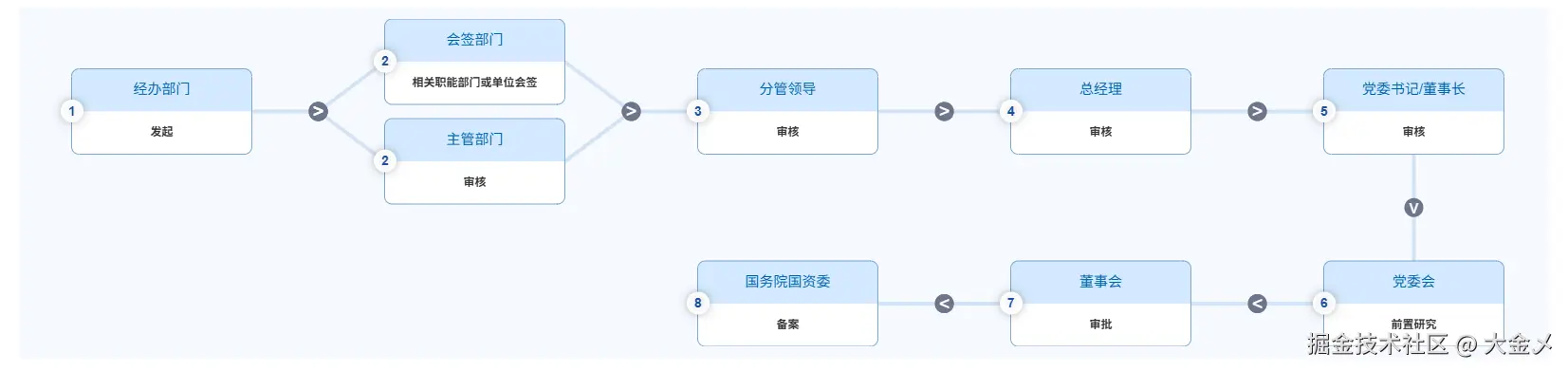
组件代码如下:
js
<template>
<div class="g6_main">
<canvas
@click="clickCanvas"
:width="canvasWidth"
:height="canvasHeight"
class="g6_main_content"
></canvas>
<el-dialog
title="审批流程节点信息"
:visible.sync="dialogData.show"
width="40%"
top="20vh"
custom-class="g6_dia"
:append-to-body="true"
>
<div class="c333 fs16" style="padding: 15px 0 30px 0">
<div class="t-c">
<span>{{
`${dialogData.actionName} ${dialogData.approveDesc}`
}}</span>
</div>
</div>
</el-dialog>
</div>
</template>
<script>
import cloneDepp from "lodash/cloneDeep";
/**
* 每一项数据带有nodeConfig节点对象,记录数据节点配置
*
* this.nodesData 数据结构:
* [
* [[--这里面是真正的数据也是个数组--], [], [], [], []], // 第一行 每行数组长度为 this.lineNum
* [[], [], [], [], []], // 第二行
* ]
*/
const lineWidth = 4; // 线条宽度
const lineColor = "#d3e3f4"; // 线条颜色
export default {
name: "Approve-G6",
data() {
return {
nodesData: [],
originData: [], // 原始数据
canvasWidth: 0,
canvasHeight: 0,
lineNum: 5, // 每一行可以放多少个节点
lineHGap: 140, // 节点之间的水平间隔 为了好看建议在 120 ~ 200 之间
lineVGap: 60, // 节点之间的垂直间隔
nodeConfig: {
nodeVGap: 15, // 单个节点内部之间上下间隔
w: 190, // 节点宽度
h: 90, // 节点高度
},
lineCenterY: [], // 每一行的中心Y轴坐标
dialogData: {
show: false,
actionName: "",
approveDesc: "",
},
scale: 1, // 缩放比例
canvasTranlate: {
x: 0,
y: 0,
},
resizeObserver: null,
};
},
mounted() {
this.observeParentDom();
},
beforeUnmount() {
this.resizeObserver.disconnect();
},
methods: {
destoryCanvas() {
const instance = this.getCanvasInstance();
if (instance) {
instance.clearRect(0, 0, this.canvasWidth, this.canvasHeight);
instance.resetTransform();
}
},
// 点击画布
clickCanvas(evt) {
let { offsetX, offsetY } = evt;
for (let i = 0; i < this.nodesData.length; i++) {
for (let k = 0; k < this.nodesData[i].length; k++) {
if (!this.nodesData[i][k]?.length) continue;
for (let j = 0; j < this.nodesData[i][k].length; j++) {
let { x, y, w, h } = this.nodesData[i][k][j]["nodeConfig"];
let inRect = this.isPointInRect(
x,
y,
w,
h,
offsetX - this.canvasTranlate.x,
offsetY - this.canvasTranlate.y
);
if (inRect) {
let { actionName, approveDesc } = this.nodesData[i][k][j];
this.showApproveInfo(actionName, approveDesc);
return void 0;
}
}
}
}
},
// 判断点是否在矩形内
isPointInRect(x, y, w, h, x1, y1) {
return x <= x1 && x1 <= x + w && y <= y1 && y1 <= y + h;
},
// 显示审批信息
showApproveInfo(actionName, approveDesc) {
this.dialogData.actionName = actionName;
this.dialogData.approveDesc = approveDesc;
this.dialogData.show = true;
},
// 获取组件父级宽度大小
getFatherSize() {
if (!this.$el.parentElement) return;
const { offsetWidth } = this.$el.parentElement;
document.querySelector(".g6_main_content").style.width =
offsetWidth + "px";
this.canvasWidth = offsetWidth * this.scale;
},
/**
* 将数组分组,每组包含lineNum个元素,不足的补冲默认数组,并将分组后的奇数行倒序
* @param arr
* @param chunkSize
*/
chunkArray(arr, chunkSize) {
const result = [];
let isOdd = 0;
let placeholder = [];
for (let i = 0; i < arr.length; i += chunkSize) {
let chunk = arr.slice(i, i + chunkSize);
if (chunk.length < chunkSize) {
chunk = chunk.concat(
new Array(chunkSize - chunk.length)
.fill(0)
.map((v) => JSON.parse(JSON.stringify(placeholder)))
);
}
if (isOdd % 2 === 1) {
chunk = chunk.reverse();
}
isOdd++;
result.push([...chunk]);
}
return result;
},
// 根据实际数据计算canvas高度
getCanvasHeight(d) {
let h = 0;
let preLineH = 0; // 每一行的高度
for (let i = 0; i < d.length; i++) {
preLineH = 0;
for (let j = 0; j < d[i].length; j++) {
if (!d[i][j]?.length) continue;
let len = d[i][j].length;
let VGap = (len - 1) * this.nodeConfig.nodeVGap;
let nodeH = len * this.nodeConfig.h;
preLineH = Math.max(preLineH, nodeH + VGap);
}
h += preLineH + this.lineVGap;
}
h -= this.lineVGap;
document.querySelector(".g6_main_content").style.height = h + "px";
this.canvasHeight = Math.ceil(h * this.scale);
},
// 获取画布实例
getCanvasInstance() {
const canvas = document.querySelector(".g6_main_content");
const ctx = canvas?.getContext("2d");
return canvas ? ctx : null;
},
/**
* 扩展:支持不同圆角半径
* @param {Object} radii - 圆角半径配置
* @param {number} radii.topLeft - 左上角半径
* @param {number} radii.topRight - 右上角半径
* @param {number} radii.bottomRight - 右下角半径
* @param {number} radii.bottomLeft - 左下角半径
*/
drawRoundRectAdvanced(ctx, x, y, width, height, radii) {
ctx.beginPath();
ctx.globalCompositeOperation = "source-over"; // 修改混合模式
// 左上角
ctx.moveTo(x + radii.topLeft, y);
ctx.arcTo(x + width, y, x + width, y + radii.topRight, radii.topRight);
// 右下角
ctx.arcTo(
x + width,
y + height,
x + width - radii.bottomRight,
y + height,
radii.bottomRight
);
// 左下角
ctx.arcTo(
x,
y + height,
x,
y + height - radii.bottomLeft,
radii.bottomLeft
);
// 左上角
ctx.arcTo(x, y, x + radii.topLeft, y, radii.topLeft);
ctx.closePath();
},
// 绘制节点
drawNode(ctx, cfg) {
let fillColor = ["#d4eaff", "#FFFFFF"];
let { x, y, w, h } = cfg;
let o = {
topLeft: 8,
topRight: 8,
bottomRight: 8,
bottomLeft: 8,
};
for (let i = 0; i < 2; i++) {
if (i === 0) {
o.bottomRight = 0;
o.bottomLeft = 0;
o.topLeft = 8;
o.topRight = 8;
} else {
o.bottomRight = 8;
o.bottomLeft = 8;
o.topLeft = 0;
o.topRight = 0;
}
this.drawRoundRectAdvanced(ctx, x, !i ? y : y + h / 2, w, h / 2, o);
ctx.fillStyle = fillColor[i];
ctx.fill();
}
// 绘制边框
ctx.strokeStyle = "#7EA7CE";
ctx.lineWidth = 1;
ctx.beginPath();
ctx.roundRect(x, y, w, h, 8);
ctx.stroke();
},
// 处理字符串超出长度
fittingString(s, len = 10) {
if (s.length <= len) {
return s;
}
return s.substring(0, len) + "...";
},
// 绘制居中文字
drawCenteredText(ctx, node) {
let { x, y, w, h } = node.nodeConfig;
y = y - h / 4;
const paddingUp = 8;
const paddingleft = 8;
const cpaddingUp = 30;
const cpaddingLeft = -5;
const textX = x + paddingleft + (w - 2 * paddingleft) / 2;
const textY = y + paddingUp + (h - 2 * paddingUp) / 2;
const circleX = x + cpaddingLeft + (w - 20 * paddingleft) / 4;
const circleY = y + cpaddingUp + (h - 2 * paddingUp) / 2;
ctx.beginPath();
// 设置文字对齐方式
ctx.textAlign = "center";
ctx.font = "15px Arial";
ctx.textBaseline = "middle";
ctx.fillStyle = "#0062A9";
// 绘制文字
let { approveSort, actionName } = node;
ctx.fillText(this.fittingString(actionName, 10), textX, textY);
this.drawNumberCircle(ctx, circleX, circleY, 12, approveSort);
ctx.shadowBlur = 0; // 阴影模糊程度,数值越大越模糊
ctx.closePath();
},
// 绘制带序号的圆形节点
drawNumberCircle(ctx, x, y, radius, number) {
ctx.beginPath();
ctx.shadowColor = "rgba(0, 0, 0, 0.3)"; // 半透明黑色阴影,更自然
ctx.shadowBlur = 10; // 阴影模糊程度,数值越大越模糊
ctx.shadowOffsetX = 0; // 水平偏移量为0
ctx.shadowOffsetY = 0; // 垂直偏移量为0(两者均为0,实现四周均匀阴影)
ctx.arc(x - 2, y, radius, 0, Math.PI * 2);
ctx.fillStyle = "#fff";
ctx.fill();
// ctx.strokeStyle = "red";// 设置边框颜色
// ctx.stroke();// 绘制边框
ctx.fillStyle = "#1A4F9B"; // 设置字体颜色
ctx.font = "bold 14px Arial";
ctx.textAlign = "center";
ctx.textBaseline = "middle";
ctx.fillText(number, x - 2, y + 1);
},
drawCenteredDescText(ctx, node) {
let { x, y, w, h } = node.nodeConfig;
y = y + h / 4;
const paddingUp = 8;
const paddingleft = 12;
let textX = x + paddingleft + (w - 2 * paddingleft) / 2;
let textY = y + paddingUp + (h - 2 * paddingUp) / 2;
// 设置文字对齐方式
ctx.textAlign = "center";
ctx.font = "bold 12px Arial";
ctx.textBaseline = "middle";
ctx.fillStyle = "#333333";
// 绘制文字
let { approveDesc } = node;
const lineWordNum = 14;
approveDesc = this.fittingString(approveDesc, lineWordNum * 2 - 1);
if (approveDesc.length > 12) {
ctx.textAlign = "start";
textX = textX - (w - 2 * paddingleft) / 2;
textY = textY - paddingUp;
ctx.fillText(approveDesc.substring(0, lineWordNum), textX, textY);
ctx.fillText(
approveDesc.substring(lineWordNum, approveDesc.length),
textX,
textY + 20
);
} else {
ctx.fillText(approveDesc, textX, textY);
}
// ctx.fillText(, textX, textY, w, h);
},
// 根据数据绘制节点
drawNodes(ctx, nodesData) {
for (let i = 0; i < nodesData.length; i++) {
for (let k = 0; k < nodesData[i].length; k++) {
if (!nodesData[i][k]?.length) continue;
for (let j = 0; j < nodesData[i][k].length; j++) {
let { nodeConfig } = nodesData[i][k][j];
this.drawNode(ctx, nodeConfig);
this.drawCenteredText(ctx, nodesData[i][k][j]);
this.drawCenteredDescText(ctx, nodesData[i][k][j]);
}
}
}
},
// 计算画布每一行绘制的统一Y中心轴坐标,后续绘制实际节点时,根据该Y轴坐标进行响应计算并绘制
getLineCenterY(d) {
let saveCenterY = [];
let lastLineY = 0; // 上一行的计算到的y轴底部坐标
for (let i = 0; i < d.length; i++) {
let curLineH = 0; // 当前行节点中最大节点高度
for (let k = 0; k < d[i].length; k++) {
if (!d[i][k]?.length) continue;
for (let j = 0; j < d[i][k].length; j++) {
let len = d[i][k].length;
let nodeRealHeight =
len * this.nodeConfig.h + (len - 1) * this.nodeConfig.nodeVGap;
curLineH = Math.max(curLineH, nodeRealHeight);
}
}
saveCenterY.push(lastLineY + curLineH / 2);
lastLineY += curLineH + this.lineVGap;
}
return saveCenterY;
},
// 根据行中心坐标以及节点中矩形元素个数获取第一个矩形的Y坐标
getFirstRectY(centerY, len) {
let realHeightHaft =
(len * this.nodeConfig.h + (len - 1) * this.nodeConfig.nodeVGap) / 2;
return centerY - realHeightHaft;
},
// 获取实际元素四边的中点坐标
getCenterPointerEgde(cfg) {
let { x, y, w, h } = cfg;
return {
topCenter: [x + w / 2, y], // 上中
rightCenter: [x + w, y + h / 2], // 右中
bottomCenter: [x + w / 2, y + h], // 下中
leftCenter: [x, y + h / 2], // 左中
};
},
// 判断path上箭头方向
getArrowDirection(isOdd) {
if (!Number.isInteger(isOdd)) return "v";
if (isOdd % 2 === 0) return ">"; // ^表示上,v表示下,<和>
if (isOdd % 2 === 1) return "<";
},
// 绘制边上的圆形
drawEgdeCircle(ctx, x, y, r) {
r = r || 10;
// 开始路径
ctx.beginPath();
// 设置填充色
ctx.fillStyle = "#6d758c";
// 圆心位置 (x, y), 半径, 起始角度, 结束角度, 方向
ctx.arc(x, y, r, 0, Math.PI * 2, false);
// 填充
ctx.fill();
ctx.closePath();
},
// 绘制边上的圆形箭头
drawEdgeArrow(ctx, textX, textY, isOdd) {
ctx.beginPath();
ctx.globalCompositeOperation = "source-over"; // 修改混合模式
const arrowTxt = this.getArrowDirection(isOdd);
ctx.textAlign = "center";
ctx.font = "20px Arial";
ctx.textBaseline = "middle";
ctx.fillStyle = "#FFFFFF";
ctx.fillText(arrowTxt, textX, textY + 1);
ctx.closePath();
},
// 绘制水平边
drawHorizontalLineEdge(ctx, start, end, centerY, isOdd) {
// 左边节点起点
let sKey = "rightCenter";
let circleX = -1;
for (let i = 0; i < start.length; i++) {
ctx.beginPath();
ctx.globalCompositeOperation = "destination-over"; // 修改混合模式
let { anchor } = start[i].edgeConfig;
let posi = anchor[sKey];
if (circleX === -1) {
circleX = posi[0] + this.lineHGap / 2;
}
ctx.moveTo(posi[0], posi[1]);
ctx.lineTo(posi[0] + this.lineHGap / 2, centerY);
ctx.lineWidth = lineWidth; // 设置线的宽度
ctx.strokeStyle = lineColor; // 设置线的颜色
ctx.lineCap = "round";
ctx.stroke();
ctx.closePath();
}
let eKey = "leftCenter";
for (let i = 0; i < end.length; i++) {
this.drawEgdeCircle(ctx, circleX, centerY, 10);
this.drawEdgeArrow(ctx, circleX, centerY, isOdd);
}
for (let i = 0; i < end.length; i++) {
this.drawEgdeCircle(ctx, circleX, centerY, 10);
this.drawEdgeArrow(ctx, circleX, centerY, isOdd);
ctx.beginPath();
ctx.globalCompositeOperation = "destination-over"; // 修改混合模式
let { anchor } = end[i].edgeConfig;
let posi = anchor[eKey];
ctx.moveTo(posi[0] - this.lineHGap / 2, centerY);
ctx.lineTo(posi[0], posi[1]);
ctx.lineWidth = lineWidth; // 设置线的宽度
ctx.strokeStyle = lineColor; // 设置线的颜色
ctx.lineCap = "round";
ctx.stroke();
ctx.closePath();
}
},
// 绘制垂直边
drawVerticalLineEdge(ctx, start, end) {
let { bottomCenter } = start["edgeConfig"]["anchor"];
let { topCenter } = end["edgeConfig"]["anchor"];
this.drawEgdeCircle(
ctx,
bottomCenter[0],
(bottomCenter[1] + topCenter[1]) / 2,
10
);
this.drawEdgeArrow(
ctx,
bottomCenter[0],
(bottomCenter[1] + topCenter[1]) / 2
);
ctx.beginPath();
ctx.globalCompositeOperation = "destination-over"; // 修改混合模式
ctx.moveTo(bottomCenter[0], bottomCenter[1]);
ctx.lineTo(topCenter[0], topCenter[1]);
ctx.lineWidth = lineWidth; // 设置线的宽度
ctx.strokeStyle = lineColor; // 设置线的颜色
ctx.lineCap = "round";
ctx.stroke();
ctx.closePath();
},
// 集中执行 drawEdge
drawEdges(ctx, nodes) {
let isOdd = 0;
for (let i = 0; i < nodes.length; i++) {
for (let k = 0; k < nodes[i].length; k++) {
if (!nodes[i][k + 1]?.length) continue;
if (!nodes[i][k]?.length || k === nodes[i].length - 1) continue;
this.drawHorizontalLineEdge(
ctx,
nodes[i][k],
nodes[i][k + 1],
this.lineCenterY[i],
isOdd
);
}
let hasNextLine =
nodes[i]?.length &&
nodes[i].length === this.lineNum &&
nodes[i + 1]?.length; // 是否有下一行数据
if (hasNextLine) {
let startNodes = nodes[i][isOdd % 2 === 0 ? this.lineNum - 1 : 0];
let endNodes = nodes[i + 1][isOdd % 2 === 0 ? this.lineNum - 1 : 0];
this.drawVerticalLineEdge(
ctx,
startNodes[startNodes.length - 1],
endNodes[0]
);
}
isOdd++;
}
},
/**
* 如果数据只有一行,且一行元素个数小于this.lineNum时,图形平移至画布中心
* 否则 根据画布余量 图形平移至画布中心
* @param ctx 画布上下文
*/
translateCenterCanvas(ctx) {
let lineOneRealNum = this.nodesData[0].filter(
(item) => item?.length
).length;
let contentWidth = 0;
if (this.nodesData.length === 1 && lineOneRealNum < this.lineNum) {
contentWidth =
lineOneRealNum * this.nodeConfig.w +
(lineOneRealNum - 1) * this.lineHGap;
} else {
contentWidth =
this.lineNum * this.nodeConfig.w +
(this.lineNum - 1) * this.lineHGap;
}
const canvasWidth = this.canvasWidth / this.scale;
const restLen = Math.max(0, canvasWidth - contentWidth);
this.canvasTranlate.x = restLen / 2;
ctx.translate(restLen / 2, 0);
},
// 计算一行放多少个节点
getLineNum(w) {
let lineNum = Math.floor(w / this.nodeConfig.w);
let accumulatedW = 0;
for (let k = 1; k <= lineNum; k++) {
accumulatedW += this.nodeConfig.w + this.lineHGap;
if (w < accumulatedW) {
if (w < accumulatedW - this.lineHGap) {
lineNum = k - 1;
} else {
lineNum = k;
}
break;
}
}
this.lineNum = lineNum;
},
initCanvas(nodes) {
this.originData = cloneDepp(nodes);
this.scale = window.devicePixelRatio || 1;
this.getFatherSize();
let realCanvasWidth = this.canvasWidth / this.scale; // 真实画布作画宽度 在缩放屏幕时,画布大小会发生变化,所以需要将画布内容限制在css尺寸内
this.getLineNum(realCanvasWidth);
if (nodes?.length) {
this.nodesData = this.chunkArray(nodes, this.lineNum);
this.getCanvasHeight(this.nodesData);
this.lineCenterY = this.getLineCenterY(this.nodesData);
this.$nextTick(() => {
let ctx = this.getCanvasInstance();
ctx.resetTransform();
// 缩放上下文
ctx.scale(this.scale, this.scale);
ctx.clearRect(0, 0, this.canvasWidth, this.canvasHeight);
if (this.scale > 1) {
ctx.imageSmoothingEnabled = false;
}
this.translateCenterCanvas(ctx);
for (let i = 0; i < this.nodesData.length; i++) {
let lineItem = this.nodesData[i];
for (let k = 0; k < lineItem.length; k++) {
if (!lineItem[k]?.length) continue;
let lineItemtarget = lineItem[k];
let lineItemtargetLen = lineItemtarget.length;
let startY = this.getFirstRectY(
this.lineCenterY[i],
lineItemtargetLen
); // 第一个矩形的起始y坐标
for (let j = 0; j < lineItemtarget.length; j++) {
let cfg = {
x: 0 + k * this.lineHGap + this.nodeConfig.w * k + 4, // 4是整体向右偏移4
y:
startY +
j * this.nodeConfig.h +
j * this.nodeConfig.nodeVGap,
w: this.nodeConfig.w,
h: this.nodeConfig.h,
};
let edgeCfg = {
anchor: this.getCenterPointerEgde(cfg),
};
lineItemtarget[j].nodeConfig = cfg;
lineItemtarget[j].edgeConfig = edgeCfg;
}
}
}
this.drawNodes(ctx, this.nodesData);
this.drawEdges(ctx, this.nodesData);
});
}
},
resizeDom() {
this.destoryCanvas();
this.initCanvas(this.originData);
},
observeParentDom() {
if (!this.$el.parentElement) return;
if (this.resizeObserver) {
this.resizeObserver.disconnect();
this.resizeObserver = null;
return;
}
const resizeObserver = new ResizeObserver((entries) => {
for (const entry of entries) {
this.resizeDom();
}
});
resizeObserver.observe(this.$el.parentElement);
this.resizeObserver = resizeObserver;
},
},
};
</script>
<style lang="less">
.g6_dia {
.el-dialog__header .el-dialog__title {
font-size: 18px;
}
}
</style>页面使用组件:
xml
<template>
    <div>
        <div><ApproveG6 ref="canvasApprove"></ApproveG6></div>
    </div>
</template>
js
<script>
methods: {
    // 接口返回的数据用这个方法来处理结构
    handlerData(dataList){
        let list = [];
        if (
          Array.isArray(dataList) && dataList.length) {
          dataList.forEach((o, ind) => {
            if (
              ind == 0 ||
              (ind > 0 &&
                o.approveSort !=
                  dataList[ind - 1].approveSort)
            ) {
              list[o.approveSort - 1] = [];
            }
            list[o.approveSort - 1].push(o);
          });

          list = list.filter((o) => {
            return o.length;
          });

          this.endStep = list.length || 0;

          if (list.length % 4 != 0) {
            const num = 4 - (list.length % 4);
            for (let i = 0; i < num; i++) {
              list.push([]);
            }
          }
        }
        list = list.filter((v) => !!v?.length);
        this.$nextTick(() => {
            this.$refs.canvasApprove?.initCanvas(list);
          });
    }
}
</script>