表单组件
说明:表单组件的二次封装,使用schema表单配置的方式实现,记录一下。
效果如图:
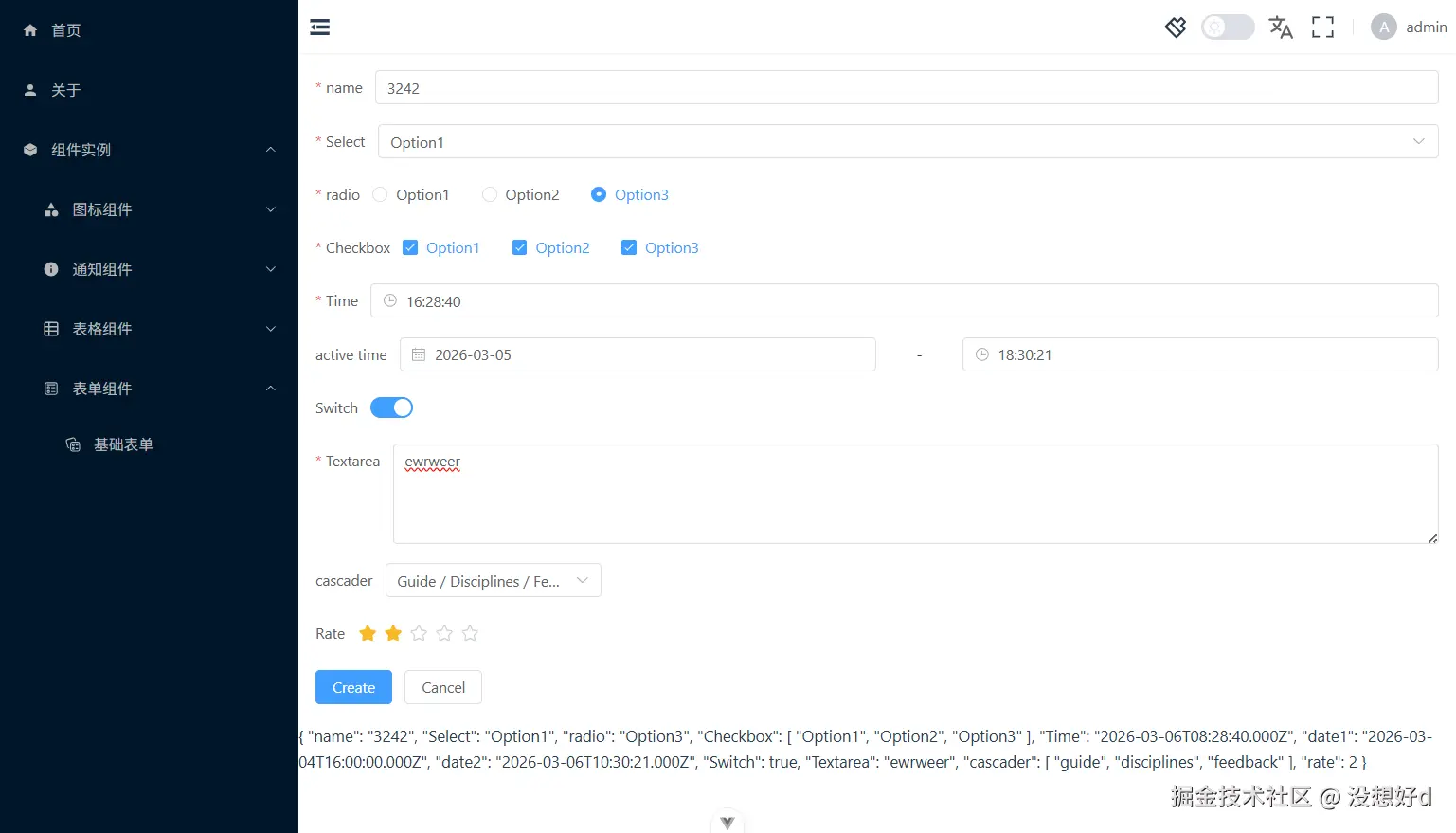
1.类型文件types.d.ts
typescript
import type {
  ColProps,
  FormItemInstance,
  FormItemProps,
  FormItemRule,
  FormMetaProps,
  FormProps
} from 'element-plus'
import { Component } from 'vue'

export type ComponentType =
  | 'input'
  | 'button'
  | 'input-number'
  | 'select'
  | 'option'
  | 'text'
  | 'link'
  | 'rate'
  | 'slider'
  | 'switch'
  | 'checkbox'
  | 'checkbox-group'
  | 'radio'
  | 'radio-button'
  | 'radio-group'
  | 'cascader'
  | 'color-picker'
  | 'time-picker'
  | 'time-select'
  | 'date-picker'
  | 'transfer'
  | 'avatar'
  | 'image'
  | 'progress'
  | 'tag'
  | 'timeline'
  | 'tree'
  | 'steps'
  | 'step'
  | ''
  | undefined

// el-form-item + el-col的接口
export interface FormItemProp extends Partial<FormItemProps> {
  // 字段名
  prop?: string
  // 表单组件类型
  type?: ComponentType
  // 事件
  events?: any
  // 扩展属性
  attrs?: any
  // 表单的默认值
  value?: any
  // el-select、el-checkbox、el-radio等组件的options
  children?: any[]
  // 布局el-col的属性span
  span?: number
  // 存在布局el-col的属性
  colProps?: ColProps
  // 嵌套schema, 用于在el-form-item中嵌套el-form-item组件
  schema?: FormSchema
  // 校验
  rules?: FormItemRule[]
  // slot
  defaultSlot?: typeof Component
  labelSlot?: typeof Component
  errorSlot?: typeof Component
  prefixSlot?: typeof Component
  suffixSlot?: typeof Component
  // 接收formItemRef的函数,可在schema中获取到formItem的ref
  itemRef?: (ref: FormItemInstance) => void
  // 接收formItem中表单组件的ref
  childRef?: (ref: any) => void
}
export type FormSchema = FormItemProp[]

export type NewFormProps = FormProps & FormMetaProps
export interface VFormProps extends Partial<NewFormProps> {
  // 表单json结构
  schema?: FormSchema
}
2.工具处理函数useForm.ts
typescript
import type { FormSchema } from './types'

/**
 * 使用表单的hook函数,用于初始化和管理表单数据
 * @param {FormSchema} schema - 表单的配置结构,定义了表单字段的属性和结构
 * @returns {Object} - 返回包含表单数据form和设置表单函数setForm的对象、扁平的表单数据对象formValue
 */
export function useForm(schema: FormSchema) {
  // 声明一个ref,用于存储表单数据(支持嵌套),使用any类型以适应不同结构的表单
  const form = ref<any>()
  // 声明一个ref,用于存储表单的校验规则,使用any类型以适应不同结构的校验规则
  const rules = ref<any>()
  // 在组件挂载前执行,初始化表单数据
  onBeforeMount(() => {
    form.value = setForm(schema || [])
    rules.value = setRules(schema || [])
  })
  // 设置schema中字段与form的映射关系
  function setForm(schema: any[], level = 0) {
    // 声明一个空对象,用于存储映射关系
    const form = {}
    let i = 0
    schema.forEach((item) => {
      // 如果不设置prop,一般是多层嵌套的外层
      if (!item.prop) {
        item.prop = `form${level}-${i}`
      }
      // 如果设置了表单默认值
      if (item.value) {
        form[item.prop] = item.value
      } else if (item.schema && item.schema.length > 0) {
        // 如果是嵌套的表单
        form[item.prop] = setForm(item.schema, level + 1)
        i++
      } else {
        // 如果没有设置默认值,则设置默认值undefined
        form[item.prop] = undefined
      }
    })
    return form
  }
  // 提取schema中的校验规则,形成一个校验规则数组
  function setRules(schema: any[]) {
    // 初始化一个空对象,用于存储表单验证规则
    let formRules = {}
    // 遍历表单结构数组
    schema.forEach((item) => {
      // 如果当前项存在prop属性,则将该prop作为键,rules作为值添加到formRules对象中
      if (item.prop && item.rules) {
        formRules[item.prop] = item.rules
      }
      // 如果当前项存在schema属性且schema数组长度大于0,则递归处理嵌套的schema
      if (item.schema && item.schema.length > 0) {
        // 使用展开运算符合并当前formRules和递归调用setRules得到的结果
        formRules = { ...formRules, ...setRules(item.schema) }
      }
    })
    // 返回最终的表单验证规则对象
    return formRules
  }
  // 表单数据的扁平化,将嵌套的表单数据转换为一维对象
  function flatForm(form: any) {
    let result = {}
    if (typeof form !== 'object') return result
    for (const key in form) {
      if (
        typeof form[key] === 'object' &&
        !Array.isArray(form[key]) &&
        form[key] && Object.keys(form[key]).length
      ) {
        // 这里是递归调用,将嵌套的表单数据转换为一维对象
        result = { ...result, ...flatForm(form[key]) }
      } else {
        // 删除form开头的字段,也就是嵌套时手动添加的字段
        if (!key.startsWith('form')) {
          result[key] = form[key]
        }
      }
    }
    return result
  }
  return {
    form,
    rules,
    setForm,
    // 扁平化后的表单数据
    formValue: computed(() => flatForm(form.value))
  }
}
3.表单组件VForm.vue
xml
<template>
  <el-form :model="formValue" :rules="rules" ref="formRef">
    <slot name="default">
      <template v-if="schema && schema.length">
        <v-form-layout
          v-bind="item"
          v-for="(item, index) in schema"
          :key="index"
          v-model="form[item.prop as string]"
        ></v-form-layout>
      </template>
    </slot>
    <slot name="actions"></slot>
  </el-form>
</template>
<script setup lang="ts">
import type { FormInstance, FormItemProp } from 'element-plus'
import type { VFormProps } from './types'
import { useForm } from './useForm'
import { exposeEventsUtils } from '@/utils/format'

const exposeEvents = ['validate', 'validateField', 'resetFields', 'clearValidate', 'scrollToField']

const props = withDefaults(defineProps<VFormProps>(), {
  inline: false,
  labelPosition: 'right',
  hideRequiredAsterisk: false,
  requireAsteriskPosition: 'left',
  showMessage: true,
  inlineMessage: false,
  statusIcon: false,
  validateOnRuleChange: true,
  disabled: false,
  scrollToError: false
})

const formRef = ref<FormInstance>()

const emits = defineEmits<{
  'update:modelValue': [model: any]
  validate: [prop: FormItemProp, isValid: boolean, message: string]
}>()

// 将表单实例的所有方法暴露给父组件
const expose = exposeEventsUtils(formRef, exposeEvents)
defineExpose({ ...expose })

// 使用工具函数useForm来处理表单数据
const { form, rules, formValue } = useForm(props.schema || [])

watch(
  form,
  () => {
    // 实现v-model的数据双向绑定
    emits('update:modelValue', form.value)
  },
  {
    deep: true
  }
)


</script>

<style scoped></style>
4.表单布局组件VFormLayout.vue,一般会有el-col这种布局组件使用
xml
<template>
  <!-- 用于在el-form-item中嵌套el-form-item表单组件 -->
  <template v-if="schema && schema.length">
    <el-form-item v-bind="props">
      <el-col v-bind="item.colProps" :span="item.span" v-for="(item, index) in schema" :key="index">
        <v-form-item v-bind="item" v-model="modelValue[item?.prop as string]"></v-form-item>
      </el-col>
    </el-form-item>
  </template>
  <!-- 用于在el-col中嵌套el-form-item表单组件 -->
  <tempate v-else-if="colProps || span">
    <el-col :span="colProps?.span || span" v-bind="colProps">
      <v-form-item v-bind="props" v-model="modelValue"></v-form-item>
    </el-col>
  </tempate>
  <template v-else>
    <v-form-item v-bind="props" v-model="modelValue"></v-form-item>
  </template>
</template>

<script setup lang="ts">
import type { FormItemProp } from './types'

const props = withDefaults(defineProps<FormItemProp>(), {
  showMessage: true,
  labelWidth: '',
  inlineMessage: '',
  required: undefined
})
const modelValue: any = defineModel()
</script>

<style scoped></style>
5.表单项组件VFormItem.vue
ini
<template>
  <el-form-item
    v-bind="props"
    :ref="(ref) => props?.itemRef && props?.itemRef(ref as FormItemInstance)"
  >
    <slot name="prefix">
      <template v-if="props?.prefixSlot">
        <component :is="props?.prefixSlot" v-bind="props" />
      </template>
    </slot>
    <template #default v-if="props?.defaultSlot">
      <component :is="props?.defaultSlot" v-bind="props" />
    </template>
    <template #default v-else>
      <!-- <el-input
        v-if="type === 'input'"
        v-model="modelValue"
        v-bind="attrs"
        v-on="events"
        :ref="(ref) => props?.childRef && props?.childRef(ref)"
      /> -->

      <!-- <el-date-picker
        v-else-if="type === 'date-picker'"
        v-model="modelValue"
        v-bind="attrs"
        v-on="events"
        :ref="(ref) => props?.childRef && props?.childRef(ref)"
      />

      <el-time-picker
        v-else-if="type === 'time-picker'"
        v-model="modelValue"
        v-bind="attrs"
        v-on="events"
        :ref="(ref) => props?.childRef && props?.childRef(ref)"
      />

      <el-switch
        v-else-if="type === 'switch'"
        v-model="modelValue"
        v-bind="attrs"
        v-on="events"
        :ref="(ref) => props?.childRef && props?.childRef(ref)"
      /> -->

      <el-select
        v-if="type === 'select'"
        v-model="modelValue"
        v-bind="attrs"
        v-on="events"
        :ref="(ref) => props?.childRef && props?.childRef(ref)"
      >
        <el-option
          v-for="(item, index) in children"
          :label="item.label"
          :key="index"
          :value="item.value"
          v-bind="item"
        />
      </el-select>

      <el-checkbox-group
        v-else-if="type === 'checkbox'"
        v-model="modelValue"
        v-bind="attrs"
        v-on="events"
        :ref="(ref) => props?.childRef && props?.childRef(ref)"
      >
        <el-checkbox
          v-for="(item, index) in children"
          :key="index"
          :value="item.value"
          v-bind="item"
          :label="item.label"
        />
      </el-checkbox-group>

      <el-radio-group
        v-else-if="type === 'radio'"
        v-model="modelValue"
        v-bind="attrs"
        v-on="events"
        :ref="(ref) => props?.childRef && props?.childRef(ref)"
      >
        <el-radio
          :label="item.value"
          v-for="(item, index) in children"
          :key="index"
          v-bind="item"
          >{{ item.label }}</el-radio
        >
      </el-radio-group>

      <!-- <el-autocomplete
        v-else-if="type === 'autocomplete'"
        v-model="modelValue"
        v-bind="attrs"
        v-on="events"
        :ref="(ref) => props?.childRef && props?.childRef(ref)"
      />

      <el-cascader
        v-else-if="type === 'cascader'"
        v-model="modelValue"
        v-bind="attrs"
        v-on="events"
        :ref="(ref) => props?.childRef && props?.childRef(ref)"
      /> -->
      <!--
      <el-time-select v-else-if="type === 'time-select'" v-model="modelValue" v-bind="attrs" /> -->

      <!-- 引入动态组件,根据type动态渲染组件 -->
      <component
        :is="'el-' + type"
        v-else-if="
          !['checkbox', 'radio', 'select'].includes(type!) && type !== undefined && type !== ''
        "
        v-model="modelValue"
        v-bind="attrs"
        v-on="events"
        :ref="(ref) => props?.childRef && props?.childRef(ref)"
      />
      <span v-else v-bind="attrs">{{ value }}</span>
    </template>
    <slot name="suffix">
      <template v-if="props?.suffixSlot">
        <component :is="props?.suffixSlot" v-bind="props" />
      </template>
    </slot>
    <template #label="scope" v-if="props?.labelSlot">
      <component :is="props?.labelSlot" v-bind="scope" />
    </template>
    <template #error="scope" v-if="props?.errorSlot">
      <component :is="props?.errorSlot" v-bind="scope" />
    </template>
  </el-form-item>
</template>

<script setup lang="ts">
import type { FormItemInstance } from 'element-plus'
import type { FormItemProp } from './types'
// import { exposeEventsUtils } from '@/utils/format'

const props = withDefaults(defineProps<FormItemProp>(), {
  showMessage: true,
  labelWidth: '',
  inlineMessage: '',
  required: undefined
})

// 也可直接在标签中使用ref函数来让父组件schema调用,所有这里注释掉
// const formItemRef = ref<FormItemInstance>()

// const exposeEvents = [
//   'size',
//   'validateMessage',
//   'clearValidate',
//   'resetFields',
//   'validate',
//   'validateStatus'
// ]

// ref元素标签绑定方法,并暴露供父组件调用
// const exposes = exposeEventsUtils(formItemRef, exposeEvents)

// defineExpose({ ...exposes })

const modelValue: any = defineModel()

onBeforeMount(() => {
  if (props.type === 'select' && props.value === '') {
    modelValue.value = undefined
  } else {
    modelValue.value = props.value
  }
})

// watch(formItemRef, () => {
//   if (formItemRef.value && props?.itemRef) {
//     props.itemRef(formItemRef.value)
//   }
// })
</script>

<style scoped></style>
6.实现demo,basic-form.vue
xml
<template>
<div>
<VForm ref="formRef" class="m-4" label-width="80px" v-model="form" :schema="schemas">
<template #actions>
<el-form-item>
<el-button type="primary" @click="onSubmit">Create</el-button>
<el-button @click="onCancel">Cancel</el-button>
</el-form-item>
</template>
</VForm>
{{ formValue }}
</div>
</template>
<script setup lang="tsx">
import type { FormSchema } from '@/components/Form/types'
import { useForm } from '@/components/Form/useForm'
import type { FormInstance, FormItemInstance } from 'element-plus'
definePage({
meta: {
title: 'pages.components.basic-form',
icon: 'fluent:form-multiple-collection-24-regular'
}
})
const formRef = ref<FormInstance>()
const formItemRef = ref<FormItemInstance>()
// const form = reactive({
// name: '',
// region: '',
// date1: '',
// date2: '',
// delivery: false,
// type: [],
// resource: '',
// desc: ''
// })
const schemas = ref([
{
prop: 'name',
value: '',
label: 'name',
type: 'input',
attrs: {
placeholder: '请输入name'
},
rules: [
{
required: true,
message: 'Please input activity name',
trigger: 'blur'
},
{
min: 3,
max: 5,
message: 'Length should be 3 to 5',
trigger: 'blur'
}
],
errorSlot: ({ error }) => {
console.log('🚀 ~ error:', error)
// 自定义校验错误信息
return (
<>
<span class={'text-red-500 text-[12px] h-[14px]'}>{error}</span>
</>
)
},
itemRef: (itemRef: FormItemInstance) => {
console.log('🚀 ~ itemRef:', itemRef)
// 获取表单项实例
formItemRef.value = itemRef
}
},
{
prop: 'Select',
label: 'Select',
type: 'select',
value: '',
children: [
{
label: 'Option1',
value: 'Option1'
},
{
label: 'Option2',
value: 'Option2'
},
{
label: 'Option3',
value: 'Option3'
}
],
rules: [
{
required: true,
message: 'Please select the activity type',
trigger: 'change'
}
]
},
{
prop: 'radio',
label: 'radio',
type: 'radio',
value: 'Option1',
children: [
{
label: 'Option1',
value: 'Option1'
},
{
label: 'Option2',
value: 'Option2'
},
{
label: 'Option3',
value: 'Option3'
}
],
rules: [
{
required: true,
message: 'Please select the activity type',
trigger: 'change'
}
]
},
{
prop: 'Checkbox',
label: 'Checkbox',
type: 'checkbox',
value: [],
children: [
{
label: 'Option1',
name: 'type'
},
{
label: 'Option2',
name: 'type'
},
{
label: 'Option3',
name: 'type'
}
],
rules: [
{
type: 'array',
required: true,
message: 'Please select at least one activity type',
trigger: 'change'
}
]
},
{
prop: 'Time',
label: 'Time',
type: 'time-picker',
value: '',
attrs: {
placeholder: 'Select time',
style: 'width: 100%'
},
colProps: {
span: 24
},
rules: [
{
type: 'date',
required: true,
message: 'Please pick a date',
trigger: 'change'
}
]
},
{
prop: '',
label: 'active time',
schema: [
{
span: 11,
prop: 'date1',
label: '',
type: 'date-picker',
attrs: {
placeholder: 'Select date',
style: {
width: '100%'
}
},
rules: [
{
type: 'date',
required: true,
message: 'Please pick a date',
trigger: 'change'
}
]
},
{
span: 2,
value: '-',
attrs: {
class: 'w-full text-center'
}
},
{
span: 11,
prop: 'date2',
label: '',
type: 'time-picker',
attrs: {
placeholder: 'Select time',
style: {
width: '100%'
}
},
rules: [
{
type: 'date',
required: true,
message: 'Please pick a time',
trigger: 'change'
}
]
}
]
},
{
prop: 'Switch',
label: 'Switch',
type: 'switch',
value: false
},
{
prop: 'Textarea',
label: 'Textarea',
type: 'input',
value: '',
attrs: {
type: 'textarea',
rows: 4
},
rules: [{ required: true, message: 'Please input activity form', trigger: 'blur' }]
},
{
prop: 'cascader',
label: 'cascader',
type: 'cascader',
value: '',
attrs: {
options: [
{
value: 'guide',
label: 'Guide',
children: [
{
value: 'disciplines',
label: 'Disciplines',
children: [
{
value: 'consistency',
label: 'Consistency'
},
{
value: 'feedback',
label: 'Feedback'
},
{
value: 'efficiency',
label: 'Efficiency'
},
{
value: 'controllability',
label: 'Controllability'
}
]
},
{
value: 'navigation',
label: 'Navigation',
children: [
{
value: 'side nav',
label: 'Side Navigation'
},
{
value: 'top nav',
label: 'Top Navigation'
}
]
}
]
},
{
value: 'component',
label: 'Component',
children: [
{
value: 'basic',
label: 'Basic',
children: [
{
value: 'layout',
label: 'Layout'
},
{
value: 'color',
label: 'Color'
},
{
value: 'typography',
label: 'Typography'
},
{
value: 'icon',
label: 'Icon'
},
{
value: 'button',
label: 'Button'
}
]
},
{
value: 'form',
label: 'Form',
children: [
{
value: 'radio',
label: 'Radio'
},
{
value: 'checkbox',
label: 'Checkbox'
},
{
value: 'input',
label: 'Input'
},
{
value: 'input-number',
label: 'InputNumber'
},
{
value: 'select',
label: 'Select'
},
{
value: 'cascader',
label: 'Cascader'
},
{
value: 'switch',
label: 'Switch'
},
{
value: 'slider',
label: 'Slider'
},
{
value: 'time-picker',
label: 'TimePicker'
},
{
value: 'date-picker',
label: 'DatePicker'
},
{
value: 'datetime-picker',
label: 'DateTimePicker'
},
{
value: 'upload',
label: 'Upload'
},
{
value: 'rate',
label: 'Rate'
},
{
value: 'form',
label: 'Form'
}
]
},
{
value: 'data',
label: 'Data',
children: [
{
value: 'table',
label: 'Table'
},
{
value: 'tag',
label: 'Tag'
},
{
value: 'progress',
label: 'Progress'
},
{
value: 'tree',
label: 'Tree'
},
{
value: 'pagination',
label: 'Pagination'
},
{
value: 'badge',
label: 'Badge'
}
]
},
{
value: 'notice',
label: 'Notice',
children: [
{
value: 'alert',
label: 'Alert'
},
{
value: 'loading',
label: 'Loading'
},
{
value: 'message',
label: 'Message'
},
{
value: 'message-box',
label: 'MessageBox'
},
{
value: 'notification',
label: 'Notification'
}
]
},
{
value: 'navigation',
label: 'Navigation',
children: [
{
value: 'menu',
label: 'Menu'
},
{
value: 'tabs',
label: 'Tabs'
},
{
value: 'breadcrumb',
label: 'Breadcrumb'
},
{
value: 'dropdown',
label: 'Dropdown'
},
{
value: 'steps',
label: 'Steps'
}
]
},
{
value: 'others',
label: 'Others',
children: [
{
value: 'dialog',
label: 'Dialog'
},
{
value: 'tooltip',
label: 'Tooltip'
},
{
value: 'popover',
label: 'Popover'
},
{
value: 'card',
label: 'Card'
},
{
value: 'carousel',
label: 'Carousel'
},
{
value: 'collapse',
label: 'Collapse'
}
]
}
]
},
{
value: 'resource',
label: 'Resource',
children: [
{
value: 'axure',
label: 'Axure Components'
},
{
value: 'sketch',
label: 'Sketch Templates'
},
{
value: 'docs',
label: 'Design Documentation'
}
]
}
]
},
events: {
change: (value) => {
console.log(value)
}
}
},
{
label: 'Rate',
prop: 'rate',
type: 'rate',
value: ''
}
] as FormSchema)
const { form, formValue } = useForm(schemas.value)
const onSubmit = () => {
formRef.value?.validate()
console.log('submit!')
}
const onCancel = () => {
// 清除指定的表单项校验
formItemRef.value?.clearValidate()
}
</script>
<style scoped></style>