作为前端开发者,你是否曾为浏览器默认滚动条那"格格不入"的外观而苦恼?明明设计稿精致优雅,滚动条却像一块补丁贴在旁边。别担心,今天我们就来彻底掌握 CSS 滚动条样式,让你的滚动栏也能成为设计亮点!
为什么需要自定义滚动条?
默认滚动条在不同操作系统下样式各异:Windows 上略显厚重,macOS 下虽然简洁但无法融入品牌色。自定义滚动条能带来:
- 品牌一致性:使用品牌色、圆角、渐变,让滚动条成为界面一部分。
- 细节体验:滑块悬停反馈、平滑滚动、隐藏冗余按钮,提升品质感。
- 空间利用:通过纤细滚动条节省横向空间,尤其适合移动端或侧边栏。
滚动条的组成与浏览器差异
滚动条主要由 轨道(Track) 、滑块(Thumb) 和 按钮(Button,上下箭头) 组成。但不同浏览器渲染机制截然不同:
- WebKit 浏览器(Chrome、Safari、Edge) :支持
::-webkit-scrollbar私有伪元素,可精细控制每一部分,甚至圆角和渐变。 - Firefox :从 64 版本开始支持标准属性
scrollbar-width和scrollbar-color,可设定宽度和颜色,但不支持圆角。 - IE/旧版 Edge:几乎无法自定义,但市场份额已可忽略。
因此,我们的策略是:以 WebKit 伪元素实现丰富样式,同时用标准属性为 Firefox 提供基本配色,实现渐进增强。
核心属性详解
1. WebKit 私有伪元素
在 WebKit 内核中,滚动条各部分对应以下伪元素:
| 伪元素 | 描述 |
|---|---|
::-webkit-scrollbar |
滚动条整体,可设置宽度/背景 |
::-webkit-scrollbar-track |
轨道(凹槽) |
::-webkit-scrollbar-thumb |
滑块(可拖动部分) |
::-webkit-scrollbar-button |
两端按钮(通常隐藏) |
::-webkit-scrollbar-corner |
水平和垂直滚动条交汇处 |
常用技巧:
- 设置
width控制滚动条粗细。 - 给滑块和轨道设置
border-radius实现圆角。 - 利用
background-clip: padding-box配合border制造留白效果。 - 隐藏按钮:
display: none。
2. 标准属性(Firefox / 新 Chrome)
scrollbar-width:可选auto(默认)、thin(细)、none(隐藏滚动条,但仍可滚动)。scrollbar-color:接受两个颜色值,分别指定滑块和轨道颜色,例如scrollbar-color: #4a90e2 #d9e2ec;。
注意:这些属性目前仅影响颜色和宽度,无法设置圆角。但 Chrome 从 121 版本开始也支持它们,与 WebKit 伪元素并存时,后者的优先级更高。
实战示例:聊天卡片列表
我们构建一个聊天消息卡片列表,容器高度固定,垂直滚动。滚动条采用渐变滑块、圆角轨道,并带有悬停反馈,同时兼容 Firefox。 效果:
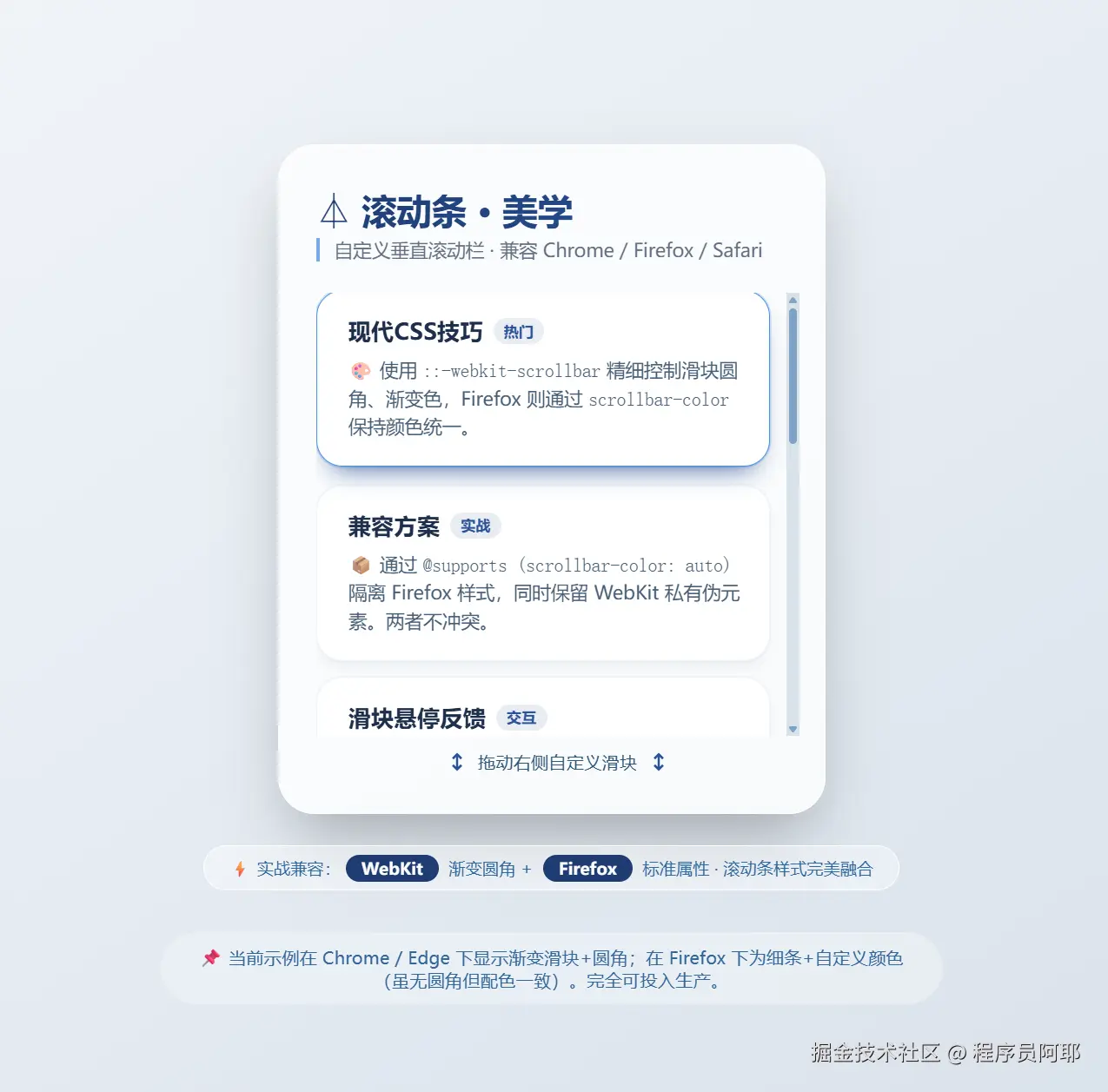
完整 HTML 代码
将以下代码保存为 .html 文件,在浏览器中打开即可看到效果。
html
xml
<!DOCTYPE html>
<html lang="zh">
<head>
    <meta charset="UTF-8">
    <meta name="viewport" content="width=device-width, initial-scale=1.0">
    <title>CSS滚动条样式 · 实战示例</title>
    <style>
        /* ===== 基础重置与排版 ===== */
        * {
            box-sizing: border-box;
            margin: 0;
        }

        body {
            background: linear-gradient(145deg, #f0f4f8 0%, #d9e2ec 100%);
            min-height: 100vh;
            display: flex;
            flex-direction: column;
            justify-content: center;
            align-items: center;
            font-family: 'Inter', system-ui, -apple-system, BlinkMacSystemFont, 'Segoe UI', Roboto, sans-serif;
            padding: 1.5rem;
        }

        /* 主卡片容器 --- 带自定义滚动条的"聊天卡片列表" */
        .scroll-demo {
            width: min(90%, 420px);
            max-width: 480px;
            background-color: #ffffffcc;
            backdrop-filter: blur(4px);
            border-radius: 28px;
            box-shadow: 0 25px 50px -12px rgba(0, 0, 0, 0.3), inset 0 1px 2px rgba(255,255,255,0.6);
            padding: 1.8rem 1.2rem 1.8rem 1.8rem;
            border: 1px solid rgba(255,255,255,0.7);
        }

        /* 标题 + 副标题 */
        .demo-header {
            margin-bottom: 1.5rem;
            padding-right: 0.6rem;
        }
        .demo-header h2 {
            font-size: 1.7rem;
            font-weight: 600;
            background: linear-gradient(130deg, #1e3c72, #2a5298);
            -webkit-background-clip: text;
            background-clip: text;
            color: transparent;
            letter-spacing: -0.01em;
            margin-bottom: 0.2rem;
        }
        .demo-header p {
            font-size: 0.9rem;
            color: #2d4059;
            opacity: 0.75;
            font-weight: 400;
            border-left: 3px solid #4a90e2;
            padding-left: 0.7rem;
        }

        /* ---------- 核心滚动容器(所有滚动条魔法发生的地方) ---------- */
        .custom-scroll-area {
            height: 340px;                  /* 固定高度触发垂直滚动条 */
            overflow-y: auto;                /* 允许垂直滚动 */
            overflow-x: hidden;              /* 隐藏水平滚动条,保持干净 */
            padding-right: 0.8rem;            /* 给滚动条留出呼吸空间,避免内容贴边 */
            display: flex;
            flex-direction: column;
            gap: 12px;                       /* 卡片间距 */
            scroll-behavior: smooth;          /* 平滑滚动 (可选) */
        }

        /* ----- 卡片样式(纯粹为了内容丰富)----- */
        .message-card {
            background: white;
            border-radius: 20px;
            padding: 1.2rem 1.2rem 1.2rem 1.5rem;
            box-shadow: 0 6px 12px -6px rgba(0, 32, 64, 0.12), 0 0 0 1px rgba(0,0,0,0.02);
            transition: all 0.2s ease;
            border: 1px solid rgba(74, 144, 226, 0.1);
        }
        .message-card:hover {
            border-color: #4a90e2;
            box-shadow: 0 12px 20px -12px #2a5298, 0 0 0 1px #4a90e240;
            transform: translateY(-2px);
        }

        .card-title {
            display: flex;
            align-items: center;
            gap: 8px;
            margin-bottom: 8px;
        }
        .card-title h3 {
            font-size: 1.1rem;
            font-weight: 600;
            color: #1e2f4b;
            margin: 0;
        }
        .badge {
            background: #e9ecf3;
            border-radius: 40px;
            padding: 3px 8px;
            font-size: 0.7rem;
            font-weight: 600;
            color: #2a5298;
            letter-spacing: 0.3px;
        }
        .message-card p {
            margin: 0;
            font-size: 0.9rem;
            line-height: 1.5;
            color: #334e68;
            opacity: 0.9;
        }

        /* ===== 1. WebKit 滚动条样式 (Chrome, Safari, Edge 等) ===== */
        .custom-scroll-area::-webkit-scrollbar {
            width: 10px;                     /* 垂直滚动条宽度 */
            background: transparent;          /* 整体背景透明,后面由track决定 */
        }

        /* 滚动条轨道(凹槽) */
        .custom-scroll-area::-webkit-scrollbar-track {
            background: #d9e2ec60;            /* 半透明轨道,带一点底色 */
            border-radius: 20px;
            margin-block: 8px;                /* 上下留白,让滑块不顶天立地 */
            border: 2px solid transparent;     /* 预留"空气感" */
            background-clip: padding-box;
        }

        /* 滚动条滑块(可拖动的小方块) */
        .custom-scroll-area::-webkit-scrollbar-thumb {
            background: linear-gradient(145deg, #8aa9cc, #5f7fa3);  /* 渐变滑块 */
            border-radius: 20px;
            border: 2px solid #d9e2ec;        /* 使用轨道相近颜色制造内边距错觉 */
            background-clip: padding-box;
            min-height: 48px;                  /* 滑块最小高度,更易点击 */
        }

        /* 滑块悬停效果 */
        .custom-scroll-area::-webkit-scrollbar-thumb:hover {
            background: linear-gradient(145deg, #4a90e2, #2a5f9e);
            border-width: 2px;
        }

        /* 滚动条两端按钮(上下箭头)------ 彻底隐藏,保持简洁 */
        .custom-scroll-area::-webkit-scrollbar-button {
            display: none;
        }

        /* 滚动条角落(水平和垂直条相交处)------ 也隐藏掉 */
        .custom-scroll-area::-webkit-scrollbar-corner {
            background: transparent;
        }

        /* ===== 2. Firefox 滚动条样式 (标准属性) ===== */
        /* 使用 @supports 优雅降级:只有支持 scrollbar-color 的浏览器(Firefox / 新版Chrome)才会应用 */
        @supports (scrollbar-color: auto) {
            .custom-scroll-area {
                /* scrollbar-width: thin;      thin | auto | none */
                scrollbar-width: thin;                /* 纤细滚动条 */
                /* scrollbar-color: 滑块颜色 轨道颜色 */
                scrollbar-color: #7fa3c4 #d9e2ec;      /* 与WebKit滑块/轨道近似,保持视觉一致 */
                /* 注意:标准属性不支持圆角和渐变,但至少颜色匹配,且宽度变细 */
            }
        }

        /* 为了让Firefox下滚动条更贴合设计,可以稍微调整轨道色(但无法设圆角,接受自然状态) */
        /* 对于新版Chrome(同时支持scrollbar-color和-webkit-scrollbar),两者可能叠加。
           但我们已让颜色相似,无论哪套生效,都不会突兀。 */

        /* ---------- 额外小美化:自定义占位符 ---------- */
        .footnote {
            margin-top: 1.5rem;
            font-size: 0.8rem;
            color: #30689e;
            background: rgba(255,255,255,0.4);
            backdrop-filter: blur(4px);
            padding: 0.5rem 1.2rem;
            border-radius: 40px;
            border: 1px solid white;
            text-align: center;
            width: fit-content;
            margin-left: auto;
            margin-right: auto;
        }
        .footnote span {
            font-weight: 600;
            background: #1e3c72;
            color: white;
            padding: 2px 12px;
            border-radius: 30px;
            margin: 0 4px;
        }

        /* 提示小箭头 */
        .scroll-hint {
            display: flex;
            justify-content: center;
            margin-top: 10px;
            color: #2f5575;
            font-size: 0.85rem;
            gap: 6px;
            align-items: center;
        }
    </style>
</head>
<body>

<div class="scroll-demo">
    <div class="demo-header">
        <h2>⏃ 滚动条 · 美学</h2>
        <p>自定义垂直滚动栏 · 兼容 Chrome / Firefox / Safari</p>
    </div>

    <!-- 滚动容器:所有滚动条样式绑定在此 -->
    <div class="custom-scroll-area">
        <!-- 卡片 1 -->
        <div class="message-card">
            <div class="card-title">
                <h3>现代CSS技巧</h3>
                <span class="badge">热门</span>
            </div>
            <p>🎨 使用 <code>::-webkit-scrollbar</code> 精细控制滑块圆角、渐变色,Firefox 则通过 <code>scrollbar-color</code> 保持颜色统一。</p>
        </div>
        <!-- 卡片 2 -->
        <div class="message-card">
            <div class="card-title">
                <h3>兼容方案</h3>
                <span class="badge">实战</span>
            </div>
            <p>📦 通过 <code>@supports (scrollbar-color: auto)</code> 隔离 Firefox 样式,同时保留 WebKit 私有伪元素。两者不冲突。</p>
        </div>
        <!-- 卡片 3 -->
        <div class="message-card">
            <div class="card-title">
                <h3>滑块悬停反馈</h3>
                <span class="badge">交互</span>
            </div>
            <p>✨ 在 WebKit 浏览器中,滑块悬停会变成深邃的蓝渐变,提升细节体验。</p>
        </div>
        <!-- 卡片 4 -->
        <div class="message-card">
            <div class="card-title">
                <h3>隐藏按钮</h3>
                <span class="badge">极简</span>
            </div>
            <p>🧹 使用 <code>::-webkit-scrollbar-button</code> 隐藏了上下箭头,滚动条更加干净利落。</p>
        </div>
        <!-- 卡片 5 -->
        <div class="message-card">
            <div class="card-title">
                <h3>轨道留白</h3>
                <span class="badge">透气</span>
            </div>
            <p>🌬️ 轨道设置 <code>margin-block: 8px</code>,滑块不会贴到顶部/底部,视觉更舒适。</p>
        </div>
        <!-- 卡片 6 -->
        <div class="message-card">
            <div class="card-title">
                <h3>Firefox 细条</h3>
                <span class="badge">标准属性</span>
            </div>
            <p>🦊 <code>scrollbar-width: thin</code> 让滚动条纤细优雅,搭配自定义颜色,融入设计。</p>
        </div>
        <!-- 卡片 7 -->
        <div class="message-card">
            <div class="card-title">
                <h3>未来标准</h3>
                <span class="badge">CSS 新趋</span>
            </div>
            <p>🔮 新版 Chrome 已支持 <code>scrollbar-color</code>,但圆角仍需 WebKit 伪元素。本示例两者兼顾。</p>
        </div>
        <!-- 卡片 8 再加一条让滚动条必然出现 -->
        <div class="message-card">
            <div class="card-title">
                <h3>滚动条哲学</h3>
                <span class="badge">细节</span>
            </div>
            <p>🧘 滚动条虽小,却是品质感的试金石。试拖拽看看,手感圆润。</p>
        </div>
    </div>

    <!-- 滚动提示(仅装饰) -->
    <div class="scroll-hint">
        <svg width="20" height="20" viewBox="0 0 24 24" fill="none" stroke="#2a5298" stroke-width="2"><path d="M12 5v14M8 15l4 4 4-4"/><path d="M8 9l4-4 4 4"/></svg>
        <span>拖动右侧自定义滑块</span>
        <svg width="20" height="20" viewBox="0 0 24 24" fill="none" stroke="#2a5298" stroke-width="2"><path d="M12 5v14M8 15l4 4 4-4"/><path d="M8 9l4-4 4 4"/></svg>
    </div>
</div>

<div class="footnote">
    ⚡ 实战兼容:<span>WebKit</span> 渐变圆角 + <span>Firefox</span> 标准属性   ·   滚动条样式完美融合
</div>

<!-- 技术说明(不影响样式) -->
<div style="margin-top: 2rem; max-width: 600px; text-align: center; font-size: 0.85rem; color: #336699; background: rgba(255,255,255,0.3); padding: 10px 20px; border-radius: 60px; backdrop-filter: blur(8px);">
    📌 当前示例在 Chrome / Edge 下显示渐变滑块+圆角;在 Firefox 下为细条+自定义颜色(虽无圆角但配色一致)。完全可投入生产。
</div>
</body>
</html>
代码解析
1. 滚动容器设置
css
css
.custom-scroll-area {
    height: 340px;
    overflow-y: auto;
    overflow-x: hidden;
    padding-right: 0.8rem; /* 避免内容紧贴滚动条 */
    scroll-behavior: smooth;
}
固定高度触发垂直滚动条,隐藏水平滚动条,并添加内边距让内容与滚动条保持距离。
2. WebKit 滚动条美化
css
css
.custom-scroll-area::-webkit-scrollbar {
    width: 10px;
}
.custom-scroll-area::-webkit-scrollbar-track {
    background: #d9e2ec60;
    border-radius: 20px;
    margin-block: 8px; /* 上下留白 */
    border: 2px solid transparent;
    background-clip: padding-box;
}
.custom-scroll-area::-webkit-scrollbar-thumb {
    background: linear-gradient(145deg, #8aa9cc, #5f7fa3);
    border-radius: 20px;
    border: 2px solid #d9e2ec;
    background-clip: padding-box;
    min-height: 48px;
}
.custom-scroll-area::-webkit-scrollbar-thumb:hover {
    background: linear-gradient(145deg, #4a90e2, #2a5f9e);
}
width: 10px定义滚动条宽度。- 轨道与滑块均设圆角,并利用
border和background-clip制造内边距效果,让滑块看起来悬浮。 margin-block让轨道上下留出空间,滑块不顶头。min-height保证滑块在内容较少时仍可点击。- 悬停时加深滑块颜色,提升交互感。
3. Firefox 兼容
css
css
@supports (scrollbar-color: auto) {
    .custom-scroll-area {
        scrollbar-width: thin;
        scrollbar-color: #7fa3c4 #d9e2ec;
    }
}
使用 @supports 检测是否支持标准属性,仅对 Firefox 和后续支持这些属性的浏览器应用。颜色尽量与 WebKit 版本匹配,宽度设为 thin 使滚动条更精致。
注意事项
- 隐藏水平滚动条 :如果内容不会水平溢出,务必设置
overflow-x: hidden,否则可能出现双滚动条。 - 兼容性检测 :可以使用
@supports为不同浏览器做渐进增强,也可以直接编写两套规则,浏览器会忽略不识别的属性。 - Firefox 圆角限制:目前 Firefox 无法实现圆角滚动条,但未来标准可能会扩展,目前只能接受这一差异。
- 留白与点击区域 :给轨道上下留白(
margin-block)能让滑块更舒适,同时注意滑块最小高度以保证可用性。 - 性能:对滚动条应用复杂渐变或阴影不会影响滚动性能,放心使用。
总结
自定义滚动条已不再是难事。通过组合 WebKit 私有伪元素和标准属性,我们能够打造出品牌统一、细节丰富的滚动栏,且兼容主流浏览器。下次当你再为默认滚动条发愁时,不妨试试这些技巧,让界面更加完美。
如果你有更多奇妙的滚动条创意,欢迎在评论区分享。别忘了点赞收藏,方便以后实战时查阅哦!