背景
因为业务需要,需要对数据进行格式化,这里记录一下常用的插件和代码,以便复用, 也给大家提供一个参考。
效果图
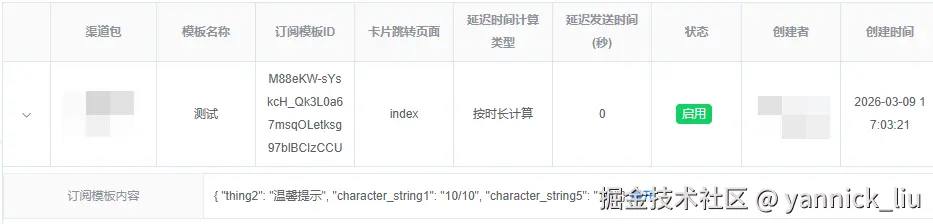
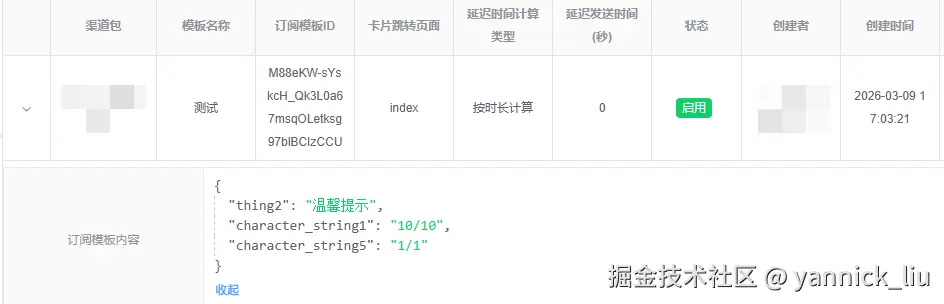
插件使用
安装插件
由于使用的是 Vue 2,需要安装 v1-latest 版本的 vue-json-pretty。
sql
npm install vue-json-pretty@v1-latest --save在组件中使用
javascript
<template>
  <div>
    <!-- 使用组件,传入要格式化的 JSON 数据 -->
    <vue-json-pretty :data="jsonData" />
  </div>
</template>


// 1. 引入组件
import VueJsonPretty from 'vue-json-pretty';
// 2. 引入样式文件(必须)
import 'vue-json-pretty/lib/styles.css';
模板文件,可直接复制到项目中
xml
<template>
  <div>
   <!--查询条件-->
    <el-form inline>
      <el-form-item>
        <el-input v-model="searchForm.name" placeholder="请输入模板名称" clearable />
      </el-form-item>
      <el-form-item>
        <el-button icon="el-icon-search" type="primary" @click="fetchData(1)">查询</el-button>
      </el-form-item>
    </el-form>

   <!--表格-->
    <el-table :data="tableData" :border="true" height="calc(100vh - 380px)">
      <!--折叠内容-->
      <el-table-column type="expand">
        <template #default="{ row }">
          <el-descriptions :column="1" size="small" :border="true" class="table-list">
            <el-descriptions-item label="订阅模板内容">
              <span v-if="!row.format"> {{ row.data }} </span>
              <vue-json-pretty v-else :data="row.data" />
              <el-button type="text" @click="row.format = !row.format" v-if="Object.keys(row.data).length > 0">
                {{ !row.format ? '展开' : '收起' }}
              </el-button>
            </el-descriptions-item>
          </el-descriptions>
        </template>
      </el-table-column>
      <!--常规字段-->
      <el-table-column v-for="i in tableColumn" :key="i.label" :label="i.label" :prop="i.prop" :width="i.width">
        <template #default="{ row }">
          <div v-if="i.prop === 'status'">
            <el-tag :type="row.status === 1 ? 'success' : 'danger'" effect="dark">
              {{ row.status === 1 ? '启用' : '禁用' }}
            </el-tag>
          </div>
          <div v-else>{{ row[i.prop] }}</div>
        </template>
      </el-table-column>
    </el-table>
  </div>
</template>

<script>
import { getSubscribeTemplateList } from '@/api/product/messageSubcribe'

// 1. 引入组件
import VueJsonPretty from 'vue-json-pretty';
// 2. 引入样式文件(必须)
import 'vue-json-pretty/lib/styles.css';

export default {
  name: 'MessageSubscribeTemplate',
  components: {
    VueJsonPretty
  },

  data() {
    return {
      searchForm: {
        name: ''
      },
      tableData: [],
      tableColumn: Object.freeze([
        { label: '模板名称', prop: 'name' },
        { label: '创建者', prop: 'created_by' },
        { label: '创建时间', prop: 'created_at' },
      ]),
    }
  },
  mounted() {
    this.fetchData()
  },

  methods: {
    // 获取列表数据
    async fetchData(pages) {
      this.pagination.page = pages || this.pagination.page
      const { page, limit } = this.pagination
      const params = {
        ...this.searchForm,
        page, limit,
      }
      const { data: { list, total } } = await getSubscribeTemplateList(params)
      this.pagination.total = total
      this.tableData = list.map(item => {
        return {
          ...item,
          format: false // 控制格式化字段
        }
      })
    },
  }
}
</script>

<style lang="scss" scoped></style>