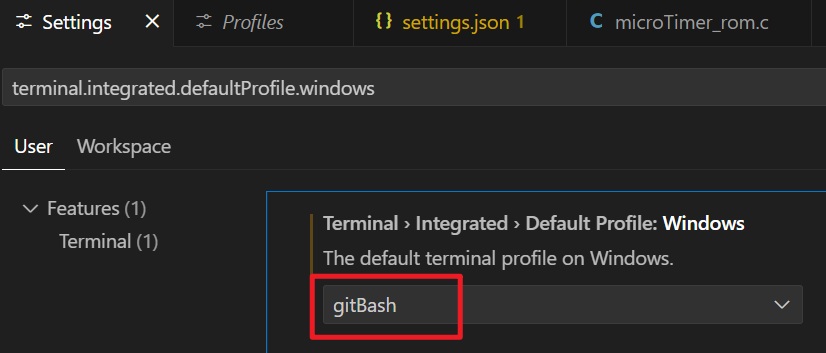
在 Windows 平台上将 VSCode 的终端改为 Git Bash 的步骤如下:
-
确保 Git Bash 已安装
如果你尚未安装 Git for Windows,请先下载并安装。安装过程中勾选"Use Git and optional Unix tools from the Command Prompt"选项,这样 Git Bash 会被添加到系统路径中。
也可以下载二进制免安装版,需要手动把路径添加到系统环境变量里面。
-
打开 VSCode 设置
- 按下快捷键
Ctrl+, ,打开设置界面。 - 或者在菜单栏中选择
File > Preferences > Settings。
- 按下快捷键
-
修改默认终端配置
- 在搜索框中输入
terminal.integrated.profiles.windows。 - 点击"Edit in settings.json"(或在右侧直接编辑 JSON 文件)。
- 在搜索框中输入
-
添加或修改终端配置
在 JSON 文件中添加或修改以下内容(确保路径与你的 Git Bash 安装路径一致):
{"terminal.integrated.profiles.windows": {"Git Bash": {"path": "C:\\Program Files\\Git\\bin\\bash.exe","args": [""]}},"terminal.integrated.defaultProfile.windows": "Git Bash"}- 如果 Git 安装在非默认路径,请将
path替换为实际的bash.exe路径(例如D:\\Git\\bin\\bash.exe)。 args中的--login -i确保 Bash 以交互模式启动并加载配置文件。
- 如果 Git 安装在非默认路径,请将
-
保存并重启终端
- 保存
settings.json文件。 - 关闭并重新打开 VSCode 的终端(快捷键
Ctrl +`),此时终端应显示为 Git Bash。
- 保存
验证是否成功
在终端中输入 echo $SHELL,如果输出 /usr/bin/bash 或类似路径,说明已切换成功。
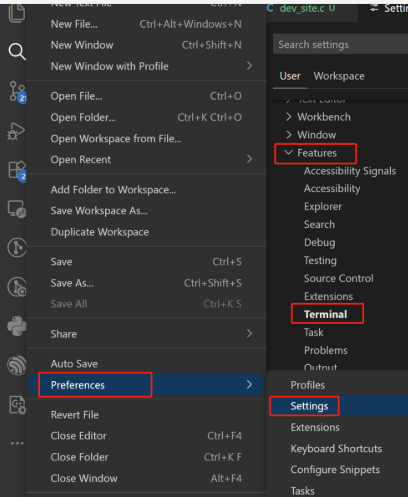
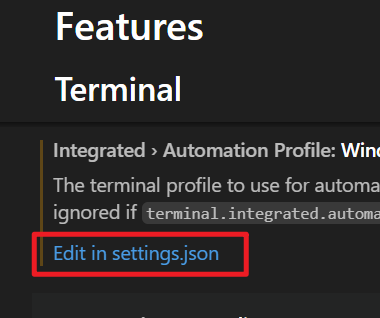
随便找个 "Edit in setting.json" 点击进入编辑页面,然后配置如下,注意 bash.exe 的路径要和本机匹配
    "terminal.integrated.profiles.windows" : {
        "gitBash": {
          "path": "C:\\Programs\\Git_V2373\\bin\\bash.exe",
        }
    },
    "terminal.integrated.defaultProfile.windows": "gitBash",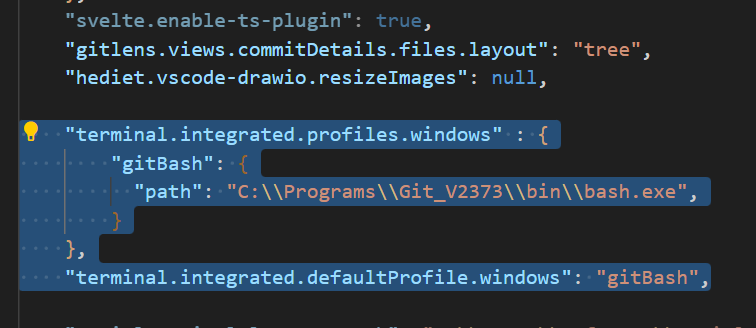
配置完成后可以搜索 terminal.integrated.defaultProfile.windows, 看看是否配置成功。