Flutter学习笔记(三)
1、环境配置
检查环境配置
sh
xumeng03@xumeng03deMacBook-Pro ~ % flutter doctor -v
[✓] Flutter (Channel stable, 3.38.9, on macOS 14.1.2 23B92 darwin-arm64 (Rosetta), locale zh-Hans-CN) [337ms]
    • Flutter version 3.38.9 on channel stable at /Users/xumeng03/flutter
    • Upstream repository https://github.com/flutter/flutter.git
    • Framework revision 67323de285 (5 周前), 2026-01-28 13:43:12 -0800
    • Engine revision 587c18f873
    • Dart version 3.10.8
    • DevTools version 2.51.1
    • Feature flags: enable-web, enable-linux-desktop, enable-macos-desktop, enable-windows-desktop, enable-android,
      enable-ios, cli-animations, enable-native-assets, omit-legacy-version-file, enable-lldb-debugging

[!] Android toolchain - develop for Android devices (Android SDK version 36.1.0) [9.8s]
    • Android SDK at /Users/xumeng03/Library/Android/sdk
    • Emulator version 36.3.10.0 (build_id 14472402) (CL:N/A)
    ✗ cmdline-tools component is missing.
      Try installing or updating Android Studio.
      Alternatively, download the tools from https://developer.android.com/studio#command-line-tools-only and make sure
      to set the ANDROID_HOME environment variable.
      See https://developer.android.com/studio/command-line for more details.
    ✗ Android license status unknown.
      Run `flutter doctor --android-licenses` to accept the SDK licenses.
      See https://flutter.dev/to/macos-android-setup for more details.

[✗] Xcode - develop for iOS and macOS [282ms]
    ✗ Xcode installation is incomplete; a full installation is necessary for iOS and macOS development.
      Download at: https://developer.apple.com/xcode/
      Or install Xcode via the App Store.
      Once installed, run:
        sudo xcode-select --switch /Applications/Xcode.app/Contents/Developer
        sudo xcodebuild -runFirstLaunch
    ✗ CocoaPods not installed.
        CocoaPods is a package manager for iOS or macOS platform code.
        Without CocoaPods, plugins will not work on iOS or macOS.
        For more info, see https://flutter.dev/to/platform-plugins
      For installation instructions, see https://guides.cocoapods.org/using/getting-started.html#installation

[✓] Chrome - develop for the web [86ms]
    • Chrome at /Applications/Google Chrome.app/Contents/MacOS/Google Chrome

[✓] Connected device (2 available) [1,338ms]
    • macOS (desktop) • macos  • darwin-arm64   • macOS 14.1.2 23B92 darwin-arm64 (Rosetta)
    • Chrome (web)    • chrome • web-javascript • Google Chrome 145.0.7632.119

[✓] Network resources [1,289ms]
    • All expected network resources are available.

! Doctor found issues in 2 categories.
1.1、Android
这里是通过Android Studio安装的
1、Android SDK
包含开发 Android 应用所需的所有工具、资源、平台文件
Android SDK
  ├── platforms/          # 各版本 Android 系统 API (android-34, android-35...)
  ├── platform-tools/     # adb、fastboot 等核心调试工具
  ├── build-tools/        # 编译打包工具 (aapt, dx, apksigner...)
  ├── emulator/           # 模拟器
  ├── cmdline-tools/      # ← 命令行管理工具 (sdkmanager, avdmanager)
  └── system-images/      # 模拟器镜像
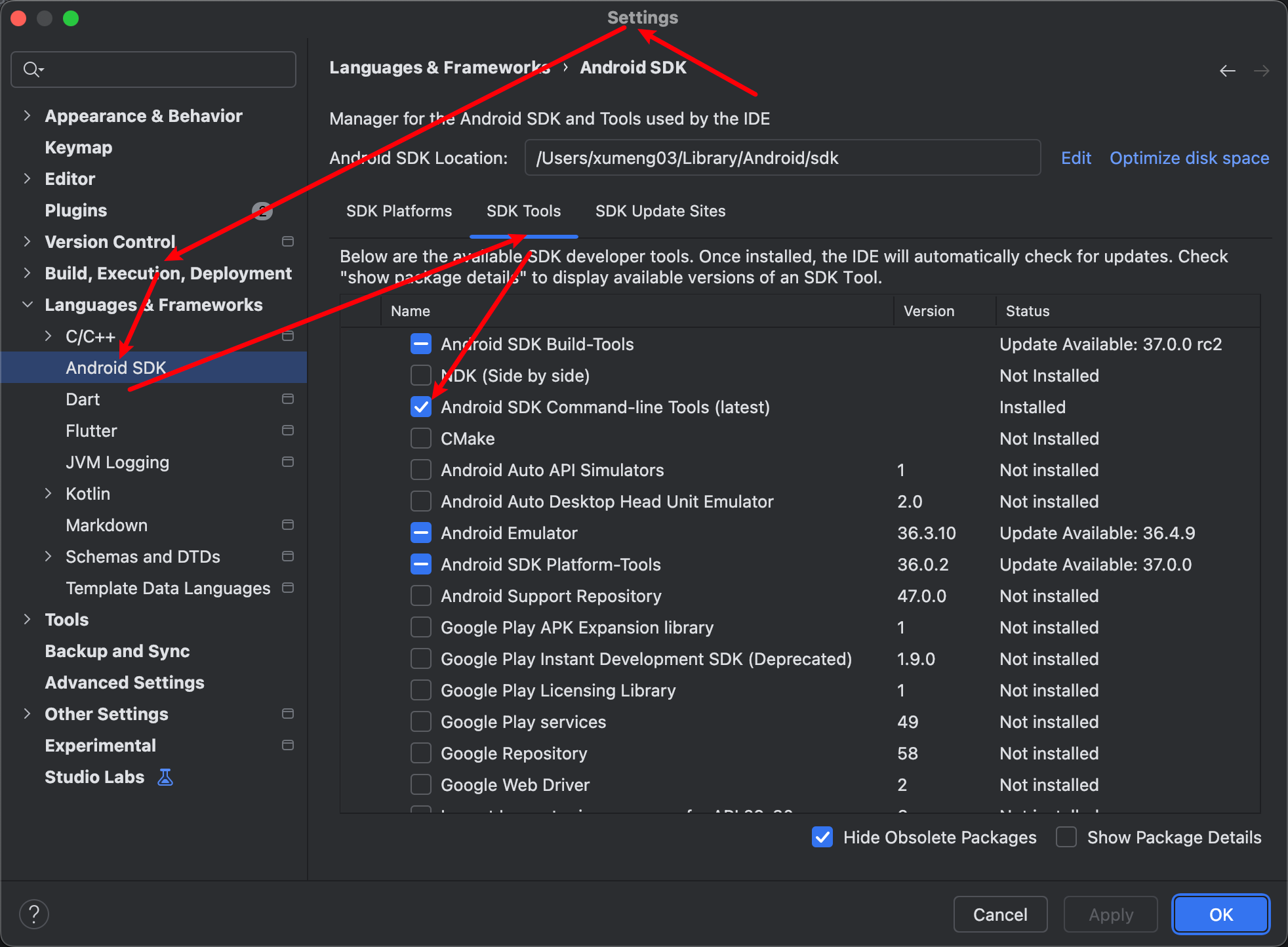
2、cmdline-tools
cmdline-tools 里最重要的是 sdkmanager,是管理其他所有组件的工具,没有 cmdline-tools,Flutter 就无法自动检查、安装或更新 SDK 组件,也无法接受许可证
3、Android 许可证
sh
# 全部输入 y 接受即可
flutter doctor --android-licenses
4、验证
sh
xumeng03@xumeng03deMacBook-Pro ~ % flutter doctor -v
[✓] Flutter (Channel stable, 3.38.9, on macOS 14.1.2 23B92 darwin-arm64 (Rosetta), locale zh-Hans-CN) [297ms]
    • Flutter version 3.38.9 on channel stable at /Users/xumeng03/flutter
    • Upstream repository https://github.com/flutter/flutter.git
    • Framework revision 67323de285 (5 周前), 2026-01-28 13:43:12 -0800
    • Engine revision 587c18f873
    • Dart version 3.10.8
    • DevTools version 2.51.1
    • Feature flags: enable-web, enable-linux-desktop, enable-macos-desktop, enable-windows-desktop, enable-android,
      enable-ios, cli-animations, enable-native-assets, omit-legacy-version-file, enable-lldb-debugging

[✓] Android toolchain - develop for Android devices (Android SDK version 36.1.0) [1,263ms]
    • Android SDK at /Users/xumeng03/Library/Android/sdk
    • Emulator version 36.3.10.0 (build_id 14472402) (CL:N/A)
    • Platform android-36, build-tools 36.1.0
    • Java binary at: /Users/xumeng03/Applications/Android Studio.app/Contents/jbr/Contents/Home/bin/java
      This is the JDK bundled with the latest Android Studio installation on this machine.
      To manually set the JDK path, use: `flutter config --jdk-dir="path/to/jdk"`.
    • Java version OpenJDK Runtime Environment (build 21.0.8+-14196175-b1038.72)
    • All Android licenses accepted.

[✗] Xcode - develop for iOS and macOS [259ms]
    ✗ Xcode installation is incomplete; a full installation is necessary for iOS and macOS development.
      Download at: https://developer.apple.com/xcode/
      Or install Xcode via the App Store.
      Once installed, run:
        sudo xcode-select --switch /Applications/Xcode.app/Contents/Developer
        sudo xcodebuild -runFirstLaunch
    ✗ CocoaPods not installed.
        CocoaPods is a package manager for iOS or macOS platform code.
        Without CocoaPods, plugins will not work on iOS or macOS.
        For more info, see https://flutter.dev/to/platform-plugins
      For installation instructions, see https://guides.cocoapods.org/using/getting-started.html#installation

[✓] Chrome - develop for the web [86ms]
    • Chrome at /Applications/Google Chrome.app/Contents/MacOS/Google Chrome

[✓] Connected device (2 available) [388ms]
    • macOS (desktop) • macos  • darwin-arm64   • macOS 14.1.2 23B92 darwin-arm64 (Rosetta)
    • Chrome (web)    • chrome • web-javascript • Google Chrome 145.0.7632.119

[✓] Network resources [1,687ms]
    • All expected network resources are available.

! Doctor found issues in 1 category.
1.2、IOS
1、Xcode
推荐在App store中下载,我这里因为系统版本未升级需要用旧版的Xcode,
Xcode下载地址:https://developer.apple.com/download/all/
下载完解压进行安装,安装的时候记得选中IOS开发
sh
sudo mv /Users/xumeng03/Downloads/Xcode.app /Applications/Xcode.app
sudo xcode-select --switch /Applications/Xcode.app/Contents/Developer
sudo xcodebuild -runFirstLaunch
2、CocoaPods
sh
brew install cocoapods3、验证
sh
xumeng03@xumeng03deMacBook-Pro ~ % flutter doctor -v
[✓] Flutter (Channel stable, 3.38.9, on macOS 14.8.4 23J319 darwin-arm64 (Rosetta), locale zh-Hans-CN) [613ms]
    • Flutter version 3.38.9 on channel stable at /Users/xumeng03/flutter
    • Upstream repository https://github.com/flutter/flutter.git
    • Framework revision 67323de285 (5 周前), 2026-01-28 13:43:12 -0800
    • Engine revision 587c18f873
    • Dart version 3.10.8
    • DevTools version 2.51.1
    • Feature flags: enable-web, enable-linux-desktop, enable-macos-desktop, enable-windows-desktop, enable-android,
      enable-ios, cli-animations, enable-native-assets, omit-legacy-version-file, enable-lldb-debugging

[✓] Android toolchain - develop for Android devices (Android SDK version 36.1.0) [1,754ms]
    • Android SDK at /Users/xumeng03/Library/Android/sdk
    • Emulator version 36.3.10.0 (build_id 14472402) (CL:N/A)
    • Platform android-36, build-tools 36.1.0
    • Java binary at: /Users/xumeng03/Applications/Android Studio.app/Contents/jbr/Contents/Home/bin/java
      This is the JDK bundled with the latest Android Studio installation on this machine.
      To manually set the JDK path, use: `flutter config --jdk-dir="path/to/jdk"`.
    • Java version OpenJDK Runtime Environment (build 21.0.8+-14196175-b1038.72)
    • All Android licenses accepted.

[✓] Xcode - develop for iOS and macOS (Xcode 16.2) [15.8s]
    • Xcode at /Applications/Xcode.app/Contents/Developer
    • Build 16C5032a
    • CocoaPods version 1.16.2

[✓] Chrome - develop for the web [26ms]
    • Chrome at /Applications/Google Chrome.app/Contents/MacOS/Google Chrome

[✓] Connected device (2 available) [6.8s]
    • macOS (desktop) • macos  • darwin-arm64   • macOS 14.8.4 23J319 darwin-arm64 (Rosetta)
    • Chrome (web)    • chrome • web-javascript • Google Chrome 145.0.7632.119

[✓] Network resources [953ms]
    • All expected network resources are available.

• No issues found!