1.故障现象
重启PI之后,发现报错,提示 initHealthMonitor(): can not start DB
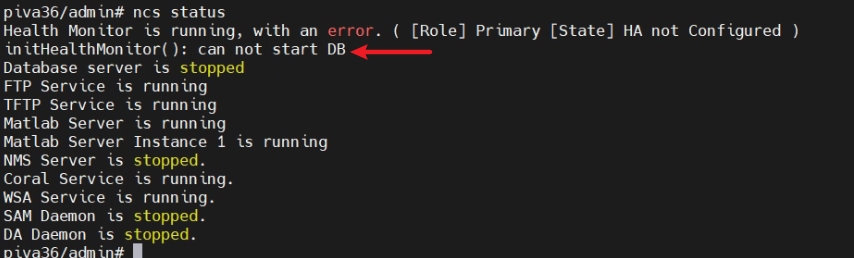
2.尝试分析和解决
通过在社区上找相关资料,发现这是数据库无法启动 ncs 服务的常见问题。关于修复的话,可以参考如下的步骤:
-
执行 ncs cleanup 命令(# ncs cleanup)
-
停止 ncs 服务(# ncs stop)并重新初始化数据库(# ncs db reinit)------测试下来ncd db reinit这个命令不存在!
-
如果以上方法无效,则需要全新安装 Prime,并恢复 Prime 的备份(如有)。
如下摘取部分过程:
#第一步,输入ncs cleanup
piva36/admin# ncs cleanup
***************************************************************************
!!!!!!!                           WARNING                           !!!!!!!
***************************************************************************
The clean up can remove all files located in the backup staging directory.
Older log files will be removed and other types of older debug information
will be removed
***************************************************************************
Do you wish to continue? ([NO]/yes) yes


***************************************************************************
!!!!!!!                DATABASE CLEANUP WARNING                     !!!!!!!
***************************************************************************
Cleaning up database will stop the server while the cleanup is performed.
The operation can take several minutes to complete
***************************************************************************
Do you wish to cleanup database? ([NO]/yes) yes


***************************************************************************
!!!!!!!                USER LOCAL DISK WARNING                      !!!!!!!
***************************************************************************
Cleaning user local disk will remove all locally saved reports, locally
backed up device configurations. All files in the local FTP and TFTP
directories will be removed.
***************************************************************************
Do you wish to cleanup user local disk? ([NO]/yes) yes
===================================================
Starting Cleanup: Wed Mar 11 07:47:27 UTC 2026
===================================================
{Wed Mar 11 07:47:35 UTC 2026} Removing all files in backup staging directory
{Wed Mar 11 07:47:35 UTC 2026} Removing all Matlab core related files
{Wed Mar 11 07:47:35 UTC 2026} Removing all older log files
{Wed Mar 11 07:47:36 UTC 2026} Cleaning older archive logs
{Wed Mar 11 07:47:44 UTC 2026} Cleaning database backup and all archive logs
{Wed Mar 11 07:47:44 UTC 2026} Cleaning older database trace files
{Wed Mar 11 07:47:44 UTC 2026} Removing all user local disk files
{Wed Mar 11 07:47:45 UTC 2026} Cleaning database
{Wed Mar 11 07:47:49 UTC 2026} Stopping server
{Wed Mar 11 07:53:21 UTC 2026} Not all server processes stop. Attempting to stop remaining
{Wed Mar 11 07:53:21 UTC 2026} Stopping database
{Wed Mar 11 07:53:24 UTC 2026} Starting database
{Wed Mar 11 07:53:49 UTC 2026} Starting database clean
{Wed Mar 11 07:54:21 UTC 2026} Completed database clean
{Wed Mar 11 07:54:21 UTC 2026} Stopping database
{Wed Mar 11 07:54:24 UTC 2026} Starting server
===================================================
Completed Cleanup
Start Time: Wed Mar 11 07:47:27 UTC 2026
Completed Time: Wed Mar 11 07:58:56 UTC 2026
===================================================
piva36/admin#

#ncs stop停止服务,然后重新初始化DB
piva36/admin# ncs stop

Stopping Prime Infrastructure...

This may take a few minutes...
Database is not running.
_outputHdlr check:Redirecting to /bin/systemctl stop vsftpd.service
Stopped FTP Service
_outputHdlr check:Redirecting to /bin/systemctl stop tftpd.service
Stopped TFTP Service
Stopping remoting: Matlab Server
Remoting 'Matlab Server' stopped successfully.
Stopping remoting: Matlab Server Instance 1
Remoting 'Matlab Server Instance 1' stopped successfully.
NMS Server is not running!.

Prime Infrastructure successfully shutdown.

SAM daemon process id does not exist
DA daemon process id does not exist
Completed shutdown of all services
piva36/admin#
做了如上操作再启动,依然会报错。即便后续在shell模式下rpm --rebuilddb 依然无法正常启动。
最后得出的结果:
1.如果有快照,恢复快照;
2.如果没有快照,这种权限损坏往往预示着 OS 层面的崩溃。如果reload无效,最稳妥的方法是重新部署一个新的 PI 虚拟机节点,然后恢复数据备份。