当传一个错误的路由,路由失败时,配置跳转到一个错误页面。
修改common模块build.gradle.kts, defaultConfig里面加上:
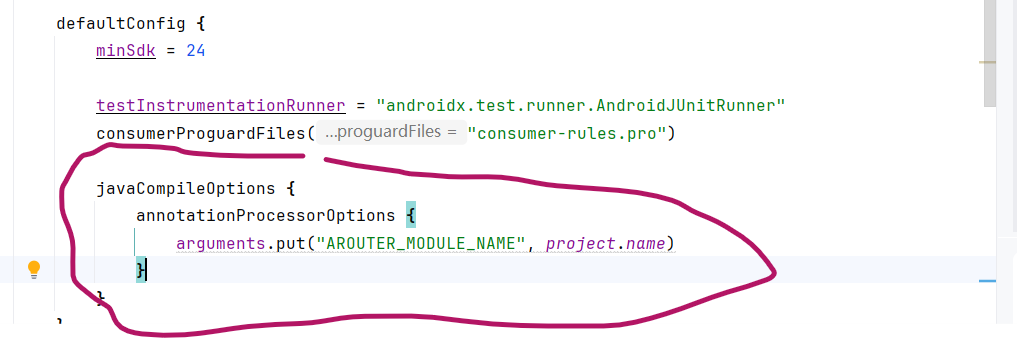
dependencies 添加:
annotationProcessor("com.alibaba:arouter-compiler:1.5.2")
完整的common/build.gradle.kts内容:
Groovy
plugins {
    alias(libs.plugins.android.library)
}

android {
    namespace = "com.example.common"
    compileSdk {
        version = release(36)
    }

    defaultConfig {
        minSdk = 24

        testInstrumentationRunner = "androidx.test.runner.AndroidJUnitRunner"
        consumerProguardFiles("consumer-rules.pro")

        javaCompileOptions {
            annotationProcessorOptions {
                arguments.put("AROUTER_MODULE_NAME", project.name)
            }
        }
    }

    buildTypes {
        release {
            isMinifyEnabled = false
            proguardFiles(
                getDefaultProguardFile("proguard-android-optimize.txt"),
                "proguard-rules.pro"
            )
        }
    }
    compileOptions {
        sourceCompatibility = JavaVersion.VERSION_11
        targetCompatibility = JavaVersion.VERSION_11
    }
}

dependencies {
    // 仅引入 API,不引入编译器
    api("com.alibaba:arouter-api:1.5.2")

    // 编译期注解处理器
    annotationProcessor("com.alibaba:arouter-compiler:1.5.2")

    // TODO 其他公共依赖库

    implementation(libs.androidx.appcompat)
    implementation(libs.google.material)
    testImplementation(libs.junit)
    androidTestImplementation(libs.androidx.junit)
    androidTestImplementation(libs.androidx.espresso.core)
}
在公共模块自定义DegradeService实现类:
java
package com.example.common;

import android.content.Context;
import android.util.Log;
import android.widget.Toast;

import com.alibaba.android.arouter.facade.Postcard;
import com.alibaba.android.arouter.facade.annotation.Route;
import com.alibaba.android.arouter.facade.service.DegradeService;
import com.alibaba.android.arouter.launcher.ARouter;

/**
 * 路由失败的统一降级处理类
 * 通过 @Route 注解注册
 */
@Route(path = "/service/degrade/globalErrorPage")
public class MyDegradeService implements DegradeService {
    private Context mContext;
    @Override
    public void onLost(Context context, Postcard postcard) {
        String failedPath = postcard.getPath(); // 获取失败的路由地址
        Log.d("DegradeService", "路由失败,失败的路由地址为:" + failedPath);

        // 防止递归:如果本次丢失的路径已经是错误页面,则不再跳转
        if ("/error/page".equals(postcard.getPath())) {
            return;
        }

        Toast.makeText(mContext, "页面不存在或暂未开放:" + failedPath + "\n 404 \n安能摧眉折腰事权贵,使我不得开心颜。", Toast.LENGTH_SHORT).show();

        ARouter.getInstance()
                .build("/error/page") // 重定向到错误页面。
                .withString("failedPath", failedPath)
                .navigation();
    }

    @Override
    public void init(Context context) {
        mContext = context;
    }
}
同样,在公共模块添加重定向的那个错误页面:
java
package com.example.common;

import android.os.Bundle;
import android.widget.TextView;

import com.alibaba.android.arouter.facade.annotation.Autowired;
import com.alibaba.android.arouter.facade.annotation.Route;
import com.alibaba.android.arouter.launcher.ARouter;

import androidx.appcompat.app.AppCompatActivity;

@Route(path = "/error/page")
public class ErrorPageActivity extends AppCompatActivity {
    @Autowired(name = "failedPath")
    String failedPath;

    @Override
    protected void onCreate(Bundle savedInstanceState) {
        super.onCreate(savedInstanceState);
        ARouter.getInstance().inject(this);
        TextView textView = new TextView(this);
        textView.setText("ErrorPageActivity\n" + String.format("%s页面不存在\n404\n日光之下无新鲜事。", failedPath));
        textView.setTextSize(16);
        setContentView(textView);
    }
}
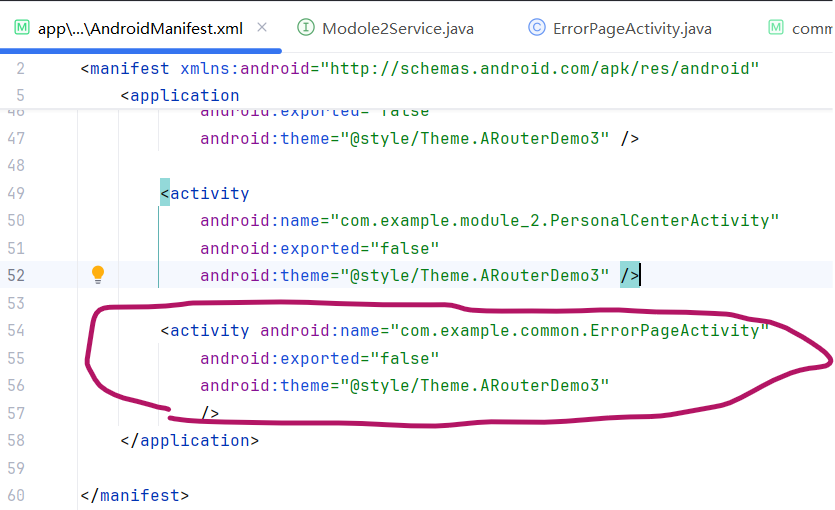
在主模块的AndroidManifest文件中不能忘了注册这个activity:
MainActivity中,随意路由一个不存在的地址:

ok. 测试结果:

ok. ARouter的测试告一段落,再贴一下MainActivity的页面代码, 后续如果需要还在这个基础上方便修改。
XML
<?xml version="1.0" encoding="utf-8"?>
<ScrollView xmlns:android="http://schemas.android.com/apk/res/android"
    xmlns:app="http://schemas.android.com/apk/res-auto"
    xmlns:tools="http://schemas.android.com/tools"
    android:layout_width="match_parent"
    android:layout_height="match_parent"
    tools:context=".MainActivity">

    <LinearLayout
        android:layout_width="match_parent"
        android:layout_height="match_parent"
        android:padding="16dp"
        android:orientation="vertical"
        android:gravity="center_horizontal">
        <TextView
            android:id="@+id/welcome_text"
            android:layout_width="wrap_content"
            android:layout_height="wrap_content"
            android:text="ARouter Demo\n 环顾当今武林,能接我一掌的后进只有南慕容北乔峰,敢问阁下是哪位?"
            android:textSize="20sp"
            android:textStyle="bold"
            android:gravity="center"
            android:layout_marginBottom="16dp" />

        <!-- 登录状态显示 -->
        <TextView
            android:id="@+id/tvLoginStatus"
            android:layout_width="match_parent"
            android:layout_height="wrap_content"
            android:text="当前状态:未登录"
            android:textSize="14sp"
            android:padding="10dp"
            android:background="#E0E0E0"
            android:layout_marginBottom="8dp"/>

        <!-- 登录/退出按钮 -->
        <Button
            android:id="@+id/btnLoginLogout"
            android:layout_width="match_parent"
            android:layout_height="wrap_content"
            android:text="模拟登录"
            android:textSize="14sp"
            android:padding="12dp"
            android:layout_marginBottom="16dp"/>

        <View
            android:layout_width="match_parent"
            android:layout_height="1dp"
            android:background="#CCCCCC"
            android:layout_marginBottom="16dp"/>

        <Button
            android:id="@+id/start_button"
            android:layout_width="match_parent"
            android:layout_height="wrap_content"
            android:text="开始 ARouter 之旅 (普通跳转)"
            android:textSize="14sp"
            android:padding="12dp"
            android:layout_marginBottom="8dp"/>

        <Button
            android:id="@+id/invokeServiceFromOtherModule"
            android:layout_width="match_parent"
            android:layout_height="wrap_content"
            android:text="跨模块调用接口"
            android:textSize="14sp"
            android:padding="12dp"
            android:layout_marginBottom="8dp"/>

        <!-- 测试拦截器按钮 -->
        <Button
            android:id="@+id/btnNeedLogin"
            android:layout_width="match_parent"
            android:layout_height="wrap_content"
            android:text="访问需要登录的页面 (测试拦截器)"
            android:textSize="14sp"
            android:padding="12dp"
            android:backgroundTint="#FF5722"
            android:layout_marginTop="16dp"/>

        <View
            android:layout_width="match_parent"
            android:layout_height="1dp"
            android:background="#CCCCCC"
            android:layout_marginBottom="16dp"/>

        <!-- 测试从其他模块获取fragment显示 -->
        <LinearLayout
            android:layout_width="match_parent"
            android:layout_height="250dp"
            android:orientation="vertical">
            <TextView
                android:layout_width="wrap_content"
                android:layout_height="wrap_content"
                android:text="从module_user模块获取的 Fragment:" />

            <FrameLayout
                android:id="@+id/container_fragment1"
                android:layout_width="match_parent"
                android:layout_height="0dp"
                android:layout_weight="1"
                android:background="#FFE4E1" />

            <TextView
                android:layout_width="wrap_content"
                android:layout_height="wrap_content"
                android:text="module_2模块的 Fragment:" />

            <FrameLayout
                android:id="@+id/container_fragment2"
                android:layout_width="match_parent"
                android:layout_height="0dp"
                android:layout_weight="1"
                android:background="#CCCCCC" />

        </LinearLayout>

        <View
            android:layout_width="match_parent"
            android:layout_height="1dp"
            android:background="#CCCCCC"
            android:layout_marginBottom="16dp"/>

        <Button
            android:layout_width="wrap_content"
            android:layout_height="wrap_content"
            android:id="@+id/gotoPathNoExist"
            android:text="路由不存在时的处理"/>
    </LinearLayout>
</ScrollView>