命令行权限不够
Chocolatey detected you are not running from an elevated command shell
(cmd/powershell).
解决方法
使用 Administrator 身份运行 命令行
问题 no such file or directory
ENOENT: no such file or directory, open package.json
Failed to build llama.cpp
xpm install @xpack-dev-tools/cmake
bash
npm error ^[[?25l^[[?25hnpm error code ENOENT
npm error npm error syscall open
npm error npm error path C:\Users\zacks\AppData\Local\npm-cache\_npx\3f6d3ce19cc8f028\package.json
npm error npm error errno -4058
npm error npm error enoent Could not read package.json: Error: ENOENT: no such file or directory, open 'C:\Users\zacks\AppData\Local\npm-cache\_npx\3f6d3ce19cc8f028\package.json'
npm error npm error enoent This is related to npm not being able to find a file.
npm error npm error enoent
npm error npm error A complete log of this run can be found in: C:\Users\zacks\AppData\Local\npm-cache\_logs\2026-03-08T05_19_47_664Z-debug-0.log
npm error [node-llama-cpp] Failed to build llama.cpp with Vulkan support. falling back to building llama.cpp with no GPU support. Error: SpawnError: Command npm exec --yes -- xpm@^0.16.3 install @xpack-dev-tools/cmake@latest --no-save exited with code 4294963238
npm error     at createError (file:///C:/Users/zacks/AppData/Roaming/npm/node_modules/openclaw/node_modules/node-llama-cpp/dist/utils/spawnCommand.js:34:20)
npm error     at ChildProcess.<anonymous> (file:///C:/Users/zacks/AppData/Roaming/npm/node_modules/openclaw/node_modules/node-llama-cpp/dist/utils/spawnCommand.js:47:24)
npm error     at ChildProcess.emit (node:events:508:28)
npm error     at cp.emit (C:\Users\zacks\AppData\Roaming\npm\node_modules\openclaw\node_modules\cross-spawn\lib\enoent.js:34:29)
npm error     at ChildProcess._handle.onexit (node:internal/child_process:294:12)
npm error npm error code ENOENT
npm error npm error syscall open
npm error npm error path C:\Users\zacks\AppData\Local\npm-cache\_npx\3f6d3ce19cc8f028\package.json
npm error npm error errno -4058
npm error npm error enoent Could not read package.json: Error: ENOENT: no such file or directory, open 'C:\Users\zacks\AppData\Local\npm-cache\_npx\3f6d3ce19cc8f028\package.json'
npm error npm error enoent This is related to npm not being able to find a file.
npm error npm error enoent
npm error npm error A complete log of this run can be found in: C:\Users\zacks\AppData\Local\npm-cache\_logs\2026-03-08T05_20_14_852Z-debug-0.log
npm error [node-llama-cpp] Failed to build llama.cpp with no GPU support. Error: SpawnError: Command npm exec --yes -- xpm@^0.16.3 install @xpack-dev-tools/cmake@latest --no-save exited with code 4294963238
npm error     at createError (file:///C:/Users/zacks/AppData/Roaming/npm/node_modules/openclaw/node_modules/node-llama-cpp/dist/utils/spawnCommand.js:34:20)
npm error     at ChildProcess.<anonymous> (file:///C:/Users/zacks/AppData/Roaming/npm/node_modules/openclaw/node_modules/node-llama-cpp/dist/utils/spawnCommand.js:47:24)
npm error     at ChildProcess.emit (node:events:508:28)
npm error     at cp.emit (C:\Users\zacks\AppData\Roaming\npm\node_modules\openclaw\node_modules\cross-spawn\lib\enoent.js:34:29)
npm error     at ChildProcess._handle.onexit (node:internal/child_process:294:12)
npm error SpawnError: Command npm exec --yes -- xpm@^0.16.3 install @xpack-dev-tools/cmake@latest --no-save exited with code 4294963238
npm error     at createError (file:///C:/Users/zacks/AppData/Roaming/npm/node_modules/openclaw/node_modules/node-llama-cpp/dist/utils/spawnCommand.js:34:20)
npm error     at ChildProcess.<anonymous> (file:///C:/Users/zacks/AppData/Roaming/npm/node_modules/openclaw/node_modules/node-llama-cpp/dist/utils/spawnCommand.js:47:24)
npm error     at ChildProcess.emit (node:events:508:28)
npm error     at cp.emit (C:\Users\zacks\AppData\Roaming\npm\node_modules\openclaw\node_modules\cross-spawn\lib\enoent.js:34:29)
npm error     at ChildProcess._handle.onexit (node:internal/child_process:294:12)
npm error A complete log of this run can be found in: C:\Users\zacks\AppData\Local\npm-cache\_logs\2026-03-08T05_17_17_046Z-debug-0.log
解决方法
清除缓存
Powershell
npm cache clean --force
Remove-Item -Recurse -Force C:\Users\zacks\AppData\Local\npm-cache\_npx
Remove-Item -Recurse -Force C:\Users\zacks\AppData\Local\npm-cache
安装 cmake
Powershell
choco install cmake -y

cmake --version
问题 cmake 找不到
npm error ^[[?25h[node-llama-cpp] + Downloading cmake
npm error [node-llama-cpp] × Failed to download cmake
npm error
npm error [node-llama-cpp] To resolve errors related to Vulkan compilation, see the Vulkan guide: https://node-llama-cpp.withcat.ai/guide/vulkan
npm error [node-llama-cpp] + Downloading cmake
npm error [node-llama-cpp] × Failed to download cmake
npm error [node-llama-cpp] A prebuilt binary was not found, falling back to using no GPU
npm error [node-llama-cpp] Failed to load a prebuilt binary for platform "win" "x64", falling back to building from source. Error: Error: A dynamic link library (DLL) initialization routine failed.
npm error \\?\C:\Users\zacks\AppData\Roaming\npm\node_modules\openclaw\node_modules\@node-llama-cpp\win-x64\bins\win-x64\llama-addon.node
npm error     at Object..node (node:internal/modules/cjs/loader:1970:18)
npm error     at Module.load (node:internal/modules/cjs/loader:1533:32)
npm error     at Module._load (node:internal/modules/cjs/loader:1335:12)
npm error     at wrapModuleLoad (node:internal/modules/cjs/loader:255:19)
npm error     at Module.require (node:internal/modules/cjs/loader:1556:12)
npm error     at require (node:internal/modules/helpers:152:16)
npm error     at loadBindingModule (file:///C:/Users/zacks/AppData/Roaming/npm/node_modules/openclaw/node_modules/node-llama-cpp/dist/bindings/getLlama.js:493:25)
npm error     at loadExistingLlamaBinary (file:///C:/Users/zacks/AppData/Roaming/npm/node_modules/openclaw/node_modules/node-llama-cpp/dist/bindings/getLlama.js:371:37)
npm error     at async getLlamaForOptions (file:///C:/Users/zacks/AppData/Roaming/npm/node_modules/openclaw/node_modules/node-llama-cpp/dist/bindings/getLlama.js:206:27)
npm error     at async Object.handler (file:///C:/Users/zacks/AppData/Roaming/npm/node_modules/openclaw/node_modules/node-llama-cpp/dist/cli/commands/OnPostInstallCommand.js:22:13) {
npm error   code: 'ERR_DLOPEN_FAILED'
npm error }
npm error ^[[?25l^[[?25hnpm error code ENOENT
npm error npm error syscall open
npm error npm error path C:\Users\zacks\AppData\Local\npm-cache\_npx\3f6d3ce19cc8f028\package.json
npm error npm error errno -4058
npm error npm error enoent Could not read package.json: Error: ENOENT: no such file or directory, open 'C:\Users\zacks\AppData\Local\npm-cache\_npx\3f6d3ce19cc8f028\package.json'
npm error npm error enoent This is related to npm not being able to find a file.
npm error npm error enoent
npm error npm error A complete log of this run can be found in: C:\Users\zacks\AppData\Local\npm-cache\_logs\2026-03-08T05_42_43_831Z-debug-0.log
npm error [node-llama-cpp] Failed to build llama.cpp with Vulkan support. falling back to building llama.cpp with no GPU support. Error: SpawnError: Command npm exec --yes -- xpm@^0.16.3 install @xpack-dev-tools/cmake@latest --no-save exited with code 4294963238
npm error     at createError (file:///C:/Users/zacks/AppData/Roaming/npm/node_modules/openclaw/node_modules/node-llama-cpp/dist/utils/spawnCommand.js:34:20)
npm error     at ChildProcess.<anonymous> (file:///C:/Users/zacks/AppData/Roaming/npm/node_modules/openclaw/node_modules/node-llama-cpp/dist/utils/spawnCommand.js:47:24)
npm error     at ChildProcess.emit (node:events:508:28)
npm error     at cp.emit (C:\Users\zacks\AppData\Roaming\npm\node_modules\openclaw\node_modules\cross-spawn\lib\enoent.js:34:29)
npm error     at ChildProcess._handle.onexit (node:internal/child_process:294:12)
npm error npm error code ENOENT
npm error npm error syscall open
npm error npm error path C:\Users\zacks\AppData\Local\npm-cache\_npx\3f6d3ce19cc8f028\package.json
npm error npm error errno -4058
npm error npm error enoent Could not read package.json: Error: ENOENT: no such file or directory, open 'C:\Users\zacks\AppData\Local\npm-cache\_npx\3f6d3ce19cc8f028\package.json'
npm error npm error enoent This is related to npm not being able to find a file.
npm error npm error enoent
npm error npm error A complete log of this run can be found in: C:\Users\zacks\AppData\Local\npm-cache\_logs\2026-03-08T05_43_09_346Z-debug-0.log
npm error [node-llama-cpp] Failed to build llama.cpp with no GPU support. Error: SpawnError: Command npm exec --yes -- xpm@^0.16.3 install @xpack-dev-tools/cmake@latest --no-save exited with code 4294963238
npm error     at createError (file:///C:/Users/zacks/AppData/Roaming/npm/node_modules/openclaw/node_modules/node-llama-cpp/dist/utils/spawnCommand.js:34:20)
npm error     at ChildProcess.<anonymous> (file:///C:/Users/zacks/AppData/Roaming/npm/node_modules/openclaw/node_modules/node-llama-cpp/dist/utils/spawnCommand.js:47:24)
npm error     at ChildProcess.emit (node:events:508:28)
npm error     at cp.emit (C:\Users\zacks\AppData\Roaming\npm\node_modules\openclaw\node_modules\cross-spawn\lib\enoent.js:34:29)
npm error     at ChildProcess._handle.onexit (node:internal/child_process:294:12)
npm error SpawnError: Command npm exec --yes -- xpm@^0.16.3 install @xpack-dev-tools/cmake@latest --no-save exited with code 4294963238
npm error     at createError (file:///C:/Users/zacks/AppData/Roaming/npm/node_modules/openclaw/node_modules/node-llama-cpp/dist/utils/spawnCommand.js:34:20)
npm error     at ChildProcess.<anonymous> (file:///C:/Users/zacks/AppData/Roaming/npm/node_modules/openclaw/node_modules/node-llama-cpp/dist/utils/spawnCommand.js:47:24)
npm error     at ChildProcess.emit (node:events:508:28)
npm error     at cp.emit (C:\Users\zacks\AppData\Roaming\npm\node_modules\openclaw\node_modules\cross-spawn\lib\enoent.js:34:29)
npm error     at ChildProcess._handle.onexit (node:internal/child_process:294:12)
npm error A complete log of this run can be found in: C:\Users\zacks\AppData\Local\npm-cache\_logs\2026-03-08T05_40_17_707Z-debug-0.log
解决
Powershell
choco install cmake -y
choco install python -y
npm install -g openclaw
缺少 C++ 运行时库
missing any VC++ toolset
You need to install the latest version of Visual Studio
including the "Desktop development with C++" workload.
Powershell
npm error [node-llama-cpp] To resolve errors related to Vulkan compilation, see the Vulkan guide: https://node-llama-cpp.withcat.ai/guide/vulkan
npm error [node-llama-cpp] A prebuilt binary was not found, falling back to using no GPU
npm error [node-llama-cpp] Failed to load a prebuilt binary for platform "win" "x64", falling back to building from source. Error: Error: A dynamic link library (DLL) initialization routine failed.
npm error \\?\C:\Users\zacks\AppData\Local\nvm\v22.22.1\node_modules\openclaw\node_modules\@node-llama-cpp\win-x64\bins\win-x64\llama-addon.node
npm error     at Object..node (node:internal/modules/cjs/loader:1864:18)
npm error     at Module.load (node:internal/modules/cjs/loader:1441:32)
npm error     at Function._load (node:internal/modules/cjs/loader:1263:12)
npm error     at TracingChannel.traceSync (node:diagnostics_channel:328:14)
npm error     at wrapModuleLoad (node:internal/modules/cjs/loader:237:24)
npm error     at Module.require (node:internal/modules/cjs/loader:1463:12)
npm error     at require (node:internal/modules/helpers:147:16)
npm error     at loadBindingModule (file:///C:/Users/zacks/AppData/Local/nvm/v22.22.1/node_modules/openclaw/node_modules/node-llama-cpp/dist/bindings/getLlama.js:493:25)
npm error     at loadExistingLlamaBinary (file:///C:/Users/zacks/AppData/Local/nvm/v22.22.1/node_modules/openclaw/node_modules/node-llama-cpp/dist/bindings/getLlama.js:371:37)
npm error     at async getLlamaForOptions (file:///C:/Users/zacks/AppData/Local/nvm/v22.22.1/node_modules/openclaw/node_modules/node-llama-cpp/dist/bindings/getLlama.js:206:27) {
npm error   code: 'ERR_DLOPEN_FAILED'
npm error }
npm error ^[[?25l^[[?25hERROR find VS
npm error msvs_version not set from command line or npm config
npm error VCINSTALLDIR not set, not running in VS Command Prompt
npm error could not use PowerShell to find Visual Studio 2017 or newer, try re-running with '--loglevel silly' for more details.
npm error
npm error         Failure details: undefined
npm error checking VS2022 (17.14.37012.4) found at:
npm error "C:\Program Files (x86)\Microsoft Visual Studio\2022\BuildTools"
npm error - found "Visual Studio C++ core features"
npm error - missing any VC++ toolset
npm error could not find a version of Visual Studio 2017 or newer to use
npm error not looking for VS2017 as it is only supported up to Node.js 21
npm error not looking for VS2017 as it is only supported up to Node.js 21
npm error not looking for VS2017 as it is only supported up to Node.js 21
npm error not looking for VS2015 as it is only supported up to Node.js 18
npm error not looking for VS2013 as it is only supported up to Node.js 8
npm error
npm error **************************************************************
npm error You need to install the latest version of Visual Studio
npm error including the "Desktop development with C++" workload.
npm error For more information consult the documentation at:
npm error https://github.com/nodejs/node-gyp#on-windows
npm error **************************************************************
npm error
npm error ERROR OMG Could not find any Visual Studio installation to use
npm error ERROR OMG Could not find any Visual Studio installation to use
npm error [node-llama-cpp] Failed to build llama.cpp with Vulkan support. falling back to building llama.cpp with no GPU support. Error: SpawnError: Command npm run -s cmake-js-llama -- clean --log-level warn --out localBuilds\win-x64-vulkan exited with code 1
npm error     at createError (file:///C:/Users/zacks/AppData/Local/nvm/v22.22.1/node_modules/openclaw/node_modules/node-llama-cpp/dist/utils/spawnCommand.js:34:20)
npm error     at ChildProcess.<anonymous> (file:///C:/Users/zacks/AppData/Local/nvm/v22.22.1/node_modules/openclaw/node_modules/node-llama-cpp/dist/utils/spawnCommand.js:47:24)
npm error     at ChildProcess.emit (node:events:519:28)
npm error     at cp.emit (C:\Users\zacks\AppData\Local\nvm\v22.22.1\node_modules\openclaw\node_modules\cross-spawn\lib\enoent.js:34:29)
npm error     at ChildProcess._handle.onexit (node:internal/child_process:293:12)
npm error ERROR find VS
npm error msvs_version not set from command line or npm config
npm error VCINSTALLDIR not set, not running in VS Command Prompt
npm error could not use PowerShell to find Visual Studio 2017 or newer, try re-running with '--loglevel silly' for more details.
npm error
npm error         Failure details: undefined
npm error checking VS2022 (17.14.37012.4) found at:
npm error "C:\Program Files (x86)\Microsoft Visual Studio\2022\BuildTools"
npm error - found "Visual Studio C++ core features"
npm error - missing any VC++ toolset
npm error could not find a version of Visual Studio 2017 or newer to use
npm error not looking for VS2017 as it is only supported up to Node.js 21
npm error not looking for VS2017 as it is only supported up to Node.js 21
npm error not looking for VS2017 as it is only supported up to Node.js 21
npm error not looking for VS2015 as it is only supported up to Node.js 18
npm error not looking for VS2013 as it is only supported up to Node.js 8
npm error
npm error **************************************************************
npm error You need to install the latest version of Visual Studio
npm error including the "Desktop development with C++" workload.
npm error For more information consult the documentation at:
npm error https://github.com/nodejs/node-gyp#on-windows
npm error **************************************************************
npm error
npm error ERROR OMG Could not find any Visual Studio installation to use
npm error ERROR OMG Could not find any Visual Studio installation to use
npm error [node-llama-cpp] Failed to build llama.cpp with no GPU support. Error: SpawnError: Command npm run -s cmake-js-llama -- clean --log-level warn --out localBuilds\win-x64 exited with code 1
npm error     at createError (file:///C:/Users/zacks/AppData/Local/nvm/v22.22.1/node_modules/openclaw/node_modules/node-llama-cpp/dist/utils/spawnCommand.js:34:20)
npm error     at ChildProcess.<anonymous> (file:///C:/Users/zacks/AppData/Local/nvm/v22.22.1/node_modules/openclaw/node_modules/node-llama-cpp/dist/utils/spawnCommand.js:47:24)
npm error     at ChildProcess.emit (node:events:519:28)
npm error     at cp.emit (C:\Users\zacks\AppData\Local\nvm\v22.22.1\node_modules\openclaw\node_modules\cross-spawn\lib\enoent.js:34:29)
npm error     at ChildProcess._handle.onexit (node:internal/child_process:293:12)
npm error SpawnError: Command npm run -s cmake-js-llama -- clean --log-level warn --out localBuilds\win-x64 exited with code 1
npm error     at createError (file:///C:/Users/zacks/AppData/Local/nvm/v22.22.1/node_modules/openclaw/node_modules/node-llama-cpp/dist/utils/spawnCommand.js:34:20)
npm error     at ChildProcess.<anonymous> (file:///C:/Users/zacks/AppData/Local/nvm/v22.22.1/node_modules/openclaw/node_modules/node-llama-cpp/dist/utils/spawnCommand.js:47:24)
npm error     at ChildProcess.emit (node:events:519:28)
npm error     at cp.emit (C:\Users\zacks\AppData\Local\nvm\v22.22.1\node_modules\openclaw\node_modules\cross-spawn\lib\enoent.js:34:29)
npm error     at ChildProcess._handle.onexit (node:internal/child_process:293:12)
npm error A complete log of this run can be found in: C:\Users\zacks\AppData\Local\npm-cache\_logs\2026-03-08T09_36_56_436Z-debug-0.log
解决方法
安装 Visual Studio
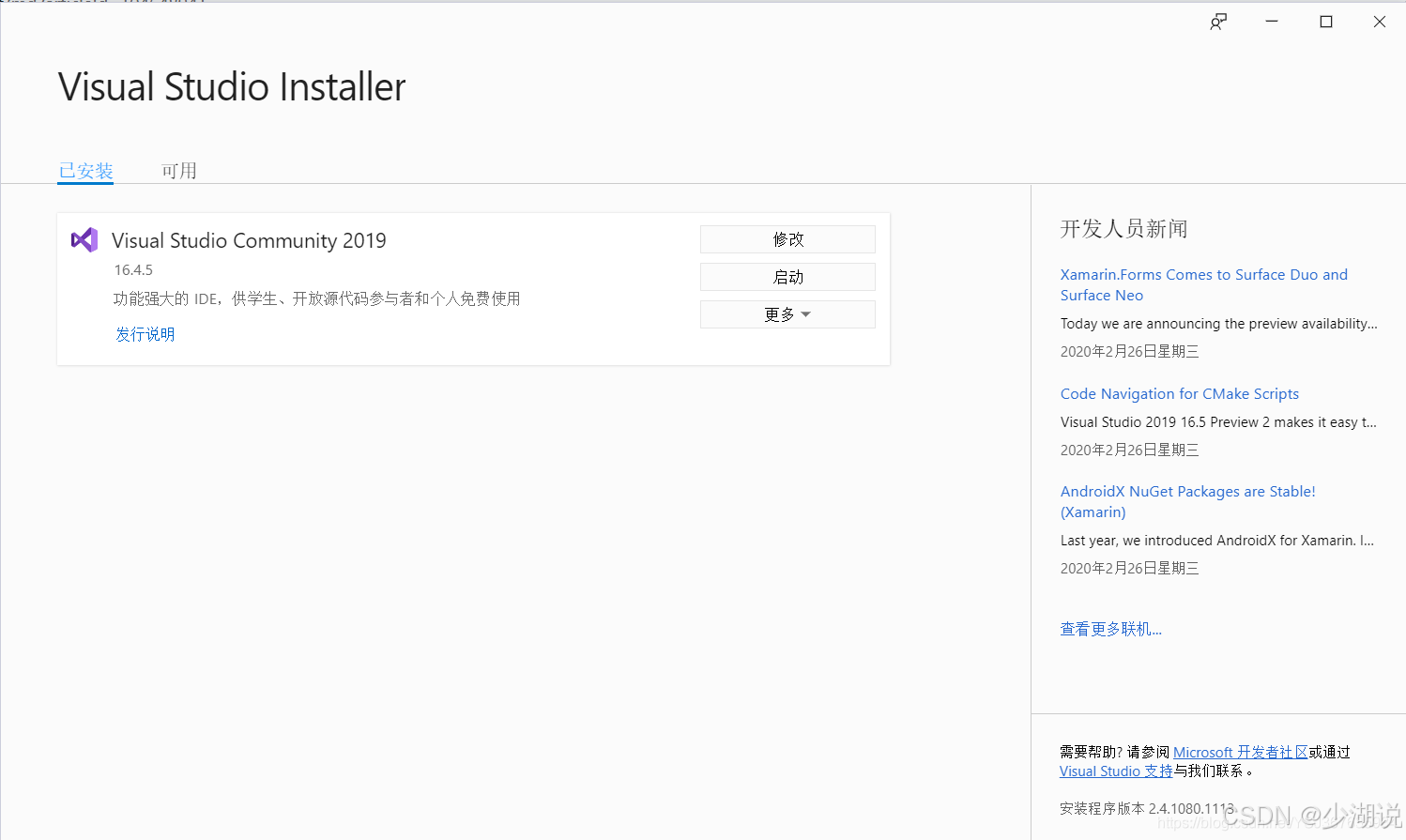
-
打开
C:\Program Files (x86)\Microsoft Visual Studio\Installer\vs_installer.exe -
修改 Build Tools 2022
-
勾选 Desktop development with C++ (桌面开发选项)
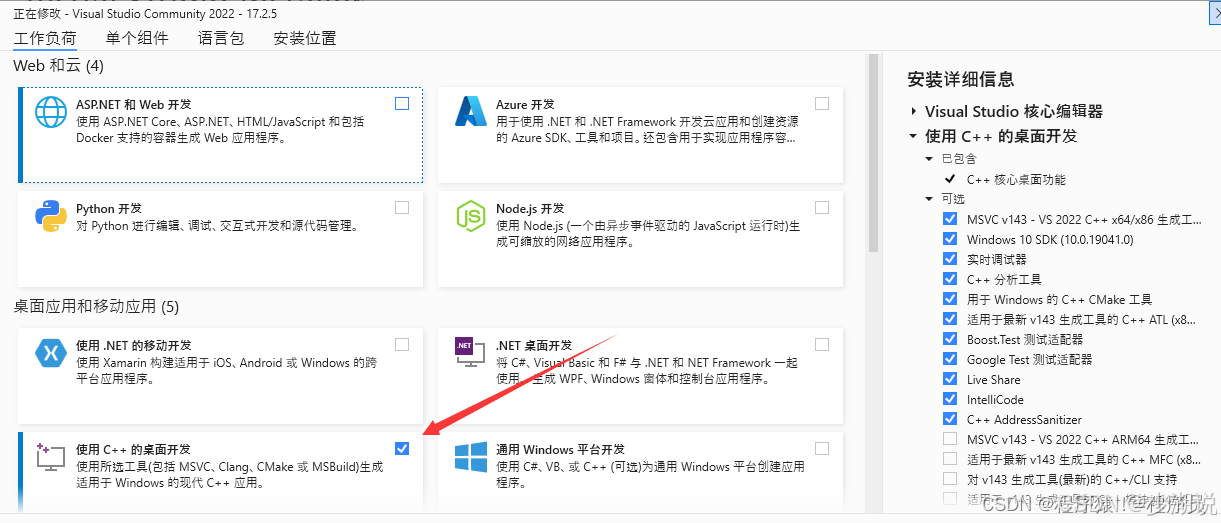
确保下面组件被选中:
✔ MSVC v143 - VS 2022 C++ x64/x86 build tools
✔ Windows 10 SDK 或 Windows 11 SDK
✔ CMake tools for Windows
此系统上禁止运行脚本
npm : 无法加载文件 C:\Program Files\nodejs\npm.ps1,因为在此系统上禁止运行脚本。有关详细信息,请参阅 https:/go.microsof
t.com/fwlink/?LinkID=135170 中的 about_Execution_Policies。
所在位置 行:290 字符: 22
$npmOutput = npm install -g "$packageName@$Tag" 2>&1 ~~~- CategoryInfo : SecurityError: (😃 \[\],ParentContainsErrorRecordException
- FullyQualifiedErrorId : UnauthorizedAccess
解决方法
运行以下命令, 允许脚本执行:
PowerShell
Set-ExecutionPolicy -ExecutionPolicy RemoteSigned -Scope Process错误信息
node.exe : npm error code 128
所在位置 行:1 字符: 1
+ & "C:\Program Files\nodejs/node.exe" "C:\Program Files\nodejs/node_mo ...
+ ~~~~~~~~~~~~~~~~~~~~~~~~~~~~~~~~~~~~~~~~~~~~~~~~~~~~~~~~~~~~~~~~~~~~~
    + CategoryInfo          : NotSpecified: (npm error code 128:String) [], RemoteException
    + FullyQualifiedErrorId : NativeCommandError
解决方法
npm 错误可能是由于缓存问题导致的。你可以清理缓存后重试, 打开 PowerShell 并运行以下命令, :
npm cache clean --force确保以下命令已经安装:
git --version
node -v
npm -v
再次重新运行安装命令