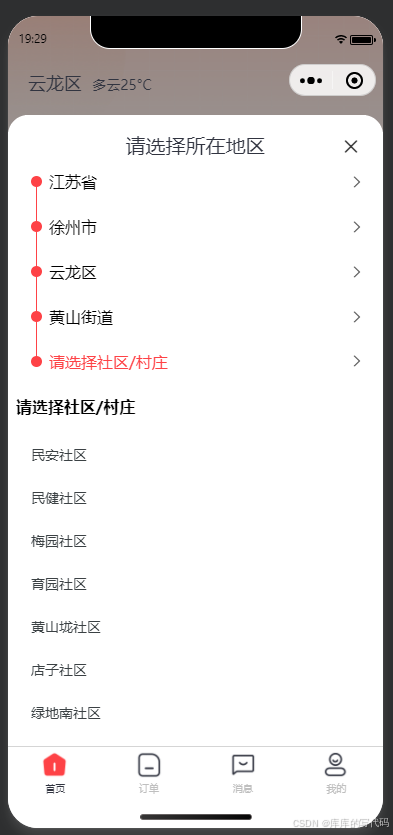
<template>
  <uni-popup ref="popupRef" type="bottom" @change="popChange" :safe-area="false">
    <view class="zq-address-picker">
      <view class="zq-address-picker__close">
        <uni-icons class="absolute" :size="20" type="closeempty" @click="closePopup" />
      </view>
      <view class="zq-address-picker__title">请选择所在地区</view>

      <!-- 已选择区域 -->
      <uni-list v-for="(item, index) in activeItems" :key="item.code" :border="false">
        <uni-list-item show-arrow clickable @click="selectLevel(item)">
          <template #header>
            <view style="display: flex; align-items: center">
              <view
                style="
                  width: 11px;
                  height: 11px;
                  background-color: #fe4246;
                  border-radius: 50%;
                  margin-right: 7px;
                  position: relative;
                "
              >
                <view
                  :style="{
                    width: '1px',
                    height: '50px',
                    'background-color': '#fe4246',
                    position: 'absolute',
                    left: '5px',
                    top: index < 1 ? 0 : index < activeItems.length - 1 ? '-20px' : '-50px'
                  }"
                >
                </view>
              </view>
              <view :class="activeLevel === item.level - 1 || !item.name ? 'zq-address-picker__select--active' : ''">
                {{ item.name || selectTitle }}
              </view>
            </view>
          </template>
        </uni-list-item>
      </uni-list>

      <view class="zq-address-picker__list">
        <view class="zq-address-picker__list-title">{{ selectTitle }}</view>
        <view class="zq-address-picker__list-content" @click="reGetList">
          <uni-load-more
            v-if="loadingStatus !== 'more'"
            :status="loadingStatus"
            :content-text="{ contentnomore: '加载失败,请点击重试' }"
          />

          <!-- 省市区选择 -->
          <uni-list :border="false">
            <uni-list-item
              v-for="(item, index) in currentList"
              :key="item.code"
              :title="item.name"
              :border="false"
              clickable
              @click="selectHandle(item, index)"
            >
              <template #footer>
                <uni-icons
                  v-if="activeItems[item.level] ? activeItems[item.level].code === item.code : false"
                  type="checkmarkempty"
                  class="zq-address-picker__list-tab--active"
                />
              </template>
            </uni-list-item>
          </uni-list>
        </view>
      </view>
    </view>
  </uni-popup>
</template>
<script setup>
import { ref, reactive, computed, watch } from 'vue'
import UserApi from '@/api/userApi'
import { children } from '@/uni_modules/lime-painter/components/common/relation'
// Props 定义
const props = defineProps({
  value: Boolean,
  selected: {
    type: Array,
    default: () => []
  }
})

// Emits 定义
const emit = defineEmits(['input', 'confirm'])

// 数据定义
const loading = ref(true)
const loadingStatus = ref('loading')
const country = ref([])
const list = ref([])
const activeLevel = ref(-1)
const activeIndex = ref(-1)
const activeItems = ref([])

// 模板 ref
const popupRef = ref(null)
let isClosing = false
// 关闭弹窗
const closePopup = () => {
  if (isClosing) return
  isClosing = true
  popupRef.value?.close()
  emit('confirm', activeItems.value)
  nextTick(() => {
    isClosing = false
  })
}

// 弹窗状态变化
const popChange = (e) => {
  const status = e.show
  if (activeLevel.value !== 4 && !status) {
    activeLevel.value = -1
    activeIndex.value = -1
    activeItems.value = []
  }
  emit('input', status)
}

// 已选择项切换
const selectLevel = (item) => {
  if (item.code) {
    activeLevel.value = item.level - 1
  }
}

// 选择处理
const selectHandle = (item, index) => {
  // 判断点击的级别 0:省 1:市 2:区 3:镇
  // UserApi.getdistrictcity({ code: item.code })
  // 选择省市区
  activeLevel.value = item.level
  activeIndex.value = index
  // // 直接通过索引赋值(Vue3 响应式支持)
  activeItems.value[item.level] = item
  activeItems.value.splice(item.level + 1)

  if (item.level == 0) {
    // 获取市
    UserApi.getdistrictcity({ provinceCode: item.code }).then((res) => {
      eachList(res.data, 1, 'cityCode', 'cityName', { provinceCode: item.code })
      item.children = res.data
      activeItems.value[item.level + 1] = {}
    })
  } else if (item.level == 1) {
    // 获取区
    UserApi.getdistrictcountry({ cityCode: item.code, provinceCode: item.provinceCode }).then((res) => {
      eachList(res.data, 2, 'countryCode', 'countryName', { cityCode: item.code, provinceCode: item.provinceCode })
      item.children = res.data
      activeItems.value[item.level + 1] = {}
    })
  } else if (item.level == 2) {
    // 获取镇
    UserApi.getdistricttown({
      countryCode: item.code,
      cityCode: item.cityCode,
      provinceCode: item.provinceCode
    }).then((res) => {
      eachList(res.data, 3, 'townCode', 'townName', {
        countryCode: item.code,
        cityCode: item.cityCode,
        provinceCode: item.provinceCode
      })
      item.children = res.data
      activeItems.value[item.level + 1] = {}
    })
  } else if (item.level == 3) {
    // 获取村
    UserApi.getdistrictvillage({
      townCode: item.code,
      countryCode: item.countryCode,
      cityCode: item.cityCode,
      provinceCode: item.provinceCode
    }).then((res) => {
      eachList(res.data, 4, 'villageCode', 'villageName', {
        townCode: item.code,
        countryCode: item.countryCode,
        cityCode: item.cityCode,
        provinceCode: item.provinceCode
      })
      item.children = res.data
      activeItems.value[item.level + 1] = {}
    })
  } else if (item.level == 4) {
    emit('confirm', activeItems.value)
  }
}

const eachList = (arr, level, code, name, obj) => {
  arr.forEach((v) => {
    v.level = level
    v.code = v[code]
    v.name = v[name]
    Object.assign(v, obj)
    if (v.children) {
      eachList(v.children, v.level + 1)
    }
  })
}

// 获取中国省市区数据
const getCityData = () => {
  if (!list.value.length) {
    loadingStatus.value = 'loading'
    UserApi.getdistrictprovince().then((res) => {
      if (Array.isArray(res.data)) {
        eachList(res.data, 0, 'provinceCode', 'provinceName')
        list.value = res.data
        if (props.selected.length) {
          console.log(7777)

          const active = []
          if (props.selected.length !== 1) {
            active[0] = list.value.find((v) => v.name === props.selected[1])
            active[1] = active[0]?.children.find((v) => v.name === props.selected[2])
            active[2] = active[1]?.children.find((v) => v.name === props.selected[3])
            active[3] = active[2]?.children.find((v) => v.name === props.selected[4])
            activeItems.value = active
            activeLevel.value = 4
          } else {
            activeLevel.value = -1
          }
        }

        loadingStatus.value = 'more'
      } else {
        loadingStatus.value = 'noMore'
      }
    })
  } else {
    loadingStatus.value = 'more'
  }
}

// 重新获取列表
const reGetList = () => {
  if (loadingStatus.value === 'noMore') {
    getList()
  }
}

const getList = () => {
  getCityData()
}

// 计算属性
const currentList = computed(() => {
  if (activeLevel.value !== -1) {
    return activeItems.value[activeLevel.value]?.children || []
  }
  return list.value
})

const selectTitle = computed(() => {
  const titles = {
    '-1': '请选择省份/地区',
    0: '请选择城市',
    1: '请选择区/县',
    2: '请选择街道/镇',
    3: '请选择社区/村庄'
  }
  return titles[activeLevel.value]
})

const showPick = () => {
  activeItems.value = []
  popupRef.value?.open()
  activeItems.value = props.selected || []
  getList()
}
const closePick = () => {
  closePopup()
}
defineExpose({
  showPick,
  closePick
})
</script>
<style lang="scss" scoped>
/* 样式保持不变 */

.zq-address-picker {
  border-top-left-radius: 20px;
  border-top-right-radius: 20px;
  background-color: white;
  padding-left: 8px;
  padding-right: 8px;
  padding-top: 16px;
  font-size: 16px;
  &__close {
    text-align: right;
    margin-right: 42px;
    margin-top: 5px;
    position: absolute;
    left: 0;
    right: 0;
    color: red;
  }

  &__title {
    font-weight: 500;
    font-size: 20px;
    color: #313440;
    line-height: 28px;
    text-align: center;
    font-style: normal;
  }

  &__select {
    &--active {
      color: $uni-color-primary;
    }
  }

  &__list {
    max-height: 48vh;
    overflow-y: auto;
    margin-top: 12px;

    &-tab {
      display: flex;
      margin-bottom: 20px;
      justify-content: space-between;
      padding-left: 16px;
      padding-right: 16px;

      &--hide {
        display: none;
      }

      &--active {
        color: $uni-color-primary !important;
      }
    }

    &-title {
      font-weight: bold;
      margin-bottom: 16px;
    }

    .uni-load-more {
      padding: 20px 0;
    }
  }

  &__quick {
    display: flex;
    flex-wrap: wrap;
    font-size: 14px;
    gap: 12px;
    margin-bottom: 14px;

    &-label {
      padding: 5px 12px;
      display: block;
      border-radius: 99px;
      background-color: #f4f3f3;
    }

    &-radio {
      display: none;
    }

    &--active {
      background-color: transparentize($uni-color-primary, 0.94);
      color: $uni-color-primary;
    }
  }
}
</style>