1、未限流
10.46.20.185 部署http的nginx下载服务
server {
listen 8443;
root /opt/data;
index index.html;
access_log /var/log/nginx/limit-conn.log;
error_log /var/log/nginx/limit-conn_error.log;
}
10.46.20.186 使用wget下载
wget http://10.46.20.185:8443/apache-jmeter-3.1-0430.tar

下载速率大约是113MB/s
2、限流
加入限流配置,limit_rate只是针对每个连接生效,如果有多个连接同时下载,整个带宽的流量还是可以比较大的。
server {
listen 8443;
root /opt/data;
index index.html;
access_log /var/log/nginx/limit-conn.log;
error_log /var/log/nginx/limit-conn_error.log;
limit_rate 500k;
}

3、并发数 + 限流
1)限制服务端的并发连接数
假设网络带宽为100M,预留80M为下载,20M为业务请求。
预留每个连接2M下载带宽,80M总流量,并发请求数大约是40req/s,nginx的配置如下
limit_conn_zone $server_name zone=perserver:10m;
server {
limit_rate 2m;
limit_conn perserver 40;
}
测试命令:
ab -n 100 -c 100 http://10.46.20.185:8443/zxhnhs562_hv10_fv1001b10000_firmware.bin
测试结果
root@k8s-04:/opt/shcp/xwq/login_proxy-master-52aa3fffd02d717f5637357cc7b96c61d49aed99# ab -n 100 -c 100 http://10.46.20.185:8443/zxhnhs562_hv10_fv1001b10000_firmware.bin
This is ApacheBench, Version 2.3 <Revision: 1807734 >
Copyright 1996 Adam Twiss, Zeus Technology Ltd, http://www.zeustech.net/
Licensed to The Apache Software Foundation, http://www.apache.org/
Benchmarking 10.46.20.185 (be patient).....done
Server Software: nginx
Server Hostname: 10.46.20.185
Server Port: 8443
Document Path: /zxhnhs562_hv10_fv1001b10000_firmware.bin
Document Length: 8446524 bytes
Concurrency Level: 100
Time taken for tests: 8.666 seconds
Complete requests: 100
Failed requests: 0
Total transferred: 844677200 bytes
HTML transferred: 844652400 bytes
Requests per second: 11.54 #/sec (mean)
Time per request: 8666.274 ms (mean)
Time per request: 86.663 ms (mean, across all concurrent requests)
Transfer rate: 95182.78 Kbytes/sec received
root@k8s-03:/opt/data# netstat -anp|grep 8443|grep ESTABLISHED|wc -l
100
速率大于80M了,而且服务器同时存在的连接数100,并发连接数就是100,没有限制到配置的40
难道没有效果?还是配置错误了,理解不对?
分析:由于server_name是从HTTP协议中提取,所以TCP请求已经过了,换一下思路经server_port作为key,这样就可以在tcp层面限制住,修改配置如下
limit_conn_zone $server_port zone=perserver:10m;
server {
limit_rate 2m;
limit_conn perserver 40;
}
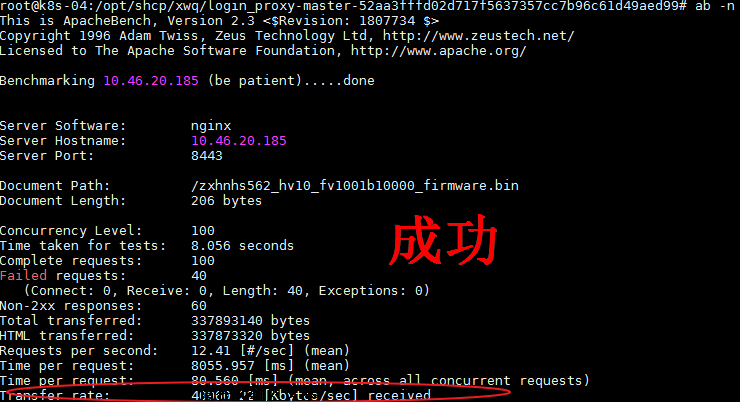
root@k8s-04:/opt/shcp/xwq/login_proxy-master-52aa3fffd02d717f5637357cc7b96c61d49aed99# ab -n 100 -c 100 http://10.46.20.185:8443/zxhnhs562_hv10_fv1001b10000_firmware.bin
This is ApacheBench, Version 2.3 <Revision: 1807734 >
Copyright 1996 Adam Twiss, Zeus Technology Ltd, http://www.zeustech.net/
Licensed to The Apache Software Foundation, http://www.apache.org/
Benchmarking 10.46.20.185 (be patient).....done
Server Software: nginx
Server Hostname: 10.46.20.185
Server Port: 8443
Document Path: /zxhnhs562_hv10_fv1001b10000_firmware.bin
Document Length: 206 bytes
Concurrency Level: 100
Time taken for tests: 4.037 seconds
Complete requests: 100
Failed requests: 40
(Connect: 0, Receive: 0, Length: 40, Exceptions: 0)
Non-2xx responses: 60
Total transferred: 337893140 bytes
HTML transferred: 337873320 bytes
Requests per second: 24.77 #/sec (mean)
Time per request: 4036.981 ms (mean)
Time per request: 40.370 ms (mean, across all concurrent requests)
Transfer rate: 81737.76 Kbytes/sec received 大约80M左右

将limiti_rate 设为1m,看看总流量能否在40m左右
2) 通过限制每个IP的连接数为10个
limit_conn_zone $binary_remote_addr zone=perip:10m;
server {
...
limit_conn perip 10;
}
ab测试可以看到,速率是5140.63 Kbytes/sec 约等于 500K * 10,针对IP的限速是比较精准的。
root@k8s-04:/opt/shcp/xwq/login_proxy-master-52aa3fffd02d717f5637357cc7b96c61d49aed99# ab -n 100 -c 100 http://10.46.20.185:8443/zxhnhs562_hv10_fv1001b10000_firmware.bin
This is ApacheBench, Version 2.3 <Revision: 1807734 >
Copyright 1996 Adam Twiss, Zeus Technology Ltd, http://www.zeustech.net/
Licensed to The Apache Software Foundation, http://www.apache.org/
Benchmarking 10.46.20.185 (be patient).....done
Server Software: nginx
Server Hostname: 10.46.20.185
Server Port: 8443
Document Path: /zxhnhs562_hv10_fv1001b10000_firmware.bin
Document Length: 206 bytes
Concurrency Level: 100
Time taken for tests: 16.053 seconds
Complete requests: 100
Failed requests: 10
(Connect: 0, Receive: 0, Length: 10, Exceptions: 0)
Non-2xx responses: 90
Total transferred: 84501110 bytes
HTML transferred: 84483780 bytes
Requests per second: 6.23 #/sec (mean)
Time per request: 16052.636 ms (mean)
Time per request: 160.526 ms (mean, across all concurrent requests)
Transfer rate: 5140.63 Kbytes/sec received