TypeScript 核心知识点整理
一、TypeScript 是什么?
二、基本类型
三、接口(Interface)和类型别名(Type)
四、类与面向对象
五、泛型
六、常用工具类型
七、模块与命名空间
八、配置 tsconfig.json
九、最佳实践
十、TS 工程化:避坑 & 最佳实践
学习资源推荐
📌 一、TypeScript 是什么?
一句话理解:给 JavaScript 加上类型检查的"防错盔甲"
主要作用:
- 是 JS 的超集(所有 JS 代码都可以直接在 TS 中运行)
- 开发时 就发现错误,不用等运行时报错,编译时做类型检查(提前发现错误,而非运行时);
- 代码提示更智能,大型项目更好维护
- 最终编译为 JS 代码,运行在浏览器 / Node.js 中
- 核心价值:代码可维护性提升(大型项目必备)、IDE 智能提示、团队协作成本降低。
📦 二、基本类型
2.1 常用类型
typescript
// 字符串
let name: string = "张三"

// 数字(整数、小数、二进制、十六进制都行)
let age: number = 25
let price: number = 99.99

// 布尔
let isStudent: boolean = true

// 数组(两种写法)
let numbers: number[] = [1, 2, 3]
let names: Array<string> = ["张三", "李四"]

// 任意类型(慎用!)
let anything: any = "可以是任何值"

// 元组(固定长度和类型)
let person: [string, number] = ["张三", 25]  // 第一个必须是string,第二个必须是number
2.2 特殊类型
typescript
// 联合类型:可以是多种类型之一
let id: string | number = 123
id = "ABC123"  // 也可以

// 字面量类型:只能是特定值
let gender: "男" | "女" = "男"
let status: 0 | 1 | 2 = 1

// 可选:可能有,可能没有
interface User {
  name: string
  age?: number  // 问号表示可选
}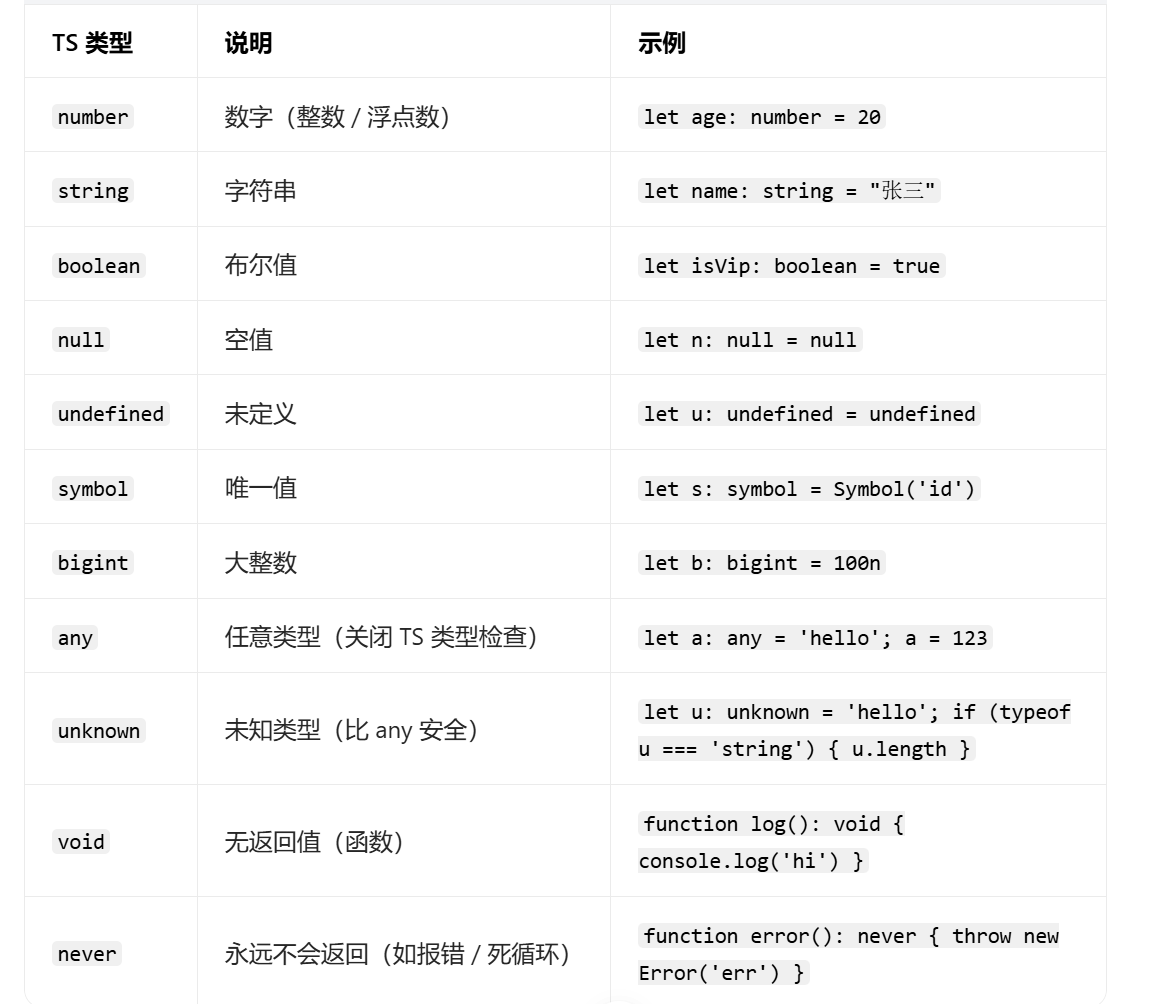
any vs unknown 关键区别:
any:完全放弃类型检查,可任意调用属性 / 方法(危险)
unknown:必须先判断类型,才能调用属性 / 方法(安全)
🎯 三、接口(Interface)和类型别名(Type)
3.1 接口 - 定义对象的形状
typescript
// 定义用户接口
interface User {
  readonly id: number     // 只读,不能修改
  name: string
  age: number
  email?: string         // 可选
  [key: string]: any     // 允许其他任意属性
}

// 使用
const user: User = {
  id: 1,
  name: "张三",
  age: 25
}
// user.id = 2  // 错误!id是只读的
3.2 接口的继承
typescript
interface Animal {
  name: string
}

interface Dog extends Animal {
  breed: string
  bark(): void
}

const myDog: Dog = {
  name: "旺财",
  breed: "金毛",
  bark: () => console.log("汪汪!")
}
3.3 类型别名
typescript
// 定义类型别名
type UserID = string | number
type Point = { x: number; y: number }

// 与接口的区别:
// 1. 接口可以合并声明,type 不能
// 2. 接口用 extends 继承,type 用 & 交叉类型
// 3. type 能表示任意类型,接口主要表示对象
🏗️ 四、类与面向对象
4.1 类的基本用法
typescript
class Person {
  // 属性
  public name: string     // 公开的(默认)
  private age: number    // 私有的,只有类内部能访问
  protected id: number  // 受保护的,类和子类能访问
  readonly idCard: string  // 只读,只能在构造函数赋值

  // 静态属性
  static species: string = "人类"

  // 构造函数
  constructor(name: string, age: number) {
    this.name = name
    this.age = age
    this.idCard = "身份证号"
  }

  // 方法
  sayHello(): void {
    console.log(`你好,我是${this.name}`)
  }

  // 静态方法
  static getSpecies(): string {
    return this.species
  }
}
4.2 继承
typescript
class Student extends Person {
  studentId: string

  constructor(name: string, age: number, studentId: string) {
    super(name, age)  // 必须先调用父类的构造函数
    this.studentId = studentId
  }

  // 重写方法
  sayHello(): void {
    super.sayHello()  // 调用父类方法
    console.log(`我的学号是${this.studentId}`)
  }
}
4.3 抽象类
typescript
abstract class Shape {
  abstract getArea(): number  // 抽象方法,子类必须实现

  display(): void {
    console.log(`面积是: ${this.getArea()}`)
  }
}

class Circle extends Shape {
  constructor(public radius: number) {
    super()
  }

  getArea(): number {
    return Math.PI * this.radius * this.radius
  }
}
🔄 五、泛型
5.1 为什么要用泛型?
问题:写一个函数,既能处理数字,又能处理字符串
typescript
// 不用泛型(不优雅)
function identity1(arg: any): any {
  return arg
}

// 用泛型(保持类型安全)
function identity2<T>(arg: T): T {
  return arg
}

// 使用
let output1 = identity2<string>("hello")  // 显式指定类型
let output2 = identity2(42)               // 自动推断为 number
5.2 泛型约束
typescript
// 限制T必须有length属性
interface Lengthwise {
  length: number
}

function loggingLength<T extends Lengthwise>(arg: T): T {
  console.log(arg.length)
  return arg
}

loggingLength("hello")  // 正确,string有length
loggingLength([1,2,3])  // 正确,数组有length
// loggingLength(123)   // 错误,数字没有length
5.3 泛型在类和接口中的应用
typescript
// 泛型接口
interface KeyValue<K, V> {
  key: K
  value: V
}

// 泛型类
class Container<T> {
  private items: T[] = []

  add(item: T): void {
    this.items.push(item)
  }

  get(index: number): T {
    return this.items[index]
  }
}

// 使用
const stringContainer = new Container<string>()
stringContainer.add("hello")

const numberContainer = new Container<number>()
numberContainer.add(123)
🛠️ 六、常用工具类型
TypeScript 内置了一些实用工具类型:
6.1 基础工具类型
typescript
// Partial<T> - 让所有属性都变成可选的
interface User {
  name: string
  age: number
}
type PartialUser = Partial<User>  // { name?: string; age?: number }

// Required<T> - 让所有属性都变成必需的
type RequiredUser = Required<PartialUser>  // 变回 { name: string; age: number }

// Readonly<T> - 让所有属性变成只读
type ReadonlyUser = Readonly<User>

// Pick<T, K> - 从T中挑选一些属性
type NameOnly = Pick<User, "name">  // { name: string }

// Omit<T, K> - 从T中排除一些属性
type WithoutAge = Omit<User, "age">  // { name: string }
6.2 其他实用工具
typescript
// ReturnType<T> - 获取函数返回类型
function getUser() { return { name: "张三", age: 25 } }
type UserType = ReturnType<typeof getUser>  // { name: string; age: number }

// Record<K, T> - 快速创建对象类型
type Page = "home" | "about" | "contact"
type PageInfo = Record<Page, { title: string }>
📁 七、模块与命名空间
7.1 ES6 模块(推荐)
typescript
// math.ts - 导出
export const PI = 3.14
export function add(a: number, b: number): number {
  return a + b
}
export default class Calculator {  // 默认导出
  multiply(a: number, b: number): number {
    return a * b
  }
}

// app.ts - 导入
import Calculator, { PI, add } from "./math"

// 整体导入
import * as Math from "./math"
console.log(Math.PI)
7.2 命名空间(旧方式)
typescript
namespace Utils {
  export function formatDate(date: Date): string {
    return date.toLocaleDateString()
  }
}

// 使用
Utils.formatDate(new Date())
⚙️ 八、配置 tsconfig.json
常用配置选项:
json
{
  "compilerOptions": {
    /* 目标版本 */
    "target": "es2016",           // 编译成什么版本的JS

    /* 模块系统 */
    "module": "commonjs",         // 使用什么模块系统

    /* 严格检查 */
    "strict": true,               // 开启所有严格检查
    "noImplicitAny": true,        // 禁止隐式的any类型

    /* 模块解析 */
    "baseUrl": "./",              // 基本路径
    "paths": {                    // 路径映射
      "@/*": ["src/*"]
    },

    /* 输出 */
    "outDir": "./dist",           // 输出目录
    "sourceMap": true             // 生成sourcemap
  },

  "include": ["src/**/*"],        // 包含哪些文件
  "exclude": ["node_modules"]     // 排除哪些文件
}
💡 九、最佳实践
1. 类型推断优先
typescript
// 不好的写法
let x: number = 10
let y: string = "hello"

// 好的写法(让TypeScript自己推断)
let x = 10        // 自动推断为number
let y = "hello"   // 自动推断为string
2. 使用可选链和空值合并
typescript
// 旧写法(冗长)
let name
if (user && user.profile && user.profile.name) {
  name = user.profile.name
} else {
  name = "默认名字"
}

// 新写法(简洁)
let name = user?.profile?.name ?? "默认名字"
3. 避免使用 any
typescript
// 坏的
function process(data: any) {
  // 这里会失去所有类型检查
}

// 好的
interface Processable {
  process(): void
}
function process(data: Processable) {
  data.process()  // 有类型检查
}
4. 使用类型守卫
typescript
// 判断是不是字符串
function isString(value: unknown): value is string {
  return typeof value === "string"
}

function process(value: unknown) {
  if (isString(value)) {
    console.log(value.toUpperCase())  // 这里value确定是string
  }
}
💡十、TS 工程化:避坑 & 最佳实践
1. 常见坑点:
-
any 滥用
问题:用 any 等于放弃 TS 类型检查 解决:优先用 unknown + 类型守卫,或精准类型定义 -
类型推导错误
问题:TS 自动推导的类型可能不符合预期 解决:手动指定类型(如 const arr: number[] = [] 而非 const arr = []) -
第三方库无类型
问题:安装的 npm 包没有 @types/xxx; 解决:安装 @types/xxx(如 npm install @types/lodash -D);typescript// 手动声明类型(在src/types/index.d.ts 中) declare module 'xxx'; // 简单声明
2. 最佳实践
- 开启严格模式:
tsconfig.json中strict: true(包含noImplicitAny/strictNullChecks等核心规则) - 优先用接口 / 类型别名:避免重复定义类型,提升复用性
- 泛型按需使用:不要过度泛型(简单场景直接用具体类型)
- 类型收窄:联合类型必须做类型判断,避免报错
- 拆分类型文件:把公共类型放在
src/types/目录下,统一管理 - 渐进式迁移:现有 JS 项目可逐步改为 TS(先改核心文件,后缀从 .js 改为 .ts)
📚 学习资源推荐
- 官方文档 :https://www.typescriptlang.org/docs/handbook/intro.html(权威,示例丰富)
- 练习平台 :https://www.typescriptlang.org/play
- 中文教程 :https://ts.xcatliu.com/
一句话总结
TypeScript = JavaScript + 类型系统,掌握类型系统,就能写出更安全的代码!