RelativeLayout 概述
RelativeLayout 是 Android 中常用的布局容器,允许通过相对定位(相对于父容器或其他视图)的方式排列子视图。与 LinearLayout 不同,它不依赖线性方向,灵活性更高。
核心特性
- 相对定位 :子视图的位置可通过与其他视图或父容器的关系定义,例如
layout_toRightOf、layout_alignParentTop。 - 灵活性:适合复杂布局,减少嵌套层级,提升性能。
- 依赖关系:需注意视图的绘制顺序,后添加的视图可能覆盖先添加的视图。
常用属性
以下属性用于定义子视图的相对位置:
相对于父容器:true/false;=true对齐,默认=false,可不设置。
layout_alignParentTop:设置当前视图是否与父视图顶端对齐true/false。layout_alignParentBottom:设置当前视图是否与父视图底部对齐true/false。layout_alignParentStart:设置当前视图是否与父视图起始边对齐true/false。layout_alignParentEnd:设置当前视图是否与父视图结束边对齐true/false。layout_alignParentLeft:设置当前视图是否与父视图左边对齐true/false。layout_alignParentRight:设置当前视图是否与父视图右边对齐true/false。layout_centerInParent:设置当前视图位于父布局的中间位置true/false。layout_centerHorizontal:设置当前视图位于父布局的水平居中位置true/false。layout_centerVertical:设置当前视图位于父布局的垂直居中位置true/false。。
相对于其他视图:=某视图的id;
layout_toLeftOf:设置当前视图位于某视图的左侧。layout_toRightOf:设置当前视图位于某视图的右侧。layout_above:设置当前视图位于某视图的上方。layout_below:设置当前视图位于某视图的下方。layout_alignTop:设置当前视图的上边界与某视图的上边界对齐。layout_alignBottom:设置当前视图的下边界与某视图的下边界对齐。layout_alignStart:设置当前视图的起始边与某视图的起始边对齐。layout_alignEnd:设置当前视图的结束边与某视图的结束边对其。layout_alignLeft:设置当前视图的左边与某视图的左边对齐。layout_alignRight:设置当前视图的右边与某视图的右边对其。layout_alignBaseline:设置当前视图与某视图的文字基准线对齐(常用于文本控件垂直对齐)。
代码示例
以下是一个简单的 RelativeLayout 示例:
XML
<RelativeLayout xmlns:android="http://schemas.android.com/apk/res/android"
    android:layout_width="match_parent"
    android:layout_height="300dp"
    android:id="@+id/parentRelative">
    <Button
        android:id="@+id/bt1"
        android:layout_width="wrap_content"
        android:layout_height="wrap_content"
        android:layout_marginTop="20dp"
        android:layout_marginLeft="20dp"
        android:text="按钮一" />
    <Button
        android:id="@+id/bt2"
        android:layout_width="wrap_content"
        android:layout_height="wrap_content"
        android:layout_toRightOf="@id/bt1"
        android:layout_alignBottom="@id/bt1"
        android:layout_marginLeft="20dp"
        android:text="与前面按钮距离20dp" />
    <Button
        android:layout_width="wrap_content"
        android:layout_height="wrap_content"
        android:text="在最底部"
        android:layout_marginLeft="20dp"
        android:layout_alignParentBottom="true"/>
    <Button
        android:layout_width="wrap_content"
        android:layout_height="wrap_content"
        android:text="在上个按钮下20dp"
        android:layout_below="@id/bt1"
        android:layout_marginLeft="50dp"
        android:layout_marginTop="20dp" />
    <Button
        android:layout_width="wrap_content"
        android:layout_height="wrap_content"
        android:text="按钮5"
        android:layout_below="@id/bt1"
        android:layout_marginTop="100dp"
        android:layout_alignLeft="@id/bt1"/>
</RelativeLayout>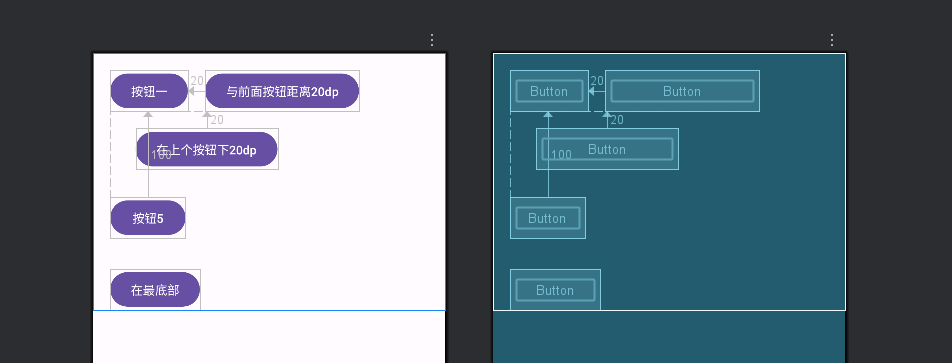
注意事项
- 性能优化:过度嵌套 RelativeLayout 可能导致测量和布局耗时增加,建议结合其他布局使用。
- ID 依赖:相对定位需引用其他视图的 ID,需确保引用的视图已定义。
- 覆盖问题 :后添加的视图可能覆盖先添加的视图,可通过
layout_align或调整顺序解决。
适用场景
- 需要视图间复杂对齐关系的布局。
- 减少嵌套层级以优化性能时。
- 动态调整视图位置的场景(如根据条件显示/隐藏视图)。