提示:文章写完后,目录可以自动生成,如何生成可参考右边的帮助文档
文章目录
前言
紧跟上一篇信息,换个布局方式渲染画布卡片
看上个渲染布局的信息:DOM手搓一个渲染卡片树的画布(一)
一、还是先看演示效果吧
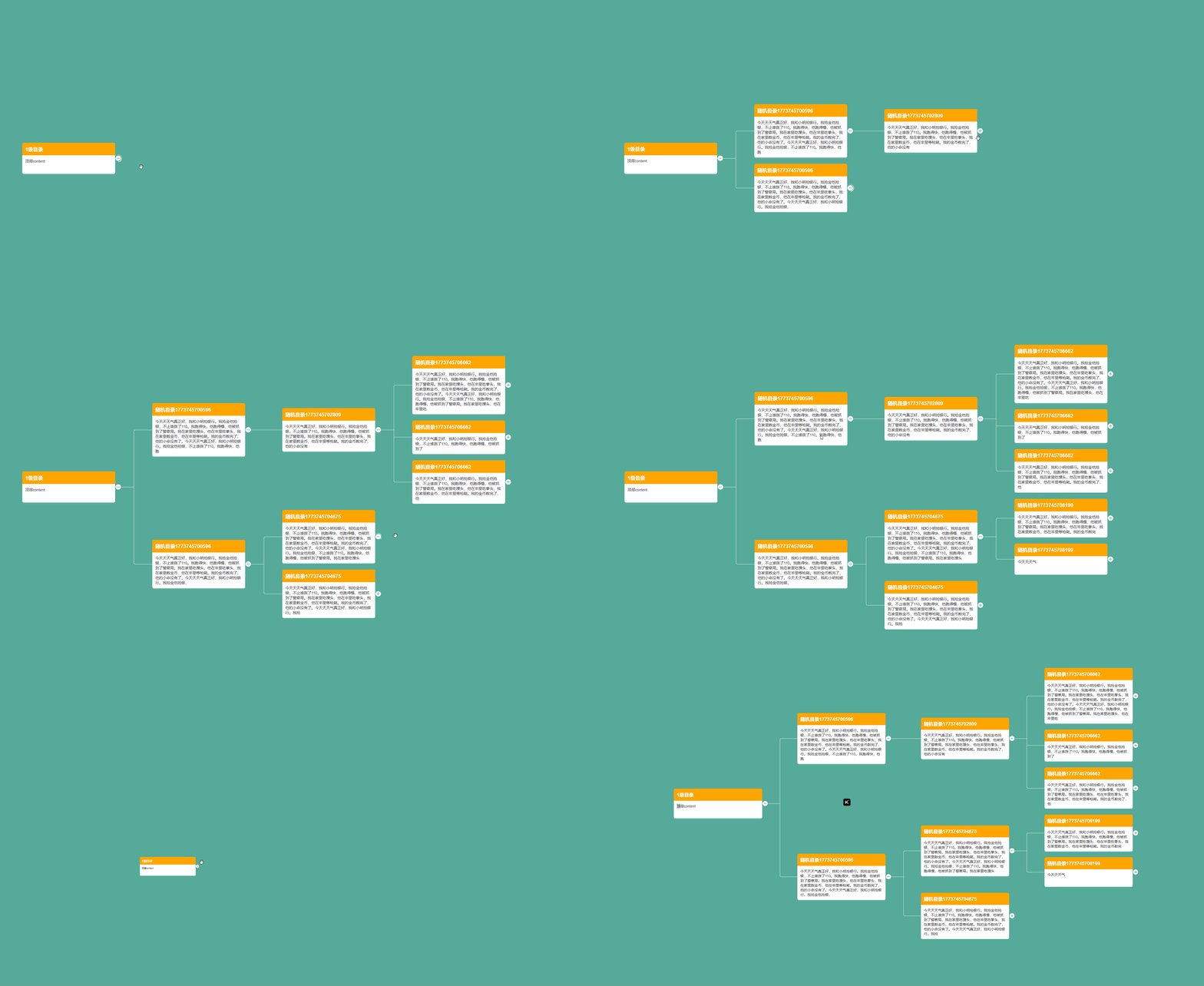
二、画布主要功能介绍
- 节点使用随机数据(模拟请求)展开下级
- 画布支持放大,缩小,拖拽功能
- 节点展开添加过渡,以及请求过渡(点击展开按钮,按钮上的旋转效果)
- 画布布局采用向右,上下扩展布局(和上一篇布局方式有点区别)
- 卡片使用随机文案长度,支持不同大小卡片渲染效果展示
- ...
三、完整代码
使用两个组件实现效果,一个是 index.vue 画布组件,放大,缩小,移动 在这个组件上实现
另一个是 TopologyItem.vue 组件,画布内的卡片,以及连接卡片的线条、展开效果等在这个组件上实现
index.vue 组件代码
typescript
<template lang="pug">
div.topology-wrapper
  div.topology-box( ref="El" @mousewheel.prevent.stop="mousewheelHandle" @mousedown="addMouseMove")
    div.translate-wrap( ref="mapRef" :style="translateStyle")
      TopologyItem( :data="treeData" :style="scaleStyle")
</template>

<script lang="ts">
import { defineComponent, reactive, computed, ref, onMounted, onUnmounted, provide } from 'vue'
import TopologyItem from './TopologyItem.vue'
import { debounce } from 'lodash-es'

export default defineComponent({
  name: 'Topology',
  components: {
    TopologyItem
  },
  setup(props) {
    const mapRef = ref<null | HTMLElement>(null);
    const mapHeight = ref<number>(0);
    // 切换节点展开关闭,判断画布卡片容器高度变化,自动移动容器,平滑展开关闭效果
    provide('action-change', () => {
      if(mapRef.value){
        const y = mapRef.value.clientHeight - mapHeight.value
        translateY.value -= y / 2
        mapHeight.value = mapRef.value.clientHeight
      }
    })

    const treeData = reactive({
      label: '1级目录',
      content: '顶层content',
      expand: false
    })

    const translateX = ref<number>(100);
    const translateY = ref<number>(100);
    const translateStyle = computed(() => {
      return `margin-left: ${translateX.value}px; margin-top: ${translateY.value}px`
    })
    const scaleStyle = computed(() => {
      return `zoom: ${scale.value}`
    })

    const scale = ref<number>(1);
    var scaleStep = 0.05;
    var maxScale = 2;
    var minScale = 0.2;
    const El = ref<null | HTMLElement>(null)

    var targetX = 0;
    var targetY = 0;

    onMounted(() => {
      document.addEventListener('mouseup', removeMouseMove)
      mapHeight.value = mapRef.value?.clientHeight as number
    })
    onUnmounted(() => {
      document.removeEventListener('mouseup', removeMouseMove);
    })
    const mousewheelHandle = (e: Event | any) => {
      let boundingRect = e.currentTarget.getBoundingClientRect();

      if(e.wheelDelta){
        let x = e.clientX - translateX.value - boundingRect.left;
        let y = e.clientY - translateY.value - boundingRect.top;
        let clientX = (x / scale.value ) * scaleStep;
        let clientY = (y / scale.value ) * scaleStep;
        if (e.wheelDelta > 0) {
          translateX.value -= scale.value >= maxScale ? 0 : clientX;
          translateY.value -= scale.value >= maxScale ? 0 : clientY;
          scale.value += scaleStep;
        } else {
          translateX.value += scale.value <= minScale ? 0 : clientX;
          translateY.value += scale.value <= minScale ? 0 : clientY;
          scale.value -= scaleStep;
          scale.value = Math.min(maxScale, Math.max(scale.value, minScale))
        }
      }
    }
    const addMouseMove = (e: Event | any) => {
      (El.value as any).style.cursor = 'grabbing';
      targetX = e.clientX;
      targetY = e.clientY;

      (El.value as any).addEventListener('mousemove', moveCanvasFunc, false);

      document.onselectstart = () => false;
      document.ondragstart = () => false;
    }
    const removeMouseMove = () => {
      (El.value as any).style.cursor = '';
      (El.value as any).removeEventListener('mousemove', moveCanvasFunc, false);

      document.onselectstart = null;
      document.ondragstart = null;
    }
    const moveCanvasFunc = (e: Event | any) => {
      e.preventDefault();
      let moveX = e.clientX - targetX;
      let moveY = e.clientY - targetY;

      translateX.value += moveX;
      translateY.value += moveY;

      targetX = e.clientX;
      targetY = e.clientY;
    }

    return {
      El,
      mapRef,
      treeData,
      translateStyle,
      scaleStyle,
      mousewheelHandle,
      addMouseMove
    }
  }
})
</script>

<style lang="stylus" scoped>
.topology-wrapper {
  height: 100%;
  --bg-color: #5a9; // 背景色,与覆盖线条颜色一致,不支持背景图,因为覆盖背景线条与图样式差异过大
  background-color: var(--bg-color);
  .topology-box {
    overflow: hidden;
    height: 100%;
    cursor: grab;
    box-sizing: border-box;
  }
}
</style>
TopologyItem.vue 组件代码
typescript
<template lang="pug">
div.topology-item-wrap
  div.topology-card-column.card-column
    div.topology-card( @mousedown.stop)
      .header {{treeData.label}}
      el-icon( :size="20" @click="expandChange" color="#ffffff" :class="{loading: isLoading }")
        i-ep-CirclePlusFilled( v-if="!treeData.expand")
        i-ep-RemoveFilled( v-else)
      .body {{treeData.content}}
  transition( :duration="300" name="scale" @after-leave="actionChange")
    div.topology-card-column.next-column( v-show="treeData.expand" v-if="treeData.children && treeData.children.length" :class="{ 'child-only-one': treeData.children.length === 1 }")
      TopologyItem( v-for="(item, i) in treeData.children" :data="item" :key="i")
</template>

<script lang="ts">
import { ref, reactive, defineComponent, inject, nextTick } from 'vue'
interface TreeNode {
  label: string;
  content: string;
  children?: TreeNode[];
  expand: boolean;
}

export default defineComponent({
  name: 'TopologyItem',
  props: {
    data: {
      type: Object,
      default: () => ({})
    }
  },
  setup(props) {
    const actionChange = inject<any>('action-change')

    const isLoading = ref<boolean>(false)
    const treeData = reactive<TreeNode>({
      label: props.data.label,
      content: props.data.content,
      children: props.data.children || [],
      expand: props.data.expand
    })

    const str = '今天天天气真正好,我和小明抢银行。我抢金他抢银,不止谁拨了110。我跑得快,他跑得慢,他被抓到了警察局。我在家里吃馒头,他在牢里吃拳头,我在家里数金币,他在牢里等枪毙。我的金币数完了,他的小命没有了。今天天天气真正好,我和小明抢银行。我抢金他抢银,不止谁拨了110。我跑得快,他跑得慢,他被抓到了警察局。我在家里吃馒头,他在牢里吃拳头,我在家里数金币,他在牢里等枪毙。我的金币数完了,他的小命没有了。'
    const expandChange = () => {
      treeData.expand = !treeData.expand
      if(treeData.expand && !treeData.children?.length){
        treeData.children = []
        isLoading.value = true
        setTimeout(() => {
          treeData.children = Array.from(new Array(Math.ceil(Math.random() * 3))).map((v, i) => {
            return {
              label: `随机目录${Date.now()}`,
              content: str.slice(0, Math.ceil(Math.random() * str.length)),
              expand: false,
              children: []
            }
          })
          isLoading.value = false

          nextTick(() => {
            actionChange()
          })
        }, 1500 * Math.random())
      } else if(treeData.expand){
        nextTick(() => {
          actionChange()
        })
      }
    }

    return {
      actionChange,
      isLoading,
      treeData,
      expandChange
    }
  }
})
</script>

<style lang="stylus" scoped>
.topology-item-wrap {
  display: flex;
  flex-wrap: nowrap;
  & + .topology-item-wrap {
    margin-top: 20px;
  }
  .topology-card-column {
    pointer-events: none;
    &.card-column {
      display: flex;
      flex-direction: column;
      justify-content: center;
      padding-right: 20px;
    }
    &.next-column {
      // padding-left: 120px;
      padding-left: 100px;
      position: relative;
      overflow: hidden;
      display: flex;
      flex-direction: column;
      justify-content: center;
      &::before {
        content: '';
        position: absolute;
        top: 50%;
        left: 0px;
        width 40px;
        border-bottom: 1px solid #ffffff;
      }
      &.child-only-one {
        > .topology-item-wrap {
          &:nth-of-type(1) {
            & > .card-column {
              & > .topology-card {
                &::before {
                  content: '';
                  pointer-events: none;
                  position: absolute;
                  top: 50%;
                  border-bottom: 1px solid #ffffff;
                  left: -100px;
                  width: 100px;
                }
              }
            }
          }
        }
      }
      &:not(.child-only-one) {
        > .topology-item-wrap {
          &:nth-of-type(1) {
            & > .card-column {
              & > .topology-card {
                &::before {
                  content: '';
                  pointer-events: none;
                  position: absolute;
                  width: 60px;
                  height: 5px;
                  top: 50%;
                  left: -60px;
                  border-top: 1px solid #ffffff;
                  border-left: 1px solid #ffffff;
                  border-top-left-radius: 5px;
                }
                &::after {
                  content: '';
                  pointer-events: none;
                  position: absolute;
                  top: calc(-99999px + 50% + 3px);
                  left: -60px;
                  height: 99999px;
                  border-left: 1px solid var(--bg-color);
                  z-index: 1;
                  border-bottom-right-radius: 5px;
                }
              }
            }
          }
        }
      }
      &:not(.child-only-one) {
        > .topology-item-wrap {
          &:last-of-type {
            & > .topology-card-column {
              & > .topology-card {
                &::before {
                  content: '';
                  pointer-events: none;
                  position: absolute;
                  top: calc(-99999px + 50%);
                  left: -60px;
                  width: 60px;
                  height: 99999px;
                  border-left: 1px solid #ffffff;
                  border-bottom: 1px solid #ffffff;
                  border-bottom-left-radius: 5px;
                }
              }
            }
          }
        }
      }
      .topology-item-wrap {
        & + .topology-item-wrap {
          > .topology-card-column > .topology-card {
            &::before {
              content: '';
              pointer-events: none;
              position: absolute;
              bottom: 50%;
              left: -60px;
              width: 60px;
              border-bottom: 1px solid #ffffff;
            }
          }
        }
      }
    }
  }
  .topology-card {
    pointer-events: auto;
    position: relative;
    cursor: default;
    width: 300px;
    border-radius: 5px;
    box-shadow: 0 3px 3px rgba(255, 255, 255, .1);
    .header {
      padding: 10px;
      background-color: orange;
      color: #ffffff;
      font-size: 16px;
      font-weight: bold;
      border-radius: 5px 5px 0 0;
      & + .el-icon {
        float: right;
        margin-right: -20px;
        // margin-top: -10px;
        cursor: pointer;
        position: absolute;
        right: -0;
        top: 50%;
        transform: translateY(-50%);
        &.loading::after {
          content: '';
          pointer-events: none;
          display: block;
          position: absolute;
          box-sizing: border-box;
          width: calc(100% + 4px);
          height: calc(100% + 4px);
          left: -2px;
          top: -2px;
          border-left: 2px solid #ffffff;
          border-bottom: 1px solid #ffffff;
          border-top: 2px solid transparent;
          border-radius: 50%;
          animation: rotating 1s linear infinite;
        }
      }
    }
    .body {
      padding: 10px;
      background-color: #ffffff;
      border-radius: 0 0 5px 5px;
      min-height: 40px;
    }
  }

  .scale-enter-active, .scale-leave-active {
    transform-origin: 0 50%;
    transition: transform .3s linear;
  }
  .scale-leave-to, .scale-enter-from {
    transform: scale(0);
  }
  .scale-enter-to, .scale-leave-from {
    transform: scale(1);
  }
}
</style>
效果演示DEMO
功能效果演示地址:DOM手搓一个渲染树形布局卡片的画布
总结
对比上一篇(开头有链接)
主要就改了下渲染卡片的布局方式,改动较大的就是卡片对齐方式,以及连接线定位,
以及更改了下随机卡片内容,演示了高度随机也支持,
还有因为是向上向下展开,需要展开关闭后重新移动定位
以上信息如有疏漏或错误,欢迎指正,谢谢