文章目录
-
- 一、支持的取值方式
- 二、完整代码示例(兼容低版本)
- 三、版本兼容说明
-
- [1. 高版本(API 15+ / HarmonyOS 5+)](#1. 高版本(API 15+ / HarmonyOS 5+))
- [2. 低版本(API 10~12)](#2. 低版本(API 10~12))
- 总结
一、支持的取值方式
| 取值类型 | 示例 | 说明 |
|---|---|---|
TouchTarget.AUTO |
.touchTarget(TouchTarget.AUTO) |
默认值,触摸区域等于组件自身尺寸 |
TouchTarget.NONE |
.touchTarget(TouchTarget.NONE) |
禁用触摸,组件不响应点击事件 |
number |
.touchTarget(20) |
四周统一扩大指定像素值的触摸区域 |
Array<number> |
.touchTarget([0, 30, 0, 30]) |
自定义四边扩大尺寸,格式为 [上, 右, 下, 左] |
二、完整代码示例(兼容低版本)
:
typescript
@Entry
@Component
struct TouchTargetDemo {
  build() {
    Column({ space: 20 }) {
      Text("触摸目标 演示").fontSize(22).fontWeight(FontWeight.Bold)

      // 1. 基础小按钮(默认触摸区域)
      Button("点我")
        .width(40)
        .height(40)
        .backgroundColor(Color.Red)
        .fontColor(Color.White)
        .onClick(() => console.log("点击了红色按钮"))
        // 高版本可添加 .touchTarget(TouchTarget.AUTO)

      // 2. 扩大触摸区域(四周 20px)
      // 高版本写法:.touchTarget(20)
      // 低版本替代:通过 margin 扩大点击区域
      Button("扩大区域")
        .width(40)
        .height(40)
        .margin(20) // 模拟四周扩大 20px 触摸区域
        .backgroundColor(Color.Blue)
        .fontColor(Color.White)
        .onClick(() => console.log("点击了蓝色扩大区域"))
        .touchable(true)

      // 3. 超小按钮(实际开发最常用场景)
      // 高版本写法:.touchTarget(30)
      // 低版本替代:通过 margin 扩大点击区域
      Stack({ alignContent: Alignment.Center }) {
        Text("+")
          .fontSize(16)
          .fontColor(Color.White)
      }
      .width(20)
      .height(20)
      .margin(30) // 模拟四周扩大 30px 触摸区域
      .backgroundColor(Color.Orange)
      .borderRadius(10)
      .onClick(() => console.log("小加号点击成功"))
      .touchable(true)

      Text("⚠️ 低版本 API 使用 touchable + 外边距模拟扩大触摸区")
        .fontSize(14)
        .fontColor(Color.Grey)
        .margin(10)
    }
    .width('100%')
    .padding(20)
    .height('100%')
  }
}
运行效果如图:
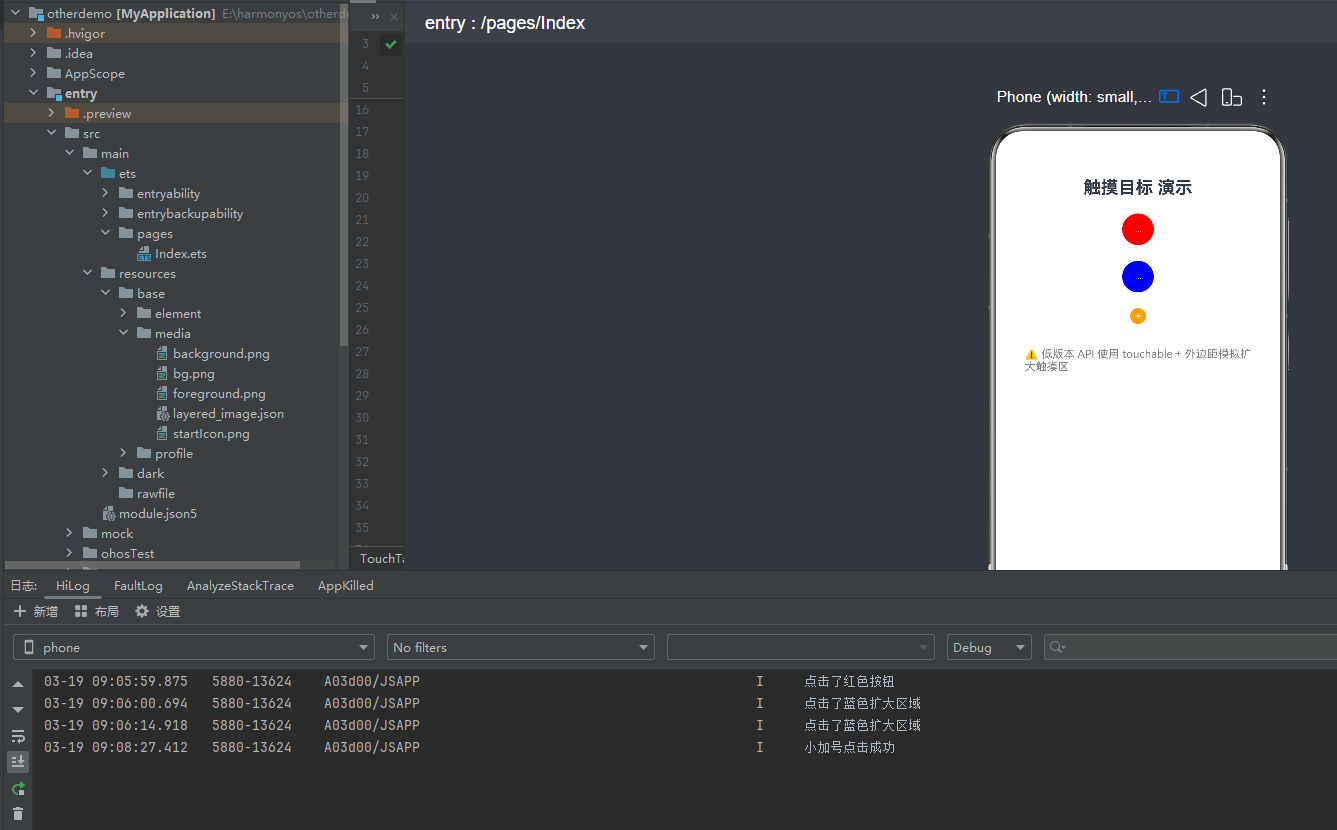
当点击图中的区域,控制台会把相应的消息打印出来
三、版本兼容说明
1. 高版本(API 15+ / HarmonyOS 5+)
直接使用 .touchTarget() 属性,语法简洁且性能更优:
typescript
// 导入依赖(API 15+ 可用)
import { TouchTarget } from '@ohos/ui';

// 示例:扩大触摸区域
Button("点我")
  .width(40)
  .height(40)
  .touchTarget(20) // 四周扩大 20px
  .onClick(() => {});
2. 低版本(API 10~12)
touch-target 属性不可用,需通过 margin + touchable(true) 模拟实现:
typescript
// 替代方案:视觉不变,点击区域扩大
Button("点我")
  .width(40)
  .height(40)
  .margin(20) // 外边距等价于扩大触摸区域
  .touchable(true) // 确保可点击
  .onClick(() => {});
总结
touch-target 是提升 HarmonyOS 应用交互体验的重要属性,尤其适合优化小组件的点击灵敏度。
- 高版本 :直接使用
.touchTarget(),语法简洁、功能完整 - 低版本 :通过
margin+touchable(true)实现等价效果,兼容所有版本
你可以根据项目的最低 API 版本选择合适的实现方式,确保代码的兼容性与易用性。
如果这篇文章对你有帮助,欢迎点赞、收藏、关注,你的支持是持续创作的动力!