从什么开始?
当我开始写这个文档的时候,我就想如何开始这个话题。因为是团队内分享,还是有必要简单介绍一下iOS开发框架内的一些前置知识,或许能让不同背景的同学也能够理解一些基本概念。
画
客户端开发工程师日常做的大部分工作都是在根据设计的UI稿来写代码完成特定的需求,如果类比成画家的话,你写的代码和Apple提供的基础框架,就是画家手中的笔和颜料。
从最简单的开始,当你要在屏幕画出一个红色背景的矩形。Apple提供了一些最基本的元素的类来做这个事情,它就是 Class UIView,Apple官方对它的描述如下:
css
UIView
An object that manages the content for a rectangular area on the screen.
那么你可以这样实现创建一个View,创建成功之后,就可以把它添加到你的UI层级种。
ini
UIView *customView = [[UIView alloc] init];
customView.frame = CGRectMake(50, 200, 200, 200);
customView.backgroundColor = UIColor.redColor;
在手机屏幕上的显示如下:
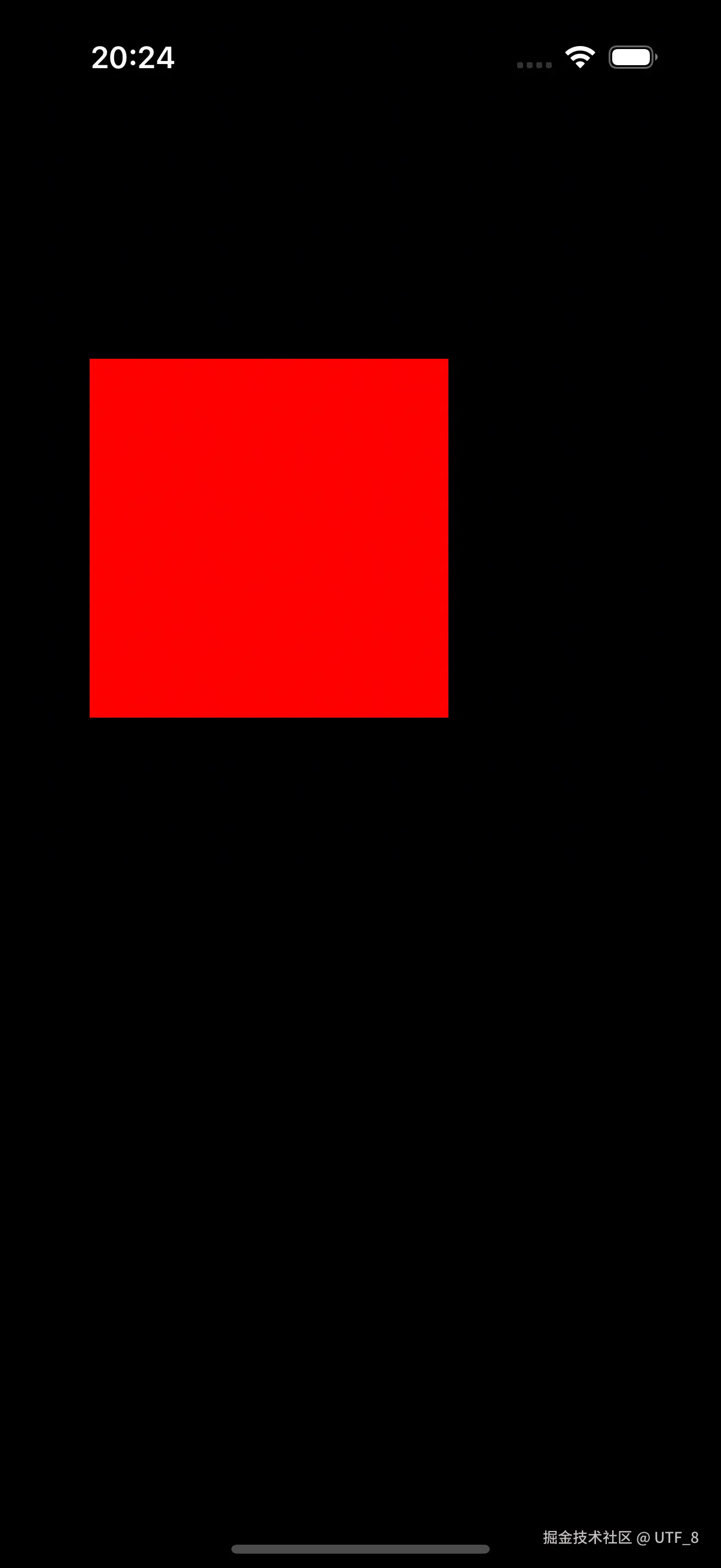
在App界面上,定位一个UI元素需要它的 position 和 size,也就是在当前基于点的坐标系下的矩形左上角的点的位置,宽和高的大小。
往下看一点
在上面我们看到使用 UIView 这个 AppKit 框架提供的 class,我们就可以画出一个红色背景的矩形。但其实在底层iOS使用的是 Core Animation 这个框架来实现的,其架构示意图如下:
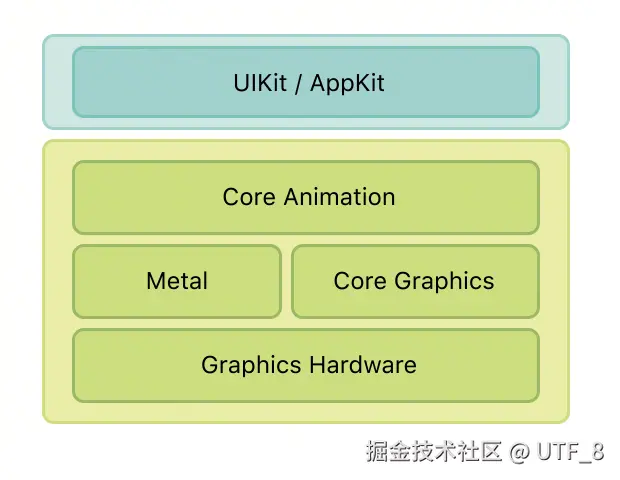
Core Animation 是 iOS 和 macOS 平台上的图形渲染和动画基础架构,可用于为应用的视图和其他视觉元素添加动画效果。Core Animation 会自动完成绘制动画每一帧所需的绝大部分工作。
Core Animation
Core Animation 提供了一个通用的系统,用于为应用程序中的视图和其他视觉元素添加动画效果。这个功能是由 Class CALayer实现的,Apple官方对它的描述如下:
css
Class
CALayer
An object that manages image-based content and allows you to perform animations on that content.
An object that manages image-based content and allows you to perform animations on that content. (a layer captures the content your app provides and caches it in a bitmap)
CALayer 和 UIView 之间的关系
在 iOS 中,每个UIView都由一个对应的CALayer对象支持,视图只是图层对象的一个简单封装,因此对图层进行的任何操作通常都能正常工作。但在 macOS 中,您必须决定哪些UIView应该使用CALayer。如果是代码表示的话,可以理解为 Class UIView 有一个类型为 CALayer 的属性。
objectivec
class UIView {
    CALayer *layer;
}
如果是使用了CALayer支持的View,则称为 layer-backed view 。layer-backed view 则由系统负责创建底层CALayer对象,并保持该CALayer与UIView同步。所有 iOS 视图都是图层支持视图,OS X 中的大多数视图也是如此。在 Mac App 开发中,如果需要使用 layer 作为 backen store,需要做如下设置。
ini
NSView *customView = [[NSView alloc] init];
[customView setWantsLayer:YES];
既然CALayer可以绘制内容,为什么还需要UIView呢。图层不处理事件、不绘制内容、不参与响应链,所以在我们的应用仍然需要一个或多个视图来处理这些类型的交互。
一颗树
在我们的app,每一个View都有其superView 和 subViews(如果有的话)。这样就构成了app的视图层树(view tree)。
objectivec
class UIView {
    CALayer *layer;
    UIView *superView;
    NSArray<UIView *> subViews;
}
上面我们说到,在iOS上面,每一个UIView有其底层的Layer,所以实际上是由对应的图层树(layer tree)。
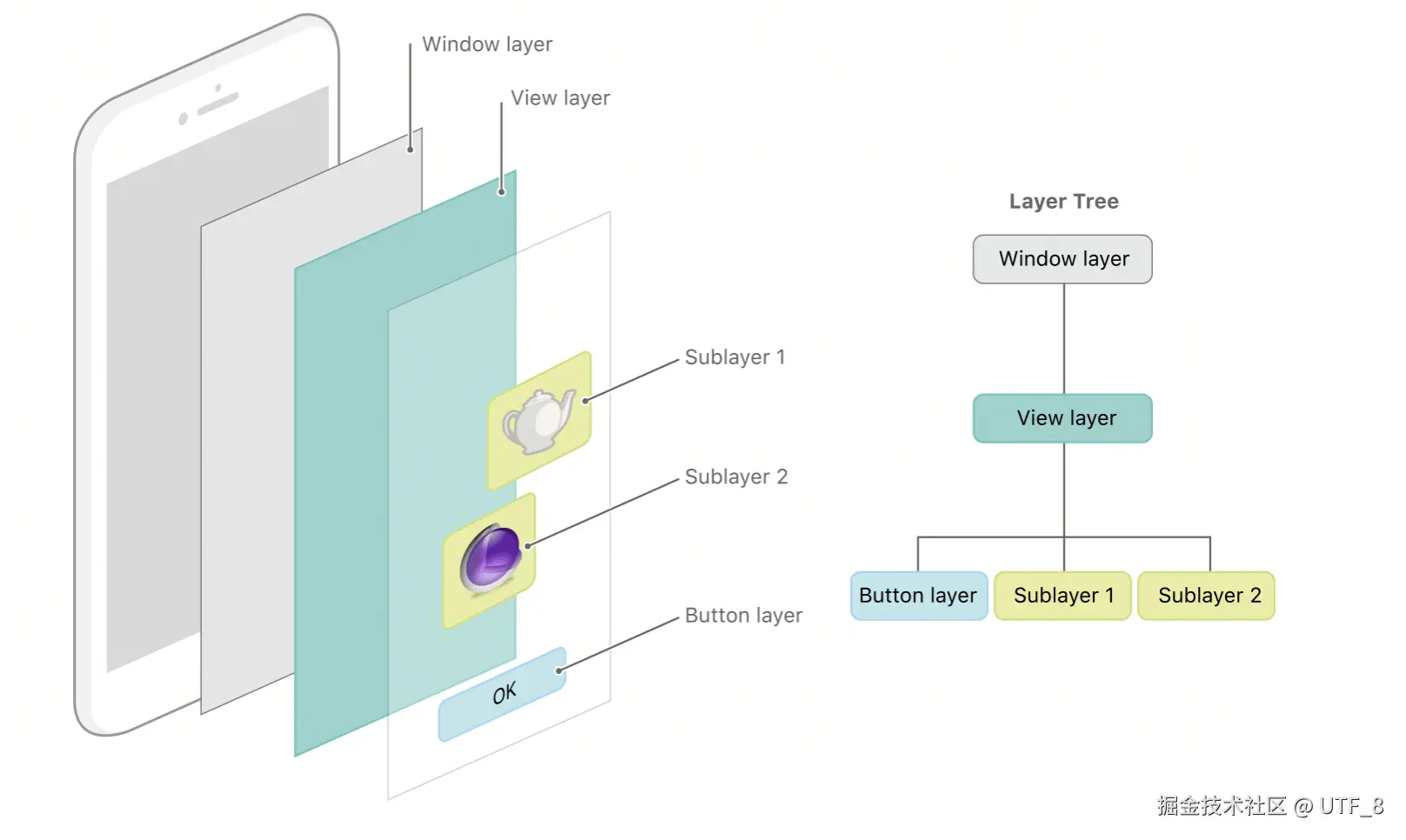
三棵树
实际上在使用 Core Animation 的界面中,有三组不同的 Layer Tree。每组图层对象在使应用程序内容显示在屏幕上方面都扮演着不同的角色。分别为:
- model layer tree :用于存储所有动画的目标值。每当您更改图层的属性时,都会用到这些对象。
- presentation layer tree:表示当前动画 layer 的实时状态。
- render tree:用户真正执行动画,并且是私有的。
只有动画在播放时,才能够访问到 presentation tree 中的layer对象,presenter tree 中的layer对象表示的是动画的实时值。这和 model layer tree 上的不同,它上面的对象反应的是代码设置的最后一个值。
从上面我们可以大概勾勒出 Class CALayer的定义:
scss
Class Layer {
    // public
    // Returns a copy of the presentation layer object that
    // represents the state of the layer as it currently appears onscreen.
    - (instancetype) presentationLayer;

    // public
    // Returns the model layer object associated with the receiver, if any.
    - (instancetype) modelLayer;

    // private
    - (instance) renderLayer;
}
如下代码展示了当你设置 view 的属性时,其实此时设置的是 model layer 对象的值。此时看如下代码的打印结果:
swift
UIView *customView = [[UIView alloc] init];
customView.frame = CGRectMake(20, 20, 20, 20);

NSLog(@"---------- custom.layer ----------");
    NSLog(@"customView.layer address = %p", customView.layer);
    NSLog(@"customView.layer.frame = %@", @(customView.layer.frame));

    NSLog(@"---------- custom.layer.modelLayer ----------");
    NSLog(@"customView.layer.modulLaye.address = %p", customView.layer.modelLayer);
    NSLog(@"customView.layer.modelLayer.frame = %@", @(customView.layer.modelLayer.frame));

    NSLog(@"---------- customView.layer.presentationLayer ----------");
    NSLog(@"customView.layer.presentationLayer.address = %p", customView.layer.presentationLayer);
    NSLog(@"customView.layer.presentationLayer.frame = %@", @(customView.layer.presentationLayer.frame));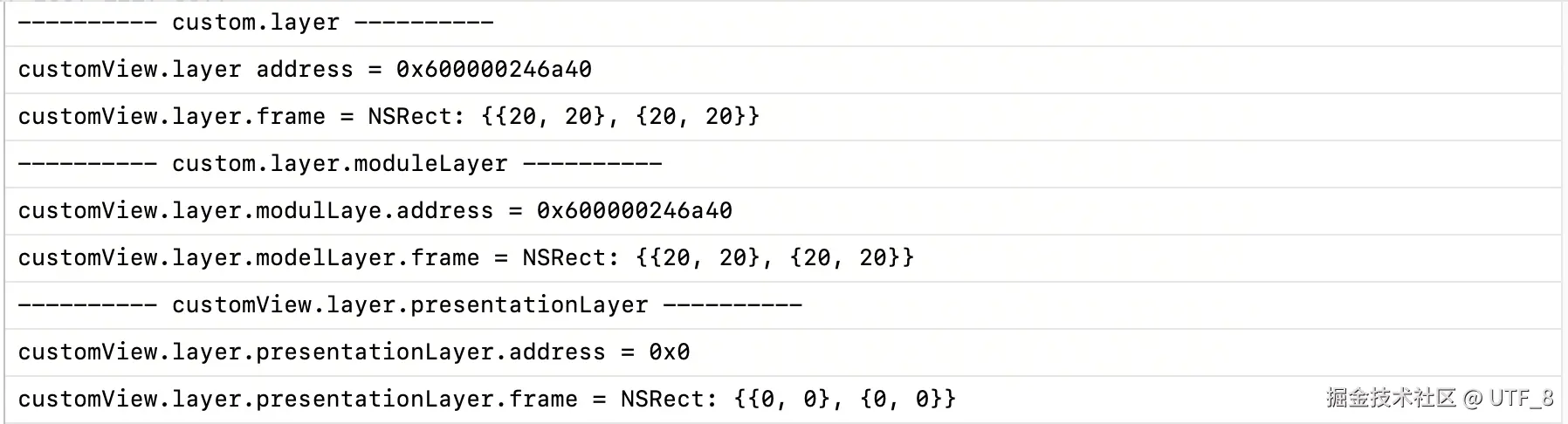
从上面的打印结果可以看出:
- 当你设置 view 的 frame 时,实际上就是设置了backed store 的 layer 的属性。
- modelLayer 返回的对象就是 layer 本身。
- presentationLayer 为nil,当没有动画被添加到 layer 时,就不会创建它。
动画
一个简单的动画
Apple 提供了框架能够使得开发人员方便的执行动画。首先介绍一下使用 CABaseAnimation 来创建一个简单的位移动画,并且观察一下 presentationLayer 的状态值。
代码如下:
- 创建一个动画
ini
- (CABasicAnimation *)basicAnimation {
    CABasicAnimation *animation = [CABasicAnimation animationWithKeyPath:@"position.x"];

       // 设置动画属性
    animation.fromValue = @(25.0f);      // 起始值
    animation.toValue = @(300.0f);        // 结束值
    animation.duration = 5.0f;          // 持续时间5秒
    animation.timingFunction = [CAMediaTimingFunction functionWithName:kCAMediaTimingFunctionEaseInEaseOut];

    // 保持动画结束后的状态
    animation.fillMode = kCAFillModeForwards;
    animation.removedOnCompletion = NO;

    return animation;
}- 创建一个 view,并添加位移动画。
ini
// 创建一个view,设置其frame
 self.customView = [[UIView alloc] init];
 self.customView.frame = CGRectMake(0, 400, 50, 50);
 CABasicAnimation *animation = [self basicAnimation];
 animation.delegate = self;
[self.customView.layer addAnimation:animation forKey:@"animation"];- 创建定时器,打印出状态信息
swift
- (void)startTimer {
    // 创建定时器,每秒打印一次View的值
    self.timer = [NSTimer scheduledTimerWithTimeInterval:1.0f
                                                  target:self
                                                selector: @selector(printViewInfo)
                                                userInfo:nil
                                                 repeats:YES];
}

- (void)printViewInfo {
    NSLog(@"---------- 第%@次开始打印 ----------", @(self.printCount + 1).stringValue);
    NSLog(@"---------- custom.layer ----------");
    NSLog(@"customView.layer address = %p", self.customView.layer);
    NSLog(@"customView.layer.frame = %@", @(self.customView.layer.frame));

    NSLog(@"---------- custom.layer.modelLayer ----------");
    NSLog(@"customView.layer.modulLaye.address = %p", self.customView.layer.modelLayer);
    NSLog(@"customView.layer.modelLayer.frame = %@", @(self.customView.layer.modelLayer.frame));

    NSLog(@"---------- customView.layer.presentationLayer ----------");
    NSLog(@"customView.layer.presentationLayer.address = %p", self.customView.layer.presentationLayer);
    NSLog(@"customView.layer.presentationLayer.frame = %@", @(self.customView.layer.presentationLayer.frame));

    NSLog(@"---------- 第%@次结束打印 ----------", @(self.printCount + 1).stringValue);
    NSLog(@"----------------------------------");
    self.printCount += 1;
}
一个简单的位移动画如下:
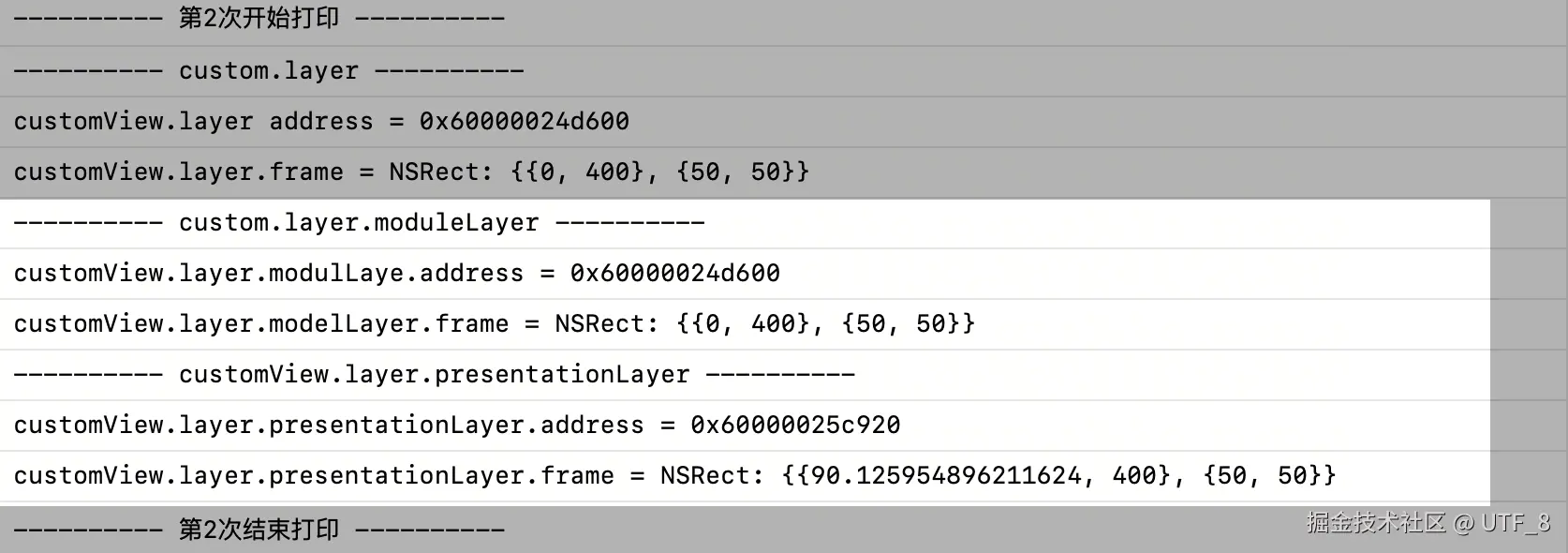
modelLayer 和 presentationLayer 的打印结果如下:
| 中间状态 | 结束状态 |
|---|---|
 å å |
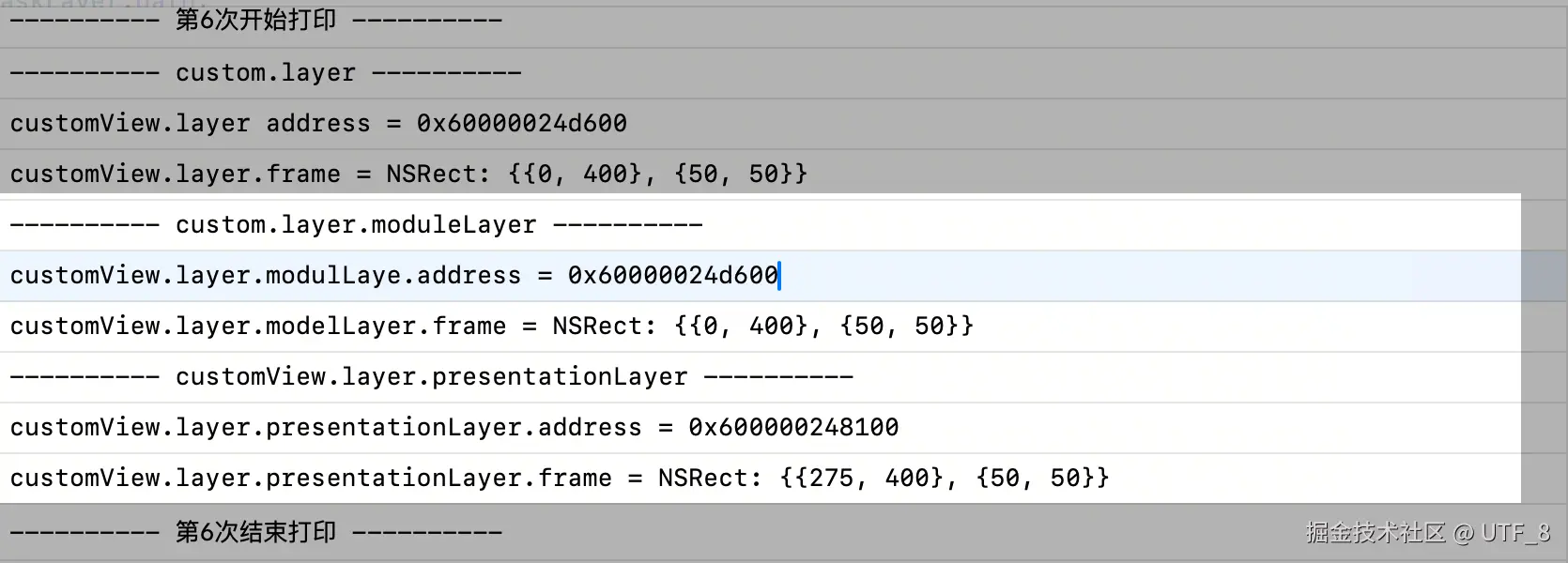 |
从上面可以看出,动画过程中,presentationLayer 的状态就是动画展示的值。因为代码中没有重新设置modelLayer 的状态,所以frame仍然是初始状态。
model layer 还是 presentation layer
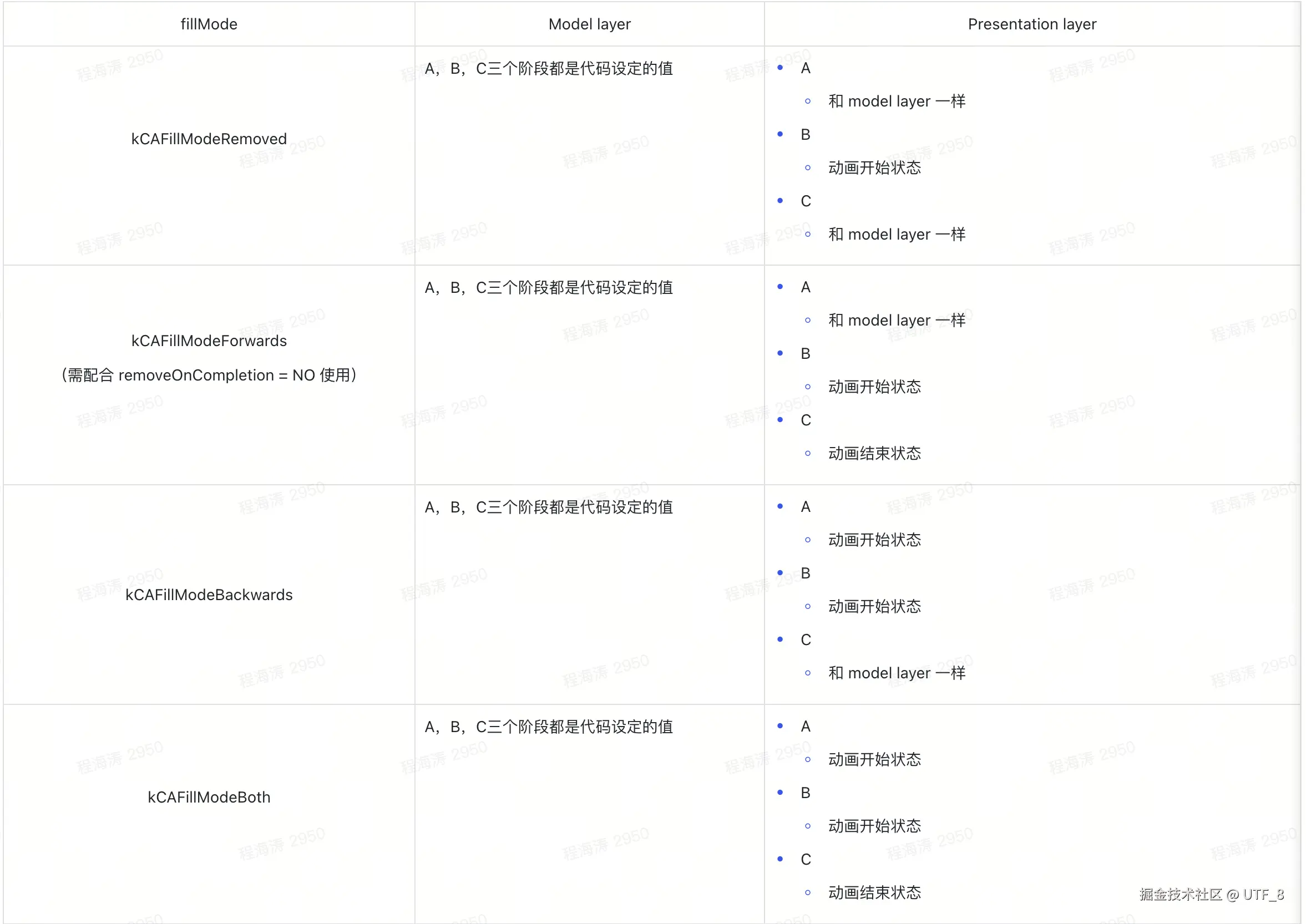
一个动画可以分为三个状态,开始,激活和结束。
A表示添加动画到layer (可以设置动画延后执行的时长)
B表示动画真正开始执行
C表示动画执行完成
暂时无法在飞书文档外展示此内容
当使用 CABaseAnimation 设置不同的参数,决定了动画开始和结束画面呈现使用的是 model layer 还是 presenta layer。也就是 fillModel 和 removedOnCompletion 字段。
重新回到设置 animation 的地方
ini
- (CABasicAnimation *)basicAnimation {
    CABasicAnimation *animation = [CABasicAnimation animationWithKeyPath:@"position.x"];

       // 设置动画属性
    animation.fromValue = @(25.0f);      // 起始值
    animation.toValue = @(300.0f);        // 结束值
    animation.duration = 5.0f;          // 持续时间5秒
    animation.timingFunction = [CAMediaTimingFunction functionWithName:kCAMediaTimingFunctionEaseInEaseOut];

    // 动画执行的开始时间
    animation.beginTime = CACurrentMediaTime() + 3;
    // 保持动画结束后的状态
    animation.fillMode = kCAFillModeForwards;
    animation.removedOnCompletion = NO;

    return animation;
}参数不同,影响的是A,B,C三个点使用的 layer,以及layer的状态值。
当你没有 removeOnCompletion = NO 时(默认为YES),动画结束后的都会恢复到 model layer 值的状态。
动画效果是,开始状态为在屏幕左边缘,动画是从屏幕中间一段位置的x方向上的位移。动画延后3s执行,执行时长为 5 s。
如果你是Apple开发人员
基于 Core Animation 绘制内容
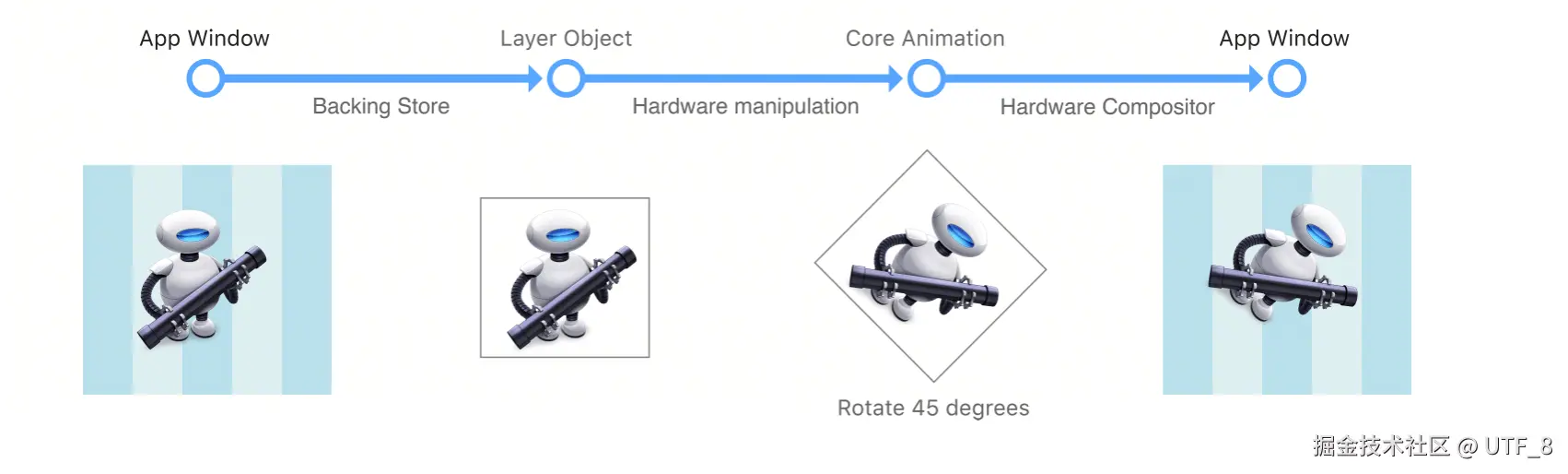
如何在屏幕上展示出内容,Core Animation 基于客户端开发人员写出的代码,来计算出当前页面layer的状态,最后由硬件处理,渲染在屏幕上。再回到下面这张图:
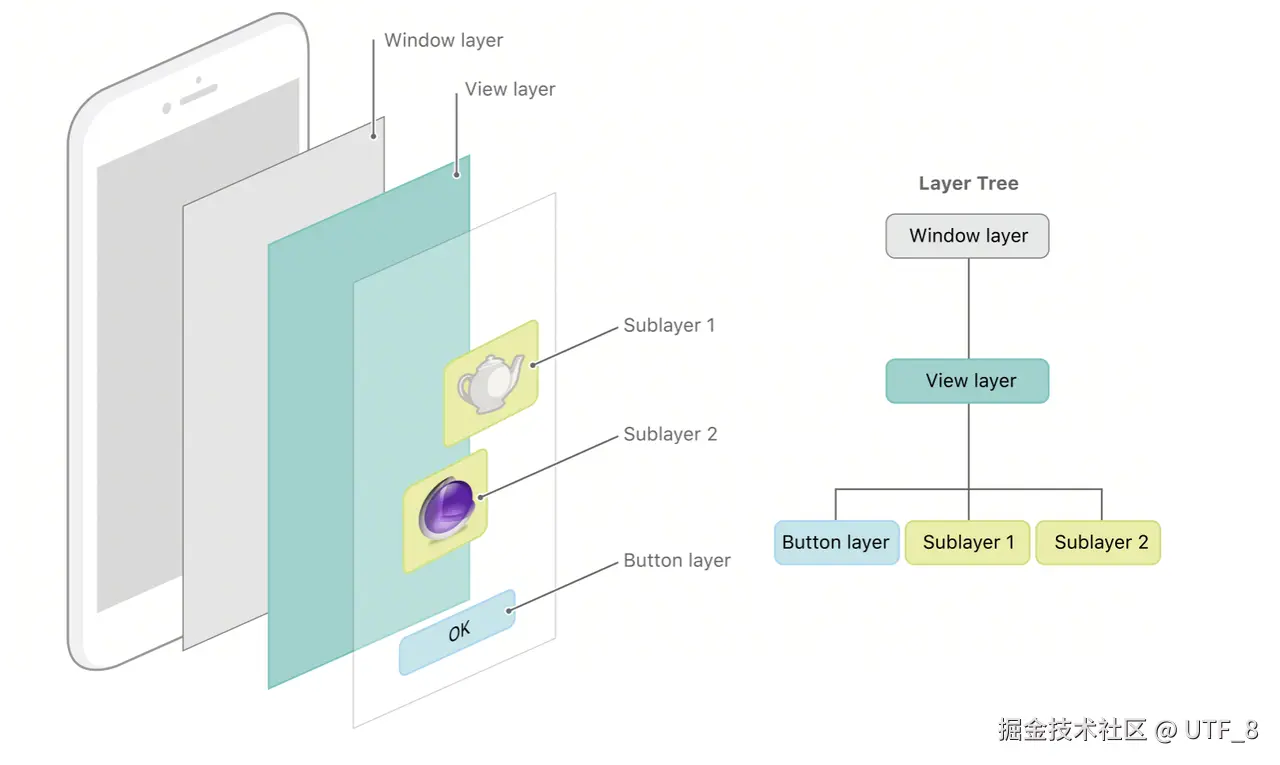
界面上的UI元素可以看作是Layer Tree,当你要获取Layer Tree所有结点的状态,需要遍历Layer Tree。
scss
- (void)traverseLayer:(CALayer *)root {
    handleLayer(root);
    for (CALayer *subLayer in root.subLayers) {
        handleLayer(subLayer);
        traverseLayer(subLayer);
    }
}

- (void)handleLayer:(CALayer *)layer {
    for (CABaseAnimation *animation in layer.allAnimations) {
        handleLayer(layer, animation);
    }
}

- (void)handleLayer(CALayer *)layer withAnimation:(CABaseAnimation *)animation {
    if (动画未开始执行) {
            根据 fillMode,设置 presentation layer 状态。
        } else if (动画执行中) {
            // 根据 animation keyPath 更新 presentation layer 状态
            // 假设是 position.x,位移动画。
            // 当前动画执行的时间t,线性变换
            rate = (animation.toValue - animation.fromValu) / 动画设定的执行时间;
            x = rate * t + animation.fromValue;
            layer.frame.origin.x = x;
        } else if (动画执行完毕) {
            根据 fillMode,设置 presentation layer 状态。
        } else {
            // 未知状态
        }
}-
优化一点点
history
之前做过一个 PK 动画,如下:
可以看出上面的动画左右两边的组件有一种"突变"的效果。后面又看了下其他app做的PK动画。
具体实现代码是如下:
根据双方投票PK人数,计算出占总人数的比例。
然后根据比例画出对应的图形,使用 UIBezierPath,是iOS 中用于绘制 2D 矢量图形的核心类。
ini
 UIBezierPath *path = [self getPathWithPercent:percent];
 CABasicAnimation *animation = [CABasicAnimation animationWithKeyPath:@"path"];
 animation.fromValue = ( __bridge id)layer.path;
 animation.toValue = ( __bridge id)path.CGPath;
 animation.duration = 0.3;
 animation.timingFunction = [CAMediaTimingFunction functionWithName:kCAMediaTimingFunctionEaseInEaseOut];
 [layer addAnimation:animation forKey:@"animation"];
在我们创建的动画中,keyPath 是 "path"。表示执行的动画可以从一个图形变换到另外一个图形,也就是我们上面看到的PK动效。
但是这种方式是不可控的,比如这篇文章提到使用 path 作为 CABaseAnimation 的 keyPath,会达不到预期的效果。
scss
// Core Animation 内部大致实现:
void displayLinkCallback() {
    // 1. 计算时间进度 (0.0 ~ 1.0)
    CGFloat progress = (currentTime - startTime) / duration;

    // 2. 应用时间函数(timingFunction)
    progress = timingFunction(progress);

    // 3. 插值计算
    // 这里的插值运算没法精准的计算出当前的 UIBezierPath path 的值
    id currentValue = interpolate(fromValue, toValue, progress);

    // 4. 更新表现层
    [presentationLayer setValue:currentValue forKeyPath:keyPath];

    // 5. 触发重绘
    [presentationLayer setNeedsDisplay];
}
now
既然使用 path 做动画达不到预期的效果。
可以重写 - (void)drawInContext:(CGContextRef)ctx方法,来自定义Layer的内容。
自定义 CustomPKLayer
less
 @interface CustomPKLayer : CALayer

@property (nonatomic , assign) CGFloat progress;

@end
ini
 @implementation CustomPKLayer

// 让 Core Animation 的属性动画系统来管理这个属性
@dynamic progress;

// 用于指定哪些键值改变时需要自动重绘视图
// 更改属性值的动画也会触发重新显示
+ (BOOL)needsDisplayForKey:(NSString *)key {
    // 当对某个keyPath,这里使用 progress
    if ([key isEqualToString:@"progress"]) {
        return YES;
    }

    return [super needsDisplayForKey:key];
}

// 自定义图层的内容绘制
- (void)drawInContext:(CGContextRef)ctx {
    CGFloat rate = self.progress;
    CGFloat width = rate == 1 ? 329 : 329 * rate;
    CGFloat height = self.frame.size.height;
    CGFloat radius = 18;
    UIBezierPath *path = [UIBezierPath bezierPath];
    [path addArcWithCenter:CGPointMake(18, 18) radius:radius startAngle:M_PI_2 endAngle:3 * M_PI_2 clockwise:YES];

    if (rate == 1) {
        [path addLineToPoint:CGPointMake(width - 18, 0)];
        [path addArcWithCenter:CGPointMake(width - 18, 18) radius:radius startAngle:-M_PI_2 endAngle:M_PI_2 clockwise:YES];
        [path addLineToPoint:CGPointMake(18, height)];
    } else {
        [path addLineToPoint:CGPointMake(width - 3, 0)];
        [path addQuadCurveToPoint:CGPointMake(width - 1.5, 3) controlPoint:CGPointMake(width , 0)];
        [path addLineToPoint:CGPointMake(width - 15, height - 2)];
        [path addQuadCurveToPoint:CGPointMake(width - 19, height) controlPoint:CGPointMake(width - 16, height)];
        [path addLineToPoint:CGPointMake(18, 36)];
    }
    CGContextAddPath(ctx, path.CGPath);
    CGContextStrokePath(ctx);
    CGContextSetFillColorWithColor(ctx, [UIColor redColor].CGColor);

    NSDate *now = [NSDate date];
    NSDateFormatter *formatter = [[NSDateFormatter alloc] init];
    [formatter setDateFormat:@"yyyy-MM-dd HH:mm:ss"];
    NSString *formattedDate = [formatter stringFromDate:now];

    NSLog(@"---------- drawInContex address ----------");
    NSLog(@"[%@]: call drawInContext modelLayer address = %p", formattedDate, self.modelLayer);
    NSLog(@"[%@]: call drawInContext presentationLayer address = %p", formattedDate, self.presentationLayer);
    NSLog(@"---------- drawInContex address ----------");
}
执行动画:
ini
CABasicAnimation *leftAnimation = [CABasicAnimation animationWithKeyPath:@"progress"];
leftAnimation.fromValue = @(0.5f);
leftAnimation.toValue = @(0.7f);
leftAnimation.duration = 3;
leftAnimation.timingFunction = [CAMediaTimingFunction functionWithName:kCAMediaTimingFunctionEaseInEaseOut];
leftAnimation.removedOnCompletion = NO;
leftAnimation.fillMode = kCAFillModeForwards;

[self.leftMaskLayer addAnimation:leftAnimation forKey:@"leftProgress"];

CABasicAnimation *rightAnimation = [CABasicAnimation animationWithKeyPath:@"progress"];
rightAnimation.fromValue = @(0.5f);
rightAnimation.toValue = @(0.3f);
rightAnimation.duration = 3;
rightAnimation.timingFunction = [CAMediaTimingFunction functionWithName:kCAMediaTimingFunctionEaseInEaseOut];
rightAnimation.removedOnCompletion = NO;
rightAnimation.fillMode = kCAFillModeForwards;

[self.rightMaskLayer addAnimation:rightAnimation forKey:@"rightProgress"];
这样执行动画,就能精准控制动画的执行,并且画出自定义的Path。这里时间有限,仅仅是测试了一个能正确展示PK动效的路径图形。
打印一些信息
前面说到我们重写了 - (void)drawInContext:(CGContextRef)ctx,在这个方法中,动画结束之后,在其中打印地址是不是可以判断当前是用 presentationLayer 还是 modelLayer 来绘制内容。
动画结束后打印:
objectivec
- (void)animationDidStop:(CAAnimation *)anim finished:(BOOL)flag {
    if (anim && flag) {
        NSDate *now = [NSDate date];
        NSDateFormatter *formatter = [[NSDateFormatter alloc] init];
        [formatter setDateFormat:@"yyyy-MM-dd HH:mm:ss"];
        NSString *formattedDate = [formatter stringFromDate:now];

        NSLog(@"---------- animation did stop ----------");
        NSLog(@"[%@]: leftMasklayer.modelLayer address = %p", formattedDate, self.leftMaskLayer.modelLayer);
        NSLog(@"[%@]: leftMasklayer.presentationLayer address = %p", formattedDate, self.leftMaskLayer.presentationLayer);
        NSLog(@"---------- animation did stop ----------");
    }
}动画结束后:- (void)drawInContext:(CGContextRef)ctx 打印
objectivec
- (void)drawInContext:(CGContextRef)ctx {
    // 省去绘制代码

    NSDate *now = [NSDate date];
    NSDateFormatter *formatter = [[NSDateFormatter alloc] init];
    [formatter setDateFormat:@"yyyy-MM-dd HH:mm:ss"];
    NSString *formattedDate = [formatter stringFromDate:now];

    NSLog(@"---------- drawInContex address ----------");
    NSLog(@"[%@]: call drawInContext modelLayer address = %p", formattedDate, self.modelLayer);
    NSLog(@"[%@]: call drawInContext presentationLayer address = %p", formattedDate, self.presentationLayer);
    NSLog(@"---------- drawInContex address ----------");
}
animation 的设置不同
css
animation.removedOnCompletion
animation.fillMode| removedOnCompletion | 打印结果 |
|---|---|
| NO | 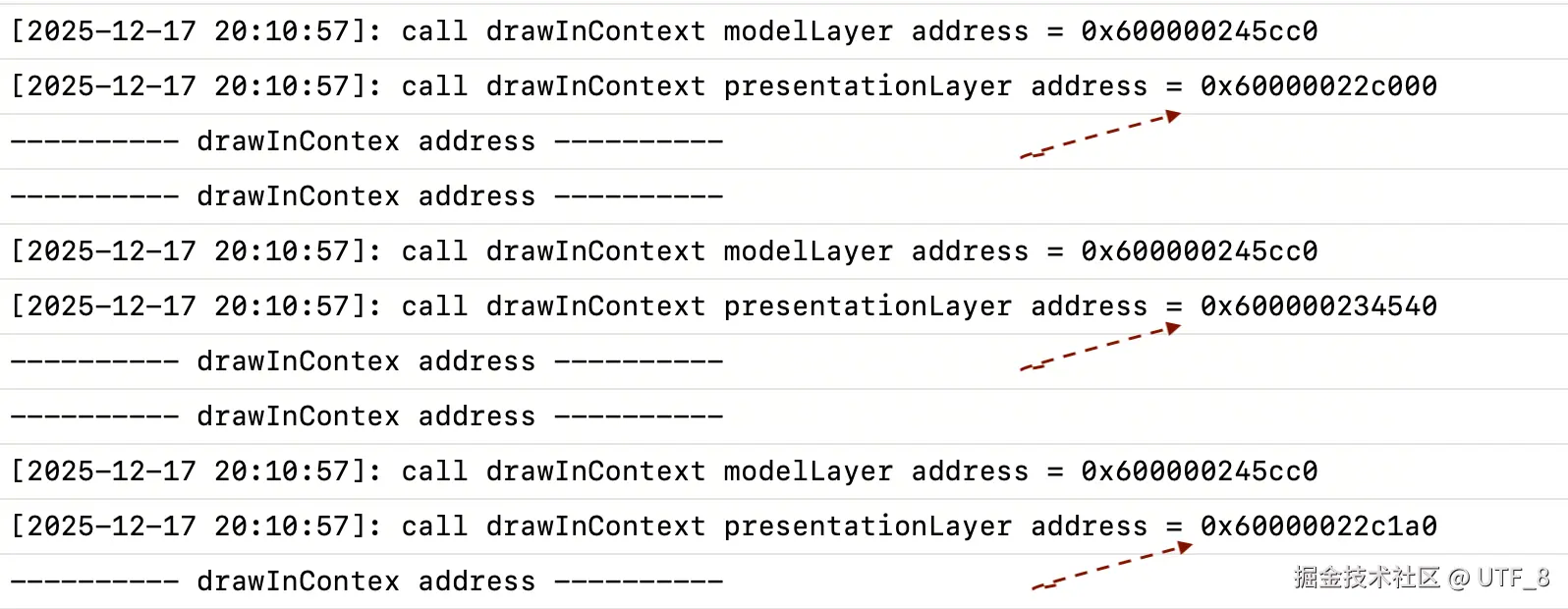 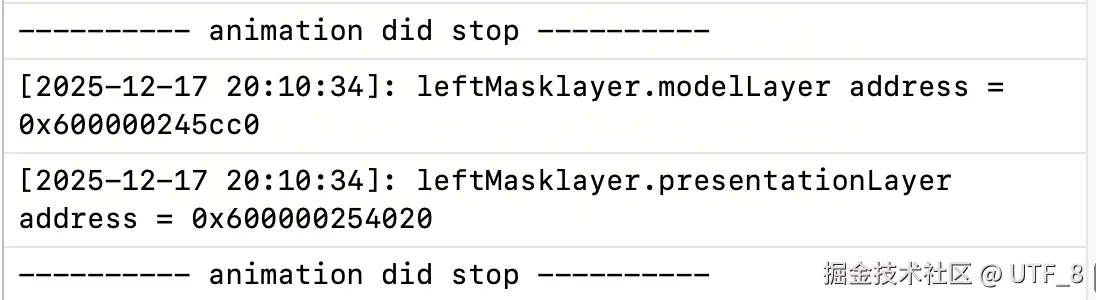 |
| YES |   |
总结
- 当没有动画添加到 layer 时,对应的 presentationLayer 不会被创建。
- 当设置 layer (modelLayer)的相关属性时,如果 presentationLayer 不会空,则其值保持和 modelLayer 一致。
- 设置的动画参数,决定了动画开始执行前,动画执行中,动画执行完成后,使用的是 presentationLayer 还是 modelLayer。
- 可以通过自定义 animation keyPath,来绘制 layer 的内容,从而实现更加精准的动画。