思科Nexus93180与华为6857(堆叠)2层互联。
STP MODE:
思科:RSTP-PVST
华为:RSTP
STP Priority:
思科:32768
华为:49152
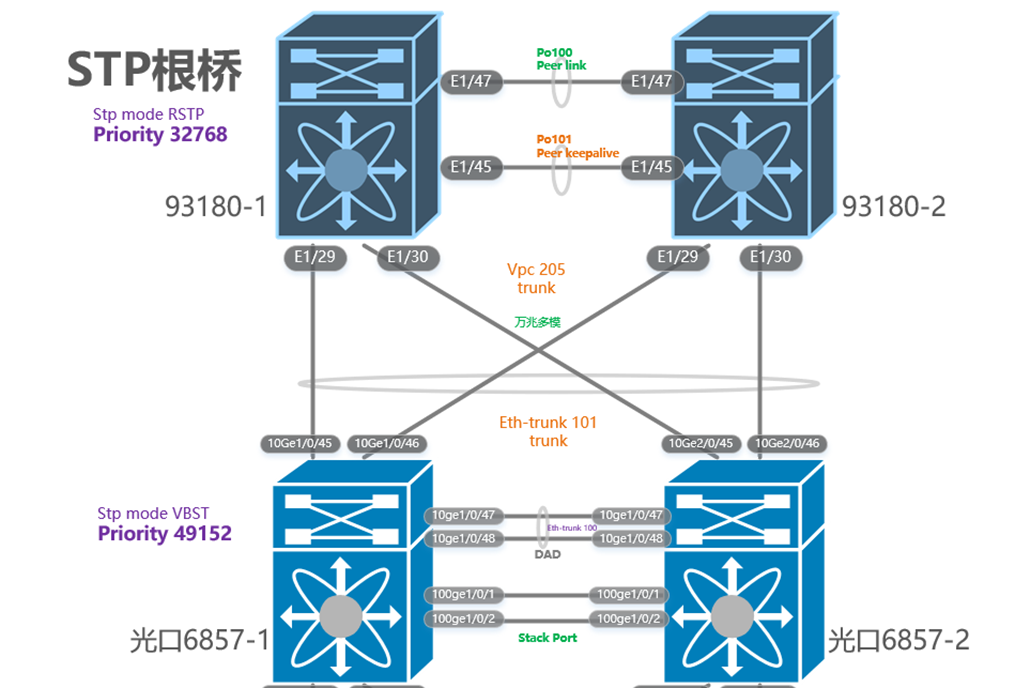
先说结论:思科的RSTP不是标准的RSTP,而是pvst的增强,所以华为侧需要使用VBST对接。
2 故障描述
2端都使用RSTP对接后,根桥选举失败
华为自己为根
Eth-trunk101 正常应该为root
bash
[~Huawei-6857]dis stp brief
 MSTID  Port                        Role  STP State     Protection      Cost    Edged
     0  Eth-Trunk101                DESI  forwarding    none             500    enable
     0  Eth-Trunk102                DESI  forwarding    none             125    enable

<Huawei-6857>display stp vlan 2
 ProcessId   InstanceId   Port                        Role  State
 ----------------------------------------------------------------------
         0            0   Eth-Trunk101                DESI  forwarding
         0            0   Eth-Trunk102                DESI  forwarding

<Huawei-6857>dis stp interface Eth-Trunk 101
CIST Global Information:
  Mode                :RSTP
  CIST Bridge         :49152.7c33-f906-6881
  Config Times        :Hello 2s MaxAge 20s FwDly 15s MaxHop 20
  Active Times        :Hello 2s MaxAge 20s FwDly 15s MaxHop 20
  CIST Root/ERPC      :49152.7c33-f906-6881 / 0 (This bridge is the root)
  CIST RegRoot/IRPC   :49152.7c33-f906-6881 / 0 (This bridge is the root)
  CIST RootPortId     :0.0
  BPDU-Protection     :Disabled
  TC or TCN received  :0
  TC count per hello  :0
  STP Converge Mode   :Normal
  Share region-configuration :Enabled
  Time since last TC  :0 days 0h:0m:0s
  Number of TC        :0
  Topo Change Flag    :0

CIST Port Information:
  Port Id             :1
  Port Name           :Eth-Trunk101
  Port State          :Forwarding
  Port Protocol       :Enabled
  Port Role           :Designated Port
  Port Priority       :128
  Port Cost(Dot1T)    :Config=auto / Active=500
  Designated Bridge/Port   :49152.7c33-f906-6881 / 128.1
  Port Edged          :Config=default / Active=enabled
  Point-to-point      :Config=auto / Active=true
  Transit Limit       :6 packets/s
  Protection Type     :None
  Port STP Mode       :RSTP
  Port Protocol Type  :Config=auto / Active=dot1s
  BPDU Encapsulation  :Config=stp / Active=stp
  PortTimes           :Hello 2s MaxAge 20s FwDly 15s RemHop 20
  TC or TCN send      :0
  TC or TCN received  :0
  TC Restriction      :False
  BPDU Sent           :0
           TCN: 0, Config: 0, RST: 74, MST: 0
  BPDU Received       :0
           TCN: 0, Config: 0, RST: 0, MST: 0
  Last forwarding time:2026-03-18 14:23:16
  Message Age         :0
<Huawei-6857>
从上面看到,收到的BPDU为0
3 Huawei修改为vbst
3.1 Change mode
bash
Stp mode vbst
Commit
3.2 Confirm stp mode
bash
<Huawei-6857>dis stp
CIST Global Information:
  Mode                :VBST
  CIST Bridge         :49152.7c33-f906-6881
  Config Times        :Hello 2s MaxAge 20s FwDly 15s MaxHop 20
  Active Times        :Hello 2s MaxAge 20s FwDly 15s MaxHop 20
  CIST Root/ERPC      :49152.7c33-f906-6881 / 0 (This bridge is the root)
  CIST RegRoot/IRPC   :49152.7c33-f906-6881 / 0 (This bridge is the root)
  CIST RootPortId     :0.0
  BPDU-Protection     :Disabled
  TC or TCN received  :0
  TC count per hello  :0
  STP Converge Mode   :Normal
  Share region-configuration :Enabled
  Time since last TC  :0 days 0h:0m:0s
  Number of TC        :0
  Topo Change Flag    :0
<Huawei-6857>
3.3 Check bpdu statistics
bash
<Huawei-6857>display stp vlan 2 bpdu statistics
---------------------------------------------------------------------------
                                  BPDUSent        TCN     Config        RST
VLANID Interface              BPDUReceived        TCN     Config        RST
---------------------------------------------------------------------------
     2 Eth-Trunk101                      6          0          0          6
                                    179173          0          0     179173
     2 Eth-Trunk102                 179081          0          0     179081
                                         2          0          0          2
---------------------------------------------------------------------------
3.4 查看指定vlan的根
bash
<Huawei-6857>display stp vlan 2 bridge root
------------------------------------------------------------------------------
                                     Hello  Max Forward
VLANID RootID               RootCost  Time  Age   Delay RootPort
------------------------------------------------------------------------------
     2 32770.0023-04ee-be65      500     2   20      15 Eth-Trunk101
------------------------------------------------------------------------------
<Huawei-6857>
3.5 查看所有vlan的根
bash
<Huawei-6857> dis stp vlan bridge root
------------------------------------------------------------------------------
                                     Hello  Max Forward
VLANID RootID               RootCost  Time  Age   Delay RootPort
------------------------------------------------------------------------------
     1 32769.7c33-f906-6881        0     2   20      15
     2 32770.0023-04ee-be65      500     2   20      15 Eth-Trunk101
     4 32772.0023-04ee-be65      500     2   20      15 Eth-Trunk101
     5 32773.0023-04ee-be65      500     2   20      15 Eth-Trunk101
     6 32774.0023-04ee-be65      500     2   20      15 Eth-Trunk101
     7 32775.0023-04ee-be65      500     2   20      15 Eth-Trunk101
     8 32776.0023-04ee-be65      500     2   20      15 Eth-Trunk101
     9 32777.0023-04ee-be65      500     2   20      15 Eth-Trunk101
     ```
3.6 查看指定vlan的端口状态
bash
<Huawei-6857>display stp vlan 2 information brief
--------------------------------------------------------------------------------
VLANID Interface              Role STPState    Protection           Cost Edged
--------------------------------------------------------------------------------
     2 Eth-Trunk101           ROOT forwarding  none                  500 disable
     2 Eth-Trunk102           DESI forwarding  none                  125 disable
--------------------------------------------------------------------------------
3.7 查看所有vlan的接口状态
bash
<Huawei-6857>display stp vlan information brief
--------------------------------------------------------------------------------
VLANID Interface              Role STPState    Protection           Cost Edged
--------------------------------------------------------------------------------
     2 Eth-Trunk101           ROOT forwarding  none                  500 disable
     2 Eth-Trunk102           DESI forwarding  none                  125 disable
     4 Eth-Trunk101           ROOT forwarding  none                  500 disable
     4 Eth-Trunk102           DESI forwarding  none                  125 disable
     5 Eth-Trunk101           ROOT forwarding  none                  500 disable
     5 Eth-Trunk102           DESI forwarding  none                  125 disable
     6 Eth-Trunk101           ROOT forwarding  none                  500 disable
     6 Eth-Trunk102           DESI forwarding  none                  125 disable
     7 Eth-Trunk101           ROOT forwarding  none                  500 disable