uniapp中使用vuex
- 使用前注意
- vue2语法中使用
-
- [1. store/index.js](#1. store/index.js)
- [2. 在 main.js 中挂载](#2. 在 main.js 中挂载)
- [3. 在组件中使用](#3. 在组件中使用)
- vue3语法中使用
-
- [1. 创建 store/index.js](#1. 创建 store/index.js)
- [2. 在 main.js 中挂载](#2. 在 main.js 中挂载)
- [3. 在组件中使用](#3. 在组件中使用)
使用前注意
- uni-app
内置了 Vuex,你不需要通过 npm 安装,直接引入使用即可。 - vue2中使用的是Vuex 3,vue3中使用的是Vuex 4,因此使用语法上有些区别。
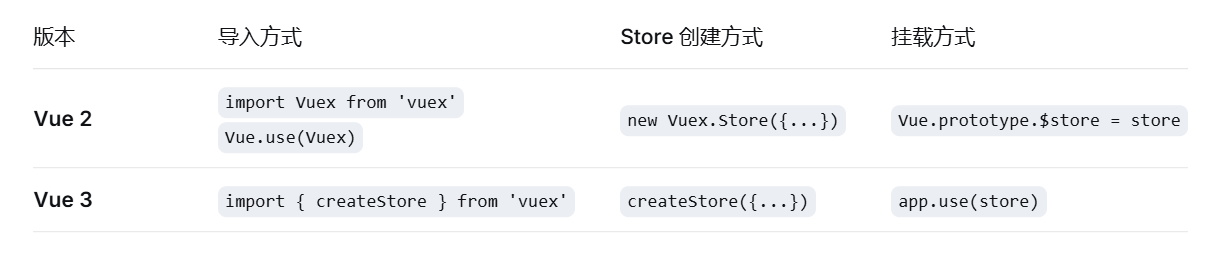
vue2语法中使用
1. store/index.js
bash
import Vue from 'vue'
import Vuex from 'vuex'

Vue.use(Vuex)

export default new Vuex.Store({
  state: {
    userInfo: null,
  },
  mutations: {
    SET_USER_INFO(state, userInfo) {
      state.userInfo = userInfo
    }
  },
  actions: {
    // 异步操作示例
    async fetchUserInfo({ commit }) {
      const res = await uni.request({ url: 'https://api.example.com/user' })
      commit('SET_USER_INFO', res.data)
    }
  },
  getters: {
    userName: state => state.userInfo?.name || '未登录'
  }
})
2. 在 main.js 中挂载
bash
import Vue from 'vue'
import App from './App'
import store from './store'  // 导入刚才创建的 store

Vue.prototype.$store = store  // 可选,便于在组件中通过 this.$store 访问

const app = new Vue({
  store,  // 注入 Vue 实例
  ...App
})
app.$mount()
3. 在组件中使用
bash
<script>
import { mapState, mapGetters, mapMutations, mapActions } from 'vuex'

export default {
  computed: {
    // 方式一:直接访问 this.$store
    // userName() { return this.$store.getters.userName }

    // 方式二:使用辅助函数(推荐)
    ...mapGetters(['userName'])
  },
  methods: {
    // 方式一:直接调用
    // fetchUserInfo() { this.$store.commit('fetchUserInfo') }

    // 方式二:使用辅助函数
    // ...mapActions(['fetchUserInfo'])   // 异步调用
  }
}
</script>
vue3语法中使用
1. 创建 store/index.js
bash
import { createStore } from 'vuex'

const store = createSore({
  state: {
    userInfo: null,
  },
  mutations: {
    SET_USER_INFO(state, userInfo) {
      state.userInfo = userInfo
    },
  },
  actions: {
    async fetchUserInfo({ commit }) {
      const res = await uni.request({ url: 'https://api.example.com/user' })
      commit('SET_USER_INFO', res.data)
    }
  },
  getters: {
    userName: state => state.userInfo?.name || '未登录'
  }
})

export default store
2. 在 main.js 中挂载
bash
import App from './App'
import store from './store'
import { createSSRApp } from 'vue'

export function createApp() {
  const app = createSSRApp(App)
  app.use(store)  // 使用 use 挂载
  return { app }
}
3. 在组件中使用
bash
<script setup>
import { useStore } from 'vuex'
import { computed } from 'vue'

const store = useStore()
const userName = computed(() => store.getters.userName)
</script>