安装
npm install --save-dev @sap/cds-compiler swagger-ui-express express
- 创建 openapi-config.json
bash
{
  "output": "app/openapi.yaml",
  "format": "yaml",
  "version": "3.0.0",
  "service": "MyService",
  "options": {
    "oDataVersion": "4.0",
    "includeDraftEntities": true,
    "includeActions": true
  }
}- 修改 package.json 添加脚本
bash
{
  "scripts": {
    "start": "cds-serve",
    "watch": "cds watch",
    "openapi": "cds compile srv/services.cds --to openapi --output app/openapi.yaml",
    "swagger": "node server.js",
    "test": "newman run postman_draft_feature_collection.json"
  }
}
创建 Swagger UI 服务器
bash
const express = require('express');
const swaggerUi = require('swagger-ui-express');
const fs = require('fs');
const path = require('path');
const cds = require('@sap/cds');

const app = express();
const PORT = process.env.PORT || 4004;

// 加载 OpenAPI 规范
const openApiPath = path.join(__dirname, 'app', 'openapi.yaml');

// 自动生成 OpenAPI 文档
async function generateOpenApi() {
  try {
    const { execSync } = require('child_process');
    execSync('cds compile srv/services.cds --to openapi > app/openapi.yaml', {
      cwd: __dirname,
      stdio: 'inherit'
    });
    console.log('✅ OpenAPI 文档生成成功');
  } catch (error) {
    console.error('❌ OpenAPI 文档生成失败:', error.message);
  }
}

// 启动 CAP 服务和 Swagger UI
async function start() {
  // 生成 OpenAPI 文档
  await generateOpenApi();

  // 加载 OpenAPI 规范
  let openApiSpec;
  try {
    const yaml = require('js-yaml');
    openApiSpec = yaml.load(fs.readFileSync(openApiPath, 'utf8'));
  } catch (error) {
    console.warn('⚠️ 未找到 OpenAPI 文件,使用默认配置');
    openApiSpec = createDefaultOpenApi();
  }

  // Swagger UI 路由
  app.use('/swagger', swaggerUi.serve, swaggerUi.setup(openApiSpec, {
    explorer: true,
    customCss: '.swagger-ui .topbar { display: none }',
    customSiteTitle: 'CAP API 文档'
  }));

  // 重定向根路径到 Swagger
  app.get('/', (req, res) => {
    res.redirect('/swagger');
  });

  // 启动 CAP 服务
  await cds.connect.to('db');
  cds.emit('served', { services: cds.services });

  app.listen(PORT, () => {
    console.log(`
    ╔═══════════════════════════════════════════════════════════╗
    ║  CAP 服务已启动                                            ║
    ╠═══════════════════════════════════════════════════════════╣
    ║  📖 Swagger UI:  http://localhost:${PORT}/swagger          ║
    ║  📡 OData 服务:   http://localhost:${PORT}/odata/v4/MyService ║
    ║  📋 $metadata:     http://localhost:${PORT}/odata/v4/MyService/$metadata ║
    ╚═══════════════════════════════════════════════════════════╝
    `);
  });
}

// 创建默认 OpenAPI 规范(备用)
function createDefaultOpenApi() {
  return {
    openapi: '3.0.0',
    info: {
      title: 'MyService API',
      version: '1.0.0',
      description: 'CAP OData 服务 API 文档'
    },
    servers: [
      {
        url: `http://localhost:${PORT}`,
        description: '本地开发服务器'
      }
    ],
    paths: {},
    components: {
      schemas: {}
    }
  };
}

start().catch(console.error);
添加 CDS 注解增强文档 修改 srv/services.cds
bash
using { my.bookshop as aa} from '../db/schema';

@requires: 'any'
@title: '订单管理服务'
@description: '提供订单、产品和订单项的 CRUD 操作及 Draft 功能'
service MyService @(impl: './service') {

    @title: '订单'
    @description: '订单主实体,支持 Draft 草稿功能'
    @odata.draft.enabled
    entity Orders as projection on aa.Orders;

    @title: '订单项'
    @description: '订单明细项目'
    entity OrderItems as projection on aa.OrderItems;

    @title: '产品'
    @description: '产品目录,支持版本控制和 Draft 功能'
    @odata.draft.enabled
    entity Products as projection on aa.Products;

    @title: '审批订单'
    @description: '将订单状态从 NEW 变更为 CONFIRMED'
    action approveOrder() returns Orders;

    @title: '取消审批'
    @description: '将订单状态从 CONFIRMED 变更回 NEW'
    action rejectApproval() returns Orders;

    @title: '提交订单'
    @description: '提交订单并扣减库存'
    action submitOrder(ID: UUID, quantity: Integer) returns Orders;
}
修改 db/schema.cds 添加文档注解
bash
@title: '书店数据模型'
@description: '包含订单、产品和订单项的数据模型'
namespace my.bookshop;

using {cuid, managed} from '@sap/cds/common';

@title: '书籍'
@description: '书籍基本信息'
@cds.persistence.exists: false
entity Book {
  key ID    : Integer @title: '书籍 ID';
      title : String @title: '书名';
      stock : Integer @title: '库存数量';
}

@title: '产品'
@description: '产品信息,支持版本控制'
entity Products : cuid, managed {
      ProductName : String(100) @title: '产品名称';
      stock       : Integer @title: '库存数量';
      @Core.Computed
      Version     : Integer @Core.Immutable @title: '版本号';
} @(
  OData.Draft.Enabled : true,
  OData.Draft.New : true,
  OData.Draft.Update : true,
  OData.Draft.Delete : true
)

@title: '订单'
@description: '客户订单,支持 Draft 草稿功能'
entity Orders : cuid, managed {
      OrderNumber  : String(20) @unique @title: '订单编号';
      CustomerName : String(100) @title: '客户名称';
      OrderDate    : Date @title: '订单日期';
      Status       : String(20) enum {
        New;
        Confirmed;
        Shipped;
        Delivered;
        Cancelled;
      } @title: '订单状态';
      TotalAmount  : Decimal(10, 2) @title: '订单总额';
      Currency     : String(3) @title: '货币';
      Notes        : String(500) @title: '备注';
      Items        : Composition of many OrderItems
                       on Items.parent = $self @title: '订单项';
} @(
  OData.Draft.Enabled : true,
  OData.Draft.New : true,
  OData.Draft.Update : true,
  OData.Draft.Delete : true
)

@title: '订单项'
@description: '订单中的产品明细'
entity OrderItems : cuid, managed {
      parent       : Association to Orders @title: '所属订单';
      ProductID    : String(50) @title: '产品 ID';
      ProductName  : String(100) @title: '产品名称';
      Quantity     : Integer @title: '数量';
      UnitPrice    : Decimal(10, 2) @title: '单价';
      LineTotal    : Decimal(10, 2) @title: '行总额';
      DeliveryDate : Date @title: '交付日期';
}
创建文档生成脚本 创建 scripts/generate-docs.js
bash
 const { execSync } = require('child_process');
const fs = require('fs');
const path = require('path');

const projectRoot = path.join(__dirname, '..');

console.log('📖 开始生成 API 文档...\n');

try {
  // 确保 app 目录存在
  const appDir = path.join(projectRoot, 'app');
  if (!fs.existsSync(appDir)) {
    fs.mkdirSync(appDir, { recursive: true });
    console.log('📁 创建 app 目录...\n');
  }

  // 生成 OpenAPI YAML
  console.log('1️⃣ 生成 OpenAPI 规范 (YAML)...');
  execSync(`cds compile srv/services.cds --to openapi > ${path.join(appDir, 'openapi.yaml')}`, {
    cwd: projectRoot,
    stdio: 'inherit'
  });

  // 生成 OpenAPI JSON(使用 node 脚本转换 YAML 为 JSON)
  console.log('2️⃣ 生成 OpenAPI JSON...');
  const yaml = require('js-yaml');
  const openApiYaml = fs.readFileSync(path.join(appDir, 'openapi.yaml'), 'utf8');
  const openApiJson = JSON.stringify(yaml.load(openApiYaml), null, 2);
  fs.writeFileSync(path.join(appDir, 'openapi.json'), openApiJson);

  console.log('\n✅ 文档生成成功!');
  console.log('\n📁 输出文件:');
  console.log('   - app/openapi.yaml');
  console.log('   - app/openapi.json');
  console.log('\n🌐 访问地址:');
  console.log('   - Swagger UI: http://localhost:4004/swagger');

} catch (error) {
  console.error('❌ 文档生成失败:', error.message);
  process.exit(1);
}
创建 .gitignore 更新
bash
# 生成的文档
app/openapi.yaml
app/openapi.json
app/api-docs.html
test-report.json
test-report.html

# 依赖
node_modules/

# 环境
.env
启动和访问
bash
# 1. 安装依赖
npm install

# 2. 生成文档
npm run docs

# 3. 启动服务(带 Swagger UI)
npm start
访问地址
bash
访问地址
功能	地址
📖 Swagger UI	http://localhost:4004/swagger
📡 OData 服务	http://localhost:4004/odata/v4/MyService
📋 $metadata	http://localhost:4004/odata/v4/MyService/$metadata
📄 HTML 文档	http://localhost:4004/api-docs.html
📥 OpenAPI YAML	http://localhost:4004/app/openapi.yaml
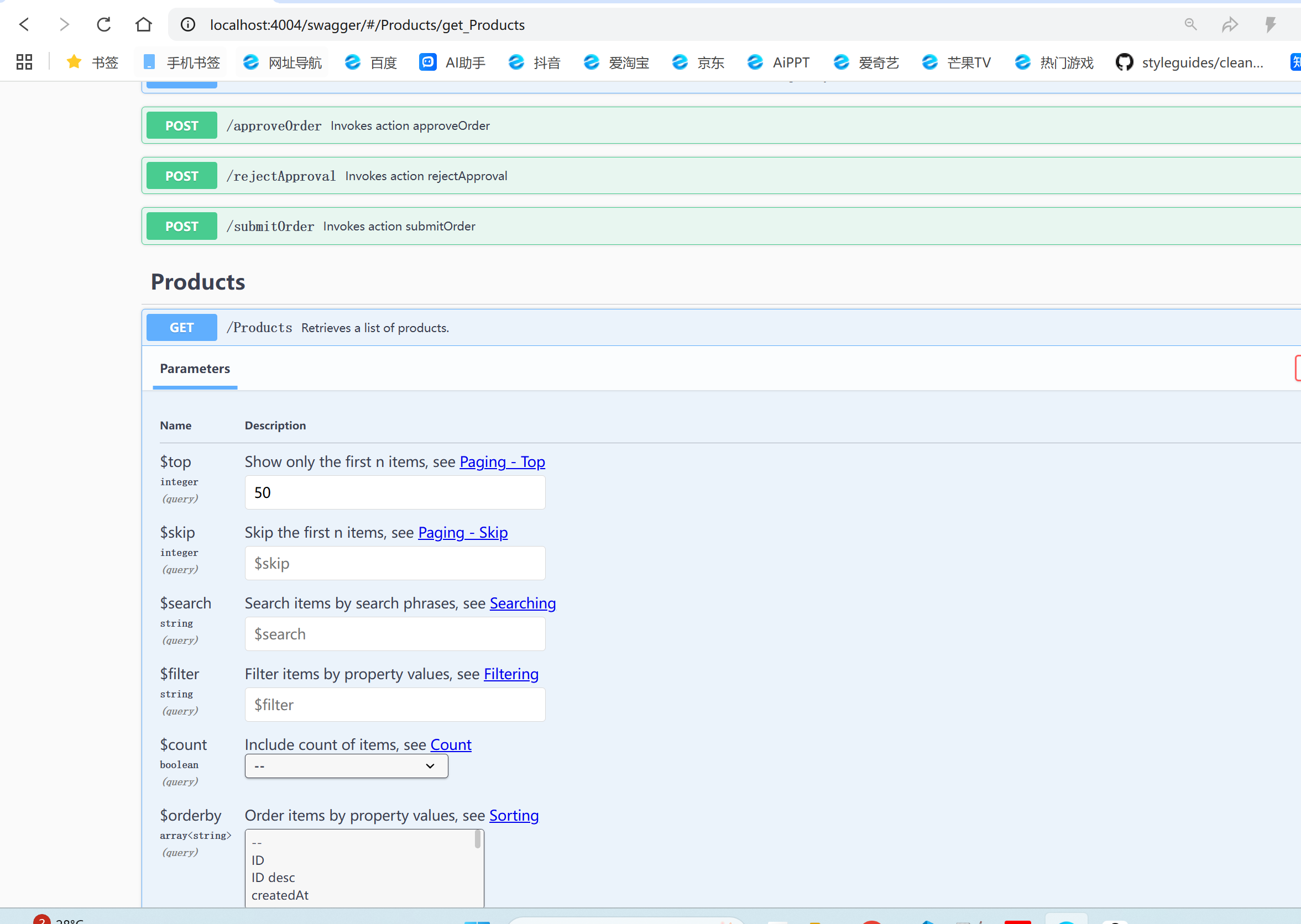
效果如上图: