本地环境git >= 2.36.0 python3 >= 3.6
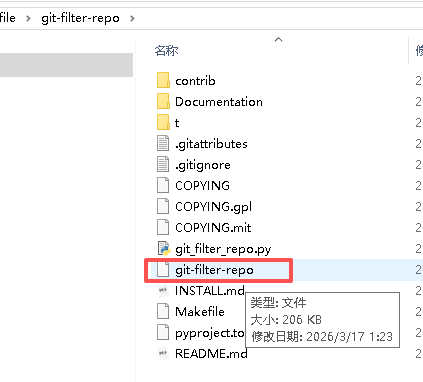
1. 找到你下载的文件
你从 GitHub 下载解压后,里面有一个 没有后缀的文件:
git-filter-repo把它复制出来。
2. 粘贴到 你要清理的项目根目录
比如你的项目是:
D:\my-project\就把 git-filter-repo 粘贴到这里:
D:\my-project\git-filter-repo3. 打开 Git Bash,进入项目目录
cd D:/my-project二、Windows 上直接使用的命令(复制就能跑)
最常用:清理 Git 历史里的超大文件(瘦身 .git)
python git-filter-repo --strip-blobs-bigger-than 1M --force如果你要删除某个特定文件
python git-filter-repo --path 大文件名字 --invert-paths --force如果你要拆分仓库
python git-filter-repo --subdirectory-filter 文件夹名三、如果提示 python 不是命令,换成这个
py git-filter-repo --strip-blobs-bigger-than 1M --force四、使用前必须做(防止出错)
备份项目(非常重要)
cp -r . ../my-project-backup如果提示工作区不干净
git add .
git commit -m "tmp"
五、清理完成后,推送到远程
git-filter-repo 在重写仓库历史时,默认会清空所有远程仓库配置(这是它的安全机制,防止你误操作覆盖远程仓库),所以你现在的本地仓库和 GitHub/Gitee 等远程仓库的连接被断开了。
需要重新关联仓库
git remote add origin 你的仓库地址 git remote add origin https://github.com/你的用户名/你的仓库名.git

git remote add origin 原仓库地址

git remote add upstream 上游仓库地址

git push -f origin main
超级总结
你从 GitHub 拉取下来之后,只需要做这一件事:
把 git-filter-repo 复制到项目目录
打开 Git Bash
运行:
python git-filter-repo --strip-blobs-bigger-than 1M --force✅ 搞定!