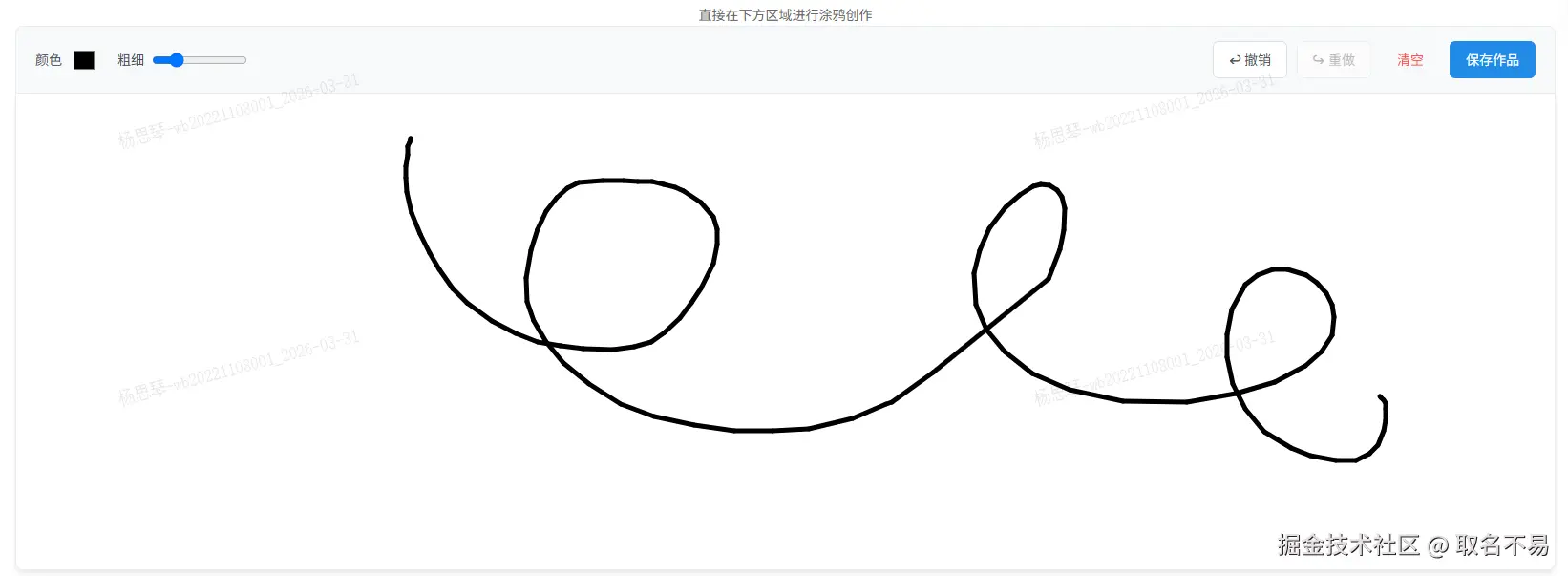
环境:s^2.15.8+nuxt-property-decorator^2.9.1+portal-vue@2
plugins/portal-vue.js
js
import Vue from 'vue'
import PortalVue from 'portal-vue'
Vue.use(PortalVue)
nuxt.config.js
js
export default { plugins: ['~/plugins/portal-vue.js'] }pages/xxx.vue或components/xxx.vue
js
<template>
  <div class="draw-page">
    <header class="draw-header">
      <p>直接在下方区域进行涂鸦创作</p>
    </header>

    <!-- 工具栏 -->
    <div class="toolbar">
      <div class="tool-item">
        <label>颜色</label>
        <input type="color" v-model="brushColor" />
      </div>
      <div class="tool-item">
        <label>粗细</label>
        <input type="range" min="1" max="20" v-model="brushSize" />
      </div>
      <div class="actions">
        <button @click="undo" :disabled="history.length === 0">↩ 撤销</button>
        <button @click="redo" :disabled="redoStack.length === 0">↪ 重做</button>
        <button @click="clearCanvas" class="btn-text">清空</button>
        <button @click="saveImage" class="btn-primary">保存作品</button>
      </div>
    </div>

    <!-- 画板容器 -->
    <div class="board-container" ref="boardContainer">
      <canvas
        ref="canvasEl"
        @mousedown="startDrawing"
        @mousemove="draw"
        @mouseup="stopDrawing"
        @mouseleave="stopDrawing"
      ></canvas>
    </div>
  </div>
</template>

<script lang="ts">
import { Component, Vue, Watch } from "nuxt-property-decorator";

interface Point {
  x: number;
  y: number;
}
interface Stroke {
  points: Point[];
  color: string;
  size: number;
}

@Component
export default class EmbeddedBoard extends Vue {
  // 状态
  brushColor = "#000000";
  brushSize = 5;
  isDrawing = false;

  // 历史记录
  history: Stroke[] = [];
  redoStack: Stroke[] = [];
  currentStroke: Stroke = { points: [], color: "", size: 0 };

  // 引用
  $refs!: {
    canvasEl: HTMLCanvasElement;
    boardContainer: HTMLDivElement;
  };

  private ctx: CanvasRenderingContext2D | null = null;

  // 监听画笔属性变化
  @Watch("brushColor")
  @Watch("brushSize")
  updateBrushStyle() {
    if (this.ctx) {
      this.ctx.strokeStyle = this.brushColor;
      this.ctx.lineWidth = this.brushSize;
    }
  }

  // 组件挂载后初始化
  mounted() {
    this.$nextTick(() => {
      this.initCanvas();
    });
  }

  // 初始化画布尺寸
  private initCanvas() {
    const canvas = this.$refs.canvasEl;
    const container = this.$refs.boardContainer;

    if (canvas && container) {
      // 设置实际像素尺寸(解决模糊问题)
      canvas.width = container.clientWidth;
      canvas.height = container.clientHeight;

      const context = canvas.getContext("2d");
      if (context) {
        this.ctx = context;
        // 初始化画笔
        this.ctx.lineCap = "round";
        this.ctx.lineJoin = "round";
        this.ctx.lineWidth = this.brushSize;
        this.ctx.strokeStyle = this.brushColor;
        // 绘制白色背景
        this.fillWhiteBackground();
      }
    }
  }

  // 填充白色背景(防止保存时透明变黑)
  private fillWhiteBackground() {
    if (!this.ctx || !this.$refs.canvasEl) return;
    this.ctx.fillStyle = "#ffffff";
    this.ctx.fillRect(
      0,
      0,
      this.$refs.canvasEl.width,
      this.$refs.canvasEl.height
    );
  }

  // 获取坐标
  private getPos(e: MouseEvent): Point {
    const rect = this.$refs.canvasEl.getBoundingClientRect();
    return {
      x: e.clientX - rect.left,
      y: e.clientY - rect.top,
    };
  }

  startDrawing(e: MouseEvent) {
    if (!this.ctx) return;
    this.isDrawing = true;
    const pos = this.getPos(e);

    // 开始新的一笔
    this.currentStroke = {
      points: [pos],
      color: this.brushColor,
      size: this.brushSize,
    };

    // 画一个点
    this.ctx.beginPath();
    this.ctx.moveTo(pos.x, pos.y);
    this.ctx.lineTo(pos.x, pos.y);
    this.ctx.stroke();
  }

  draw(e: MouseEvent) {
    if (!this.isDrawing || !this.ctx) return;
    e.preventDefault(); // 防止拖动图片

    const pos = this.getPos(e);
    this.currentStroke.points.push(pos);

    this.ctx.lineTo(pos.x, pos.y);
    this.ctx.stroke();
    this.ctx.beginPath();
    this.ctx.moveTo(pos.x, pos.y);
  }

  stopDrawing() {
    if (!this.isDrawing) return;
    this.isDrawing = false;
    if (this.ctx) this.ctx.beginPath(); // 重置路径

    // 保存历史
    if (this.currentStroke.points.length > 1) {
      this.history.push({ ...this.currentStroke });
      this.redoStack = []; // 新操作清空重做栈
    }
  }

  // 重绘整个画布(用于撤销/重做)
  private redraw() {
    if (!this.ctx || !this.$refs.canvasEl) return;

    // 清空
    this.ctx.clearRect(
      0,
      0,
      this.$refs.canvasEl.width,
      this.$refs.canvasEl.height
    );
    this.fillWhiteBackground();

    // 重绘所有笔画
    this.history.forEach((stroke) => {
      if (stroke.points.length === 0) return;
      this.ctx!.beginPath();
      this.ctx!.lineCap = "round";
      this.ctx!.lineJoin = "round";
      this.ctx!.lineWidth = stroke.size;
      this.ctx!.strokeStyle = stroke.color;

      this.ctx!.moveTo(stroke.points[0].x, stroke.points[0].y);
      for (let i = 1; i < stroke.points.length; i++) {
        this.ctx!.lineTo(stroke.points[i].x, stroke.points[i].y);
      }
      this.ctx!.stroke();
    });
  }

  undo() {
    if (this.history.length === 0) return;
    const last = this.history.pop();
    if (last) this.redoStack.push(last);
    this.redraw();
  }

  redo() {
    if (this.redoStack.length === 0) return;
    const last = this.redoStack.pop();
    if (last) this.history.push(last);
    this.redraw();
  }

  clearCanvas() {
    if (!this.ctx) return;
    this.history = [];
    this.redoStack = [];
    this.ctx.clearRect(
      0,
      0,
      this.$refs.canvasEl.width,
      this.$refs.canvasEl.height
    );
    this.fillWhiteBackground();
  }

  saveImage() {
    const link = document.createElement("a");
    link.download = `sketch-${Date.now()}.png`;
    link.href = this.$refs.canvasEl.toDataURL();
    link.click();
  }
}
</script>

<style scoped>
.draw-page {
  /* max-width: 1000px; */
  margin: 40px auto;
  padding: 20px;
  font-family: -apple-system, BlinkMacSystemFont, "Segoe UI", Roboto, sans-serif;
}

.draw-header {
  text-align: center;
  margin-bottom: 1px;
}

.draw-header h2 {
  margin: 0 0 10px 0;
  color: #333;
  font-size: 28px;
}

.draw-header p {
  color: #666;
  margin: 0;
}

/* 工具栏样式 */
.toolbar {
  display: flex;
  flex-wrap: wrap;
  gap: 20px;
  align-items: center;
  padding: 15px 20px;
  background: #f8f9fa;
  border: 1px solid #e9ecef;
  border-bottom: none;
  border-radius: 8px 8px 0 0;
}

.tool-item {
  display: flex;
  align-items: center;
  gap: 8px;
  font-size: 14px;
  color: #495057;
}

.tool-item input[type="color"] {
  border: none;
  width: 30px;
  height: 30px;
  cursor: pointer;
  background: none;
}

.tool-item input[type="range"] {
  width: 100px;
}

.actions {
  margin-left: auto;
  display: flex;
  gap: 10px;
}

button {
  padding: 8px 16px;
  border-radius: 6px;
  border: 1px solid #dee2e6;
  background: #fff;
  color: #495057;
  cursor: pointer;
  font-size: 14px;
  transition: all 0.2s;
}

button:hover:not(:disabled) {
  background: #e9ecef;
  border-color: #adb5bd;
}

button:disabled {
  opacity: 0.4;
  cursor: not-allowed;
}

.btn-primary {
  background: #228be6;
  color: white;
  border-color: #228be6;
}

.btn-primary:hover:not(:disabled) {
  background: #1c7ed6;
}

.btn-text {
  color: #fa5252;
  border-color: transparent;
  background: transparent;
}

.btn-text:hover:not(:disabled) {
  background: #fff5f5;
  color: #fa5252;
}

/* 画板容器 */
.board-container {
  width: 100%;
  height: 500px; /* 固定高度,也可以设为 auto */
  border: 1px solid #e9ecef;
  border-radius: 0 0 8px 8px;
  overflow: hidden;
  background: #fff;
  box-shadow: 0 4px 6px -1px rgba(0, 0, 0, 0.1);
}

canvas {
  display: block;
  cursor: crosshair;
}
</style>
展示效果