本文展示了一个智能食材管理系统的移动端原型设计。
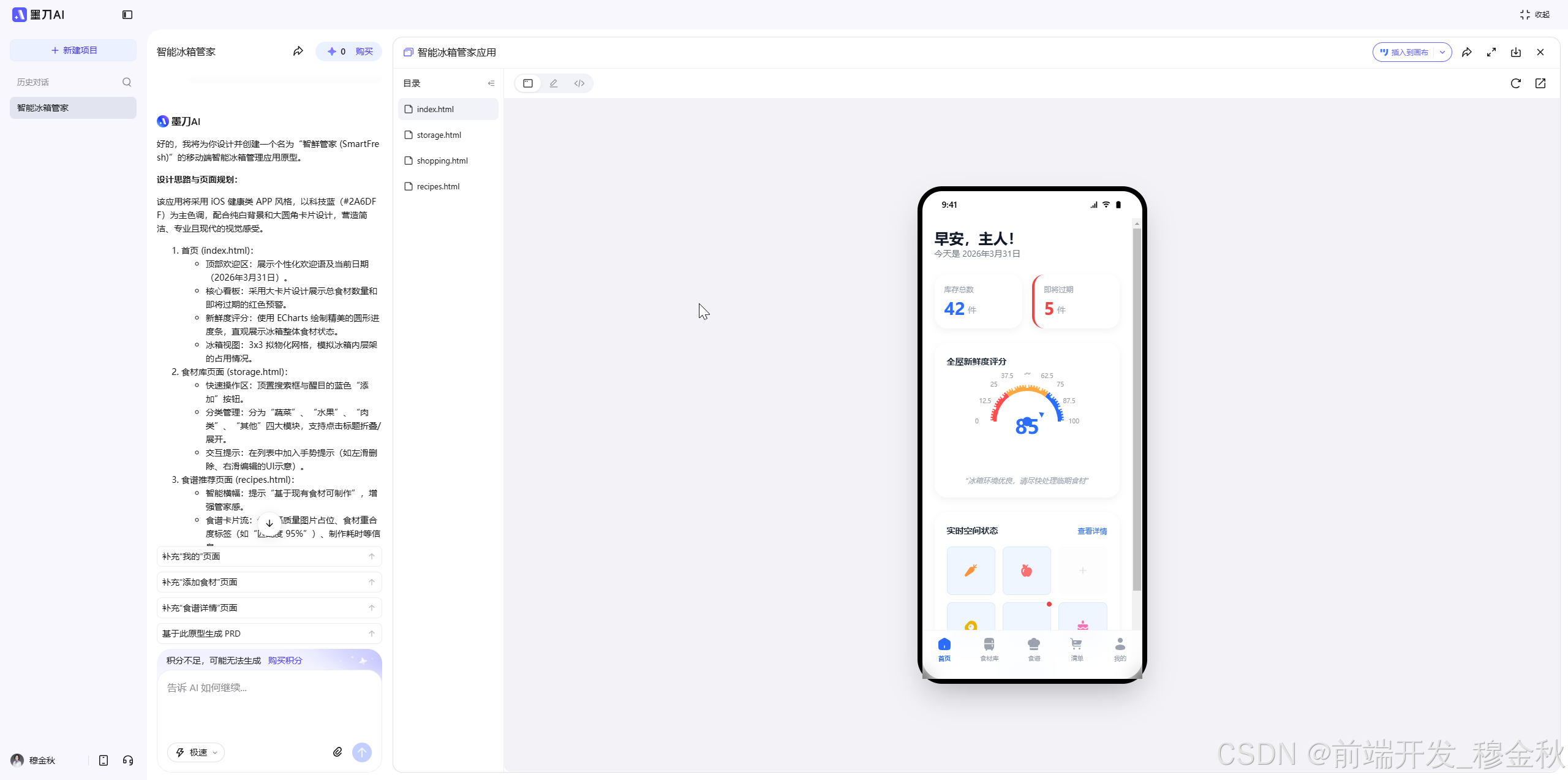
页面采用iOS风格,包含状态栏、欢迎语、核心数据统计(库存总数42件、临期食材5件)、新鲜度评分仪表盘(当前85分)和 3x3网格展示的冰箱空间状态。
底部导航栏提供首页、食材库、食谱、购物清单和个人中心五个功能入口。
设计使用HTML+CSS+JavaScript实现,采用Tailwind CSS框架,并集成了ECharts数据可视化图表。
页面整体布局简洁美观,交互元素清晰,展示了智能食材管理系统的核心功能模块。
原型
首页
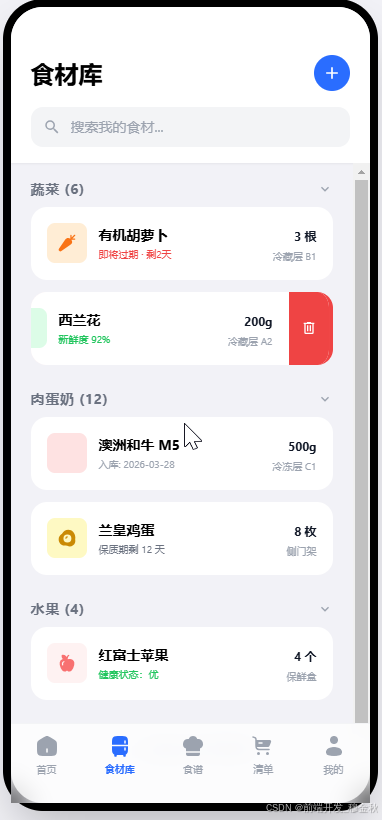
食材库
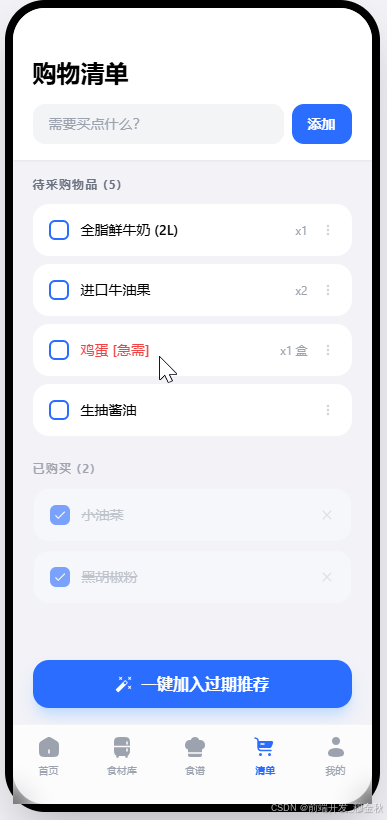
购物清单
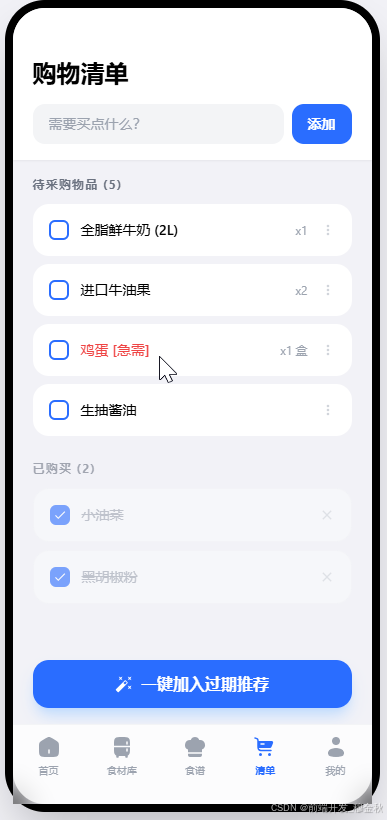
今日推荐
代码实现
来感受下墨刀AI的代码实力
index.html
html
<!DOCTYPE html>

<html lang="zh-CN">
<head>
<meta charset="utf-8"/>
<meta content="width=device-width, initial-scale=1.0" name="viewport"/>
<title>智鲜管家 - 首页</title>
<script src="https://modao.cc/agent-py/static/source/js/tailwindcss.3.4.3.js"></script>
<script src="https://modao.cc/agent-py/static/source/js/iconify-icon.min.1.0.7.js"></script>
<script src="https://modao.cc/agent-py/static/source/js/echarts.min.5.4.3.js"></script>
<style>
        body { font-family: -apple-system, BlinkMacSystemFont, "Segoe UI", Roboto, "Helvetica Neue", Arial, sans-serif; background-color: #F2F2F7; }
        .ios-card { background: white; border-radius: 20px; box-shadow: 0 4px 12px rgba(0,0,0,0.05); }
        .tab-active { color: #2A6DFF; }
    </style>
</head>
<body class="flex justify-center items-center min-h-screen">
<!-- 模拟手机容器 -->
<div class="w-[375px] h-[812px] bg-white relative overflow-hidden flex flex-col shadow-2xl rounded-[40px] border-[8px] border-black">
<!-- 状态栏 -->
<div class="h-11 w-full flex justify-between px-8 items-center text-sm font-semibold">
<span>9:41</span>
<div class="flex gap-1.5">
<iconify-icon class="text-black" icon="mdi:signal"></iconify-icon>
<iconify-icon class="text-black" icon="mdi:wifi"></iconify-icon>
<iconify-icon class="text-black" icon="mdi:battery"></iconify-icon>
</div>
</div>
<!-- 内容滚动区 -->
<div class="flex-1 overflow-y-auto px-5 pb-24">
<!-- 欢迎语 -->
<div class="mt-4 mb-6">
<h1 class="text-2xl font-bold text-gray-900">早安,主人!</h1>
<p class="text-gray-500 text-sm">今天是 2026年3月31日</p>
</div>
<!-- 核心数据 -->
<div class="grid grid-cols-2 gap-4 mb-6">
<div class="ios-card p-4 flex flex-col">
<span class="text-gray-400 text-xs font-medium mb-1">库存总数</span>
<div class="flex items-end gap-1">
<span class="text-3xl font-bold text-[#2A6DFF]">42</span>
<span class="text-gray-400 text-sm pb-1">件</span>
</div>
</div>
<div class="ios-card p-4 flex flex-col border-l-4 border-red-500">
<span class="text-gray-400 text-xs font-medium mb-1">即将过期</span>
<div class="flex items-end gap-1">
<span class="text-3xl font-bold text-red-500">5</span>
<span class="text-gray-400 text-sm pb-1">件</span>
</div>
</div>
</div>
<!-- 新鲜度评分 -->
<div class="ios-card p-5 mb-6">
<h3 class="text-sm font-bold text-gray-800 mb-2">全屋新鲜度评分</h3>
<div class="w-full h-40" id="healthChart"></div>
<p class="text-center text-xs text-gray-400 mt-2 italic">"冰箱环境优良,请尽快处理临期食材"</p>
</div>
<!-- 冰箱状态图 -->
<div class="ios-card p-5">
<div class="flex justify-between items-center mb-4">
<h3 class="text-sm font-bold text-gray-800">实时空间状态</h3>
<span class="text-[#2A6DFF] text-xs font-medium">查看详情</span>
</div>
<div class="grid grid-cols-3 gap-3">
<!-- 3x3 Grid -->
<div class="aspect-square bg-blue-50 rounded-lg flex items-center justify-center border border-blue-100">
<iconify-icon class="text-orange-400 text-2xl" icon="fluent:food-carrot-24-filled"></iconify-icon>
</div>
<div class="aspect-square bg-blue-50 rounded-lg flex items-center justify-center border border-blue-100">
<iconify-icon class="text-red-400 text-2xl" icon="fluent:food-apple-24-filled"></iconify-icon>
</div>
<div class="aspect-square bg-gray-50 rounded-lg flex items-center justify-center border border-gray-100 opacity-30">
<iconify-icon class="text-gray-400 text-xl" icon="mdi:plus"></iconify-icon>
</div>
<div class="aspect-square bg-blue-50 rounded-lg flex items-center justify-center border border-blue-100">
<iconify-icon class="text-yellow-500 text-2xl" icon="fluent:food-egg-24-filled"></iconify-icon>
</div>
<div class="aspect-square bg-blue-50 rounded-lg flex items-center justify-center border border-blue-100 relative">
<iconify-icon class="text-red-700 text-2xl" icon="fluent:food-meat-24-filled"></iconify-icon>
<div class="absolute -top-1 -right-1 w-3 h-3 bg-red-500 rounded-full border-2 border-white"></div>
</div>
<div class="aspect-square bg-blue-50 rounded-lg flex items-center justify-center border border-blue-100">
<iconify-icon class="text-pink-400 text-2xl" icon="fluent:food-cake-24-filled"></iconify-icon>
</div>
<div class="aspect-square bg-gray-50 rounded-lg flex items-center justify-center border border-gray-100 opacity-30">
<iconify-icon class="text-gray-400 text-xl" icon="mdi:plus"></iconify-icon>
</div>
<div class="aspect-square bg-blue-50 rounded-lg flex items-center justify-center border border-blue-100">
<iconify-icon class="text-blue-400 text-2xl" icon="fluent:drink-bottle-24-filled"></iconify-icon>
</div>
<div class="aspect-square bg-gray-50 rounded-lg flex items-center justify-center border border-gray-100 opacity-30">
<iconify-icon class="text-gray-400 text-xl" icon="mdi:plus"></iconify-icon>
</div>
</div>
</div>
</div>
<!-- 底部导航 -->
<div class="absolute bottom-0 left-0 right-0 h-20 bg-white/80 backdrop-blur-md border-t border-gray-100 px-6 flex justify-between items-center pb-4">
<a class="flex flex-col items-center tab-active" href="index.html">
<iconify-icon class="text-2xl" icon="solar:home-2-bold"></iconify-icon>
<span class="text-[10px] mt-1 font-bold">首页</span>
</a>
<a class="flex flex-col items-center text-gray-400" href="storage.html">
<iconify-icon class="text-2xl" icon="solar:fridge-bold"></iconify-icon>
<span class="text-[10px] mt-1">食材库</span>
</a>
<a class="flex flex-col items-center text-gray-400" href="recipes.html">
<iconify-icon class="text-2xl" icon="solar:chef-hat-bold"></iconify-icon>
<span class="text-[10px] mt-1">食谱</span>
</a>
<a class="flex flex-col items-center text-gray-400" href="shopping.html">
<iconify-icon class="text-2xl" icon="solar:cart-large-bold"></iconify-icon>
<span class="text-[10px] mt-1">清单</span>
</a>
<div class="flex flex-col items-center text-gray-400">
<iconify-icon class="text-2xl" icon="solar:user-bold"></iconify-icon>
<span class="text-[10px] mt-1">我的</span>
</div>
</div>
</div>
<script>
        // 初始化新鲜度图表
        const chart = echarts.init(document.getElementById('healthChart'));
        const option = {
            series: [{
                type: 'gauge',
                startAngle: 180,
                endAngle: 0,
                min: 0,
                max: 100,
                splitNumber: 8,
                axisLine: {
                    lineStyle: {
                        width: 10,
                        color: [
                            [0.3, '#FF4D4F'],
                            [0.7, '#FFA940'],
                            [1, '#2A6DFF']
                        ]
                    }
                },
                pointer: { icon: 'path://M12.8,0.7l12,40.1H0.7L12.8,0.7z', length: '12%', width: 10, offsetCenter: [0, '-40%'], itemStyle: { color: 'auto' } },
                axisTick: { distance: -15, length: 8, lineStyle: { color: '#fff', width: 2 } },
                splitLine: { distance: -20, length: 15, lineStyle: { color: '#fff', width: 4 } },
                axisLabel: { distance: -20, color: '#999', fontSize: 10 },
                anchor: { show: true, showAbove: true, size: 15, itemStyle: { color: '#2A6DFF' } },
                title: { show: false },
                detail: {
                    valueAnimation: true,
                    fontSize: 32,
                    fontWeight: 'bold',
                    offsetCenter: [0, '20%'],
                    formatter: '{value}',
                    color: '#2A6DFF'
                },
                data: [{ value: 85 }]
            }]
        };
        chart.setOption(option);
    </script>
</body>
</html>