注:本文为 "Linux /tmp 目录" 相关合辑。
英文引文,机翻未校。
略作重排,未整理去重。
如有内容异常,请看原文。
Everything Essential About the tmp Directory in Linux
Linux 中 tmp 目录的全部相关要点
May 5, 2023 By Sagar Sharma
Updated on May 24, 2024
Learn some crucial things about the /tmp directory. You'll also learn how it is different from the /var/tmp directory.
了解 /tmp 目录的相关内容,同时掌握其与 /var/tmp 目录的区别。
If you have been using Linux for a while, you must have come across the /tmp directory.
若你已使用 Linux 一段时间,必然会接触到 /tmp 目录。
You may have some idea about it but you probably didn't pay enough attention to it.
你或许对其有一定了解,但通常不会给予足够关注。
Then there is also a /var/tmp directory that sounds similar.
此外还存在名称相近的 /var/tmp 目录。
So in this article, I will walk you through some crucial things that you need to know about the /tmp directory. I'll also discuss how it is different from the /var/tmp directory.
本文将介绍与 /tmp 目录相关的内容,并说明其与 /var/tmp 目录的差异。
What is the /tmp directory in Linux?
Linux 中的 /tmp 目录是什么?
As the name suggests, the tmp (temporary) directory under root is used to store the data used by the system and user applications to store the data that are needed for a short period of time. Most Linux distributions are preconfigured to empty the tmp directory after each reboot.
顾名思义,根目录下的 tmp(temporary,临时)目录用于存放系统与用户应用程序短期内所需的数据。多数 Linux 发行版默认在每次重启后清空该目录。
Sounds complex? Let me give you an example.
理解起来较为复杂?可通过示例说明。
So let's suppose you are installing software in your system so the installer may store some files that are needed during the installation.
例如在系统中安装软件时,安装程序会存放安装过程所需的文件。
Similarly, while working on a project, your system may store the files in the tmp directory when making changes or they can also be the auto-saved versions of that file.
同理,处理项目时,系统会在修改文件时将相关内容存放至 tmp 目录,也可能存放文件的自动保存版本。
In simple words, the tmp directory is nothing but a directory used to store the files that are needed temporarily and can be removed once they are no longer needed.
简单来说,tmp 目录用于存放临时文件,文件不再需要时即可删除。
Are /tmp and /var/tmp the same? No!
/tmp 与 /var/tmp 相同吗?并不相同!
Yes, there is a significant difference between the /tmp and the /var/tmp directory.
二者之间存在明显区别。
The short answer is how they both deal with the temporary files.
简要区别体现在对临时文件的处理方式上。
The /tmp directory is used to store the short-lived temporary files whereas the /var/tmp directory is used to store long-lived temporary files.
/tmp 目录用于存放短期临时文件,/var/tmp 目录用于存放长期临时文件。
Want more details? Here you have it!
如需详细说明,内容如下:
- Endurance: Generally, the files stored in the
/tmpdirectory are removed at the boot time whereas the files inside/var/tmpare kept even after reboot.
留存时长 :通常/tmp目录内的文件会在系统启动时删除,而/var/tmp内的文件在重启后仍会保留。 - For user VS Systemwide: Typically, the files inside the
/tmpdirectory can be accessed by every user whereas the files of/var/tmpare mostly user-specific.
用户范围 :/tmp目录内的文件可供所有用户访问,/var/tmp内的文件多为用户专属。 - Usage (the most crucial difference): The
/tmpdirectory is used to store the files that are needed for a short time like for the installation of a package. Whereas the/var/tmpdirectory is used for files that are needed for a longer period of time like system backup or log files.
用途 :/tmp目录用于存放软件包安装等短期所需文件,/var/tmp目录用于存放系统备份、日志文件等长期所需文件。
Automate tmp directory cleaning
自动清理 tmp 目录
As I said earlier, most, if not all, distributions clean the /tmp directory when you reboot your Linux system.
如前文所述,多数 Linux 发行版会在系统重启时清理 /tmp 目录。
If that's the case, then why do you need to explicitly clean the /tmp directory? Because you don't reboot your server everyday like a desktop computer. I mean check the uptime of your server; it might be running for weeks, if not for months and years.
即便如此仍需手动清理,原因在于服务器不会像桌面设备每日重启,其运行时长可能长达数周、数月甚至数年。
此操作并非适用于所有场景,仅在服务器磁盘空间不足时,才需要配置 tmp 目录自动清理。
To automate the cleaning of the tmp directory, the most critical thing is to identify what to remove in the first place.
实现 tmp 目录自动清理,首先需确定删除对象。
So the sweet spot is to remove the files that are not used for the last three days and are not owned by the root.
合适的策略是删除近三日未使用且非 root 所属的文件。
And for that purpose, you can [use the find command in the following manner:
可通过如下方式使用 find 命令实现:
bash
sudo find /tmp -type f \( ! -user root \) -atime +3 -deleteBut this won't automate the process.
该命令无法实现自动执行。
For that, you'd have to [create a cron job to automate the execution.
需创建 cron 任务实现定时执行。
First, open the root crontab using the following:
首先通过以下命令打开 root 级 crontab:
bash
sudo crontab -eIf you are using the cron table for the first time, it will ask you to choose your preferred text editor. I will recommend using the nano:
首次使用 cron 表时,系统会提示选择文本编辑器,推荐使用 nano。
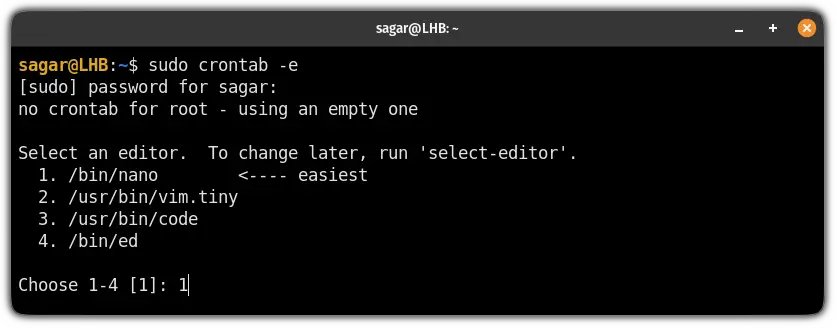
Once done, [go to the end of the file in nano using Alt + / and paste the following line into the file:
完成后,在 nano 中按 Alt + / 跳转至文件末尾,粘贴如下内容:
bash
0 0 * * * sudo find /tmp -type f ! -user root -atime +3 -deleteSave changes and that's it!
保存修改即可完成配置。
Did you know about the black hole of Linux filesystem?
你了解 Linux 文件系统中的"黑洞"吗?
I'm talking about the /dev/null directory here as whatever is sent there, can not be traced back! Want to know how it can be used? Here you have a detailed guide:
此处所指为 /dev/null 目录,所有写入该目录的内容均无法找回。如需了解其用法,可查阅详细指南。
I hope you will find this guide helpful. And if you have any questions or suggestions, leave a comment.
希望本指南对你有所帮助,如有疑问或建议可留言评论。
Understanding and Utilizing the /tmp Directory in Linux
理解与使用 Linux 中的 /tmp 目录
Last Updated: Dec 22, 2025
In the Linux operating system, the /tmp directory plays a crucial role. It is a standardized location where applications and system processes can store temporary files. These files are often short-lived, used for intermediate calculations, caching data during an operation, or as a workspace for running tasks. Understanding the /tmp directory is essential for system administrators, developers, and power users as it can impact system performance, security, and the proper functioning of applications.
在 Linux 操作系统中,/tmp 目录具有重要作用,是应用程序与系统进程存放临时文件的标准路径。这类文件通常生命周期较短,用于中间计算、操作过程中的数据缓存或任务运行的工作空间。理解 /tmp 目录对系统管理员、开发者与高级用户而言十分重要,其会影响系统性能、安全性与应用程序正常运行。
1. Fundamental Concepts of /tmp
1. /tmp 目录的基础概念
Location and Standardization
路径与标准化
The /tmp directory is a well-established part of the Linux Filesystem Hierarchy Standard (FHS). It is typically located at the root level of the filesystem, i.e., /tmp. This standardization ensures that applications across different Linux distributions can rely on a common location for storing temporary data.
/tmp 目录是 Linux 文件系统层次标准(FHS)的既定组成部分,通常位于文件系统根目录,即 /tmp。该标准化设定使不同 Linux 发行版的应用程序可依托统一路径存放临时数据。
File Lifespan
文件生命周期
Files stored in the /tmp directory are generally considered temporary. Most Linux distributions are configured to clean up the /tmp directory periodically. For example, some systems may delete files older than a certain time (e.g., 10 days) during system startup or through a cron job.
/tmp 目录内的文件均为临时文件,多数 Linux 发行版会定期清理该目录。例如部分系统会在启动时或通过 cron 任务删除超过指定时长(如 10 天)的文件。
Mounting and Storage
挂载与存储
The /tmp directory can be mounted as a separate filesystem. In some cases, it may be mounted as a tmpfs, which is a temporary filesystem stored in memory. This provides fast read and write access but has limited storage capacity based on the available system memory.
/tmp 目录可作为独立文件系统挂载,部分场景下会以 tmpfs 形式挂载,即存储于内存中的临时文件系统。该方式读写速度快,但存储容量受系统可用内存限制。
# Check if /tmp is a tmpfs
mount | grep /tmp
2. Usage Methods
2. 使用方法
Creating Temporary Files
创建临时文件
Applications can create temporary files in the /tmp directory using programming languages. Here is an example in Python:
应用程序可通过编程语言在 /tmp 目录创建临时文件,以下为 Python 示例:
import tempfile

# Create a temporary file in /tmp
with tempfile.NamedTemporaryFile(dir='/tmp') as temp_file:
temp_file.write(b'This is a temporary file.')
temp_file.seek(0)
print(temp_file.read())
Using /tmp in Shell Scripts
在 Shell 脚本中使用 /tmp
In shell scripts, you can use the /tmp directory to store intermediate results. For example:
在 Shell 脚本中,可使用 /tmp 目录存放中间结果,示例如下:
#!/bin/bash

# Create a temporary file in /tmp
temp_file="/tmp/my_temp_file.txt"
echo "This is a test" > $temp_file
cat $temp_file
rm $temp_file
3. Common Practices
3. 常规用法
Application-Specific Temporary Files
应用专属临时文件
Many applications use the /tmp directory to store their own temporary files. For example, web browsers may use it to cache downloaded files, and image editing tools may use it for intermediate processing.
诸多应用会使用 /tmp 目录存放自身临时文件,例如网页浏览器用于缓存下载文件,图像编辑工具用于中间处理。
System-Level Temporary Data
系统级临时数据
The system itself may use the /tmp directory for various purposes. For instance, when a user logs in via SSH, the system may create temporary files in /tmp to manage the session.
系统自身也会将 /tmp 目录用于多种场景,例如用户通过 SSH 登录时,系统会在 /tmp 中创建临时文件以管理会话。
Sharing Temporary Data
共享临时数据
Multiple processes can share temporary data stored in the /tmp directory. For example, if one script generates some data and another script needs to use it, they can both access the relevant files in /tmp.
多个进程可共享 /tmp 目录内的临时数据,例如一个脚本生成数据,另一脚本可直接访问 /tmp 内对应文件。
4. Best Practices
4. 最佳实践
Security Considerations
安全注意事项
-
File Permissions : When creating files in
/tmp, ensure that the file permissions are set appropriately. For example, if a file contains sensitive data, it should not be world-readable.
文件权限 :在/tmp中创建文件时需设置合理权限,包含敏感数据的文件不应设置为全局可读。Create a file with restricted permissions
touch /tmp/my_sensitive_file
chmod 600 /tmp/my_sensitive_file -
Avoiding Name Collisions : Use unique names for temporary files. You can use tools like
mktempto generate unique filenames.
避免名称冲突 :为临时文件使用唯一名称,可通过mktemp等工具生成唯一文件名。temp_file=$(mktemp /tmp/my_temp_file.XXXXXX)
Performance Optimization
性能优化
-
Using
tmpfs: If possible, use atmpfsfor the/tmpdirectory. This can significantly improve performance as disk I/O is replaced with memory-based operations.
使用tmpfs:条件允许时为/tmp目录使用tmpfs,以内存操作替代磁盘 I/O,可显著提升性能。Mount /tmp as tmpfs
sudo mount -t tmpfs -o size=512M tmpfs /tmp
Cleanup
清理操作
- Explicit Cleanup : In your scripts and applications, make sure to clean up the temporary files you create. This helps in conserving disk space and preventing clutter.
显式清理:在脚本与应用程序中及时清理创建的临时文件,以节省磁盘空间、避免文件冗余。
Conclusion
总结
The /tmp directory in Linux is a vital component that provides a standardized location for storing temporary data. By understanding its fundamental concepts, usage methods, common practices, and best practices, users can make the most of this directory while ensuring system performance and security. Whether you are a developer writing applications or a system administrator managing a Linux server, proper utilization of the /tmp directory is essential for the smooth operation of the system.
Linux 中的 /tmp 目录是存放临时数据的标准路径,属于系统重要组成部分。理解其基础概念、使用方式、常规用法与最佳实践,可在保障系统性能与安全的前提下充分利用该目录。无论是开发应用的开发者,还是管理 Linux 服务器的系统管理员,合理使用 /tmp 目录对系统平稳运行均十分重要。
References
参考资料
- Linux Filesystem Hierarchy Standard (FHS): https://refspecs.linuxfoundation.org/FHS_3.0/fhs/index.html
- Python
tempfiledocumentation: https://docs.python.org/3/library/tempfile.html - Linux
mktempman page: https://man7.org/linux/man-pages/man1/mktemp.1.html
Using /tmp/ and /var/tmp/ Safely
安全使用 /tmp/ 与 /var/tmp/ 目录
/tmp/ and /var/tmp/ are two world-writable directories Linux systems provide for temporary files. The former is typically on tmpfs and thus backed by RAM/swap, and flushed out on each reboot. The latter is typically a proper, persistent file system, and thus backed by physical storage. This means:
/tmp/ 与 /var/tmp/ 是 Linux 系统提供的两个全局可写临时文件目录。前者通常基于 tmpfs,依托内存与交换分区存储,每次重启后清空;后者为常规持久化文件系统,依托物理存储设备。具体含义如下:
-
/tmp/should be used for smaller, size-bounded files only;/var/tmp/should be used for everything else.
/tmp/仅适用于小型、容量受限的文件,其余场景使用/var/tmp/。 -
Data that shall survive a boot cycle shouldn't be placed in
/tmp/.需在重启后保留的数据不应存放于
/tmp/。
If the $TMPDIR environment variable is set, use that path, and neither use /tmp/ nor /var/tmp/ directly.
若已设置 $TMPDIR 环境变量,应使用该路径,而非直接使用 /tmp/ 或 /var/tmp/。
See file-hierarchy(7) for details about these two (and most other) directories of a Linux system.
有关这两个目录及 Linux 系统多数其他目录的详情,可查阅对应文档。
Common Namespace
公共命名空间
Note that /tmp/ and /var/tmp/ each define a common namespace shared by all local software. This means guessable file or directory names below either directory directly translate into a 🚨 Denial-of-Service (DoS) 🚨 vulnerability or worse: if some software creates a file or directory /tmp/foo then any other software that wants to create the same file or directory /tmp/foo either will fail (as the file already exists) or might be tricked into using untrusted files. Hence: do not use guessable names in /tmp/ or /var/tmp/ --- if you do you open yourself up to a local DoS exploit or worse. (You can get away with using guessable names, if you pre-create subdirectories below /tmp/ for them, like X11 does with /tmp/.X11-unix/ through tmpfiles.d/ drop-ins. However this is not recommended, as it is fully safe only if these directories are pre-created during early boot, and thus problematic if package installation during runtime is permitted.)
注意 /tmp/ 与 /var/tmp/ 均为本地所有软件共享的公共命名空间,使用可猜测的文件或目录名会直接引发拒绝服务(DoS)漏洞,甚至更严重的问题:若某软件创建 /tmp/foo 文件或目录,其他软件尝试创建同名对象时会失败,或被诱导使用不可信文件。因此不应在两个目录中使用可猜测名称,否则会面临本地 DoS 攻击风险。(可通过预创建子目录规避该问题,例如 X11 通过 tmpfiles.d 配置创建 /tmp/.X11-unix/,但该方式仅在系统启动早期创建目录时安全,运行期间安装软件包时存在隐患。)
To protect yourself against these kinds of attacks Linux provides a couple of APIs that help you avoiding guessable names. Specifically:
Linux 提供多项 API 以防范此类攻击,避免使用可猜测名称,具体如下:
- Use
mkstemp()(POSIX),mkostemp()(glibc),mkdtemp()(POSIX),tmpfile()(C89) - Use
open()withO_TMPFILE(Linux) memfd_create()(Linux; this doesn't bother with/tmp/or/var/tmp/at all, but uses the same RAM/swap backing astmpfsuses, hence is very similar to/tmp/semantics.)
memfd_create()(Linux 系统专用;该函数完全不依赖/tmp/或/var/tmp/,而是采用与tmpfs相同的内存/交换分区作为后端存储,因此其行为逻辑与/tmp/高度相似。)
For system services systemd provides the PrivateTmp= boolean setting. If turned on for a service (👍 which is highly recommended), /tmp/ and /var/tmp/ are replaced by private sub-directories, implemented through Linux file system namespacing and bind mounts. This means from the service's point of view /tmp/ and /var/tmp/ look and behave like they normally do, but in reality they are private sub-directories of the host's real /tmp/ and /var/tmp/, and thus not system-wide locations anymore, but service-specific ones. This reduces the surface for local DoS attacks substantially. While it is recommended to turn this option on, it's highly recommended for applications not to rely on this solely to avoid DoS vulnerabilities, because this option is not available in environments where file system namespaces are prohibited, for example in certain container environments. This option is hence an extra line of defense, but should not be used as an excuse to rely on guessable names in /tmp/ and /var/tmp/. When this option is used, the per-service temporary directories are removed whenever the service shuts down, hence the lifecycle of temporary files stored in it is substantially different from the case where this option is not used. Also note that some applications use /tmp/ and /var/tmp/ for sharing files and directories. If this option is turned on this is not possible anymore as after all each service gets its own instances of both directories.
systemd 为系统服务提供 PrivateTmp= 布尔型配置项,启用该配置(推荐操作)后,会通过 Linux 文件系统命名空间与绑定挂载,为 /tmp/ 与 /var/tmp/ 创建私有子目录。从服务视角来看,两个目录的表现与常规一致,实际为宿主真实目录的私有子目录,不再是系统全局路径,而是服务专属路径,可大幅降低本地 DoS 攻击风险。建议启用该配置,但应用程序不应仅依赖该配置规避 DoS 漏洞,该配置在禁用文件系统命名空间的环境(如部分容器环境)中不可用。该配置属于额外防护手段,不能成为在目录中使用可猜测名称的理由。启用该配置后,服务关闭时会删除对应私有临时目录,临时文件生命周期与未启用时存在明显差异。此外部分应用通过两个目录共享文件与目录,启用该配置后该功能无法实现,各服务拥有独立目录实例。
Automatic Clean-Up
自动清理
By default, systemd-tmpfiles will apply a concept of ⚠️ "ageing" to all files and directories stored in /tmp/ and /var/tmp/. This means that files that have neither been changed nor read within a specific time frame are automatically removed in regular intervals. (This concept is not new to systemd-tmpfiles, it's inherited from previous subsystems such as tmpwatch.) By default files in /tmp/ are cleaned up after 10 days, and those in /var/tmp after 30 days.
默认情况下,systemd-tmpfiles 会对 /tmp/ 与 /var/tmp/ 内的所有文件和目录应用"老化"机制,即定期删除指定时长内未修改、未读取的文件。(该机制并非 systemd-tmpfiles 独有,继承自 tmpwatch 等早期子系统。)默认 /tmp/ 内文件 10 天后清理,/var/tmp 内文件 30 天后清理。
This automatic clean-up is important to ensure disk usage of these temporary directories doesn't grow without bounds, even when programs abort unexpectedly or otherwise don't clean up the temporary files/directories they create. On the other hand it creates problems for long-running software that does not expect temporary files it operates on to be suddenly removed. There are a couple of strategies to avoid these issues:
自动清理机制可避免临时目录磁盘占用无限制增长,即便程序异常终止或未清理创建的临时文件/目录也可生效。但该机制会对长期运行软件造成影响,此类软件不希望操作的临时文件被突然删除,可通过以下策略规避问题:
-
Make sure to always keep a file descriptor to the temporary files you operate on open, and only access the files through them. This way it doesn't matter whether the files have been unlinked from the file system: as long as you have the file descriptor open you can still access the file for both reading and writing. When operating this way it is recommended to delete the files right after creating them to ensure that on unexpected program termination the files or directories are implicitly released by the kernel.
始终保持操作的临时文件文件描述符处于打开状态,仅通过文件描述符访问文件。即便文件从文件系统解除链接,只要文件描述符打开,仍可正常读写。建议创建文件后立即删除,确保程序异常终止时内核隐式释放文件或目录。
-
🥇 Use
memfd_create()orO_TMPFILE. This is an extension of the suggestion above: files created this way are never linked under a filename in the file system. This means they are not subject to ageing (as they come unlinked out of the box), and there's no time window where a directory entry for the file exists in the file system, and thus behaviour is fully robust towards unexpected program termination as there are never files on disk that need to be explicitly deleted.优先使用
memfd_create()或O_TMPFILE。该方式为上述建议的延伸,创建的文件不会在文件系统中关联文件名,不受老化机制影响,且不存在目录项存在的时间窗口,程序异常终止时无需手动删除磁盘文件,稳定性更强。 -
🥇 Take an exclusive or shared BSD file lock (
flock()) on files and directories you don't want to be removed. This is particularly interesting when operating on more than a single file, or on file nodes that are not plain regular files, for example when extracting a tarball to a temporary directory. The ageing algorithm will skip all directories (and everything below them) and files that are locked through a BSD file lock. As BSD file locks are automatically released when the file descriptor they are taken on is closed, and all file descriptors opened by a process are implicitly closed when it exits, this is a robust mechanism that ensures all temporary files are subject to ageing when the program that owns them dies, but not while it is still running. Use this when decompressing tarballs that contain files with old modification/access times, as extracted files are otherwise immediately candidates for deletion by the ageing algorithm. Theflocktool of theutil-linuxpackages makes this concept available to shell scripts.优先为不希望删除的文件与目录添加 BSD 排他锁或共享锁。该方式适用于多文件操作或非普通文件节点操作场景,例如将压缩包解压至临时目录。老化算法会跳过所有加锁的目录(含子目录内容)与文件。BSD 文件锁会在文件描述符关闭时自动释放,进程退出时会隐式关闭所有打开的文件描述符,该机制可确保程序运行时临时文件不被清理,程序终止后纳入老化范围。解压包含旧修改/访问时间文件的压缩包时建议使用该方式,否则解压文件会立即成为老化删除对象。
util-linux包中的flock工具可在 Shell 脚本中实现该功能。 -
Keep the access time of all temporary files created current. In regular intervals, use
utimensat()or a related call to update the access time ("atime") of all files that shall be kept around. Since the ageing algorithm looks at the access time of files when deciding whether to delete them, it's sufficient to update their access times in sufficiently frequent intervals to ensure the files are not deleted. Since most applications (and tools such asls) primarily care for the modification time (rather than the access time) using the access time for this purpose should be acceptable.保持创建的所有临时文件访问时间为最新状态,定期通过
utimensat()等函数更新需保留文件的访问时间(atime)。老化算法依据文件访问时间判断是否删除,频繁更新访问时间即可避免文件被删除。多数应用(如ls工具)主要关注文件修改时间而非访问时间,因此该方式具备可行性。 -
Set the "sticky" bit on regular files. The ageing logic skips deletion of all regular files that have the sticky bit (
chmod +t) set. This is honoured for regular files only however, and has no effect on directories as the sticky bit has a different meaning for them.为普通文件设置粘滞位。老化逻辑会跳过所有设置粘滞位(
chmod +t)的普通文件,该设置仅对普通文件生效,对目录无作用,因粘滞位对目录有其他含义。 -
Don't use
/tmp/or/var/tmp/, but use your own sub-directory under/run/or$XDG_RUNTIME_DIR(the former if privileged, the latter if unprivileged), or/var/lib/and~/.config/(similar, but with persistency and suitable for larger data). The two temporary directories/tmp/and/var/tmp/come with the implicit clean-up semantics described above. When this is not desired, it's possible to create private per-package runtime or state directories, and place all temporary files there. However, do note that this means opting out of any kind of automatic clean-up, and it is hence particularly essential that the program cleans up generated files in these directories when they are no longer needed, in particular when the program dies unexpectedly. Note: this strategy is only really suitable for packages that operate in a "system wide singleton" fashion with "long" persistence of its data or state, i.e. as opposed to programs that run in multiple parallel or short-living instances. This is because a private directory under/run(and the other mentioned directories) is itself system and package specific singleton with greater longevity.不使用
/tmp/或/var/tmp/,转而在/run/(特权用户)或$XDG_RUNTIME_DIR(非特权用户)下创建专属子目录,或使用/var/lib/与~/.config/(具备持久化特性,适用于大容量数据)。两个临时目录自带上述自动清理语义,无需该特性时可创建软件包专属运行时或状态目录,存放所有临时文件。该方式会脱离自动清理机制,程序需在文件不再需要时及时清理,尤其在程序异常终止时。该策略仅适用于系统全局单实例、数据或状态长期持久化的软件包,不适用于多并行实例或短生命周期程序,因/run/下的私有目录为系统与软件包专属单实例,生命周期更长。 -
Exclude your temporary files from clean-ups via a
tmpfiles.d/drop-in (which includes drop-ins in the runtime-only directory/run/tmpfiles.d/). Thex/Xline types may be used to exclude files matching the specified globbing patterns from the ageing logic. If this is used, automatic clean-up is not done for matching files and directory, and much like with the previous option it's hence essential that the program generating these temporary files carefully removes the temporary files it creates again, and in particular so if it dies unexpectedly.通过
tmpfiles.d/配置(含/run/tmpfiles.d/运行时配置)将临时文件排除在清理范围外,可使用x/X类型配置项将匹配指定通配符模式的文件排除在老化逻辑外。使用该方式后,匹配文件与目录不会自动清理,程序需谨慎清理创建的临时文件,尤其在异常终止时。
🥇 The semantics of options 2 (in case you only deal with temporary files, not directories) and 3 (in case you deal with both) in the list above are in most cases the most preferable. It is thus recommended to stick to these two options.
多数场景下,方案 2(仅处理临时文件)与方案 3(同时处理文件与目录)为优选方案,推荐使用。
While the ageing logic is very useful as a safety concept to ensure unused files and directories are eventually removed a well written program avoids even creating files that need such a clean-up. In particular:
老化机制作为安全策略,可确保未使用文件与目录最终被清理,而设计合理的程序应避免创建需要此类清理的文件,具体方式如下:
- Use
memfd_create()orO_TMPFILEwhen creating temporary files.
创建临时文件时使用memfd_create()或O_TMPFILE。 unlink()temporary files right after creating them. This is very similar toO_TMPFILEbehaviour: consider deleting temporary files right after creating them, while keeping open a file descriptor to them. UnlikeO_TMPFILEthis method also works on older Linux systems and other OSes that do not implementO_TMPFILE.
创建临时文件后立即执行unlink(),该行为与O_TMPFILE类似,创建文件后删除并保持文件描述符打开。与O_TMPFILE不同,该方式适用于未实现O_TMPFILE的旧版 Linux 系统与其他操作系统。
Disk Quota
磁盘配额
Generally, files allocated from /tmp/ and /var/tmp/ are allocated from a pool shared by all local users. Moreover the space available in /tmp/ is generally more restricted than /var/tmp/. This means, that in particular in /tmp/ space should be considered scarce, and programs need to be prepared that no space is available. Essential programs might require a fallback logic using a different location for storing temporary files hence. Non-essential programs at least need to be prepared for ENOSPC errors and generate useful, actionable error messages.
通常 /tmp/ 与 /var/tmp/ 内的文件存储空间为本地所有用户共享,且 /tmp/ 可用空间比 /var/tmp/ 更受限。因此 /tmp/ 空间可视为稀缺资源,程序需应对空间不足的情况。核心程序需配置备用逻辑,切换至其他路径存放临时文件;非核心程序至少需处理 ENOSPC 错误并生成有效提示信息。
Some setups employ per-user quota on /var/tmp/ and possibly /tmp/, to make ENOSPC situations less likely, and harder to trigger from unprivileged users. However, in the general case no such per-user quota is implemented though, in particular not when tmpfs is used as backing file system, because --- even today --- tmpfs still provides no native quota support in the kernel.
部分环境会为 /var/tmp/ 与 /tmp/ 配置用户级配额,降低空间不足概率,防止非特权用户触发该问题。但多数场景下未配置用户级配额,尤其在 tmpfs 作为后端文件系统时,内核至今未提供 tmpfs 原生配额支持。
Early Boot Considerations
系统启动早期注意事项
Both /tmp/ and /var/tmp/ are not necessarily available during early boot, or --- if they are available early --- are not writable. This means software that is intended to run during early boot (i.e. before basic.target --- or more specifically local-fs.target --- is up) should not attempt to make use of either. Interfaces such as memfd_create() or files below a package-specific directory in /run/ are much better options in this case. (Note that some packages instead use /dev/shm/ for temporary files during early boot; this is not advisable however, as it offers no benefits over a private directory in /run/ as both are backed by the same concept: tmpfs. The directory /dev/shm/ exists to back POSIX shared memory (see shm_open() and related calls), and not as a place for temporary files. /dev/shm is problematic as it is world-writable and there's no automatic clean-up logic in place.)
系统启动早期,/tmp/ 与 /var/tmp/ 可能不可用,或可用但不可写。因此启动早期运行的软件(basic.target 或更具体的 local-fs.target 启动前)不应使用这两个目录,memfd_create() 或 /run/ 下软件包专属目录为更优选择。(部分软件包在启动早期使用 /dev/shm/ 存放临时文件,该方式不推荐,因其与 /run/ 私有目录均依托 tmpfs,无额外优势。/dev/shm/ 用于支撑 POSIX 共享内存,而非临时文件存储,且该目录全局可写、无自动清理机制,存在隐患。)
© systemd, 2025
Change the Default /tmp Directory to a User-Defined Path
将默认 /tmp 目录修改为用户自定义路径
Last updated: March 25, 2025
Written by: Hiks Gerganov
Reviewed by: Michal Aibin
1. Introduction
1. 简介
The Linux temporary directory follows the convention of UNIX in general and resides at /tmp , which is the standard temporary directory path in POSIX. While we can change its underlying partition, how we enforce a new temporary path depends on the context.
Linux 临时目录遵循 UNIX 通用惯例,路径为 /tmp,也是 POSIX 标准临时目录路径。可修改其底层分区,而指定新临时路径的方式取决于具体场景。
In this tutorial, we explore ways to change the Linux temporary directory path . First, we discuss a standard method to tell an application it should store its temporary data elsewhere. After that, we turn to two more direct methods for changing what and where /tmp is.
本教程将探讨修改 Linux 临时目录路径的方式,首先介绍告知应用程序切换临时数据存储路径的标准方法,随后介绍两种直接修改 /tmp 指向与实际位置的方式。
Importantly, we don't explicitly talk about the [Filesystem Hierarchy Standard (FHS) paths /var/tmp and /usr/tmp , although some of the methods discussed should work for them as well.
本文不专门讨论文件系统层次标准(FHS)中的 /var/tmp 与 /usr/tmp 路径,但部分方法同样适用于这两个目录。
We tested the code in this tutorial on Debian 11 (Bullseye) with GNU Bash 5.1.4. It should work in most POSIX-compliant environments.
本教程代码在 Debian 11(Bullseye)与 GNU Bash 5.1.4 环境下测试,适用于多数兼容 POSIX 的环境。
2. Temporary Directory Variables and Location
2. 临时目录变量与路径
The default Linux temporary directory path is /tmp . Still, we might be able to influence that in certain environments by setting variables in the shell.
Linux 默认临时目录路径为 /tmp,部分环境下可通过 Shell 设置变量修改该路径。
There are three main environment variables that often dictate the current path applications should use for temporary data :
通常有三个环境变量决定应用程序临时数据的存储路径:
- $TEMP
- $TMP
- $TMPDIR
Let's see which variables affect our environment by setting each with export and testing:
通过 export 分别设置变量并测试,观察其对环境的影响:
shell
$ export TMP=/home/baeldung/temp
$ mktemp
/tmp/tmp.nA4AHrA010
$ export TEMP=/home/baeldung/temp
$ mktemp
/tmp/tmp.klx300K667
$ export TMPDIR=/home/baeldung/temp
$ mktemp
/home/baeldung/temp/tmp.x666010MXU
Notably, **only the export of *KaTeX parse error: Undefined control sequence: \* at position 7: TMPDIR\̲*̲ changes the be...TMPDIR* 会改变 *mktemp* 命令的行为。
Actually, some interpreters, such as Python, employ all of the above to deduce a system's temporary directory. Yet, even Python defines a priority:
部分解释器(如 Python)会通过上述所有变量判断系统临时目录,且 Python 存在优先级顺序:
- $TMPDIR
- $TEMP
- $TMP
- /tmp
So, similar to the POSIX mktemp , the interpreter prioritizes KaTeX parse error: Undefined control sequence: \* at position 77: ...expected as **\\̲\*̲TMPDIR\* is in the POSIX standard(https://pubs.opengroup.org/onlinepubs/9699919799/basedefs/V1_chap08.html) * as well:
与 POSIX 标准的 mktemp 类似,解释器优先使用 *KaTeX parse error: Undefined control sequence: \* at position 29: ...量或默认路径。这符合预期,因 \̲*̲TMPDIR* 属于 POSIX 标准变量:
shell
TMPDIR
This variable shall represent a pathname of a directory
made available for programs that need a place to create
temporary files.
In other words, although Python is just an example, **some applications may employ *KaTeX parse error: Undefined control sequence: \* at position 5: TEMP\̲*̲ and \*TMP*, but most should check and adhere to *KaTeX parse error: Undefined control sequence: \* at position 7: TMPDIR\̲*̲ as the standar...TEMP* 与 *KaTeX parse error: Undefined control sequence: \* at position 4: TMP\̲*̲,但多数应用会检测并遵循 \*TMPDIR*,将其作为修改临时目录路径的标准方式。
Now, let's see what we can do about the applications that don't use any of the above.
接下来介绍针对不使用上述变量的应用程序的处理方式。
3. Change the Temporary Directory Location
3. 修改临时目录位置
Like other Linux filesystem objects, directories can be pointed to by [links. Although with potential side effects, we can even replace /tmp with a link, switching up the actual directory or the reference path.
与其他 Linux 文件系统对象相同,目录可通过链接指向其他路径。尽管存在潜在副作用,仍可将 /tmp 替换为链接,修改其实际目录或引用路径。
3.1. Link to /tmp
3.1. 链接至 /tmp
Of course, we can always link back to /tmp .
可创建指向 /tmp 的链接。
For example, an application may use */var/app/tmp* instead of the system's default temporary directory . In this case, we can avoid having to change environment variables by using ln:
例如某应用使用 */var/app/tmp* 而非系统默认临时目录,此时可通过 ln 命令避免修改环境变量:
shell
$ mv /var/app/tmp/* /tmp
$ rm --recursive --force /var/app/tmp
$ ln --symbolic /tmp /var/app/tmp
There are several steps to this process:
该过程包含多个步骤:
- move all data from /var/app/tmp to /tmp , being careful when replacing
将 /var/app/tmp 内所有数据移至 /tmp,注意覆盖操作 - remove /var/app/tmp
删除 /var/app/tmp - recreate /var/app/tmp as a symbolic link (symlink) to /tmp
将 /var/app/tmp 重新创建为指向 /tmp 的符号链接
This way, our application should be able to directly employ /tmp without further modifications. One main drawback of this method is the possibility of the application to delete the */var/app/tmp* directory and recreate it .
该方式可使应用直接使用 /tmp,无需额外修改。主要缺陷在于应用可能删除并重新创建 */var/app/tmp* 目录。
3.2. /tmp Link
3.2. /tmp 目录作为链接
Alternatively, we can [carefully delete */tmp* and recreate it as a link, which points elsewhere :
也可谨慎删除 */tmp*,并将其重新创建为指向其他路径的链接:
shell
$ mkdir /xtmp
$ chmod 1777 /xtmp
$ chown root:root /xtmp
$ cp /xtmp/* /tmp
$ rm --recursive --force /tmp
$ ln --symbolic /xtmp /tmp
This more complex process involves multiple commands:
该复杂流程包含多条命令:
-
create a new directory /xtmp
创建新目录 /xtmp
-
make the permissions of /xtmp like the [permissions as a temporary directory
为 /xtmp 设置临时目录标准权限
-
remove the original /tmp [(dangerous)
删除原 /tmp 目录(存在风险)
-
recreate /tmp as a symbolic link to /xtmp
将 /tmp 重新创建为指向 /xtmp 的符号链接
Still, there are several pitfalls to this approach:
该方式存在多项隐患:
-
/tmp is often a mount point for a separate partition, requiring further steps involving [*/etc/fstab*
/tmp 通常为独立分区挂载点,需修改 /etc/fstab 完成配置 -
/tmp must have the correct permissions to avoid issues
/tmp 需设置正确权限以避免异常 -
depending on the time the partition behind /xtmp is mounted, earlier boot services may fail
若 /xtmp 所属分区挂载时机较晚,启动早期服务可能运行失败
-
using a link instead of /tmp may cause problems for some applications
以链接替代 /tmp 可能导致部分应用出现问题
If we consider all of the above, this is still a viable solution.
综合考量上述因素后,该方式仍具备可行性。
4. Summary
4. 总结
In this article, we looked at changing the Linux temporary directory path.
本文介绍了修改 Linux 临时目录路径的多种方式。
In conclusion, as long as they check them, we can tell applications to use another path for storing temporary files via environment variables. Still, we always have the alternative of changing what points to /tmp and where /tmp itself points.
综上,若应用检测相关环境变量,可通过变量指定临时文件存储路径;也可通过修改链接指向,变更 /tmp 的引用对象与实际路径。
How to change default /tmp to /home/user/tmp
如何将默认 /tmp 目录修改为 /home/user/tmp
Is there an environment variable to set the temporary directory on debian based systems?
Debian 系系统中是否存在可设置临时目录的环境变量?
I have a java applet that uses that environement variable and it's getting confused when launching two instances of the same applet.
有一个 Java 小程序使用该环境变量,启动两个相同实例时会出现冲突。
edited Oct 9, 2009 at 22:31
Dennis Williamson
asked Oct 9, 2009 at 14:33
Disco
-- poige
Commented May 1, 2017 at 17:13
Answers
I am unsure if the java applet will actually look at the environment variables before it starts, but what you can do it edit /etc/profile and add the following lines:
不确定 Java 小程序启动时是否检测环境变量,可编辑 /etc/profile 并添加如下内容:
shell
if [[ -O /home/$USER/tmp && -d /home/$USER/tmp ]]; then
TMPDIR=/home/$USER/tmp
else
# You may wish to remove this line, it is there in case
# a user has put a file 'tmp' in there directory or a
rm -rf /home/$USER/tmp 2> /dev/null
mkdir -p /home/$USER/tmp
TMPDIR=$(mktemp -d /home/$USER/tmp/XXXX)
fi

TMP=$TMPDIR
TEMP=$TMPDIR

export TMPDIR TMP TEMP
To make it a true tmp directory (as in the files go away when the session is ended, you'll want to edit the user's .bash_logout as well as the skeleton .bash_logout (/etc/skel/.bash_logout) to include the following:
若要实现会话结束时删除文件的标准临时目录特性,需编辑用户 .bash_logout 与模板文件 /etc/skel/.bash_logout,添加如下内容:
if [ -O $TMPDIR && -d $TMPDIR ]; then
rm -rf $TMPDIR/*
fi
The logout portion is dangerous is the variable doesn't get set and your logged in as root! I wouldn't add this to the root account or anyone that is a member of the wheel group! Proceed at your own caution.
若变量未设置且以 root 登录,登出清理部分存在风险!不建议为 root 或 wheel 组用户添加该配置,操作需谨慎。
edited Feb 10, 2021 at 0:12
miku
answered Oct 9, 2009 at 15:00
TrueDuality
I wouldn't put the cleanup into .bash_logout at all - what happens if they open up two sessions and log out of one? Use tmpwatch.
不建议将清理逻辑写入 .bash_logout,若用户打开两个会话并登出其中一个会出现异常,推荐使用 tmpwatch。
-- MikeyB
Commented Oct 10, 2009 at 4:19
That is a much better cleanup solution, thanks for adding that.
这是更优的清理方案,感谢补充。
-- TrueDuality
Commented Oct 16, 2009 at 12:34
NB: the tmpwatch command does not exists on BSD (e.g. OSX) version of unix, for anyone going for portability. My CentOS boxes have it though.
注意:tmpwatch 命令在 BSD 系统(如 OSX)中不存在,CentOS 系统包含该命令。
-- Cometsong
Commented Nov 29, 2018 at 14:44
The file you are looking for is:
所需配置文件为:
/etc/environmentYou have to set the TEMP variable like:
需按如下方式设置 TEMP 变量:
TEMP=/home/user/tmpanswered Oct 9, 2009 at 14:59
cstamas
And even export TEMP=/home/user/tmp
还需执行 export TEMP=/home/user/tmp
-- Fedir RYKHTIK
Commented Jun 27, 2014 at 15:06
@Fedir that is in the shell, yes.
该操作在 Shell 中执行。
-- cstamas
Commented Jul 2, 2013 at 19:33
If you want /home/user/tmp to be cleaned on reboot, I suggest you add an @reboot job to the user's personal crontab.
若希望重启时清理 /home/user/tmp,建议在用户个人 crontab 中添加 @reboot 任务。
answered Oct 13, 2009 at 2:06
Teddy
When does /tmp get cleared?
/tmp 目录何时被清空?
I'm taking to putting various files in /tmp, and I wondered about the rules on deleting them?
我习惯将各类文件放入 /tmp,想了解其删除规则。
I'm imagining it's different for different distributions, and I'm particularly interested in Ubuntu and Fedora desktop versions.
不同发行版规则存在差异,重点关注 Ubuntu 与 Fedora 桌面版。
But a nice general way of finding out would be a great thing.
同时希望了解通用查询方式。
Even better would be a nice general way of controlling it! (Something like 'every day at 3 in the morning, delete any /tmp files older than 60 days, but don't clear the directory on reboot')
更希望掌握通用控制方式,例如每日凌晨 3 点删除 60 天前的 /tmp 文件,且重启时不清空目录。
edited Feb 8, 2018 at 12:33
asked Apr 6, 2012 at 15:09
John Lawrence Aspden
Related:
-- Ciro Santilli OurBigBook.com
Commented Apr 2, 2019 at 11:12
Answers
That depends on your distribution. On some systems, it's deleted only when booted; others have cron jobs deleting items older than n hours.
规则取决于发行版,部分系统仅在启动时删除,部分通过 cron 任务删除超过指定小时数的文件。
-
On Debian and derivatives
Debian 及其衍生版 -
On Debian and in general, on boot rules are defined in
/etc/default/rcS.在 Debian 系统中,启动相关规则通常定义在
/etc/default/rcS文件中。 -
On Ubuntu since version 15.10 and its derivatives: using
tmpfiles.d.
Ubuntu 15.10 及后续版本 :使用tmpfiles.d机制。 -
The default
tmp.confonly clears/tmpon boot.默认的
tmp.conf仅在系统启动时清理/tmp。 -
For more details, see this answer.
更多细节可参考该回答。
-
On Ubuntu 15.04 and before: using
tmpreaper
Ubuntu 15.04 及更早版本 :使用tmpreaper工具。 -
which gets called by
/etc/cron.daily,该工具由
/etc/cron.daily定时调用。 -
configured via
/etc/default/rcSand/etc/tmpreaper.conf.相关配置通过
/etc/default/rcS和/etc/tmpreaper.conf完成。 -
On distributions from Red Hat and its derivatives: by age
Red Hat 系列及其衍生版:按文件存活时长清理。 -
RHEL 7, 8 and others with SYSTEMD
RHEL 7、8 等使用 systemd 的系统。
-
configured via
/usr/lib/tmpfiles.d/tmp.conf,通过
/usr/lib/tmpfiles.d/tmp.conf进行配置。 -
called by
systemd-tmpfiles-clean.service.由
systemd-tmpfiles-clean.service服务执行。 -
RHEL 6
RHEL 6 系统。
-
used
/etc/cron.daily/tmpwatch.使用
/etc/cron.daily/tmpwatch实现定时清理。 -
On Gentoo :
Gentoo 系统: -
used
/etc/conf.d/bootmisc.相关配置位于
/etc/conf.d/bootmisc。
edited Apr 11, 2024 at 9:58
djdomi
answered Apr 6, 2012 at 15:12
kba
And regardless of when this happens, the only safe moment is generally on boot, right after mounting it, since running processes may have files locked there, and these should not be deleted.
无论清理时机如何,安全的操作时间通常为启动挂载目录后,运行中的进程可能锁定文件,此类文件不应删除。
-- adaptr
Commented Apr 6, 2012 at 15:14
On RedHat-like systems with systemd (centos7/rhel7), it's configured in /usr/lib/tmpfiles.d/tmp.conf. It's called by systemd's target systemd-tmpfiles-clean.service.
CentOS 7 / RHEL 7 等 systemd 类 Red Hat 系统,配置位于 /usr/lib/tmpfiles.d/tmp.conf,由 systemd-tmpfiles-clean.service 执行。
-- Franklin Piat
Commented Mar 13, 2015 at 12:06
On legacy Debian, you can consider tmpreaper package, it's forked version of tmpwatch.
旧版 Debian 可使用 tmpreaper 包,为 tmpwatch 的分支版本。
-- Věroš K.
Commented Oct 12, 2017 at 9:37
Ubuntu 19.04: cat: /etc/default/rcS: No such file or directory
Ubuntu 19.04 中不存在 /etc/default/rcS 文件。
-- user257904
Commented Oct 10, 2019 at 22:17
@Boris : answer is out-dated for ubuntu, see this answer on askubuntu
该回答对新版 Ubuntu 已过时,可查阅 askubuntu 对应解答。
-- bernard paulus
Commented Jun 2, 2020 at 14:18
On CentOS (and I assume Fedora), there's a job in /etc/cron.daily called tmpwatch. This runs /usr/sbin/tmpwatch, which will delete files that haven't been accessed in the specified number of hours, i.e., the default behavior is to examine the atime for the file to evaluate if it's been used recently.
CentOS(推测 Fedora 同理)的 /etc/cron.daily 中存在 tmpwatch 任务,执行 /usr/sbin/tmpwatch,删除指定小时数内未访问的文件,默认依据文件 atime 判断近期是否使用。
Other distros (and installations) may have /tmp mounted as tmpfs, which is an in-memory filesystem. This will get cleared on boot.
其他发行版或安装环境可能将 /tmp 挂载为 tmpfs 内存文件系统,重启时自动清空。
answered Apr 6, 2012 at 16:01
cjc
I don't have this on CentOS 7.4.
CentOS 7.4 中不存在该任务。
-- Kevin Lemaire
Commented Feb 15, 2018 at 11:06
@KevinLemaire The functionality was moved into a systemd service.
该功能已迁移至 systemd 服务。
-- cjc
Commented Feb 15, 2018 at 15:30
If you didn't find the tmpwatch file, you can download tmpwatch by using yum install tmpwatch
未找到 tmpwatch 文件可通过 yum install tmpwatch 安装。
-- Ng Sek Long
Commented Nov 12, 2018 at 8:18
Can I get tmpwatch on other distros? Sounds amazing. I'm on debian based distro
Debian 系系统能否使用 tmpwatch?
-- Jonathan
Commented May 14, 2019 at 22:40
sudo find /tmp -type f -atime +10 -delete will delete tmp files that haven't been accessed in 10 days, use with care
sudo find /tmp -type f -atime +10 -delete 可删除 10 天未访问的临时文件,谨慎使用。
-- Jonathan
Commented May 14, 2019 at 22:42
On Ubuntu 11.10 which I'm using, there's an [upstart script in /etc/init/mounted-tmp.conf. The start of it says this:
所用 Ubuntu 11.10 系统中,/etc/init/mounted-tmp.conf 包含 upstart 脚本,开头内容如下:
# mounted-tmp - Clean /tmp directory
#
# Cleans up the /tmp directory when it does not exist as a temporary
# filesystem.

description "Clean /tmp directory"

start on (mounted MOUNTPOINT=/tmp) or (mounted MOUNTPOINT=/usr)
You can read in more details, however in general /tmp is cleaned when it's either mounted or /usr is mounted. This regularly happens on boot, so this /tmp cleaning runs on every boot.
详情可查阅脚本,通常 /tmp 或 /usr 挂载时执行清理,该行为在启动时触发,因此每次重启均会清理 /tmp。
In /etc/default/rcS you have TMPTIME set, which is used in the above init script to feed the two find commands at its end - basically controlling file deletion based on their times (modified, changed, accessed).
/etc/default/rcS 中的 TMPTIME 参数,用于脚本末尾的两个 find 命令,依据文件修改、变更、访问时间控制删除。
answered Apr 6, 2012 at 15:31
Reference
- Everything Essential About the tmp Directory in Linux - 2023
https://linuxhandbook.com/tmp-directory/ - Using /tmp/ and /var/tmp/ Safely
https://systemd.io/TEMPORARY_DIRECTORIES/ - Understanding and Utilizing the
/tmpDirectory in Linux --- 2025
https://linuxvox.com/blog/tmp-linux/ - Change the Default /tmp Directory to a User-Defined Path | 2025
https://www.baeldung.com/linux/change-tmp-directory-path - linux - How to change default /tmp to /home/user/tmp - 2009
https://serverfault.com/questions/72955/how-to-change-default-tmp-to-home-user-tmp - linux - When does /tmp get cleared? - 2012
https://serverfault.com/questions/377348/when-does-tmp-get-cleared