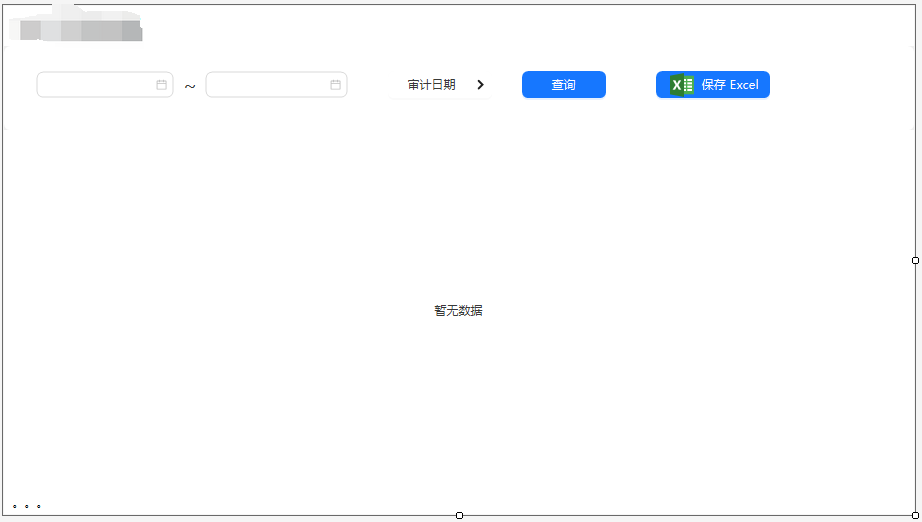
一个winform 典型的窗口页面,有日期选择,查询到table控件中,保存到excel.
cs
using AntdUI;
using ClosedXML.Excel;
using light.Models;
using System;
using System.Collections.Generic;
using System.ComponentModel;
using System.Data;
using System.Drawing;
using System.Reflection;
using System.Text;
using System.Windows.Forms;
using static System.Windows.Forms.VisualStyles.VisualStyleElement;

namespace light.Forms
{
    public partial class A07 : UserControl
    {
        List<light.Models.A07> TableList = new List<light.Models.A07>();

        public A07()
        {
            InitializeComponent();


            table1.Columns.Add((new AntdUI.Column("ColNumber", "行号") { Render = (row, data, index) => index + 1 }).SetWidth("auto").SetAlign());
            table1.Columns.Add(new AntdUI.Column("Id", "主键").SetWidth("auto").SetAlign());
            table1.Columns.Add(new AntdUI.Column("StoreName", "店名").SetWidth("auto").SetAlign());
            table1.Columns.Add(new AntdUI.Column("RechargeAmount", "充值金额").SetWidth("auto").SetAlign());
            table1.Columns.Add(new AntdUI.Column("SalesCompanyAffiliated", "销售公司").SetWidth("auto").SetAlign());
            table1.Columns.Add(new AntdUI.Column("StoreCode", "店代码").SetWidth("auto").SetAlign());
            table1.Columns.Add(new AntdUI.Column("AuditDate", "审计日期").SetWidth("auto").SetAlign());
            table1.Columns.Add(new AntdUI.Column("VehicleModel", "车型").SetWidth("auto").SetAlign());

            table1.RowHeight = 22;
            table1.Bordered = true;
            table1.ScrollBar.SIZE = 20;
            table1.ScrollBar.SIZE_BAR = 12;


            datePicker1.Value = DateTime.Now.Date;
            datePicker2.Value = DateTime.Now.Date;

            dropdown1.SelectedValue = "审计日期";  //默认值

            MT.SaveLog("A07", "启动", "", "");

        }

        private void button1_Click(object sender, EventArgs e)
        {


            if (dropdown1.SelectedValue.Equals("审计日期"))
            {
                TableList = MT.db.A07s
                   .Where(p => p.AuditDate.Value.Date >= datePicker1.Value)
                   .Where(p => p.AuditDate.Value.Date <= datePicker2.Value).ToList();

            }


            table1.DataSource = TableList;

            downtxt.Text = "总条数:" + TableList.Count().ToString();
        }

        private void dropdown1_SelectedValueChanged(object sender, ObjectNEventArgs e)
        {
            dropdown1.Text = dropdown1.SelectedValue.ToString();
        }


        //下载excel按钮
        private void button2_Click(object sender, EventArgs e)
        {
            SaveFileDialog dialog = new SaveFileDialog();

            // 设置对话框的属性
            dialog.InitialDirectory = "D:\\"; // 设置初始目录
            dialog.Filter = "EXCEL文件 (*.xlsx)|*.xlsx|所有文件 (*.*)|*.*"; // 设置文件过滤器
            dialog.FilterIndex = 1; // 设置默认的文件过滤器索引
            dialog.RestoreDirectory = true; // 设置在关闭对话框前还原目录

            if (dialog.ShowDialog() == DialogResult.OK) // 显示对话框
            {
                Task task = Task.Run(() => save_excel(dialog.FileName));
            }

            MT.SaveLog("A07", "下载", "", "");
        }


        //下载excel函数
        void save_excel(string file)
        {
            try
            {
                using (var workbook = new XLWorkbook())
                {
                    var worksheet = workbook.Worksheets.Add("Sheet1");
                    //写表头
                    worksheet.Cell(1, 1).Value = "行号";
                    worksheet.Cell(1, 2).Value = "主键";
                    worksheet.Cell(1, 3).Value = "店名";
                    worksheet.Cell(1, 4).Value = "充值金额";
                    worksheet.Cell(1, 5).Value = "销售公司";
                    worksheet.Cell(1, 6).Value = "店代码";
                    worksheet.Cell(1, 7).Value = "审计日期";
                    worksheet.Cell(1, 8).Value = "车型";

                    var properties = typeof(light.Models.A07).GetProperties(BindingFlags.Public | BindingFlags.Instance);

                    for (int row = 0; row < TableList.Count; row++)
                    {
                        for (int col = 0; col < properties.Length; col++)
                        {
                            var value = properties[col].GetValue(TableList[row], null);

                            //行号和主键是数字,需要转换成数字格式,金额也是数字格式,其他的都是文本格式
                            if (col == 0)
                            {
                                worksheet.Cell(row + 2, col + 1).Value = Convert.ToInt32(row + 1);
                                worksheet.Cell(row + 2, col + 2).Value = Convert.ToInt32(value?.ToString() ?? "");
                            }
                            //金额
                            else if (col == 2) { worksheet.Cell(row + 2, col + 2).Value = Convert.ToDecimal(value?.ToString() ?? ""); }

                            //其它
                            else { worksheet.Cell(row + 2, col + 2).Value = value?.ToString() ?? ""; }

                        }
                    }

                    //   string tmp = "d:\\" + System.DateTime.Now.ToString("yyyy-MM-dd HH-mm-ss") + " 开票比对后.xlsx";
                    worksheet.Columns().AdjustToContents(1, 10, 30);//自动调整宽度,从第一行开始,最小10字宽,最大30字宽
                    workbook.SaveAs(file);//存储路径
                    downtxt.Text = "文件保存到: " + file;


                }
            }
            catch (Exception ex)
            {
                MessageBox.Show(ex.Message);
            }
        }

        private void pageHeader1_Click(object sender, EventArgs e)
        {

        }
    }
}