目录
目标
初步掌握Chroma向量数据库的使用方法,包括增删改查及自定义嵌入模型。Chroma向量数据库有Client-Server Mode和Chroma Clients两种使用模式,这里以Chroma Clients模式作为我们的入门演示。
Chroma的版本
1.5.5
官网
 https://docs.trychroma.com/docs/overview/getting-started
安装Chroma
第一步:安装Chroma向量数据库。不能科学上网的同学可以使用国内镜像去安装。
bash
pip install chromadb -i http://mirrors.aliyun.com/pypi/simple/实战
最简实现
第一步:创建集合。
python
import chromadb

chroma_client = chromadb.Client()
# 创建集合
collection = chroma_client.create_collection(name="first_collection")第二步:往集合中添加数据。
python
# Chroma将自动存储文本并处理嵌入和索引
# 下面三条数据对应三个ID
collection.add(
    ids=["123456", "123457", "123458", "123459", "123460", "123461", "123462", "123463"],
    documents=[
        "我喜欢看金庸的武侠小说。",
        "今天的工作任务很多。",
        "人工智能非常难学。",
        "凡人修仙传动画片很好看。",
        "今天的股票大涨。",
        "国际油价持续上涨。",
        "金价持续上涨。",
        "乔丹是NBA当之无愧的第一人。"
    ]
)第三步:查询集合中的相关数据。这里注意:第一次使用Chroma时,程序会下载并安装all-MiniLM-L6-v2的嵌入模型。
python
#使用一组查询文本对集合进行查询,Chroma将返回最相似的n个结果。
results = collection.query(
    query_texts=["经济基础决定上层建筑。"],
    n_results=3
)
print(results)
新增数据
新增元数据( metadatas )
向量数据库并非只存向量,元数据也很重要。因为向量只解决相似度检索,元数据提升业务可控性。元数据的作用具体体现在这些场景:文档来源、业务分类、时间信息、权限与安全控制、约束检索范围(不同用户或公司输入相同的问题得到不同的结果)。如下面的代码中,元数据明确规定了不同角色之间的数据权限。
python
import chromadb

chroma_client = chromadb.Client()
# 创建集合
collection = chroma_client.create_collection(name="first_collection")
# Chroma将自动存储文本并处理嵌入和索引
# 下面三条数据对应三个ID
collection.add(
    ids=[
        "123456", "123457", "123458", "123459",
        "123460", "123461", "123462", "123463"
    ],
    documents=[
        "退款规则:电商订单在7天内可申请无理由退款。",
        "金融产品赎回规则:理财产品需T+2日到账,提前赎回可能产生手续费。",
        "员工请假制度:年假需提前3天申请,病假需提供医疗证明。",
        "服务器故障处理流程:P1级故障需10分钟内响应并启动应急预案。",
        "VIP客户退款政策:VIP用户可享受优先退款审核通道,24小时内处理。",
        "新加坡地区税务说明:GST税率为9%,适用于所有消费类交易。",
        "数据访问权限说明:敏感数据仅限admin角色访问,普通用户无权限。",
        "物流配送规则:标准配送3-5天,加急配送24小时内送达。"
    ],
    metadatas=[
        {
            "tenant_id": "shop_A",
            "business_unit": "ecommerce",
            "region": "SG",
            "language": "zh",
            "doc_type": "policy",
            "permission": "user"
        },
        {
            "tenant_id": "shop_A",
            "business_unit": "fintech",
            "region": "SG",
            "language": "zh",
            "doc_type": "policy",
            "permission": "user"
        },
        {
            "tenant_id": "company_hr",
            "business_unit": "hr",
            "region": "global",
            "language": "zh",
            "doc_type": "handbook",
            "permission": "employee"
        },
        {
            "tenant_id": "company_ops",
            "business_unit": "devops",
            "region": "global",
            "language": "zh",
            "doc_type": "runbook",
            "permission": "engineer"
        },
        {
            "tenant_id": "shop_A",
            "business_unit": "ecommerce",
            "region": "SG",
            "language": "zh",
            "doc_type": "policy",
            "permission": "vip"
        },
        {
            "tenant_id": "gov_sg",
            "business_unit": "tax",
            "region": "SG",
            "language": "zh",
            "doc_type": "regulation",
            "permission": "public"
        },
        {
            "tenant_id": "company_it",
            "business_unit": "security",
            "region": "global",
            "language": "zh",
            "doc_type": "policy",
            "permission": "admin"
        },
        {
            "tenant_id": "shop_A",
            "business_unit": "logistics",
            "region": "SG",
            "language": "zh",
            "doc_type": "policy",
            "permission": "user"
        }
    ]
)
新增外部向量
**新增操作必须提供文档、向量或两者都提供(如果文档存储在其他地方或者文档内容很大,推荐只添加嵌入和元数据,这里就不做演示了。)。**元数据是可选的。当只提供文档时,Chroma将使用集合的嵌入功能为生成向量。这一点在之前的最简配置已经得到了证实。如果我们使用其他方法得到了文档对应的向量,我们可以直接将这些向量保存进Chroma中,此时Chroma中的嵌入模型不会重新生成向量将它们覆盖。
python
import chromadb

chroma_client = chromadb.Client()
# 创建集合
collection = chroma_client.create_collection(name="first_collection")
# Chroma将自动存储文本并处理嵌入和索引
# 下面三条数据对应三个ID
collection.add(
    ids=["123456", "123457", "123458", "123459", "123460", "123461", "123462", "123463"],
    documents=[
        "我喜欢看金庸的武侠小说。",
        "今天的工作任务很多。",
        "人工智能非常难学。",
        "凡人修仙传动画片很好看。",
        "今天的股票大涨。",
        "国际油价持续上涨。",
        "金价持续上涨。",
        "乔丹是NBA当之无愧的第一人。"
    ],
    embeddings=[
        [1.1, 2.3, 3.2],
        [4.5, 6.9, 4.4],
        [1.1, 2.3, 3.2],
        [4.6, 6.3, 4.4],
        [2.0, 3.1, 5.6],
        [7.2, 1.4, 0.9],
        [3.3, 8.8, 2.1],
        [5.5, 2.2, 9.7]
    ]
)
# 使用一组查询文本对集合进行查询,Chroma将返回最相似的n个结果。
results = collection.query(
    # 因为collection中已手动写入3维embedding,
    # 若使用query_texts,Chroma会通过默认embedding_function生成384维向量,
    # 会导致维度不匹配错误。
    # 因此这里使用query_embeddings,直接提供同维度(3维)向量进行检索。
    query_embeddings=[[0.1, 0.2, 0.3]],
    n_results=3,
    include=["embeddings", "documents", "distances"]
)
print(results)
#向量维度
print(len(results["embeddings"][0][0]))
删除数据
根据ID删除数据
python
import chromadb

chroma_client = chromadb.Client()
# 创建集合
collection = chroma_client.create_collection(name="first_collection")
# Chroma将自动存储文本并处理嵌入和索引
# 下面三条数据对应三个ID
collection.add(
    ids=["123456", "123457", "123458", "123459", "123460", "123461", "123462", "123463"],
    documents=[
        "我喜欢看金庸的武侠小说。",
        "今天的工作任务很多。",
        "人工智能非常难学。",
        "凡人修仙传动画片很好看。",
        "今天的股票大涨。",
        "国际油价持续上涨。",
        "湖人总冠军。",
        "乔丹是NBA当之无愧的第一人。"
    ]
)
#使用一组查询文本对集合进行查询,Chroma将返回最相似的n个结果。
results = collection.query(
    query_texts=["谁是NBA第一人。"],
    n_results=3
)
print(results)

collection.delete(
    ids=["123463"],
)
results = collection.query(
    query_texts=["谁是NBA第一人。"],
    n_results=3
)
print(results)
根据where删除数据
python
import chromadb

chroma_client = chromadb.Client()
# 创建集合
collection = chroma_client.create_collection(name="first_collection")
# Chroma将自动存储文本并处理嵌入和索引
# 下面三条数据对应三个ID
collection.add(
    ids=[
        "123456", "123457", "123458", "123459",
        "123460", "123461", "123462", "123463"
    ],
    documents=[
        "退款规则:电商订单在7天内可申请无理由退款。",
        "金融产品赎回规则:理财产品需T+2日到账,提前赎回可能产生手续费。",
        "员工请假制度:年假需提前3天申请,病假需提供医疗证明。",
        "服务器故障处理流程:P1级故障需10分钟内响应并启动应急预案。",
        "VIP客户退款政策:VIP用户可享受优先退款审核通道,24小时内处理。",
        "新加坡地区税务说明:GST税率为9%,适用于所有消费类交易。",
        "数据访问权限说明:敏感数据仅限admin角色访问,普通用户无权限。",
        "物流配送规则:标准配送3-5天,加急配送24小时内送达。"
    ],
    metadatas=[
        {
            "tenant_id": "shop_A",
            "business_unit": "ecommerce",
            "region": "SG",
            "language": "zh",
            "doc_type": "policy",
            "permission": "user"
        },
        {
            "tenant_id": "shop_A",
            "business_unit": "fintech",
            "region": "SG",
            "language": "zh",
            "doc_type": "policy",
            "permission": "user"
        },
        {
            "tenant_id": "company_hr",
            "business_unit": "hr",
            "region": "global",
            "language": "zh",
            "doc_type": "handbook",
            "permission": "employee"
        },
        {
            "tenant_id": "company_ops",
            "business_unit": "devops",
            "region": "global",
            "language": "zh",
            "doc_type": "runbook",
            "permission": "engineer"
        },
        {
            "tenant_id": "shop_A",
            "business_unit": "ecommerce",
            "region": "SG",
            "language": "zh",
            "doc_type": "policy",
            "permission": "vip"
        },
        {
            "tenant_id": "gov_sg",
            "business_unit": "tax",
            "region": "SG",
            "language": "zh",
            "doc_type": "regulation",
            "permission": "public"
        },
        {
            "tenant_id": "company_it",
            "business_unit": "security",
            "region": "global",
            "language": "zh",
            "doc_type": "policy",
            "permission": "admin"
        },
        {
            "tenant_id": "shop_A",
            "business_unit": "logistics",
            "region": "SG",
            "language": "zh",
            "doc_type": "policy",
            "permission": "user"
        }
    ]
)
results = collection.query(
    query_texts=["电商订单在多少天内可申请无理由退款。"],
    n_results=1
)
print(results)

collection.delete(
    where={
        "tenant_id": "shop_A",
    }
)

results = collection.query(
    query_texts=["电商订单在多少天内可申请无理由退款。"],
    n_results=1
)
print(results)
修改数据
upsert表示有则覆盖无则插入;update则只做修改。
upsert方法
python
import chromadb

chroma_client = chromadb.Client()
# 创建集合
collection = chroma_client.create_collection(name="first_collection")
# Chroma将自动存储文本并处理嵌入和索引
# 下面三条数据对应三个ID
collection.add(
    ids=[
        "123456", "123457", "123458", "123459",
        "123460", "123461", "123462", "123463"
    ],
    documents=[
        "退款规则:电商订单在7天内可申请无理由退款。",
        "金融产品赎回规则:理财产品需T+2日到账,提前赎回可能产生手续费。",
        "员工请假制度:年假需提前3天申请,病假需提供医疗证明。",
        "服务器故障处理流程:P1级故障需10分钟内响应并启动应急预案。",
        "VIP客户退款政策:VIP用户可享受优先退款审核通道,24小时内处理。",
        "新加坡地区税务说明:GST税率为9%,适用于所有消费类交易。",
        "数据访问权限说明:敏感数据仅限admin角色访问,普通用户无权限。",
        "物流配送规则:标准配送3-5天,加急配送24小时内送达。"
    ],
    metadatas=[
        {
            "tenant_id": "shop_A",
            "business_unit": "ecommerce",
            "region": "SG",
            "language": "zh",
            "doc_type": "policy",
            "permission": "user"
        },
        {
            "tenant_id": "shop_A",
            "business_unit": "fintech",
            "region": "SG",
            "language": "zh",
            "doc_type": "policy",
            "permission": "user"
        },
        {
            "tenant_id": "company_hr",
            "business_unit": "hr",
            "region": "global",
            "language": "zh",
            "doc_type": "handbook",
            "permission": "employee"
        },
        {
            "tenant_id": "company_ops",
            "business_unit": "devops",
            "region": "global",
            "language": "zh",
            "doc_type": "runbook",
            "permission": "engineer"
        },
        {
            "tenant_id": "shop_A",
            "business_unit": "ecommerce",
            "region": "SG",
            "language": "zh",
            "doc_type": "policy",
            "permission": "vip"
        },
        {
            "tenant_id": "gov_sg",
            "business_unit": "tax",
            "region": "SG",
            "language": "zh",
            "doc_type": "regulation",
            "permission": "public"
        },
        {
            "tenant_id": "company_it",
            "business_unit": "security",
            "region": "global",
            "language": "zh",
            "doc_type": "policy",
            "permission": "admin"
        },
        {
            "tenant_id": "shop_A",
            "business_unit": "logistics",
            "region": "SG",
            "language": "zh",
            "doc_type": "policy",
            "permission": "user"
        }
    ]
)
results = collection.query(
    query_texts=["电商订单在多少天内可申请无理由退款。"],
    n_results=1,
    include=["metadatas", "documents", "distances"]
)
print(results)

collection.upsert(
    ids=["123456", ],
    documents=["退款规则:电商订单在30天内可申请无理由退款。", ],
)

results = collection.query(
    query_texts=["电商订单在多少天内可申请无理由退款。"],
    n_results=1,
    include=["metadatas", "documents", "distances"]
)
print(results)

collection.upsert(
    ids=["888888", ],
    documents=["游戏很好玩。", ],
)

results = collection.query(
    query_texts=["游戏好不好玩?"],
    n_results=1,
    include=["metadatas", "documents", "distances"]
)
print(results)
update方法
python
import chromadb

chroma_client = chromadb.Client()
# 创建集合
collection = chroma_client.create_collection(name="first_collection")
# Chroma将自动存储文本并处理嵌入和索引
# 下面三条数据对应三个ID
collection.add(
    ids=[
        "123456", "123457", "123458", "123459",
        "123460", "123461", "123462", "123463"
    ],
    documents=[
        "退款规则:电商订单在7天内可申请无理由退款。",
        "金融产品赎回规则:理财产品需T+2日到账,提前赎回可能产生手续费。",
        "员工请假制度:年假需提前3天申请,病假需提供医疗证明。",
        "服务器故障处理流程:P1级故障需10分钟内响应并启动应急预案。",
        "VIP客户退款政策:VIP用户可享受优先退款审核通道,24小时内处理。",
        "新加坡地区税务说明:GST税率为9%,适用于所有消费类交易。",
        "数据访问权限说明:敏感数据仅限admin角色访问,普通用户无权限。",
        "物流配送规则:标准配送3-5天,加急配送24小时内送达。"
    ],
    metadatas=[
        {
            "tenant_id": "shop_A",
            "business_unit": "ecommerce",
            "region": "SG",
            "language": "zh",
            "doc_type": "policy",
            "permission": "user"
        },
        {
            "tenant_id": "shop_A",
            "business_unit": "fintech",
            "region": "SG",
            "language": "zh",
            "doc_type": "policy",
            "permission": "user"
        },
        {
            "tenant_id": "company_hr",
            "business_unit": "hr",
            "region": "global",
            "language": "zh",
            "doc_type": "handbook",
            "permission": "employee"
        },
        {
            "tenant_id": "company_ops",
            "business_unit": "devops",
            "region": "global",
            "language": "zh",
            "doc_type": "runbook",
            "permission": "engineer"
        },
        {
            "tenant_id": "shop_A",
            "business_unit": "ecommerce",
            "region": "SG",
            "language": "zh",
            "doc_type": "policy",
            "permission": "vip"
        },
        {
            "tenant_id": "gov_sg",
            "business_unit": "tax",
            "region": "SG",
            "language": "zh",
            "doc_type": "regulation",
            "permission": "public"
        },
        {
            "tenant_id": "company_it",
            "business_unit": "security",
            "region": "global",
            "language": "zh",
            "doc_type": "policy",
            "permission": "admin"
        },
        {
            "tenant_id": "shop_A",
            "business_unit": "logistics",
            "region": "SG",
            "language": "zh",
            "doc_type": "policy",
            "permission": "user"
        }
    ]
)
results = collection.query(
    query_texts=["电商订单在多少天内可申请无理由退款。"],
    n_results=1,
    include=["metadatas", "documents", "distances"]
)
print(results)

collection.update(
    ids=["123456", ],
    documents=["退款规则:电商订单在30天内可申请无理由退款。", ],
)

results = collection.query(
    query_texts=["电商订单在多少天内可申请无理由退款。"],
    n_results=1,
    include=["metadatas", "documents", "distances"]
)
print(results)

collection.update(
    ids=["888888", ],
    documents=["张三的爱好是打篮球。", ],
)

results = collection.query(
    query_texts=["张三的爱好是什么?"],
    n_results=1,
    include=["metadatas", "documents", "distances"]
)
print(results)
自定义嵌入模型
适配器类
python
import requests

class MyOllamaEmbeddingFunction:
    def __init__(self, model="qwen3-embedding:8b"):
        self.model = model
        self.url = "http://localhost:11434/api/embeddings"
        self.session = requests.Session()

    def _embed(self, texts):
        embeddings = []
        for text in texts:
            res = self.session.post(self.url, json={
                "model": self.model,
                "prompt": text
            })
            embeddings.append(res.json()["embedding"])
        return embeddings

    #给 add 用
    def embed_documents(self, input):
        return self._embed(input)

    #给 query 用
    def embed_query(self, input):
        return self._embed(input)

    #为兼容旧接口(可选)
    def __call__(self, input):
        return self._embed(input)
测试
python
import chromadb

from chroma_test.MyOllamaEmbeddingFunction import MyOllamaEmbeddingFunction

client = chromadb.Client()

embedding_fn = MyOllamaEmbeddingFunction()

collection = client.create_collection(
    name="rag_collection",
    embedding_function=embedding_fn
)

collection.add(
    ids=[
        "123456", "123457", "123458", "123459",
        "123460", "123461", "123462", "123463"
    ],
    documents=[
        "退款规则:电商订单在7天内可申请无理由退款。",
        "金融产品赎回规则:理财产品需T+2日到账,提前赎回可能产生手续费。",
        "员工请假制度:年假需提前3天申请,病假需提供医疗证明。",
        "服务器故障处理流程:P1级故障需10分钟内响应并启动应急预案。",
        "VIP客户退款政策:VIP用户可享受优先退款审核通道,24小时内处理。",
        "新加坡地区税务说明:GST税率为9%,适用于所有消费类交易。",
        "数据访问权限说明:敏感数据仅限admin角色访问,普通用户无权限。",
        "物流配送规则:标准配送3-5天,加急配送24小时内送达。"
    ],
    metadatas=[
        {
            "tenant_id": "shop_A",
            "business_unit": "ecommerce",
            "region": "SG",
            "language": "zh",
            "doc_type": "policy",
            "permission": "user"
        },
        {
            "tenant_id": "shop_A",
            "business_unit": "fintech",
            "region": "SG",
            "language": "zh",
            "doc_type": "policy",
            "permission": "user"
        },
        {
            "tenant_id": "company_hr",
            "business_unit": "hr",
            "region": "global",
            "language": "zh",
            "doc_type": "handbook",
            "permission": "employee"
        },
        {
            "tenant_id": "company_ops",
            "business_unit": "devops",
            "region": "global",
            "language": "zh",
            "doc_type": "runbook",
            "permission": "engineer"
        },
        {
            "tenant_id": "shop_A",
            "business_unit": "ecommerce",
            "region": "SG",
            "language": "zh",
            "doc_type": "policy",
            "permission": "vip"
        },
        {
            "tenant_id": "gov_sg",
            "business_unit": "tax",
            "region": "SG",
            "language": "zh",
            "doc_type": "regulation",
            "permission": "public"
        },
        {
            "tenant_id": "company_it",
            "business_unit": "security",
            "region": "global",
            "language": "zh",
            "doc_type": "policy",
            "permission": "admin"
        },
        {
            "tenant_id": "shop_A",
            "business_unit": "logistics",
            "region": "SG",
            "language": "zh",
            "doc_type": "policy",
            "permission": "user"
        }
    ]
)

results = collection.query(
    query_texts=["请说一下退款规则"],
    n_results=1,
    include=["embeddings", "documents", "distances"]
)

print(results)
#向量维度
print(len(results["embeddings"][0][0]))

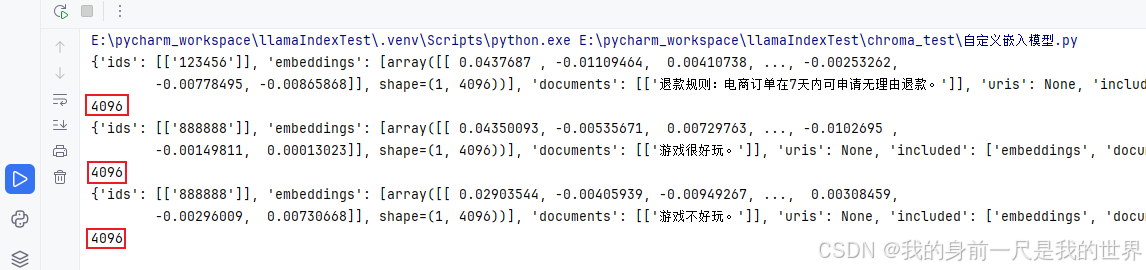
#验证修改操作是使用的Chroma默认的嵌入模型还是我们自定义的模型
collection.upsert(
    ids=["888888", ],
    documents=["游戏很好玩。", ],
)
results = collection.query(
    query_texts=["游戏好不好玩?"],
    n_results=1,
    include=["embeddings", "documents", "distances"]
)
print(results)
print(len(results["embeddings"][0][0]))

collection.update(
    ids=["888888", ],
    documents=["游戏不好玩。", ],
)
results = collection.query(
    query_texts=["游戏好不好玩?"],
    n_results=1,
    include=["embeddings", "documents", "distances"]
)
print(results)
print(len(results["embeddings"][0][0]))
验证结果