音乐节拍器应用
欢迎加入开源鸿蒙跨平台社区:
https://openharmonycrossplatform.csdn.net
一、项目概述
运行效果图
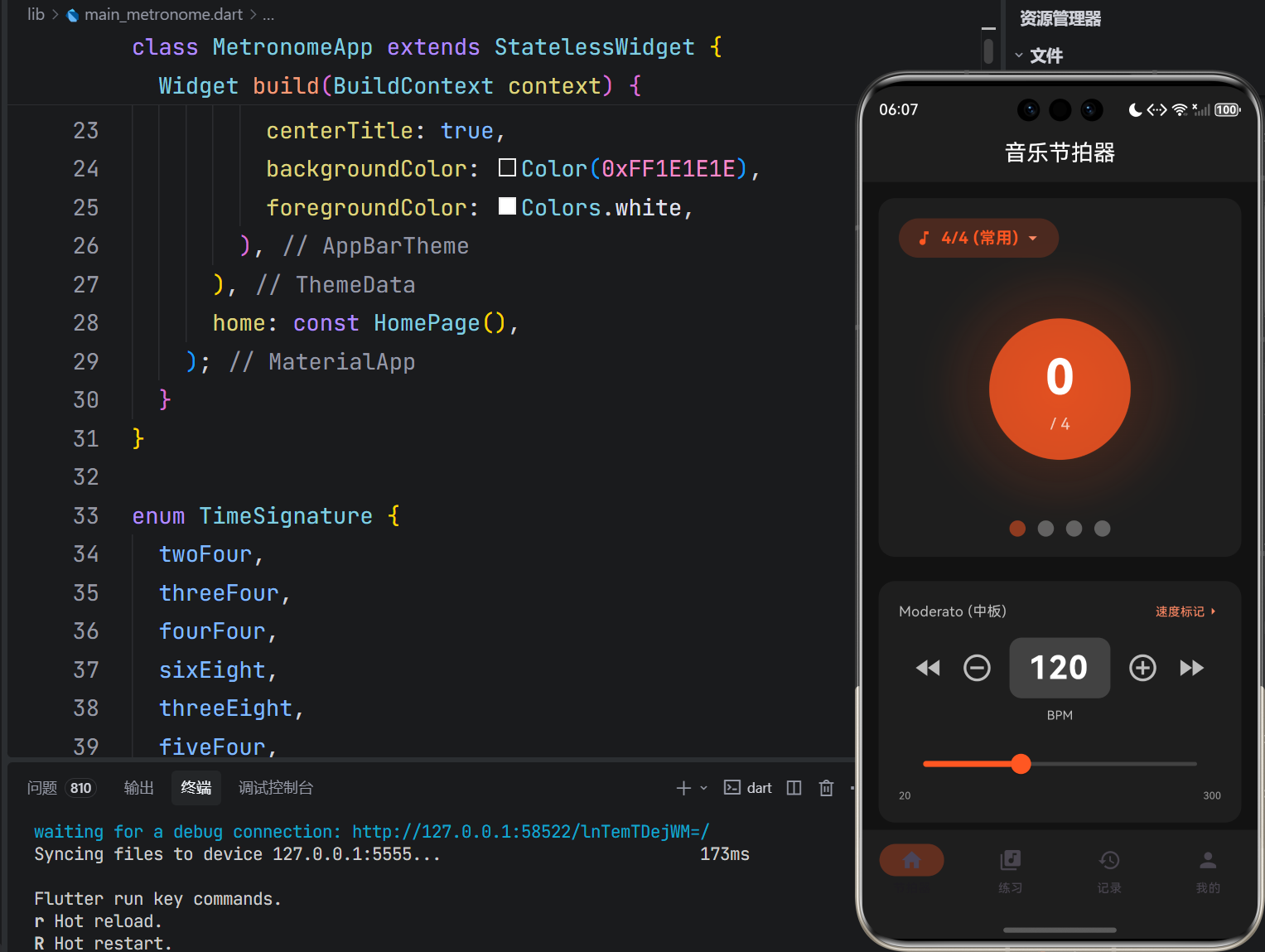
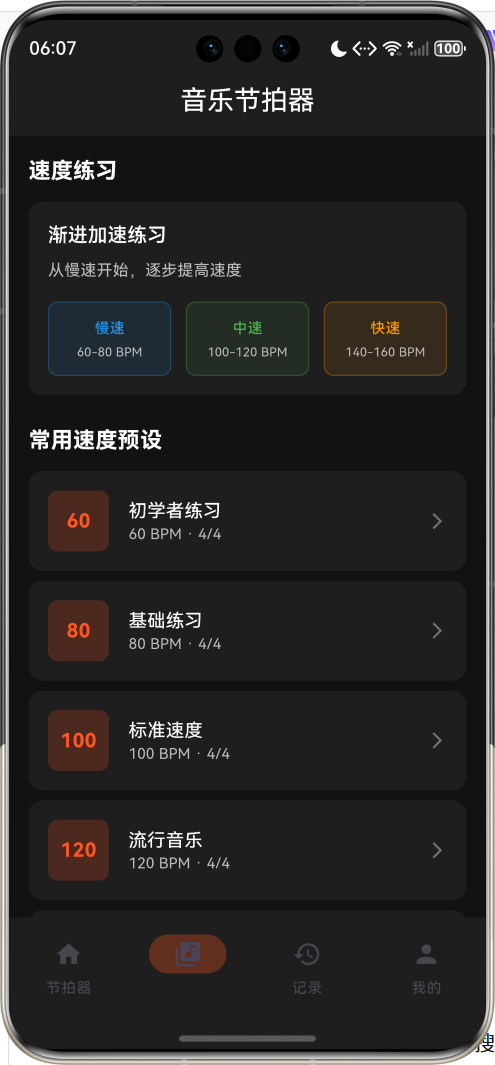
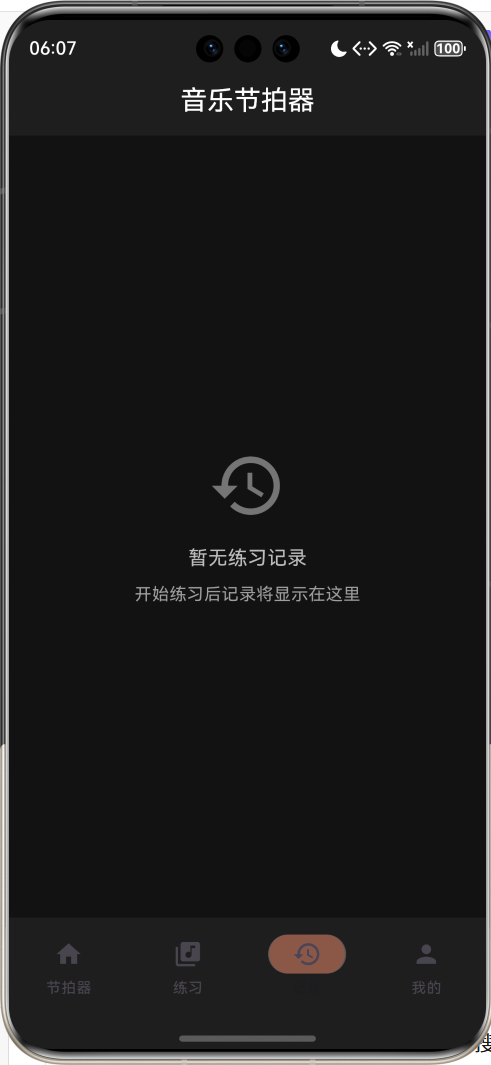
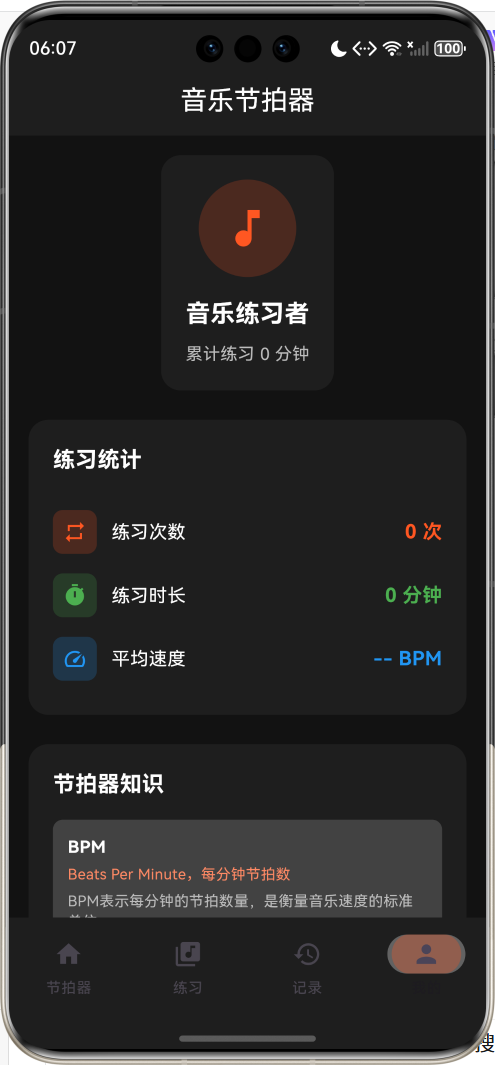
1.1 应用简介
音乐节拍器是一款专业的音乐练习工具,旨在帮助音乐学习者掌握稳定的节奏感。节奏是音乐的骨架,良好的节奏感是每一位音乐人必备的基本功。本应用提供精准的节拍提示、多种拍号支持和速度标记参考,适用于钢琴、吉他、架子鼓等各类乐器的练习场景。
从古典音乐到现代流行,从独奏到合奏,节拍器都是音乐练习中不可或缺的工具。本应用采用简洁直观的界面设计,配合视觉和触觉反馈,让用户能够专注于节奏训练,逐步建立起稳定的内心节拍感。
1.2 核心功能
| 功能模块 | 功能描述 | 实现方式 |
|---|---|---|
| 节拍器 | 精准节拍提示 | Timer + HapticFeedback |
| BPM调节 | 20-300 BPM范围 | Slider + 按钮调节 |
| 拍号设置 | 多种拍号支持 | 枚举 + 选择器 |
| 速度标记 | 意大利语速度术语 | 数据映射 + 范围判断 |
| 练习记录 | 练习时长统计 | 数据模型 + 列表展示 |
| 视觉反馈 | 节拍动画效果 | AnimationController |
1.3 拍号类型
| 拍号 | 英文标识 | 每小节拍数 | 适用场景 |
|---|---|---|---|
| 2/4 | twoFour | 2拍 | 进行曲、波尔卡 |
| 3/4 | threeFour | 3拍 | 圆舞曲、小步舞曲 |
| 4/4 | fourFour | 4拍 | 流行、摇滚、古典 |
| 6/8 | sixEight | 6拍 | 摇摆乐、船歌 |
| 3/8 | threeEight | 3拍 | 小步舞曲、谐谑曲 |
| 5/4 | fiveFour | 5拍 | 现代音乐、爵士 |
| 7/8 | sevenEight | 7拍 | 民族音乐、现代古典 |
| 4/4 (常用) | common | 4拍 | 最常用的拍号 |
1.4 速度标记
| 标记 | 中文名称 | BPM范围 |
|---|---|---|
| Largo | 广板 | 40-60 |
| Larghetto | 甚缓板 | 60-66 |
| Adagio | 慢板 | 66-76 |
| Andante | 行板 | 76-108 |
| Moderato | 中板 | 108-120 |
| Allegretto | 小快板 | 100-120 |
| Allegro | 快板 | 120-168 |
| Vivace | 活泼的快板 | 168-176 |
| Presto | 急板 | 168-200 |
| Prestissimo | 最急板 | 200-208 |
1.5 技术栈
| 技术领域 | 技术选型 | 版本要求 |
|---|---|---|
| 开发框架 | Flutter | >= 3.0.0 |
| 编程语言 | Dart | >= 2.17.0 |
| 设计规范 | Material Design 3 | - |
| 状态管理 | setState | - |
| 目标平台 | 鸿蒙OS | API 21+ |
1.6 项目结构
lib/
└── main_metronome.dart
    ├── MetronomeApp              # 应用入口
    ├── TimeSignature             # 拍号枚举
    ├── TempoMarking              # 速度标记枚举
    ├── PracticeSession           # 练习记录模型
    ├── HomePage                  # 主页面
    │   ├── _buildMetronomePage() # 节拍器页
    │   ├── _buildPracticePage()  # 练习页
    │   ├── _buildHistoryPage()   # 记录页
    │   └── _buildProfilePage()   # 个人中心
    └── 辅助方法
二、系统架构
2.1 整体架构图
Business Logic
Data Layer
Presentation Layer
节拍器页
核心功能
练习页
记录页
个人中心
TimeSignature
拍号枚举
TempoMarking
速度标记枚举
PracticeSession
练习记录模型
节拍计时
_metronomeTimer
BPM调节
_setBpm
动画控制
_pulseController
记录管理
_sessions
2.2 类图设计
uses
uses
records
has
contains
MetronomeApp
+Widget build()
HomePage
-int _currentIndex
-int _bpm
-TimeSignature _timeSignature
-bool _isPlaying
-int _currentBeat
-Timer _metronomeTimer
-int _elapsedSeconds
-List<PracticeSession> _sessions
-AnimationController _pulseController
-AnimationController _beatController
+Widget build()
-void _startMetronome()
-void _stopMetronome()
-void _playBeat()
-void _setBpm()
<<enumeration>>
TimeSignature
twoFour
threeFour
fourFour
sixEight
threeEight
fiveFour
sevenEight
common
+String displayName
+int beatsPerMeasure
+String description
<<enumeration>>
TempoMarking
largo
larghetto
adagio
andante
moderato
allegretto
allegro
vivace
presto
prestissimo
+String name
+String chineseName
+(int,int) : bpmRange
PracticeSession
+String id
+DateTime date
+int durationSeconds
+int bpm
+TimeSignature timeSignature
+String durationString
2.3 数据流程图
开始节拍
停止节拍
调节BPM
切换拍号
用户操作
操作类型
启动Timer
停止Timer
更新速度
更新拍号
触觉反馈
动画播放
节拍计数
保存记录
重新计算间隔
重置节拍
2.4 节拍器工作流程
动画 触觉反馈 Timer 应用 用户 动画 触觉反馈 Timer 应用 用户 点击开始 设置状态为播放 创建周期Timer 间隔触发 触发震动 播放脉冲动画 更新节拍计数 间隔触发 循环播放... 点击停止 取消Timer 保存练习记录
三、核心模块设计
3.1 数据模型设计
3.1.1 拍号枚举 (TimeSignature)
dart
enum TimeSignature {
  twoFour,      // 2/4拍
  threeFour,    // 3/4拍
  fourFour,     // 4/4拍
  sixEight,     // 6/8拍
  threeEight,   // 3/8拍
  fiveFour,     // 5/4拍
  sevenEight,   // 7/8拍
  common,       // 4/4 (常用)
}

extension TimeSignatureExtension on TimeSignature {
  String get displayName;      // 显示名称
  int get beatsPerMeasure;     // 每小节拍数
  String get description;      // 适用场景描述
}
3.1.2 速度标记枚举 (TempoMarking)
慢速 Largo 40-60 BPM Larghetto 60-66 BPM Adagio 66-76 BPM 中速 Andante 76-108 BPM Moderato 108-120 BPM Allegretto 100-120 BPM 快速 Allegro 120-168 BPM Vivace 168-176 BPM Presto 168-200 BPM Prestissimo 200-208 BPM 速度标记BPM范围
3.1.3 练习记录模型 (PracticeSession)
dart
class PracticeSession {
  final String id;                    // 唯一标识
  final DateTime date;                // 练习日期
  final int durationSeconds;          // 练习时长(秒)
  final int bpm;                      // 练习速度
  final TimeSignature timeSignature;  // 拍号

  String get durationString {
    final minutes = durationSeconds ~/ 60;
    final seconds = durationSeconds % 60;
    return '$minutes:${seconds.toString().padLeft(2, '0')}';
  }
}
3.2 页面结构设计
3.2.1 节拍器主页面
节拍器页
拍号选择器
计时显示
节拍动画圆
节拍指示器
BPM控制区
开始/停止按钮
脉冲动画
当前节拍显示
速度标记
+/- 按钮
BPM输入框
滑动条
3.2.2 练习页面
练习页
速度练习区
常用速度预设
慢速 60-80
中速 100-120
快速 140-160
初学者练习 60
基础练习 80
标准速度 100
流行音乐 120
摇滚节奏 140
3.3 状态管理
3.3.1 核心状态变量
dart
class _HomePageState extends State<HomePage> with TickerProviderStateMixin {
  // 导航状态
  int _currentIndex = 0;

  // 节拍器状态
  int _bpm = 120;                              // 当前BPM
  TimeSignature _timeSignature = TimeSignature.common;  // 当前拍号
  bool _isPlaying = false;                     // 是否正在播放
  int _currentBeat = 0;                        // 当前节拍

  // 计时状态
  Timer? _metronomeTimer;                      // 节拍定时器
  int _elapsedSeconds = 0;                     // 已用时间

  // 记录状态
  final List<PracticeSession> _sessions = [];  // 练习记录
  int _totalPracticeMinutes = 0;               // 总练习分钟数

  // 动画状态
  late AnimationController _pulseController;   // 脉冲动画
  late AnimationController _beatController;    // 节拍动画
}
3.3.2 节拍计算逻辑
dart
void _playBeat() {
  if (!_isPlaying) return;

  // 计算节拍间隔(毫秒)
  final intervalMs = (60000 / _bpm).round();

  // 触觉反馈
  HapticFeedback.lightImpact();

  // 播放动画
  _pulseController.forward().then((_) {
    _pulseController.reverse();
  });

  // 更新节拍计数
  setState(() {
    _currentBeat = (_currentBeat + 1) % _timeSignature.beatsPerMeasure;
  });

  // 设置下一次触发
  _metronomeTimer = Timer(Duration(milliseconds: intervalMs), _playBeat);
}
四、UI设计规范
4.1 配色方案
应用采用深色主题设计,营造专业音乐氛围:
| 颜色类型 | 色值 | 用途 |
|---|---|---|
| 主色 | #FF5722 (DeepOrange) | 按钮、强调元素 |
| 背景色 | #121212 | 页面背景 |
| 卡片背景 | #1E1E1E | 卡片、弹窗 |
| 文字主色 | #FFFFFF | 主要文字 |
| 文字次色 | #B0BEC5 | 次要文字 |
4.2 字体规范
| 元素 | 字号 | 字重 | 颜色 |
|---|---|---|---|
| 节拍数字 | 48px | Bold | #FFFFFF |
| BPM数字 | 32px | Bold | #FFFFFF |
| 速度标记 | 14px | Regular | #B0BEC5 |
| 拍号显示 | 16px | Bold | #FF5722 |
4.3 组件规范
4.3.1 节拍动画圆
        ┌─────────────────┐
       ╱                   ╲
      │    ┌───────────┐    │
      │    │     1     │    │
      │    │   / 4     │    │
      │    └───────────┘    │
      │                     │
       ╲                   ╱
        └─────────────────┘
4.3.2 节拍指示器
4/4拍:  ● ○ ○ ○
        ↑ 第1拍(强拍)

3/4拍:  ● ○ ○

6/8拍:  ● ○ ○ ○ ○ ○
4.3.3 BPM控制区
┌─────────────────────────────────────────────────┐
│          Allegro (快板)            速度标记 >   │
│                                                 │
│   <<  <  ┌────────┐  >  >>                     │
│          │  120   │                            │
│          └────────┘                            │
│            BPM                                  │
│                                                 │
│   ├───────────●─────────────────────────────┤  │
│   20                                    300    │
└─────────────────────────────────────────────────┘
五、核心功能实现
5.1 节拍器核心
dart
void _startMetronome() {
  if (_isPlaying) return;

  setState(() {
    _isPlaying = true;
    _currentBeat = 0;
    _elapsedSeconds = 0;
  });

  _playBeat();
  _startTimer();
}

void _stopMetronome() {
  if (!_isPlaying) return;

  _metronomeTimer?.cancel();

  // 保存练习记录(练习超过10秒才保存)
  if (_elapsedSeconds >= 10) {
    final session = PracticeSession(
      id: DateTime.now().millisecondsSinceEpoch.toString(),
      date: DateTime.now(),
      durationSeconds: _elapsedSeconds,
      bpm: _bpm,
      timeSignature: _timeSignature,
    );
    setState(() {
      _sessions.add(session);
      _totalPracticeMinutes += _elapsedSeconds ~/ 60;
    });
  }

  setState(() {
    _isPlaying = false;
    _currentBeat = 0;
  });
}
5.2 BPM调节
dart
void _setBpm(int value) {
  setState(() {
    _bpm = value.clamp(20, 300);  // 限制在20-300范围
    _bpmController.text = '$_bpm';
  });
}

void _incrementBpm(int delta) {
  _setBpm(_bpm + delta);
}
5.3 节拍动画
dart
// 脉冲动画
_pulseController = AnimationController(
  duration: const Duration(milliseconds: 100),
  vsync: this,
);
_pulseAnimation = Tween<double>(begin: 1.0, end: 1.15).animate(
  CurvedAnimation(parent: _pulseController, curve: Curves.easeOut),
);

// 在节拍触发时播放
_pulseController.forward().then((_) {
  _pulseController.reverse();
});
5.4 触觉反馈
dart
// 每次节拍触发震动
HapticFeedback.lightImpact();

// 强拍可以使用更强的反馈
if (_currentBeat == 0) {
  HapticFeedback.mediumImpact();
}
六、音乐知识
6.1 拍号详解
拍号 Time Signature
分子: 每小节拍数
分母: 以何种音符为一拍
2 = 2拍
3 = 3拍
4 = 4拍
6 = 6拍
4 = 四分音符
8 = 八分音符
示例
4/4 = 每小节4个四分音符
6/8 = 每小节6个八分音符
6.2 速度标记对照
| 意大利语 | 中文 | BPM | 情感特征 |
|---|---|---|---|
| Largo | 广板 | 40-60 | 庄严、宽广 |
| Adagio | 慢板 | 66-76 | 悠闲、从容 |
| Andante | 行板 | 76-108 | 行走般的速度 |
| Moderato | 中板 | 108-120 | 中等速度 |
| Allegro | 快板 | 120-168 | 活泼、快速 |
| Presto | 急板 | 168-200 | 非常快速 |
6.3 练习建议
练习建议
初学者
进阶者
专业者
60-80 BPM
先慢后快
注重稳定性
100-120 BPM
变速练习
复杂节奏型
各种速度
内心节拍感
不依赖节拍器
七、扩展功能规划
7.1 后续版本规划
2024-01-07 2024-01-14 2024-01-21 2024-01-28 2024-02-04 2024-02-11 2024-02-18 2024-02-25 2024-03-03 2024-03-10 2024-03-17 2024-03-24 节拍器核心 BPM调节 拍号支持 声音反馈 重音设置 渐进加速 节奏型库 练习计划 云端同步 V1.0 基础版本 V1.1 增强版本 V1.2 进阶版本 音乐节拍器开发计划
7.2 功能扩展建议
7.2.1 声音反馈
添加节拍声音:
- 强拍重音(不同音色)
- 弱拍轻音
- 自定义音效
7.2.2 渐进加速
自动加速练习:
- 设定起始BPM和目标BPM
- 每N小节自动加速
- 帮助突破速度瓶颈
7.2.3 节奏型库
预设常见节奏型:
- 基础练习节奏
- 流行音乐节奏
- 古典音乐节奏
- 爵士节奏
八、注意事项
8.1 开发注意事项
-
Timer管理:及时取消Timer避免内存泄漏
-
动画性能:使用AnimationController优化动画
-
触觉反馈:适度使用,避免过度震动
-
状态同步:播放状态改变时更新UI
8.2 常见问题
| 问题 | 原因 | 解决方案 |
|---|---|---|
| 节拍不准 | Timer精度问题 | 使用精确计时方法 |
| 动画卡顿 | 帧率过低 | 优化动画实现 |
| 状态不同步 | 未调用setState | 在状态变更时调用setState |
8.3 练习提示
🎵 音乐练习小贴士 🎵
节拍器是工具,不是目的。
目标是建立稳定的内心节拍感。
初学时慢练,稳定后再加速。
每天坚持练习,比偶尔长时间练习更有效。
九、运行说明
9.1 环境要求
| 环境 | 版本要求 |
|---|---|
| Flutter SDK | >= 3.0.0 |
| Dart SDK | >= 2.17.0 |
| 鸿蒙OS | API 21+ |
9.2 运行命令
bash
# 查看可用设备
flutter devices

# 运行到鸿蒙设备
flutter run -d 127.0.0.1:5555 lib/main_metronome.dart

# 运行到Windows
flutter run -d windows -t lib/main_metronome.dart

# 代码分析
flutter analyze lib/main_metronome.dart
十、总结
音乐节拍器应用通过精准的节拍提示、丰富的拍号支持和专业的速度标记参考,为音乐学习者提供了一个实用的节奏训练工具。应用采用深色主题设计,符合音乐工具的专业定位;核心功能简洁直观,易于上手;动画和触觉反馈增强了用户体验。
核心功能涵盖8种常用拍号,从2/4到7/8,满足各种音乐风格的需求。BPM范围从20到300,覆盖从最慢到最快的所有速度。速度标记功能帮助用户理解意大利语速度术语,建立专业的音乐知识体系。
通过本应用,希望能够帮助音乐学习者建立稳定的节奏感,提升演奏水平,在音乐道路上走得更远。
节奏是音乐的脉搏