Flutter 的异常处理机制包括 同步异常 和 异步异常 ,涉及多个层面,如 Dart 语言级别的异常捕获 、Flutter 框架的错误处理机制 、自定义异常处理 以及 错误上报。
Dart语言级别的异常
同步异常
php
dart
复制编辑
void main() {
  try {
    int result = int.parse('abc'); // 除以 0,会触发异常
  } catch (e, stackTrace) {
    print("捕获异常: $e");
    print("堆栈信息: $stackTrace");
  }
}
异步异常
异步 Future 任务的异常需要使用 .catchError() 或 try-catch 捕获:
csharp
dart
复制编辑
Future<void> asyncTask() async {
  try {
    await Future.delayed(Duration(seconds: 1));
    throw Exception("异步任务异常");
  } catch (e) {
    print("捕获 Future 异常: $e");
  }
}

void main() {
  asyncTask();
}
另一种方式是 .catchError():
javascript
dart
复制编辑
Future<void> asyncTask() {
  return Future.delayed(Duration(seconds: 1))
      .then((_) => throw Exception("异步任务异常"))
      .catchError((e) {
        print("Future 捕获异常: $e");
      });
}
以上都是我们需要自己手动写try-catch的语句,但是有些时候,我们并不知道代码里面是否会抛异常,也就不会去写try-catch语句,flutter是否有一种兜底的机制,能catch住所有异常,然后我们再这里上报异常信息到服务器,答案是:有!
Flutter 框架级别的异常处理
Flutter 提供了一套全局异常处理机制,包括:
-
FlutterError.onError -
runZonedGuarded
Flutter 框架错误 ( FlutterError.onError )
Flutter 框架内部的异常(例如 setState(),build()等框架 期间的异常)会由 FlutterError.onError 处理
ini
dart
复制编辑
void main() {
  FlutterError.onError = (FlutterErrorDetails details) {
    app.error(
      'Flutter Error: $description',
      details.exception,
      details.stack,
    );
  };

  runApp(MyApp());
}
渲染异常
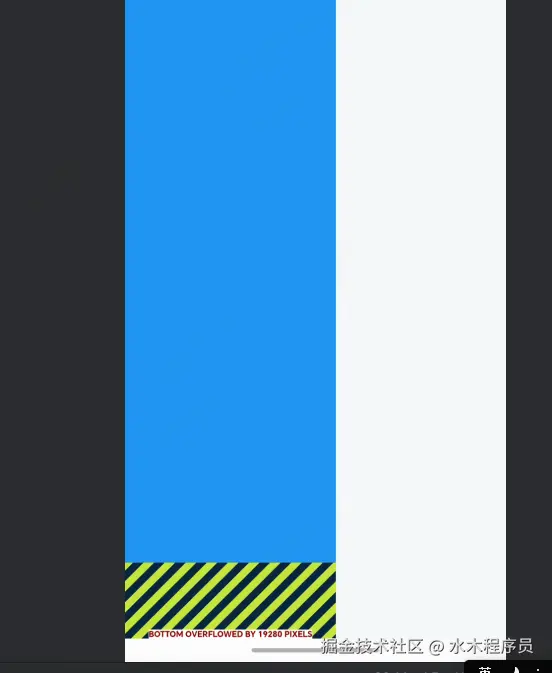
比如说布局溢出了,发生了异常,控制台会有类似输出
less
I/flutter ( 12871 ): Flutter Error: ══╡ EXCEPTION CAUGHT BY RENDERING LIBRARY ╞══════════════════════ I/flutter ( 12871 ): The following assertion was thrown during layout: I/flutter ( 12871 ): A RenderFlex overflowed by 19280 pixels on the bottom. I/flutter ( 12871 ): I/flutter ( 12871 ): The relevant error-causing widget was: I/flutter ( 12871 ): Column I/flutter ( 12871 ): Column:file: /// Volumes/Lenovo/code/mproject/flutter/mflutter/lib/pages/ai _office_ page.dart:29:16 I/flutter ( 12871 ): I/flutter ( 12871 ): The overflowing RenderFlex has an orientation of Axis.vertical. I/flutter ( 12871 ): The edge of the RenderFlex that is overflowing has been marked in I/flutter ( 12871 ): the rendering with a yellow and black striped pattern. This is I/flutter ( 12871 ): usually caused by the contents being too big for the RenderFlex. I/flutter ( 12871 ): Consider applying a flex factor (e.g. using an Expanded widget) I/flutter ( 12871 ): to force the children of the RenderFlex to fit within the I/flutter ( 12871 ): available space instead of being sized to their natural size. I/flutter ( 12871 ): This is considered an error condition because it indicates that I/flutter ( 12871 ): there is content that cannot be seen. If the content is I/flutter ( 12871 ): legitimately bigger than the available space, consider clipping I/flutter ( 12871 ): it with a ClipR屏幕上会出现警示条纹的情况
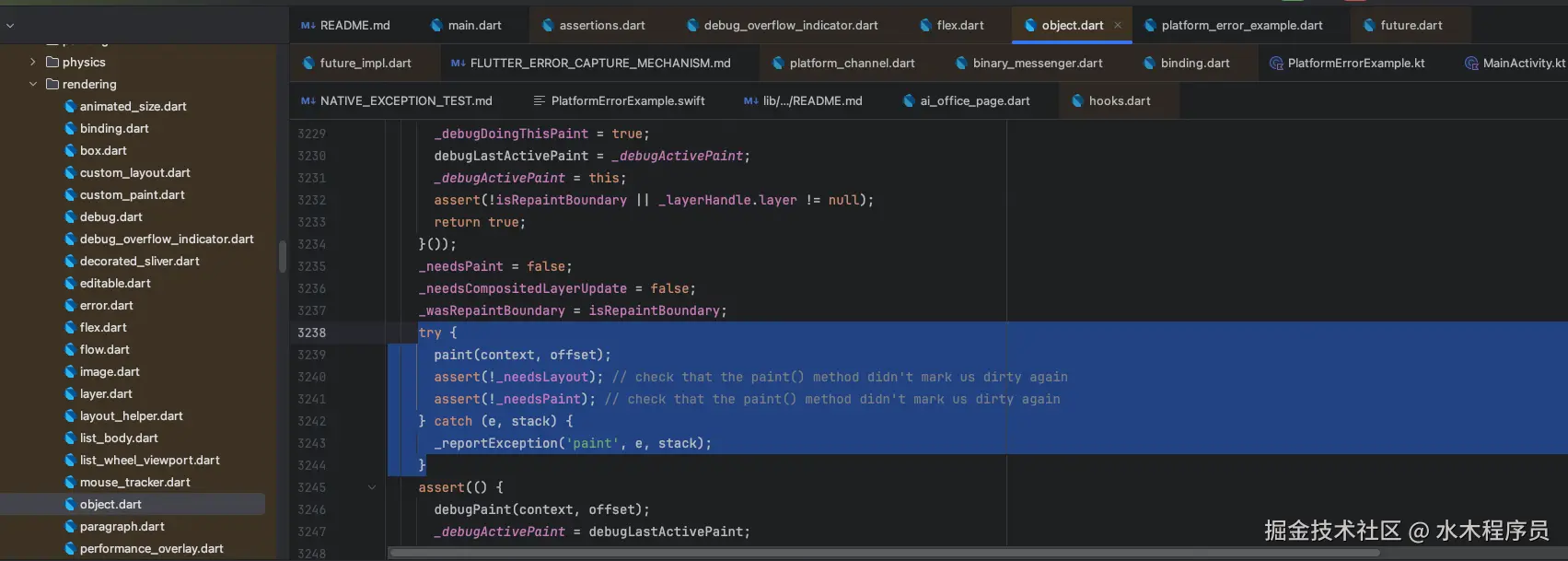
渲染函数被try-catch包围
build等widget生命周期出错
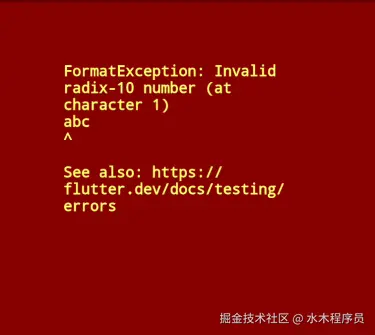
包括在build中如果出现了业务错误也会由FlutterError.onError接管
scss
Widget build(BuildContext context) {
  int.parse('abc');
  return Scaffold();
}
bash
错误是 ══╡ EXCEPTION CAUGHT BY WIDGETS LIBRARY ╞════════════════════════
I/flutter (13634): The following FormatException was thrown building
I/flutter (13634): AIOfficePage(dirty, state: _AIOfficePageState#69df9):
I/flutter (13634): Invalid radix-10 number (at character 1)
I/flutter (13634): abc
屏幕显示
本质还是Flutter框架层try-catch住异常,然后抛给FlutterError.onError
ini
void performRebuild() {
  Widget? built;
  try {
    assert(() {
      _debugDoingBuild = true;
      return true;
    }());
    built = build();
    assert(() {
      _debugDoingBuild = false;
      return true;
    }());
    debugWidgetBuilderValue(widget, built);
  } catch (e, stack) {
    _debugDoingBuild = false;
    built = ErrorWidget.builder(
    //在这里会调用FlutterError.onError
      _reportException(
        ErrorDescription('building $this'),
        e,
        stack,
        informationCollector: () => <DiagnosticsNode>[
          if (kDebugMode)
            DiagnosticsDebugCreator(DebugCreator(this)),
        ],
      ),
    );
  } finally {
    // We delay marking the element as clean until after calling build() so
    // that attempts to markNeedsBuild() during build() will be ignored.
    super.performRebuild(); // clears the "dirty" flag
  }
GestureDector.onTap
dart
T? invokeCallback<T>(String name, RecognizerCallback<T> callback, { String Function()? debugReport }) {
  T? result;
  try {
    assert(() {
      if (debugPrintRecognizerCallbacksTrace) {
        final String? report = debugReport != null ? debugReport() : null;
        // The 19 in the line below is the width of the prefix used by
        // _debugLogDiagnostic in arena.dart.
        final String prefix = debugPrintGestureArenaDiagnostics ? '${' ' * 19}❙ ' : '';
        debugPrint('$prefix$this calling $name callback.${ (report?.isNotEmpty ?? false) ? " $report" : "" }');
      }
      return true;
    }());
    result = callback();
  } catch (exception, stack) {
    InformationCollector? collector;
    assert(() {
      collector = () => <DiagnosticsNode>[
        StringProperty('Handler', name),
        DiagnosticsProperty<GestureRecognizer>('Recognizer', this, style: DiagnosticsTreeStyle.errorProperty),
      ];
      return true;
    }());
    FlutterError.reportError(FlutterErrorDetails(
      exception: exception,
      stack: stack,
      library: 'gesture',
      context: ErrorDescription('while handling a gesture'),
      informationCollector: collector,
    ));
  }
  return result;
}
从上面的例子可以看出来FlutterError.onError主要是处理Flutter框架在处理布局、渲染、点击函数等核心流程外面包裹了一层try-catch,在异常发生的时候去调用FlutterError.onError方法的
runGuardedZone
Flutter 中普通的 try-catch 只能捕获「同步代码」和「当前调用栈内的异步代码」异常,但对 Future、Timer、isolate 等脱离当前调用栈的异步操作异常,try-catch 无法捕获;而 runZonedGuarded 可以监控整个「代码区域」内的所有异常(同步 + 异步),是全局异常捕获的核心手段。
scss
runZonedGuarded(() {
  runApp(const MyApp());
}, (err, stackTrace) {
  print('zone错误 $stackTrace');
});
同步异常捕获
vbnet
R? runZonedGuarded<R>(R body(), void onError(Object error, StackTrace stack),
    {Map<Object?, Object?>? zoneValues, ZoneSpecification? zoneSpecification}) {
  checkNotNullable(body, "body");
  checkNotNullable(onError, "onError");
  _Zone parentZone = Zone. _current;
  HandleUncaughtErrorHandler errorHandler = (Zone self, ZoneDelegate parent,
      Zone zone, Object error, StackTrace stackTrace) {
    try {
      parentZone.runBinary(onError, error, stackTrace);
    } catch (e, s) {
      if (identical(e, error)) {
        parent.handleUncaughtError(zone, error, stackTrace);
      } else {
        parent.handleUncaughtError(zone, e, s);
      }
    }
  };
  if (zoneSpecification == null) {
    zoneSpecification = ZoneSpecification(handleUncaughtError: errorHandler);
  } else {
    zoneSpecification = ZoneSpecification.from(zoneSpecification,
        handleUncaughtError: errorHandler);
  }
  //这里加了try-catch
  try {
    return _runZoned<R>(body, zoneValues, zoneSpecification);
  } catch (error, stackTrace) {
    //这里去执行异常处理
    onError(error, stackTrace);
  }
  return null;
}
异步异常捕获
以Future.delay为例
ini
///sky_engine/lib/async/future.dart
factory Future.delayed(Duration duration, [FutureOr<T> computation()?]) {
  if (computation == null && !typeAcceptsNull<T>()) {
    throw ArgumentError.value(
        null, "computation", "The type parameter is not nullable");
  }
  _Future<T> result = new _Future<T>();
  new Timer(duration, () {
    if (computation == null) {
      result._complete(null as T);
    } else {
      try {
        result._complete(computation());
      } catch (e, s) {
        _completeWithErrorCallback(result, e, s);
      }
    }
  });
  return result;
}


void _completeWithErrorCallback(
    _Future result, Object error, StackTrace? stackTrace) {
  //拿到和当前Zone绑定的错误处理回调去执行
  AsyncError? replacement = Zone.current.errorCallback(error, stackTrace);
  if (replacement != null) {
    error = replacement.error;
    stackTrace = replacement.stackTrace;
  } else {
    stackTrace ??= AsyncError.defaultStackTrace(error);
  }
  result._completeError(error, stackTrace);
}
Timer创建的时候去绑定Zone和Future回调的关系
dart
factory Timer(Duration duration, void Function() callback) {
  if (Zone.current == Zone.root) {
    // No need to bind the callback. We know that the root's timer will
    // be invoked in the root zone.
    return Zone.current.createTimer(duration, callback);
  }
  return Zone.current
.createTimer(duration, Zone.current.bindCallbackGuarded(callback));
}
scss
///sky_engine/lib/async/zone.dart
R _rootRun<R>(Zone? self, ZoneDelegate? parent, Zone zone, R f()) {
  if (identical(Zone. _current, zone)) return f();

  if (zone is! _Zone) {
    throw ArgumentError.value(zone, "zone", "Can only run in platform zones");
  }

  _Zone old = Zone. _enter(zone);
  try {
    return f();
  } finally {
    Zone. _leave(old);
  }
}

static _Zone _enter(_Zone zone) {
  assert(!identical(zone, _current));
  _Zone previous = _current;
  _current = zone;
  return previous;
}

static _Zone _current = _rootZone;
至于使用静态变量存放 _current 会不会导致 多线程 问题,答案是:不会
scss
传统多线程模型(Java/C++):
┌─────────────────────────────────────────────────────────┐
│                    共享内存空间                          │
│  ┌─────────────┐  ┌─────────────┐  ┌─────────────┐    │
│  │  线程 1     │  │  线程 2     │  │  线程 3     │    │
│  │  共享变量   │  │  共享变量   │  │  共享变量   │    │
│  └─────────────┘  └─────────────┘  └─────────────┘    │
│         ↓                ↓                ↓             │
│    可能发生竞争条件、数据竞争、死锁等问题                │
└─────────────────────────────────────────────────────────┘

Dart Isolate 模型:
┌─────────────────────────────────────────────────────────┐
│  ┌─────────────────┐  ┌─────────────────┐              │
│  │   Isolate 1     │  │   Isolate 2     │              │
│  │  独立内存空间    │  │  独立内存空间    │              │
│  │  ┌───────────┐  │  │  ┌───────────┐  │              │
│  │  │Zone._current│  │  │  │Zone._current│  │              │
│  │  │  (独立)    │  │  │  │  (独立)    │  │              │
│  │  └───────────┘  │  │  └───────────┘  │              │
│  └─────────────────┘  └─────────────────┘              │
│         ↓                    ↓                          │
│    通过消息通信          通过消息通信                    │
│    (不共享内存)          (不共享内存)                    │
└─────────────────────────────────────────────────────────┘
综上,其实异常的捕获根本还是try-catch,只是不同的错误在不同的方法里面加了对应的try-catch,然后回调出来
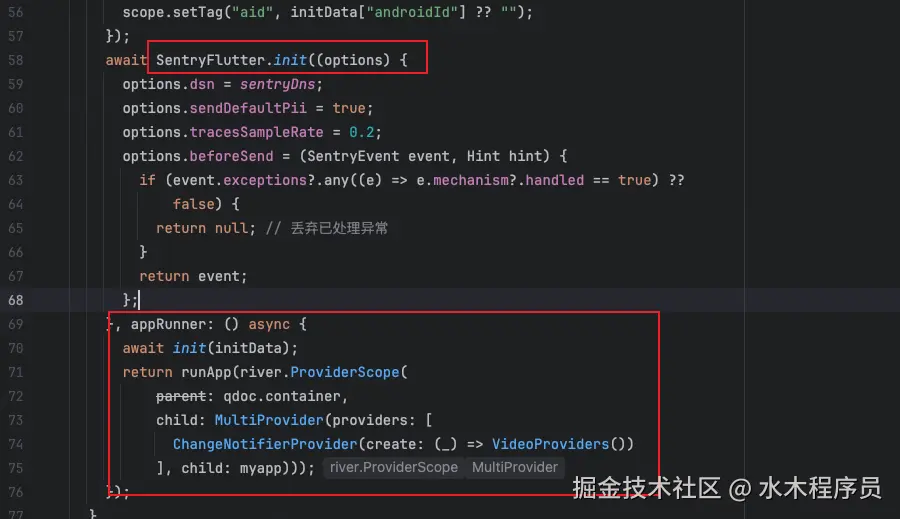
sentry里面的接入
ai办公举例
dart
static R? sentryRunZonedGuarded<R>(
  Hub hub,
  R Function() body,
  void Function(Object error, StackTrace stack)? onError, {
  Map<Object?, Object?>? zoneValues,
  ZoneSpecification? zoneSpecification,
}) {
  final sentryOnError = (exception, stackTrace) async {
    final options = hub.options;
    await _captureError(hub, options, exception, stackTrace);

    if (onError != null) {
      onError(exception, stackTrace);
    }
  };

  final userPrint = zoneSpecification?.print;

  ......
  return runZonedGuarded(
    body,
    sentryOnError,
    zoneValues: zoneValues,
    zoneSpecification: sentryZoneSpecification,
  );
less
///FlutterErrorIntegration.dart
@override
void call(Hub hub, SentryFlutterOptions options) {
  _defaultOnError = FlutterError.onError;
  _integrationOnError = (FlutterErrorDetails errorDetails) async {

      ......

      var event = SentryEvent(
        throwable: throwableMechanism,
        level: options.markAutomaticallyCollectedErrorsAsFatal
            ? SentryLevel.fatal
: SentryLevel.error,
        contexts: flutterErrorDetails.isNotEmpty
            ? (Contexts()..['flutter_error_details'] = flutterErrorDetails)
            : null,
        // ignore: invalid_use_of_internal_member
        timestamp: options.clock(),
      );

      await hub.captureEvent(event, stackTrace: stackTrace, hint: hint);
      // we don't call Zone.current.handleUncaughtError because we'd like
      // to set a specific mechanism for FlutterError.onError.
    }
    if (_defaultOnError != null) {
      _defaultOnError!(errorDetails);
    }
  };
  FlutterError.onError = _integrationOnError;

  options.sdk.addIntegration('flutterErrorIntegration');
}