注:本文为 "UNIX 终端 I/O " 相关合辑。
英文引文,机翻未校。
中文引文,略作重排。
图片清晰度受引文原图所限。
如有内容异常,请看原文。
Terminal I/O
终端输入输出
Overview:
概述:
Why should we need to know about terminal I/O with all these nifty graphical user interfaces out there? Terminals are thing of the past, right? Sorry, in Unix, the terminal device driver controls a lot more than just terminals. modems, printers, direct connections to other computers, and other special devices that rely on streams of characters.
如今存在各类便捷的图形用户界面,为何仍需了解终端输入输出?终端已然成为过去式,对吗?遗憾的是,在 Unix 系统中,终端设备驱动程序管控的对象远不止终端本身,还包括调制解调器、打印机、与其他计算机的直连设备,以及其他依赖字符流的专用设备。
Terminal devices can be put into different states. The default state of the terminal when running in a shell is canonical mode, also known as cooked mode. In this mode, the terminal driver returns one line of data at a time from the terminal device. Any special characters are processed as they come into the device (^C, ^Z, etc.).
终端设备可被设置为不同状态。终端在 shell 中运行时的默认状态为规范模式,也被称为熟模式。该模式下,终端驱动程序从终端设备中单次返回一行数据,设备接收到的各类特殊字符(^C、^Z 等)会被即时处理。
The second state the terminal can be in is noncanonical mode, or raw mode. In this state, the terminal device driver returns one character at a time without assembling lines of data. Also, special characters are not processed in this mode. Programs such as vi, pine, and elm use this mode for data input and output. This allows complete control of input and output characters.
终端可处于的第二种状态为非规范模式,也被称为原始模式。该状态下,终端设备驱动程序单次返回一个字符,不会对数据进行行组装,同时不会处理特殊字符。vi、pine、elm 等程序均采用该模式进行数据输入输出,可实现对输入输出字符的完全管控。
A third state, one which Posix.1 defines, is the cbreak mode. This mode is similar to raw mode, except that the processing of special characters still takes place and the corresponding signals are raised for the special characters.
Posix.1 标准定义的第三种状态为半原始模式。该模式与原始模式相近,区别在于半原始模式仍会处理特殊字符,并为特殊字符触发对应的信号。
P.326 Figure Here
此处为第 326 页附图
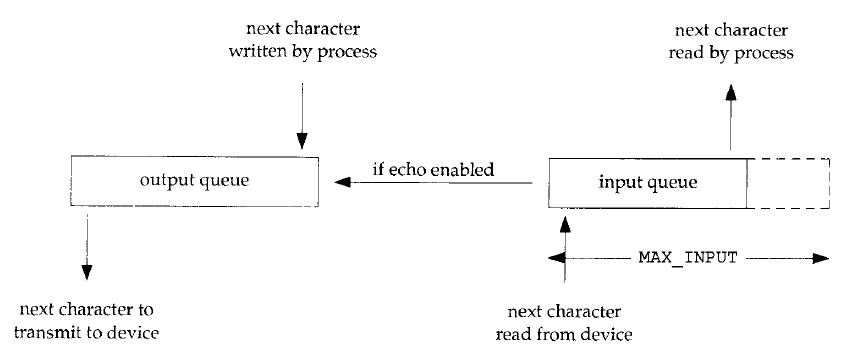
Logical picture of input and output queues for a terminal device.
终端设备输入和输出队列的逻辑图
Things to remember about the Input and Output Queues:
关于输入输出队列的要点:
- There is a link between the input and output queue if echoing is enabled. This means you don't need to send your keystrokes to stdout if echoing is enabled, it is done for you.
若开启回显功能,输入队列与输出队列之间存在关联。这意味着开启回显后,无需手动将按键输入发送至标准输出,系统会自动完成该操作。 - There is a limit to the size of the input queue, this limit is defined by the macro
MAX_INPUT. This means that if you try to type a line that is larger thanMAX_INPUT, then the terminal device will not read anything beyond theMAX_INPUTnumber of characters. Most Unix systems will echo the bell character (^G) when you try to type beyond this limit and the characters you type will not be echo'd or stored in the queue.
输入队列存在容量限制,该限制由宏MAX_INPUT定义。若输入的单行字符数超出MAX_INPUT,终端设备将不会读取超出该数值的字符。多数 Unix 系统在输入超出该限制时,会回显振铃字符(^G),且超出部分的字符不会被回显或存入队列。 - The limit
MAX_CANONis the maximum number of bytes that can be stored in an input line. This is the same asMAX_INPUTon many systems, including Linux and HPUX.
限制值MAX_CANON为单行输入可存储的最大字节数,在 Linux、HPUX 等多数系统中,该值与MAX_INPUT相等。 - There is an output queue, but you never really need to worry about this. If a process tries to write info to the output queue and the queue is filled up, the kernel will put that process to sleep (it will block), until there is more room on the queue. This limit is not defined in any standard header file.
系统存在输出队列,但通常无需关注。若进程尝试向已满的输出队列写入数据,内核会将该进程挂起(阻塞),直至队列出现空余空间。该队列的容量限制未在任何标准头文件中定义。 - Most of the processing of the input queue on Unix systems takes place in a module called the terminal line discipline . This takes place between the system functions and the device driver.
Unix 系统中,输入队列的多数处理操作由名为终端线路规程的模块完成,该模块运行于系统函数与设备驱动程序之间。
P. 327 Figure Here
此处为第 327 页附图
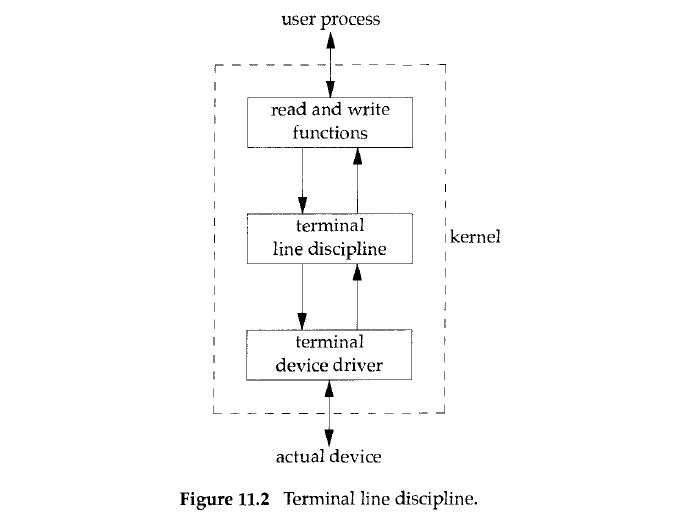
Terminal line discipline
终端行规程
内核中位于终端驱动程序 与用户进程之间的一层处理模块,负责对终端输入输出做行缓冲、特殊字符处理(如退格、中断、回显等),分为规范模式与非规范模式处理逻辑。
Getting and Setting the Terminal Attributes:
终端属性的获取与设置:
All of the attributes that can be controlled in the terminal device are contained in the termios structure. This structure is defined as:
终端设备中所有可管控的属性均存储于 termios 结构体中,该结构体的定义如下:
c
struct termios {
    tcflag_t    c_iflag;    /* input flags */
    tcflag_t    c_oflag;    /* output flags */
    tcflag_t    c_cflag;    /* control flags */
    tcflag_t    c_lflag;    /* local flags */
    cc_t        c_cc[NCCS]; /* control characters */
};
The c_iglag attribute is what controls any input characteristics of the terminal (map CR to NL, ring bell on input queue full, etc.). The c_oflag attribute is what you set to control any output processing of the terminal (expand tabs to spaces, map lowercase to uppercase on output, etc.). Most of the c_oflag settings are not Posix compliant. The c_cflag attribute is for setting the serial line attributes (enable parity, set flow control, etc.). The c_lflag attribute is for the settigns of the interface between the user and the device driver (local echo, enable signals generated byt the terminal, etc.).
属性 c_iflag 用于管控终端的各类输入特性(如将回车符映射为换行符、输入队列满时触发振铃等)。属性 c_oflag 用于设置终端的输出处理规则(如将制表符展开为空格、输出时将小写字母转为大写字母等),该属性的多数配置不符合 Posix 标准。属性 c_cflag 用于配置串行线路参数(如启用奇偶校验、设置流控制等)。属性 c_lflag 用于设置用户与设备驱动程序之间的交互规则(如本地回显、启用终端触发的信号等)。
This structure is used with two different functions, tcgetattr() and tcsetattr(). The prototypes are as follows:
该结构体配合 tcgetattr() 与 tcsetattr() 两个函数使用,函数原型如下:
c
#include <termios.h>
int tcgetattr(int filedes, struct termios *termptr);
int tcsetattr(int filedes, int opt, const struct termios *termptr);
Both return: 0 if OK, -1 on error
两个函数执行成功时返回 0,出错时返回 -1
As the names suggest, tcgetattr() gets the current state of the terminal that the open file descriptor filedes points to, and tcsetattr() sets attributes for the terminal that filedes is associated with. These functions will return an error if the filedes argument is not associated with a terminal device.
顾名思义,tcgetattr() 用于获取已打开文件描述符 filedes 指向终端的当前状态,tcsetattr() 用于为 filedes 关联的终端设置属性。若参数 filedes 未关联终端设备,函数会返回错误。
The argument opt in tcsetattr() is for specifying when the changes are to take place. This is defined by the following macros:
tcsetattr() 中的参数 opt 用于指定属性修改的生效时机,由以下宏定义:
TCSANOWMake the changes now.
TCSANOW立即生效修改。TCSADRAINMake the changes after all output has been transmitted from the buffer. This should be used when setting output attributes.
TCSADRAIN待缓冲区中所有输出数据传输完成后生效修改,设置输出属性时应使用该宏。TCSAFLUSHMake the changes after all output has been transmitted, and flush the input queue of any unprocessed data.
TCSAFLUSH待所有输出数据传输完成后生效修改,并清空输入队列中未处理的数据。
How fast are we talking?
传输速率设置:
Sometimes you may find that you need to change the speed of the terminal dsession to match that of the device it is connected to. This is done with four functions in combination with the tcgetattr() and tcsetattr() functions.
实际应用中,有时需要修改终端会话的传输速率,使其与对接设备的速率匹配。该操作需通过四个函数,配合 tcgetattr() 与 tcsetattr() 共同完成。
c
#include <termios.h>
speed_t cfgetispeed(const struct termios *termptr);
speed_t cfgetospeed(const struct termios *termptr);
Both return: baud rate value
两个函数均返回波特率数值
c
speed_t cfsetispeed(struct termios *termptr, speed_t speed);
speed_t cfsetospeed(struct termios *termptr, speed_t speed);
Both return: 0 if OK, -1 on error
两个函数执行成功时返回 0,出错时返回 -1
The first thing that must be done here in order to change the baud rate of the terminal is use tcgetattr() so that you can pass the termios struct to the cfset functions. You then pass the struct to the cfset functions to set the correct baud rate in the termios struct. This does not actually set the terminal speed, however. You still need to make a call to tcsetattr() with termios struct that has the changed baud rate.
修改终端波特率的第一步,是调用 tcgetattr() 获取终端属性,将 termios 结构体传入速率设置函数。随后通过速率设置函数,在 termios 结构体中配置目标波特率。该操作不会直接修改终端速率,还需调用 tcsetattr(),传入已更新波特率的 termios 结构体完成配置。
- The order of calls to change the baud rate:
改波特率的调用顺序: - tcgetattr() -- Get the current settings
tcgetattr() -- 获取当前配置 - cfsetispeed() -- Set the input speed in the termios struct
cfsetispeed() -- 在termios结构体中设置输入速率 - cfsetospeed() -- Set the output speed in the termios struct
cfsetospeed() -- 在termios结构体中设置输出速率 - cfsetattr() -- Make the changes to the terminal to reflect the changed struct
tcsetattr() -- 应用修改后的结构体,更新终端配置
Terminal line control
终端行控制
The line control for the terminal is important if you want to prevent overflowing the buffer for the device when there is no hardware flow control implemented. Also, you can flush the input and/or output of a device discarding any data that has not already been sent or read from the buffer.
若系统未实现硬件流控制,终端行控制可避免设备缓冲区溢出,同时可清空设备的输入/输出缓冲区,丢弃其中未传输或未读取的数据。
c
#include <termios.h>
int tcdrain(int filedes);
int tcflow(int filedes, int action);
int tcflush(int filedes, int queue);
int tcsendbreak(int filedes, int duration);
All four return: 0 if OK, -1 on error
四个函数执行成功时均返回 0,出错时返回 -1
The tcdrain() function suspends the process until all of the data in the ouput buffer has been transmitted. The tcflow() function gives control over input and output flow control. The action argument to tcflow() can be any of the following macros:
函数 tcdrain() 会挂起进程,直至输出缓冲区中的所有数据传输完毕。函数 tcflow() 用于管控输入输出流控制,其参数 action 可取值为以下宏:
TCOOFFSuspend Output
TCOOFF暂停输出TCOONRestart output
TCOON重启输出TCIOFFSuspend input
TCIOFF暂停输入TCIONRestart input
TCION重启输入
The tcflush() function lets us discard input or output buffer data. Data in the input buffer is data that has been received but not read yet. Data in the output buffer is data that has been written but not transmitted yet. The queue argument can have the follow macro values:
函数 tcflush() 用于丢弃输入或输出缓冲区的数据。输入缓冲区中的数据为已接收但未读取的数据,输出缓冲区中的数据为已写入但未传输的数据。参数 queue 可取值为以下宏:
TCIFLUSHFlush the input buffer
TCIFLUSH清空输入缓冲区TCOFLUSHFlush the output buffer
TCOFLUSH清空输出缓冲区TCIOFLUSHFlush both the input and output buffers
TCIOFLUSH同时清空输入与输出缓冲区
The tcsendbreak() function transmits a continous stream of zero bits. If the duration attribute is set to 0, then the duration of the transmition is between 0.25 and 0.5 seconds. If the duration is nonzero, it is implementation specific. Under Linux, if the duration is nonzero, the length of transmission is d u r a t i o n × N duration \times N duration×N seconds where N is between 0.25 and 0.5.
函数 tcsendbreak() 用于持续传输零比特流。若参数 duration 设为 0,传输时长为 0.25 至 0.5 秒;若 duration 不为 0,传输时长由具体实现决定。在 Linux 系统中,duration 非零时,传输时长为 d u r a t i o n × N duration \times N duration×N 秒,其中 N N N 取值范围为 0.25 至 0.5。
What Terminal Is This?
终端设备识别:
At some point in your career, you may want to find out what terminal device your process is attached to. In the old days, you could just open "/dev/tty" and that was the correct terminal for your process all of the time. Now, their is a POSIX.1 call that you can make to guarantee that you have the right name of your terminal device.
实际开发中,有时需要确定进程关联的终端设备。早期可直接打开 /dev/tty,该文件始终对应进程的终端设备。如今可通过 POSIX.1 标准函数,准确获取终端设备名称。
c
#include <stdio.h>
char *ctermid(char *ptr);
returns some stuff
返回对应终端设备相关信息
If ptr is not null, it must be an array of char's that is as large as or larger than the macro L_ctermid and the name of the controlling terminal is stored in this array. If ptr is null, then the name of the controlling terminal is stored in a static array. In both cases, a pointer to the first element of the array storing the name of the controlling terminal is returned.
若参数 ptr 非空,其需为长度不小于宏 L_ctermid 的字符数组,控制终端名称会存入该数组;若 ptr 为空,控制终端名称会存入静态数组。两种情况下,函数均返回存储终端名称数组的首元素指针。
Two really cool and usful functions are isatty() and ttyname().
isatty() 与 ttyname() 是两个实用函数。
c
#include <unistd.h>
int isatty(int filedes);
Returns: 1 if terminal device, 0 otherwise
若关联终端设备则返回 1,否则返回 0
c
char *ttyname(int filedes);Returns: pointer to pathname of terminal, NULL on error
返回终端设备路径名指针,出错时返回 NULL
These functions are useful in finding out if filedes is associated with a terminal device or not. Under the hood, the function ttyname(), searches through the terminal device files in /dev/ looking for a matching special file with the same device number and i-node number as filedes. If this statement made no since to you, just ignore it for now.
这两个函数可用于判断文件描述符 filedes 是否关联终端设备。底层实现中,函数 ttyname() 会遍历 /dev/ 目录下的终端设备文件,查找与 filedes 设备号、i-node 号匹配的特殊文件。若暂无法理解该逻辑,可先行忽略。
Captain Cooked Mode! Arrrr! (Wait, was he a pirate?)
熟模式解析:
So, what is this cooked terminal mode anyway? When you read from the terminal, if the terminal returns a line at a time instead of each character as it is received, then you are in cooked (canonical) mode. There are a number of reasons that can make the read return:
那么终端熟模式究竟是什么?当从终端执行 read 操作时,若终端逐行返回数据,而非逐个返回接收的字符,即处于熟模式(规范模式)。read 函数返回的原因包含以下几种:
- The requested number of bytes has been read (you hit the end of your buffer man!). The next time you do a
read, you pick up where you left off if you hadn't finished reading the complete line.
已读取请求数量的字节(缓冲区已读满)。若未读完完整一行,下一次调用read会从上次中断的位置继续读取。 - It returns when you reach the end of a line which can be any of the following characters:
NL,EOL,EOL2,EOF, andCRif theICRNLflag is set for the terminal and theIGNCRflag is not set. IfEOFis the line delimiter, then it is thrown out. The others are returned to the caller.
读取至行尾时返回,行尾可由以下字符标识:NL、EOL、EOL2、EOF,以及终端设置ICRNL标志且未设置IGNCR标志时的CR。若EOF为行分隔符,该字符会被丢弃,其余行尾字符会返回给调用者。 - If a signal is caught and
SA_RESTARTwas not specified as a flag tosigaction()thereadwill return.
若进程捕获到信号,且sigaction()未设置SA_RESTART标志,read函数会返回。
Cooked mode is the default state of your terminal for almost all shells. At least when you execute another program with the shell, the terminal is put into cooked mode before it makes a call to an exec function.
熟模式是绝大多数 shell 中终端的默认状态。通过 shell 执行其他程序时,终端会在调用 exec 函数前切换至熟模式。
Raw!
原始模式:
Raw, or noncanonical for those that don't like raw, is a bit harder to explain. It doesn't necessarily return one byte at a time. You can also set a time limit for your read to return if the number of characters you want to get have not been received from the device. The first step in going into raw mode, no matter what form you want, is to turn off the flag ICANON for your terminal device. This makes it so the input is not put into lines before it is returned. It also makes so some of the special characters are not processed: ERASE, KILL, EOF, NL, EOL, EOL2, CR, REPRINT, STATUS, and WERASE.
原始模式(非规范模式)的逻辑相对复杂,其并非必然逐字节返回数据。还可设置超时时间,若未从设备接收到目标数量的字符,read 函数会在超时后返回。进入任意形式原始模式的第一步,是关闭终端设备的 ICANON 标志。该操作会使输入数据不再按行组装后返回,同时不再处理以下特殊字符:ERASE、KILL、EOF、NL、EOL、EOL2、CR、REPRINT、STATUS、WERASE。
So, how do we specify how long to wait for input and how many bytes to read before we return? There are two variables in the c_cc array in the termios structure that must be set: MIN and TIME. These elements are indexed by the macro defines VMIN and VTIME. MIN is the minimum number of bytes that are read in before returning (read blocks until MIN number of bytes have been read). TIME is the amount of time in tenths of a second to wait for data to arrive. So, here is the breakdown of the different cases:
那么如何设置输入等待时长与返回前需读取的字节数?需配置 termios 结构体中 c_cc 数组的两个变量:MIN 与 TIME,对应宏 VMIN 与 VTIME 索引。MIN 为返回前需读取的最小字节数(read 会阻塞直至读取到 MIN 字节),TIME 为等待数据的超时时间,单位为 0.1 秒。不同场景的逻辑如下:
-
1.
MIN > 0andTIME > 0
MIN > 0且TIME > 0In this case,
readwill return ifMINnumber of bytes have been read from the device. It will also return if the number of tenths-of-a-second specified in theTIMEvariable have elapsed after the first byte has been read. This means, if nothing is inputed, thereadblocks indefinately. The timer only starts if a byte gets read and does not restart after more bytes are read.该场景下,若从设备读取到
MIN字节,read会返回;若读取首个字节后,超时时间耗尽,read也会返回。无输入时read会永久阻塞,计时器仅在读取到首个字节时启动,且读取后续字节不会重置计时器。 -
2.
MIN > 0andTIME == 0
MIN > 0且TIME == 0In this case, there is no time limit imposed on the
read. It will read until at leastMINbytes have been received. This can causereadto block forever ifMINbytes are never received.该场景下
read无超时限制,会持续读取直至接收到至少MIN字节。若始终未接收到MIN字节,read会永久阻塞。 -
3.
MIN == 0andTIME > 0
MIN == 0且TIME > 0The timer is started as soon as
readis called.readreturns only afterTIMEtenths-of-a-second have elapsed or a single byte has been received.调用
read时立即启动计时器,read会在超时时间耗尽或接收到单个字节后返回。 -
4.
MIN == 0andTIME == 0
MIN == 0且TIME == 0In this case, if data is available, the number of bytes requested (or all the data if it is less than the number of bytes requested) are returned. If no data is available,
readreturns 0 immediately.该场景下,若存在可用数据,返回请求数量的字节(数据量不足时返回全部数据);若无可用数据,
read立即返回 0。
This can be a little confusing at first, just read it a couple of times if you don't understand. Then let it mull over in your brain. Try writing a toy program for each case discussed above. Here is an example of the use of the c_cc variable:
该逻辑初次理解时易混淆,可反复阅读梳理思路,也可针对上述场景编写简易程序验证。以下为 c_cc 变量的使用示例:
c
struct termios trm;

tcgetattr(STDIN_FILENO, &trm); /* get the current settings */
trm.c_cc[VMIN] = 1;     /* return after one byte read */
trm.c_cc[VTIME] = 0;    /* block forever until 1 byte is read */
        .
        .               /* set some other stuff */
        .
tcsetattr(STDIN_FILENO, TCSANOW, &trm); /* set the terminal with the new
                                           settings */
Some source code for raw mode taken from the Stevens book:
以下摘自 Stevens 著作中的原始模式实现源码:
c
#include <termios.h>

static struct termios   save_termios;
static int              term_saved;

int tty_raw(int fd) {       /* RAW! mode */
    struct termios  buf;

    if (tcgetattr(fd, &save_termios) < 0) /* get the original state */
        return -1;

    buf = save_termios;

    buf.c_lflag &= ~(ECHO | ICANON | IEXTEN | ISIG);
                    /* echo off, canonical mode off, extended input
                       processing off, signal chars off */

    buf.c_iflag &= ~(BRKINT | ICRNL | ISTRIP | IXON);
                    /* no SIGINT on BREAK, CR-toNL off, input parity
                       check off, don't strip the 8th bit on input,
                       ouput flow control off */

    buf.c_cflag &= ~(CSIZE | PARENB);
                    /* clear size bits, parity checking off */

    buf.c_cflag |= CS8;
                    /* set 8 bits/char */

    buf.c_oflag &= ~(OPOST);
                    /* output processing off */

    buf.c_cc[VMIN] = 1;  /* 1 byte at a time */
    buf.c_cc[VTIME] = 0; /* no timer on input */

    if (tcsetattr(fd, TCSAFLUSH, &buf) < 0)
        return -1;

    term_saved = 1;

    return 0;
}


int tty_reset(int fd) { /* set it to normal! */
    if (term_saved)
        if (tcsetattr(fd, TCSAFLUSH, &save_termios) < 0)
            return -1;

    return 0;
}
Window Size
终端窗口大小
Ever wonder how some terminal applications redraw the screen when you changed the size of your xterm? There is a structure that the kernel maintains for every terminal and pseudo terminal. This is the winsize struct:
部分终端应用会在调整 xterm 窗口大小时重绘界面,其实现逻辑如下:内核为每个终端与伪终端维护一个结构体,即 winsize 结构体:
c
struct winsize {
    unsigned short  ws_row;     /* rows in characters */
    unsigned short  ws_col;     /* columns in characters */
    unsigned short  ws_xpixel;  /* horizontal size in pixels (not used) */
    unsigned short  ws_ypixel;  /* vertical size in pixels (not used) */
};
The signal SIGWINCH is sent to the forground process any time there is a change made to this strucure in the kernel. We can get the current value of this structure by making a call to ioctl with TIOCGWINSZ request:
内核中该结构体发生变化时,会向前台进程发送 SIGWINCH 信号。通过 ioctl 函数搭配 TIOCGWINSZ 请求,可获取该结构体的当前值:
c
struct winsize  size;

ioctl(STDIN_FILENO, TIOCGWINSZ, (char *) &size);
To change the structure in kernel memory, a call to ioctl is made with the TIOCSWINSZ request:
通过 ioctl 函数搭配 TIOCSWINSZ 请求,可修改内核内存中的该结构体:
c
struct winsize  size;

ioctl(STDIN_FILENO, TIOCSWINSZ, (char *) &size);
When you set the size of the structure in the kernel, if the size is different than it was previously, SIGWINCH is sent to the foreground process.
修改内核中该结构体的尺寸时,若尺寸与原值不同,前台进程会接收到 SIGWINCH 信号。
终端 I/O 之综述
posted @ 2014-03-01 22:15 ITtecman
一、终端输入工作模式
终端 I/O 包含两类工作模式:
- 规范模式输入处理(Canonical mode input processing)。该模式下,终端输入以行为单位完成处理,针对每一次读操作请求,终端驱动程序返回的字符数量最多为一行。
- 非规范模式输入处理(Noncanonical mode input processing)。输入字符不构成行结构。
未进行特殊配置时,系统默认采用规范模式。
V7 及早期 BSD 系列终端驱动程序支持三类终端输入模式:
(a)加工模式,输入字符构成行结构,并对特殊字符执行处理;
(b)原始模式,输入字符不构成行结构,且不对特殊字符执行处理;
(c)cbreak 模式,输入字符不构成行结构,但对部分特殊字符执行处理。
二、终端设备队列结构
终端设备由内核空间中的终端驱动程序实施控制。每一台终端设备均配置一个输入队列与一个输出队列,逻辑结构如图 18‑1 所示。
图 18‑1 终端设备输入、输出队列逻辑结构
图 18‑1 可转换为下述形式,便于理解:
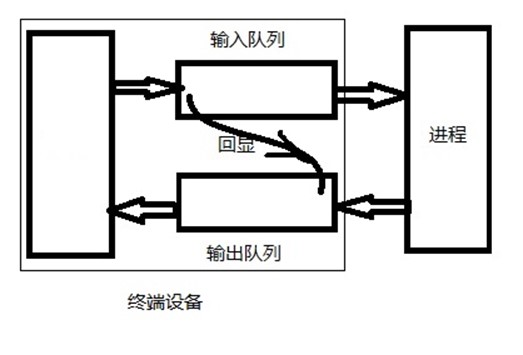
针对该示意图,说明如下:
- 回显功能启用时,输入队列与输出队列之间存在隐含数据通路。
- 输入队列长度由常量
MAX_INPUT限定,该值为有限数值。特定设备输入队列填满后,系统行为由具体实现定义,多数 UNIX 系统会输出响铃字符作为响应。 - 示意图未标注输入限制参数
MAX_CANON,该参数表示规范模式下单行输入的最大字节数量。 - 输出队列通常具备有限长度,应用程序无法获取对应长度常量。内核会在输出队列即将填满时阻塞写进程,直至队列空间可用,因此应用程序无需关注该队列长度。
- 输入队列或输出队列可通过
tcflush函数执行刷清操作。
三、终端行规程模块
多数 UNIX 系统在终端行规程(terminal line discipline)模块内完成规范模式处理。该模块位于内核通用读写函数与实际设备驱动程序之间,结构如图 18‑2 所示。
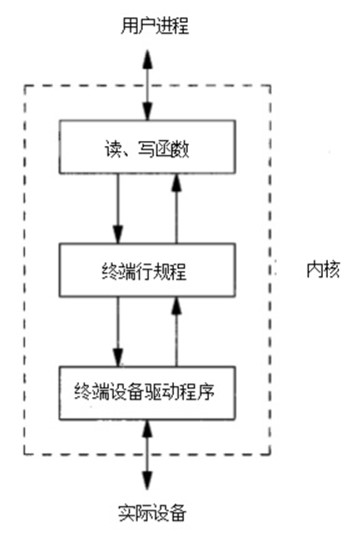
图 18‑2 终端行规程
四、终端属性结构体 termios
终端设备的可检测与可配置参数均封装于 termios 结构中,该结构定义于头文件 <termios.h>。
c
struct termios {
    tcflag_t    c_iflag;    /* input flags */
    tcflag_t    c_oflag;    /* output flags */
    tcflag_t    c_cflag;    /* control flags */
    tcflag_t    c_lflag;    /* local flags */
    cc_t        c_cc[NCCS]; /* control characters */
};
4.1 结构成员功能说明
- 输入标志(c_iflag):用于终端驱动程序控制输入字符处理流程,包括输入字节第 8 位剥离、奇偶校验允许等操作。
- 输出标志(c_oflag):用于驱动程序控制输出处理流程,包括输出格式转换、换行符映射为 CR/LF 等操作。
- 控制标志(c_cflag):用于配置 RS‑232 串行线路参数,包括调制解调器状态线忽略、字符停止位数量等设置。
- 本地标志(c_lflag):用于控制驱动程序与用户层交互行为,包括回显开关、可见擦除字符、终端信号生成、后台输出作业控制等功能。
4.2 结构相关数据类型
tcflag_t类型可容纳全部标志位数值,通常定义为unsigned int或unsigned long。c_cc数组存储全部可配置特殊字符,NCCS为数组长度,取值范围通常为 15--20,多数 UNIX 系统定义的特殊字符数量多于 POSIX 标准规定的 11 个。cc_t类型可存储单个特殊字符数值,通常定义为unsigned char。
五、终端配置标志与操作函数
表 18‑1 至表 18‑4 列出可配置终端设备标志。Single UNIX Specification 定义了跨平台通用标志子集,各平台存在扩展实现。
表 18‑1 c_cflag 终端标志
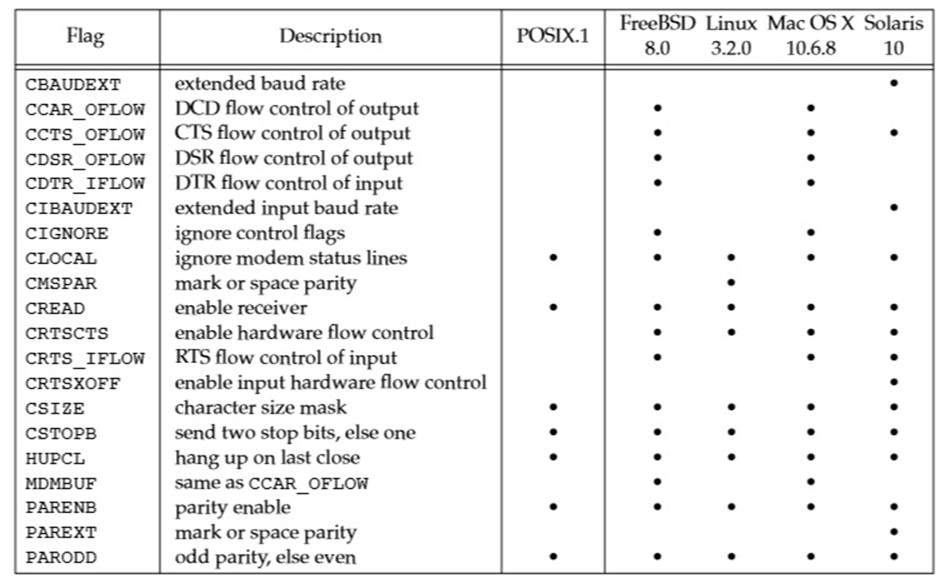
表 18‑2 c_iflag 终端标志
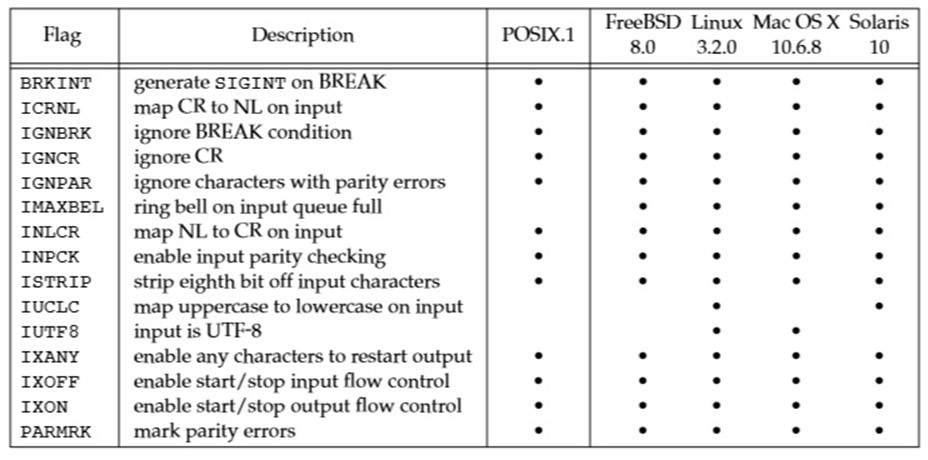
表 18‑3 c_lflag 终端标志
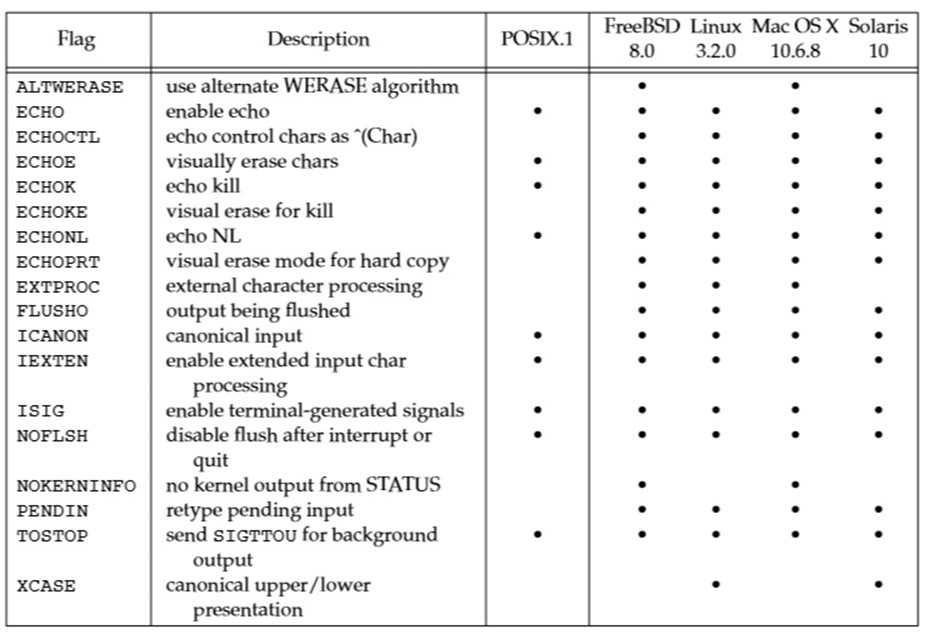
表 18‑4 c_oflag 终端标志
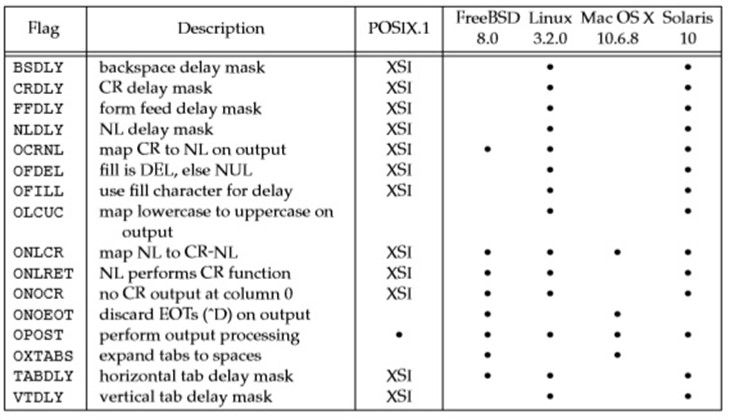
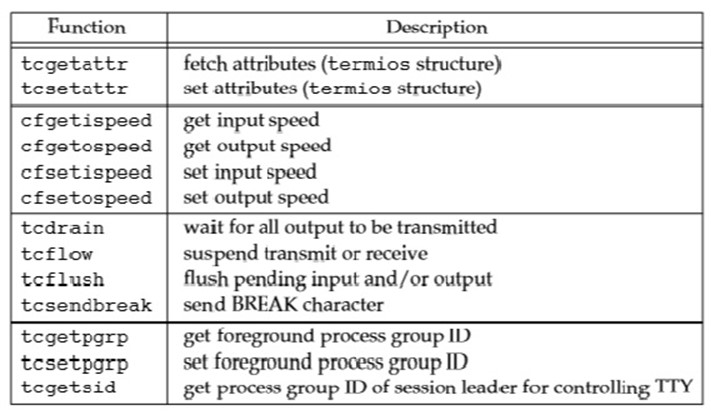
表 18‑5 列出 Single UNIX Specification 定义的终端设备操作函数,用于检测与配置终端设备属性。
表 18‑5 终端 I/O 函数总览
5.1 函数接口设计说明
Single UNIX Specification 针对终端设备未采用传统 ioctl 接口,而是采用表 18‑5 所列 13 个函数。该设计的原因在于,终端设备 ioctl 调用的最后一个参数类型随操作类型变化,无法执行编译期类型检查。
终端设备操作函数共 13 个,其中 tcgetattr 与 tcsetattr 可配置约 70 种标志位,对应表 18‑1 至表 18‑4。终端设备配置选项数量较多,且需根据设备类型选择适配参数,导致终端设备处理流程复杂度较高。
表 18‑5 所列 13 个函数的相互关系如图 18‑3 所示。
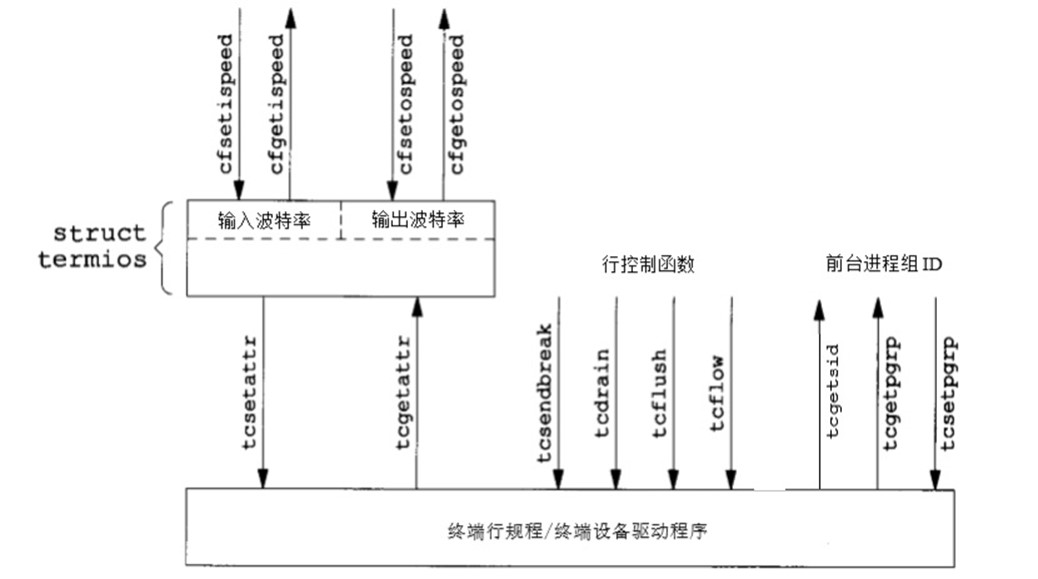
图 18‑3 终端相关函数关系图
终端 I/O 之特殊输入字符
posted @ 2014-03-02 11:08 ITtecman
一、POSIX.1 特殊输入字符概述
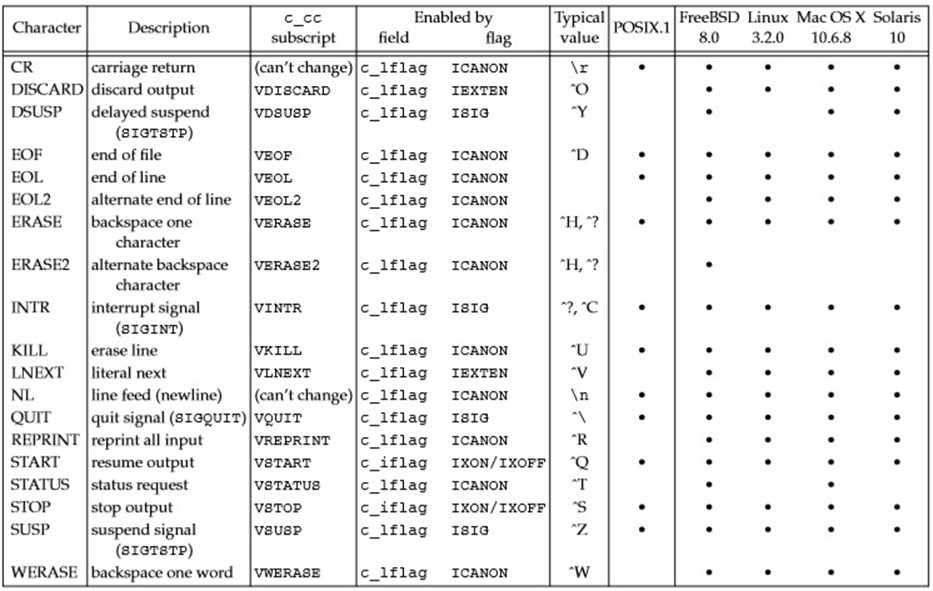
POSIX.1 标准定义 11 个输入特殊处理字符,各具体实现可扩展定义额外特殊字符。表 18‑6 对上述字符进行汇总。
表 18‑6 终端特殊输入字符
1.1 特殊字符修改规则
POSIX.1 定义的 11 个特殊字符中,9 个字符可修改为任意数值,不可修改字符为换行符与回车符(\n 与 \r)。部分实现不允许修改 STOP 与 START 字符。字符修改通过更改 termios 结构中 c_cc 数组对应元素实现,数组元素以 V 开头的宏作为下标。
1.2 特殊字符禁用方法
POSIX.1 支持特殊字符禁用功能。将 c_cc 数组元素赋值为 _POSIX_VDISABLE 数值,可禁用对应特殊字符。
二、特殊字符配置实例
在对各特殊字符展开说明前,给出修改特殊字符的示例程序。程序清单 18‑1 实现中断字符禁用,并将文件结束符配置为 Ctrl+B。
程序清单 18‑1 禁用中断字符并修改文件结束字符
c
#include "apue.h"
#include <termios.h>

int
main(void)
{
    struct termios  term;
    long            vdisable;

    if (isatty(STDIN_FILENO) == 0)
        err_quit("standard input is not a terminal device");

    if ((vdisable = fpathconf(STDIN_FILENO, _PC_VDISABLE)) < 0)
        err_quit("fpathconf error or _POSIX_VDISABLE not in effect");

    if (tcgetattr(STDIN_FILENO, &term) < 0)  /* fetch tty state */
        err_sys("tcgetattr error");

    term.c_cc[VINTR] = vdisable;  /* disable INTR character */
    term.c_cc[VEOF]  = 2;         /* EOF is Control-B */

    if (tcsetattr(STDIN_FILENO, TCSAFLUSH, &term) < 0)
        err_sys("tcsetattr error");

    exit(0);
}
程序说明
- 终端特殊字符修改操作仅在标准输入为终端设备时执行,通过
isatty函数完成设备类型检测。 - 通过
fpathconf函数获取_POSIX_VDISABLE常量数值。 - 通过
tcgetattr函数从内核读取termios结构,修改结构成员后调用tcsetattr函数应用配置,其余终端属性保持不变。 - 中断键禁用与中断信号忽略为不同操作。程序清单 18‑1 禁止终端驱动程序通过特殊字符生成
SIGINT信号,进程仍可通过kill函数接收该信号。
三、特殊输入字符详细说明
此类字符被定义为特殊输入字符,其中 STOP 与 START(Ctrl+S 与 Ctrl+Q)同时参与输出流程特殊处理。多数特殊字符被终端驱动程序识别并处理后会被丢弃,不会传递至执行读操作的进程。例外字符为换行符(NL、EOL、EOL2)与回车符(CR)。
3.1 行界定与结束类字符
- CR :回车符,为不可修改字符。规范模式下被识别。启用
ICANON与ICRNL且禁用IGNCR时,CR转换为NL,具备与NL相同的行为。该字符经转换后传递至读进程。 - EOF :文件结束符。规范模式(
ICANON)下被识别。输入该字符时,待读取字节立即传递至读进程;无待读字节时返回 0。行首输入EOF为常规文件结束指示方式。规范模式处理完成后该字符被丢弃,不传递至读进程。 - EOL :附加行界定符,功能与
NL一致。规范模式(ICANON)下被识别,字符传递至读进程,实际应用中较少使用。 - EOL2 :第二类行界定符,功能与
NL一致,处理规则与EOL字符相同。 - NL :换行符,也称为行界定符,为不可修改字符。规范模式(
ICANON)下被识别,字符传递至读进程。
3.2 字符擦除类字符
- ERASE :擦除字符,功能等效于退格。规范模式(
ICANON)下被识别,擦除当前行前一字符,不可跨越行首擦除上行字符。规范模式处理完成后该字符被丢弃,不传递至读进程。 - ERASE2 :第二类擦除字符,功能等效于退格,处理规则与
ERASE一致。 - KILL :行擦除字符。规范模式(
ICANON)下被识别,执行整行擦除操作。处理完成后该字符被丢弃,不传递至读进程。 - WERASE :单词擦除字符。扩展规范模式(
IEXTEN与ICANON置位)下被识别,执行前一单词擦除操作。首先跳过连续空白字符,随后回退至前一记号起始位置。默认记号边界为空白字符,启用ALTWERASE标志时,记号边界改为非字母数字字符。处理完成后该字符被丢弃,不传递至读进程。
3.3 信号与作业控制类字符
- INTR :中断字符。
ISIG标志置位时被识别,生成SIGINT信号并发送至前台进程组全部进程。处理完成后该字符被丢弃,不传递至读进程。 - QUIT :退出字符。
ISIG标志置位时被识别,生成SIGQUIT信号并发送至前台进程组全部进程。处理完成后该字符被丢弃,不传递至读进程。 - SUSP :挂起作业控制字符。作业控制功能启用且
ISIG标志置位时被识别,生成SIGTSTP信号并发送至前台进程组全部进程。处理完成后该字符被丢弃,不传递至读进程。 - DSUSP :延迟挂起作业控制字符。扩展模式下,作业控制功能启用且
ISIG标志置位时被识别。该字符与SUSP字符一致,可生成SIGTSTP信号并发送至前台进程组全部进程。延迟挂起字符的信号触发时机为进程读取控制终端时,而非字符输入时。处理完成后该字符被丢弃,不传递至读进程。 - STATUS :BSD 状态请求字符。扩展规范模式(
IEXTEN与ICANON置位)下被识别,生成SIGINFO信号并发送至前台进程组全部进程。禁用NOKERNINFO时,终端同时输出前台进程组状态信息。处理完成后该字符被丢弃,不传递至读进程。
3.4 输入输出控制类字符
- START :启动字符。
IXON置位时在输入流被识别,IXOFF置位时由系统自动输出。IXON启用时,输入START可恢复STOP暂停的输出,字符处理后被丢弃,不传递至读进程。IXOFF启用时,输入缓冲区无溢出风险时,终端驱动程序自动输出START恢复输入流程。 - STOP :停止字符。
IXON置位时在输入流被识别,IXOFF置位时由系统自动输出。IXON启用时,输入STOP暂停输出流程,字符处理后被丢弃,不传递至读进程。输入START可恢复暂停的输出。IXOFF启用时,终端驱动程序自动输出STOP防止输入缓冲区溢出。 - DISCARD :删除符,扩展模式(
IEXTEN)下被识别。该字符触发后续输出丢弃功能,直至下一个DISCARD字符输入或丢弃条件清除(FLUSHO选项)。处理完成后该字符被丢弃,不传递至读进程。
3.5 其他特殊功能字符
- LNEXT :字面下一字符。扩展模式(
IEXTEN)下被识别,忽略下一字符的全部特殊含义,用于输入任意字符至应用程序。LNEXT字符处理后被丢弃,后续输入字符传递至读进程。 - REPRINT :重打印字符。扩展规范模式(
IEXTEN与ICANON置位)下被识别,触发未读输入内容重回显操作。处理完成后该字符被丢弃,不传递至读进程。
四、终端 BREAK 条件说明
终端设备需定义的另一类条件为 BREAK。BREAK 不属于字符类型,而是异步串行数据传输过程中出现的传输状态。串行接口可通过多种方式向设备驱动程序传递 BREAK 状态通知。
异步串行传输中,BREAK 表现为持续时间超过单字节传输时长的全 0 位序列,该连续 0 位序列整体被识别为 BREAK 条件。
终端 I/O 之获得和设置终端属性
posted @ 2014-03-02 12:52 ITtecman
一、终端属性操作函数原型
终端属性的获取与设置通过 tcgetattr 与 tcsetattr 函数实现,可完成 termios 结构的读写操作,进而检测与配置终端标志及特殊字符,控制终端工作行为。
c
#include <termios.h>

int tcgetattr(int filedes, struct termios *termptr);
int tcsetattr(int filedes, int opt, const struct termios *termptr);
二、函数返回值与适用条件
两个函数返回值规则:执行成功返回 0,执行出错返回 -1。
两个函数均以 termios 结构指针为参数,实现终端属性的获取或配置。函数仅作用于终端设备,若文件描述符 filedes 未指向终端设备,函数返回 -1,并将 errno 设置为 ENOTTY。
三、tcsetattr 配置生效选项
tcsetattr 函数的 opt 参数用于指定新终端属性生效时机,可选常量如下:
- TCSANOW:配置修改立即生效。
- TCSADRAIN:等待全部输出数据发送完成后,配置修改生效。输出相关参数修改建议采用该选项。
- TCSAFLUSH:等待全部输出数据发送完成后生效,同时丢弃未读入的输入队列数据。
四、配置生效验证说明
tcsetattr 函数返回值存在特定行为:函数执行任意一项请求操作后即返回 0,不保证全部配置均生效。调用成功后,需通过 tcgetattr 读取实际终端属性,与目标配置对比,验证配置一致性。
进程关系之 tcgetpgrp、tcsetpgrp 和 tcgetsid 函数
posted @ 2014-01-10 14:07 ITtecman
一、函数作用概述
需要有一种方法来通知内核哪一个进程组是前台进程组,这样,终端设备驱动程序就能了解将终端输入和终端产生的信号送到何处。
二、前台进程组管理函数
2.1 函数原型
c
#include <unistd.h>

pid_t tcgetpgrp( int filedes );
// 返回值:若成功则返回前台进程组的进程组 ID,若出错则返回-1

int tcsetpgrp( int filedes, pid_t pgrpid );
// 返回值:若成功则返回 0,若出错则返回-1
2.2 函数功能说明
- tcgetpgrp :返回前台进程组的进程组 ID,该前台进程组与在
filedes上打开的终端相关联。 - tcsetpgrp :如果进程有一个控制终端,则该进程可以调用此函数将前台进程组 ID 设置为
pgrpid。pgrpid的值必须是同一个会话中的一个进程组 ID。filedes必须引用该会话的控制终端。
2.3 使用场景
大多数应用程序并不直接调用这两个函数。它们通常由作业控制 shell 调用。
三、会话首进程获取函数
3.1 函数原型
Single UNIX Specification 定义了称为 tcgetsid 的 XSI 扩展。
c
#include <termios.h>
pid_t tcgetsid( int filedes );
// 返回值:若成功则返回会话首进程的进程组 ID,若出错则返回-1
3.2 函数功能说明
给出控制 TTY 的文件描述符,应用程序就能获得会话首进程的进程组 ID。
需要管理控制终端的应用程序可以调用tcgetsid函数,识别出控制终端的会话首进程的会话 ID(它等价于会话首进程的进程组 ID)。
line:「线路」/「行」
1. line = 线路(硬件 / 物理层)
硬件串口、物理连接 → 线路
2. line = 行(软件 / 输入层)
文本输入、换行、行缓冲 → 行
Reference
- Notes 7: Terminal I/O(APUE 1, ed)
https://beej.us/298C/notes/notes7.html - 终端 I/O 之综述 - ITtecman - 博客园
https://www.cnblogs.com/nufangrensheng/p/3575752.html - 终端 I/O 之获得和设置终端属性 - ITtecman - 博客园
https://www.cnblogs.com/nufangrensheng/p/3576682.html - 终端 I/O 之特殊输入字符 - ITtecman - 博客园
https://www.cnblogs.com/nufangrensheng/p/3576423.html - 进程关系之 tcgetpgrp、tcsetpgrp 和 tcgetsid 函数 - ITtecman - 博客园
https://www.cnblogs.com/nufangrensheng/p/3513642.html