在Windows环境可以使用QT官方自带的windeployqt进行打包QT程序,但是Linux环境却没有;
所以今天从零开始搭建Linux环境打包QT程序的环境;(纯源码编译安装)
使用的是linuxdeployqt,现将全部步骤记录下来,供后来者参考!
系统信息: 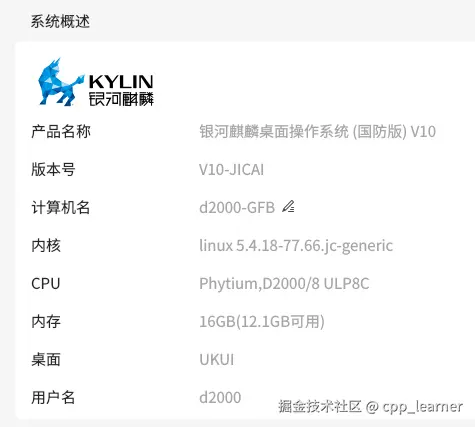
首先确保在 ~/.bashrc 中添加了QT的安装路径:

资源下载:download.csdn.net/download/cp...
1.linuxdeployqt
下载:
bash
git clone https://github.com/probonopd/linuxdeployqt.git修改代码,兼容高版本系统:
bash
cd linuxdeployqt
vi tools/linuxdeployqt/main.cpp

# 注释如下内容: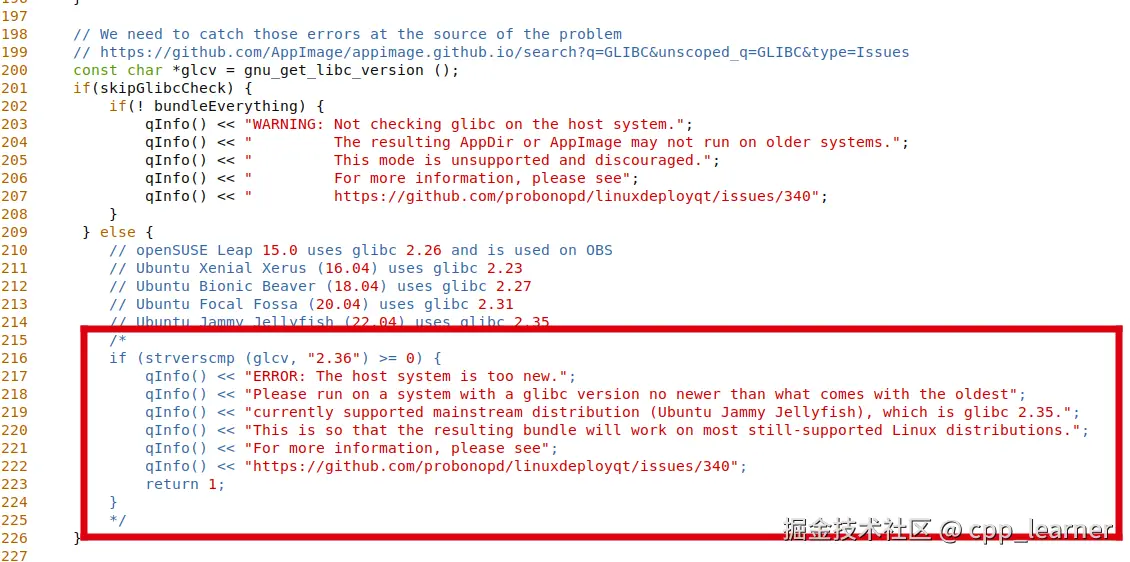
编译安装:
bash
mkdir build && cd build
cmake ..
make -j4将编译出来的linuxdeployqt 拷贝到 /usr/local/bin路径:
bash
sudo cp tools/linuxdeployqt/linuxdeployqt /usr/local/bin/
sudo chmod 777 /usr/local/bin/linuxdeployqt

linuxdeployqt --version
2.appimagetool
下载:
bash
# x86_64 架构:
wget https://github.com/AppImage/AppImageKit/releases/download/continuous/appimagetool-x86_64.AppImage

# ARM 架构 (aarch64):
wget https://github.com/AppImage/AppImageKit/releases/download/continuous/appimagetool-aarch64.AppImage  -O  appimagetool
# -O 修改名称将下载的appimagetool 拷贝到 /usr/local/bin路径:
bash
# 授予可执行权限
chmod  777  appimagetool

# 移动到系统PATH目录,以便在任意位置调用
sudo mv appimagetool  /usr/local/bin/appimagetool

appimagetool --version
3.patchelf
下载:
bash
wget https://github.com/NixOS/patchelf/archive/refs/tags/0.18.0.tar.gz -O patchelf-0.18.0.tar.gz编译安装:
bash
tar -xzf patchelf-0.18.0.tar.gz
cd patchelf-0.18.0
./bootstrap.sh   # 生成 configure 脚本
./configure --prefix=/usr/local
make
sudo make install

# 验证
patchelf --version
4.libfuse2
下载:
bash
wget https://github.com/libfuse/libfuse/releases/download/fuse-2.9.9/fuse-2.9.9.tar.gz解压缩:
bash
# 解压源码包
tar -xzvf fuse-2.9.9.tar.gz

# 进入源码目录
cd fuse-2.9.9
修改源码:
bash
vi include/fuse_kernel.h
将:
#include <sys/types.h>
#define __u64 uint64_t
#define __s64 int64_t
#define __u32 uint32_t
#define __s32 int32_t
#define __u16 uint16_t
修改为:
#include <sys/types.h>
#ifdef __linux__
#include <linux/types.h>
#else
/* 非 Linux 系统才需要自定义这些类型 */
#define __u64 uint64_t
#define __s64 int64_t
#define __u32 uint32_t
#define __s32 int32_t
#define __u16 uint16_t
#endif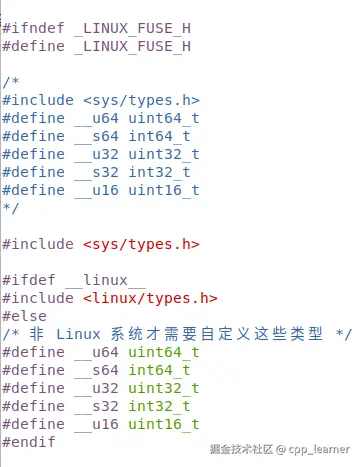 编译安装:
编译安装:
bash
# 配置编译环境
./configure

# 开始编译
make

# 安装库文件
sudo make install
配置:
bash
# 将 /usr/local/lib 添加到链接器配置中
echo /usr/local/lib | sudo tee /etc/ld.so.conf.d/libfuse.conf

# 更新链接器缓存
sudo ldconfig

# 查看版本信息
pkg-config --modversion fuse
5.打包QT程序
 打包命令:
打包命令:
bash
linuxdeployqt 可执行程序 -appimage将QT程序单独放在一个独立的文件夹中,然后运行命令打包:
bash
linuxdeployqt untitled -appimage此时应该会报错: 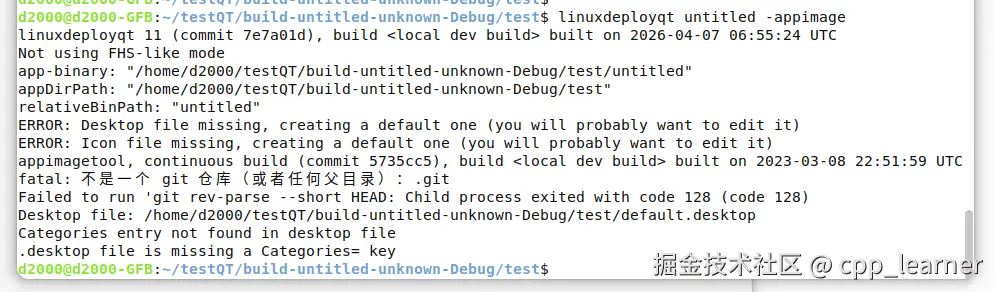 说明: 1.前两个ERROR报错 linuxdeployqt 在打包时需要一个 .desktop 文件(用于定义程序在桌面环境中的名称、图标、启动方式等)和一个图标文件(通常是 PNG 格式)。它在当前目录中没有找到这两个文件,所以自动生成了默认的 default.desktop 和 default.png(一个空文件)。 注意,这两个错误可忽略!
2.git报错 appimagetool 试图执行 git rev-parse --short HEAD 来获取当前 Git 提交的短哈希,用于生成版本号。但当前目录(或上层目录)不是一个 Git 仓库,所以 git 报错。 注意,此报错也可忽略!
3.最后两行报错
bash
Categories entry not found in desktop file
.desktop file is missing a Categories= key
这两行报错会导致无法打包生成.AppImage文件,即打包失败! 需要注意! 因为linuxdeployqt 需要一个有效的 .desktop 文件来描述应用程序。 它会自动生成一个默认的(default.desktop),但缺少必需的 Categories 字段。
解决:在自动生成的default.desktop文件添加添加一行 Categories=Utility 即可
bash
vi default.desktop

[Desktop Entry]
Type=Application
Name=Application
Exec=AppRun %F
Icon=default
Comment=Edit this default file
Terminal=true
Categories=Utility		# 添加此行
重新打包:
bash
# 输入命令重新生成.AppImage 文件
appimagetool .
此时QT程序已经打包成功! 生成最终的产物:Application-aarch64.AppImage,可以独立运行,其已经包含了所有的QT依赖。
以下是打包QT时的输出:
bash
# 1.开始打包
d2000@d2000-GFB:~/testQT/build-untitled-unknown-Debug/test$ linuxdeployqt untitled -appimage
linuxdeployqt 11 (commit 7e7a01d), build <local dev build> built on 2026-04-07 06:55:24 UTC
Not using FHS-like mode
app-binary: "/home/d2000/testQT/build-untitled-unknown-Debug/test/untitled"
appDirPath: "/home/d2000/testQT/build-untitled-unknown-Debug/test"
relativeBinPath: "untitled"
ERROR: Desktop file missing, creating a default one (you will probably want to edit it)
ERROR: Icon file missing, creating a default one (you will probably want to edit it)
appimagetool, continuous build (commit 5735cc5), build <local dev build> built on 2023-03-08 22:51:59 UTC
fatal: 不是一个 git 仓库(或者任何父目录):.git
Failed to run 'git rev-parse --short HEAD: Child process exited with code 128 (code 128)
Desktop file: /home/d2000/testQT/build-untitled-unknown-Debug/test/default.desktop
Categories entry not found in desktop file
.desktop file is missing a Categories= key
d2000@d2000-GFB:~/testQT/build-untitled-unknown-Debug/test$


# 2.修改default.desktop 文件
d2000@d2000-GFB:~/testQT/build-untitled-unknown-Debug/test$ vi default.desktop


# 3.再次打包
d2000@d2000-GFB:~/testQT/build-untitled-unknown-Debug/test$ appimagetool .
appimagetool, continuous build (commit 5735cc5), build <local dev build> built on 2023-03-08 22:51:59 UTC
WARNING: appstreamcli command is missing, please install it if you want to use AppStream metadata
Using architecture aarch64
/home/d2000/testQT/build-untitled-unknown-Debug/test should be packaged as Application-aarch64.AppImage
WARNING: AppStream upstream metadata is missing, please consider creating it
         in usr/share/metainfo/default.appdata.xml
         Please see https://www.freedesktop.org/software/appstream/docs/chap-Quickstart.html#sect-Quickstart-DesktopApps
         for more information or use the generator at http://output.jsbin.com/qoqukof.
Generating squashfs...
Parallel mksquashfs: Using 8 processors
Creating 4.0 filesystem on Application-aarch64.AppImage, block size 131072.
[========================================================================================-] 506/506 100%

Exportable Squashfs 4.0 filesystem, gzip compressed, data block size 131072
	compressed data, compressed metadata, compressed fragments,
	compressed xattrs, compressed ids
	duplicates are removed
Filesystem size 23573.57 Kbytes (23.02 Mbytes)
	39.02% of uncompressed filesystem size (60415.04 Kbytes)
Inode table size 2347 bytes (2.29 Kbytes)
	42.73% of uncompressed inode table size (5493 bytes)
Directory table size 807 bytes (0.79 Kbytes)
	52.10% of uncompressed directory table size (1549 bytes)
Xattr table size 23 bytes (0.02 Kbytes)
	82.14% of uncompressed xattr table size (28 bytes)
Number of duplicate files found 3
Number of inodes 67
Number of files 57
Number of fragments 24
Number of symbolic links  2
Number of device nodes 0
Number of fifo nodes 0
Number of socket nodes 0
Number of directories 8
Number of ids (unique uids + gids) 1
Number of uids 1
	root (0)
Number of gids 1
	root (0)
Embedding ELF...
Marking the AppImage as executable...
Embedding MD5 digest
Success

Please consider submitting your AppImage to AppImageHub, the crowd-sourced
central directory of available AppImages, by opening a pull request
at https://github.com/AppImage/appimage.github.io
d2000@d2000-GFB:~/testQT/build-untitled-unknown-Debug/test$


# 4.打包成功,输出Application-aarch64.AppImage产物
d2000@d2000-GFB:~/testQT/build-untitled-unknown-Debug/test$ ll
总用量 43148
drwxrwxr-x 4 d2000 d2000     4096 4月   8 11:09 ./
drwxrwxr-x 3 d2000 d2000     4096 4月   7 15:37 ../
-rwxr-xr-x 1 d2000 d2000 24338816 4月   8 11:09 Application-aarch64.AppImage*
lrwxrwxrwx 1 d2000 d2000        8 4月   8 10:53 AppRun -> untitled*
-rw-rw-r-- 1 d2000 d2000      143 4月   8 11:06 default.desktop
-rw-rw-r-- 1 d2000 d2000        0 4月   8 10:53 default.png
lrwxrwxrwx 1 d2000 d2000       11 4月   8 09:50 .DirIcon -> default.png
drwxrwxr-x 7 d2000 d2000     4096 4月   8 10:53 doc/
drwxrwxr-x 2 d2000 d2000     4096 4月   8 10:53 lib/
-rwxrwxr-x 1 d2000 d2000 19817697 4月   7 15:53 untitled*
d2000@d2000-GFB:~/testQT/build-untitled-unknown-Debug/test$
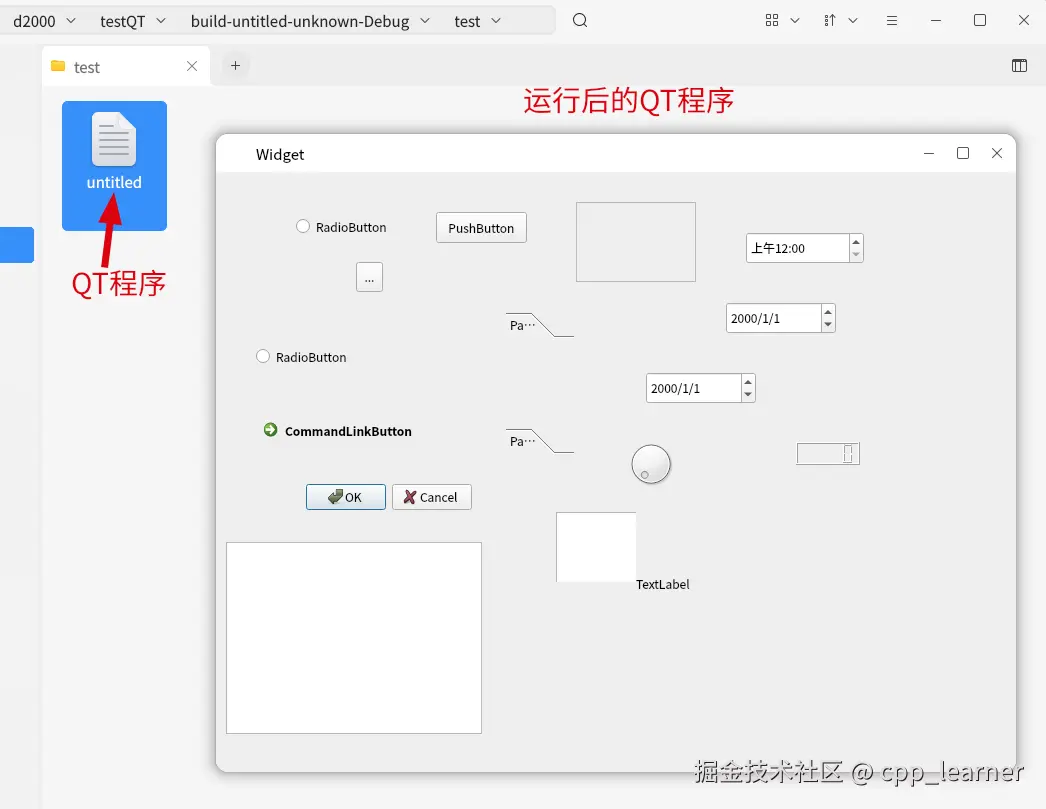
运行打包出来的QT程序: 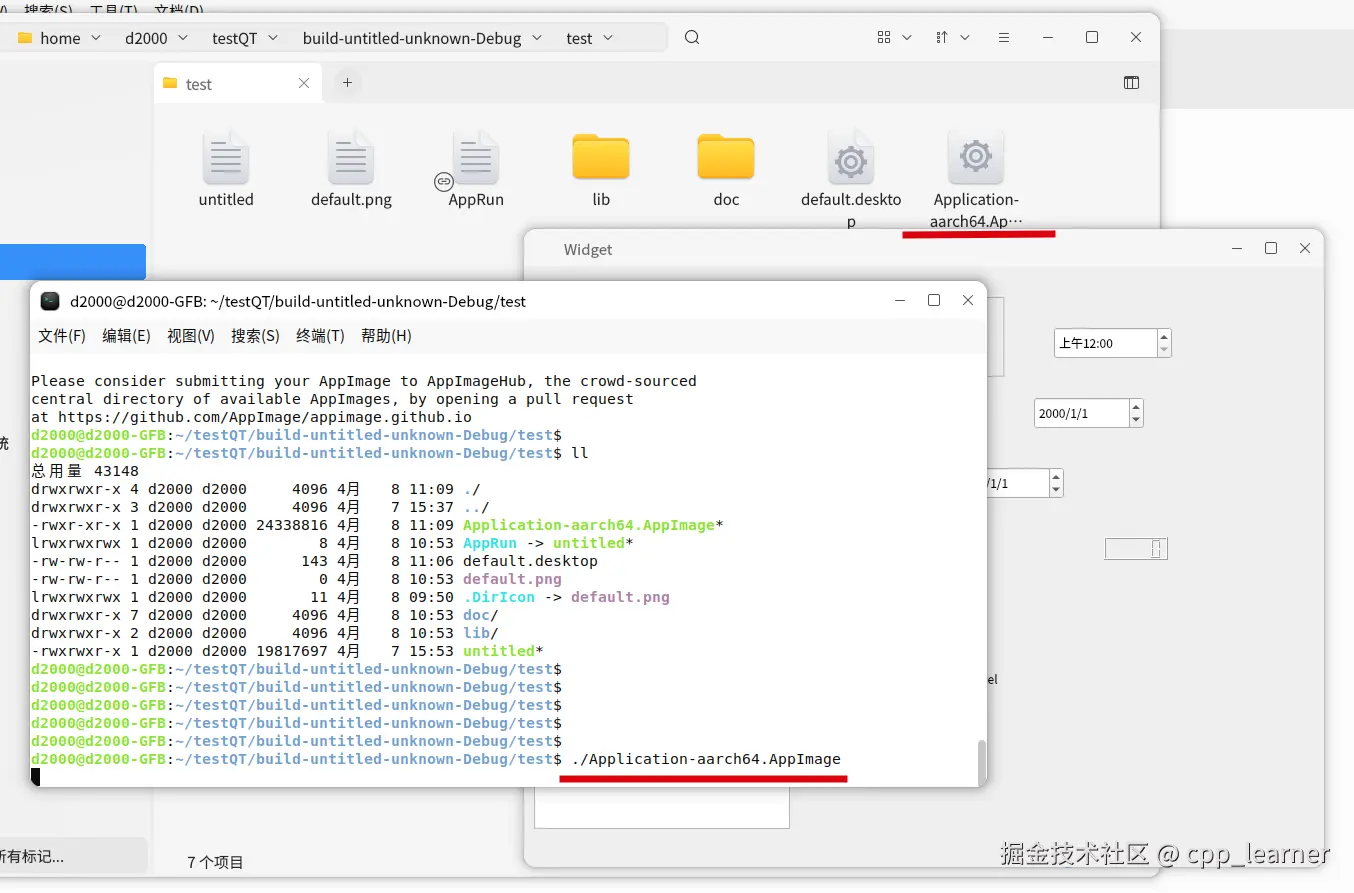 可以将Application-aarch64.AppImage重命名,然后拷贝到另一台电脑上运行了!
6.特殊情况
Application-aarch64.AppImage本质上也是一个压缩包,可以使用./Application-aarch64.AppImage --appimage-extract 对其进行解压缩,得到打包前的程序;
如果拷贝到目标电脑上无法运行,提示dlopen(): error loading libfuse.so.2 类似的错误,那就是目标机器没有安装libfuse2,目标机器还得手动安装;(在线或者源码编译安装)
bash
# Debian / Ubuntu 及其衍生版
sudo apt update
sudo apt install libfuse2

# Fedora
sudo dnf install fuse

# 基于 Arch Linux
sudo pacman -S fuse2否则就使用./Application-aarch64.AppImage --appimage-extract 命令解压缩出来,尝试能否正常运行!
正常情况下,应该是可以正常运行的!
完!