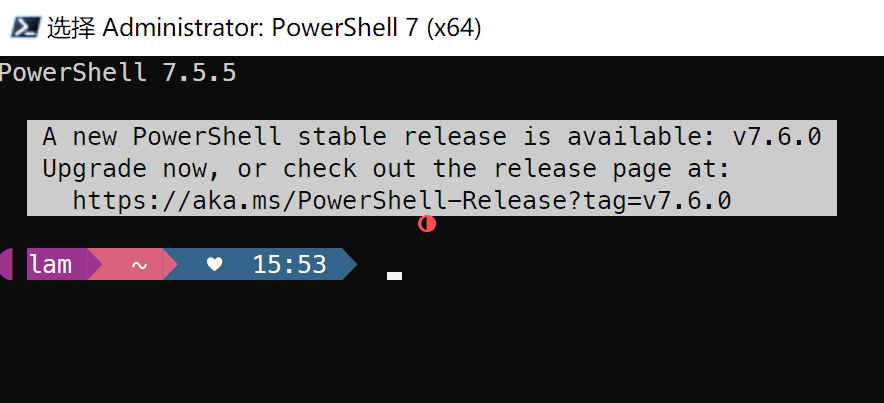
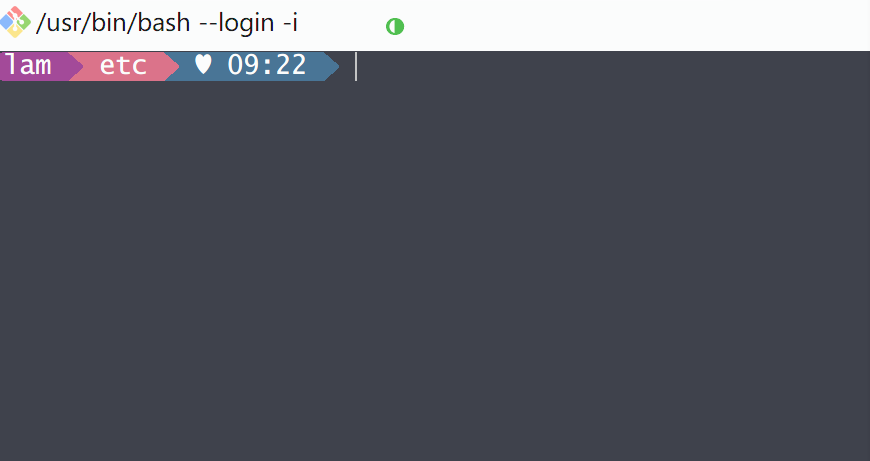
效果图如下:
powershell 7方案
git bash方案
1升级安装 PowerShell 7
下载地址:https://github.com/PowerShell/PowerShell/releases
win10 1809装不了Windows terminal 本人试过了提示不兼容
其他:git bash方案的话下载安装git即可
2安装字体NerdFonts
ub.com/romkatv/dotfiles-public/tree/master/.local/share/fonts/NerdFonts
💡Tips: 除了NerdFonts,还有很多程序员爱用的字体,例如JetBrainsMonoNerdFont-Regular,但是win10 PowerShell 7似乎只能识别NerdFonts字体,其他字体没试成功;如果用Windows terminal就可以换更多字体。
3安装Oh My Posh
bash
winget install oh-my-posh注意: windows update 要打开。如果离线安装还可能会用上"Add-AppxPackage"命令,还要打开win10自己可选功能有点麻烦,最好还是有微软商店,直接安装;如果好久没打开过更新,可能还要用DISM /Online /Cleanup-image /Restorehealth来修复
Add-AppxPackage:部署失败,原因是 0x80073CF3
本人由于系统老旧,在这个问题上困扰了好久一直没装winget、也装不回来微软商店...
4下载主题文件
下载地址:https://ohmyposh.dev/docs/themes
5配置主题文件进Powershell
bash
notepad $Profile填入
bash
oh-my-posh --init --shell pwsh --config "替换为你自己存放主题的目录\M365Princess.omp.json" | Invoke-ExpressionM365Princess.omp.json 这是我的主题文件
重启Powershell,搞定!
附:网上也有其他环境配置环境变量$env:POSH_THEMES_PATH/、用命令Get-PoshThemes来查主题,个人觉得没必要就不折腾了。
6方案2-配置主题文件进git bash
找到git的配置文件,路径如下
bash
C:\Program Files\Git\etc\bash.bashrc最后一行添加以下代码
bash
eval "$(oh-my-posh --init --shell bash --config '替换为你自己存放主题的目录\M365Princess.omp.json')"重启Git bash,搞定!